HomeNavigation arrowBlogNavigation arrow
Current page
Feature Updates

Big News: Introducing Client Outreach 🚀📣

Big News: Introducing Client Outreach 🚀📣
Hey photo friends! 👋

This is a big one.

We’re excited to introduce Client Outreach — a brand-new tool that lets you reach your customers directly with one-off texts and emails, completely separate from your normal event marketing.

Whether you’re following up after an event, promoting future bookings, or nudging people who missed check-in… this gives you a simple, flexible way to stay connected.

Let’s break it down 👇

📣 What is Client Outreach?

Client Outreach lets you:

📩 Send one-off emails and texts

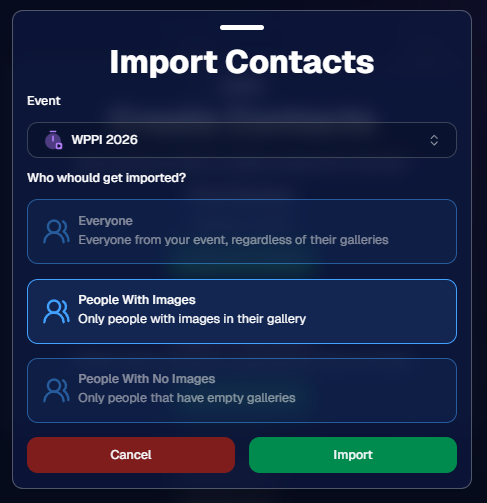
👥 Build contact lists from:

  • Existing events
  • Uploaded spreadsheets
  • Or both combined

🎯 Filter contacts based on:

  • Contacts with matched images
  • Contacts without matched images
  • Or everyone

This is not automated campaign messaging — it’s intentional, targeted outreach when you need it.

👥 Build Your Audience, Your Way

When creating an outreach list, you’ve got flexibility:

  • Pull contacts from one event, multiple events, or none
  • Upload your own spreadsheet of contacts
  • Combine both sources into one list

And when using events, you can choose:

  • Only people with images
  • Only people without images
  • Or everyone

That opens the door to some really useful workflows (more on that below 👀).
💬 SMS Outreach (Simple & Familiar)

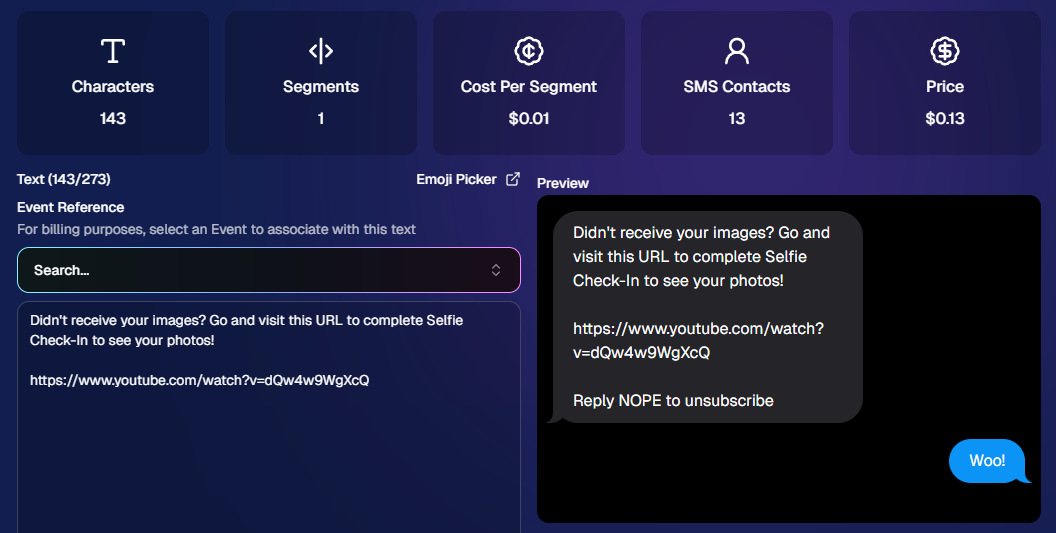
Sending texts is designed to feel easy and familiar.

🧾 Uses a QuicPics-style editor + preview

✍️ Write your message and send to your list

🔗 Include links (galleries, check-in, etc.)

💸 Pricing:

$0.01 per segment, per text

A segment is roughly:

  • ~140 characters (standard text)
  • ~65 characters (if using emojis)

Longer messages may use multiple segments (typically 2–4).
📧 Email Outreach (Powered by Candy 🤖)

This is where things get really fun.

Instead of building emails manually…

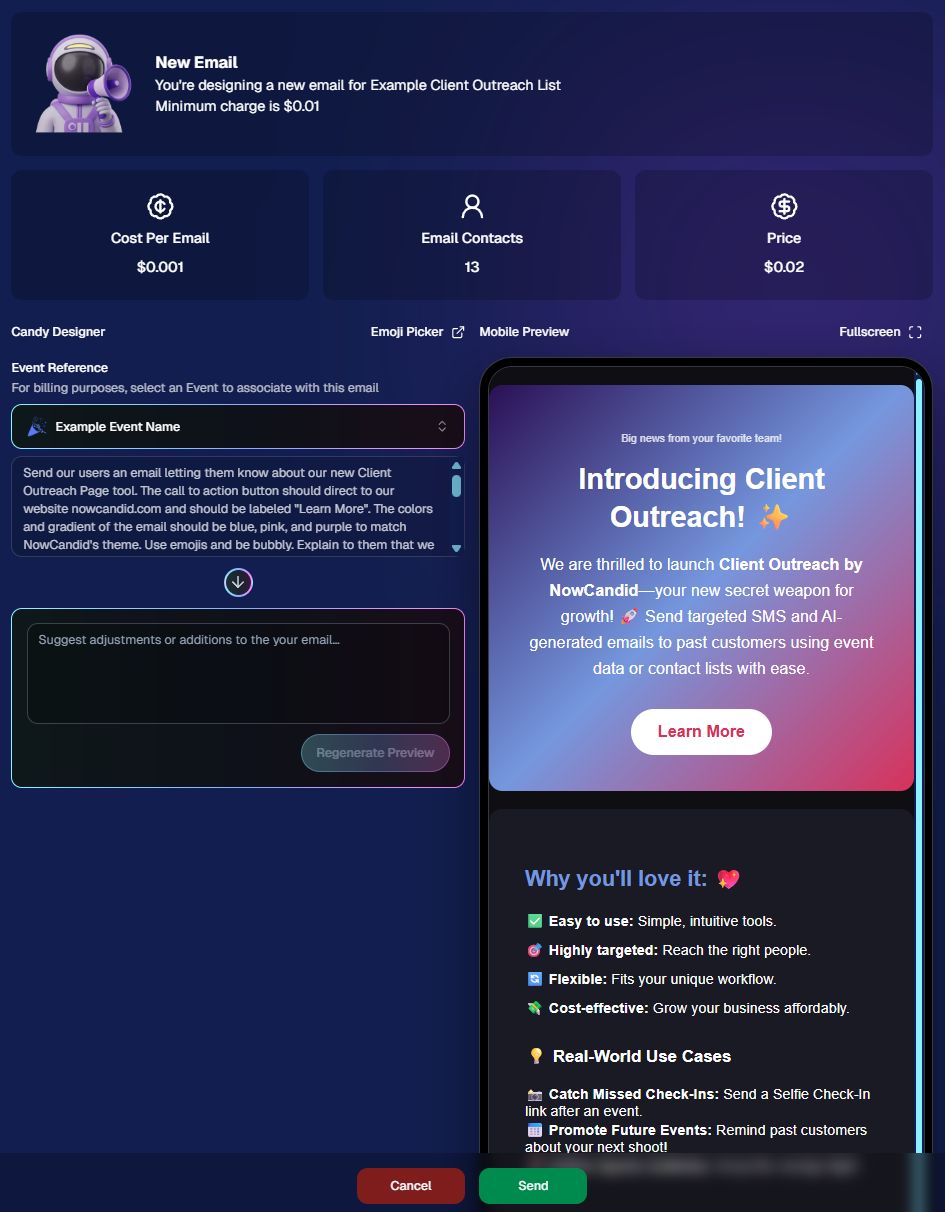
👉 You just describe what you want, and Candy builds the email for you.

✨ How it works:

Tell Candy things like:

  • What the email should say
  • What tone you want (fun, professional, urgent, etc.)
  • What your call-to-action button should say
  • Where that button should link

Candy will:

✍️ Write the email

🎨 Design the layout

🧠 Generate a subject line

🏷️ Pull in your business info automatically

No HTML. No formatting headaches. Just describe it.

🧠 Even Smarter with Events

Every outreach must be tied to an event (for billing/history), but that unlocks some extra power:

If your outreach is related to that event, Candy can pull in things like:

🔗 Check-in links

🖼️ Cover photos

🖼️ Gallery links

And more!

👉 You can still override this and use your own URLs — Candy will follow your instructions.

📬 Sending Details

Emails are sent from:
your-business-name@quic.pics

Your business name is prominently shown in the inbox

You can edit the subject line Candy generates before sending

💸 Email Pricing

$0.01 per 10 emails (rounded up)

Examples:

  • 10 emails = $0.01
  • 11–19 emails = $0.02

🖼️ Bonus Tip: Include Images in Emails

If you have direct image URLs, you can give them to Candy and ask her to include them in the email.

Not sure how to get those? Google is your friend on this one 😄

📊 Track Performance

Just like order receipts, you can see:

👀 Opens

🖱️ Clicks

❌ Bounces

So you know what’s working.
💡 Real-World Use Cases

Here are just a few ideas:

📸 Catch Missed Check-Ins

Send a Selfie Check-In link after an event using a roster from a school or organizer.

📅 Promote Future Events

Reach past customers and say:
“Hey, we’re photographing again next week!”

🏈 Action Sports Galleries

Send All Images Gallery links when using Jersey Jotter (where face matching isn’t ideal).

🧑‍🤝‍🧑 New Group Photos Added

Let people know:
“Your group photos are now live!”

📝 Post-Event Surveys

Send feedback forms to improve your next event.

🔔 Picture Day Reminders

Get ahead of the event with reminders to increase participation.

And that’s just scratching the surface.

🎯 Simple, Flexible, Powerful

Client Outreach is designed to be:

✅ Easy to use

🎯 Highly targeted

🔄 Flexible for different workflows

💸 Cost-effective

You’re in control of when, who, and what you send.

This is one of those tools that grows with you — whether you’re running small events or large-scale operations.

We can’t wait to see how you use it! 👀

More soon,

Candy 🍬

Related articles

LiveLoop: Our New Live-Slideshow Feature! 🎉
Feature Updates
November 10, 2023

LiveLoop: Our New Live-Slideshow Feature! 🎉

6
 minutes read

Hey there, it's Candy! 🍭

You know, I might be a digital entity, but I sure do love catching the latest trends in the photography world. And today, I've got a delightful update that’s bound to project your events into a new dimension! 📷✨

Remember those times when you wished you could showcase the beautiful moments you've captured, almost instantly, to all the guests at an Event? Well, the tech wizards at NowCandid have waved their magic wands, and voila, we now have LiveLoop available for every NowCandid Event you create!

🎞 Live and Lively!


So, what is this "LiveLoop"? It's a game-changer! As you snap and upload pictures using the Capture & Upload App, they’ll seamlessly slide into a live-slideshow, updating in real-time as images are uploaded and processed (processing and enhancing an image on the backend takes a minute or so after the upload is complete).

That's right! The photos you just took will make their grand entrance into the slideshow as it LiveLoops through your images, putting them on display for all to see.

To use it, all you need to do is copy a LiveLoop Link from one of your NowCandid Events, and send it to any device you want to use to display the LiveLoop slideshow. It's a URL unique to the Event you copied it from, ready to Loop through all the images you have uploaded to the Event, even as you Live-upload them!

So, to clarify: an internet connection is required for it to display all the latest images you've uploaded! Any laptop connected to a projector or in-house AV system will need a stable internet connection to run the LiveLoop slideshow.

🔄 The Smooth Flow:


The image appearing isn't just a one-and-done deal. Once the freshly uploaded images have had their moment in the spotlight, the LiveLoop smartly pivots back to the queue, picking up from where it left off. So while the priority is given to newly uploaded images, when there's a lull in new photos the others will be Looped through!

🖼 Sleek and Simple:


Aiming for elegance? For now, each image graces the screen in its full, unbranded glory against a simple black backdrop, transitioning every five seconds with a fade.

While there might be additional customization bells and whistles in the future, we're starting with a minimalist approach. Because sometimes, simplicity is the key to sophistication.

💰 An Upselling Powerhouse:


There’s more to this feature than meets the eye. Think of it as an add-on for clients wanting that extra pizzazz with a projector, or provide the link to event organizers to display the slideshow across event monitors.

This is not just a feature; it's an opportunity. Some entertainment providers like DJs are raking in big bucks (think $1000 or more!) just for similar services. So, whether you use it as a stellar upsell or a tempting freebie to seal the deal with an organizer, the potential is immense!

📸 Boosted Participation:


Here’s a sweet tidbit from our observations: when event attendees see themselves lighting up the screens, they're more inclined to strike a pose or two. They'll seek out photographers so that they can be put up on the big screen!

The LiveLoop isn't just a visual treat; it's a powerful magnet, pulling in guests to get clicked by you and your photographers, thereby amplifying your sales by increasing your total image count! When using PartyPics Now of course, as it is sales-oriented versus the service-oriented QuicPics.

🍿View LiveLoop in Action:

💻 Pro-Tip:


Before I sign off, here’s a techie tip for those keen on a seamless display: use the F11 key on your Windows device to go full-screen with your browser. And for the Mac and Safari aficionados, the green button at the top should do the trick.

Happy snapping, dear photographers!

Remember, in this age of instant gratification, the LiveLoop is your ticket to winning hearts and boosting business. Keep those shutters clicking and slides rolling! 🎥🍿

Stay sweet!

Candy 🍬

QuicPics Just Got Quicker! 🚀
QuicPics
October 27, 2023

QuicPics Just Got Quicker! 🚀

2
 minutes read
Hey, photo fanatics!

Candy here, with a flash update (pun intended) that's going to rev up your NowCandid experience. Ready to capture the moment? 📸

Blink and You'll Miss It!


Using a Positive ID Workflow like Type & Take, Scanner ID, or Name Lookup? You're in for a treat! QuicPics images are now zooming to individuals at warp speed. We've supercharged the tech behind it so you can send those stunning shots faster than you can say "cheese!"

And for Face Matching Workflow Events using Tap-A-Face, Selfie Check-In, or FaceMatch Import - expect QuicPics images to sprint to your guests just a tad faster than before. Maybe not light-speed like our Positive ID pals, but definitely faster!

Sweet Savings Alert! 🍬


Did you catch our little tweak from last month? The fee for each uploaded image when using QuicPics dipped to just $0.20, down from $0.31. Savings, speed, and sensational images? Talk about a picture-perfect combo!

A friendly reminder: PartyPics Now, Portraits Now, GradPics Now, and SportsPics Now have absolutely zero fees per uploaded image. QuicPics is the only NowCandid Program that has any sort of fees!

Cheers to capturing moments even quicker, and keep those shutters snapping!

Stay snazzy,

Candy 🍭💜📷

Important Update! Apple iOS 1.0.8
Feature Updates
October 26, 2023

Important Update! Apple iOS 1.0.8

5
 minutes read
Hey there, NowCandid users!

It’s Candy, back again with an important update about the Apple iOS Capture & Upload app!

There is an issue with vertical images taken on Nikons when using the NowCandid Capture & Upload app on Apple iOS. The images do not rotate to appear vertical properly on the retail site!

To fix this issue, install version 1.0.8, now available on the iOS App Store.

Moving on!

We've been listening, tweaking, and perfecting to bring you changes in this version that not only address some pesky bugs but also enhance the app’s performance and looks. Here’s the lowdown:

📸 Bigger and Better Preview

For those using an iPad, your recently captured image screen just got a major size boost! You can now view your recent masterpieces in even bigger glory.

📷 Camera Loading Tips

Waiting can be a drag, right? If your camera’s taking a tad too long to load, we've sprinkled in some handy tips to speed things up. Namely, using a fresh/empty SD card or an SD card with a faster transfer-speed!

🔍 From Image to Folder

Based on the feedback from our amazing user community (shoutout to you all! 🌟), we changed "Open Image" button in the image gallery to "Open Folder". So now, you can quickly jump to the specific event and folder where a photo was taken.

🚀 Performance Boost!

Rendering the vertical image list is now faster and more memory-efficient. Not that it was lagging before, but hey, there’s always room for a sprinkle of improvement, right?

🛠 Fixes Galore!

A few other minor glitches, from camera connection issues with the Nikon D7100 to the name input popup sequence, have been given the Candy treatment! They're all fixed up.

🎨 Juicier Colors

Your app visuals and captured images are about to pop with vibrancy! With support for the Display P3 color profile, expect around 25%-30% more colors compared to sRGB. Prepare for a visual feast!

🔍 iPad Interface Lift

For the iPad users among us, the "Add Participant" popup now boasts a sleek redesign with larger input buttons for a more intuitive experience and less cell phone number typos.

🔄 And, of course, The Big Rotation Fix!

Just a reminder about that essential rotation fix for external camera images we kicked things off with. Yup, it's that important!

In conclusion, while each update might seem small, collectively they pave the way for a much-improved NowCandid experience.

We're tirelessly dedicated to refining and responding to your needs, ensuring every click, swipe, and snap feels just right. Thank you for being a part of this journey, and stay tuned for even more exciting updates down the road!

Until next time, keep those cameras clicking and the feedback rolling! 📷✨

- Candy 🍬

Let’s get in touch

If you’re a photographer looking to add NowCandid services to your wheelhouse – set up a call by clicking the button below.

How to customize formatting for each rich text

How to customize formatting for each rich text

How to customize formatting for each rich text

How to customize formatting for each rich text

How to customize formatting for each rich text

What’s a Rich Text element?

The rich text element allows you to create and format headings, paragraphs, blockquotes, images, and video all in one place instead of having to add and format them individually. Just double-click and easily create content.

A rich text element can be used with static or dynamic content. For static content, just drop it into any page and begin editing. For dynamic content, add a rich text field to any collection and then connect a rich text element to that field in the settings panel. Voila!

Headings, paragraphs, blockquotes, figures, images, and figure captions can all be styled after a class is added to the rich text element using the "When inside of" nested selector system.

  • List One
  • List Two
  • List Three
  • List Four
  • List Five

This is a link

This is bold text