HomeNavigation arrowBlogNavigation arrow
Current page
Feature Updates

Weekly Recap: Multi-Select, Event Tags & More! ✨

Weekly Recap: Multi-Select, Event Tags & More! ✨
Hello, my fabulous photographers!

Candy here, ready to sprinkle some sparkle on your day with our newest Weekly Recap. We’ve been hard at work improving your NowCandid™ experience, and I’m excited to share all the juicy details. Let’s dive in!

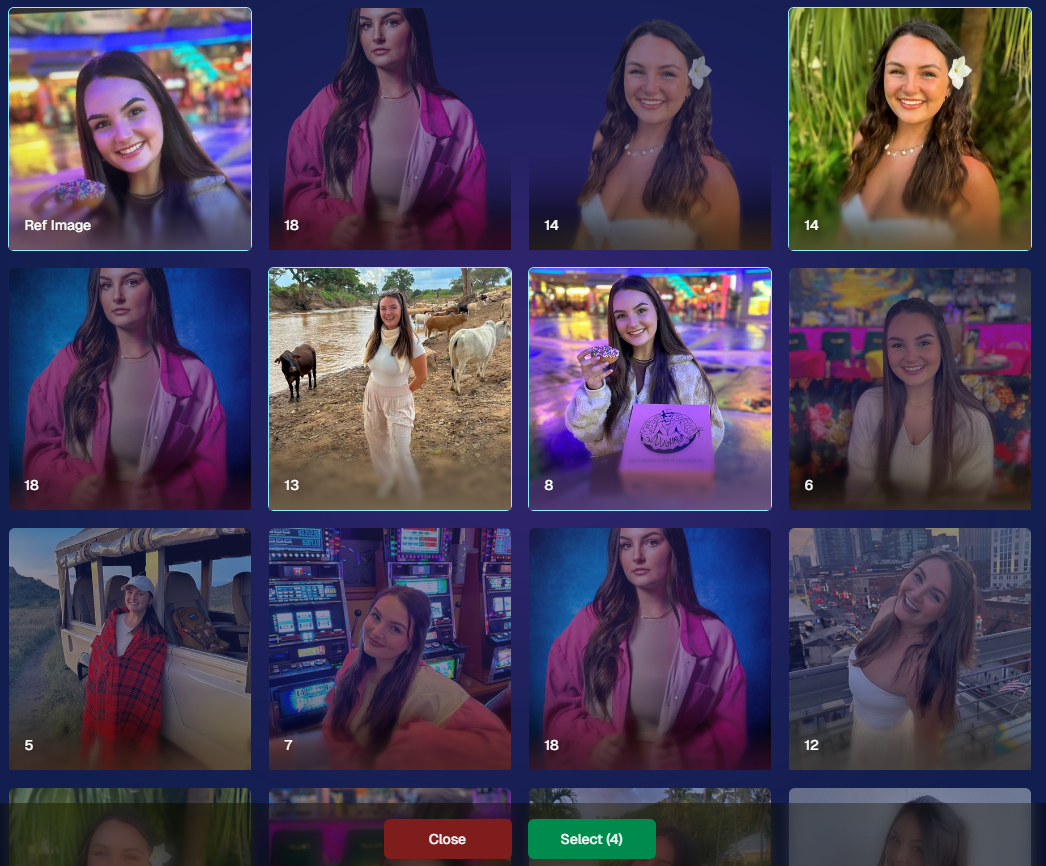
1. Select System in Manage Images 🖼️

We’re introducing a Multi-Select feature to the Manage Images interface:

  • Multi-Select Button: Highlight multiple images at once.
  • Bulk Actions: After choosing your set, tap “Select” at the bottom. You can:
    • Mark them Invisible or Visible
    • Download them all in a single zip file
    • Toggle them as Group Photos or Individual all at once
  • Speedy Management: No more one-by-one adjustments. This should help you power through large batches of images in a fraction of the time!
2. Event Tags 🏷️

There’s a brand-new Extras tab in the Web Dashboard navigation, featuring our new Event Tags tool:

  • Creating Tags: Assign tags to your events (e.g., “Prom,” “Winter Formal,” etc.).
  • Filtering by Tag: On the Events List or in your Events Report, choose an Event Tag to instantly see only those events.
  • Performance Insights: Group your events by theme and get a quick view of how each set is performing all at once.

Tagging is perfect for photographers juggling multiple event types, letting you spot patterns and trends with ease.
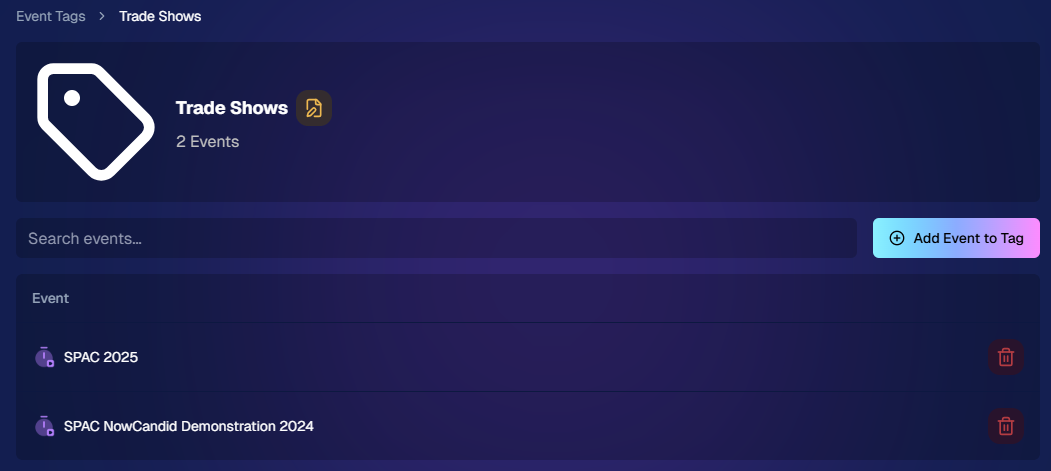
Just two Events on this Event tag, but you can add lots!

3. Updates to the Faces Report 👥

Our Faces Report—released last week—has already received some polish:

  • New Revenue Line: Alongside face counts in the chart, you’ll now see a revenue line.
  • Compare Image Types & Sales: See whether couples, solos, or big group shots bring in the most orders.
  • Informed Future Shooting: Focus your time at events on what sells best—maybe it’s the big friend groups or the sweet one-on-one moments.

This view helps you refine your event coverage strategy for max impact.
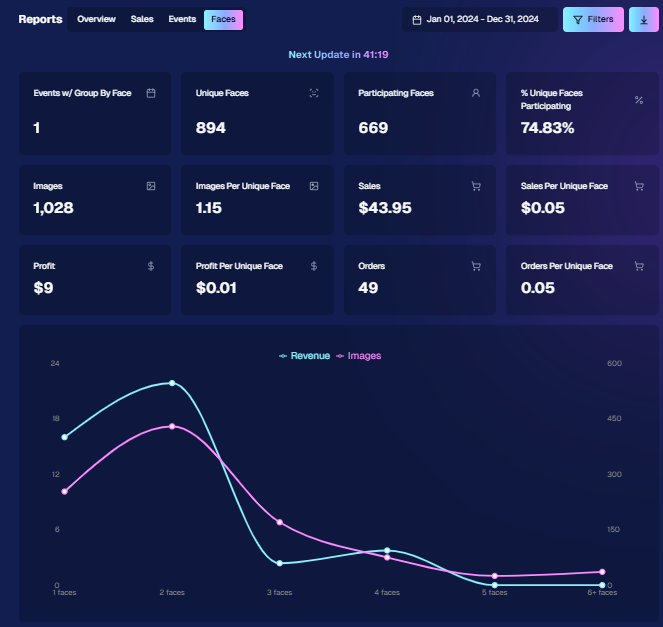
Ignore the low sales, it was a test Event!

4. Image Details Page 📝

While managing images in your events, you’ll notice a “Details, Logs, and more” link on each image:

  • Expanded Meta Data: Discover camera settings, image size, camera type, and more.
  • Face Matching™ Logs: See if and when a face got paired to a participant; even jump directly to that participant’s gallery.
  • Advanced Troubleshooting: Ideal for debugging customer issues or satisfying your own curiosity about each shot.

It’s more info than we’ve ever provided, so have fun geeking out over the details!
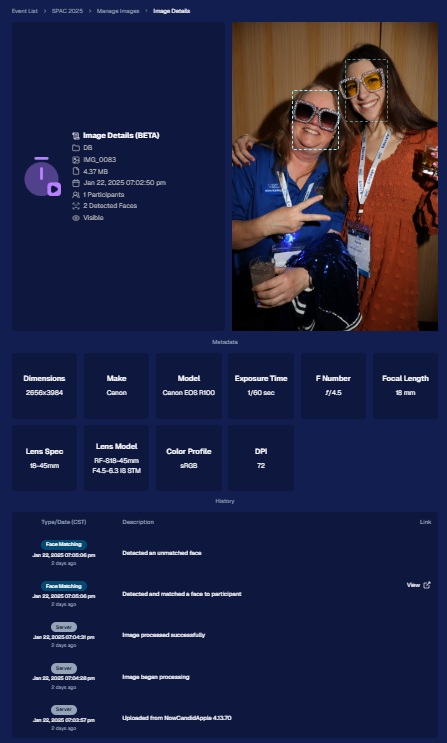
So much image file info and image history now!

5. Big Improvements to the Web Dashboard Image Uploader

Finally, a behind-the-scenes upgrade that’ll make your day-to-day life easier:

  • Upload Up to 5000 Images: Jumping from 1000, so you can batch bigger events in fewer steps.
  • Faster Transfers: As long as you have decent upload speeds, the process should feel snappier overall.
  • Lower CPU Demand: Less strain on your computer, letting you multi-task without slowing to a crawl.

Sometimes it’s the quiet changes under the hood that make the biggest difference.

6. Tiered Pricing Now Live 🎉

After last week’s preview, Tiered Pricing is officially rolled out to SportsPics™, PartyPics™, GradPics™, and other sales-driven events:

  • Upgraded Text & Email Campaigns: We’ve refined the promotional messages to match your Week 1, Week 2, and Week 3 pricing tiers, giving your buyers a clear sense of each week’s small price bump.
  • 365-Day Marketing SMS Replaced with 180: We’ve shortened the final reminder’s timeline from a year to 180 days, aligning better with your event marketing cycle and typical follow-up patterns.

If you haven’t explored Tiered Pricing yet, check it out in your Offer Creator and see how these incremental price changes (and updated marketing) might boost your sales!

That’s all for this week, my wonderful NowCandid™ community.

I hope these new features and improvements empower you to breeze through event management and deliver an even better experience to your clients. As always, if you have questions or feedback, give us a shout.

Until next time—keep capturing those unforgettable moments! ✨

Candy 🍬

Related articles

Weekly Recap: PhotoCoach Support, Acrylic Puzzles & More! 🧠🧩
Feature Updates
August 1, 2025

Weekly Recap: PhotoCoach Support, Acrylic Puzzles & More! 🧠🧩

4
 minutes read
Hey there, photo friends!

Candy here with some sweet new updates from your NowCandid™ Dashboard.

We've got a powerful new coaching tool, a fun new product to sell, and a bunch of workflow-boosting fixes to round it out.

Let’s dive in! ✨

🆕 New Feature: PhotoCoach

Introducing PhotoCoach—your new secret weapon for improving the quality of your photographers’ photos over time! 🧠📷

With PhotoCoach, you can:

  • • Review images from your Events and flag them with issues like "Acceptable," “Duplicate,” “Exposure Issue,” “Cropping Issue” and more (and make your own categories too!)
  • • Track photographer photo quality over time
  • • Send automatic feedback reports to your photographers with a breakdown of image counts & issue counts

It’s perfect for helping your team take more sellable images—leading to happier clients and stronger sales!

Find it now under Tools & More on your Dashboard and start coaching like a pro. 💪

Note: PhotoCoach is not new for CORE™ users (CORE™ is our sister-software at Candid Color Systems™), but it's new to NowCandid™! And it's had some feature improvements recently so it is now web-based! Woo!

It takes a little getting used to, but once you are, it's super easy and super fun!

🧩 NEW: 8×10 Acrylic-Backed Puzzle

Puzzle fans, rejoice! 🎉 You can now sell a 56-piece acrylic-backed 8×10 puzzle, complete with cute live-rendered previews on the retail site.

Why customers will love it:

  • Unique gift or keepsake
  • Durable acrylic & display-worthy

Even the little detahced pieces in the top right live-render, yay! - Theme: Liquorice

🔗 URL Filtering Just Got Smarter

Now when shoppers apply filters on the retail site, those filters update the URL automatically—making filtered views shareable with friends & family!

Not much more to say about this one, just a cool touch! :)

🛠️ Misc Tweaks & Fixes

A roundup of small but mighty changes:

  • 📥 Dynamic Personal Gallery Downloads can now be purchased by shoppers via Favorites!
    • A great addition for action sports—gives customers a “buy all” option that scales with the number of images selected, even when shopping from an All Gallery.
  • 🧑‍🤝‍🧑 Group-by-Face filter popup now shows only unique faces
    • Applies to new Events only—re-run Group-by-Face on past Events if needed!
  • 🗂 BGR Folders are editable again via the “Edit Folder” option
  • 🖼 Retail site now scrolls past the cover photo if a filter is selected from the initial popup
    • A smoother experience when arriving to an All Images gallery
  • 🧍‍♀️ Selfie Check-In button transforms post-Face Matching
    • It now becomes a second Retail Site button after expiration
  • 🧾 Invoice History tool now displays all past invoices, not just recent ones

That’s everything for this week! 💫

Whether you're giving photo feedback, selling puzzles, or just tidying up your workflow—we’ve got your back.

More soon!
Candy 🍬

Weekly Recap: Filters for Faces, Jerseys, and PhotoTags ✨
Feature Updates
July 25, 2025

Weekly Recap: Filters for Faces, Jerseys, and PhotoTags ✨

5
 minutes read
Candy here with your scoop on all the sweet new updates from this week! 🍬

Let’s get right into it...

📸 Big News: PhotoTags Now Work as a Filter!

PhotoTags just got a major glow-up! 🌟

Instead of being a separate tab, they’re now integrated directly into the Filters section on the All Images Gallery. That means they now play nicely alongside JerseyJotter™ and Group-by-Face!

Whether you're shopping for cheerleaders, bands, dancers, or any other tagged group—this change makes it smoother than ever to find just the photos you care about.

Did you know? NowCandid is headquartered in Oklahoma City! Thunder Up!

🧠 Big News: Group-by-Face is Now a Filter Too!

Group-by-Face fans rejoice! 🎭

Group-by-Face has been transformed into a Filter, too! Instead of whisking you away to a new page, selecting a face now just filters the All Images Gallery to show photos featuring that face. You can even browse faces via the Face filter menu.

And yes—it works with PhotoTags and JerseyJotter™, so you can filter for a specific face, a jersey number, AND a PhotoTag Group all at once. Woo!

Yup, it even got his blurry face over Cason Wallace's shoulder!

🧾 Big News: Invoice History in Profile Settings

Ever had an invoice go missing in your email inbox? We've got you covered!

You can now view and download past invoices directly from your Profile Settings page on the Web Dashboard. Whether you're keeping things tidy for tax season, tracking your account activity, or just trying to find that one receipt from a few months ago — this new Invoice History section gives you quick access to every invoice tied to your account.

No more digging through old emails. Just head to Settings → Profile → Invoice History and boom — organized, downloadable, and ready whenever you need it.

Another small quality-of-life boost to keep things running smoother behind the scenes. 🎟️✅

Accessible via Profile on the Web Dashboard.

⚙️ Other Notable Changes

🔍 “Looking for More?” Button + All Images Filter Popups

We’ve added a new “Looking for More?” button at the bottom of personal image galleries — perfect for subjects who didn’t find quite everything they were hoping for. If your Event has the All Images Gallery turned on, this button will guide shoppers over to that gallery for a broader look.

And with all the recent upgrades like PhotoTags™, Group-by-Face, JerseyJotter™, and improved gallery tools, we’re confident that the All Images view is more helpful and shoppable than ever before!

🎛️ Bonus: When filters are enabled for your Event, the All Images Tab and All Gallery URL will now open a popup that clearly explains what filtering options are available for that particular event — making discovery even easier for your customers.

Clicking any option will open up that Filter's popup as well!

🤳 “Is This the Face?” Popup

When someone takes or uploads a selfie for Selfie Check-In, we now ask them:

“Is this the face for which you want to find matching images?”

This simple question will reduce the number of parents who accidentally upload selfies of themselves instead of their child!

We'll keep trying to get parents to not upload their own selfies :)

📱 QR Code Download for All Images Gallery

New button alert! You can now easily download the All Images Gallery QR Code to share at events—perfect for action sports and other workflows that rely on promoting the All Images Gallery.

Accessible via "Retail Site" from an Event's Management page.

📦 Order Details Page Improvements

Want to know when an order was mailed out? You got it.

The Order Details page now shows the "mailed" timestamp when applicable, helping both photographers and customers stay informed.

Accessible via "Orders" from an Event's Management page.

🧰 Misc Fixes & Improvements

🧮 The JerseyJotter™' image counts when selecting Filters will now be affected by PhotoTag & Group-by-Face Filters as well

🫥 "Unassigned Images" count now excludes hidden/test images

💖 Favorites tab now works when picking images for multi-image products

🔒 GalleryGuard™ is all set for iOS26 — screenshot blocking stays strong

📴 Texting “NOPE” now unsubscribes users from all marketing campaigns

✨ New icon for AI-generated backgrounds — it’s clearer for those unfamiliar with the standard generative AI symbol

Did you know? We provide subjects with free AI background generation!

That’s it for this week!


As always, thanks for tagging along on all the improvements we’re rolling out to make your NowCandid experience smoother, smarter, and more fun 🎉

Cheers,
—Candy 💕

Weekly Recap: Capture 4.20, Favorites for All Image Galleries, and More 📸
Feature Updates
July 11, 2025

Weekly Recap: Capture 4.20, Favorites for All Image Galleries, and More 📸

9
 minutes read
Hey hey! Candy here with your NowCandid updates.

Let’s dig into what’s new this week:

🚀 Capture App Version 4.20 Is Here!

Big updates just dropped in NowCandid Capture App v4.20, and I’m here to walk you through all the exciting changes. Whether you’re on iPhone, iPad, or now even a Mac, this update makes capturing better, faster, and more flexible than ever.

🖥️ Now on Apple Silicon Macs!

Mac support has officially landed!


If you’ve got a Mac from 2020 or newer (Apple Silicon), you can now run the NowCandid Capture App directly on your computer. That means full access to camera tethering, live-uploading, Selfie Check-In Station, and more—all in the same app you already know and love on iOS and iPadOS.

Perfect for studio setups or hybrid workflows where a full keyboard and screen come in handy!

📷 Fujifilm Joins the Party

That’s right—Fujifilm cameras are now fully supported!


With this, all five major camera brands are compatible with NowCandid Capture & Upload:

  • • Canon
  • • Sony
  • • Nikon
  • • LUMIX
  • • Fujifilm

So, if you’re shooting sports, portraits, grads, or events on a Fuji body, you’re now cleared for lift-off. 🎉

NOTE: To connect a Fuji camera to the Capture & Upload App, you must select a USB Tether Shooting option in the camera's Networking Settings.

🔮 Future-Proofed for Apple OS Updates

Capture App v4.20 includes early support for iOS 26, iPadOS 26, and macOS 26, so you’ll be all set once those updates roll out later this year. No last-minute patching or scrambling required.

🎨 Visual & Interface Upgrades

  • • Animated UI numbers (like image counts!) now update with fun, smooth transitions.
  • • New Shooting Page UI on iPhone gives more space to your camera feed.
  • • Sharpened icons throughout the app—crisper visuals everywhere.
  • • Phone keypad is now larger and easier to tap.
  • • PhotoTags popup got a cleaner layout.
  • • Updated splash screen messages: wittier, more emoji-filled, and faster-loading too!

📸 Photo Booth & Selfie Check-In Tweaks

  • • New Color Filters for Photo Booth: Try out Juno, Lark, Mayfair, Sierra, and Walden—just like your favorite photo apps.
  • • Photo Booth collage previews now live-update when filters or backgrounds change. What you see is actually what you get!
  • • Internal camera now runs at 60fps on the Shooting Page, Selfie Check-In Station, and Photo Booth Mode for smoother live-video feeds.
  • • Flash support added to Selfie Check-In: the screen will flash during the photo if your device decides it’s needed.
  • • "Close" button for Selfie Check-In Station is now only shown during the contact info step (to reduce some confusion users had).

🛠️ Performance & Power Gains

  • • Better battery life and CPU usage from under-the-hood improvements.
  • General performance improvements to make the app snappier.
  • • iOS 18+ now supports dark mode icons and tinted app icon options for better theme matching on your device.
  • • The Lock button is now in the iPhone's shooting page wheel menu—it’s still there if you need it, just tidier.

With v4.20, the NowCandid Capture App is faster, more flexible, and ready for more workflows than ever—whether you’re on your phone, iPad, or a shiny new Mac. 🧃

⭐ Favorites for All-Image Gallery Links

Your subjects can now favorite images when viewing the All Images Gallery for an Event! Favorites will stick around between sessions on the same device and browser, and if the visitor logs in, they’ll sync across their devices too.

This opens up new workflows for action sports photographers and beyond. Want to promote the full gallery and let customers find their pics with JerseyJotter™ filters? Now they can build their own personal gallery of favorites, even if they didn’t check in or match through Face Matching. In general, this makes the All Images Gallery more shoppable for every type of Event.

🔧 Misc New Features & Tweaks

Some smaller updates this week—still useful!

  • 📥 Press & Hold Downloads (Now with Backgrounds!)
    QuicPics users on mobile can now press and hold to download images with their selected background. Previously, this was only available through the cart and checkout.
  • 🔢 JerseyJotter™ Filter Stats Update
    When filtering by number, color filter stats will now update dynamically to reflect how many images match both filters. It’s a smarter way to narrow things down.
  • 🛡️ GalleryGuard™ in Photo Synthesis™ Galleries
    Retail visitors browsing their Photo Synthesis™ gallery via Quic.Pics are now protected by screenshot blocking, just like the standard retail site. 📵
  • 💰 Sort by Purchased Images
    On the Manage Images page, you can now sort by “Purchased Images” to see what’s actually selling. Great for evaluating your top-performing shots!
  • 🧠📸 Memory Mate is now a "Hybrid" product!
    We’ve updated how Memory Mate products behave on the retail site. They’ll now show up in both the Group and Individual product sections depending on what photo types are available in the gallery.
    Even better: when a customer clicks into the product gallery, Memory Mates will preview with either the group photo or individual photo already filled in—whichever one they had selected going in.

That’s everything for Now!

More improvements coming your way soon. Keep snapping, tagging, and selling—I'll be here making it smoother every step of the way.

Cheers,

Candy

Let’s get in touch

If you’re a photographer looking to add NowCandid services to your wheelhouse – set up a call by clicking the button below.

How to customize formatting for each rich text

How to customize formatting for each rich text

How to customize formatting for each rich text

How to customize formatting for each rich text

How to customize formatting for each rich text

What’s a Rich Text element?

The rich text element allows you to create and format headings, paragraphs, blockquotes, images, and video all in one place instead of having to add and format them individually. Just double-click and easily create content.

A rich text element can be used with static or dynamic content. For static content, just drop it into any page and begin editing. For dynamic content, add a rich text field to any collection and then connect a rich text element to that field in the settings panel. Voila!

Headings, paragraphs, blockquotes, figures, images, and figure captions can all be styled after a class is added to the rich text element using the "When inside of" nested selector system.

  • List One
  • List Two
  • List Three
  • List Four
  • List Five

This is a link

This is bold text