HomeNavigation arrowBlogNavigation arrow
Current page
Feature Updates

Weekly Recap: Multi-Select, Event Tags & More! ✨

Weekly Recap: Multi-Select, Event Tags & More! ✨
Hello, my fabulous photographers!

Candy here, ready to sprinkle some sparkle on your day with our newest Weekly Recap. We’ve been hard at work improving your NowCandid™ experience, and I’m excited to share all the juicy details. Let’s dive in!

1. Select System in Manage Images 🖼️

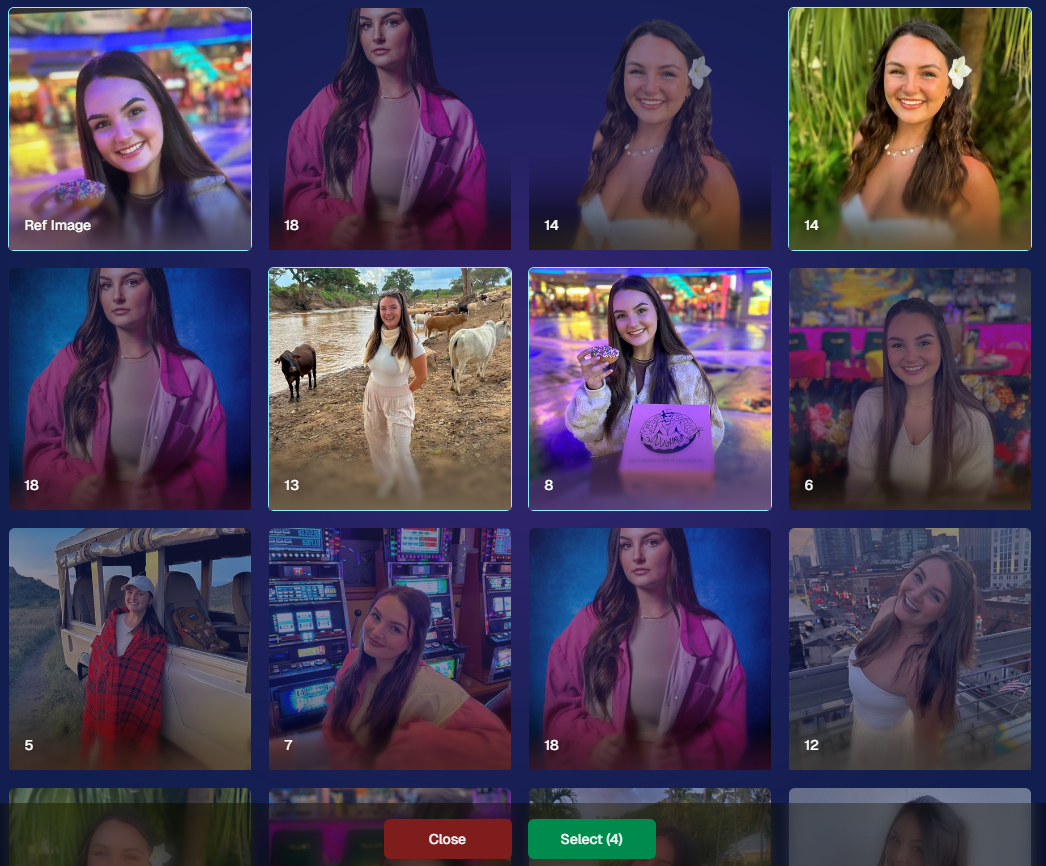
We’re introducing a Multi-Select feature to the Manage Images interface:

  • Multi-Select Button: Highlight multiple images at once.
  • Bulk Actions: After choosing your set, tap “Select” at the bottom. You can:
    • Mark them Invisible or Visible
    • Download them all in a single zip file
    • Toggle them as Group Photos or Individual all at once
  • Speedy Management: No more one-by-one adjustments. This should help you power through large batches of images in a fraction of the time!
2. Event Tags 🏷️

There’s a brand-new Extras tab in the Web Dashboard navigation, featuring our new Event Tags tool:

  • Creating Tags: Assign tags to your events (e.g., “Prom,” “Winter Formal,” etc.).
  • Filtering by Tag: On the Events List or in your Events Report, choose an Event Tag to instantly see only those events.
  • Performance Insights: Group your events by theme and get a quick view of how each set is performing all at once.

Tagging is perfect for photographers juggling multiple event types, letting you spot patterns and trends with ease.
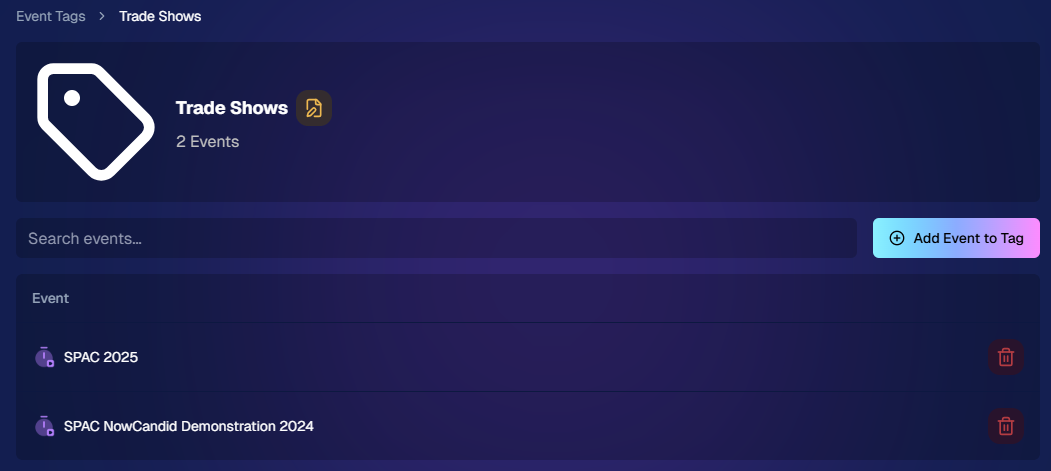
Just two Events on this Event tag, but you can add lots!

3. Updates to the Faces Report 👥

Our Faces Report—released last week—has already received some polish:

  • New Revenue Line: Alongside face counts in the chart, you’ll now see a revenue line.
  • Compare Image Types & Sales: See whether couples, solos, or big group shots bring in the most orders.
  • Informed Future Shooting: Focus your time at events on what sells best—maybe it’s the big friend groups or the sweet one-on-one moments.

This view helps you refine your event coverage strategy for max impact.
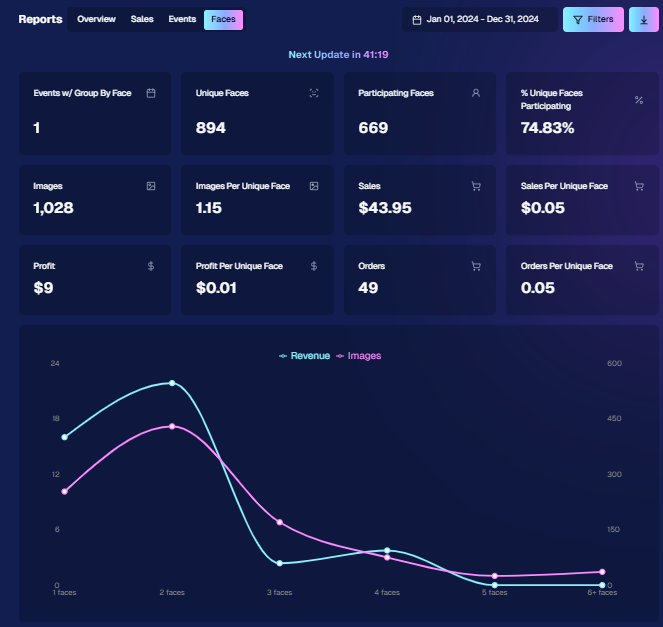
Ignore the low sales, it was a test Event!

4. Image Details Page 📝

While managing images in your events, you’ll notice a “Details, Logs, and more” link on each image:

  • Expanded Meta Data: Discover camera settings, image size, camera type, and more.
  • Face Matching™ Logs: See if and when a face got paired to a participant; even jump directly to that participant’s gallery.
  • Advanced Troubleshooting: Ideal for debugging customer issues or satisfying your own curiosity about each shot.

It’s more info than we’ve ever provided, so have fun geeking out over the details!
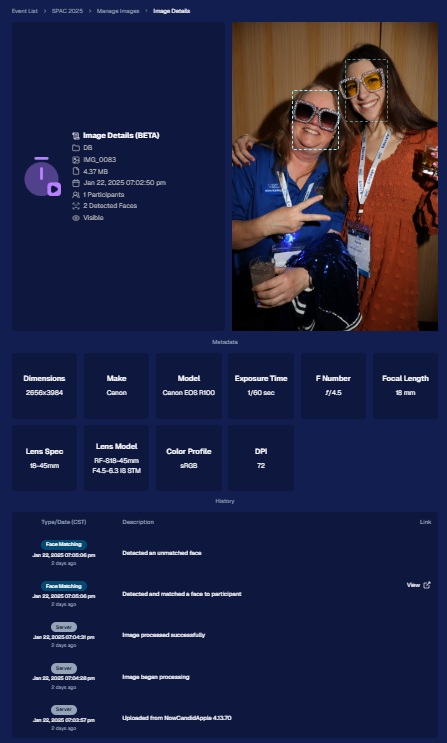
So much image file info and image history now!

5. Big Improvements to the Web Dashboard Image Uploader

Finally, a behind-the-scenes upgrade that’ll make your day-to-day life easier:

  • Upload Up to 5000 Images: Jumping from 1000, so you can batch bigger events in fewer steps.
  • Faster Transfers: As long as you have decent upload speeds, the process should feel snappier overall.
  • Lower CPU Demand: Less strain on your computer, letting you multi-task without slowing to a crawl.

Sometimes it’s the quiet changes under the hood that make the biggest difference.

6. Tiered Pricing Now Live 🎉

After last week’s preview, Tiered Pricing is officially rolled out to SportsPics™, PartyPics™, GradPics™, and other sales-driven events:

  • Upgraded Text & Email Campaigns: We’ve refined the promotional messages to match your Week 1, Week 2, and Week 3 pricing tiers, giving your buyers a clear sense of each week’s small price bump.
  • 365-Day Marketing SMS Replaced with 180: We’ve shortened the final reminder’s timeline from a year to 180 days, aligning better with your event marketing cycle and typical follow-up patterns.

If you haven’t explored Tiered Pricing yet, check it out in your Offer Creator and see how these incremental price changes (and updated marketing) might boost your sales!

That’s all for this week, my wonderful NowCandid™ community.

I hope these new features and improvements empower you to breeze through event management and deliver an even better experience to your clients. As always, if you have questions or feedback, give us a shout.

Until next time—keep capturing those unforgettable moments! ✨

Candy 🍬

Related articles

Capture & Upload App Update: Version 3.22
Feature Updates
May 10, 2024

Capture & Upload App Update: Version 3.22

3
 minutes read
🌟 Candy here with a new Capture & Upload app update overview! 🌟

Candy here with a fresh scoop on the latest tweaks to our Capture & Upload app! 📲 While this update might seem light on the surface, it's packed with all sorts of behind-the-scenes magic to boost performance and stability. ✨

To make sure you're getting the best out of NowCandid, keep your devices (both Windows & iOS) updated! 🔄

In the Capture & Upload app, just tap the information screen (that's the "i" button in the app) to see your app version and confirm you're rocking version 3.22. 🎉

iOS & Windows App Updates: 🛠️

  • Misc improvements & fixes to keep things running smoothly.
  • Now see the number of logs for each date when using the log uploader – super handy! 🗓️
  • New "Having trouble?" popup if 30 seconds pass on the take photo screen without any action. It's got helpful reminders in case something's amiss! 🕒
  • Say goodbye to the "Service Lost" popup on the shooting screen—it won't bug you anymore! 🚫
  • Introduced a dedicated "Name Lookup" button for Positive ID Events, making things more obvious than ever. 🔍
  • Misc UI tweaks & improvements to spruce things up!
  • Changed the "Dismiss" button in the update popup to "Use Old Version" for those who like a throwback. ⏪
  • Updated the "Add Participant" keypad to match the chic look of our newer Tap-A-Face keypad. 👯

iOS-App-Only Updates: 🍏

  • Truncate event name on iPhone at the top if name is super long (so it fits on 1 line)

Thanks for tuning in, and for being such amazing users of NowCandid! 🌈

See you again soon! And remember, if you've got questions or need a little help, just reach out. We're here for you! 💌

Cheers and sparkles,

Candy 🍬

Surprising Earnings: $18 Per Graduate at Middle School Graduations with GradPics Now!
GradPics
May 9, 2024

Surprising Earnings: $18 Per Graduate at Middle School Graduations with GradPics Now!

8
 minutes read

Breaking New Ground at Middle School Graduations 🎓

Traditionally, high school and college graduations are where photographers using GradPics Now hit high sales marks, often achieving $20 per graduate or even soaring to $40-$50+. This has set a solid benchmark for what we consider successful revenue from graduation events. However, middle school graduations, also known as moving up ceremonies, have typically seen much lower sales figures—until now.

A Surprising Success Story 🌟

A GradPics Now user recently shattered our modest expectations by earning over $18 per graduate at a middle school graduation ceremony. Covering this event with the same vigor and strategy as higher education graduations, including the use of our Selfie Check-In feature, this photographer managed to turn what is often considered a less lucrative opportunity into a significant success. With more than 400 graduates participating, the total sales exceeded $7,200 for just this one middle school event. Impressive, right?

The Power of Immediate Engagement 📸

This remarkable achievement highlights an important lesson: the potential of middle school graduations as viable and profitable photography events. The success at this particular ceremony suggests that GradPics Now, especially with the implementation of Selfie Check-In, is exceptionally effective at capturing the moment and leveraging the emotions of proud parents. This immediate engagement allows photographers to capitalize on the celebratory atmosphere right then and there, boosting sales significantly.

Expanding Your Horizons 🌍

This case study serves as a powerful testament to the capabilities of GradPics Now across different educational levels. If you've primarily focused on high school or college graduations, it might be time to consider the untapped potential of middle school ceremonies. The combination of efficient technology and emotional moments can clearly yield fantastic results.

Get Prepared with Pre-Grad Chats 💬

Interested in exploring how you can maximize your success with middle school graduations? Schedule a pre-grad chat with Jack (https://calendly.com/nowcandid-training) to refine your strategy and ensure you're fully equipped to make the most of every graduation ceremony this season. We salute all graduation photographers making memorable moments last. Good luck this grad season, and here's to raising the bar even higher!

Grad Season Preparation: Schedule a Pre-Grad Chat with Jack!
GradPics
May 7, 2024

Grad Season Preparation: Schedule a Pre-Grad Chat with Jack!

7
 minutes read
As graduation season approaches, ensuring your photography services are streamlined and optimized can significantly impact your sales and client satisfaction.

At NowCandid, we're dedicated to helping you maximize your graduation ceremony photography with efficient tools and strategies. Let's dive into how you can enhance your approach this grad season.

Schedule Your Pre-Grad Strategy Session 📅

Kick off the season right by booking a pre-grad chat with Jack (https://calendly.com/nowcandid-training). In this meeting, we'll cover:

  • Event Setup: Make sure you setup your GradPics Now Event correctly, and know what to expect.
  • Equipment Review: Ensure you have all the necessary gear for what you want to accomplish.
  • Best Practices: Tips and tricks to boost your confidence and readiness.

This session is crucial for tackling your events with the expertise needed to capture every memorable moment.

Jack has even doubled his usual Calendly availability for grad season! Take advantage!

Mastering Selfie Check-In 🤳

Selfie Check-In revolutionizes how you capture and associate images with graduates:

  • Ensure Participation: Encourage every graduate to use the Selfie Check-In upon arrival. Consider assigning assistants to facilitate this process.
  • Visibility: Utilize multiple QR code placements—signs, lanyards, and handheld QR code signs (https://www.teamphotonetwork.com/QP...) to ensure no one misses out.
  • Extended Reach: Gather information not just from graduates, but also their families, expanding your marketing reach.

Benefits of Live-Uploading 🌐

Connect your camera to an iPhone, iPad, or Windows device for real-time image uploading and instant gallery updates:

  • Immediate Availability: Images are uploaded during the ceremony, speeding up delivery and increasing sales potential.
  • Seamless Integration: Use either direct camera tethering or post-event uploading through the NowCandid Web Dashboard for continuous marketing and matching.
  • Less Work: Once you and your photographers leave a ceremony, you're done! Walk away and watch the sales roll in.

Comprehensive Photo Coverage 📸

Go beyond the traditional shots to truly capture the spirit of graduation. More photos mean higher chances of sales. Capture a broad range of moments to provide ample choices for your clients.

  • Processionals
  • Buddy Shots
  • Pre-Stage Portraits
  • Post-Stage Portraits
  • Handshake Shots
  • Recessionals
  • Friends & Family Shots

Why Choose NowCandid for Graduations? 🎓

GradPics Now isn't just about taking photos; it's about enhancing the entire experience:

  • Background Removal: Currently free! Background removal can add a professional touch, allowing subjects to choose from selectable, default backgrounds.
  • Full Support: Our support team handles customer inquiries related to orders and ordering, so you can focus on shooting.
  • Cost-Effective: No subscriptions; we only profit when you do, only taking a small commission on orders, ensuring our goals align with your success.
  • User-Friendly: Designed for ease of use, robust against mistakes, and backed by reliable recovery options.
  • Residual Sales: We keep images hosted and online for at least 15 years, helping you get residual sales as the years go by.
  • Successful: Graduation photographers find it incredibly easy compared to their past workflows, and find themselves earning 20%+ more (or in some cases, much more than that!) than what they previously made in sales, with a fraction of the effort.

Ready to take your graduation photography to the next level?

Don't wait—schedule your session with Jack today (https://calendly.com/nowcandid-training) and ensure you're fully prepared to make this grad season your most successful yet!

Let’s get in touch

If you’re a photographer looking to add NowCandid services to your wheelhouse – set up a call by clicking the button below.

How to customize formatting for each rich text

How to customize formatting for each rich text

How to customize formatting for each rich text

How to customize formatting for each rich text

How to customize formatting for each rich text

What’s a Rich Text element?

The rich text element allows you to create and format headings, paragraphs, blockquotes, images, and video all in one place instead of having to add and format them individually. Just double-click and easily create content.

A rich text element can be used with static or dynamic content. For static content, just drop it into any page and begin editing. For dynamic content, add a rich text field to any collection and then connect a rich text element to that field in the settings panel. Voila!

Headings, paragraphs, blockquotes, figures, images, and figure captions can all be styled after a class is added to the rich text element using the "When inside of" nested selector system.

  • List One
  • List Two
  • List Three
  • List Four
  • List Five

This is a link

This is bold text