HomeNavigation arrowBlogNavigation arrow
Current page
Events

Deliver Faster and Start Selling Sooner

Deliver Faster and Start Selling Sooner

Why timing is the most overlooked “marketing strategy” in event photography

In photography, timing matters.

Not just because clients want their photos quickly—but because buying behavior is emotional and time-sensitive. The longer customers wait to see their images, the more the energy fades. The excitement from the event turns into “I’ll get to it later,” and “later” often becomes “never.”

That’s why one of the biggest marketing advantages you can build into your business isn’t a fancy email template or a new ad campaign. It’s this:

Deliver faster—so you can start selling sooner.

NowCandid™ is built around that idea.

The real problem: attention decays fast

After an event, people are at peak interest:

  • •They’re excited.
  • •They’re already talking about it.
  • •They’re texting friends.
  • •They’re posting.
  • •They’re still in “memory mode.”

That’s the moment when they’re most likely to open a message, click a gallery link, and buy.

But when delivery drags out:

  • •They stop checking.
  • •They forget.
  • •They move on.
  • •They’re less likely to convert.

Even a delay of a couple days can change the outcome.

The NowCandid approach: proactive delivery, not passive browsing

A lot of platforms rely on customers to work hard to find their photos. The experience is often:

“Here’s a link. Good luck.”

NowCandid is designed to flip that.

Instead of waiting for customers to dig through a massive gallery, the platform is built to connect the right photos to the right people quickly, and then help you reach them while the moment still feels immediate.

Here’s what that looks like.

The “faster = more sales” workflow

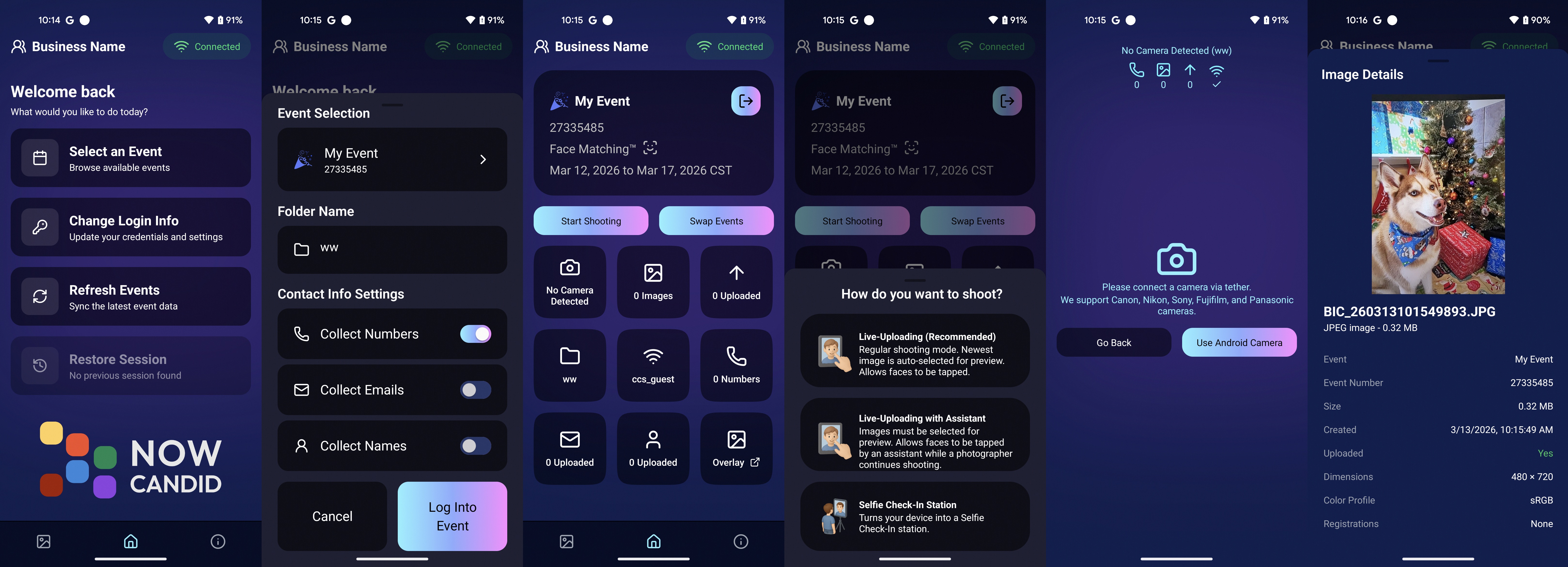
1) Customers complete a quick Selfie Check-In™

Selfie Check-In gives customers a simple way to identify themselves and provide contact info, so your system has what it needs to deliver their images efficiently—without a bunch of manual work on your end.

The key benefit: less friction.
You’re not chasing names after the fact. They’re raising their hand while the event energy is still high.

2) Images can be live-uploaded as they are shot

When you can upload while you shoot, you change the entire sales timeline.

Instead of “photos delivered days later,” you’re moving toward:

  • •Same-day visibility
  • •Immediate browsing
  • •Faster order velocity

Even if you don’t upload every frame live, the ability to move photos quickly gives you leverage. It’s the difference between a slow drip and a real-time experience.

3) Galleries can be sent right away

Once customers are identified and images are flowing in, the next step is simple:

Send the gallery.

That’s where momentum turns into conversion.

You’re no longer hoping attendees remember to check a website later. You’re proactively reaching them with a direct path to their photos.

4) Customers receive images while it still feels immediate

This is the most important part.

People buy when:

  • •They can find themselves quickly
  • •The experience feels fresh
  • •They’re emotionally connected to the moment

When images arrive while the event still feels “present,” the purchase becomes part of the experience—not an afterthought.

That’s why speed isn’t just operational.
It’s marketing.

What this unlocks for photographers

When delivery speeds up, you’ll feel the impact in a few places immediately:

✅ More orders (because more people actually view their photos)

Fast delivery increases engagement. Engagement increases conversion.

✅ Higher order values (because customers stay in the moment)

When people browse while excited, they tend to buy more. They’re not minimizing the purchase—they’re celebrating the memory.

✅ Less support burden

Most support requests come from confusion and delay:

  • •“Where are my photos?”
  • •“How do I find my kid?”
  • •“I can’t remember the link.”

A fast, direct delivery workflow reduces those issues naturally.

✅ Better event/client satisfaction

Organizers don’t want complaints. Faster delivery means fewer unhappy guests and fewer incoming emails for the client—which makes you look professional (and helps you get rebooked).

The takeaway: timing is a growth strategy

If you want to grow your event photography business, you don’t always need more marketing.

Sometimes you need better timing.

NowCandid is built to help you:

  • •Identify customers quickly
  • •Upload faster
  • •Deliver sooner
  • •Convert while energy is high

Because in volume photography, the platform that helps you move faster is usually the platform that helps you sell more.

Want to see what “fast delivery” looks like in practice?

If you tell us what type of events you shoot (sports, schools, graduations, dances, etc.), we’ll recommend the best NowCandid workflow to deliver faster and start selling sooner. Set a time with one of our reps using our Calendly: https://calendly.com/nowcandid-training.

Related articles

Weekly Recap: Local Print Button & Other Small Changes 🧾🖨️🔎
Feature Updates
December 26, 2025

Weekly Recap: Local Print Button & Other Small Changes 🧾🖨️🔎

2
 minutes read
Hey photo friends! 👋


Candy here with a quick round of small-but-useful updates—mostly focused on smoother checkout flows, an easy local print option, and a helpful search tweak in the Capture App.

🛍️ Retail Updates

🛑 Quic-Events download edge case prevented

  • Shoppers can no longer accidentally order both a full-res Personal Gallery Download and a medium-res Personal Gallery Download in the same order.

🧹 Manual checkout: trims trailing spaces

  • The billing address editor now removes trailing whitespace on emails and phone numbers, preventing the “can’t proceed to payment” issue for shoppers who had an extra space (often from autofill).

🧩 Packages: clearer image picker wording

The package item image-picker now uses cleaner language:

  • Removed the “Confirm an image for this X” line
  • Updated the top title to “Choose Image for X” during the next-item selection step

🖥️ Dashboard

🖨️ New “Print locally” button in lightboxes

  • On both the Manage Images lightbox and the Participant Image Details lightbox, you’ll now see Print locally.
    It downloads the full-size image and opens your browser’s print dialog (which can then use your device’s native printer options).

📱 Capture App iOS 4.22.1 (OTA)

🔎 Smarter Name Lookup search results

  • Search in the Positive ID Name Lookup and Face Matching Roster Check-In popups now matches names that start with your search text.
  • Example: typing “AL” finds Albert without also pulling up Hal.

(As usual, OTA update = restart the app or use Check for updates.)

That’s the scoop for this week!

Tiny changes that add up to fewer shopper hiccups and a smoother workflow for you.

Keep creating magic,
Candy 🍬

Weekly Recap: Apple Pay Everywhere, Capture App 4.22 & Clearer Check-Ins 🍬📱
Feature Updates
December 19, 2025

Weekly Recap: Apple Pay Everywhere, Capture App 4.22 & Clearer Check-Ins 🍬📱

3
 minutes read

Hey photo friends! 👋


Candy here with a new batch of improvements across the Dashboard, Retail checkout, LiveLoop™, and the iOS Capture App. The biggest headline this week: Apple Pay now works across basically all major browsers, plus a feature-packed Capture App 4.22.

🛍️ Retail: Apple Pay in More Browsers

🍎 Apple Pay is now supported on Chrome, Edge, and Firefox

  • 🍎 Including on Windows and Chromebooks. More shoppers can check out faster with fewer steps.

🧾 Manual checkout fixes

  • ✅ Fixed an edge case where “Shipping address is same as billing” still forced shipping entry
  • 🧹 Fixed an edge case where a prefilled participant email had trailing whitespace and blocked checkout

📱 Capture App iOS 4.22

📷 Fujifilm file names now match the camera’s file name

  • Helpful for keeping filenames consistent with what you see on-camera.

📺 AirPlay shows the latest/selected image by default

  • Think of it like a one-device, real-time mini slideshow. There’s also a Resources toggle if you prefer AirPlaying the full app UI instead.

🧩 Folder naming rule update: No underscores in folder names

  • Underscores are now reserved internally, so the app will prevent using them in folder names going forward.

🏷️ Selfie Check-In Station can require PhotoTag check-in

  • Matches the web behavior and is controlled via your Custom Offer Advanced Settings.

🫥 Check-in reference images hidden from the shooting strip

  • Keeps the strip cleaner and focused on the images that matter for sales.

🖥️ Dashboard: Clarity & Capability Updates

🏷️ Additional Contact badges on PhotoRoster page

  • Additional contacts now show a badge there, just like on the Participant List page.

🚫 Legacy Events can be marked invisible

  • The visibility toggle is now available on legacy event details pages too.

🍬 Candy got smarter and more capable

  • Improvements across: main Candy, Compare Report Candy, Image Timeline Candy, and Mini Candy.

📊 Compare Report improvements

  • ✍️ Fixed a typo
  • 🧠 More intelligent summary output

🧾 Reports fix: Hidden events no longer appear in the specific event selector

🌀 LiveLoop™ Fix

🧼 Cutout preview edge case fixed

  • Cutouts won’t show with a checkered background during the “in-progress” phase. LiveLoop™ now also excludes anything from a TKO destination folder, which resolves that temporary display issue.

✅ Check-In Label Updates

🧑‍🏫 Non-sports Events now use clearer labels

  • “First Name” → Photo Subject’s First Name
  • “Last Name” → Photo Subject’s Last Name

That’s the scoop for this week!

Between broader Apple Pay support, a stronger Capture App release, and clearer participant tools, a lot of little friction points just got cleaned up.

Keep creating magic,
Candy 🍬

Weekly Recap: Horizontal 3D Plaques, Event Calendar View & PhotoTag LiveLoop Links 📅🌀
Feature Updates
December 12, 2025

Weekly Recap: Horizontal 3D Plaques, Event Calendar View & PhotoTag LiveLoop Links 📅🌀

5
 minutes read
Hey photo friends! 👋

Candy here! This week’s updates are big on visual workflows: more orientation options for our 3D products, a new Calendar view for Events, and PhotoTag-powered LiveLoop™ links for better slideshow control.

Let’s jump in!

🖼️ Big Product Upgrade: Horizontal Orientation for 3D Plaques & Prints

End customers now have more flexibility when ordering these 3D-rendered products:

🎓 Graduation Plaque now supports a new horizontal design

  • • 🔄 Customers can switch orientations during the live 3D render
  • • 🖼️ Updated 2D render support included as well

🪧 Premium Plaque now supports a horizontal design

  • 🔄 Orientation can be switched during the live 3D render

🖨️ Premium Print now supports a horizontal design

  • 🔄 Orientation can be switched during the live 3D render

✍️ Caption preview fix: Premium Print/Plaque now correctly reflect the default “Line 2” in the 3D render before a shopper enters their own text

These updates make it easier to sell premium products even when the “best” shot isn’t a perfect vertical crop.

📅 New Dashboard Event Calendar View

Prefer a more visual way to plan and review your schedule?

🗓️ Event Calendar is now available via the calendar button on the Event List page

👀 Great for spotting what’s coming up at a glance, instead of scanning a long list

🌀 LiveLoop™: PhotoTag Links

LiveLoop™ just got more flexible:

🏷️ PhotoTags now have LiveLoop links

  • • Found in a couple places on the PhotoTag page in the Dashboard
  • • Pulls in new images automatically, just like a normal LiveLoop™

🧾 Cleaner titles & history

  • • LiveLoop page now shows the Event name in the title bar, history, and links
  • • PhotoTag links show as: PhotoTagName – EventName

Perfect for running separate slideshows per team, division, day, or group without juggling multiple Events.

🖥️ Dashboard Improvements

🧹 New “Clear” button in Manage Images select mode (clear selections without re-entering select mode)

📋 PhotoRoster uploads improved:

  • • 📞 Additional phone columns now ignore parentheses (like main phone)
  • • 🔀 Columns can be in any order (matching Event roster upload behavior)

🔗 Fixed Image Details lightbox link for images manually removed on Participant Details

🧾 Positive ID Code PDF sorting updated:

  • • A–Z participants with no PhotoTag
  • • Then PhotoTags A–Z (participants A–Z inside each)
  • • Then blank cards at the end

🛍️ Retail & Check-In Updates

🚫 Invisible Events are now truly inaccessible

  • • If an Event is marked invisible, its retail site + check-in pages now show an “Event is no longer available” screen

🌎 Positive ID check-in phone formatting helper

  • • If an existing registration code has a phone without “+”, we’ll append “+1” to default to US country format (unless it already starts with “+” for another country)

🧩 Fixed a retail site crash when the Statuette Ornament was included in a package

🛡️ iPhone GalleryGuard now loads faster

🛠️ Misc Fixes & Improvements

🖨️ Backprinting updates for existing Events when your business info is updated (previously it was locked to whatever info existed when the Event was created)

✉️ Fixed a strange edge case where email-only participants wouldn’t send if another email in the queue contained “.@”

✅ Improved email validation across all web check-ins

That’s the week!

Between horizontal premium product designs, PhotoTag-level LiveLoops™, and a Calendar view for Events, you’ve got a lot more control over how things look and how you run the day. 💫

Keep creating magic,

Candy 🍬

Let’s get in touch

If you’re a photographer looking to add NowCandid services to your wheelhouse – set up a call by clicking the button below.

How to customize formatting for each rich text

How to customize formatting for each rich text

How to customize formatting for each rich text

How to customize formatting for each rich text

How to customize formatting for each rich text

What’s a Rich Text element?

The rich text element allows you to create and format headings, paragraphs, blockquotes, images, and video all in one place instead of having to add and format them individually. Just double-click and easily create content.

A rich text element can be used with static or dynamic content. For static content, just drop it into any page and begin editing. For dynamic content, add a rich text field to any collection and then connect a rich text element to that field in the settings panel. Voila!

Headings, paragraphs, blockquotes, figures, images, and figure captions can all be styled after a class is added to the rich text element using the "When inside of" nested selector system.

  • List One
  • List Two
  • List Three
  • List Four
  • List Five

This is a link

This is bold text