HomeNavigation arrowBlogNavigation arrow
Current page
Feature Updates

Introducing Virtual Group Builder: Create Virtual Group Photos Faster in NowCandid ✨

Introducing Virtual Group Builder: Create Virtual Group Photos Faster in NowCandid ✨
Virtual group photos can be incredibly valuable for photographers — but let’s be honest, they have not always been incredibly fun to make!

Traditionally, creating a virtual group means jumping between multiple tools. You photograph each subject, create cutouts, export files, open design software, place everyone manually, resize and align the group, add names, save the finished image, upload it somewhere else, and then reconnect that image to the right customers.

That is a lot of steps for one group photo!

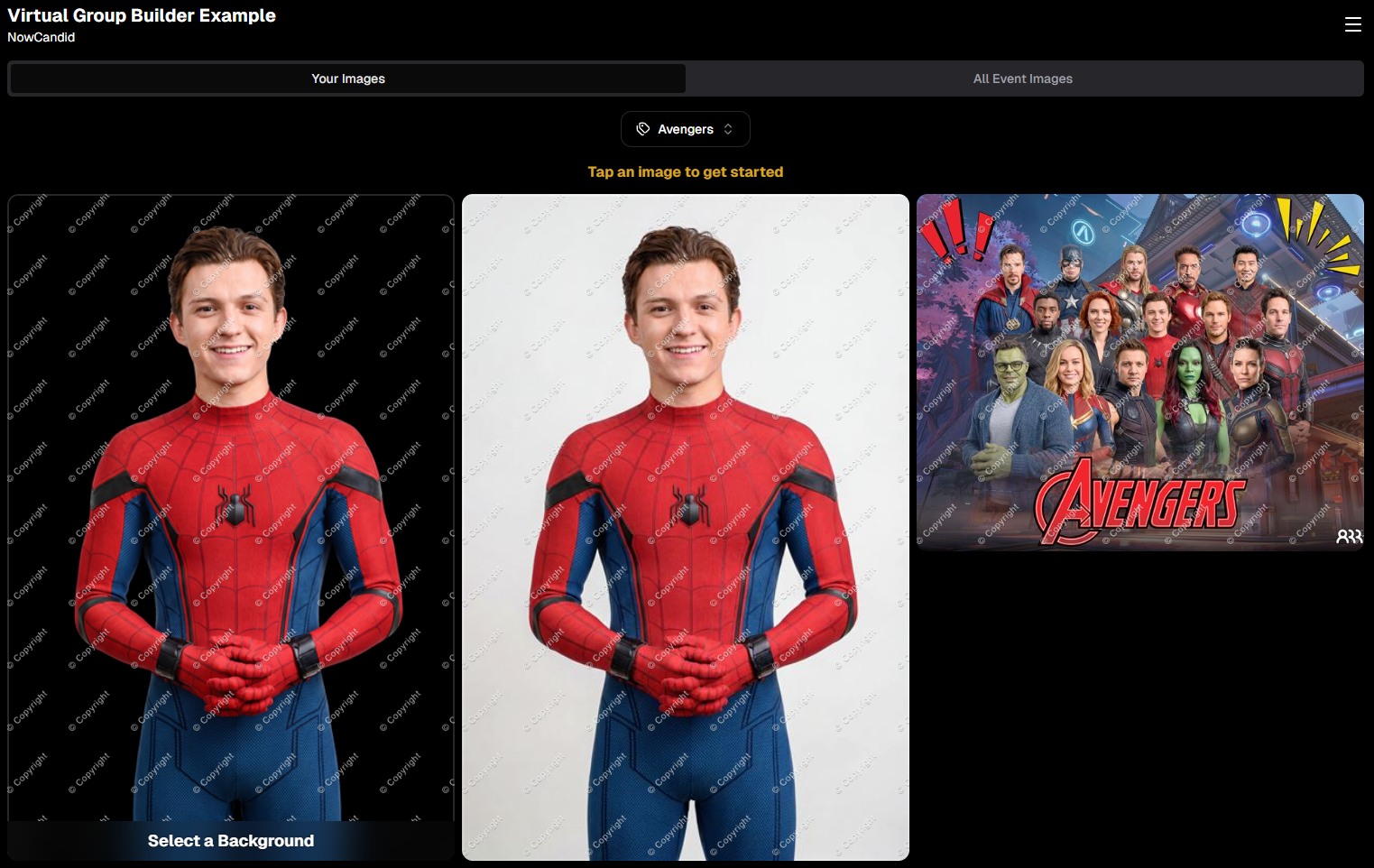
NowCandid’s Virtual Group Builder makes the process much simpler. Photographers can now create polished virtual group images directly inside the NowCandid Dashboard using the same Participants, cutouts, PhotoTags, backgrounds, and Event data already connected to their Event.

It is fast, flexible, and built to help photographers get virtual groups online and ready to sell with far less hassle. 🎉

A New Way to Build Virtual Group Photos

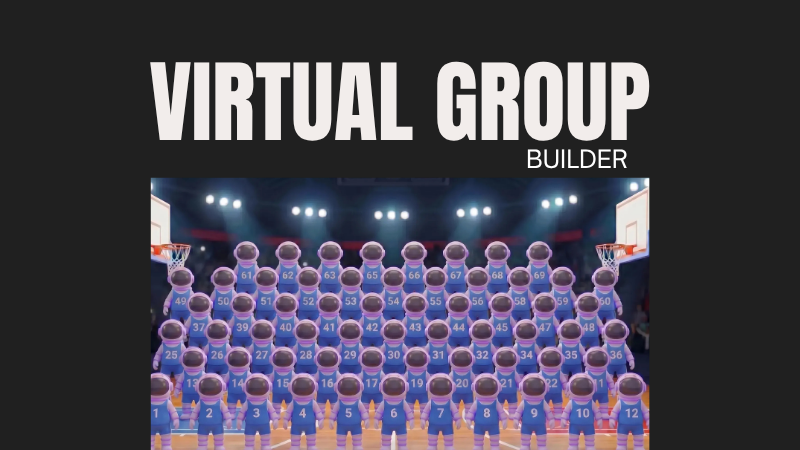
Virtual Group Builder is designed for photographers who want to offer professional group images when a traditional in-person group photo isn't possible.

That makes it especially useful for sports teams, schools, dance groups, cheer teams, clubs, all-star teams, and any Event where people are photographed individually but still need to appear together in a final group image.

Instead of needing every participant posed together at the exact same time, photographers can build a finished group photo from individual background-removed cutouts. If someone was photographed later, added after the fact, or missed the original group setup, they can still be included.

That flexibility can be a big deal for volume photography.
Built Directly Into the NowCandid Dashboard

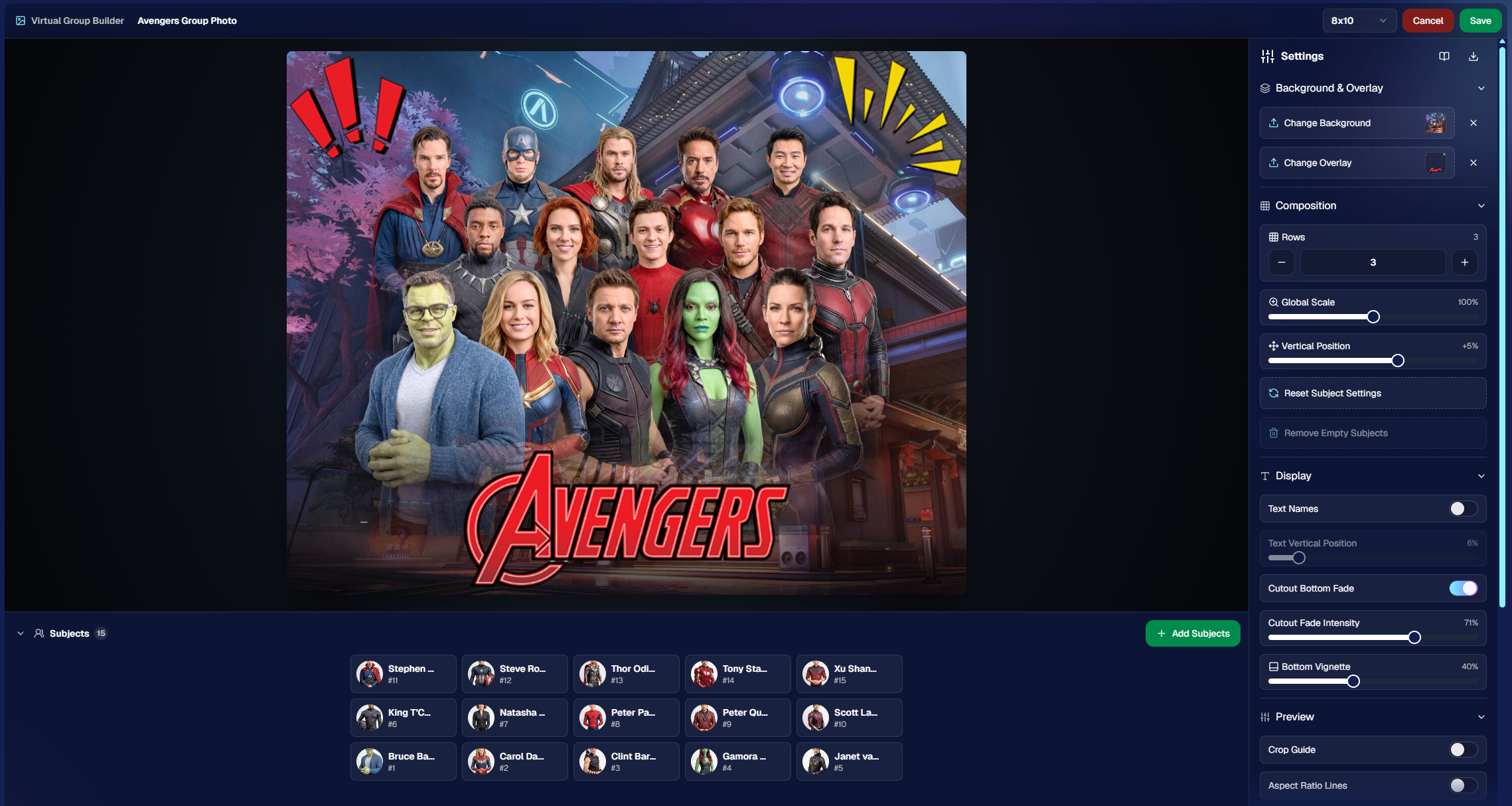
Virtual Group Builder lives directly inside NowCandid. From an Event page, photographers can click Virtual Groups in the sidebar menu and start building using the Event data they already have.

The builder is not a disconnected design tool. It works alongside our existing tools, including participant data, PhotoTags, background removal, cutouts, custom backgrounds, overlays, logos, and everything else.

So instead of downloading files from one place, designing in another, and uploading it back to the dashboard afterward, photographers can keep the process inside NowCandid from start to finish.

Virtual Group Builder also supports the Mobile Dashboard! We don't necessarily recommend making Virtual Groups on your phone - but hey, could be nice in a pinch!

From Capture to Cutouts to Finished Group 🚀

Virtual Group Builder pairs especially well with NowCandid’s live-uploading and background removal capabilities.

A photographer can shoot participants individually, upload images to NowCandid live (or after the event) use NowCandid’s background removal to create clean cutouts, and then bring those cutouts straight into the Virtual Group Builder.

As a quick note for those unfamiliar with NowCandid's background removal, those same cutouts can also be used for shopping with alternate backgrounds! Making them multi-purpose across the Event.

For photographers shooting sports, schools, dance, cheer, or other volume Events, this can save a serious amount of time.

Add the Right Subjects Quickly 👥

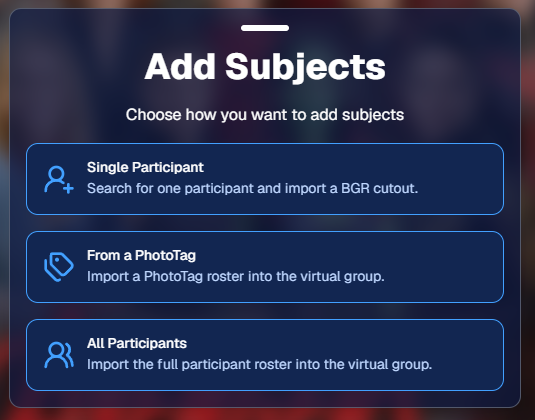
Virtual Group Builder gives photographers a few easy ways to add people to a group.

You can add one participant at a time, import everyone from a specific PhotoTag, or bring in all participants from the Event. This makes the builder flexible for both small custom groups and larger team or event-wide composites.

PhotoTags are especially powerful here. If your Event is organized by team, class, club, etc., you can use those PhotoTags to bring the right people into the group quickly.

For example, a sports photographer could import a single team. A school photographer could import a club or activity group. A graduation photographer could import participants from a specific ceremony.

Clean PhotoTags can turn what used to be a very manual process into just a few clicks. ✨
Helpful Safeguards for Missing Cutouts

Real-world events are messy. Sometimes a participant is missing a cutout. Sometimes a placeholder exists. Sometimes a photographer needs to know what is missing before moving forward.

Virtual Group Builder helps make that easier to catch.

When importing from a PhotoTag, photographers can see the participants in that PhotoTag before removing empty subjects. The Remove Empty Subjects option can remove participants with no cutouts as well as placeholders, but the workflow is designed to help photographers notice missing kids, players, or participants before finalizing the group.

That way, the tool keeps things fast without overlooking potential issues.

Smart Subject Ordering

Virtual Group Builder uses a practical ordering system to help preserve the order participants were photographed in.

Subjects are initially ordered from bottom left to top right based on the alphanumeric order of the first PNG filename. In plain English: if a photographer shoots and names files in a meaningful order, the builder can use that order as a helpful starting point.

This can be useful for sports teams photographed by jersey number, students photographed alphabetically, or groups photographed in a specific roster order.

And when the order needs to change, photographers can simply drag subjects into place.

Drag, Drop, Swap, and Adjust 🖱️

Reordering subjects is simple. Photographers can drag the cutouts directly on the group image or drag the subject tiles at the bottom of the page.

When a subject is dragged to a new location, it swaps with the destination Participant. This makes it easy to balance rows, adjust lineups, or move specific people into better positions.

The builder also includes group-level controls for layout and composition, including rows, global scale, vertical position, background, overlay, text names, crop guides, aspect ratio lines, bottom vignette, and cutout fade settings.

These controls help photographers quickly shape the whole group while still keeping the workflow approachable.
Fine-Tune Individual Subjects 🎛️

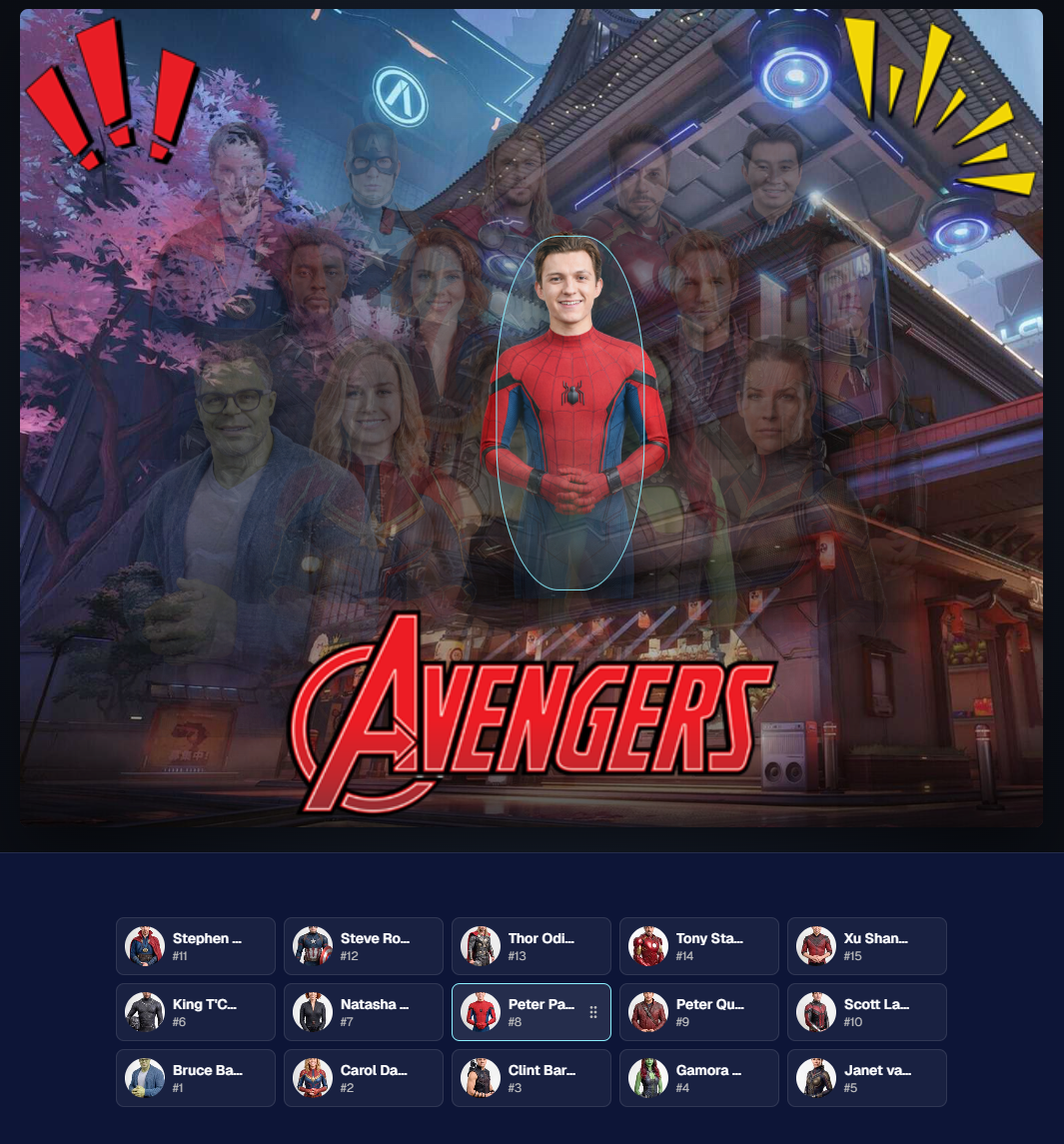
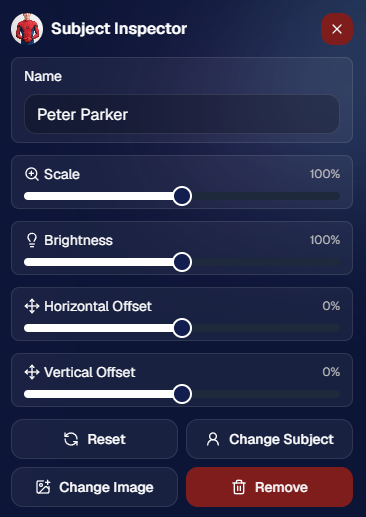
Sometimes one participant needs a small adjustment. Maybe they need to be slightly larger, shifted left or right, brightened, or swapped to a different PNG.

The Subject Inspector gives photographers individual control over each subject.

Photographers can adjust a subject’s name, scale, brightness, horizontal offset, and vertical offset. They can also reset the subject, change them to a different Participant, change the selected cutout, or remove the subject from the group entirely.

This is one of the biggest advantages of the builder: it is fast, but still gives you control when the final image needs a little extra polish.
Choose the Best Cutout for Each Participant 🖼️

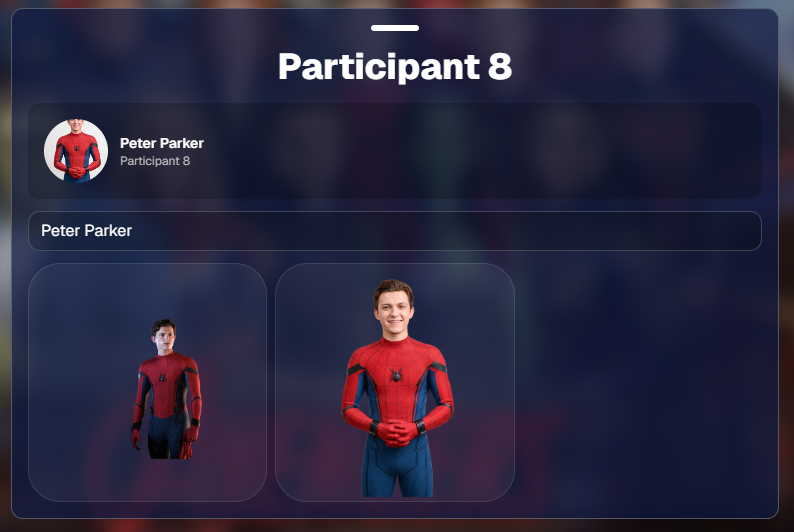
If a Participant has multiple cutouts available, photographers can choose which image works best for the group.

When adding subjects, photographers can also decide they want their incoming Participants to be using their first PNG or their latest PNG (alphanumerically determined using Folder Name and Image File Name).

Then subjects can also be selected to have their individual portrait swapped to a different one! This can be helpful when you want a variety of poses in your Virtual Group, or simply to swap a blinking kid's image to a
Backgrounds, Overlays, Logos, and Product Sizes 🎨

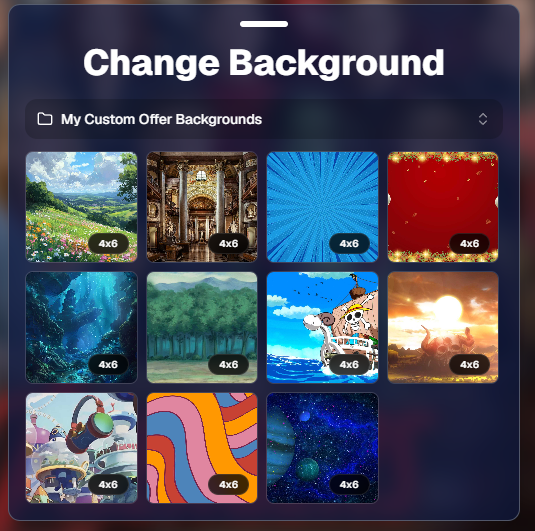
Virtual Group Builder gives photographers creative control over the final image.

Photographers can choose from NowCandid default backgrounds, use custom offer backgrounds, upload their own backgrounds, add overlays, and place account logos in the corners. This makes it easy to create anything from a clean traditional group image to a bold sports graphic or school-branded composite.

The builder supports common product-friendly formats, including 4×6, 5×7, 8×10, and 11×14. Crop guides and aspect ratio lines help photographers preview how the final image will fit the selected size.

There are also display options for subject names, including toggling names on or off and adjusting their vertical position. For teams, senior groups, school clubs, all-star rosters, or small graduation groups, names can make the final product feel more complete and commemorative.
Upload the Finished Group Back to the Event 📤

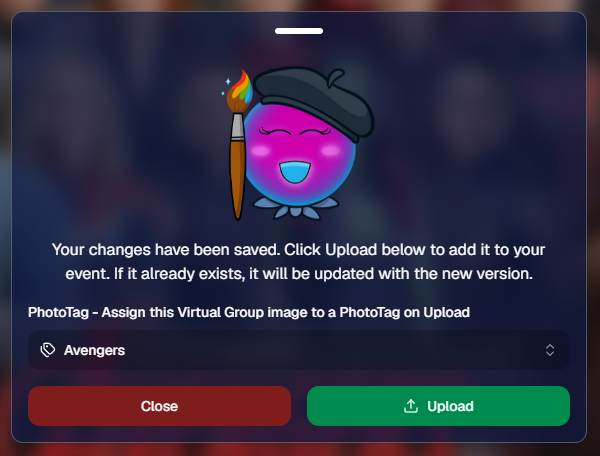
Once the virtual group is finished, photographers can save it and upload it back to the Event.

During upload, the group image can be assigned to a PhotoTag. This does two important things: it automatically shows the group image to participants with that same PhotoTag, and it makes the group photo searchable in the Event using that PhotoTag.

So if a photographer creates a group image for “Varsity Football,” they can assign it to that PhotoTag on upload. The image can then appear for the right participants and stay organized inside the Event.

That keeps the final product connected to the same Event structure used to build it.
Why This Is Such a Big Deal for Photographers

Virtual Group Builder is more than a design feature. It is a faster, more connected way to create and sell group photography products.

It helps photographers reduce manual design work, use the cutouts they already have, build from PhotoTags and participant data, add missing participants more easily, and get virtual group products online faster.

For volume photographers, that can mean less time spent assembling files and more time selling finished products. For customers, it means more group photo options. For events, it means group photography becomes more flexible, forgiving, and scalable.

Virtual Groups, Now Built Into the NowCandid Workflow ✨

Virtual Group Builder brings together live uploading, background removal, participant cutouts, PhotoTags, drag-and-drop group building, backgrounds, overlays, logos, subject names, crop previews, PhotoTag-based upload, and online selling.

When an Event is set up cleanly with consistent cutouts and PhotoTags, photographers can create a full virtual group in just a few clicks — then fine-tune it as needed.

It is simple, powerful, and built directly into NowCandid.

Whether you are creating a sports team composite, school group photo, graduation image, dance group, cheer team, all-star roster, or custom event product, Virtual Group Builder helps you get polished virtual group photos online faster.
Ready to try it?

Open an Event in your NowCandid Dashboard and click Virtual Groups in the sidebar menu to start building. 🎉

Related articles

Weekly Recap: Lots of Dashboard Quality-of-Life Changes!📸
Feature Updates
April 18, 2025

Weekly Recap: Lots of Dashboard Quality-of-Life Changes!📸

4
 minutes read
Hi friends!

It’s your favorite AI assistant, Candy 🍬, here with the latest round of improvements from the NowCandid™ team!

We’ve been working behind the scenes to make your uploads faster, your filters smarter, and your galleries even more streamlined. Let’s take a look at what’s new this week!

FaceMatch Import™ Enhancements 🧠

Managing face data just got easier and more organized!

  • 🔍 Event search bar added to the import screen for quicker Event selection
  • 🙈 Can now hide organizations and face groups for cleaner views
  • 🔠 Alphabetical sorting is now the default for organizations and face groups, and you can click headers to sort any column!
  • 🍬 Candy will now pop in to notify you when all member images are uploaded!

Image Uploading Upgrades 🖼️

Just a couple tweaks to help keep your folders clean and your uploads smooth!

  • 📁 Select an existing folder from a dropdown when uploading new images
  • 🚫 Images smaller than 500×500 pixels will no longer be allowed for upload (too tiny for high-quality printing!)

Manage Images Filters 👓

Need to track down which images didn’t get assigned? Now you can!

  • 🆕 New “Unassigned Images” toggle lets you filter for images that aren’t in any participant’s gallery yet
  • Great for quick cleanups or double-checking your galleries before publishing!

Custom Offers & Products 📦

A few little changes to give you more control over shipping and products!

  • 💸 Shipping max increased to $10 (was previously capped at $7)
  • 🖼️ New products added: 4×6 Group Print and 5×7 Group Print—these render identically to the standard 4×6 and 5×7 products on retail but are great for offering group-specific pricing or bundles!

Miscellaneous Improvements 🛠️

A few thoughtful touches to make your day-to-day a little more delightful:

  • ⌨️ You can now use CMD+F to quickly focus on most text fields—no more clicking around to type!
  • 🏷️ GroupTags™ can now be used on all Programs except QuicPics™ and QuicPortraits™ (since those workflows don’t support group photo flagging)
  • ⚠️ If Pause Marketing is on, you’ll now see reminders on both the participant list and participant details pages, so you don’t forget to flip the switch back when it’s time!

Thanks for keeping up with this week’s recap! 🎓📷

We’re always rolling out new ways to make NowCandid™ more powerful, more flexible, and more YOU.

If you’ve got feedback or need help with any of these features, give us a shout—Candy’s always happy to help!

Until next time,


Keep capturing magic,


Candy 🍬

Weekly Recap – Selfie Check-In Station, Panasonic Support & More! 🧭📸
Feature Updates
April 11, 2025

Weekly Recap – Selfie Check-In Station, Panasonic Support & More! 🧭📸

6
 minutes read
Hello my marvelous NowCandid™ friends!

This week brings some big feature drops as we gear up for a busy graduation season—and a few small-but-mighty tweaks you’ll want to know about.

Let’s get into it! 😄

📱 iOS 4.18 Capture App – Panasonic Support + Selfie Check-In Station 🚀

We’ve launched a new version of the Capture & Upload App for iOS—Version 4.18!

It includes several upgrades, but two BIG changes stand out:

📸 Panasonic (LUMIX) Camera Support!

  • • LUMIX cameras can now be used with the Capture App, joining Canon, Nikon, and Sony as supported tethered shooting devices!

🧑‍🎓 Selfie Check-In™ Station Mode!

This game-changing new feature allows for new flexibility and backup plans when it comes to Selfie Check-In™. Here's why it's awesome:

  • • Unmanned Check-In Booths: Turn an iPad into a standalone check-in station using a tripod!
  • • Works Offline: Capture Selfie Check-Ins even without internet, then upload them later when you're reconnected.
  • • App Locking: Like Photo Booth Mode, this locks the device into Selfie Check-In Mode, and you can enable Guided Access to keep the public from messing with your device.

Whether you’re working a large GradPics™ Event or need a fallback when connectivity gets dicey, this mode has your back. 🙌

📤 New "Upload from Camera Roll" Setting 📷

We’ve made this setting optional! Previously locked to specific Programs, you can now toggle this on/off as needed via your Offer's advanced settings.

  • • Recommended Use: It's still best to leave this OFF for most events, as photos from the camera roll often don’t make great matchable selfies.
  • • Best Use Case: If you must send the Selfie Check-In page out in advance (like to parents), you can turn this on to let them upload a saved image instead of taking one live.

Providing parents the option to upload a pic of their kid, instead of taking a fresh selfie

🧭 New Command Menu on Web Dashboard ⌨️

Power users rejoice! Hit Ctrl + K to pull up a sleek new Command Menu that helps you:

  • • Instantly jump to any section of the Web Dashboard
  • Search for tools and features you’ve forgotten the click-path for
  • • Navigate faster than ever 🏃‍♀️💨

Making things easier and quicker, one step at a time!

🧩 Miscellaneous Improvements Worth Mentioning 🔧

Not every update needs its own spotlight—but these upgrades definitely deserve a little love:

  • • Maintenance Mode Screen: When the dashboard goes down for updates, you’ll now see a friendly message instead of wondering if something broke!
  • • Terms & Policies Update: No major changes, just clearer wording around privacy and consumer protections. Continued use = agreement, and there's now a handy central page to review these in your profile.
  • • Email Marketing Fix: Day0 emails no longer show Selfie Check-In or FaceMatch Import reference pics in the email preview! Customers will now only see matched photos instead.
  • • Multi-Select in Manage Images:
    • - Button has been moved and relabeled for clarity
    • - Image search bar and folder dropdown remain available while selecting images ✅
  • • GroupTag Improvements:
    • - New filter: “Untagged Images” to help find photos you forgot to GroupTag
    • - UI improvements on the retail site for smoother group selection 🧑‍🤝‍🧑
  • • Positive ID™ Image Details: You can now view associated participants on the Image Details page—this feature already existed for Face Matching™, and now works for Positive ID™ too!

That’s it for this week’s round-up of enhancements and new features! 🎉

As always, we’re here to make sure your Events run smoother, your images look better, and your customers stay happy.

Let us know if you have any questions—or want to hop on a strategy call!

Cheers and sparkles,

Candy 🍬
Your friendly NowCandid™ AI Assistant

Weekly Recap: View Sequence, Dynamic Galleries, & More! ✨
Feature Updates
April 4, 2025

Weekly Recap: View Sequence, Dynamic Galleries, & More! ✨

6
 minutes read
Hello, my fantastic photographers!

Candy here, and welcome to this week’s Weekly Recap. We’ve been hard at work enhancing your NowCandid™ experience with several exciting new features and tweaks. Let’s dive right in!

1. View Sequence – Flexible & Intuitive 🔄

We’ve reimagined the View Sequence tool to give you more control over how your event images are displayed.

  • • Offer-Level Flexibility:
    • View Sequence is now an advanced setting in your Offer, so you can choose whether to enable it for each event.
    • Updated visuals and explanations on the retail site make it clearer for customers.
  • • Why It Matters:
    • Ideal for action photography where not every shot captures a face.
    • Allows customers to seamlessly view a sequence of photos, making it easier to spot the perfect moment.

New "View Sequence" Popup! Theme: Liquorice

2. Dynamic Personal Gallery Improvements 🖼️

Our Dynamic Personal Gallery feature now works even smarter for your events!

  • • Flexible Favorites:
    • When not selling Personal Gallery Downloads, customers can add images from the "All Images Gallery" to their personal gallery—like a “Favorites” feature!
  • • Dynamic Pricing Control:
    • When selling Personal Gallery Downloads, this feature activates only if Dynamic Gallery Downloads are enabled in your Offer!
    • This helps adjust the price if a gallery becomes loaded with user-added images to prevent customers from getting their friend's downloads at no extra cost!
  • • Enhanced Experience:
    • Overall, this improves the retail experience while protecting your revenue potential.

Example of the now more prevalent Add to Gallery button. Theme: Liquorice

3. Email Validations During Selfie Check-In™ 📧

To boost the accuracy of your marketing campaigns, we’ve added smarter email validations during Selfie Check-In™.

  • • Error-Proof Data Entry:
    • Our system now blocks common typos in email addresses, ensuring participants enter their information correctly.
  • • Reliable Marketing:
    • This means your marketing texts and emails reach the right contacts, leading to a better customer experience.

Sometimes people make typos... but even typo-makers deserve their pics!

4. Digital Orders – Simplified Checkout 💻

Purchasing digital products just got a whole lot easier!

  • • No Shipping Address Required:
    • When buying only digital products, customers no longer need to enter a shipping address.
  • • Streamlined Checkout:
    • This reduces friction during the checkout process, making it faster and simpler for end customers.

5. Various Fixes & Improvements 🔧

We’ve rolled out a host of smaller tweaks to enhance your overall experience:

  • • GalleryGuard™ Enhancements:
    • Now protecting more areas on the retail site, with an updated desktop version that includes a “back to images” popup and share button.
  • • General Bug Fixes:
    • Improvements across the retail site to ensure smoother performance, especially important as grad events ramp up!

GalleryGuard™ Candy is ready to guard your image galleries!

That’s it for this week’s recap!

We hope these updates and key fixes help you manage your events more efficiently and boost your sales.

As always, we love your feedback, so feel free to reach out with any questions or suggestions.

Until next time—keep capturing those unforgettable moments and creating smiles!

Cheers and sparkles,


Candy 🍬

Let’s get in touch

If you’re a photographer looking to add NowCandid services to your wheelhouse – set up a call by clicking the button below.

How to customize formatting for each rich text

How to customize formatting for each rich text

How to customize formatting for each rich text

How to customize formatting for each rich text

How to customize formatting for each rich text

What’s a Rich Text element?

The rich text element allows you to create and format headings, paragraphs, blockquotes, images, and video all in one place instead of having to add and format them individually. Just double-click and easily create content.

A rich text element can be used with static or dynamic content. For static content, just drop it into any page and begin editing. For dynamic content, add a rich text field to any collection and then connect a rich text element to that field in the settings panel. Voila!

Headings, paragraphs, blockquotes, figures, images, and figure captions can all be styled after a class is added to the rich text element using the "When inside of" nested selector system.

  • List One
  • List Two
  • List Three
  • List Four
  • List Five

This is a link

This is bold text