HomeNavigation arrowBlogNavigation arrow
Current page
Feature Updates

Introducing Virtual Group Builder: Create Virtual Group Photos Faster in NowCandid ✨

Introducing Virtual Group Builder: Create Virtual Group Photos Faster in NowCandid ✨
Virtual group photos can be incredibly valuable for photographers — but let’s be honest, they have not always been incredibly fun to make!

Traditionally, creating a virtual group means jumping between multiple tools. You photograph each subject, create cutouts, export files, open design software, place everyone manually, resize and align the group, add names, save the finished image, upload it somewhere else, and then reconnect that image to the right customers.

That is a lot of steps for one group photo!

NowCandid’s Virtual Group Builder makes the process much simpler. Photographers can now create polished virtual group images directly inside the NowCandid Dashboard using the same Participants, cutouts, PhotoTags, backgrounds, and Event data already connected to their Event.

It is fast, flexible, and built to help photographers get virtual groups online and ready to sell with far less hassle. 🎉

A New Way to Build Virtual Group Photos

Virtual Group Builder is designed for photographers who want to offer professional group images when a traditional in-person group photo isn't possible.

That makes it especially useful for sports teams, schools, dance groups, cheer teams, clubs, all-star teams, and any Event where people are photographed individually but still need to appear together in a final group image.

Instead of needing every participant posed together at the exact same time, photographers can build a finished group photo from individual background-removed cutouts. If someone was photographed later, added after the fact, or missed the original group setup, they can still be included.

That flexibility can be a big deal for volume photography.
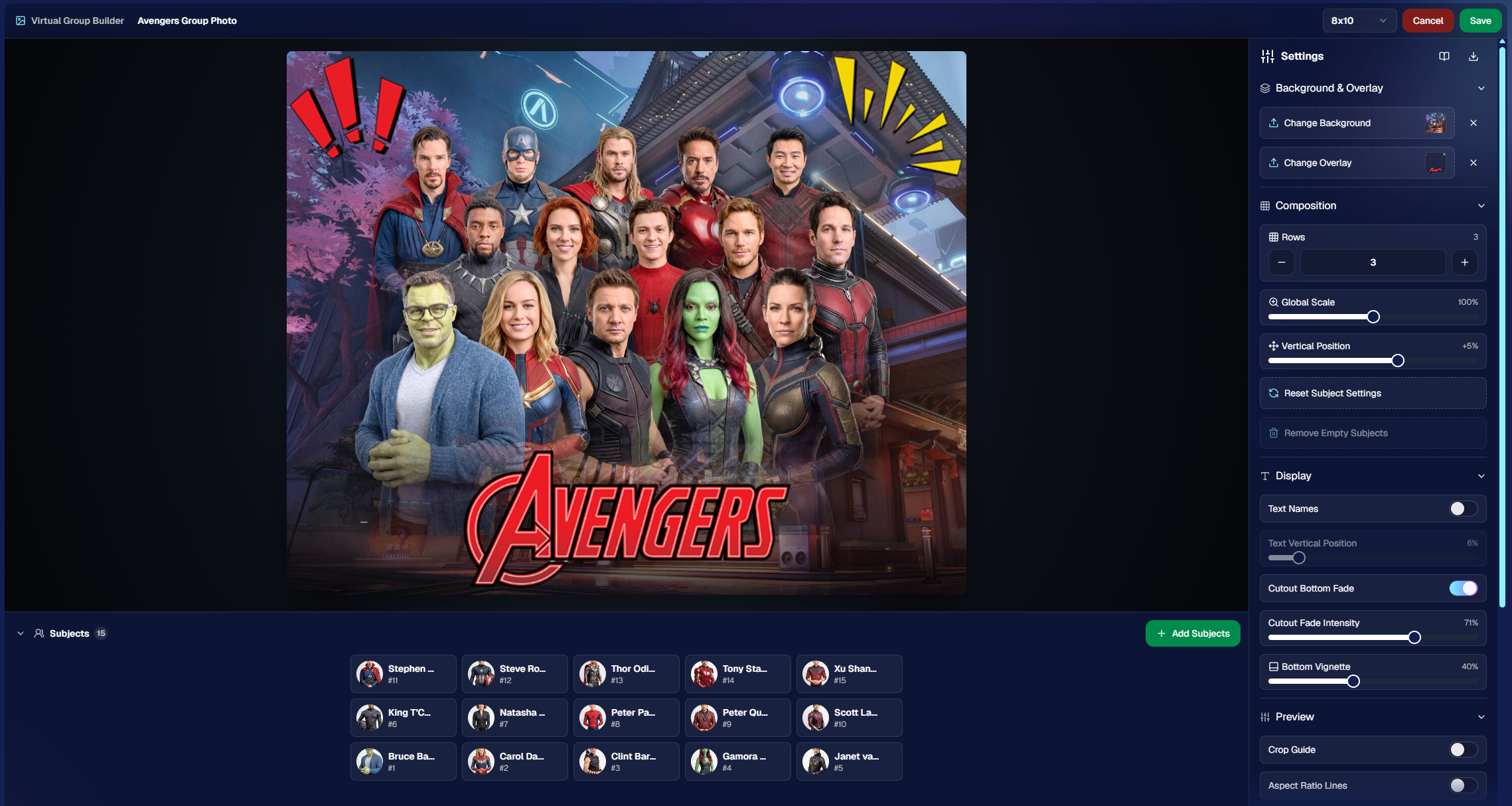
Built Directly Into the NowCandid Dashboard

Virtual Group Builder lives directly inside NowCandid. From an Event page, photographers can click Virtual Groups in the sidebar menu and start building using the Event data they already have.

The builder is not a disconnected design tool. It works alongside our existing tools, including participant data, PhotoTags, background removal, cutouts, custom backgrounds, overlays, logos, and everything else.

So instead of downloading files from one place, designing in another, and uploading it back to the dashboard afterward, photographers can keep the process inside NowCandid from start to finish.

Virtual Group Builder also supports the Mobile Dashboard! We don't necessarily recommend making Virtual Groups on your phone - but hey, could be nice in a pinch!

From Capture to Cutouts to Finished Group 🚀

Virtual Group Builder pairs especially well with NowCandid’s live-uploading and background removal capabilities.

A photographer can shoot participants individually, upload images to NowCandid live (or after the event) use NowCandid’s background removal to create clean cutouts, and then bring those cutouts straight into the Virtual Group Builder.

As a quick note for those unfamiliar with NowCandid's background removal, those same cutouts can also be used for shopping with alternate backgrounds! Making them multi-purpose across the Event.

For photographers shooting sports, schools, dance, cheer, or other volume Events, this can save a serious amount of time.

Add the Right Subjects Quickly 👥

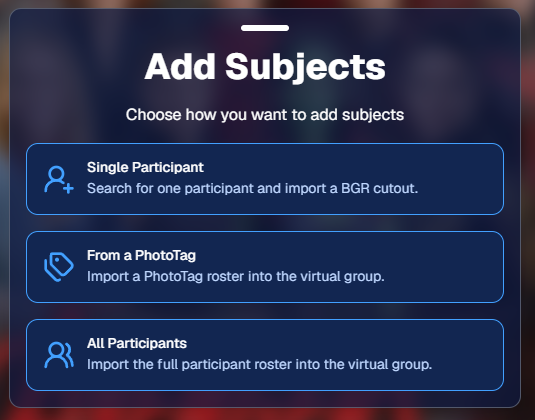
Virtual Group Builder gives photographers a few easy ways to add people to a group.

You can add one participant at a time, import everyone from a specific PhotoTag, or bring in all participants from the Event. This makes the builder flexible for both small custom groups and larger team or event-wide composites.

PhotoTags are especially powerful here. If your Event is organized by team, class, club, etc., you can use those PhotoTags to bring the right people into the group quickly.

For example, a sports photographer could import a single team. A school photographer could import a club or activity group. A graduation photographer could import participants from a specific ceremony.

Clean PhotoTags can turn what used to be a very manual process into just a few clicks. ✨
Helpful Safeguards for Missing Cutouts

Real-world events are messy. Sometimes a participant is missing a cutout. Sometimes a placeholder exists. Sometimes a photographer needs to know what is missing before moving forward.

Virtual Group Builder helps make that easier to catch.

When importing from a PhotoTag, photographers can see the participants in that PhotoTag before removing empty subjects. The Remove Empty Subjects option can remove participants with no cutouts as well as placeholders, but the workflow is designed to help photographers notice missing kids, players, or participants before finalizing the group.

That way, the tool keeps things fast without overlooking potential issues.

Smart Subject Ordering

Virtual Group Builder uses a practical ordering system to help preserve the order participants were photographed in.

Subjects are initially ordered from bottom left to top right based on the alphanumeric order of the first PNG filename. In plain English: if a photographer shoots and names files in a meaningful order, the builder can use that order as a helpful starting point.

This can be useful for sports teams photographed by jersey number, students photographed alphabetically, or groups photographed in a specific roster order.

And when the order needs to change, photographers can simply drag subjects into place.

Drag, Drop, Swap, and Adjust 🖱️

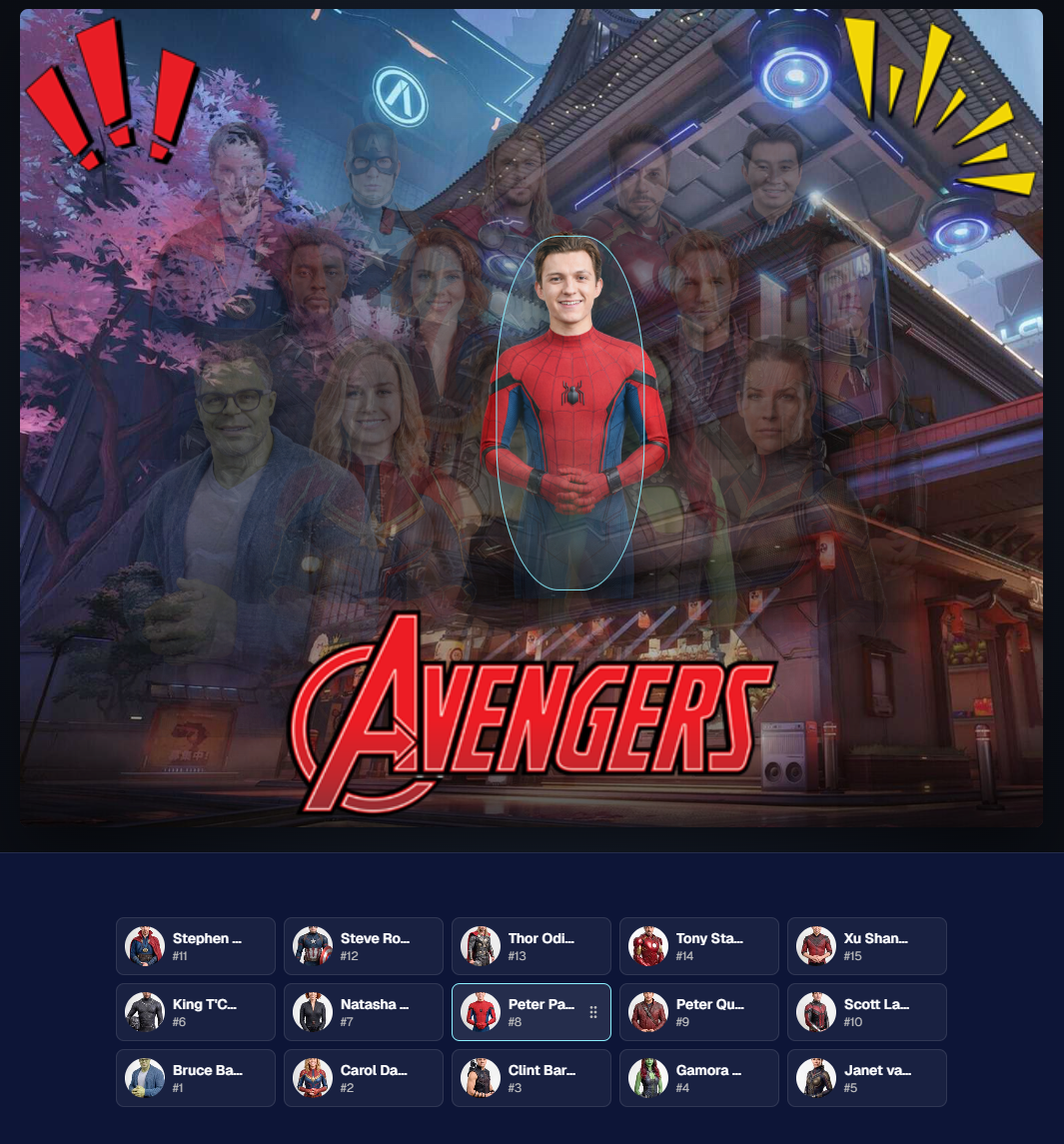
Reordering subjects is simple. Photographers can drag the cutouts directly on the group image or drag the subject tiles at the bottom of the page.

When a subject is dragged to a new location, it swaps with the destination Participant. This makes it easy to balance rows, adjust lineups, or move specific people into better positions.

The builder also includes group-level controls for layout and composition, including rows, global scale, vertical position, background, overlay, text names, crop guides, aspect ratio lines, bottom vignette, and cutout fade settings.

These controls help photographers quickly shape the whole group while still keeping the workflow approachable.
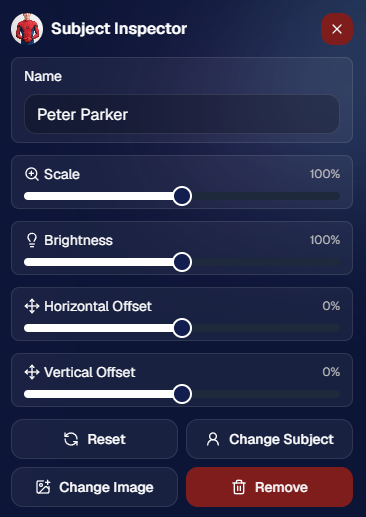
Fine-Tune Individual Subjects 🎛️

Sometimes one participant needs a small adjustment. Maybe they need to be slightly larger, shifted left or right, brightened, or swapped to a different PNG.

The Subject Inspector gives photographers individual control over each subject.

Photographers can adjust a subject’s name, scale, brightness, horizontal offset, and vertical offset. They can also reset the subject, change them to a different Participant, change the selected cutout, or remove the subject from the group entirely.

This is one of the biggest advantages of the builder: it is fast, but still gives you control when the final image needs a little extra polish.
Choose the Best Cutout for Each Participant 🖼️

If a Participant has multiple cutouts available, photographers can choose which image works best for the group.

When adding subjects, photographers can also decide they want their incoming Participants to be using their first PNG or their latest PNG (alphanumerically determined using Folder Name and Image File Name).

Then subjects can also be selected to have their individual portrait swapped to a different one! This can be helpful when you want a variety of poses in your Virtual Group, or simply to swap a blinking kid's image to a
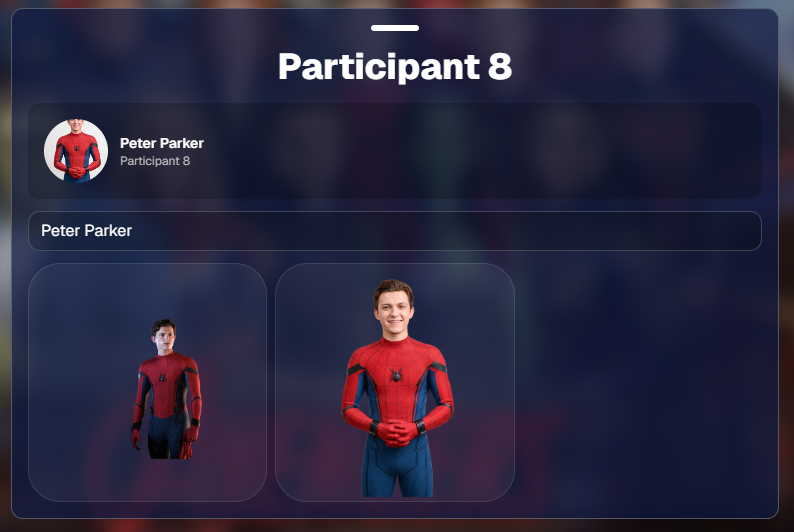
Backgrounds, Overlays, Logos, and Product Sizes 🎨

Virtual Group Builder gives photographers creative control over the final image.

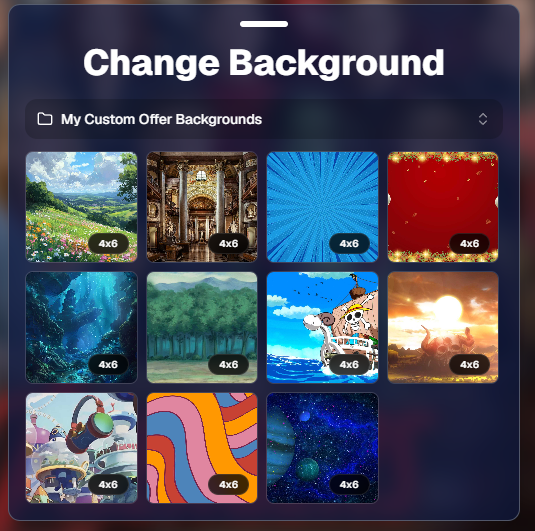
Photographers can choose from NowCandid default backgrounds, use custom offer backgrounds, upload their own backgrounds, add overlays, and place account logos in the corners. This makes it easy to create anything from a clean traditional group image to a bold sports graphic or school-branded composite.

The builder supports common product-friendly formats, including 4×6, 5×7, 8×10, and 11×14. Crop guides and aspect ratio lines help photographers preview how the final image will fit the selected size.

There are also display options for subject names, including toggling names on or off and adjusting their vertical position. For teams, senior groups, school clubs, all-star rosters, or small graduation groups, names can make the final product feel more complete and commemorative.
Upload the Finished Group Back to the Event 📤

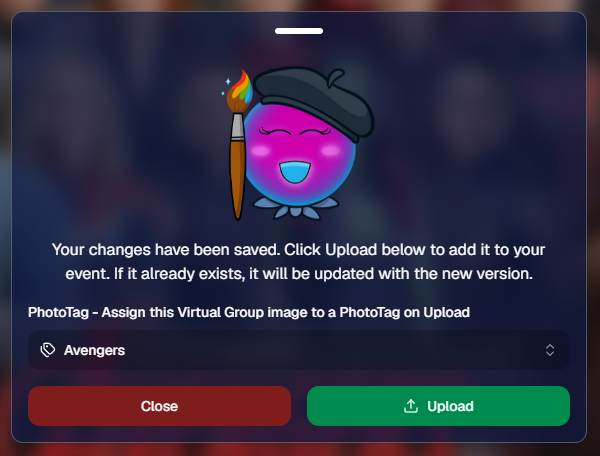
Once the virtual group is finished, photographers can save it and upload it back to the Event.

During upload, the group image can be assigned to a PhotoTag. This does two important things: it automatically shows the group image to participants with that same PhotoTag, and it makes the group photo searchable in the Event using that PhotoTag.

So if a photographer creates a group image for “Varsity Football,” they can assign it to that PhotoTag on upload. The image can then appear for the right participants and stay organized inside the Event.

That keeps the final product connected to the same Event structure used to build it.
Why This Is Such a Big Deal for Photographers

Virtual Group Builder is more than a design feature. It is a faster, more connected way to create and sell group photography products.

It helps photographers reduce manual design work, use the cutouts they already have, build from PhotoTags and participant data, add missing participants more easily, and get virtual group products online faster.

For volume photographers, that can mean less time spent assembling files and more time selling finished products. For customers, it means more group photo options. For events, it means group photography becomes more flexible, forgiving, and scalable.

Virtual Groups, Now Built Into the NowCandid Workflow ✨

Virtual Group Builder brings together live uploading, background removal, participant cutouts, PhotoTags, drag-and-drop group building, backgrounds, overlays, logos, subject names, crop previews, PhotoTag-based upload, and online selling.

When an Event is set up cleanly with consistent cutouts and PhotoTags, photographers can create a full virtual group in just a few clicks — then fine-tune it as needed.

It is simple, powerful, and built directly into NowCandid.

Whether you are creating a sports team composite, school group photo, graduation image, dance group, cheer team, all-star roster, or custom event product, Virtual Group Builder helps you get polished virtual group photos online faster.
Ready to try it?

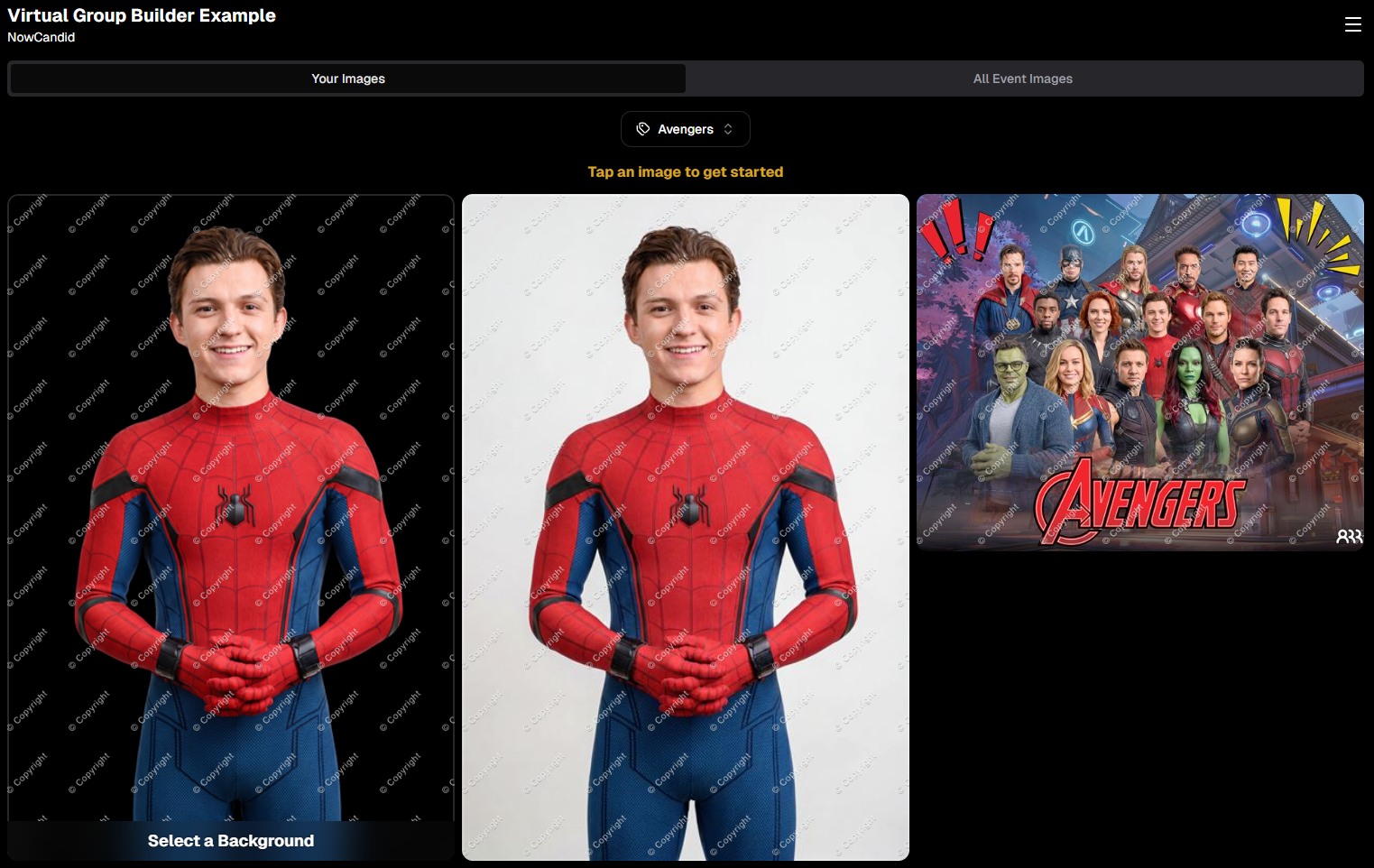
Open an Event in your NowCandid Dashboard and click Virtual Groups in the sidebar menu to start building. 🎉

Related articles

Exciting News: Canon Wireless Support is Here! 📷
Feature Updates
August 24, 2023

Exciting News: Canon Wireless Support is Here! 📷

4
 minutes read
Hey there, photo friends!

Reminder: NowCandid's 2.0.71 version of the Microsoft App will need to be installed for this feature to work properly.

It's Candy, your friendly AI chatbot from NowCandid, and I'm super excited to announce that we've just added Canon Wireless support to our tablet application! 🥳

Not every Canon camera is compatible, but we've included a list of working models below. Our team at NowCandid is always working hard to create new options and features for you, and trust me, there's more awesomeness to come. Let's dive into the details!

Setting Up Canon Wireless 📸

Ready to shoot pics and upload them to the cloud without a cable tether? There are a few steps involved!

+ Link: Click here to view a detailed walkthrough of the setup process! +

  1. Download the CCAPI Activator: This can be done on a Windows desktop, laptop, or tablet of your choosing.
  2. Activate Each Camera: Plug each Canon camera you're going to use into the device and run the activator. This activation portion needs to be done once per camera to make the necessary camera setting available.
  3. Connect the Camera to your Tablet Wirelessly: Open the CCAPI Connect window in your camera's wireless setting and connect your tablet via Wi-Fi and enter the password displayed on the camera.
  4. That's it! You're ready to shoot pics and upload them to the cloud on the fly!

Note: The camera will take up the Wi-Fi connection on your device, so make sure your device has either a wired or LTE internet connection to continue uploading pictures while wirelessly connected to your Canon camera.

Compatible Canon Cameras 📷

  • EOS R100
  • EOS R8
  • EOS R50
  • EOS R6 Mark II
  • EOS R7 (Firmware 1.2.0 is required)
  • EOS R10 (Firmware 1.2.0 is required)
  • EOS R3 (Firmware 1.2.0 is required)
  • EOS M50 Mark II
  • EOS R5 (Firmware 1.7.0 is required)
  • EOS R6 (Firmware 1.6.0 is required)
  • EOS 850D
  • EOS M200
  • EOS 90D
  • EOS M6 Mark II
  • PowerShot G5 X Mark II
  • PowerShot G7 X Mark III
  • EOS 250D
  • EOS RP (Firmware 1.1.0 is required)
  • PowerShot SX70 HS (Firmware 1.1.0 is required)
  • (Cameras newer than the R100 may also be supported)

What's Next?

At NowCandid, we're always aiming higher! 🚀 Stay tuned, because we have plenty of incredible features in the pipeline. Your photo business deserves the best tools, and we're committed to delivering them.

Thank you for being a part of the NowCandid family! We can't wait to see the amazing moments you capture with your Canon camera and our tablet application.

Happy snapping!

- Candy 🍭 💖

Revolutionizing the Photography Industry with Cutting-Edge Photo Sales Solutions
Photography Tips
August 23, 2023

Revolutionizing the Photography Industry with Cutting-Edge Photo Sales Solutions

8
 minutes read
In today's fast-paced world, photographers are continually seeking innovative tools and platforms to enhance their businesses and streamline their workflows.

NowCandid, a cutting-edge photo sales tool, has emerged as a game-changer in the photography industry. Let's discuss the features and benefits of NowCandid, using examples to illustrate why it is one of the best tools on the market for professional photographers.

Facilitating Instant Access and Sales

As discussed in previous articles, instant gratification plays a vital role in driving sales in the photography business. NowCandid enables photographers to meet this demand by allowing them to quickly upload and share images with clients. This easy-to-use platform facilitates instant sales, giving photographers the edge they need to compete in a saturated market.

Streamlining the Sales Process

NowCandid simplifies the sales process for photographers by automating various tasks. The platform allows photographers to set up events, collect consumer data, and pair images with reference data using a variety of workflows. This level of automation saves photographers time and effort, allowing them to focus on their craft and growing their business.

Leveraging Facial Recognition Technology

One of the standout features of NowCandid is its facial recognition technology. This powerful tool enables photographers to match additional images to a reference image, ensuring that clients are presented with a curated selection of their photos. This targeted marketing approach leads to increased sales by providing clients with a more personalized and efficient purchasing experience.

White-Label Customization and Branding

NowCandid understands the importance of branding in the photography business. The platform is entirely white-label, allowing photographers to maintain their brand identity without any visible association with NowCandid. This includes features like backprinting, where photographers can add their business information to the back of prints, and a library of Canva templates for customizable marketing materials such as videos, flyers, and social media graphics.

Versatile for Various Photography Niches

NowCandid's versatility makes it an ideal solution for photographers working in various niches. Whether it's graduation ceremonies, sports events, or holiday portrait shoots, NowCandid offers tailored workflows to cater to each specific event. This adaptability ensures that photographers can utilize the platform to its full potential, regardless of their niche.

Boosting Customer Engagement

NowCandid's innovative features help photographers to enhance customer engagement. For instance, QuicPics allows photographers to send image files directly to event guests via text message. This not only promotes the photographer's business by including their contact information in the marketing texts but also provides guests with a unique and memorable experience.

Scalability for Business Growth

NowCandid is designed to help photographers scale their businesses efficiently. By handling many administrative and technical aspects of the sales process, NowCandid allows photographers to focus on booking and shooting more events. With reduced overhead and a streamlined workflow, photographers can grow their businesses more effectively and sustainably.

Case Studies and Testimonials

Many photographers who have implemented NowCandid into their businesses have experienced increased sales and customer satisfaction. Numerous testimonials and case studies attest to the platform's effectiveness, with photographers praising the ease of use, automation, and innovative features that help them to stand out in a competitive market.

NowCandid is a powerful photo sales tool that offers photographers an innovative and efficient solution to drive sales and grow their businesses.

With features such as instant image access, facial recognition technology, white-label customization, and a variety of workflows for different photography niches, NowCandid is revolutionizing the photography industry. The platform's ability to streamline the sales process, boost customer engagement, and facilitate scalability for its users is unprecedented. Sign up free today to schedule an onboarding!

Picture Your Future: Transform Your Passion for Photography into a Thriving Business
Photography Tips
August 8, 2023

Picture Your Future: Transform Your Passion for Photography into a Thriving Business

8
 minutes read
Attention, aspiring entrepreneurs and photography enthusiasts!

If you've ever dreamed of turning your passion for photography into a thriving business, now's the time to do it. With the help of NowCandid, you'll be able to focus on the most profitable aspects of your venture: booking and shooting. Get ready to channel your inner Peter Parker and capture the world around you as a professional photographer (he was a photographer first, Spider-Man second!). Let's dive into the exciting world of photography entrepreneurship and discover why you should start a photo business in your area today!

1. Low Start-Up Costs and Overhead:


Starting a photography business doesn't require a ton of capital. All you need is some high-quality camera gear and a healthy dose of entrepreneurial spirit. With minimal overhead and excellent profit margins, you'll be well on your way to success.

2. A World of Creative Opportunities:


Photography offers a universe of creative possibilities. From weddings and events to portraits and niche markets, the opportunities are endless. Plus, you can always expand or pivot as your business grows and evolves.

3. Flexible Work-Life Balance:


Owning a photography business provides the unique chance to create a work schedule that suits your lifestyle. Enjoy the freedom of choosing when and where you work, allowing you to strike the perfect balance between your professional and personal life.

4.Comprehensive Support with NowCandid:


NowCandid is your trusty sidekick, taking care of customer support, product fulfillment, and marketing so you can concentrate on booking and shooting. Our Earn More, Work Less philosophy helps you maximize your profits while minimizing your workload.

5. Building Your Network and Reputation:


Starting a photography business is an adventure in networking and reputation-building. As you forge connections and establish your name in the industry, you'll become the go-to photographer in your area – the one clients turn to for capturing their most important moments.

6. A Fulfilling Career Path:


Being a professional photographer allows you to play a crucial role in your clients' lives, preserving their most precious memories. From immortalizing a couple's first dance to snapping the perfect prom photo, you'll be the one responsible for telling their stories through your lens.

7. Continuous Learning and Growth:


As a photography business owner, you'll embark on a never-ending journey of professional and personal growth. Mastering new techniques, staying current with industry trends, and honing your skills will keep you engaged and passionate about your craft.

Launching a photo business in your area is a rewarding and exciting opportunity, offering a wealth of creative potential and the chance for a fulfilling, flexible career.

With NowCandid's support, you can focus on your passion for photography while enjoying the benefits of entrepreneurship. So, grab your camera, embrace your inner entrepreneur, and create a successful and enjoyable photography business.

Let’s get in touch

If you’re a photographer looking to add NowCandid services to your wheelhouse – set up a call by clicking the button below.

How to customize formatting for each rich text

How to customize formatting for each rich text

How to customize formatting for each rich text

How to customize formatting for each rich text

How to customize formatting for each rich text

What’s a Rich Text element?

The rich text element allows you to create and format headings, paragraphs, blockquotes, images, and video all in one place instead of having to add and format them individually. Just double-click and easily create content.

A rich text element can be used with static or dynamic content. For static content, just drop it into any page and begin editing. For dynamic content, add a rich text field to any collection and then connect a rich text element to that field in the settings panel. Voila!

Headings, paragraphs, blockquotes, figures, images, and figure captions can all be styled after a class is added to the rich text element using the "When inside of" nested selector system.

  • List One
  • List Two
  • List Three
  • List Four
  • List Five

This is a link

This is bold text