HomeNavigation arrowBlogNavigation arrow
Current page
Feature Updates

Weekly Recap: Auto Editor (Beta), Pay Later Badges, and Faster Manage Images

Weekly Recap: Auto Editor (Beta), Pay Later Badges, and Faster Manage Images

Hey photo friends! 👋
This week’s updates bring a mix of AI editing power, cleaner review tools, and a small boost to retail conversion clarity—plus a helpful Android Capture App fix.

Let’s jump in. 💫

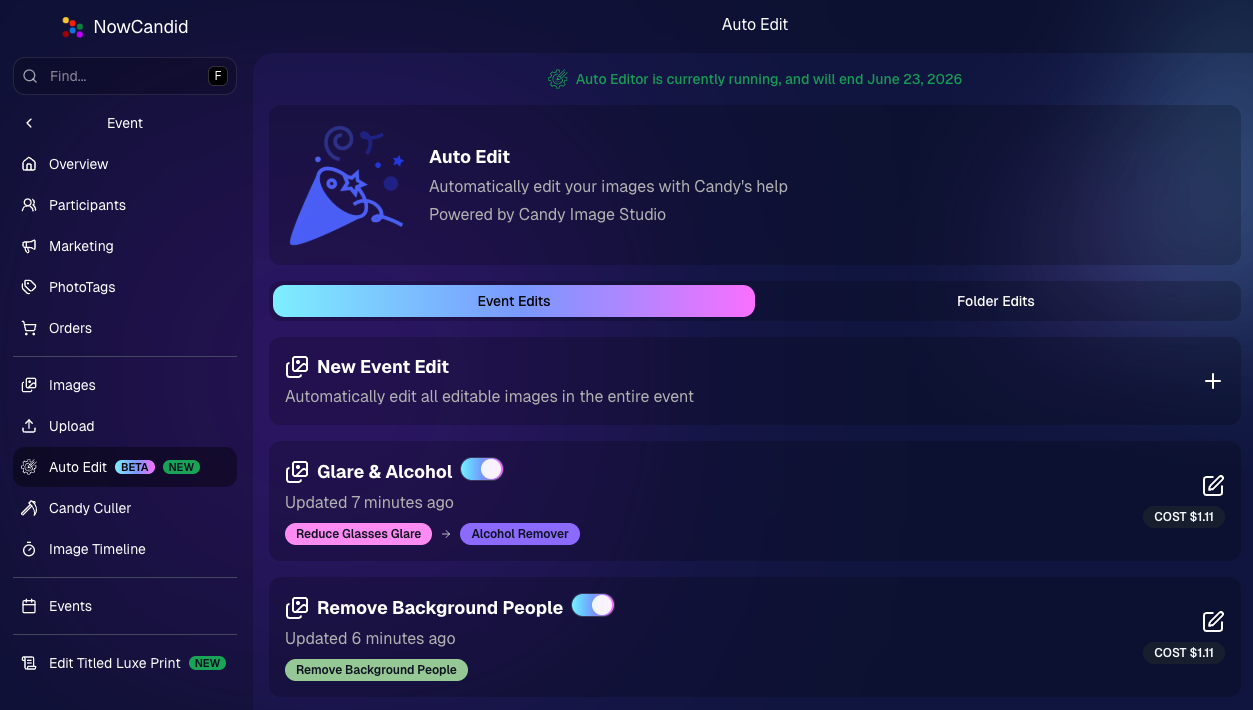
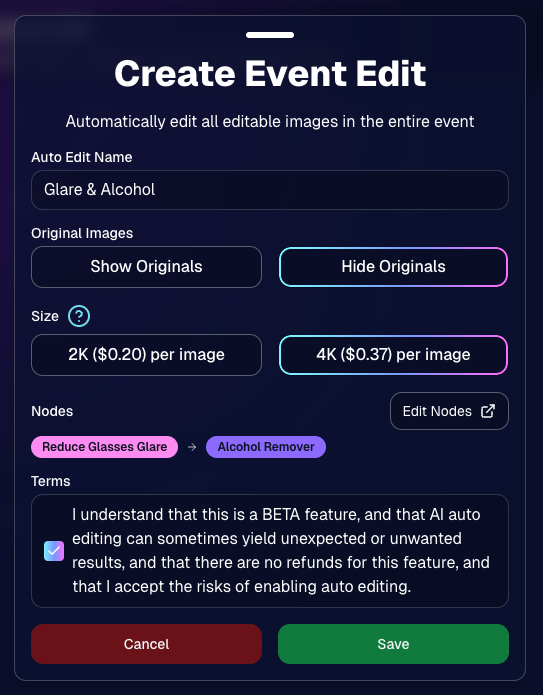
🧠 Auto Editor (BETA)— AI Edit an Entire Event or Folder

We’re rolling out an Auto Editor (Beta) that can automatically AI-edit:

  • • All images in an event, or
  • • All images in a specific folder

Auto Editor is powered by Candy Image Studio (same nodes, same pricing), and edited images keep their existing matches—just like when you run Candy Image Studio on an event image.

Important notes:

  • • You are billed per image edit.
  • • This is a BETA feature—we recommend testing on yourself (or doing one-offs in Candy Image Studio) before relying on it for a real event.
  • • Auto Editor can run up to 60 days after the event start date, similar to other event workflows.

Common use cases

  • • Light face retouching
  • • Fix subject lighting
  • • Reduce glare on glasses
  • • Remove alcohol
  • • Add green screens

Fun use cases

  • • Automatic glamour looks
  • • Anime style
  • • Chibi style
  • • Anything you can build with a custom text node

Where to find it

  • • On an Event page in the Dashboard sidebar, near JerseyJotter and Candy Culler
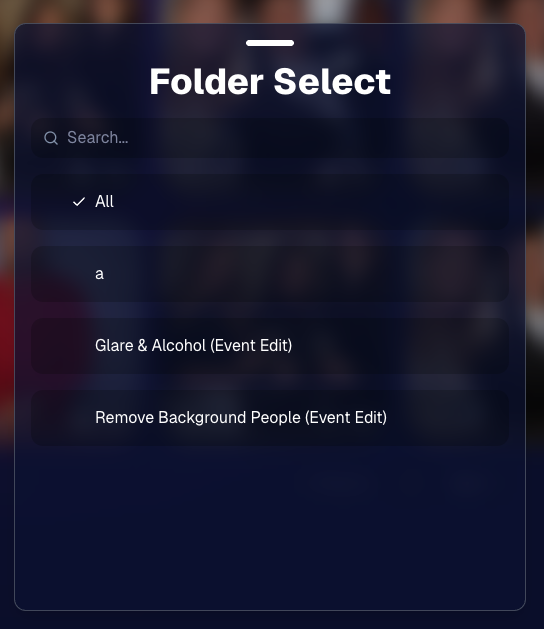
  • • The folder selector will show whether you’re running an Event Edit or a Folder Edit
  • • The Event List will show an Auto Editor attribute for events that used it (and includes an Auto Editor filter)
  • • EMP also shows the Auto Editor attribute on its event list page
🎨 Candy Image Editor + Manage Images Improvements

A few upgrades landed that make AI editing and review smoother:

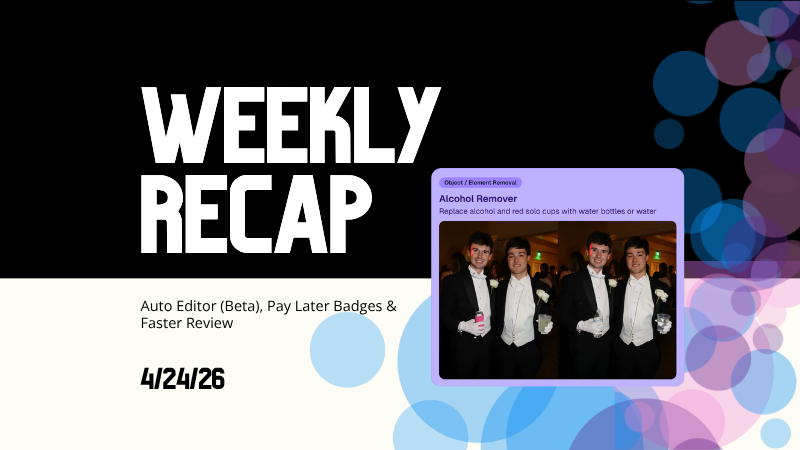
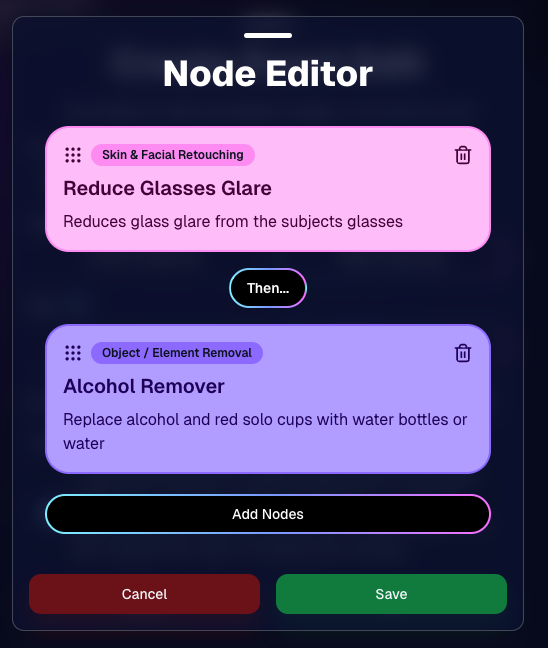
  • • New node: Alcohol Remover is now available in Candy Image Editor.
  • • Replace uploaded images more easily (non-event images): you can drag a new image onto the one you already uploaded to replace it, instead of starting over.
  • • New “Preview Original” option on Manage Images lightbox for AI-edited images uploaded from Candy Image Studio
    • • You can also toggle this view using \.
  • • Manage Images search is faster (image searching performance improved).
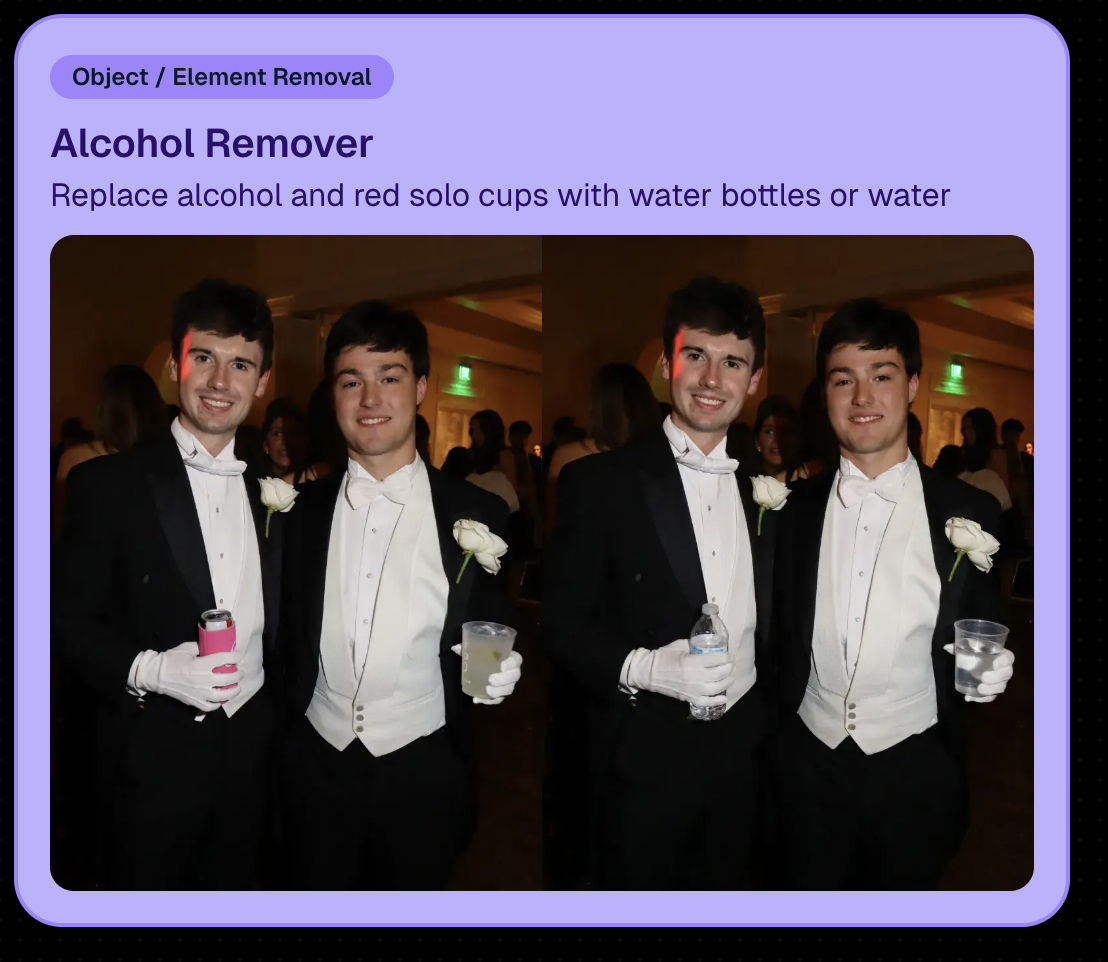
New Alcohol Remover Node

Preview Original Image Option

📣 Client Outreach: URL No Longer Required for Texts

Client Outreach texts no longer require a URL, but the system will show a warning if you try to send one without a link.

One important reminder: the number Client Outreach texts send from is different than the number used for automated event marketing—so recipients may not have any message history for context when they receive it.

🏷️ PhotoTags Page: Clearer Counts

The Event PhotoTags page now shows Contacts and Participants as separate columns for better clarity.

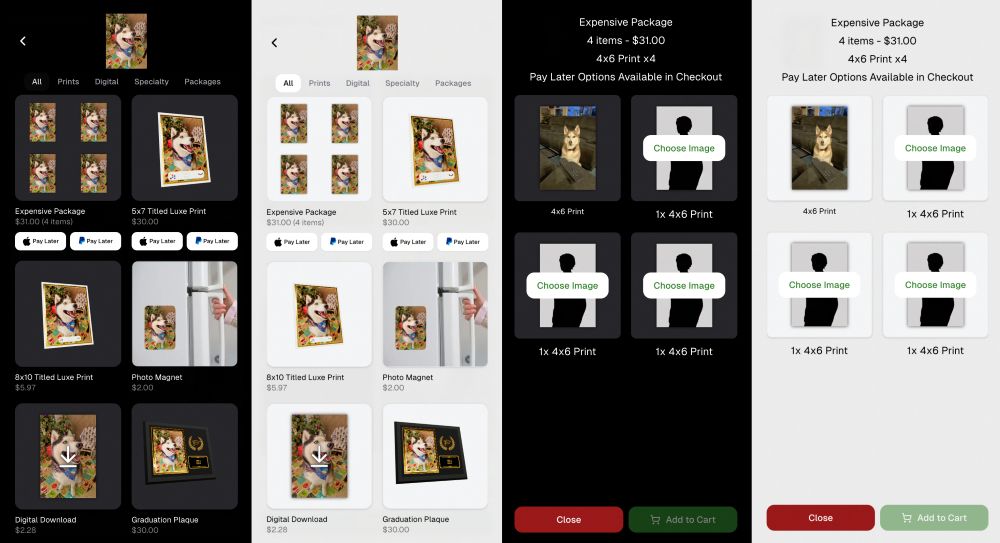
🛍️ Retail: Pay Later Badges (more visible financing options)

Retail now shows Apple Pay Later and PayPal Pay Later badges on the store sheet for items $30 or more.

A few notes:

  • • Pay Later options have always been available—this change just makes them more obvious to customers.
  • • This UI may be temporary and could be removed at any time.

Reminders on existing Pay Later availability:

  • • Klarna & Affirm are available through Apple Pay for orders $35+
  • • Some credit cards offer Pay Later through Apple Pay (eligibility varies)
  • • Klarna, Affirm, and Zip are available through Google Pay for orders $35+
  • • PayPal Pay Later (Pay in 4) is available for $30+
  • • PayPal Pay Later (Pay Monthly) is available for $49+
🤖 Android Capture App 5.5: Duplicate Image Fix

The Capture App on Android (v5.5, Google Play) now fixes an issue where some cameras were sending duplicate images to the app.

That’s the week! 💫

Between the new Auto Editor (Beta), smoother “preview original” review flows, and clearer Pay Later messaging on retail, this update is all about saving time and helping customers convert with less friction.

Keep creating magic,
— The NowCandid Team 🍬

Related articles

Weekly Recap: Even Stronger Image Privacy & UI Polish 🔒🧰
Feature Updates
October 24, 2025

Weekly Recap: Even Stronger Image Privacy & UI Polish 🔒🧰

5
 minutes read
Hey photo friends! 👋


This week we further tightened subject image provacy, and freshened up the UI across Dashboard and Retail.

Here’s what’s new:

📋 Dashboard

  • 🏷️ Clearer overlay labels: Event List & Event Details now show Banner or Full Frame thumbnails instead of a generic “graphic overlay” text label only.
  • 🧩 Overlay importer: Now a tidy 2-column layout instead of one at a time, to more quickly let you seek out a specific event's overlays to reuse.
  • 📥 Participant download sheet (big data friendly): Handles very large folder/frame totals without breaking.
  • 🧭 Smarter participant pic choice: If a participant was merged from multiple sources, the sheet now prioritizes the non–Roster record for their participant pic (instead of the silhouette).
  • 🖼️ Retail cover editor: See a preview of the cover photo on retail before saving (not just after).
  • 🔔 Auto-resume marketing alerts: If marketing has been paused too long, you’ll get an inbox + push when it auto-resumes (first Friday after 20 days).
  • 👤 Participant Details upgrades:
    • 🖼️ Higher-res non-BGR images & backgrounds
    • 💡 Lightbox UI and previews that match Manage Images
    • 🟠🟥🟩 Thicker status borders + bold assignment text
  • 🏷️ PhotoTags popup: New All / Assigned / Unassigned tabs for faster tagging.
  • 🧾 Merged participant awareness:
    • Order counts on Participant Details and Participant List now include merged participants
    • Marketing count shows which contact info each message went to
  • Performance wins:
    • Participant List scales better with hundreds or thousands of people
    • PhotoRosters FaceGroup list is snappier with large rosters
  • 🪟 Updated popups: Smoother UI with animated width/height changes.

🛍️ Retail

  • 🖥️ Small desktop fix: Layout issues resolved for some compact screens.
  • 🛡️ Harder to lift images: Retail page changes to defeat "allow right click" browser extensions to continue to try and protect images & privacy.

🔒 Image Privacy & Other Fixes

  • 🔒 Enhanced privacy on retail: Images are now even safer from link guessing or misuse while the experience stays the same.
  • Fewer auth requests: Both Dashboard and Retail make fewer calls when refocusing windows, resulting in improved performance!
  • 🧩 Private Download Gallery: BGR cutouts/backgrounds load correctly again.
  • 🔎 Search released images: Now supports BGR and hides not-visible images.
  • Clearer “active” events: Event List now shows “Live on Capture App” to indicate capture-ready status, as opposed to "Active" which caused confusion related to Face Matching.

That’s the scoop! 💫

Less friction, clearer signals, and stronger protection—so you can spend more time shooting and selling.

Keep being amazing,
Candy 🍬

Weekly Recap: Sharper Images, A New Workflow & Capture App 4.20.10 📸✨
Feature Updates
October 10, 2025

Weekly Recap: Sharper Images, A New Workflow & Capture App 4.20.10 📸✨

3
 minutes read
Hey photo friends!

This week’s updates are focused on clarity, quality, and efficiency—from sharper image previews across the board to a brand-new Face Matching Workflow, Roster Check-In.

Let’s take a look! 👀

🏅 New Workflow: Roster Check-In™

Made for sports and other rostered shoots when you want Face Matching™ + a roster in one workflow.

How it works:

1. Upload a roster to the Event (via the Dashboard, under your Event's Participants & Contacts page)

2. In the Capture & Upload app, log into your Event and choose Roster Check-In™ as your shooting mode

3. Pick a name from the roster (or add one via Type & Take)

4. Take a quick reference photo (using the device's camera or a tethered camera)

Done! Future image uploads, from the Capture & Upload app or from the Dashboard, will automatically match to that person and market them their new gallery.

Note: Requires Capture & Upload App 4.20.10

📋 Dashboard

  • 🏷️ PhotoTags on Tap-A-Face: You can now set PhotoTags when creating a participant via the manual Tap-A-Face available on the Image Details page
  • 🖼️ Higher-resolution images across key pages, including:
    • Manual Assign Images page
    • Image Release Gallery
  • 🎨 Overlay importer now shows full-frame previews (previously only banners)

🛍️ Retail Site

  • 🧖 Confirmation popup when adding Retouch items to the cart—provides extra info to the subjects about the retouching process
  • 😊 Face Finder now shows higher-resolution previews for better clarity

🔒 Private Image Download Galleries

  • 🖼️ Higher-res image previews for a sharper, more polished experience

📱 iOS Capture App 4.20.10 (coming Oct 10–13)

  • 👥 New Workflow: Roster Check-In™ — streamline your workflow by checking in subjects directly using a roster and the Capture & Upload App
  • 💬 UI updates:
    • Most error popups replaced with native dialogs for cleaner alerts
    • Login popup stays open on invalid login (no more accidental closures)
  • Performance boosts everywhere:
    • Less memory usage for uploads
    • Faster image details popups and Name Lookup lists
    • Better performance for image previews across the shooting page, film strip, image gallery, and FM Roster Check-In

🧩 Smaller Fixes & Improvements

  • 📸 Faster image loading:
    • Participant list and event overview now use smaller thumbnails
    • PhotoRoster™ Selfie Check-In™ imports now load quicker
  • 🗂️ BGR folder fixes: Group status button behavior corrected for edit folder popups
  • 📍 Tap locations on Image Details page now align correctly
  • 🖼️ Higher-res thumbnails on Manage Images (even in the smaller grid view)
  • 💌 Email-only participants now receive new image alerts after placing an order
  • 🧠 Watermark improvement: Retail site static watermarking now shows the word “Copyright” instead of your business name — this helps prevent AI tools from removing it as platforms are adding copyright-protection safeguards

That’s everything for this week! 💫

From sharper previews to smarter check-ins, these updates make every step of your workflow a little smoother (and crisper!).

Keep being amazing,
Candy 🍬

Turning Shipping Into a Smart Strategy with NowCandid™
NowCandid 101
October 6, 2025

Turning Shipping Into a Smart Strategy with NowCandid™

5
 minutes read

Shipping isn’t just about getting products into your customers’ hands—it’s a vital part of your business strategy. With NowCandid™, photographers gain control and flexibility to make shipping not just efficient, but profitable and professional.

Let’s explore how shipping can work harder for your business.

1. Flexible Shipping That Fits Your Business

Every photography business is different—and so are its logistics needs. With NowCandid™, you’re in control. You can set your shipping prices on a scale that fits your market, giving you the freedom to align costs with your audience, region, and event type.

Want to keep things straightforward? Match your lab’s costs and pass them directly to customers.


Need to account for higher packaging or handling expenses? Adjust your pricing accordingly.

This flexibility ensures you can stay competitive, protect your margins, and offer customers transparent, fair pricing—without the guesswork or hidden fees.

2. Shipping as a Profit Center

Instead of treating shipping as a pass-through expense, many photographers use NowCandid to turn it into a profit opportunity.

By setting shipping rates slightly higher than lab cost, you can generate additional income per order—a small margin that adds up quickly across dozens or hundreds of orders.

You’re already capturing the moments, managing the orders, and providing the customer experience. Why not let shipping work for you, too?

A few dollars added to each order’s shipping fee can translate into a reliable, consistent revenue stream—helping you grow your bottom line without extra work.

3. Shipping as a Customer Experience Tool

Shipping is more than a logistical step—it’s often the final impression your business makes. With NowCandid, every order is handled through a professional, automated process that builds trust and satisfaction.

✅ Orders are processed with consistent timelines.


✅ Taxes are automatically calculated and remitted as part of NowCandid’s marketplace facilitator model.


✅ Communication is streamlined and branded under your business name.

This creates a professional, polished experience that parents, schools, and organizations love. It’s not just about the product they receive—it’s about the confidence that it will arrive smoothly and on time.

Why It Matters

Traditional photographers often see shipping as an unavoidable expense. NowCandid helps reframe it as a strategic lever—a small but powerful part of your business model that can:

  • Protect your profit margins through scalable rate control.
  • Enhance customer trust with clear, reliable fulfillment.
  • Boost your professional reputation through smooth delivery experiences.

With full control and transparency, you can adjust your shipping strategy any time based on season, event type, or customer feedback.

Final Thoughts

At NowCandid™, our goal is to help photographers build stronger, more profitable businesses—with smart tools that work behind the scenes.

By managing shipping strategically—not just as a necessity but as part of your customer and revenue plan—you can deliver a better experience, strengthen your brand, and keep more of what you earn.


👉 Ready to put your shipping strategy to work? Create your free account today and see how NowCandid helps you ship smarter.

Let’s get in touch

If you’re a photographer looking to add NowCandid services to your wheelhouse – set up a call by clicking the button below.

How to customize formatting for each rich text

How to customize formatting for each rich text

How to customize formatting for each rich text

How to customize formatting for each rich text

How to customize formatting for each rich text

What’s a Rich Text element?

The rich text element allows you to create and format headings, paragraphs, blockquotes, images, and video all in one place instead of having to add and format them individually. Just double-click and easily create content.

A rich text element can be used with static or dynamic content. For static content, just drop it into any page and begin editing. For dynamic content, add a rich text field to any collection and then connect a rich text element to that field in the settings panel. Voila!

Headings, paragraphs, blockquotes, figures, images, and figure captions can all be styled after a class is added to the rich text element using the "When inside of" nested selector system.

  • List One
  • List Two
  • List Three
  • List Four
  • List Five

This is a link

This is bold text