HomeNavigation arrowBlogNavigation arrow
Current page
Feature Updates

Weekly Recap: Auto Editor (Beta), Pay Later Badges, and Faster Manage Images

Weekly Recap: Auto Editor (Beta), Pay Later Badges, and Faster Manage Images

Hey photo friends! 👋
This week’s updates bring a mix of AI editing power, cleaner review tools, and a small boost to retail conversion clarity—plus a helpful Android Capture App fix.

Let’s jump in. 💫

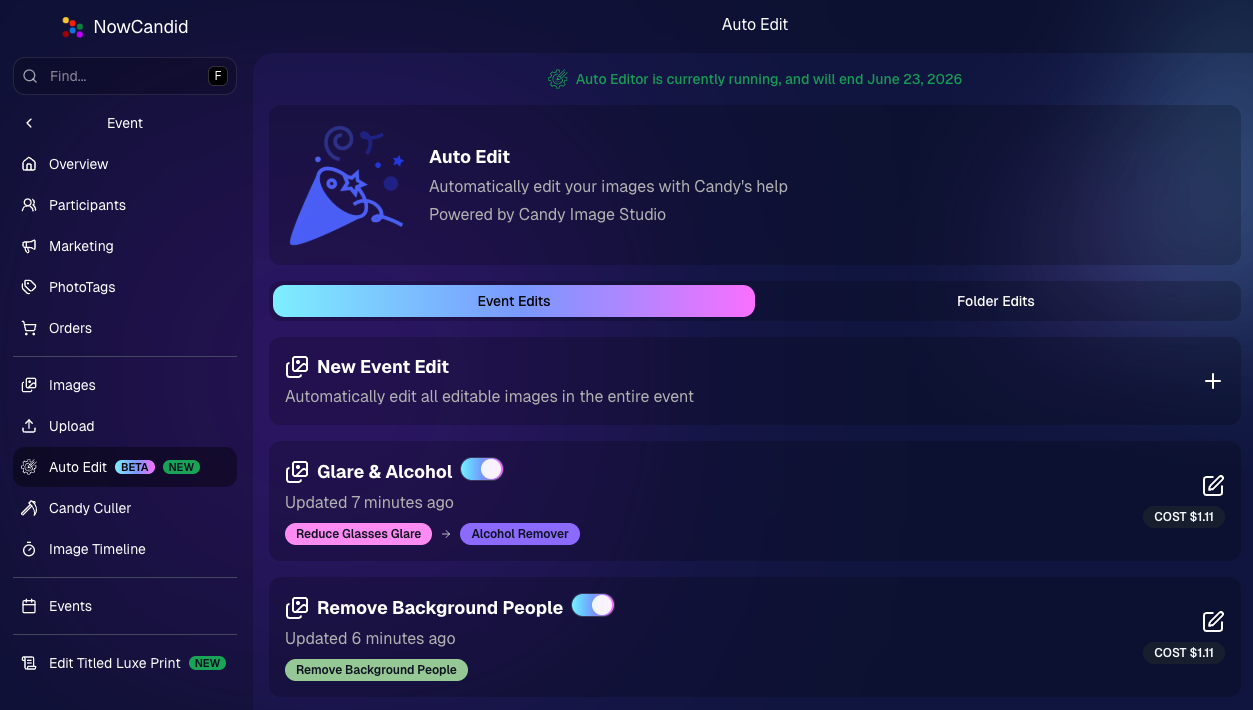
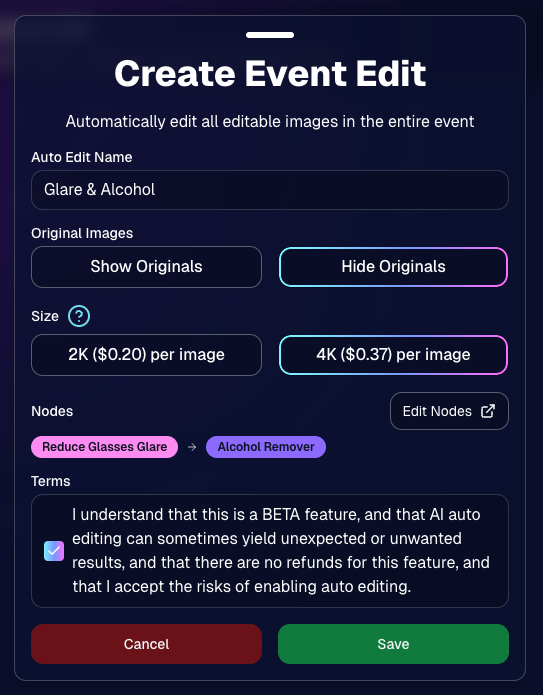
🧠 Auto Editor (BETA)— AI Edit an Entire Event or Folder

We’re rolling out an Auto Editor (Beta) that can automatically AI-edit:

  • • All images in an event, or
  • • All images in a specific folder

Auto Editor is powered by Candy Image Studio (same nodes, same pricing), and edited images keep their existing matches—just like when you run Candy Image Studio on an event image.

Important notes:

  • • You are billed per image edit.
  • • This is a BETA feature—we recommend testing on yourself (or doing one-offs in Candy Image Studio) before relying on it for a real event.
  • • Auto Editor can run up to 60 days after the event start date, similar to other event workflows.

Common use cases

  • • Light face retouching
  • • Fix subject lighting
  • • Reduce glare on glasses
  • • Remove alcohol
  • • Add green screens

Fun use cases

  • • Automatic glamour looks
  • • Anime style
  • • Chibi style
  • • Anything you can build with a custom text node

Where to find it

  • • On an Event page in the Dashboard sidebar, near JerseyJotter and Candy Culler
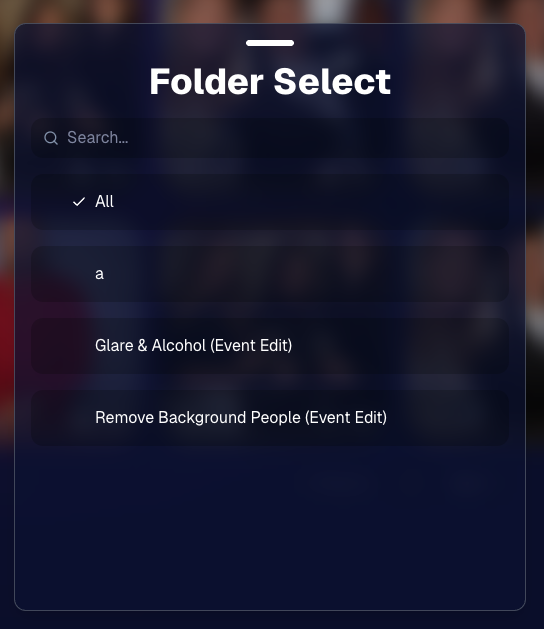
  • • The folder selector will show whether you’re running an Event Edit or a Folder Edit
  • • The Event List will show an Auto Editor attribute for events that used it (and includes an Auto Editor filter)
  • • EMP also shows the Auto Editor attribute on its event list page
🎨 Candy Image Editor + Manage Images Improvements

A few upgrades landed that make AI editing and review smoother:

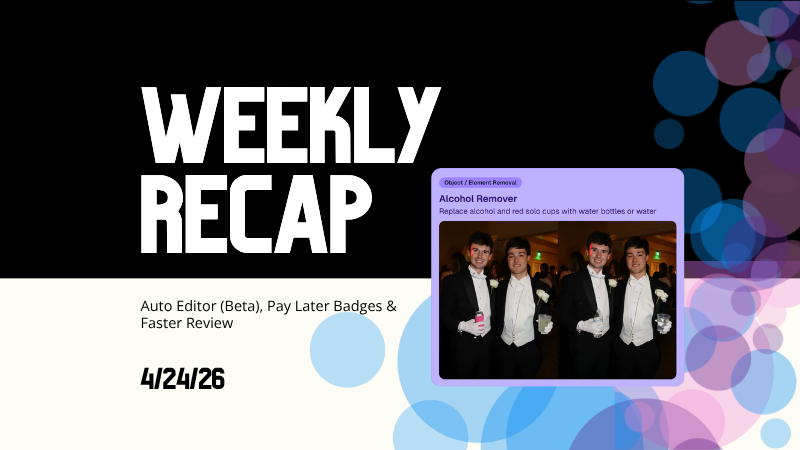
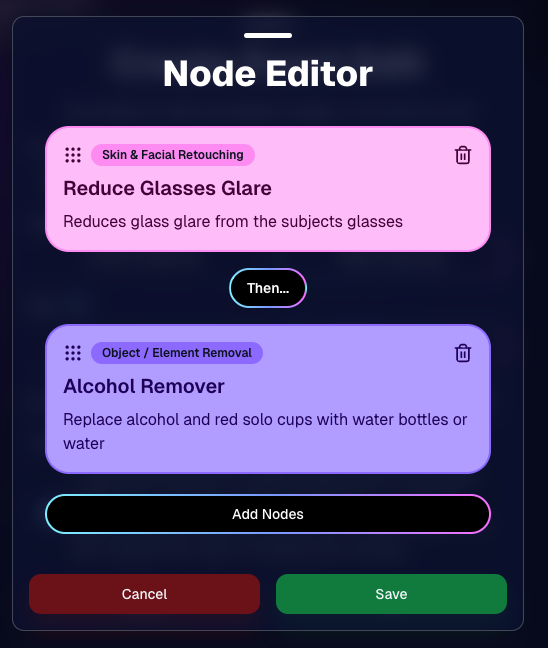
  • • New node: Alcohol Remover is now available in Candy Image Editor.
  • • Replace uploaded images more easily (non-event images): you can drag a new image onto the one you already uploaded to replace it, instead of starting over.
  • • New “Preview Original” option on Manage Images lightbox for AI-edited images uploaded from Candy Image Studio
    • • You can also toggle this view using \.
  • • Manage Images search is faster (image searching performance improved).
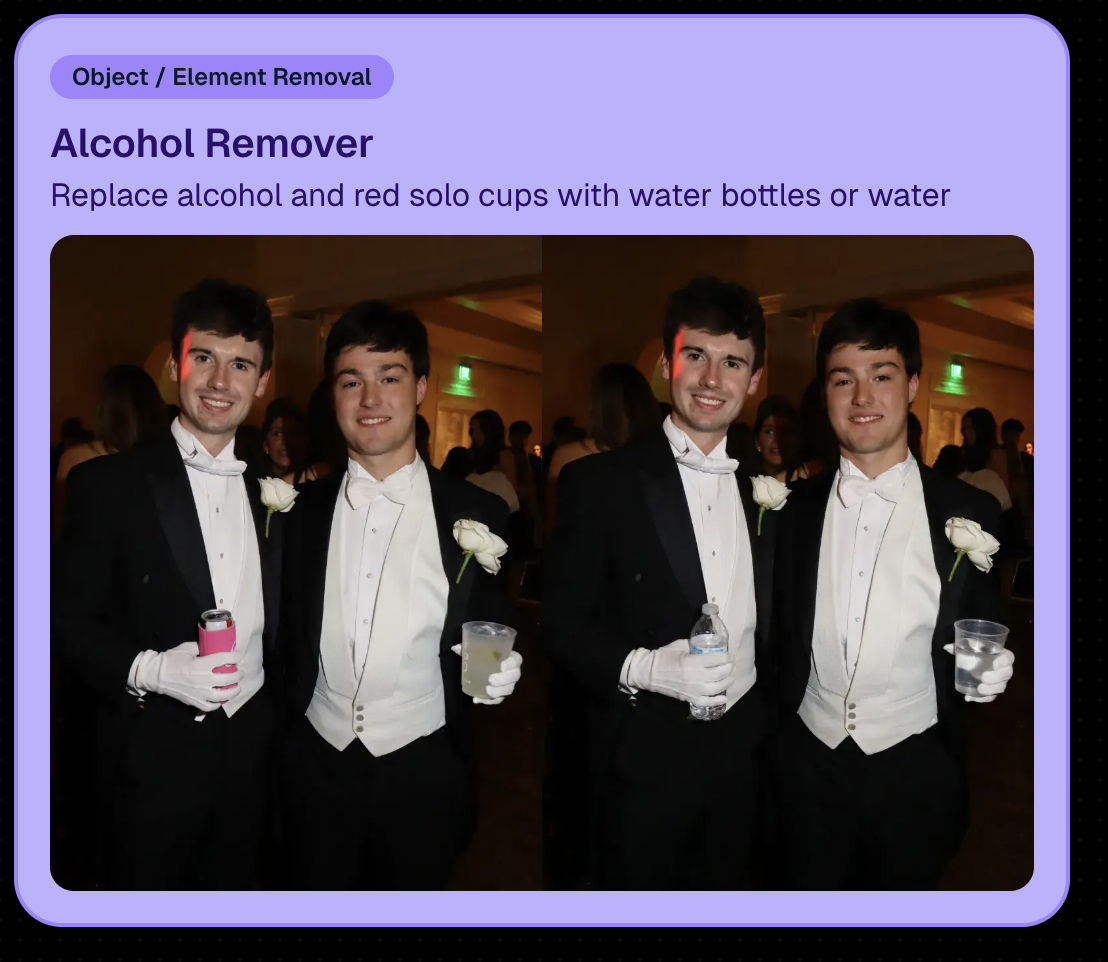
New Alcohol Remover Node

Preview Original Image Option

📣 Client Outreach: URL No Longer Required for Texts

Client Outreach texts no longer require a URL, but the system will show a warning if you try to send one without a link.

One important reminder: the number Client Outreach texts send from is different than the number used for automated event marketing—so recipients may not have any message history for context when they receive it.

🏷️ PhotoTags Page: Clearer Counts

The Event PhotoTags page now shows Contacts and Participants as separate columns for better clarity.

🛍️ Retail: Pay Later Badges (more visible financing options)

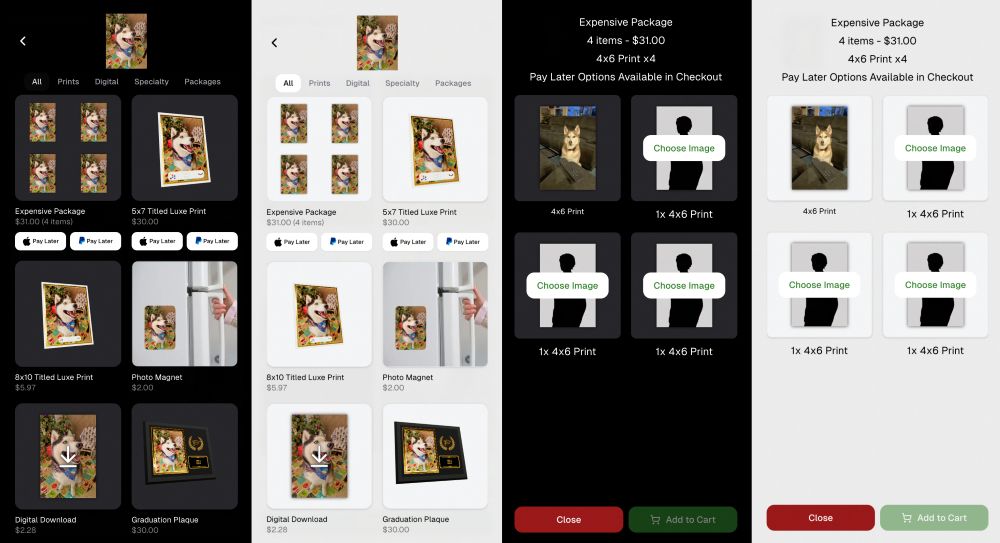
Retail now shows Apple Pay Later and PayPal Pay Later badges on the store sheet for items $30 or more.

A few notes:

  • • Pay Later options have always been available—this change just makes them more obvious to customers.
  • • This UI may be temporary and could be removed at any time.

Reminders on existing Pay Later availability:

  • • Klarna & Affirm are available through Apple Pay for orders $35+
  • • Some credit cards offer Pay Later through Apple Pay (eligibility varies)
  • • Klarna, Affirm, and Zip are available through Google Pay for orders $35+
  • • PayPal Pay Later (Pay in 4) is available for $30+
  • • PayPal Pay Later (Pay Monthly) is available for $49+
🤖 Android Capture App 5.5: Duplicate Image Fix

The Capture App on Android (v5.5, Google Play) now fixes an issue where some cameras were sending duplicate images to the app.

That’s the week! 💫

Between the new Auto Editor (Beta), smoother “preview original” review flows, and clearer Pay Later messaging on retail, this update is all about saving time and helping customers convert with less friction.

Keep creating magic,
— The NowCandid Team 🍬

Related articles

Weekly Recap: A Slicker Image Details Page & Some Nice Quality-of-Life Upgrades📸
Feature Updates
June 13, 2025

Weekly Recap: A Slicker Image Details Page & Some Nice Quality-of-Life Upgrades📸

4
 minutes read
Hey friends, Candy here!

This week we’ve got a shiny new Image Details page, some small but mighty tweaks across the board, and a handful of fixes to make your dashboard life just a bit smoother.

Let’s take a peek! 👀

🌟 Brand-New Image Details Page!

Your favorite behind-the-scenes image panel just got a makeover—and it's so much faster now! Whether you’re digging into face match data or reviewing contact info, everything’s loading snappier and more clearly than ever.

You’ll notice:

  • • Cleaner layout 🧼
  • • Larger image preview
  • Speedy load times ⚡
  • Better organization of metadata 🗂️

Details, Participants, and Logs have also been split into three distinct tabs!

Go ahead, give it a click from the Manage Images page or a Participant's Details page!

You can even hover highlighted faces with your mouse to view attached Participants!

In case you need to know how to get to the Image Details page!

🔧 Misc Changes & Improvements

Some smart, helpful little tweaks that add up to a smoother experience:

  • 🔗 Image Details links added to image previews on the Participant Details page (because shortcuts are life).
  • 🖼️ Free Download / Medium-Res Download for QuicPics™ Events are now set to a 2:3 aspect ratio—perfect for showcasing your 2:3 Full Frame overlay art!
  • 📦 Better retail display for big packages: Packages with 5+ items are now prettier, yay!

A look at the new 5+ Item Package graphic! Retail Theme: Liquorice - Event Program: QuicPics

  • 🎯 Face Matching Confidence level is now selectable during Event Creation, not just after. Set your confidence from the start!
  • 🛡 GalleryGuard™ has been updated to work even on iOS 26. The screenshots stay black. The images stay safe.

🐛 Bug Fixes

A few pesky things we squashed this week:

  • 🚫 The Unassigned Images count no longer includes BGR cutouts that have already been matched. More accurate image management FTW.
  • 🔄 Some Events were having trouble loading the Manage Images page. That glitch has now been zapped. 💥

That’s all for now!

Be sure to check out the new Image Details page, and if you haven’t yet, try out GalleryGuard™ on your own iOS device—it’s basically wizardry. 🧙‍♂️

Until next week,
💖 Candy

Weekly Recap: Longer Face Matching™, New PhotoRoster Tools & Retail Tweaks!🗓
Feature Updates
June 6, 2025

Weekly Recap: Longer Face Matching™, New PhotoRoster Tools & Retail Tweaks!🗓

5
 minutes read
Hey friends! 📸

Candy here with another round of updates from the NowCandid™ world.

This week brings big improvements for Face Matching™ Events, new ways to re-use your check-ins across Events, and a couple of helpful tweaks to the retail site and image management tools.

Let’s dive in! 👇

⏳ Face Matching™ Now Lasts 60 Days!

That’s right—your Face Matching™ window has now doubled from 30 to 60 days from your Event's Start Date! 🙌

This means even more time for:

  • • Late uploads to still get matched 🔄
  • • Schools to send out the Selfie Check-In™ link after the Event 📬
  • Stragglers to find their photos 🧍‍♀️🧍‍♂️🧍

But here’s your friendly reminder: the faster you upload, the better your sales! 🏃‍♂️💸

📸 Every image uploaded goes through:

  • • Exposure correction automatically
  • • Optional cart-wide light retouching for customers
  • • Manual review for print color accuracy
  • • Intuitive cropping tools for end users

So don’t sit on your images to batch-edit them all—uploading sooner = more sales.

Every day that passes = potential sales slipping by. Speed matters!

🔁 Create PhotoRosters™ from Selfie Check-Ins!

This one’s a fun one for graduation season! 🎓

Now you can create a PhotoRoster™ directly from the Selfie Check-Ins™ of a previous Event.

Here’s why it’s awesome:

  • • Ran a great Prom with tons of Check-Ins? ✅
  • Reuse that same data to auto-create your graduation PhotoRoster™! 🎓
  • If participants Check-In again or get added via Tap-A-Face™, NowCandid™ automatically merges based on contact info = no duplicate galleries, no confusion!

Perfect for client relationships where you cater to all of their school's Events!

🧰 Misc. Improvements & Fixes

A few extra goodies for your workflow this week:

  • 🔠 New image name sort option on the Manage Images page (great for keeping sequences clean).
  • 📲 Prominent Selfie Check-In™ button added to All Images galleries (so folks can find their pics even faster!).
  • 🧾 A “non-refundable” tag has been added to the shopping cart & receipt for digital items to help set better expectations.
    • (Digital photography = no take-backs! This helps avoid confusion.)

That’s all for now! 🎉

If you have any questions about the new features, you can always reach me from your dashboard! 💬

See you next week for more enhancements and pro tips!

Cheers,

Candy

Weekly Recap: Easier Shopping, Bilingual Check-Ins & More!
Feature Updates
May 30, 2025

Weekly Recap: Easier Shopping, Bilingual Check-Ins & More!

2
 minutes read
Hey there! 👋

Candy here with your weekly dose of NowCandid™ updates!

We’ve rolled out some helpful new features to make check-ins smoother, shopping more intuitive, and checkouts faster. Let’s take a peek! 👀

🌍 ¡Check-In en Español!

We’ve added Spanish language support for all customer check-in pages, including:

  • • Selfie Check-In™
  • • Simple Check-In
  • • Scan Card Check-In

The system will auto-detect the user’s browser language and serve the Spanish version when appropriate.

More languages are planned in the future, so stay tuned! 🌐

Bonus: We also have added Spanish versions of the Privacy Policy & Terms of Use for end customers to use!

🛍 Easier Package Shopping 🖼️

Package selection just got a serious upgrade! 🎁

When a customer is picking images for each item in a Package, they’ll now see:

  • • Tabs to toggle between All Images and their Personal Gallery
  • • Pagination to easily flip through the All Images Tab

This is especially useful when customers are shopping for Packages directly from a link to the All Images Gallery — now it’s easier to browse and find their perfect shot! 💫

🛠 Miscellaneous Fixes & Tweaks

Here’s a quick roundup of other small (but mighty!) improvements this week:

  • 🏷️ Empty PhotoTags™ no longer appear on the retail site — cleaner and simpler for your customers!
  • 💸 Venmo now shows up more consistently as an express checkout option.
  • 📅 Interested in attending Summer Seminar 2025 in OKC? Head to the Profile Page in your dashboard for the invite and sign-up link!
  • 🐞 Tons of small bug fixes and polish across the platform. We’re always working to keep things speedy, intuitive, and delightful!

See you next week with more exciting improvements!

As always, if you need anything — just ask me!😄

Cheers,

Candy

Let’s get in touch

If you’re a photographer looking to add NowCandid services to your wheelhouse – set up a call by clicking the button below.

How to customize formatting for each rich text

How to customize formatting for each rich text

How to customize formatting for each rich text

How to customize formatting for each rich text

How to customize formatting for each rich text

What’s a Rich Text element?

The rich text element allows you to create and format headings, paragraphs, blockquotes, images, and video all in one place instead of having to add and format them individually. Just double-click and easily create content.

A rich text element can be used with static or dynamic content. For static content, just drop it into any page and begin editing. For dynamic content, add a rich text field to any collection and then connect a rich text element to that field in the settings panel. Voila!

Headings, paragraphs, blockquotes, figures, images, and figure captions can all be styled after a class is added to the rich text element using the "When inside of" nested selector system.

  • List One
  • List Two
  • List Three
  • List Four
  • List Five

This is a link

This is bold text