HomeNavigation arrowBlogNavigation arrow
Current page
Feature Updates

Weekly Recap: Auto Headsize for Virtual Groups, New BGR Report, HEIC Conversion & More

Weekly Recap: Auto Headsize for Virtual Groups, New BGR Report, HEIC Conversion & More

This week’s updates include some helpful improvements across Virtual Group Builder, reporting, image conversion, participant management, and folder downloads.

The biggest highlight is a new Auto Headsize option in Virtual Group Builder, designed to give you a much better starting point when building virtual groups. We also added a new BGR Report to help you see which backgrounds are being ordered most, plus a few quality-of-life improvements throughout the Dashboard.

Let’s take a look!

🧑‍🤝‍🧑 Virtual Group Builder Improvements

✨ New Auto Headsize button

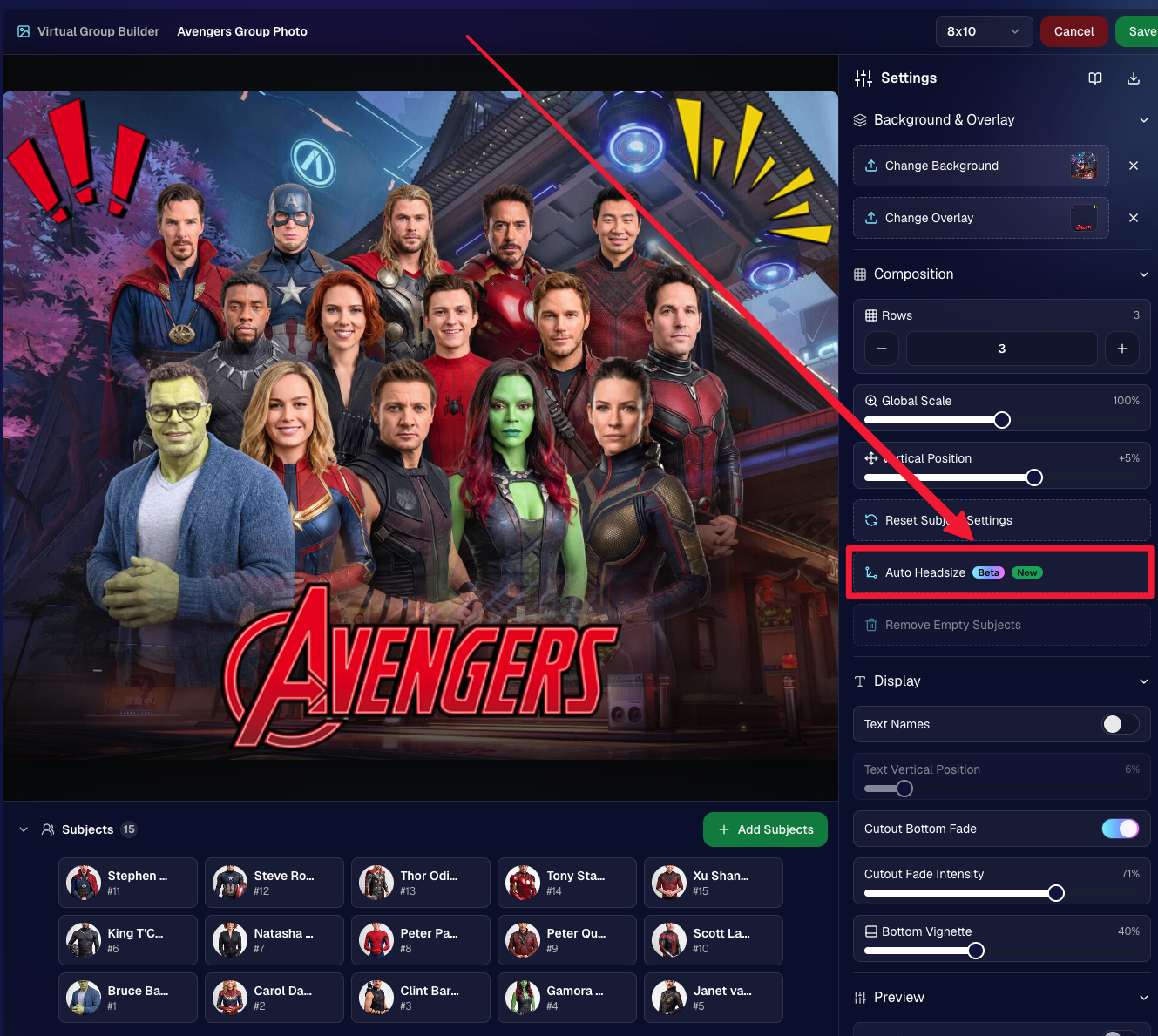
Virtual Group Builder now has a new Auto Headsize button.

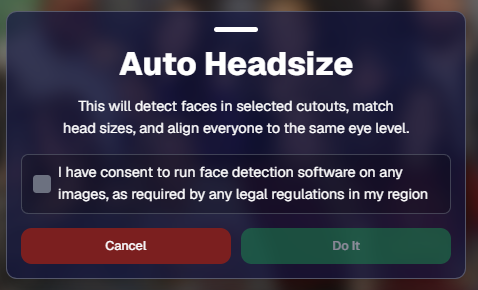
This feature automatically detects faces and adjusts the scale and vertical offset of all cutouts so that subjects have roughly the same head size and are closer to eye level.

That means when you’re building a virtual group, you should have a much better starting point before making your final manual adjustments.
🏷️ Improved PhotoTag import behavior

We improved the behavior when importing a PhotoTag into Virtual Group Builder, helping that workflow feel smoother when adding subjects from a specific PhotoTag.

🚀 Upload fix for new from-scratch Virtual Groups

Fixed an issue where uploads were not uploading properly when working from /new on a from-scratch Virtual Group instead of an existing one.

👥 Smarter default subject behavior

Virtual Group Builder now skips the initial “add to group or replace group” popup when the only subjects in the group are the default 8 subjects.

🖼️ Bottom logo spacing improved

Bottom logos are now spaced the same distance from the bottom as top logos are from the top.

📊 Reporting Updates

📈 Events and Sales Report tables now have sortable columns

The Events Report and Sales Report tables now support sortable columns, making it easier to review and organize report data directly in the table.

🎨 New BGR Report

There is now a new BGR Report that shows the most ordered backgrounds for BGR images.

The report shows:

  • How many orders a background has
  • How many items a background has

Important note: if you upload the same background to multiple Events, those will show up as different backgrounds in the report. To avoid that, use the background import feature.

🖼️ Image Converter Update

📱 HEIC conversion is now supported

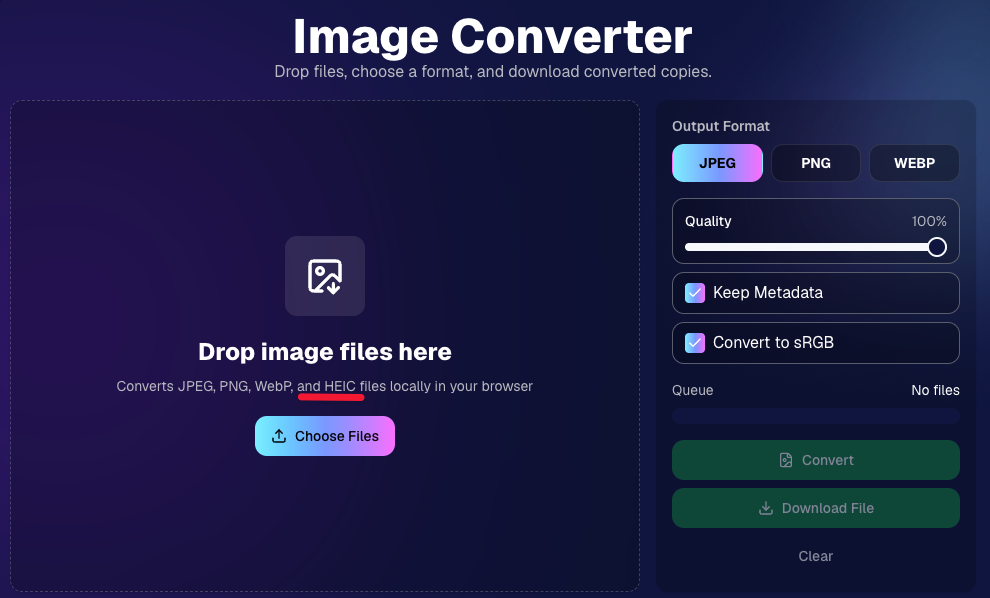
The Image Convert page at tools/convert now supports converting from HEIC files.

This should be helpful when working with images from devices that commonly save in HEIC format.
👥 Participant List Update

🏷️ Set PhotoTags for selected participants

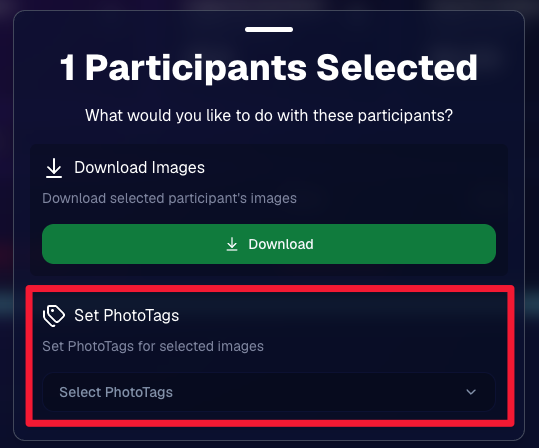
On the Participant List page, the selected participants popup now includes a new option to set PhotoTags for those selected participants.

This gives you another way to update participant organization in bulk.
📂 Manage Images Update

⬇️ Download Folder improvements

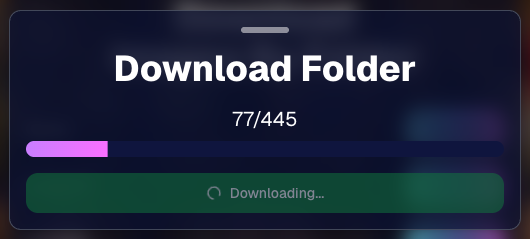
The Download Folder feature on the Manage Images page now includes an X/X counter while downloading.

We also improved the behavior when downloading a folder with hundreds of images, which should make larger folder downloads clearer and more manageable.
That’s the week!

This week’s updates should make several everyday workflows smoother: Virtual Group Builder now has a stronger starting point with Auto Headsize, BGR background performance is easier to review, HEIC files are easier to convert, participant PhotoTags are easier to update, and large folder downloads are clearer.

Keep creating magic,
Candy 🍬

Related articles

Event Landing Page: NowCandid's New Option for Event Sharing
Feature Updates
September 29, 2023

Event Landing Page: NowCandid's New Option for Event Sharing

3
 minutes read
Hello there, photo enthusiasts! It's your gal Candy, always here with the latest scoops from the world of NowCandid.

Guess what we just finished cooking up? A brand-new feature that can be helpful to how you share your events. It’s a cool new Event Landing Page feature unique to your NowCandid account. Buckle up as I overview this new addition. 🚀

A Personal Hub for Your Events 🎡

Ever dreamt of having a central hub where all your Face Matching Events are displayed neatly? Your wish has just been granted! The Event Landing Page acts as a display window for all your Face Matching Events, providing people with the event name and date for each. However, do note that this page doesn't include Positive ID Events, as they are more inherently geared towards privacy and do not have an All Images Gallery to link to in the first place.

To access it, head to your Account Settings on the web Dashboard. Choose "Event Landing Configuration" to be able to change your password & copy the link to your landing page! That's it!

Password Protected Paradise 🛡

Security is our middle name! Well, not literally, but you get the idea! Your Event Landing Page is nestled safely behind a password of your choosing. This ensures that only those you provide the password can access your page.

Search Made Simple 🔍

With the handy search bar nestled at the top, finding an event is as easy as pie. Just type in components of the Event Name and voila, the list trims down to match your search text as you type.

Your Brand, Loud and Clear 📢

At the helm of the page, your business name features prominently alongside the advertised contact information of your choice. Whether it's a phone number, email address, or website, it’s all about staying connected with your beloved clientele. Check your account settings to review your advertised business info if you haven't previously!

A Click into the Gallery 🖼

A simple click on the Event name whisks the visitor straight into the All Images Gallery for that Event, where watermarked images from the Event can be viewed and purchased.

Keep Privacy in Mind ❤

While this feature opens up a new avenue of image sharing, it’s crucial to tread with thoughtfully. Always gauge the comfort of your subjects with having their images accessible in this manner. The default password protection is a gentle push to ensure you are maintaining some degree of boundary. Additionally, always consider whether or not there are any privacy regulations you could be in violation of in your region with a feature such as this.

To Use or Not to Use, It’s Your Call 📞

While some may enjoy this cool extra feature, others may find NowCandid’s existing setup satisfying enough! It's all up to you, we just want to provide your more options and more possibilities.

Until next time!

Keep those shutters clicking and spirits high,

  • Candy
QuicPics: Lowering Fees & Trying Something New
QuicPics
September 21, 2023

QuicPics: Lowering Fees & Trying Something New

7
 minutes read
Change is in the air at NowCandid!

It's all about creating more value for you the photographer and enhancing the customer experience! Here's a detailed look at the latest changes we're rolling out for QuicPics and what they mean for you.

1. More Room to Click with Reduced Fees:

The upload fee for each image on QuicPics is getting a significant trim, dropping from $0.31 to just $0.20. Our aim? To offer photographers greater flexibility, letting you focus on capturing plenty of shots without being overly conscious about the associated costs.

2. Unique Price Levels Tailored for QuicPics:

QuicPics is donning a fresh identity with its Price Levels. No longer a reflection of PartyPics Now, these new levels are designed to specifically enhance the QuicPics experience. There's now an expansive range of specialty products, including blankets, canvas wraps, metal prints, and much more. We've created fun themed packages, set very reasonable prices on premium items, and provided enticing discounts on the full-resolution digital downloads & packages. And here's the cherry on top - to the end consumer, all products come with free shipping!

+ Click here to check out the new Price Levels. +

3. Lowered Margin:

With QuicPics' new pricing strategy, photographers can anticipate margins ranging between 10% to 30%. While this is much lower than our other programs, our goal is to bolster the overall volume of sales through reasonable pricing on specialty items. QuicPics sales have been almost non-existent thus far, given you're providing "free" social media size image files of all images to all participants. We think these changes will help bolster the sales of QuicPics Events a bit. And remember, a smaller percentage of a bigger pie can often be more substantial than a larger slice of a smaller pie.

4. Continuing to Market with a Gentle Touch:

While we're working hard to boost sales, we're committed to keeping our marketing approach gentle and unobtrusive. With the new QuicPics Price Levels, the removal of weekly price hikes reflects this ethos, ensuring there's zero undue pressure on the end consumer to make a purchase.

5. The Bigger Picture:

Our new strategy aims to strike a balance. By nurturing a growth in QuicPics Event sales while ensuring a reasonable margin for NowCandid, we have been able to justify the reduced upload fee. Furthermore, if sales surpass our conservative estimates, we are planning even more substantial fee reductions in the future!

Some Parting Thoughts:

While the average sales from QuicPics Events have traditionally been on the modest side, our revamped approach aims to change that narrative. Higher sales volumes, even with the revised margins, should translate to improved profits for our photographers. Reducing the fee per image upload will allow you to both save money and take more images, and more images could result in slightly higher sales as well. We'd like to lower the image per upload fee as low as possible, but need a way to cover costs in the meantime, all while trying to provide a good experience to the end consumer. We hope this new direction can result in a win-win-win for all parties involved. More pictures taken of end consumers and more fun product options, less fees for the photographer, same revenue for NowCandid.

We're excited!

We like these changes and truly believe they reflect a balanced mix of value, quality, and profit. Your feedback matters, so if you have thoughts, queries, or concerns, don't hesitate to get in touch.

Here's to a brighter, more lucrative future with QuicPics!

New and Improved SportsPics Now Price Levels!
SportPics
September 21, 2023

New and Improved SportsPics Now Price Levels!

4
 minutes read
Hey there, it's Candy! 🍭

I'm super thrilled to share that we're taking our SportsPics Now Price Levels up a notch!

Double the Levels, Double the Fun!

We used to have 5 Price Levels, but guess what? We’ve now expanded to 10! And the cherry on top? The middlemost Price Levels have been adjusted to very closely match the most common & successful prices Volume Sports Photographers tend to charge. Whether you're an experienced Volume Sports Photographer or someone just getting into it, these 10 Price Levels should be able to meet most of your needs!

New Products

Hold onto your hats because this is the part that I'm most excited about! We're introducing a plethora of new products for your end consumers to purchase. Want to give your walls a makeover? Our wall clings and cloth banners are perfect for that. Looking to bring photos to life? Dive into our video animations. And that's just scratching the surface! We also have larger statuettes, shimmering metal prints, fun spirit noggins, acrylic cutout magnets, and so much more.

More Desirable Packages

Wait, there’s more! Our new and improved packages are curated with your end customers in mind. Each bundle has been thoughtfully put together to offer a mix of products that are most likely to be purchased together, ensuring that more customers can find the package that they are looking for.

Sample Graphic Improvements

Our graphics team has made some improvements, and I’m excited to present our new & improved sample graphics on the retail site. Designed to capture attention, they're set to give your sales that extra oomph!

To sum it all up, SportsPics Now is not just offering more Price Levels, but an entire overhaul!

As always, if you have any questions or need recommendations, I'm here to help.

Don't forget to review other blog posts for all the latest updates and offerings. And remember, with NowCandid, every click counts!

Candy, signing off! 💖🍬📸

Let’s get in touch

If you’re a photographer looking to add NowCandid services to your wheelhouse – set up a call by clicking the button below.

How to customize formatting for each rich text

How to customize formatting for each rich text

How to customize formatting for each rich text

How to customize formatting for each rich text

How to customize formatting for each rich text

What’s a Rich Text element?

The rich text element allows you to create and format headings, paragraphs, blockquotes, images, and video all in one place instead of having to add and format them individually. Just double-click and easily create content.

A rich text element can be used with static or dynamic content. For static content, just drop it into any page and begin editing. For dynamic content, add a rich text field to any collection and then connect a rich text element to that field in the settings panel. Voila!

Headings, paragraphs, blockquotes, figures, images, and figure captions can all be styled after a class is added to the rich text element using the "When inside of" nested selector system.

  • List One
  • List Two
  • List Three
  • List Four
  • List Five

This is a link

This is bold text