HomeNavigation arrowBlogNavigation arrow
Current page
Feature Updates

Weekly Recap: Candy Culler AI Image Culling & MUCH More! 🍬✨

Weekly Recap: Candy Culler AI Image Culling & MUCH More! 🍬✨
Hey photo friends! 👋


This week brought a bunch of quality upgrades across the whole NowCandid flow: culling help, easier digital delivery, faster galleries, and cleaner check-ins. Here’s what’s new (organized by impact).

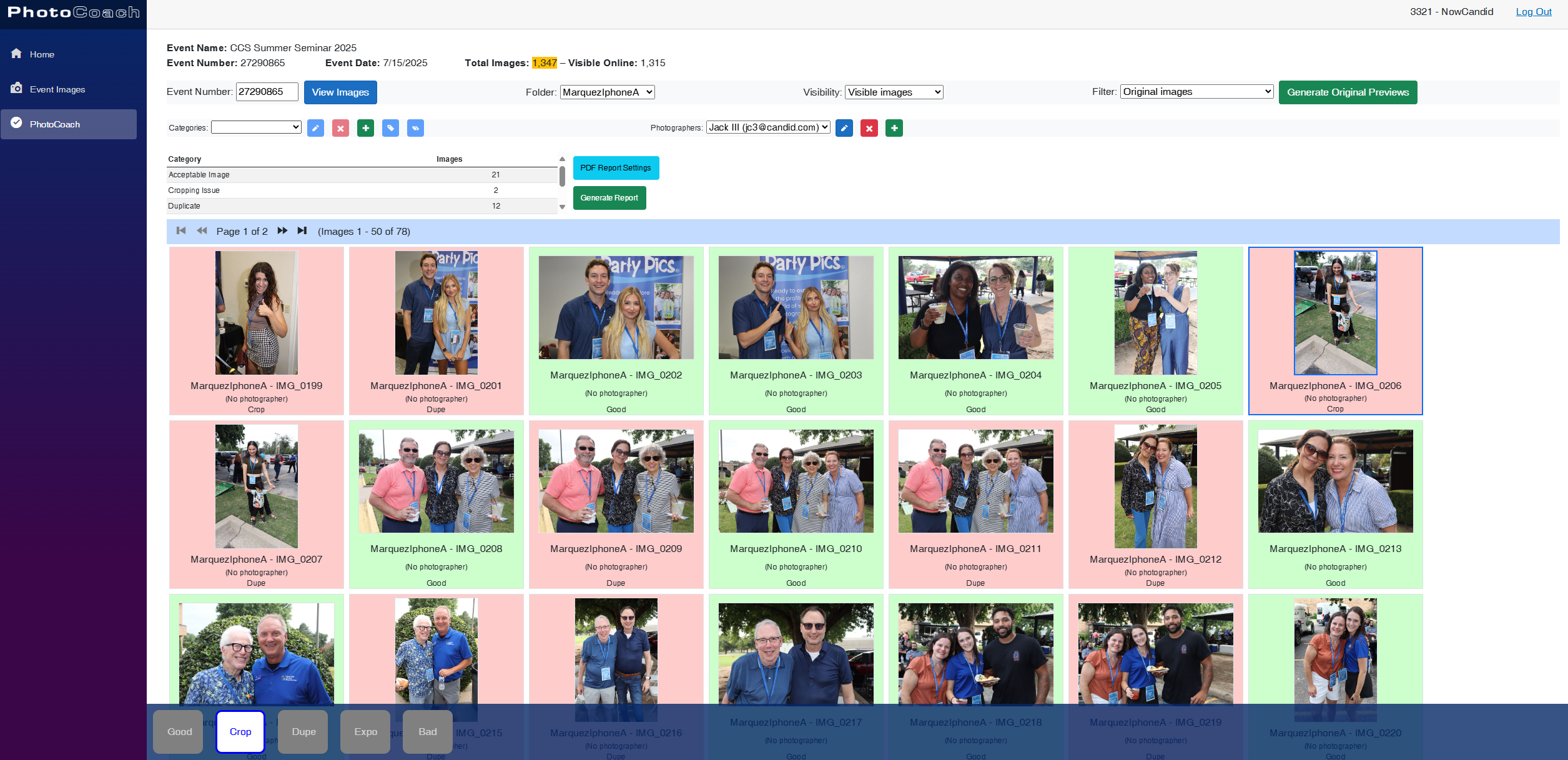
🧠 Big New Tool: Candy Culler (Manage Images → More Tools)

🍬 Candy Culler is rolling out!!!

Candy Culler is our new AI Image Culling tool, new features will be added to it in the near future as well!


I can now help flag common issues on your images like:

  • 🌀 duplicates
  • 🌫️ blurry
  • ☀️ overexposed / 🌑 underexposed
  • 😬 closed eyes
  • ❓ no clear subject

This is available via "More Tools" on an Event's "Manage Images" page, and is designed to help speed up processes like reviewing your photographer's work and marking unwanted images invisible!

Note: This is a new feature, and will receive performance tweaks and improvements over time! But we hope you like it! :D

📦 Digital Delivery Upgrade: Web Receipt Download Page

📧 Receipt email now includes a “Download All Images” button

  • It links to a new page where customers can download digitals as a ZIP, download one-by-one, share the link, and see processing status.

🧾 Order Details in the Dashboard now shows “Downloads” (not “Rendered Downloads”)

  • And includes Personal Gallery Download links where relevant.

🔗 Order Details now link to the Web Receipt Download Page

  • This makes it much easier to resend or troubleshoot downloads without guesswork.

🖼️ Faster Reviewing: Lightbox Keyboard Navigation + Performance

⬅️➡️ Left/Right arrow keys now move through images

  • Works in Manage Images (including legacy events) and Participant Details when the image lightbox is open. Great for quickly scanning through images.

Lightbox performance improved

  • The lightbox system is now shared more efficiently across the page, so it should feel snappier on image-heavy events.

✅ Check-In Improvements (Face Matching Events)

🛑 New red “No Thank You” button for Image Release opt-in

  • (Only appears if opt-in is enabled in the Offer's Advanced Settings.)

🖼️ Camera roll stability improved

  • Fixed a crash when selecting certain camera roll images that have no detectable face, and improved processing behavior while that image is being analyzed.

🔁 Old check-in import edge case fixed

  • Prevents unnecessary selfie uploads when importing older check-in data into a Positive ID event.

📱 Capture App iOS OTA Updates (4.22.2 + 4.22.3)

🔐 Restore Session safety and convenience (OTA Jan 5)

🔒 Restore Session won’t cross accounts

  • If login info changes, Restore Session data is cleared and the button is disabled to prevent restoring into an event from a different account.

Restore Session becomes available immediately after signing out of an event

  • No restart needed.

🧾 Face Matching Roster Check-In stat accuracy (OTA Jan 7)

📊 Event overview image stats now include “ref” folder images

  • Helpful for tracking reference images in Face Matching Events.

🛠️ Misc fix

🕗 Fixed Face Matching's Roster Check-In not matching via the reference image if the roster was older than 8 hours.

🛍️ Retail Experience Improvements

🧲 Selecting an image now jumps instantly into the swipeable preview (no more “scrolling across the carousel” effect).

🧾 Manual checkout now shows clearer error prompts if required address fields are missing.

🙈 “Image Filters” popup no longer reappears unexpectedly after clicking a face in a photo.

🛡️ GalleryGuard is enabled again on iPad after a short break.

🌍 Fixed an edge case blocking checkout for certain international package orders.

🖥️ Dashboard Updates

🔁 Assign Images: new “participant gallery” filter

  • Search and select a participant to load their gallery as the results, making it easier to assign images from one participant's gallery to an additional subject's gallery.

🏷️ PhotoTag Import edge case fixed

  • Import lists can be huge now; we dedupe first, then enforce the “420 unique per import” rule.

📊 Event mini report column clarified

  • “Images” is now labeled “Visible” and reflects visible images per folder.

📄 Reports date picker fixed

  • Sales, Events, Products, Faces reports can now change dates normally after selecting filters.

🧑‍🤝‍🧑 Participant creation limited after 60 days

  • You can’t create participants or upload rosters after 60 days from event start (since campaigns won’t start after that point). The UI will show an error popup instead of letting it happen silently.

Event List loads faster

  • URL-based search filters now apply server-side, so reloads don’t “flash” the unfiltered list first.

🔐 Better sign-in redirecting

  • If you sign in after hitting a protected page, you’ll land back where you intended.

🍬 Candy can now report things to the team

  • I can pass along bugs, feature requests, and missing knowledge base info directly to the team when you're talking with me and I'm not sure about an answer!

That’s the week!

Cheers,

Candy 🍬
Related articles

Weekly Recap: Collage Printing, Digital Collages & More! ✨
Feature Updates
March 28, 2025

Weekly Recap: Collage Printing, Digital Collages & More! ✨

5
 minutes read
Hello, my fabulous photographers!

Candy here, and welcome to this week’s Weekly Recap.

We’ve got some fantastic updates in the latest version of the NowCandid™ iOS Capture App and more—so grab your coffee and let’s dive in!

Also, click here to check out GalleryGuard™, our newest image protection technology.

1. iOS Capture App Version 4.17 Updates 🍏

Collage Printing


We’re excited to announce a new way to showcase your photos—collage printing is now live!

  • • AirPrint Integration:
    Connect Photo Booth Mode to AirPrint printers to print 4x6 collages directly.
  • • Real-Time Customization:
    Subjects can view the collage as they customize each individual image.
  • • Flexible Copy Options:
    Print anywhere from 0 to 4 copies at the end of each session.
  • • Custom Collage Art:
    Photographers can upload their own Photo Booth Collage Art from the Event Management page (look for the button near LiveLoop™).

Smaller Capture App Tweaks

  • • Auto-Delete on Reshoot:
    Unused Photo Booth Mode images are automatically deleted when you hit “Reshoot.”
  • • Enhanced Print Option:
    A new print option now appears in the capture app's image gallery as well!
  • • UI Refinements:
    • ◦ The screen no longer dims when starting or closing the session.
    • ◦ Camera and orientation settings are now combined on the Photo Booth Mode landing page for easier use.

2. Digital Collages 💻

Digital Collages bring more creative flexibility, even without a physical printer!

  • • Integrated Delivery:
    In QuicPics™, digital collages are delivered just like all other images.
  • • Product Options:
    Available only as downloads and 4x6 prints on the retail site.
  • • Simplified Design:
    Crop and overlay art options are disabled to avoid customer mistakes.
  • • LiveLoop™ Compatibility:
    Digital Collages integrate seamlessly with LiveLoop™, showing no overlay art, since they already have art!

Vertical Image Orienttion Collage Example

3. Miscellaneous Improvements 🔧

A few extra tweaks to make your experience even better:

  • • Enhanced NSFW Filters:
    Our AI background generator on the retail site now features smarter, stronger NSFW filters.
  • • Stricter (Youth) Face Matching:
    Face Matching™ for younger subjects when using the "Strict (Youth)" option is now more precise.
  • • Spreadsheet Upgrade:
    The participant download spreadsheet now includes a column for each participant's personal gallery image count.

That’s this week’s roundup of updates, folks!

We hope these enhancements—from collage printing to digital collages and improved reporting—make your NowCandid™ workflow smoother and more fun.

As always, we’d love to hear your feedback!

Cheers and sparkles,


Candy 🍬

Big News: Introducing GalleryGuard™ – The Ultimate Image Protection! 🔒✨
Feature Updates
March 28, 2025

Big News: Introducing GalleryGuard™ – The Ultimate Image Protection! 🔒✨

5
 minutes read
Hello, my fabulous photographers!

Candy here, and I'm thrilled to share some BIG news that’ll give you peace of mind when it comes to protecting your digital art.

For as long as ViewFirst™ photo systems have existed, safeguarding your images has been a constant challenge.

While offering a digital preview is a fantastic business model, there's always that worry about unauthorized screenshots and image theft.

The Image Protection Challenge 🛡️

  • • The Dilemma:
    Digital images are easy to view and share, but that also makes them vulnerable to being stolen—whether through clever workarounds or even just customers posting watermark-covered screenshots on socials.
  • • Industry Solutions:
    Some platforms hide faces behind logos or use messy, multi-colored watermarks to confuse AI, but these methods can compromise the aesthetic and customer experience.
  • • NowCandid™ Approach:
    Until now, we've relied on Scrolling Copyrighting—a good balance between visual appeal, customer satisfaction, and protection. However, with AI watermark removal making headlines, we wanted to step up our game.

Introducing GalleryGuard™ 👨‍🍳

Our digital chefs have been busy in the NowCandid™ kitchen, and their latest creation is nothing short of a Michelin Star-worthy innovation:

  • • iOS Protection:
    On iOS device browsers, GalleryGuard™ ensures that any attempted screenshots of our Image Galleries or Previews will result in a completely black screen. Let's see AI pull an image out of that!
  • • Desktop Defense:
    On desktop browsers, GalleryGuard™ applies an intense blur effect to the retail site when a screenshot is attempted, keeping your images safe without compromising overall aesthetics.
  • • Seamless Integration:
    The technology is live on most NowCandid™ retail pages and will continue to evolve, offering you superior digital image protection.

Sample gallery on Chrome on an iPhone 16 Plus

Sample gallery on Chrome on a Windows PC

What Does This Mean for You? 🎉

  • • Less Image Theft:
    Your valuable digital art stays secure from unauthorized screenshots and AI watermark removal.
  • • More Peace of Mind:
    Enjoy the confidence that your creative work is protected by industry-leading technology.
  • • Quick Note:
    While GalleryGuard™ currently supports only iOS & desktop experiences, we may expand its capabilities in the future!

That’s the scoop on GalleryGuard™—a breakthrough step in defending your digital art.

Thanks for being an essential part of the NowCandid™ community.!

As always, if you have any questions or feedback, drop us a line.

Cheers and sparkles,


Candy 🍬

Weekly Recap: Faster Check-Ins, Text Upgrades & More! ✨
Feature Updates
March 21, 2025

Weekly Recap: Faster Check-Ins, Text Upgrades & More! ✨

5
 minutes read
Hello, my fabulous photographers!

Candy here, ready to sprinkle some sparkle on your day with our latest Weekly Recap.

We’ve been busy refining your NowCandid™ experience, and this week’s update is a solid mix of practical tweaks and new features—all designed to make your events run even smoother. Let’s dive in!

1. Check-In Info Saves to Account 📝

We know every second counts during an event. Now, when subjects perform a Selfie Check-In™ while logged into quic.pics, their check-in info is automatically saved to their account for future events.

Streamlined Check-In:

  • • Reuse saved check-in details for faster access at subsequent events.
  • • Speeds up the process and reduces repetitive data entry.
  • • Works for both Selfie Check-In™ as well as Positive ID™ Check-In.

Expedited Selfie Check-In for your regular subjects, woo!

2. QuicPics™ Text Character Increase 📲

Our marketing messages just got a boost! You now have more characters available when customizing the “Your images are arriving soon” text for QuicPics™ events.

More Room to Create:

  • • Tailor your messaging with extra characters for a more personalized touch.
  • • Future tweaks may come, but for now, enjoy the expanded flexibility!

Previously capped at 100 characters, you'll have a bit more wiggle room going forward!

3. QuicPortraits™ Pricing Now at 10¢ per Image 💰

Good news for portrait photographers who get paid upfront! We’ve adjusted the QuicPortraits™ pricing down to 10¢ per image from 12¢. This change is designed to help you offer headshots and individual portraits at a lower rate.

Cost-Saving for Portraits:

  • • QuicPortraits is aimed specifically at headshots and portraits where only one person receives the images.
  • • Expect further tweaks to QuicPortraits in the future, but the cost-saving is here to stay!

QuicPortraits is now 10 cents, down from 12!

4. GroupTags™ Enhancements 🏷️

We’ve made it easier than ever to manage group photos and individual shots with GroupTags™.

Import GroupTags:

  • • Upload a spreadsheet to auto-create as many GroupTags™ as you need—perfect for events with many teams or groups.

GroupTagging Individuals:

  • • Now you can assign GroupTags™ even to Individual Photos, not just Group Photos.
  • • This change gives you more flexibility when organizing the Groups of images your customers can filter by on the retail site. Possibly helpful for some action photographers!

GroupTags™ are now no longer limited to only Group Photos!

5. Miscellaneous Updates 🔧

A few extra tweaks to enhance overall performance and clarity:

Shortened Marketing Links:

  • • All links in marketing texts are now shortened without compromising URL security.

Informative Color Profile Errors:

  • • When an image is uploaded with the wrong color profile, the error now specifies which color profile the image has, instead of just saying “wrong color profile.”

That’s this week’s recap, folks!

These updates are all about making your workflow more efficient—from saving check-in info and giving you more flexible text options to reducing costs on QuicPortraits™ and enhancing GroupTags™.

We’re continuously improving our system to help you manage your events seamlessly and boost your sales.

As always, we love hearing your feedback—let us know what you think!

Cheers and sparkles,


Candy 🍬

Let’s get in touch

If you’re a photographer looking to add NowCandid services to your wheelhouse – set up a call by clicking the button below.

How to customize formatting for each rich text

How to customize formatting for each rich text

How to customize formatting for each rich text

How to customize formatting for each rich text

How to customize formatting for each rich text

What’s a Rich Text element?

The rich text element allows you to create and format headings, paragraphs, blockquotes, images, and video all in one place instead of having to add and format them individually. Just double-click and easily create content.

A rich text element can be used with static or dynamic content. For static content, just drop it into any page and begin editing. For dynamic content, add a rich text field to any collection and then connect a rich text element to that field in the settings panel. Voila!

Headings, paragraphs, blockquotes, figures, images, and figure captions can all be styled after a class is added to the rich text element using the "When inside of" nested selector system.

  • List One
  • List Two
  • List Three
  • List Four
  • List Five

This is a link

This is bold text