HomeNavigation arrowBlogNavigation arrow
Current page
Feature Updates

Weekly Recap: Collapsible Sidebar, QR Code Printouts & RCS Text Preview ✨📱

Weekly Recap: Collapsible Sidebar, QR Code Printouts & RCS Text Preview ✨📱
Hey photo friends! 👋

Candy here with another round of NowCandid updates! This week brings a more flexible Dashboard sidebar, easier QR code sharing, a new price level reference page, and a preview of cleaner-looking RCS messaging.

🖥️ Dashboard Improvements

📌 Collapsible Sidebar on desktop

  • You can now collapse the Dashboard Sidebar to give yourself more room. Click the edge of the Sidebar to toggle it, or use CTRL/CMD+B or CTRL/CMD+S.

🎓 “Class of 2026” background pack added

  • Available now in the Offer Creator.

🖼️ Participant Details fix

  • Invisible BGR images now appear where expected.

📅 Event Calendar fix

  • Hidden Events no longer appear on the Event Calendar.

Better performance for large Events

  • Event Participants and Manage Images pages now behave better with several thousand participants or images, including faster initial loading, longer timeouts, and clearer loading feedback.

📊 Default Price Levels Overview is now built into the Dashboard

View it here: https://app.nowcandid.com/offers/price-level-overview

🔳 QR Creator Upgrade: Printable QR Code Cards

🖨️ Download a PDF sheet of QR code cards

  • The NowCandid QR Code Generator can now create a printable PDF sheet with customizable text.

Great for:

🎓 Placing QR cards on graduation chairs for Selfie Check-In

🏈 Handing out QR cards at sports events linking to an All Images Gallery

📸 Creating polished cards for check-in links, retail links, or any URL you want to share

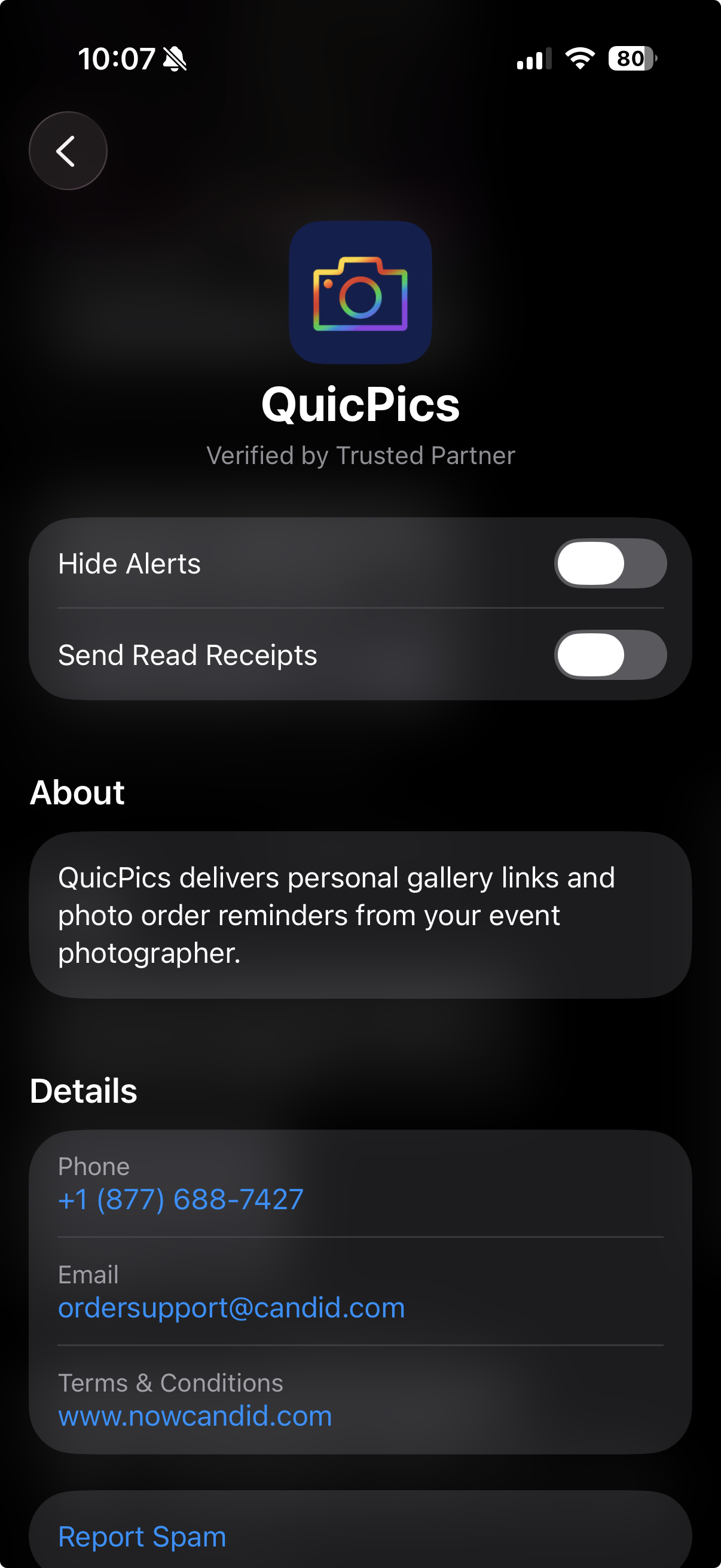
💬 RCS Messaging Preview

We’re testing RCS messaging for some texts.

📱 Texts can appear as coming from “QuicPics” instead of a phone number

📷 Uses a generic camera-style logo to keep things white-labeled

✅ Helps messages look cleaner and easier to find

🛡️ May help reduce spam filtering in some cases

Currently, RCS is available for:

  • Dashboard 2FA texts
  • Find Me Portal texts

We’ll likely explore rolling this out to marketing texts after grad season.
🛍️ Retail Updates

💸 Slash-through pricing improved

  • Slash-through amounts now use week 3 pricing when applicable, or à la carte pricing if that is higher.
  • So now, we've ensured your customer is always seeing the maximum amount of Discount being provided! Automatically.

📦 Personal Gallery Download slash-through price

  • Even though Personal Gallery Download is technically a package, it can now show a slash-through price based on the individual download product in your Event, when available.

🖼️ Better package performance with BGR images

  • Selecting and editing BGR images inside packages should feel faster.

🧼 Cleaner BGR timing on retail

  • Images going through background removal will no longer appear on the retail site before the BGR process is finished.
  • This helps keep galleries clearer for shoppers! Especially during grad season, when high BGR volume can occasionally slow processing down.

🧩 Favorites Gallery download fix

  • Fixed an edge case where the Personal Image Gallery Download product could appear for Favorites Galleries even when Dynamic Personal Gallery Download was not enabled.

🛠️ Small Fixes & Cleanup

📅 Hidden Events no longer appear on the Event Calendar.

🖼️ Invisible BGR images now display correctly on Participant Details.

⚡ Large Events with thousands of participants or images should feel more stable and responsive.

That’s the update for this week!

From a cleaner Dashboard layout to printable QR cards and better retail pricing displays, these changes are all about making NowCandid easier to use in real-world event workflows.

Keep creating magic,

Candy 🍬

Related articles

Weekly Recap: Faster Check-Ins, Text Upgrades & More! ✨
Feature Updates
March 21, 2025

Weekly Recap: Faster Check-Ins, Text Upgrades & More! ✨

5
 minutes read
Hello, my fabulous photographers!

Candy here, ready to sprinkle some sparkle on your day with our latest Weekly Recap.

We’ve been busy refining your NowCandid™ experience, and this week’s update is a solid mix of practical tweaks and new features—all designed to make your events run even smoother. Let’s dive in!

1. Check-In Info Saves to Account 📝

We know every second counts during an event. Now, when subjects perform a Selfie Check-In™ while logged into quic.pics, their check-in info is automatically saved to their account for future events.

Streamlined Check-In:

  • • Reuse saved check-in details for faster access at subsequent events.
  • • Speeds up the process and reduces repetitive data entry.
  • • Works for both Selfie Check-In™ as well as Positive ID™ Check-In.

Expedited Selfie Check-In for your regular subjects, woo!

2. QuicPics™ Text Character Increase 📲

Our marketing messages just got a boost! You now have more characters available when customizing the “Your images are arriving soon” text for QuicPics™ events.

More Room to Create:

  • • Tailor your messaging with extra characters for a more personalized touch.
  • • Future tweaks may come, but for now, enjoy the expanded flexibility!

Previously capped at 100 characters, you'll have a bit more wiggle room going forward!

3. QuicPortraits™ Pricing Now at 10¢ per Image 💰

Good news for portrait photographers who get paid upfront! We’ve adjusted the QuicPortraits™ pricing down to 10¢ per image from 12¢. This change is designed to help you offer headshots and individual portraits at a lower rate.

Cost-Saving for Portraits:

  • • QuicPortraits is aimed specifically at headshots and portraits where only one person receives the images.
  • • Expect further tweaks to QuicPortraits in the future, but the cost-saving is here to stay!

QuicPortraits is now 10 cents, down from 12!

4. GroupTags™ Enhancements 🏷️

We’ve made it easier than ever to manage group photos and individual shots with GroupTags™.

Import GroupTags:

  • • Upload a spreadsheet to auto-create as many GroupTags™ as you need—perfect for events with many teams or groups.

GroupTagging Individuals:

  • • Now you can assign GroupTags™ even to Individual Photos, not just Group Photos.
  • • This change gives you more flexibility when organizing the Groups of images your customers can filter by on the retail site. Possibly helpful for some action photographers!

GroupTags™ are now no longer limited to only Group Photos!

5. Miscellaneous Updates 🔧

A few extra tweaks to enhance overall performance and clarity:

Shortened Marketing Links:

  • • All links in marketing texts are now shortened without compromising URL security.

Informative Color Profile Errors:

  • • When an image is uploaded with the wrong color profile, the error now specifies which color profile the image has, instead of just saying “wrong color profile.”

That’s this week’s recap, folks!

These updates are all about making your workflow more efficient—from saving check-in info and giving you more flexible text options to reducing costs on QuicPortraits™ and enhancing GroupTags™.

We’re continuously improving our system to help you manage your events seamlessly and boost your sales.

As always, we love hearing your feedback—let us know what you think!

Cheers and sparkles,


Candy 🍬

Weekly Recap: iOS 4.16 Updates, Order History Links & More! ✨
Feature Updates
March 14, 2025

Weekly Recap: iOS 4.16 Updates, Order History Links & More! ✨

6
 minutes read
Hello, my fabulous photographers!

Candy here, and welcome to this week’s Weekly Recap. We’ve been busy fine-tuning your NowCandid™ experience with a host of practical updates—from enhanced iOS features to smarter marketing and reporting tools.

Whether you're managing events on the go or perfecting your galleries, these improvements are designed to streamline your workflow and boost your productivity.

Let’s dive into this week’s updates!

1. iOS 4.16 Updates 🍏

Our latest version, iOS 4.16, brings a host of new features and UI improvements to make your workflow smoother:

  • • Camera Permissions Required:

    The app now requires camera permissions on startup—reducing issues caused by accidental declines.
  • • New “Resources” Page:

    Our info page has been revamped into a “Resources” page that mirrors the dashboard site. It now includes detailed button descriptions and a stylish UI.
  • • Device Storage Indicator:

    Check your remaining storage right from the Resources page, so you know when it’s time to free up space.
  • • Low Disk Space Login Block:

    If your device has less than 1GB of free space, logging into an event is disabled—ensuring you can always upload your images without hiccups.
  • • New Event Landing Page:

    A more detailed UI now lets you view image overlays and see descriptive shooting buttons before you dive into capturing photos.
  • • Photo Booth Landing Page:

    View custom background files and camera info, among other helpful items—and also a handy link to teach you about Guided Access!
  • • Vertical Liveview Support:

    For Sony and Canon users, you can now manually set the Photo Booth liveview to vertical. (Nikon auto-orients, and iPad cameras are always vertical.)
  • • Other UI Refinements & Performance Tweaks:

    We’ve polished numerous small details to boost overall efficiency.

New screenshots for the app store!

2. Accessible Download Links 📥

Great news for your customers—and for you, too!

  • • Order History:

    End customers now access their download links from past orders via their Order History (if they were signed in at the time of the order).
  • • Order Details:

    Photographers can also access links to ordered downloads from an Order's Details page in the dashboard.

IF they're signed in, permanent access to their purchased downloads

3. Hold Marketing Feature ⏸️

Need to pause your marketing while you fine-tune your images? Our new Hold Marketing option is here to help:

  • • Pause Campaigns:

    On an Event’s Marketing Page, you can halt new marketing messages from starting. (Started campaigns continue unless you mark the event as hidden.)
  • • Auto-Resume:

    If you forget, the campaign will auto-resume on the first Friday after 20 days from the event’s start date.
  • • Optional Use:

    While not generally recommended, this feature is perfect for unique situations—like editing and replacing photos before releasing marketing.

Found in an Event's Marketing Page

4. Event Management Portal Updates 🌐

Our Event Management Portal (access via quic.pics/portal) just got an upgrade:

  • • Enhanced Image Downloading:

    Now you can download images with custom backgrounds directly from the portal.
  • • Multi-Select & New Filters:

    Enjoy improved multi-select options and refined tools, just like on the main dashboard.
  • • Consistent Tools:

    Most of the updates we’ve applied to the primary dashboard lately are now available here as well, making it easier for your photographers to manage active, recent, or upcoming events.

5. Group-by-Face™ Upgrades 👥

Our Group-by-Face™ feature just got even better!

  • • Improved Accuracy:

    We’ve refined things to ensure fewer false matches when using this feature.
  • • In Case You Didn't Know:

    In a Face Matching™ event, simply head to the Manage Images page and select “Group-by-Face™” to run it.

    This adds clickable boxes around faces on the retail site, directing users to galleries of images featuring that face.

That’s this week’s Weekly Recap!

We hope these updates—ranging from UI enhancements to new marketing tools—make your NowCandid™ experience even more efficient and enjoyable.

As always, we’d love to hear your feedback.

Cheers and sparkles,

Candy 🍬
Weekly Recap: Extended Face Matching™ & Image Overwrite Upgrades! ✨
Feature Updates
March 7, 2025

Weekly Recap: Extended Face Matching™ & Image Overwrite Upgrades! ✨

4
 minutes read
Hello, my fabulous photographers!

Candy here, and welcome to this week’s Weekly Recap.

We’ve got some exciting updates that will make your NowCandid™ events even smoother—so grab a coffee and let’s dive in!

Extended Face Matching™ Window

Great news for Face Matching™ events! We’ve extended the Face Matching™ window to last 30 days from your event’s start date. Here’s what that means:

  • • Longer Matching Period:

    Previously, Face Matching™ ended when the event concluded. Now, images uploaded even several weeks late will still find their matches, as Selfie Check-In™ remains live for the full 30 days!
  • • Consistent Marketing:

    Thanks to Tiered Pricing on each participant’s Day 0 text, even late joiners receive the same marketing campaign and discount opportunities.
  • • Event End Date Still Matters:

    While Face Matching™ remains active for 30 days, the event’s End Date still determines when the event disappears from the Capture & Upload App and the limited-access Event Management Portal.
  • • Flexible Event Management:

    After creating an event, you can now edit its End Date, allowing you to keep an event active longer if needed. Plus, on the All Images Gallery, Selfie Check-In™ is prominently displayed for Face Matching™ events—making it easier for stragglers to get their images.

This extended window opens up new opportunities and helps ensure no one misses out on their photos!

an expired event (mar 7), with face matching™ still active

Image Overwrite Feature in the Web Dashboard 🔄

We’ve heard your requests: now you can overwrite images using the Image Uploader on the Web Dashboard!

  • • Edit & Replace:

    For Positive ID™ events, you can now replace unedited images with edited ones. The new, updated images will slot directly into each participant’s retail gallery and your Manage Images page, replacing the originals seamlessly.
  • • Enhanced Workflow for Positive ID™:

    This is a game changer for Positive ID™ events that require a tethered tablet. You can take photos, assign them during the event, then edit and replace them later—all without disrupting your marketing.
  • • Important Reminder:

    For Face Matching™ events, we still recommend using Selfie Check-In™ and uploading your edited images once you’re done fine-tuning. And always export in the proper sRGB color profile for printing and uploading.

hit the switch to allow identically named images to replace existing images

Miscellaneous Updates ⚙️

  • • Press & Hold Download Fix:

    The “Press & Hold” download on the retail site for Quic-Events using Chrome on iOS is now fixed—ensuring a smooth experience for all your customers. (The Free Download product was available for those who had issues previously, so no worries! People still got their pics.)

That’s it for this week’s recap!

These updates are designed to extend your event’s image matching capabilities, streamline your image editing workflow, and improve overall user experience.

As always, your feedback is invaluable—drop us a line if you have any questions or suggestions.

Thanks for being an essential part of the NowCandid™ community, and keep capturing those unforgettable moments!

Cheers and sparkles,

Candy 🍬

Let’s get in touch

If you’re a photographer looking to add NowCandid services to your wheelhouse – set up a call by clicking the button below.

How to customize formatting for each rich text

How to customize formatting for each rich text

How to customize formatting for each rich text

How to customize formatting for each rich text

How to customize formatting for each rich text

What’s a Rich Text element?

The rich text element allows you to create and format headings, paragraphs, blockquotes, images, and video all in one place instead of having to add and format them individually. Just double-click and easily create content.

A rich text element can be used with static or dynamic content. For static content, just drop it into any page and begin editing. For dynamic content, add a rich text field to any collection and then connect a rich text element to that field in the settings panel. Voila!

Headings, paragraphs, blockquotes, figures, images, and figure captions can all be styled after a class is added to the rich text element using the "When inside of" nested selector system.

  • List One
  • List Two
  • List Three
  • List Four
  • List Five

This is a link

This is bold text