HomeNavigation arrowBlogNavigation arrow
Current page
Feature Updates

Weekly Recap: Express Checkout Confirmations, Capture App Speed Testing, and a New Lightroom Classic Plugin

Weekly Recap: Express Checkout Confirmations, Capture App Speed Testing, and a New Lightroom Classic Plugin
Hey photo friends! 👋


This week’s updates are all about clearer customer actions, smoother retail performance, and new tools that speed up upload workflows. Plus, a strong round of Capture App polish (iOS & Android OTA) and some important Dashboard + Marketing fixes.

Let’s jump in. ✨

🛍️ Retail: Fewer Mis-clicks, Better Previews, Faster Feel

✅ Express Checkout confirmation (all express checkouts)

All express checkout flows now show a confirmation popup that clearly displays the shipping address selected, with options to place the order or go back. It also includes an invalid address popup.

Previously, people would sometimes purchase without double checking their express-checkout-method's default shipping address. So, this change is designed to reduce address mistakes and improve customer experience!
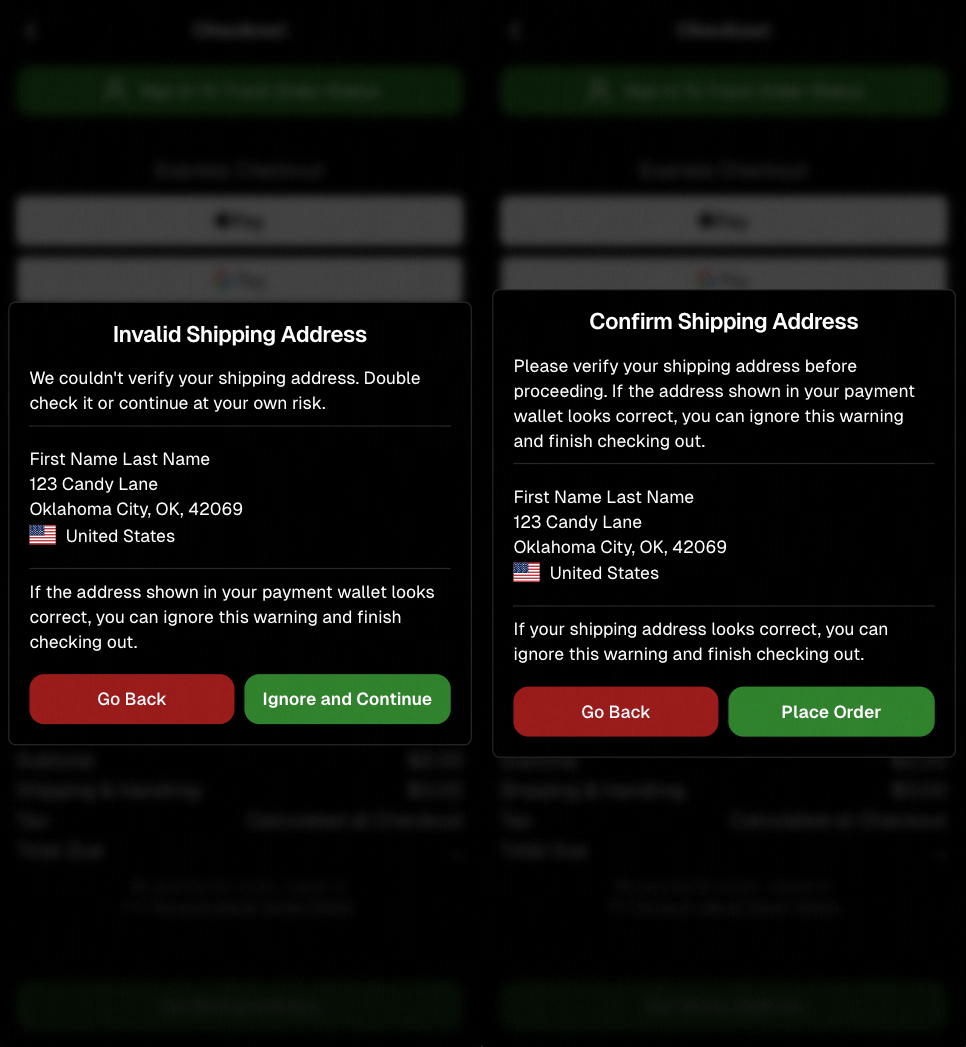
Confirmation popup now clearly displays shipping address confirmation.

🧠 Better UI + performance improvements

  • Improved local rendering (performance, memory usage, and task handling) — originally aimed to improve the retail experience on low-end devices, but it should make most devices feel faster!

  • Native “leave page” confirmation on supported browsers/devices (desktop + Samsung back button) when navigating away from an event page (refresh/back).
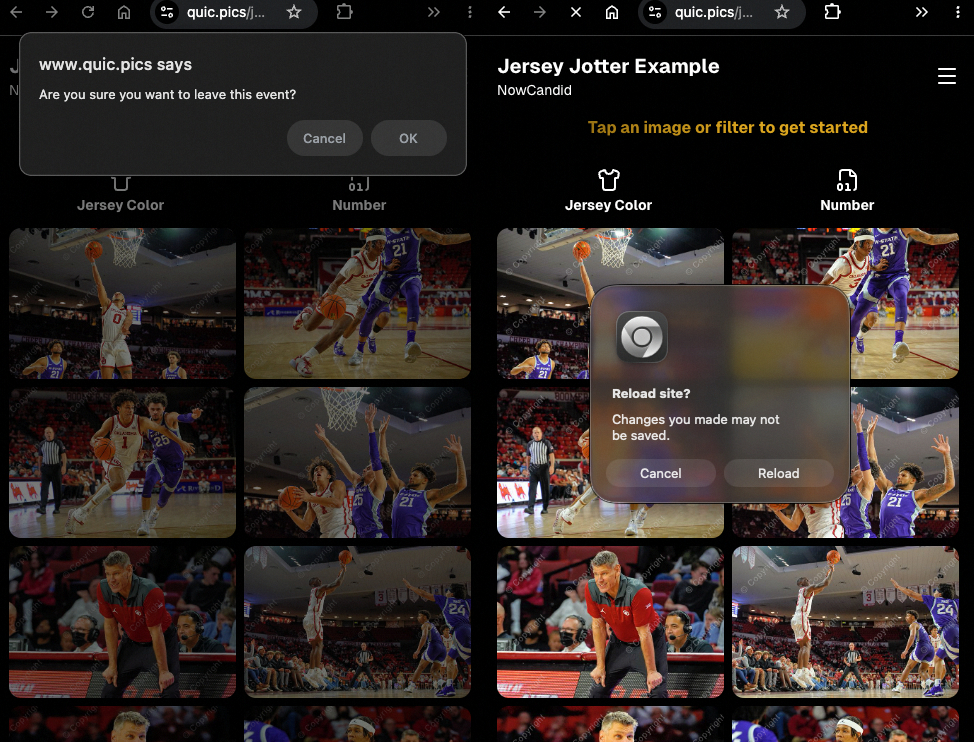
Leave page confirmation

🖼️ Clearer package download expectations + better pickers

  • Personal Gallery Downloads on store sheet and package editor now show “+X Images” in the configurator when there are more than 4 images—so customers don’t think they only get what’s previewed.
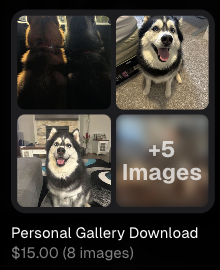
Personal Gallery Download "+X Images"

    • Personal Gallery Download products inside packages can now be clicked to preview contents.

    • Desktop product/package image pickers are now two columns (like mobile), allowing larger image preview during selection.
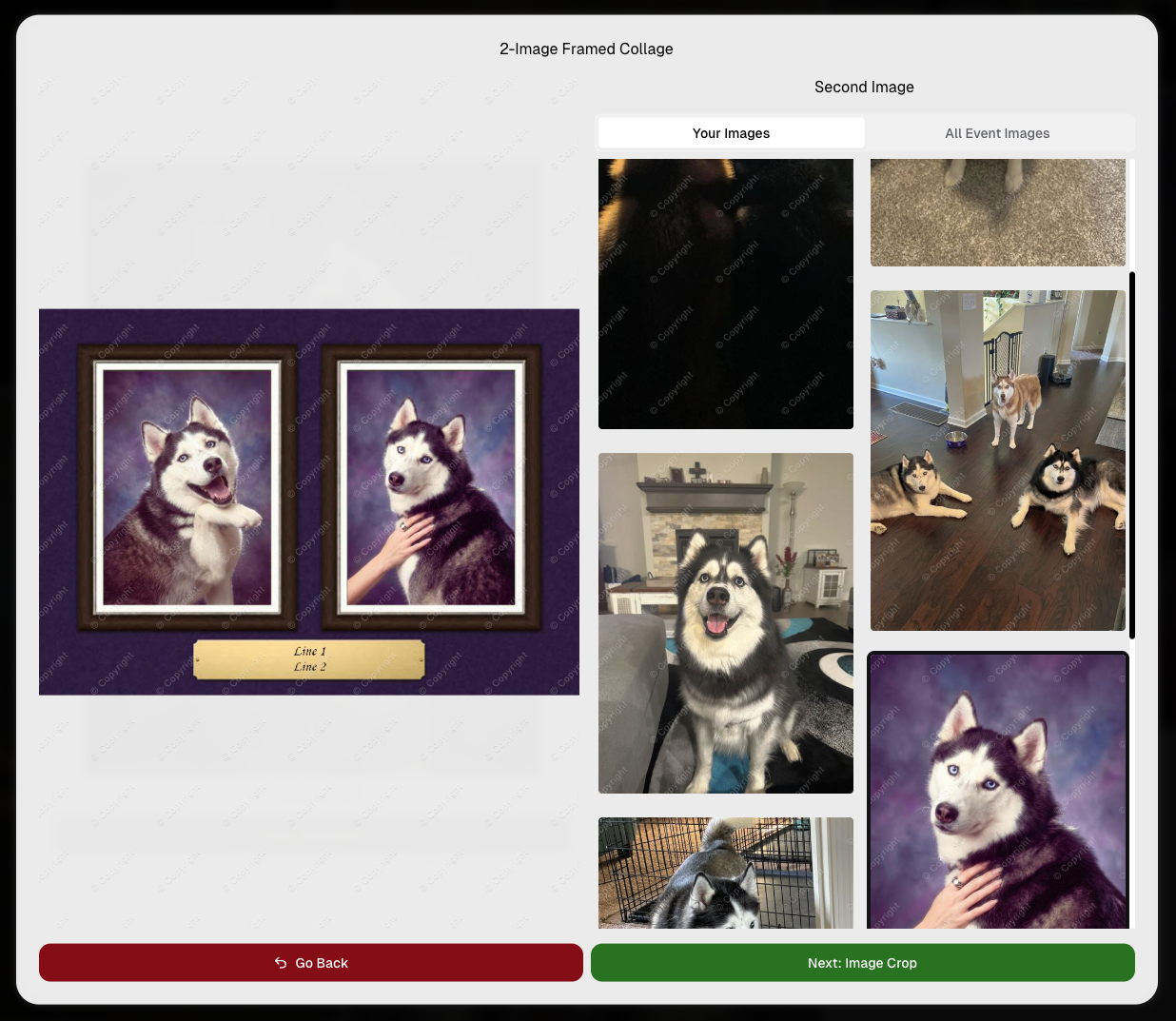
    Larger two column image previews

      • Image Filters landing popup now includes “Browse all photos without a filter” so customers who think they must pick a filter know they can also just browse!
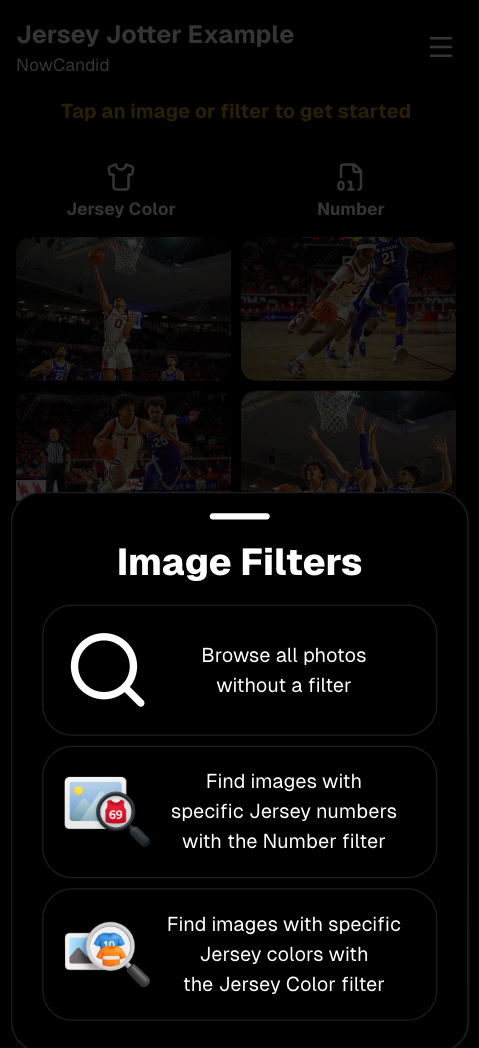
      Image Filters landing popup

      🧩 Retail fixes worth noting

      • Fixed a slashed discount amount showing on week 3 when there is no higher amount.
      • Fixed a GalleryGuard edge case that could close the retail site on some Android devices that support mobile context menus when long-pressing.
      • Fixed a race condition where a Group-by-Face gallery loaded from URL params could show default results instead of the filtered view.
      • Fixed an edge case where manually assigned images marked as group could behave like non-group images on retail.

      📱 Capture App OTA: 5.6.1 & 5.6.2 (iOS & Android)

      🌐 NEW: Network Speed Test (5.6.1)

      A new Network Speed Test button is available in Resources. Tap Run Test to check download speed, upload speed, and latency to NowCandid servers (so results may differ from Google/Ookla). It’s a quick test (downloads 5 MB, uploads 2 MB) and is useful for diagnosing weak or congested service during events.

      Mbps is a standard measurement for connection speeds, and 1 megabit per second (Mbps) is 0.125 Megabytes per second (MB/s). So 8 Mbps is 1 Megabyte per second, max. For example, with images that are 10 Megabytes in size, a speed of 8 Mbps would take a minimum of 10 seconds to upload. When speeds are very slow, image uploads may be impossible due to uploads timing out and restarting. In these cases, open the app when you have a stronger connection and all your images will start going up!
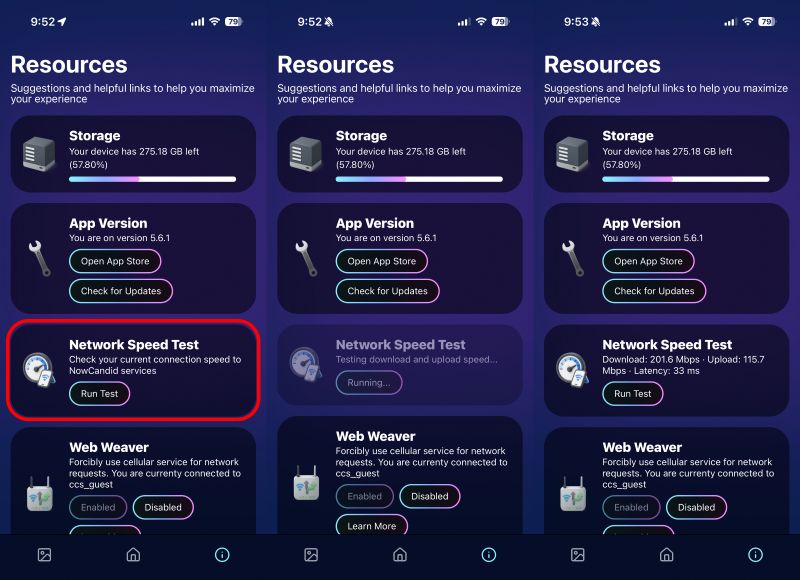
      Network Speed Test

      🎪 Photo Booth + Selfie Check-In Station UI upgrades (5.6.2)

      • Photo Booth landing page updated to be more user-friendly (always-visible scrollbar, updated text, sticky go back/continue buttons, red/green emphasis, and a popup explaining why Continue is greyed out).
      • Selfie Check-In Station landing page updated with red/green Go Back / Begin buttons.
      • New dropdown icon beside Group Photo toggle (when an event has PhotoTags) to better display there are additional options to assign PhotoTags.
      • Fixed edge case cancel/continue behavior on Selfie Check-In Station when no contact info was entered.
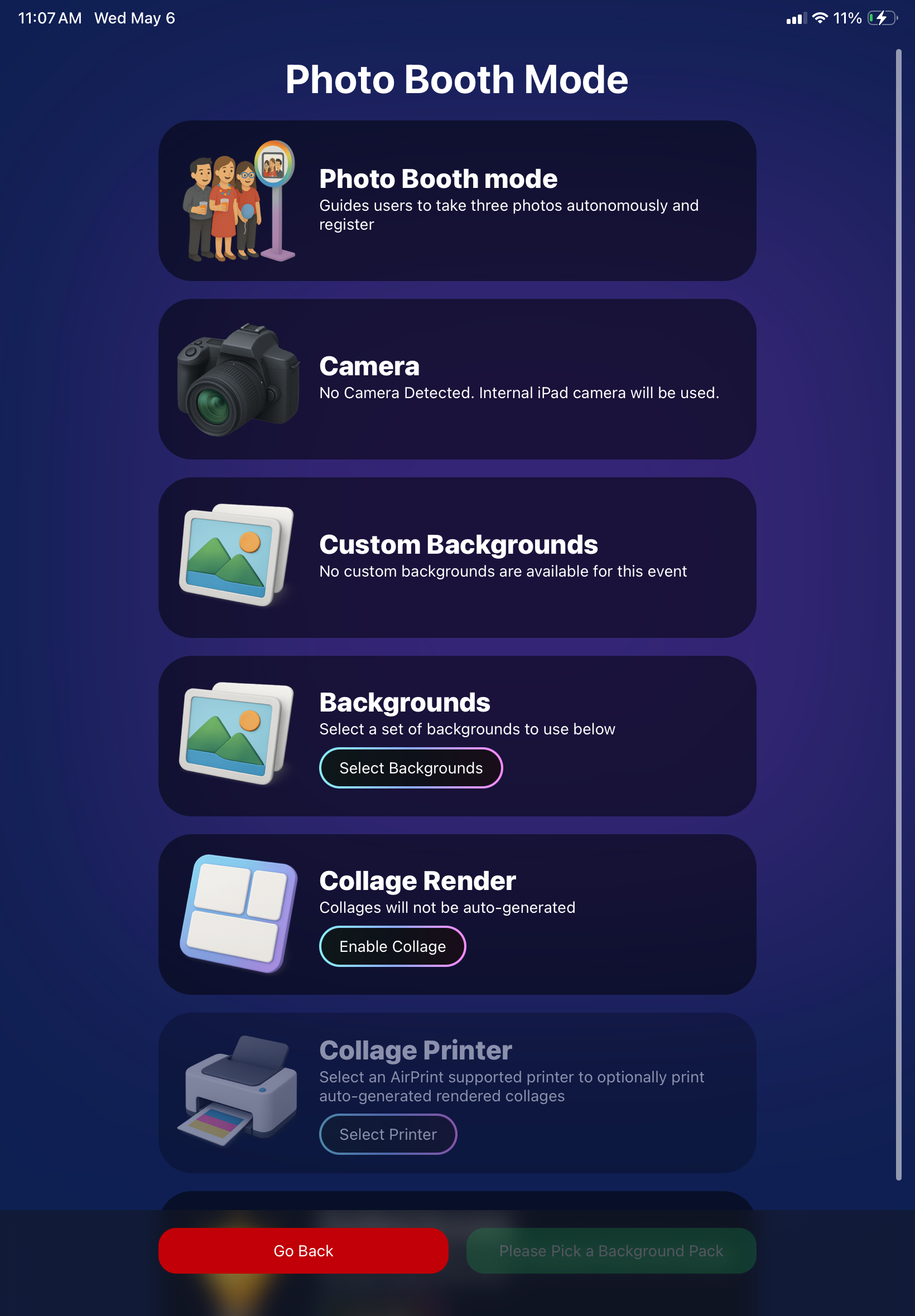
      🧩 NEW: Lightroom Classic Plugin (Official)

      We’ve launched an official Lightroom Classic plugin to upload images to NowCandid events directly from Lightroom Classic.

      Key notes:

      • Lightroom Classic only
      • Same image rules apply (color profile, DPI, etc.)
      • Uses Capture App login
      • Only events within 60 days of event start date show in the selector
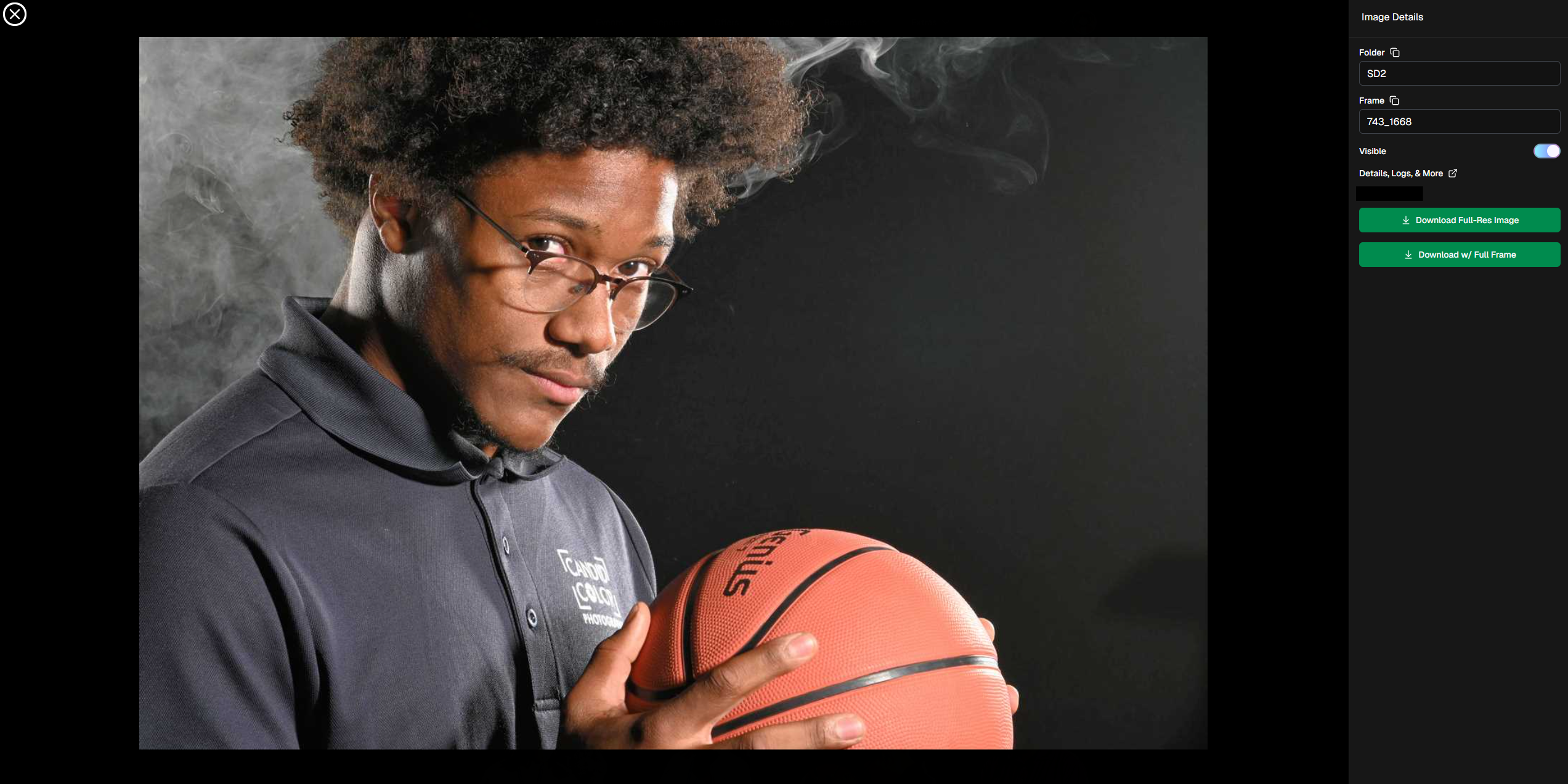
      • Image Details → Logs will show “Uploaded from NowCandid Lightroom Plugin”
      • Docs include guide/download/installation: https://app.nowcandid.com/docs/tools-more/lightroom
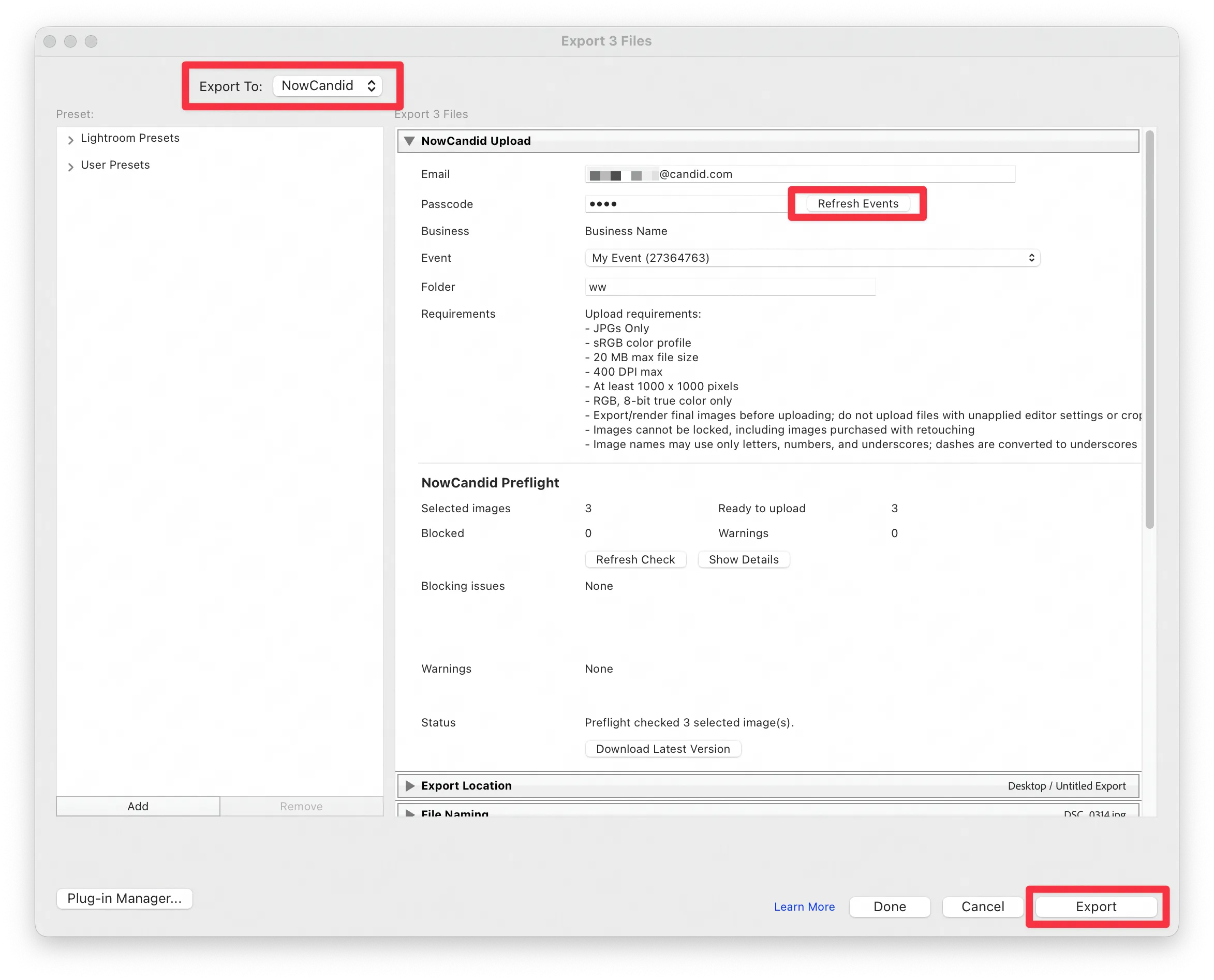
      Lightroom Classic Plugin

      Upload from NowCandid Lightroom Plugin

      🖥️ Dashboard: Upload & Roster Clarity + Small UX Wins

      • Event roster upload and PhotoRoster upload now warn about every unrecognized column, making it easier to spot misspellings (especially for optional columns).
      • Participant list page download now puts additional contacts into columns instead of rows.
      • Participant list download now puts merged contacts into their own row if they have different first/last names.
      • Image upload naming cleanup:
        • spaces/parentheses now automatically become underscores (e.g., Image (2)Image_2)
        • names ending in z now get a trailing underscore (e.g., ImagezImagez_)
      • Candy got even better at using the new Docs for responses.
      • Password reset now shows a clear “Your link has expired” screen (links expire after 24 hours).
      • Fixed participant filter inside another participant’s manual assign/unassign page not working properly.
      • Participant Details PhotoTag assignment UI: merged participants no longer incorrectly show PhotoTags as assigned.
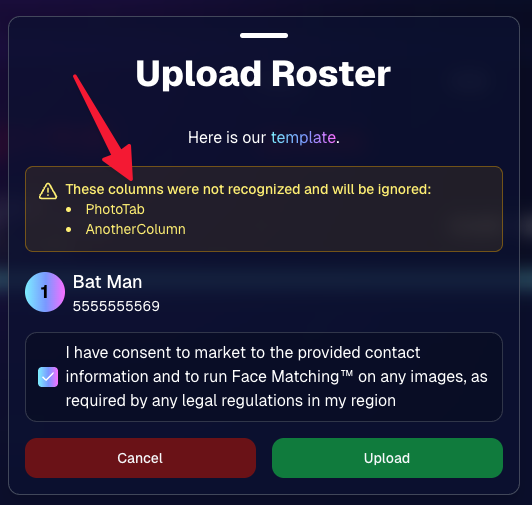
      Upload Roster now warns about every unrecognized column.

      📣 Marketing Fixes

      • Fixed edge cases where galleries that were only AI-edited images could cause follow-up email marketing issues and show as 0 images on Participant List.
      • Fixed Day0 marketing edge case not starting if gallery is just AI-edited images.
      • SMS gallery links now include “View photos:” before the gallery URL to reduce confusion where some users thought the gallery link was an unsubscribe link.

      That’s the week! 💫

      Between the Lightroom Classic plugin, the Capture App’s new Network Speed Test, and retail improvements that reduce confusion (and improve performance), this week was packed with practical wins you’ll feel right away.

      Keep it sparkly,

      Candy

      Related articles

      Weekly Recap: Filters for Faces, Jerseys, and PhotoTags ✨
      Feature Updates
      July 25, 2025

      Weekly Recap: Filters for Faces, Jerseys, and PhotoTags ✨

      5
       minutes read
      Candy here with your scoop on all the sweet new updates from this week! 🍬

      Let’s get right into it...

      📸 Big News: PhotoTags Now Work as a Filter!

      PhotoTags just got a major glow-up! 🌟

      Instead of being a separate tab, they’re now integrated directly into the Filters section on the All Images Gallery. That means they now play nicely alongside JerseyJotter™ and Group-by-Face!

      Whether you're shopping for cheerleaders, bands, dancers, or any other tagged group—this change makes it smoother than ever to find just the photos you care about.

      Did you know? NowCandid is headquartered in Oklahoma City! Thunder Up!

      🧠 Big News: Group-by-Face is Now a Filter Too!

      Group-by-Face fans rejoice! 🎭

      Group-by-Face has been transformed into a Filter, too! Instead of whisking you away to a new page, selecting a face now just filters the All Images Gallery to show photos featuring that face. You can even browse faces via the Face filter menu.

      And yes—it works with PhotoTags and JerseyJotter™, so you can filter for a specific face, a jersey number, AND a PhotoTag Group all at once. Woo!

      Yup, it even got his blurry face over Cason Wallace's shoulder!

      🧾 Big News: Invoice History in Profile Settings

      Ever had an invoice go missing in your email inbox? We've got you covered!

      You can now view and download past invoices directly from your Profile Settings page on the Web Dashboard. Whether you're keeping things tidy for tax season, tracking your account activity, or just trying to find that one receipt from a few months ago — this new Invoice History section gives you quick access to every invoice tied to your account.

      No more digging through old emails. Just head to Settings → Profile → Invoice History and boom — organized, downloadable, and ready whenever you need it.

      Another small quality-of-life boost to keep things running smoother behind the scenes. 🎟️✅

      Accessible via Profile on the Web Dashboard.

      ⚙️ Other Notable Changes

      🔍 “Looking for More?” Button + All Images Filter Popups

      We’ve added a new “Looking for More?” button at the bottom of personal image galleries — perfect for subjects who didn’t find quite everything they were hoping for. If your Event has the All Images Gallery turned on, this button will guide shoppers over to that gallery for a broader look.

      And with all the recent upgrades like PhotoTags™, Group-by-Face, JerseyJotter™, and improved gallery tools, we’re confident that the All Images view is more helpful and shoppable than ever before!

      🎛️ Bonus: When filters are enabled for your Event, the All Images Tab and All Gallery URL will now open a popup that clearly explains what filtering options are available for that particular event — making discovery even easier for your customers.

      Clicking any option will open up that Filter's popup as well!

      🤳 “Is This the Face?” Popup

      When someone takes or uploads a selfie for Selfie Check-In, we now ask them:

      “Is this the face for which you want to find matching images?”

      This simple question will reduce the number of parents who accidentally upload selfies of themselves instead of their child!

      We'll keep trying to get parents to not upload their own selfies :)

      📱 QR Code Download for All Images Gallery

      New button alert! You can now easily download the All Images Gallery QR Code to share at events—perfect for action sports and other workflows that rely on promoting the All Images Gallery.

      Accessible via "Retail Site" from an Event's Management page.

      📦 Order Details Page Improvements

      Want to know when an order was mailed out? You got it.

      The Order Details page now shows the "mailed" timestamp when applicable, helping both photographers and customers stay informed.

      Accessible via "Orders" from an Event's Management page.

      🧰 Misc Fixes & Improvements

      🧮 The JerseyJotter™' image counts when selecting Filters will now be affected by PhotoTag & Group-by-Face Filters as well

      🫥 "Unassigned Images" count now excludes hidden/test images

      💖 Favorites tab now works when picking images for multi-image products

      🔒 GalleryGuard™ is all set for iOS26 — screenshot blocking stays strong

      📴 Texting “NOPE” now unsubscribes users from all marketing campaigns

      ✨ New icon for AI-generated backgrounds — it’s clearer for those unfamiliar with the standard generative AI symbol

      Did you know? We provide subjects with free AI background generation!

      That’s it for this week!


      As always, thanks for tagging along on all the improvements we’re rolling out to make your NowCandid experience smoother, smarter, and more fun 🎉

      Cheers,
      —Candy 💕

      Weekly Recap: Capture 4.20, Favorites for All Image Galleries, and More 📸
      Feature Updates
      July 11, 2025

      Weekly Recap: Capture 4.20, Favorites for All Image Galleries, and More 📸

      9
       minutes read
      Hey hey! Candy here with your NowCandid updates.

      Let’s dig into what’s new this week:

      🚀 Capture App Version 4.20 Is Here!

      Big updates just dropped in NowCandid Capture App v4.20, and I’m here to walk you through all the exciting changes. Whether you’re on iPhone, iPad, or now even a Mac, this update makes capturing better, faster, and more flexible than ever.

      🖥️ Now on Apple Silicon Macs!

      Mac support has officially landed!


      If you’ve got a Mac from 2020 or newer (Apple Silicon), you can now run the NowCandid Capture App directly on your computer. That means full access to camera tethering, live-uploading, Selfie Check-In Station, and more—all in the same app you already know and love on iOS and iPadOS.

      Perfect for studio setups or hybrid workflows where a full keyboard and screen come in handy!

      📷 Fujifilm Joins the Party

      That’s right—Fujifilm cameras are now fully supported!


      With this, all five major camera brands are compatible with NowCandid Capture & Upload:

      • • Canon
      • • Sony
      • • Nikon
      • • LUMIX
      • • Fujifilm

      So, if you’re shooting sports, portraits, grads, or events on a Fuji body, you’re now cleared for lift-off. 🎉

      NOTE: To connect a Fuji camera to the Capture & Upload App, you must select a USB Tether Shooting option in the camera's Networking Settings.

      🔮 Future-Proofed for Apple OS Updates

      Capture App v4.20 includes early support for iOS 26, iPadOS 26, and macOS 26, so you’ll be all set once those updates roll out later this year. No last-minute patching or scrambling required.

      🎨 Visual & Interface Upgrades

      • • Animated UI numbers (like image counts!) now update with fun, smooth transitions.
      • • New Shooting Page UI on iPhone gives more space to your camera feed.
      • • Sharpened icons throughout the app—crisper visuals everywhere.
      • • Phone keypad is now larger and easier to tap.
      • • PhotoTags popup got a cleaner layout.
      • • Updated splash screen messages: wittier, more emoji-filled, and faster-loading too!

      📸 Photo Booth & Selfie Check-In Tweaks

      • • New Color Filters for Photo Booth: Try out Juno, Lark, Mayfair, Sierra, and Walden—just like your favorite photo apps.
      • • Photo Booth collage previews now live-update when filters or backgrounds change. What you see is actually what you get!
      • • Internal camera now runs at 60fps on the Shooting Page, Selfie Check-In Station, and Photo Booth Mode for smoother live-video feeds.
      • • Flash support added to Selfie Check-In: the screen will flash during the photo if your device decides it’s needed.
      • • "Close" button for Selfie Check-In Station is now only shown during the contact info step (to reduce some confusion users had).

      🛠️ Performance & Power Gains

      • • Better battery life and CPU usage from under-the-hood improvements.
      • General performance improvements to make the app snappier.
      • • iOS 18+ now supports dark mode icons and tinted app icon options for better theme matching on your device.
      • • The Lock button is now in the iPhone's shooting page wheel menu—it’s still there if you need it, just tidier.

      With v4.20, the NowCandid Capture App is faster, more flexible, and ready for more workflows than ever—whether you’re on your phone, iPad, or a shiny new Mac. 🧃

      ⭐ Favorites for All-Image Gallery Links

      Your subjects can now favorite images when viewing the All Images Gallery for an Event! Favorites will stick around between sessions on the same device and browser, and if the visitor logs in, they’ll sync across their devices too.

      This opens up new workflows for action sports photographers and beyond. Want to promote the full gallery and let customers find their pics with JerseyJotter™ filters? Now they can build their own personal gallery of favorites, even if they didn’t check in or match through Face Matching. In general, this makes the All Images Gallery more shoppable for every type of Event.

      🔧 Misc New Features & Tweaks

      Some smaller updates this week—still useful!

      • 📥 Press & Hold Downloads (Now with Backgrounds!)
        QuicPics users on mobile can now press and hold to download images with their selected background. Previously, this was only available through the cart and checkout.
      • 🔢 JerseyJotter™ Filter Stats Update
        When filtering by number, color filter stats will now update dynamically to reflect how many images match both filters. It’s a smarter way to narrow things down.
      • 🛡️ GalleryGuard™ in Photo Synthesis™ Galleries
        Retail visitors browsing their Photo Synthesis™ gallery via Quic.Pics are now protected by screenshot blocking, just like the standard retail site. 📵
      • 💰 Sort by Purchased Images
        On the Manage Images page, you can now sort by “Purchased Images” to see what’s actually selling. Great for evaluating your top-performing shots!
      • 🧠📸 Memory Mate is now a "Hybrid" product!
        We’ve updated how Memory Mate products behave on the retail site. They’ll now show up in both the Group and Individual product sections depending on what photo types are available in the gallery.
        Even better: when a customer clicks into the product gallery, Memory Mates will preview with either the group photo or individual photo already filled in—whichever one they had selected going in.

      That’s everything for Now!

      More improvements coming your way soon. Keep snapping, tagging, and selling—I'll be here making it smoother every step of the way.

      Cheers,

      Candy

      Weekly Recap: Offer-Level Backgrounds, Jersey Filters & Pop Rocks Theme 🎆
      Feature Updates
      July 3, 2025

      Weekly Recap: Offer-Level Backgrounds, Jersey Filters & Pop Rocks Theme 🎆

      4
       minutes read
      Hey friends! It’s Candy, back again with updates on all things NowCandid.

      This week? We’re talking backgrounds, jersey-spotting magic, and some serious product glow-ups. Let’s dig in! 🍬✨

      🎨 Offer-Level Background Customization Is Here!

      Now, you can set custom backgrounds at the Offer level!

      • • Pick from hundreds of preloaded background options
      • • Or upload your own (yep, your own!)
      • • Drag and drop to arrange their order just how you like
      • • Choose between 20 and 32 backgrounds to match your event’s vibe
      • • This background selection will set the choices for dynamic BGR images in Events using that Offer

      Find it under "Image Backgrounds" when editing one of your custom offers!

      🏀 JerseyJotter™ Got Even Smarter

      Multiple jersey numbers at once? Don’t mind if I do! 🎯

      Retail customers can now filter by more than one jersey number while browsing galleries—so if they’re hunting down that epic shot of #1 handing off to #23, they can actually find it. The more, the merrier!

      JerseyJotter™ in action! Now able to filter down even more. Theme: Liquorice

      ✨ New & Improved Product Renders!

      Our non-rendering products got a visual upgrade! Depending on the program or market, you’ll now see better sample graphics in the product gallery for:

      • • Spirit Noggins
      • • Spirit Sticks
      • • Canvas Wraps
      • • Wall Clings
      • • ...and even statuettes and acrylic magnets when using standard images.

      Graduations? Sports? Social vibes? We’ve got you covered with graphics that actually match the moment. Love that for us. 💅

      Here are two examples of what we're talking about:

      ✨ Improving Live-Rendering for Statuettes

      📸 Statuettes now render in the product gallery with a transparent acrylic base (ooh, classy) and an updated plate design.


      🎯 And just in case you missed it: Acrylic Magnets and Statuettes now live-render when customers are viewing the product gallery for a background-removed image.

      Theme: Pop Rocks - Watermarking: Off

      🎆 In Case You Missed It: Pop Rocks Theme!

      We dropped a new “Pop Rocks” retail theme right before the 4th of July—complete with fireworks, dark mode, and party vibes galore.


      Use it for summer celebrations, school events, or whenever you feel like turning up the wow.

      🛠️ Misc Fixes & Tweaks!

      🖼️ Quic-Event Tweak: When not selling a Digital Download product in your Quic-Events, the free download will now be much higher resolution!

      🤳 Selfie Check-In™: A sneaky bug was messing with Selfie Check-In™ on some phones, but I waved my magic wand and poof—fixed.

      📅 Report Date Picker: You can now select dates earlier than July 2023 when setting date ranges for reports. A little overdue... but better late than never, right? 😅

      That’s all for this week!

      Until next week,
      – Candy 🍭✨

      Let’s get in touch

      If you’re a photographer looking to add NowCandid services to your wheelhouse – set up a call by clicking the button below.

      How to customize formatting for each rich text

      How to customize formatting for each rich text

      How to customize formatting for each rich text

      How to customize formatting for each rich text

      How to customize formatting for each rich text
      How to customize formatting for each rich text

      What’s a Rich Text element?

      The rich text element allows you to create and format headings, paragraphs, blockquotes, images, and video all in one place instead of having to add and format them individually. Just double-click and easily create content.

      A rich text element can be used with static or dynamic content. For static content, just drop it into any page and begin editing. For dynamic content, add a rich text field to any collection and then connect a rich text element to that field in the settings panel. Voila!

      Headings, paragraphs, blockquotes, figures, images, and figure captions can all be styled after a class is added to the rich text element using the "When inside of" nested selector system.

      • List One
      • List Two
      • List Three
      • List Four
      • List Five

      This is a link

      This is bold text