HomeNavigation arrowBlogNavigation arrow
Current page
Feature Updates

Weekly Recap: Express Checkout Confirmations, Capture App Speed Testing, and a New Lightroom Classic Plugin

Weekly Recap: Express Checkout Confirmations, Capture App Speed Testing, and a New Lightroom Classic Plugin
Hey photo friends! 👋


This week’s updates are all about clearer customer actions, smoother retail performance, and new tools that speed up upload workflows. Plus, a strong round of Capture App polish (iOS & Android OTA) and some important Dashboard + Marketing fixes.

Let’s jump in. ✨

🛍️ Retail: Fewer Mis-clicks, Better Previews, Faster Feel

✅ Express Checkout confirmation (all express checkouts)

All express checkout flows now show a confirmation popup that clearly displays the shipping address selected, with options to place the order or go back. It also includes an invalid address popup.

Previously, people would sometimes purchase without double checking their express-checkout-method's default shipping address. So, this change is designed to reduce address mistakes and improve customer experience!
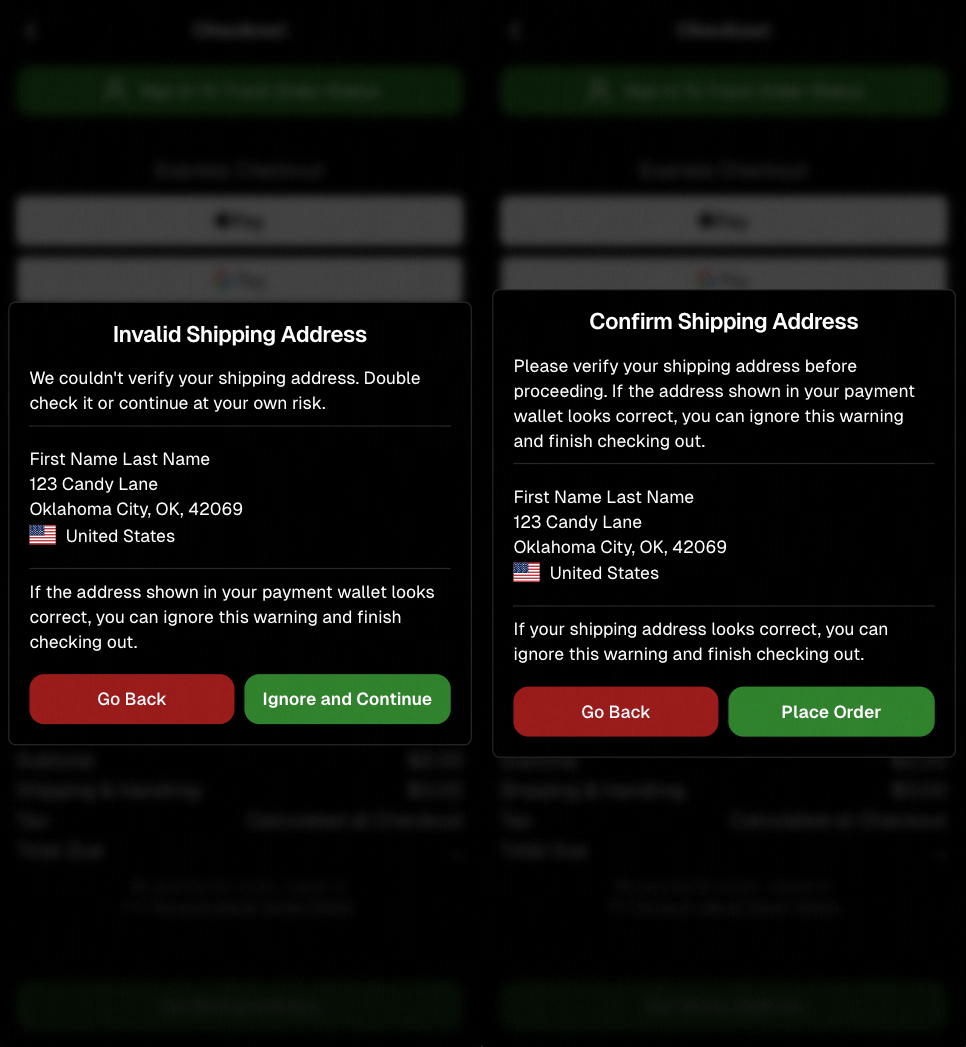
Confirmation popup now clearly displays shipping address confirmation.

🧠 Better UI + performance improvements

  • Improved local rendering (performance, memory usage, and task handling) — originally aimed to improve the retail experience on low-end devices, but it should make most devices feel faster!

  • Native “leave page” confirmation on supported browsers/devices (desktop + Samsung back button) when navigating away from an event page (refresh/back).
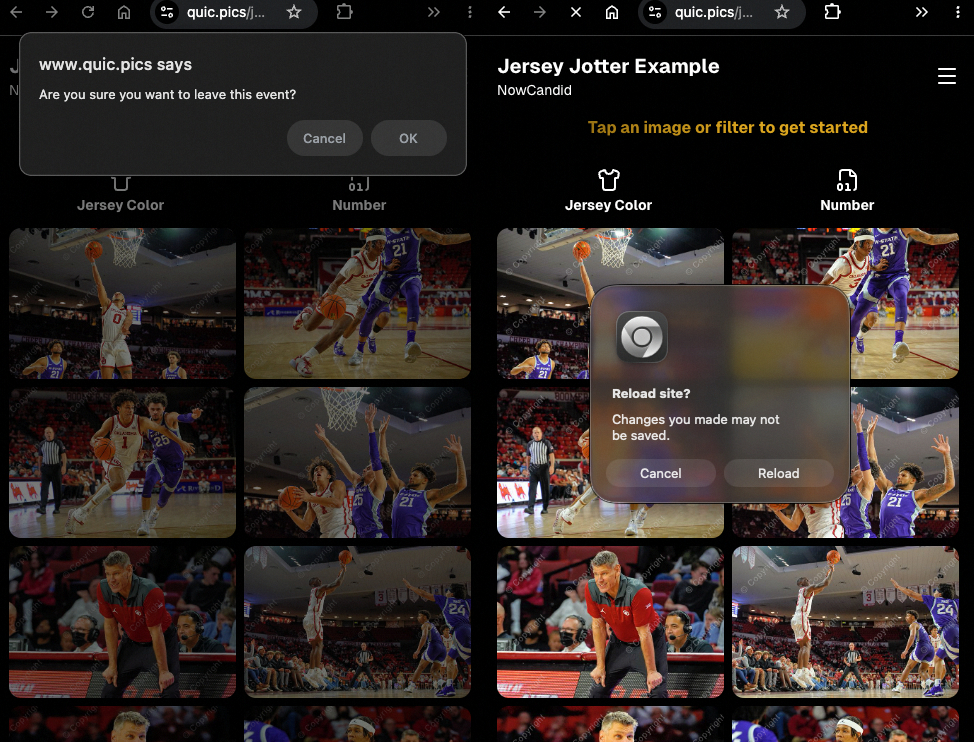
Leave page confirmation

🖼️ Clearer package download expectations + better pickers

  • Personal Gallery Downloads on store sheet and package editor now show “+X Images” in the configurator when there are more than 4 images—so customers don’t think they only get what’s previewed.
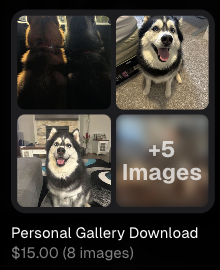
Personal Gallery Download "+X Images"

    • Personal Gallery Download products inside packages can now be clicked to preview contents.

    • Desktop product/package image pickers are now two columns (like mobile), allowing larger image preview during selection.
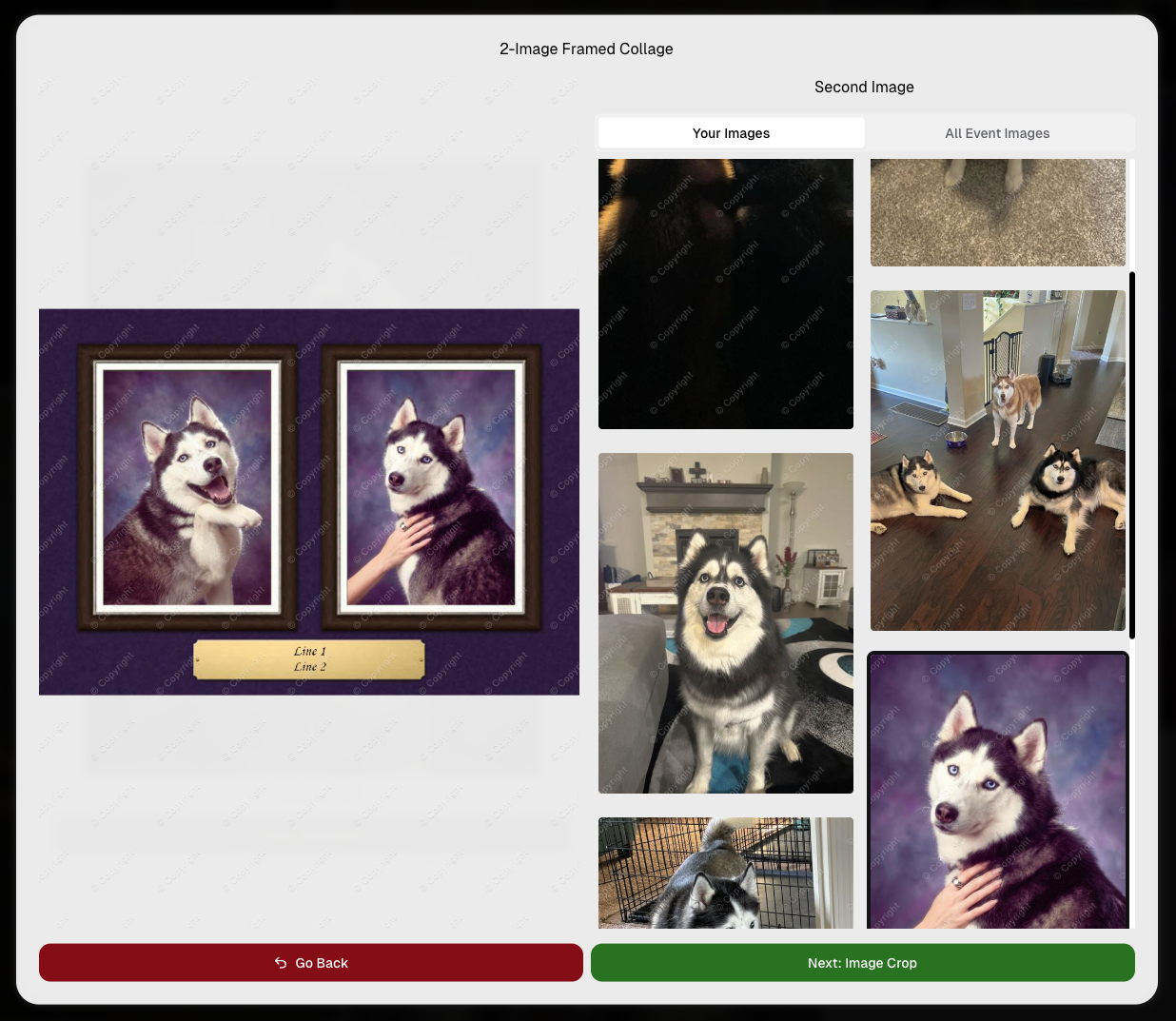
    Larger two column image previews

      • Image Filters landing popup now includes “Browse all photos without a filter” so customers who think they must pick a filter know they can also just browse!
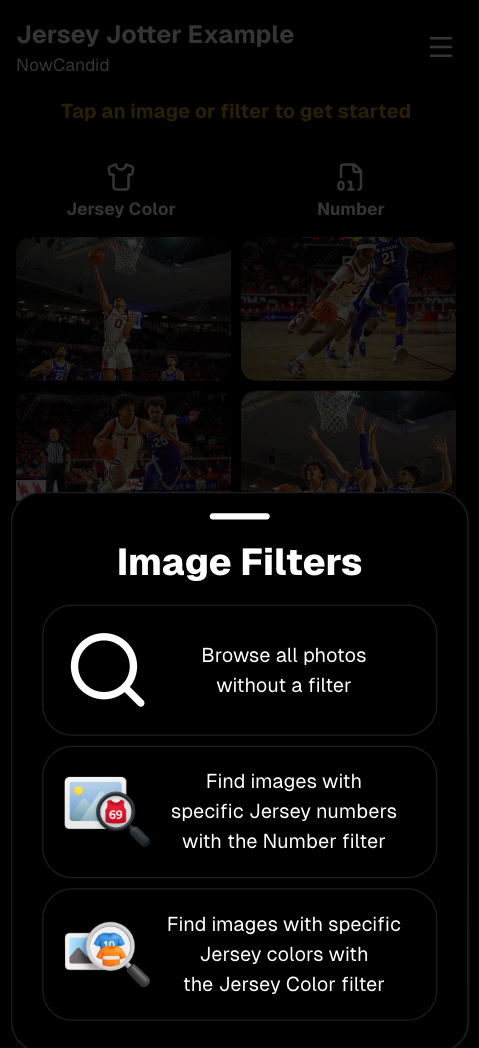
      Image Filters landing popup

      🧩 Retail fixes worth noting

      • Fixed a slashed discount amount showing on week 3 when there is no higher amount.
      • Fixed a GalleryGuard edge case that could close the retail site on some Android devices that support mobile context menus when long-pressing.
      • Fixed a race condition where a Group-by-Face gallery loaded from URL params could show default results instead of the filtered view.
      • Fixed an edge case where manually assigned images marked as group could behave like non-group images on retail.

      📱 Capture App OTA: 5.6.1 & 5.6.2 (iOS & Android)

      🌐 NEW: Network Speed Test (5.6.1)

      A new Network Speed Test button is available in Resources. Tap Run Test to check download speed, upload speed, and latency to NowCandid servers (so results may differ from Google/Ookla). It’s a quick test (downloads 5 MB, uploads 2 MB) and is useful for diagnosing weak or congested service during events.

      Mbps is a standard measurement for connection speeds, and 1 megabit per second (Mbps) is 0.125 Megabytes per second (MB/s). So 8 Mbps is 1 Megabyte per second, max. For example, with images that are 10 Megabytes in size, a speed of 8 Mbps would take a minimum of 10 seconds to upload. When speeds are very slow, image uploads may be impossible due to uploads timing out and restarting. In these cases, open the app when you have a stronger connection and all your images will start going up!
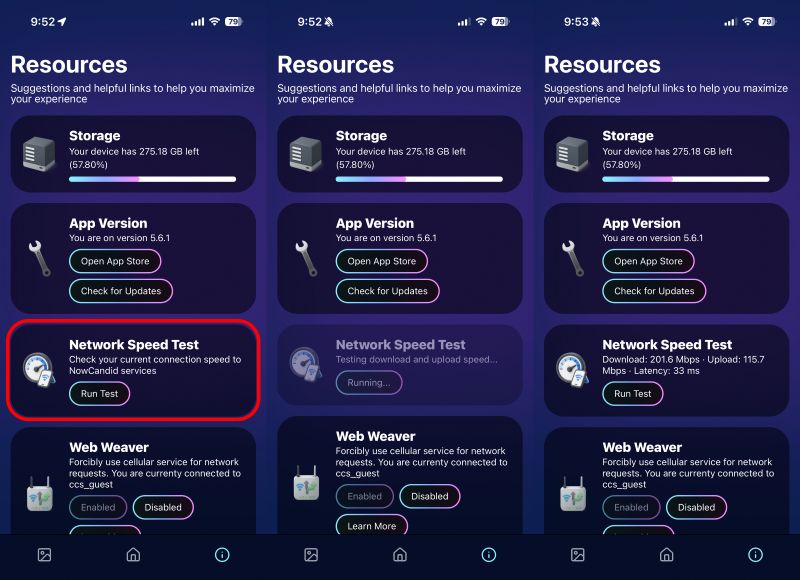
      Network Speed Test

      🎪 Photo Booth + Selfie Check-In Station UI upgrades (5.6.2)

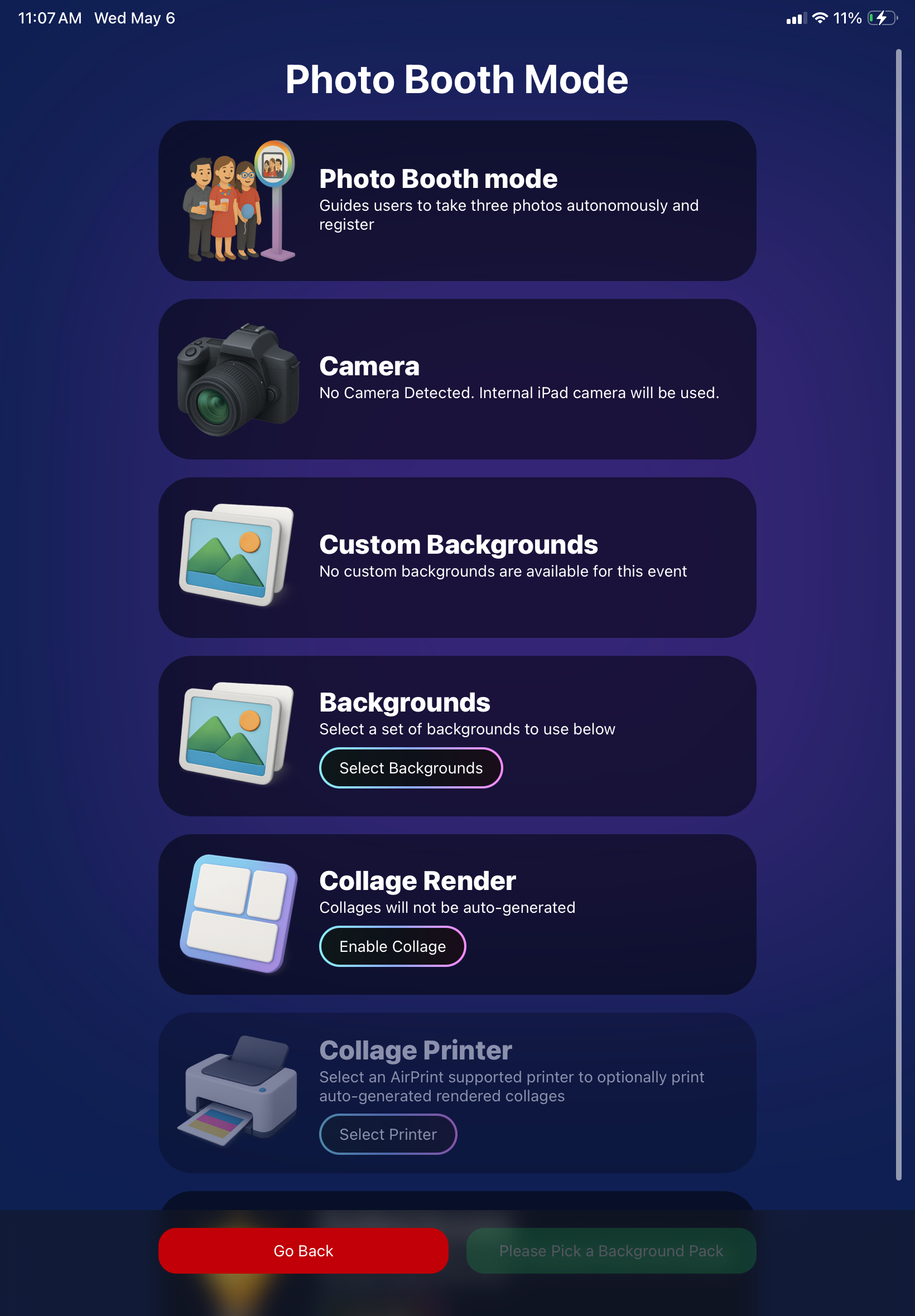
      • Photo Booth landing page updated to be more user-friendly (always-visible scrollbar, updated text, sticky go back/continue buttons, red/green emphasis, and a popup explaining why Continue is greyed out).
      • Selfie Check-In Station landing page updated with red/green Go Back / Begin buttons.
      • New dropdown icon beside Group Photo toggle (when an event has PhotoTags) to better display there are additional options to assign PhotoTags.
      • Fixed edge case cancel/continue behavior on Selfie Check-In Station when no contact info was entered.
      🧩 NEW: Lightroom Classic Plugin (Official)

      We’ve launched an official Lightroom Classic plugin to upload images to NowCandid events directly from Lightroom Classic.

      Key notes:

      • Lightroom Classic only
      • Same image rules apply (color profile, DPI, etc.)
      • Uses Capture App login
      • Only events within 60 days of event start date show in the selector
      • Image Details → Logs will show “Uploaded from NowCandid Lightroom Plugin”
      • Docs include guide/download/installation: https://app.nowcandid.com/docs/tools-more/lightroom
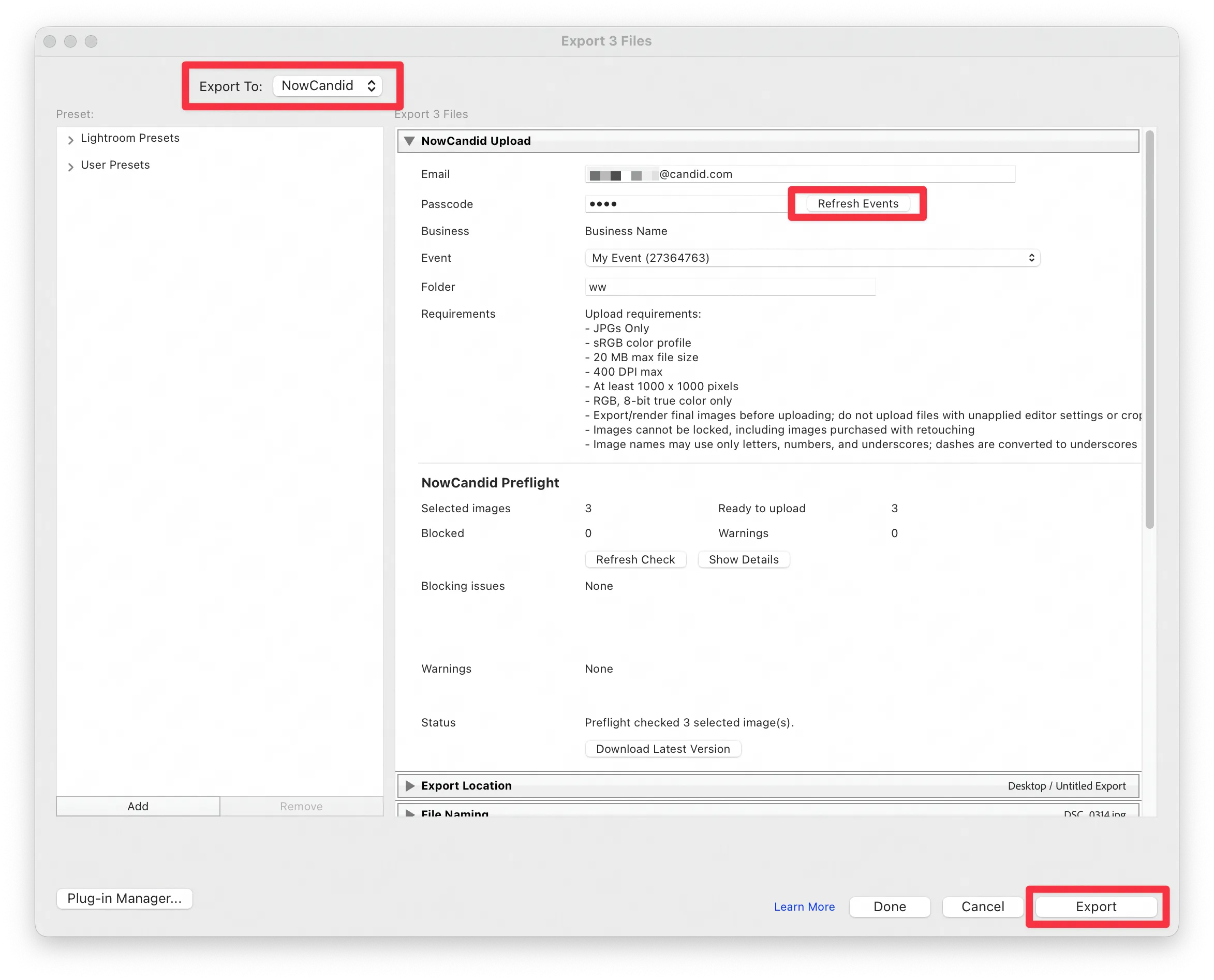
      Lightroom Classic Plugin

      Upload from NowCandid Lightroom Plugin

      🖥️ Dashboard: Upload & Roster Clarity + Small UX Wins

      • Event roster upload and PhotoRoster upload now warn about every unrecognized column, making it easier to spot misspellings (especially for optional columns).
      • Participant list page download now puts additional contacts into columns instead of rows.
      • Participant list download now puts merged contacts into their own row if they have different first/last names.
      • Image upload naming cleanup:
        • spaces/parentheses now automatically become underscores (e.g., Image (2)Image_2)
        • names ending in z now get a trailing underscore (e.g., ImagezImagez_)
      • Candy got even better at using the new Docs for responses.
      • Password reset now shows a clear “Your link has expired” screen (links expire after 24 hours).
      • Fixed participant filter inside another participant’s manual assign/unassign page not working properly.
      • Participant Details PhotoTag assignment UI: merged participants no longer incorrectly show PhotoTags as assigned.
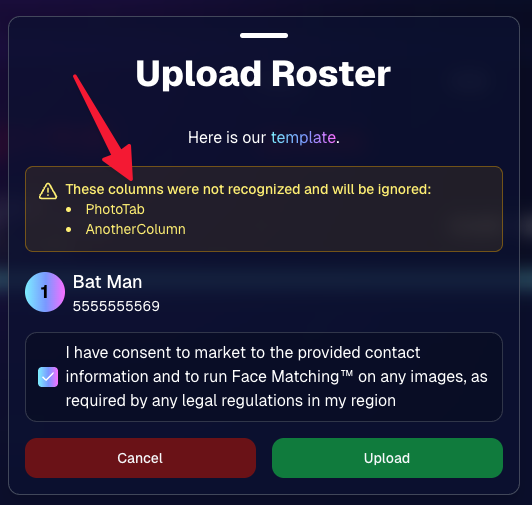
      Upload Roster now warns about every unrecognized column.

      📣 Marketing Fixes

      • Fixed edge cases where galleries that were only AI-edited images could cause follow-up email marketing issues and show as 0 images on Participant List.
      • Fixed Day0 marketing edge case not starting if gallery is just AI-edited images.
      • SMS gallery links now include “View photos:” before the gallery URL to reduce confusion where some users thought the gallery link was an unsubscribe link.

      That’s the week! 💫

      Between the Lightroom Classic plugin, the Capture App’s new Network Speed Test, and retail improvements that reduce confusion (and improve performance), this week was packed with practical wins you’ll feel right away.

      Keep it sparkly,

      Candy

      Related articles

      Weekly Recap: New Unified Sidebar, Valentine’s Theme & Pano Updates 🍬❤️
      Feature Updates
      February 13, 2026

      Weekly Recap: New Unified Sidebar, Valentine’s Theme & Pano Updates 🍬❤️

      4
       minutes read

      Hey photo friends! 👋


      Big week. We’ve rolled out a brand-new unified Sidebar, added new pano options, improved Dashboard speed, and dropped a Valentine’s-ready retail theme.

      Let’s break it down.

      🧭 New Unified Sidebar (Desktop + Mobile)

      The Dashboard navigation just got a major upgrade.

      🖥️📱 One unified sidebar across desktop and mobile

      • No more different layouts depending on device. Navigation is now consistent everywhere.

      🔎 “Sidebar Find” (press F to search)

      • The old command palette is now built into the Sidebar.
      • Press F and start typing to jump anywhere.

      🍬 Candy Navigation Assistant

      • If no results are found, Candy will try to take you where you meant to go!

      👀 Previously hidden items (like Extras) are now much easier to find.

      This is one of the biggest usability upgrades we’ve shipped in a while!

      🖼️ Panoramic Updates

      🖨️ New 24×8 Panoramic Print (non-group version)

      • In addition to the group-only pano lineup, there’s now a non-group 24×8 option.

      🏷️ Existing panos renamed to “X Group Print”

      • Makes it clearer which pano products are group-only.

      🧱 Extreme aspect ratio images (1:3 or 3:1)

      • These are now limited to Panoramic Print products only.

      🧼 Fixed banner artwork incorrectly appearing on pano products in the store sheet.

      🛍️ Retail Improvements

      Much faster initial image grid rendering

      ✨ Removed quick “No Images” flash during load

      🎨 Fixed “View Images” hero button text being too dark on some themes

      ✂️ Crop size checker now correctly respects orientation for large-format products

      💕 New SweetHearts Theme (Valentine’s Ready)

      💖 SweetHearts retail theme released

      🎉 Includes custom heart confetti at checkout

      Just in time for Valentine’s Day sessions!

      🖥️ Dashboard Improvements

      🌾 Candy Culler upgrades

      • Can now set an entire filter to visible or invisible (except duplicates)
      • No longer also culls PhotoRoster reference images (whoops!)

      🧑‍🤝‍🧑 Group Photo toggle added for Portraits Program

      📂 Increased row limits for roster and PhotoRoster uploads

      🛠️ Fixed overlay import not working properly

      📏 Improved DPI validation on banner artwork (matching full frame improvements)

      ⚡ Faster requests across many areas including:

      • Profile updates
      • 2FA verification
      • Invoice loading/downloading
      • Retail settings updates
      • Bank info updates
      • Password reset emails

      📱 Fixed mobile dashboard scrolling/focus issues in popups

      🧾 Fixed create event occasionally not redirecting correctly

      📸 Fixed QuicPics creation confirmation spam edge case

      📬 Fixed unread inbox items appearing from before account creation

      🔐 Security Improvements

      🔒 Improved password reset security

      🔑 Strengthened 2FA flows and verification handling

      🤳 Selfie Check-In

      🖼️ Images under 100×100 are now blocked (lab requirement enforcement)

      🌀 LiveLoop

      🌫️Updated backdrop blur

      • Looks better and is more performant, reducing crashes on WebKit browsers.

      That’s the week!

      A cleaner, unified Dashboard experience, smarter pano handling, better retail performance, and a Valentine’s-ready theme to boot.

      Keep creating magic,

      Candy 🍬

      Weekly Recap: New 24×8 Panoramic Print, and More! 🖼️🧾
      Feature Updates
      January 30, 2026

      Weekly Recap: New 24×8 Panoramic Print, and More! 🖼️🧾

      3
       minutes read
      Hey photo friends! 👋


      This week is a mix of one new product and a handful of refinements across retail pricing, check-in validation, and Dashboard tools.

      Here’s what changed.

      🆕 New Product

      🖼️ 24×8 Panoramic Print (Group-only)

      • A new panoramic option in the same aspect ratio as the other pano prints, built for team and group shots. (Like the others, it’s group-only.)

      🛍️ Retail: Pricing & Editing Improvements

      💸 Package “slashed” pricing corrected and standardized

      • Fixes around week 2/3 slash amounts so package comparisons are more accurate and consistent (including cases where tiered pricing is disabled on Quic events).

      ✍️ Captions editor now allows hyphens and periods

      • Small change, big relief for subjects with multi-hyphenate names.

      ✅ Check-In Page: Better Email Validation

      📧 Improved email validation

      • Now also requires at least one period
      • Now blocks obvious typos like addresses ending in “.con”
      • These are in addition to previously existing "catches" we had in place to help customers avoid typos

      👥 Additional Contacts now use the same validation rules

      • Makes additional contact info more typo-proof too!

      🖥️ Dashboard: Fewer Snags, More Visibility

      🧪 Image Tester now supports PNG files

      • Helpful for validating cutouts and art files.

      📏 Improved DPI validation for artwork uploads (and Image Tester)

      • Better handling for images that don’t explicitly include DPI metadata.

      📦 Package editor expanded limits

      • You can now include up to 16 4×6 and 5×7 prints in a package
      • (Digital downloads remain capped at 16; most other items remain capped at 8).

      📁 Manage Images: Folder Download fixed for large folders

      • Folders over 100 images now reliably download in multiple ZIPs (no more stopping after the first chunk).

      🧾 Order Details page got a big clarity upgrade

      You can now see key indicators and selections more directly, including:

      • ✨ product finish/overlay indicators
      • 🖼️ backgrounds / AI background indicators (where applicable)
      • 📝 captions and chosen colors
      • ⬇️ background downloads working correctly again

      🍬 Candy Culler Improvements

      📊 Results update automatically while culling runs

      • As progress changes, search results refresh so culled images can appear without you manually refreshing.

      🗂️ New downloadable folder report

      • Quick export alongside the toggle for easier review/sharing.

      💬 Misc

      📲 Day 0 SMS link placement updated

      • The retail link now appears after the unsubscribe text to encourage better MMS link previews.

      That’s the week!

      Another new pano option, tighter retail pricing presentation, cleaner check-ins, and a more informative Dashboard where it counts.

      Candy 🍬

      Weekly Recap: New Panoramic Prints, Smarter Culling Tools & Checkout Improvements🖼️🧾
      Feature Updates
      January 23, 2026

      Weekly Recap: New Panoramic Prints, Smarter Culling Tools & Checkout Improvements🖼️🧾

      5
       minutes read
      Hey photo friends! 👋

      Candy here with this week’s updates. Highlights include two new panoramic print products, a bunch of Manage Images + Candy Culler usability wins, and retail checkout + link preview improvements.

      Let’s jump in!

      🆕 New Products: Panoramic Prints (Group-Only)

      🖼️ 15×5 Panoramic Print (Group-only)


      🖼️ 30×10 Panoramic Print (Group-only)

      These are available across both Dashboard + Retail.

      Reminders:

      When you flag photos as Group Photos, they will become purchasable on Group products only IF you have Group Products in your Event's Offer.

      If there are NOT Group Products in your Event's Offer, then images marked as Group Photos will be purchasable on any product (including downloads).

      🖥️ Dashboard: Manage Images + Candy Culler Improvements

      🧰 More Tools always visible on Manage Images

      • Previously it only appeared after an event had at least one image.

      🌾 Candy Culler icon updated (axe → scythe)

      👁️ Visibility toggle added right on the Cull page

      • Toggle visibility from the top-right of the image without opening the lightbox.

      📦 Download Folder improves naming

      • Downloads now default to the folder name for the ZIP file, and you can choose where to save or rename it.

      ⌨️ CTRL/CMD+F supported on the Event PhotoTags page

      🧑‍🤝‍🧑 Rosters, PhotoTags & Participant Fixes

      🏷️ Roster upload now accepts “PhotoTags” column header

      • Previously only accepted “PhotoTag”.

      🧩 PhotoTag filtering fixed on Participant List + Participant Details

      • Especially in edge cases where a later-merged record had the PhotoTag but the initial record didn’t.

      📇 PhotoRoster Data Upload now supports 3 Additional Contacts (up from 2)

      🧾 Image Release Gallery fixes

      • Face count edge cases resolved (duplicates/additional contacts/duplicate submissions)
      • Program filter fixed

      🛍️ Retail: Checkout & Sharing Improvements

      🧾 Improved checkout backend

      • Includes protections to reduce the edge case of double charges during backend disruptions.

      🔗 Link previews fixed for non-QuicPics events

      • Previews should reliably appear in apps like iMessage and Discord.
        • If a retail hero exists, it’s used
        • Otherwise, the first relevant gallery image is used

      🛡️ GalleryGuard enabled when watermark opacity is 0%

      • For events where the retail watermark setting is set to 0% opacity, GalleryGuard will still protect images.
        (Still disabled for Quic-type events.)

      🌀 LiveLoop™ Fixes

      🧠 Fixed out-of-memory crashing sometimes for LiveLoops with artwork renders

      🖼️ Fixed artwork sometimes disappearing after LiveLoop runs for a long time

      ⚡ Performance & UI Fixes (Small but Helpful)

      🚀 Offer list + Event Details load a bit faster

      👤 Some profile actions are faster (passcode changes, retail settings, account data used by PhotoCoach / PortraitPress popups)

      🧩 Fixed some Participant Details pages not loading

      🖼️ Fixed Manage Images lightbox details getting out of sync when using arrow keys

      🧷 Fixed Manage Images scrolling to the top when toggling visibility

      🔑 Fixed Forgot Password page not sending email

      📦 Offer Creator: New “À La Carte” Package Breakdown

      🧮 New “À La Carte” section inside packages shows:

      • Individual item costs (if each package item is present in the offer as an individual product)
      • The package discount a shopper is getting (shows 0% if discount would be negative)

      Note / Feature-Preview: In the near future, this will also be expanded to better highlight savings on packages on the retail site to your customers, automatically!

      ✅ Misc + Check-In Improvement

      💬 Text campaigns weekend test: recurring (non-day-0) texts will now place the retail link at the very end to encourage link previews.

      🤳 Selfie Check-In reliability improvements

      That’s the week!

      New panoramic prints, smoother culling, better retail reliability, and a bunch of cleanup that should make day-to-day usage feel tighter.

      Keep creating magic,

      Candy 🍬

      Let’s get in touch

      If you’re a photographer looking to add NowCandid services to your wheelhouse – set up a call by clicking the button below.

      How to customize formatting for each rich text

      How to customize formatting for each rich text

      How to customize formatting for each rich text

      How to customize formatting for each rich text

      How to customize formatting for each rich text
      How to customize formatting for each rich text

      What’s a Rich Text element?

      The rich text element allows you to create and format headings, paragraphs, blockquotes, images, and video all in one place instead of having to add and format them individually. Just double-click and easily create content.

      A rich text element can be used with static or dynamic content. For static content, just drop it into any page and begin editing. For dynamic content, add a rich text field to any collection and then connect a rich text element to that field in the settings panel. Voila!

      Headings, paragraphs, blockquotes, figures, images, and figure captions can all be styled after a class is added to the rich text element using the "When inside of" nested selector system.

      • List One
      • List Two
      • List Three
      • List Four
      • List Five

      This is a link

      This is bold text