HomeNavigation arrowBlogNavigation arrow
Current page
Feature Updates

Weekly Recap: Faster Background Removal, Smarter Digital Downloads & New AI Editing Tools 📸✨

Weekly Recap: Faster Background Removal, Smarter Digital Downloads & New AI Editing Tools 📸✨
Hey photo friends! 👋

Last week, we were busy hosting our annual Summer Seminar in Denver, Colorado—and we had a great time with everyone who joined us!

That means this week’s recap includes two weeks of updates. Nothing too wild, but plenty of useful improvements across Retail, the Dashboard, Auto Editor, Capture App, and more while we continue working on some bigger changes behind the scenes.

Let’s catch up!

⚡ Faster Background Removal

✂️ Background Removal processing is faster

  • We made multiple speed improvements over the past two weeks to help cutouts finish sooner, especially during higher-volume periods.

📥 Smarter Digital Download Delivery

Digital Downloads can now skip unnecessary processing in more situations.

Some downloads are now available immediately

  • If a customer selects No Overlay, the Event has no artwork, and/the image is not a BGR image, the customer will skip the cropping step on the retail site and receive the full-resolution image without waiting for an 8×12 rendered version.

🖼️ Full aspect ratio is preserved

  • These downloads bypass the cropping step and work more like Personal Gallery Download products.

🆓 Also applies to Medium Res and Free Downloads

  • This includes cases where those downloads are automatically upgraded to full resolution.

📧 Clearer receipt messaging for custom renders

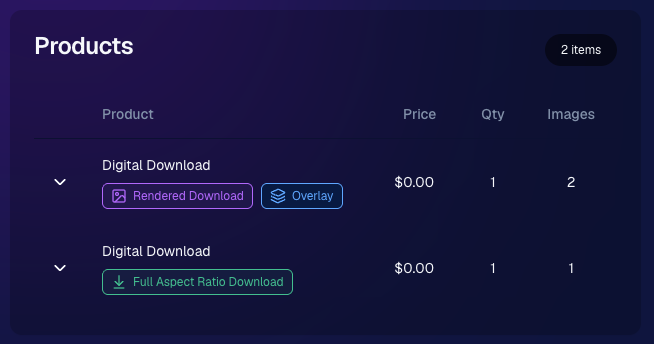
🧾 Order Details now identifies each download type

  • Digital Downloads can now show a Rendered Download or a Full Aspect Ratio Download badge, making it clearer which version was delivered to your customers.
🎨 Auto Editor & Candy Image Studio Updates

🧩 Auto Editor now supports image-input nodes

  • You can now use nodes such as:
    • Custom Image
    • Copy Style
    • Diploma Fix

🙈 Auto Edit originals won’t be texted too early

  • QuicPics and QuicPortraits will no longer send the original image by MMS when it belongs to an active Auto Edit with Hide Originals enabled. The system will wait for the edited version instead.

🕺 New Retro Pop node

  • Give images a colorful, retro-inspired treatment.

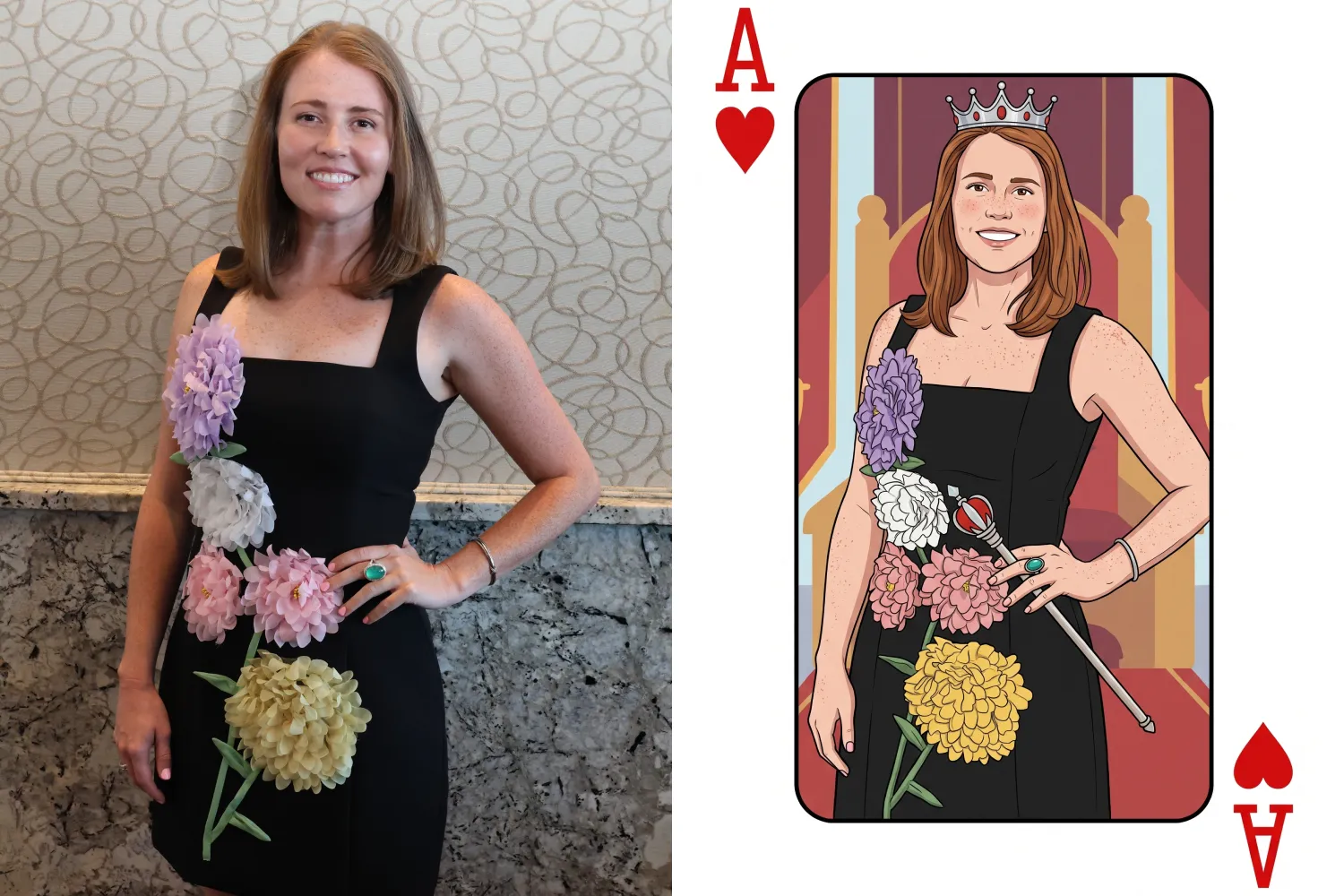
🂡 New Ace Card node

  • Turn subjects into a bold playing-card-style design.

💬 QuicPics & Marketing Improvements

👥 QuicPics can now send to multiple contacts on merged participants

  • If merged participant records contain different phone numbers or email addresses, regular QuicPics can now send to each unique contact.

✉️ Marketing startup fix for BGR cutouts

  • Fixed an edge case where marketing would not begin if the only visible images were cutouts from the newer Background Removal system.

🔗 Hot Links now better respect Hide Originals

  • Fixed an issue where the preview could temporarily show the original image before an Auto Edit finished generating.

📱 Capture App Updates

Capture App 5.8.1

iOS and Android OTA updates

🎨 Updated Event artwork is refreshed at login

  • If artwork changed, the latest file is pulled when logging into the Event normally.

🛠️ Small follow-up fix

  • An additional 5.8.1 update was released to address a minor issue.

Capture App 5.9

iOS and Android App Store update

📲 iOS OTA updates are easier to install

  • You no longer need to completely restart the app or return to the Home Screen to install an available Over-the-Air update.

🤖 Android compatibility updates

  • Required updates were made to stay current with new Google Play requirements.

🛍️ Retail Download Fixes

📱 Safari share sheet reliability improved

  • Press-and-hold downloads should now open the native share sheet more consistently on Safari.

🖼️ Virtual Group download cleanup

  • Virtual Groups in QuicPics no longer offer a Download with Art option.

🎨 Background selection fixes

  • Fixed cases where:
    • A PNG could be downloaded without selecting a background and receive an incorrect blue background
    • Faux renders showed no selected background in the download popup

🔐 Facebook login works again

🖥️ Dashboard Improvements

📊 Image Timeline cleanup

  • Fixed chart display issues, removed folders that were not useful in the timeline, and prevented multiple summaries from appearing when switching folders quickly.

🌾 Candy Culler controls are clearer

  • Filter visibility and report controls now use more descriptive buttons, similar to Manage Images.

📈 BGR Folder Stats fixed

  • Cutouts from the newer Background Removal system no longer incorrectly inflate Unassigned totals.

📱 Mobile Dashboard

🔗 More reliable deep linking

  • Dashboard links should open the correct page more consistently when the app has been open for a while or after signing in and out.

That’s the two-week update!

Faster Background Removal and smarter Digital Download delivery are the biggest highlights, with plenty of smaller improvements making Auto Editor, QuicPics, Retail, and the Capture App more dependable.

Thanks again to everyone who joined us in Denver for Summer Seminar—we loved seeing you!

Keep creating magic,

Candy 🍬

Related articles

Weekly Recap: Positive ID Upgrade, Wallet Glow-Up & Capture App Fixes 📱🛍️
Feature Updates
September 5, 2025

Weekly Recap: Positive ID Upgrade, Wallet Glow-Up & Capture App Fixes 📱🛍️

5
 minutes read
Hey photo friends!

Lots of small but meaningful updates this week—making check-ins better, dashboards clearer, retail orders more polished, and Capture App workflows smoother.

Here’s the scoop:

✅ Positive ID Improvement

  • 👥 Additional Contact support for Simple Check-In & Scan Card Check-In

Subjects can now enter friend or family contact info in addition to their own at Positive ID Events!

This feature was previously limited to Selfie Check-In and Face Matching Events!

📋 Dashboard Improvements

  • 🏷️ Badges for Additional Contacts: Participants and Contacts added as “Additional Contacts” now display a badge for extra clarity
  • 📦 Order Details upgrade: Resubmits now show receive date, order status, and mail date
  • 🔍 New Participant & Contact filters:
    • Option to hide Additional Contacts
    • PhotoTag dropdown added to filters
    • Filter UI updated for consistency with the Event List & Manage Images pages

🛍️ Retail Updates

  • 📦 Billing UI: “Billing same as shipping” checkbox hidden on digital-only orders
  • 🛒 Checkout flow: Steps before & after checkout refreshed for improved clarity
  • 📧 Post-checkout sheet: Now always shows their email on the order, plus order ID & support email
  • 🖼️ Wallet product upgraded: Now precut with rounded corners for a more professional look!
    • ⚠️ Wallets no longer support banner overlays
    • 💲 Price increased slightly more than other products (+21¢) to account for the upgrade

Retail site renders have also been updated to match the upgraded wallets!

📱 Capture App 4.20.4 (iOS)

  • 🛠️ Duplicate participant fixes: App is much less likely to create unnecessary duplicates when merging
  • 🧾 Name Lookup fix: List now properly populates with Scan Card participants, even if some had no names
  • 📷 Nikon Z series fix: Prevents cameras from showing as “connected” while powered off with USB power on

🛠️ Small but Mighty Fixes

  • 👤 No more comma-separated names if merged participants have identical first + last names
  • 💲 Recent price changes went live this week
  • 🍎 Fixed Apple Pay prompt not reappearing after dismissal
  • 🌎 Fixed timezone issues on “X min ago” displays in Image Details & Order Details
  • 🏷️ Fixed PhotoTag/Group selector incorrectly showing on package image picker when no PhotoTags existed
  • 📧 Download receipt emails now specify that files will come from YourPhotos@orderssupport.picsemail.com, helping subjects find their downloads

That’s a wrap for this week! 💫

Whether you’re checking in guests, managing contacts, or delivering polished wallets, these updates should make your work a little smoother.

Keep being amazing,

Candy 🍬

Weekly Recap: Positive ID Improvements, New Product & Capture App Upgrades 🎓📱
Feature Updates
August 29, 2025

Weekly Recap: Positive ID Improvements, New Product & Capture App Upgrades 🎓📱

5
 minutes read
Hey photo friends!

We’ve got a bunch of tidy little upgrades this week—making rosters cleaner, products better, and the Capture App easier to use on busy Positive ID shoots. Here’s what’s new:

📋 Dashboard Improvements

👥 Extra Contacts on Positive ID Rosters: Now supported, just like with PhotoRosters

🏷️ Auto-create PhotoTags: Uploading a Positive ID Roster with new tags? They can now be created automatically in the Event at the same time

📜 Image Details history: Now shows manual unassignments for better tracking

🛍️ Retail Site Updates

🎓 Graduation Plaque: Text now renders live on the retail site

🎓 Graduation Tassel Frame: Text now renders live on the retail site, and features a gold gradient text instead of plain white, and has a new matching stock example

🖼️ New Print Products: 10×18 Print and 10×18 Group Photo now available in the Custom Offer Creator & Editor

📱 Capture App 4.20.3 (iOS)

🔠 Alphabetical PhotoTags: Tags are now sorted A–Z

📌 Persistent PhotoTag filter: Name Lookup will keep your selected filter until you change it or remove it—great for shooting one team at a time

💻 New iPad UI for Name Lookup: Multiple sortable columns + participant image counts in green (easy to see who’s been photographed already)

Better performance: Faster Name Lookup when working with large rosters

📷 Camera support: Sony 7RM3A now supported

🔄 Auto-rotation fixes for vertical images with CamFi & Canon Wireless

📡 Canon Wireless connections working again with the Capture App

🛠️ Small but Mighty Fixes

🏷️ Retail shipping & billing default now set to “Select” instead of "Alabama"

📑 Updated templates for PhotoRoster/Positive ID Roster spreadsheets

📂 CSV roster uploads now supported (not just Excel files)

🔍 Ctrl+F search now works on the Web Dashboard's Blog page

📏 Better DPI conversions in uploader & image details for cm → inches situations

👤 Positive ID Roster fixes for a bug that caused some images to assign to additional Participants

🖼️ Retail Groups tab cutouts now display properly as JPEGs when originals are hidden on the retail site

That’s a wrap for this week! 💫

From cleaner rosters to new products, these changes should make your workflow smoother and your galleries better.

Keep being amazing,

Candy 🍬

Weekly Recap: More PhotoTag Power + Capture App Upgrades 🏷️📱
Feature Updates
August 15, 2025

Weekly Recap: More PhotoTag Power + Capture App Upgrades 🏷️📱

6
 minutes read

Hey there, photo friends!

We’ve got more PhotoTag goodness this week, along with some handy Capture App improvements and small workflow wins. Here’s what’s new:

🏷️More Ways to Use PhotoTags in the Dashboard

  • • Assign PhotoTags to Participants right from the Participant Details page
  • • See PhotoTag images on the Participant Details page for quick reference
  • • Filter Participants by PhotoTag from the Participant List page
  • • PhotoTags now appear on Scan Cards—assigned tags will print right under the participant’s name
  • • Participant galleries on retail now include group photos from their assigned PhotoTags

📋Smoother Roster & Participant Management

  • • Contacts created via scan cards, rosters, Tap-A-Face, or generic check-in are now fully editable like normal participants—no more “blank” contacts
  • • Roster uploads no longer require you to manually remove parentheses in your files (one less cleanup step!)

📱Capture App 4.20.2 Highlights

  • • Use cellular while connected to CamFi or Canon Wi-Fi (great for maintaining uploads while tethered)
  • • Force cellular use via the Resources page if needed
  • • App badge now shows the number of unuploaded images
  • • Sort and filter by PhotoTag in Name Lookup to speed up team or group sessions
  • • New UI improvements, including:
    • • Fullscreen card scan popup on iPhone
    • • New “Choose Participant” popup design
    • • Native iOS-style dropdowns and toggle switches for a cleaner, faster feel

🖼️Small Retail Site Improvements

  • • When cropping an image with a background selected, the cropper now shows the background so you can see exactly how it will look
  • • Jersey Jotter filter combos are now inclusive—meaning “Black + 0” will only show black jerseys with the number 0, not all black jerseys or all 0 jerseys

That’s it for this week!

Lots of small changes adding up to smoother workflows and better gallery organization. 🏆

Keep being amazing,

Candy 🍬

Let’s get in touch

If you’re a photographer looking to add NowCandid services to your wheelhouse – set up a call by clicking the button below.

How to customize formatting for each rich text

How to customize formatting for each rich text

How to customize formatting for each rich text

How to customize formatting for each rich text

How to customize formatting for each rich text

What’s a Rich Text element?

The rich text element allows you to create and format headings, paragraphs, blockquotes, images, and video all in one place instead of having to add and format them individually. Just double-click and easily create content.

A rich text element can be used with static or dynamic content. For static content, just drop it into any page and begin editing. For dynamic content, add a rich text field to any collection and then connect a rich text element to that field in the settings panel. Voila!

Headings, paragraphs, blockquotes, figures, images, and figure captions can all be styled after a class is added to the rich text element using the "When inside of" nested selector system.

  • List One
  • List Two
  • List Three
  • List Four
  • List Five

This is a link

This is bold text