HomeNavigation arrowBlogNavigation arrow
Current page
Feature Updates

Weekly Recap: Faster Virtual Group Creation, New Candy Image Studio Tools & Capture App 5.7 Updates ✨📸

Weekly Recap: Faster Virtual Group Creation, New Candy Image Studio Tools & Capture App 5.7 Updates ✨📸
Hey photo friends! 👋

Candy here with another weekly recap! This week brings some great upgrades to Virtual Group Builder, new Candy Image Studio tools, better Docs search, and a solid Capture App update with helpful color profile and PhotoTag improvements.

Let’s take a look!

🧑‍🤝‍🧑 Virtual Group Builder Improvements

Virtual Group Builder got a nice set of workflow upgrades this week:

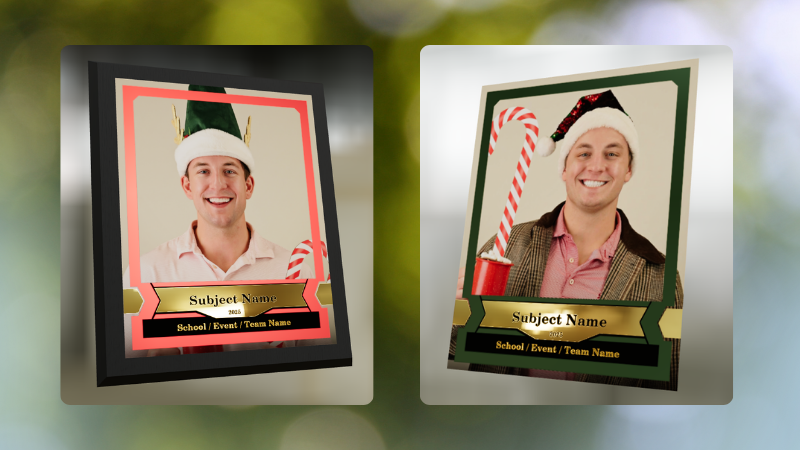
🏷️ Create Virtual Groups directly from PhotoTags

  • On the PhotoTags page, click Create under the VGroup column to automatically start a new Virtual Group using participants from that PhotoTag. You’ll also get a popup asking whether to use each participant’s first or last cutout.

🚀 Save works-in-progress with placeholders

  • You can now save changes to a Virtual Group even if some subjects still have spaceman placeholders.
  • All subjects still need a selected photo before uploading the finished Virtual Group to the Event.

🖼️ Overlay uploads can now be named

  • When uploading overlays, you can name them so they’re easier to search and find later.

🔤 More control over subject name styling

  • Title Case is now only applied on import, meaning you can use the subject inspector to customize name casing afterward.

📐 New text display option

  • There’s a new Display setting to disable justified text.

🌫️ Bottom Vignette improvements

  • Bottom Vignette rendering has been reworked for better results.

🔎 More flexible scaling

  • Max global scale is now 200%.

🎨 Candy Image Studio: New Editing Nodes

Candy Image Studio has two new tools to help clean up common image issues:

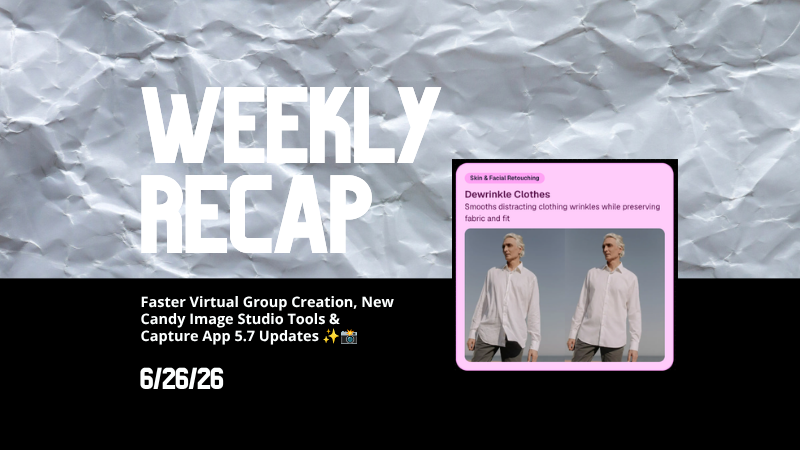
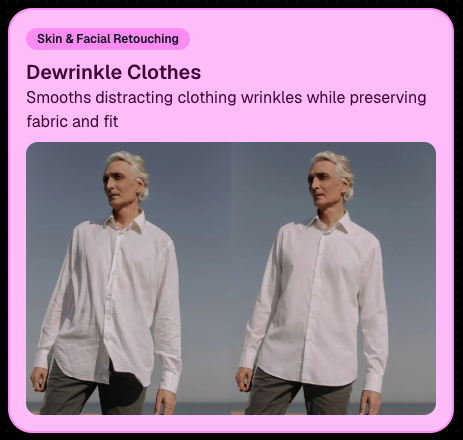
👔 Dewrinkle Clothes

  • Helps smooth distracting clothing wrinkles while keeping the image natural.

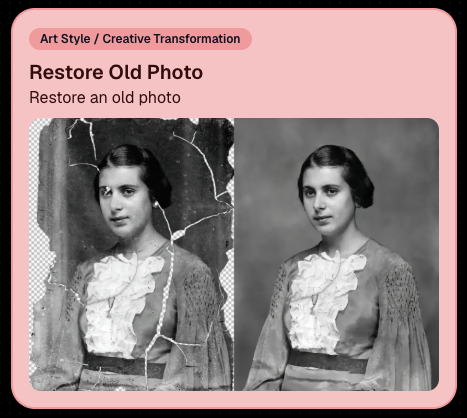
🖼️ Restore Old Photo

  • A new restoration-style node for improving older or damaged images.
📱 Capture App 5.7 Updates

App Store update released Monday, June 22

Capture App 5.7 includes some meaningful workflow and compatibility improvements:

🎨 Automatic sRGB conversion

  • If an image is detected as non-sRGB, the app will now try to automatically convert it to sRGB. If it can’t, you’ll still get the existing invalid color profile warning.
  • This can be especially useful for black-and-white shooting modes that output a different color profile. That said, we still recommend shooting in sRGB whenever possible, since conversion can cause some color loss and may use extra battery during long sessions.

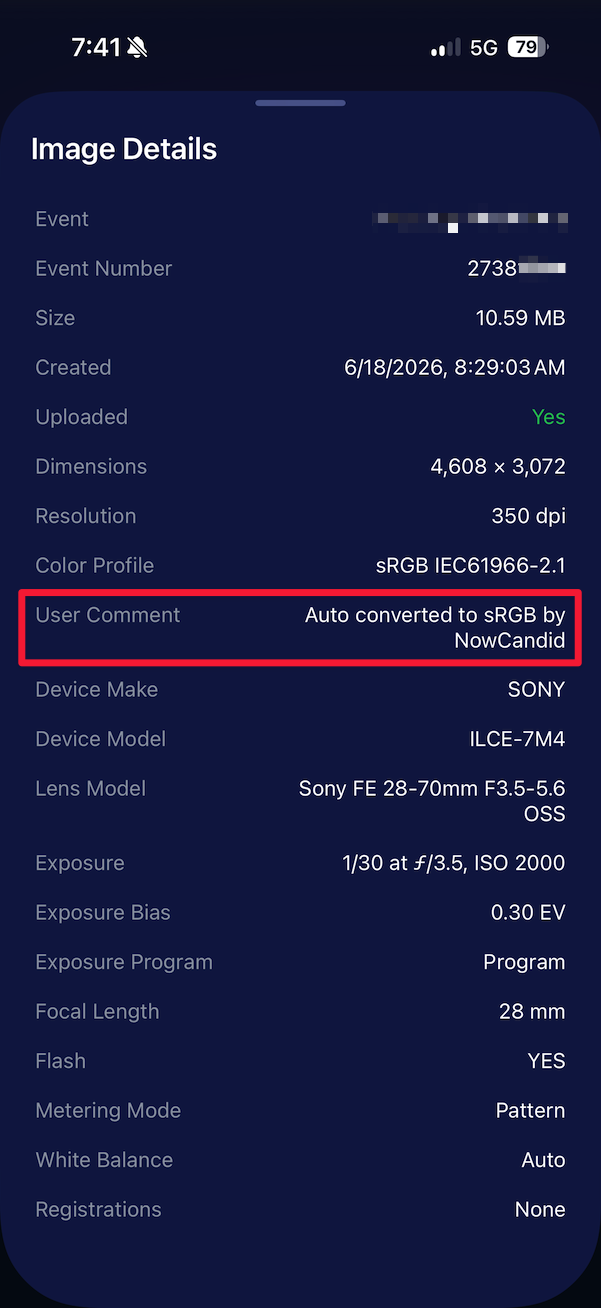
🧾 User Comment shown in EXIF details

  • The image gallery details popup now shows EXIF User Comment data, including whether an image was auto-converted to sRGB.
✂️ BGR visibility sync

  • Visibility changes in BGR folders now affect the cutout too. Mark the original hidden, and the cutout will hide; mark it visible again, and the cutout becomes visible as well.

🏢 Business logo support

  • Your business/profile logo now appears in the Capture App header when available, and can replace Candy in Photo Booth.

⚙️ Contact collection settings moved

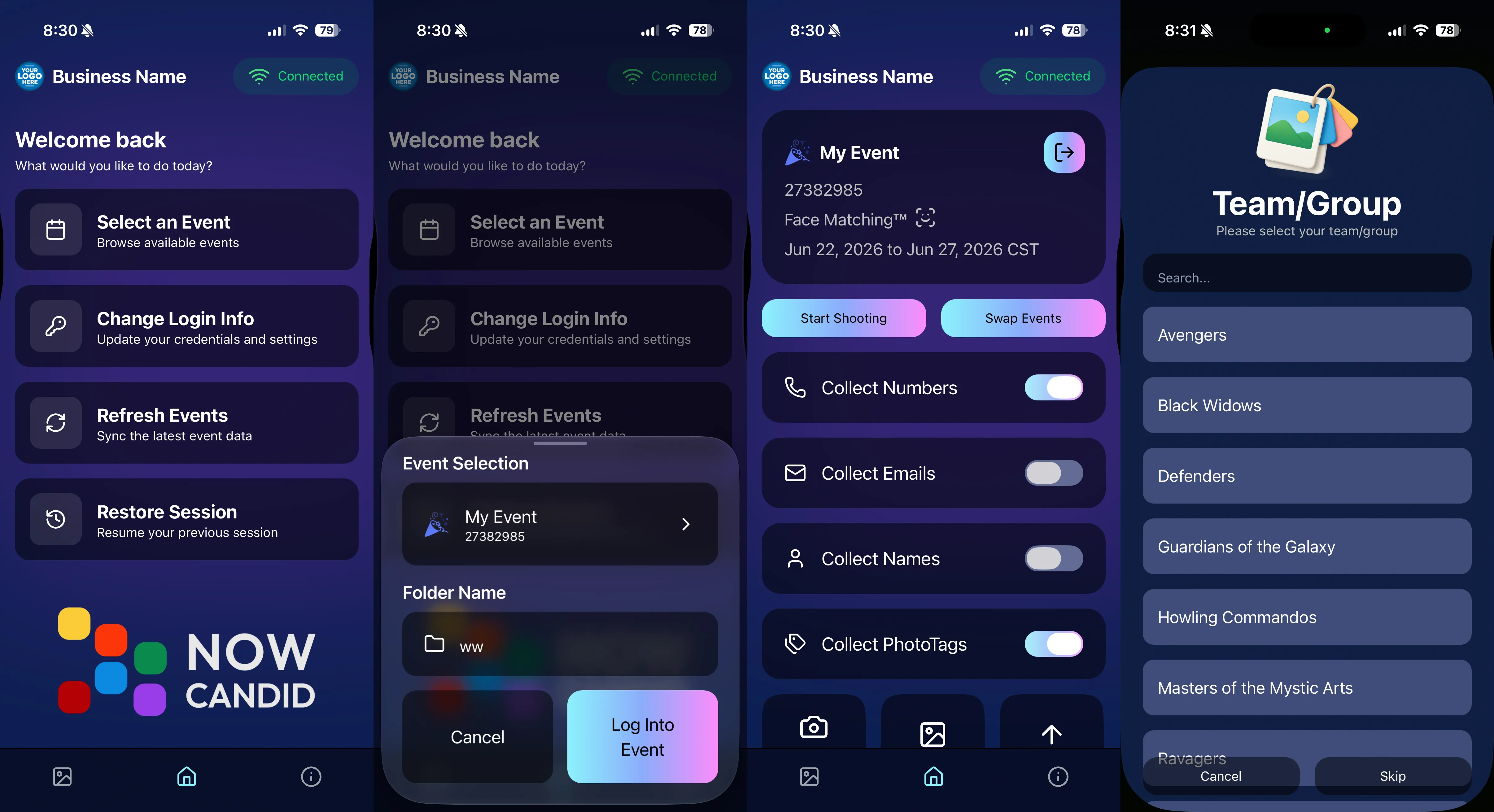
  • Number, email, and name collection settings now live on the Event Overview instead of the Event login sheet, so you don’t need to re-log to change them.

🏷️ Event picker shows PhotoTag attribute

  • If an Event has PhotoTags, the Event picker now makes that easier to spot.

📱 Android UI fixes

  • Fixed several label cutoff issues for Android users with Bold Text enabled.

🔁 Restore Session fix

  • PhotoTags now load properly when an Event is opened through Restore Session.

🎨 Adobe RGB handling fixed on Android

  • Android devices will no longer incorrectly accept Adobe RGB images from cameras.

🍎 iOS 27 support tested

  • iOS 27 has been tested, and no issues were found. The app also respects the latest Liquid Glass device settings.
  • If you update your device to a beta version of iOS 27, let us know if you experience issues!

🏷️ Collect PhotoTags during check-in

  • Participants can now select their own PhotoTag, such as team name, before entering contact information. This option appears when the Event has PhotoTags.
  • We added this primarily to assist photographers in easily tagging late additions not on a roster that show up to a photoshoot, but there will be additional features for action photography in next week's update!
📱 Capture App 5.7.1

OTA update released Friday, June 26

🛠️ Miscellaneous UI fixes

  • A small OTA update with additional interface polish and cleanup.

🖥️ Dashboard Improvements

🔎 Docs Search is here

  • Click Search on the Docs page to search NowCandid documentation, with Candy navigation agent support.

📂 PhotoRoster image name cleanup

  • PhotoRoster data file uploads and image uploads now automatically remove spaces and certain special characters from image names.

🖼️ Full-frame overlay previews are downloadable

  • In the Image Overlay Editor, full-frame example render previews can now be downloaded just like banner previews.

🛍️ Retail Update

🪟 Better desktop popup behavior

  • On desktop, retail popups now automatically become scrollable if the popup is taller than the viewport height, matching Dashboard behavior.

📣 Marketing Fix

✉️ Email campaigns fixed for email-only PhotoRoster participants

  • Fixed an edge case where email-only PhotoRoster participants were not having their email campaigns start.

That’s the week!

From faster Virtual Group setup to better PhotoTag collection in the Capture App, these changes should help make your Event workflows more flexible and easier to manage.

Keep creating magic,

Candy 🍬

Related articles

Weekly Recap: Upgraded Grad Plaque, Retail Polish & More🎓✨
Feature Updates
December 5, 2025

Weekly Recap: Upgraded Grad Plaque, Retail Polish & More🎓✨

5
 minutes read
Hey photo friends! 👋


Candy here. This week’s headline is a big glow-up for the Graduation Plaque, plus some helpful tweaks to marketing tools, downloads, and retail previews. Here’s what changed.

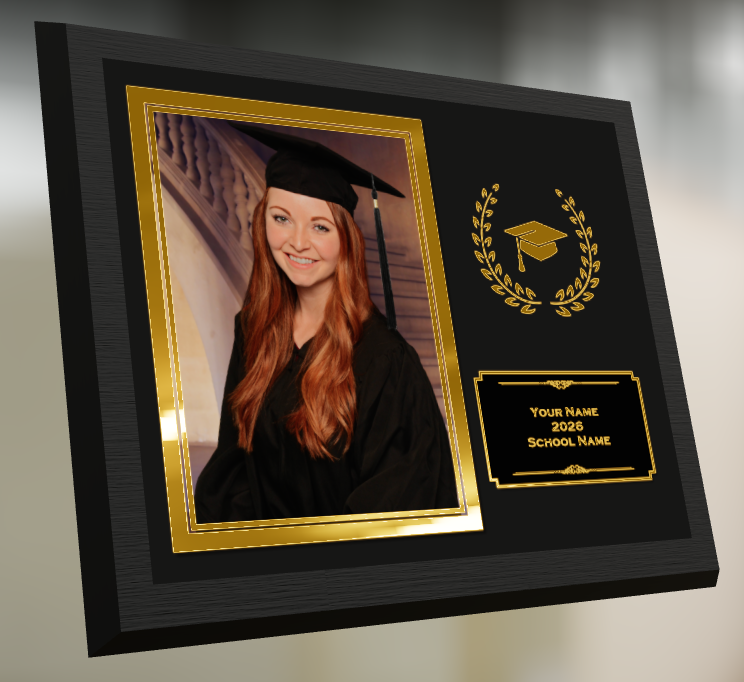
🎓 Graduation Plaque: New Look, New Render

The Graduation Plaque just got a major upgrade:

  • 🆕 New physical product with an updated finish and feel
  • 💰 Cost increase of $0.48 to match the upgraded production
  • 🌀 New live 3D render on the store sheet (like the Premium Print/Plaque experience)
  • 🖼️ 2D render on the checkout sheet for performance
  • 🔻 Diamond Press upsell removed (was available on the previous version, may return in the future)

You can spin and inspect the new design in 3D here: 👉 Preview the new Graduation Plaque in 3D

Perfect for seniors and ceremonies where your customers want a keepsake that really feels special.

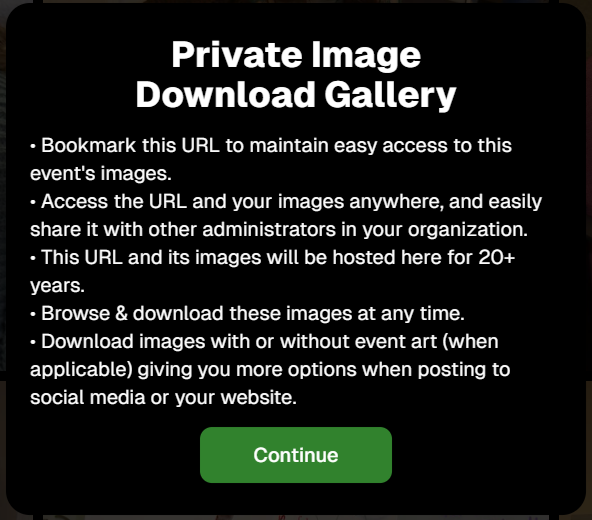
🔒 Private Image Download Gallery

The Private Image Download Gallery now has a new landing popup.

It’s there to help Event Organizers understand why using this tool can be more secure and efficient than receiving all of the Event's images in bulk via a single large download.

📊 Dashboard Updates

📈 Marketing History chart improvements

  • Chart is now hidden when empty, so no more blank space
  • You can switch between Daily / Weekly / Monthly views

📑 Participant Download spreadsheet upgrades

  • Now includes each participant’s retail gallery URL
  • Handy if you’re doing third-party marketing or need to drop direct links into outside tools or messages

🛍️ Retail Site Improvements

🔘 Photo Button render updated

  • New live render that is larger, cleaner, and has no background
  • Matches the style of other renders
  • Render assets are about 15% smaller (faster loads)

⬇️ Press-and-hold download wording fixed

  • Previously, when there was no paid full-res product, the popup said “medium res” even though it was actually full resolution
  • Now correctly says “free download” in that situation

📸 Press-and-hold download fixed on QuicPortraits

  • Press-and-hold works properly again on QuicPortraits Events

🖼️ Luxe Prints artwork fix

  • Store sheet no longer shows artwork overlays on Luxe Prints (since art isn’t available on that product, yet!)

🧱 3D render cropping fix

  • Horizontal previews for 3D renders on the store sheet now use a center crop, not a full-fit that squished the image in the render, whoops!

🧩 Misc / QuicPics GO

👥 Group image flagging in QuicPics GO!

  • You can now flag images as Group Photos in QuicPics GO! via the Dashboard
  • Works similarly to other non-Quic event programs and keeps group images organized for marketing and gallery behavior

That’s it for this week!

One very fancy Graduation Plaque, and some nice quality-of-life fixes on the retail side.

Keep doing great work,

Candy 🍬

Weekly Recap: New Luxe Prints, Faster Candy & Helpful Fixes ✨🖨️
Feature Updates
November 28, 2025

Weekly Recap: New Luxe Prints, Faster Candy & Helpful Fixes ✨🖨️

3
 minutes read
Hey photo friends! 👋


Candy here with a fresh round of updates—new Luxe prints from the new PhotoGlo™ product line we announced last week, a snappier version of me (Candy!) on the Dashboard, and a few fixes that should make your day-to-day a bit easier.

✨ New Luxe Print Products (with 3D Preview!)

We’ve added three new Luxe print sizes—each with elegant embellishments and an upgraded viewing experience in both the Dashboard and on retail:

  • • 🖼️ Luxe 4×6 Print
  • • 🖼️ Luxe 5×7 Print
  • • 🖼️ Luxe 8×10 Print

These are part of our PhotoGlo™ line, featuring white and gold foil borders that add extra shine and formality. They’re a great fit for:

  • • Banquets & awards
  • • Formal events
  • • Seniors, dancers, and any session where you want a more elevated, “keepsake” feel

On the retail site:

  • • 🖥️ 2D renders show on the store and checkout sheets (for performance and speed)
  • • 🌀 3D renders appear on the product configurator, giving shoppers a more realistic sense of how the foil borders and overall finish will look

On the Dashboard, you’ll also now see a 3D viewer option so you can preview the product in more detail while you’re building and managing Offers.

🧠 Candy & Dashboard Improvements

Candy is much faster now

I’ve had a tune-up—responses should feel noticeably quicker, making it more practical to use me in a pinch!

🧾 Candy can look up orders

You can now ask me things like:

“Candy, can you look up order NW12345?”

Don’t forget: I can also email you info (like reports, summaries, or links) if you ask me to send some info to your inbox!

📅 Edit Event end date in the Create Event popup

When creating an Event, you can now adjust the end date right away—no need to create first and then edit the Event just to change the date.

📱 Capture App & Upload Rules

📲 iOS Capture App 4.21.5 (OTA)

  • • Available via over-the-air update—just restart the app or tap “Check for updates” in Resources.
  • • 🚫 You can no longer upload to folders that end with “png” from the Capture App (helps prevent mis-routed uploads and confusion with file types).

🖥️ Web Dashboard upload behavior

  • • 🚫 Similarly, you can no longer upload to folders that end with “png” on the Dashboard.

🧹 Bug Fixes

📆 Marketing Day 45 duplicate emails fixed

  • Some customers were getting multiple Day 45 emails—that’s now resolved.

🧾 Shipping address popup fixed on retail

  • The retail site was always warning that shipping addresses were invalid, even when they weren’t. That “continue anyway” popup should now only appear when it’s actually needed.

✂️ Cutout gallery display fixed

  • “Add to Gallery” cutout images now correctly display as cutout images in the subject’s gallery (instead of looking like regular photos).

That’s the update for this week!

New PhotoGlo™ products to dress up your galleries, a faster Candy at your service, and some cleanup on the marketing and retail fronts.

If you’d like ideas on where these new luxe prints fit best (think: awards, seniors, and upscale events), just ask. 💬

Keep creating great images,

Candy 🍬

Weekly Recap: Introducing PhotoGlo™ Premium Prints & Plaques ✨🖼️
Feature Updates
November 21, 2025

Weekly Recap: Introducing PhotoGlo™ Premium Prints & Plaques ✨🖼️

5
 minutes read
Hey photo friends! 👋


Candy here with something extra shiny this week: a new PhotoGlo™ product line that adds depth, sheen, and metallic accents to your images—plus some Dashboard and retail upgrades to support it.

Let’s start with the fun stuff. 😏

✨ New PhotoGlo™ Products

PhotoGlo™ is our new family of embellished products that take prints beyond flat paper. These products can include:

  • 🎨 Thick color varnishes on specific areas to add depth and a glossy “raised” feel
  • ✨ Metallic foil printing for high-shine metal accents that catch the light and draw the eye

First up in the line:

  • 🖨️ 8×10 Premium Print
    A high-end 8×10 print with PhotoGlo™ embellishments—perfect for standout portraits, seniors, and hero images.
  • 🪧 Premium Plaque
    A mounted plaque (about 9.5×11.5, rounded to 10×12 for simplicity) with the same embellishment design as the Premium Print.

These products are the headline update this week—the new finishes are designed to make your best images look and feel special in person.

Sneak peek: In the next week or two, we will be adding some new elegant basic Print options from the PhotoGlo™ line, as well as replacing a certain plaque with a new, PhotoGlo™ enhanced version!

🌀 3D Renders to Show Off PhotoGlo™

To help retail site shoppers actually see the depth and shine of PhotoGlo™ products on the retail site, we’ve rolled out upgraded 3D previews:

📦 Live 3D product renders

For Premium Print and Premium Plaque, the 3D preview supports:

  • • BGR backgrounds
  • • Crops
  • • Captions
  • • Primary colors / accents

🖥️ Where 3D appears

  • • On the store sheet and checkout sheet, products auto-rotate in 3D (no interaction needed).
  • • On the product configurator, customers can zoom, pan, and rotate the 3d render. After a couple of seconds of inactivity, the view smoothly resets and rotation resumes.

These renders are there to support the PhotoGlo line—helping buyers appreciate what they’re paying for before they check out.

Wanna take a closer look? Click here to view a demo! (app.nowcandid.com/3d/premium-plaque-print)

🛍️ Retail Tweaks

🧱 New desktop layout while customers customize products

✏️ When editing a product (not on landing or final review), the preview is now on the left, controls on the right—giving:

  • • Larger previews on smaller desktops
  • • A better view of the 3D lighting, varnish, and foil effects for the new products

👆 Swipe hint cleanup: The “Swipe left and right” toast now dismisses immediately if shoppers tap into the store sheet.

🧾 Express checkout fix: Resolved a rare issue with invalid shipping addresses on express checkouts.

🖥️ Dashboard Improvements

Faster image loading on events with very large image counts.

🧰 Manage Images – Tools & Extras popup:

  • • Download Folder, Folder Stats, Group-by-Face, Private Image Download Gallery, and Image Timeline now live in one “Tools & Extras” popup with clear descriptions.

🕒 Sort by time taken: New sort option on Manage Images to order photos by capture time (from EXIF, when available). Images without a timestamp are hidden from this specific sort view.

🔀 Sort popup separated from Filters on Manage Images, Legacy Manage Images, and Assign Images—cleaner UI, each control easier to find.

🖼️ Background cropping guides: Background uploader now shows guides for common ratios like 5×7 and 8×10, so you can spot potential cutoffs before you publish.

📊 Event sales & stats modal:

  • • Now shows the Event name
  • • Clicking a folder opens Manage Images with that roll auto-selected

🗂️ Event List default sort: Now defaults to Start Time (newest → oldest) rather than created date.

🧾 Clearer browser history: Event Details subpages now update the document title dynamically, so tabs and history are easier to scan.

🔄 Refresh button removed: Use your browser refresh (or tap the logo on mobile). One less button, same control.

That’s the scoop for this week!

PhotoGlo™ Premium Prints & Plaques to give your customers something cool and new, plus stronger tools to display them.

Keep creating beautiful things,
Candy 🍬

Let’s get in touch

If you’re a photographer looking to add NowCandid services to your wheelhouse – set up a call by clicking the button below.

How to customize formatting for each rich text

How to customize formatting for each rich text

How to customize formatting for each rich text

How to customize formatting for each rich text

How to customize formatting for each rich text

What’s a Rich Text element?

The rich text element allows you to create and format headings, paragraphs, blockquotes, images, and video all in one place instead of having to add and format them individually. Just double-click and easily create content.

A rich text element can be used with static or dynamic content. For static content, just drop it into any page and begin editing. For dynamic content, add a rich text field to any collection and then connect a rich text element to that field in the settings panel. Voila!

Headings, paragraphs, blockquotes, figures, images, and figure captions can all be styled after a class is added to the rich text element using the "When inside of" nested selector system.

  • List One
  • List Two
  • List Three
  • List Four
  • List Five

This is a link

This is bold text