HomeNavigation arrowBlogNavigation arrow
Current page
Feature Updates

Weekly Recap: Introducing PhotoGlo™ Premium Prints & Plaques ✨🖼️

Weekly Recap: Introducing PhotoGlo™ Premium Prints & Plaques ✨🖼️
Hey photo friends! 👋


Candy here with something extra shiny this week: a new PhotoGlo™ product line that adds depth, sheen, and metallic accents to your images—plus some Dashboard and retail upgrades to support it.

Let’s start with the fun stuff. 😏

✨ New PhotoGlo™ Products

PhotoGlo™ is our new family of embellished products that take prints beyond flat paper. These products can include:

  • 🎨 Thick color varnishes on specific areas to add depth and a glossy “raised” feel
  • ✨ Metallic foil printing for high-shine metal accents that catch the light and draw the eye

First up in the line:

  • 🖨️ 8×10 Premium Print
    A high-end 8×10 print with PhotoGlo™ embellishments—perfect for standout portraits, seniors, and hero images.
  • 🪧 Premium Plaque
    A mounted plaque (about 9.5×11.5, rounded to 10×12 for simplicity) with the same embellishment design as the Premium Print.

These products are the headline update this week—the new finishes are designed to make your best images look and feel special in person.

Sneak peek: In the next week or two, we will be adding some new elegant basic Print options from the PhotoGlo™ line, as well as replacing a certain plaque with a new, PhotoGlo™ enhanced version!

🌀 3D Renders to Show Off PhotoGlo™

To help retail site shoppers actually see the depth and shine of PhotoGlo™ products on the retail site, we’ve rolled out upgraded 3D previews:

📦 Live 3D product renders

For Premium Print and Premium Plaque, the 3D preview supports:

  • • BGR backgrounds
  • • Crops
  • • Captions
  • • Primary colors / accents

🖥️ Where 3D appears

  • • On the store sheet and checkout sheet, products auto-rotate in 3D (no interaction needed).
  • • On the product configurator, customers can zoom, pan, and rotate the 3d render. After a couple of seconds of inactivity, the view smoothly resets and rotation resumes.
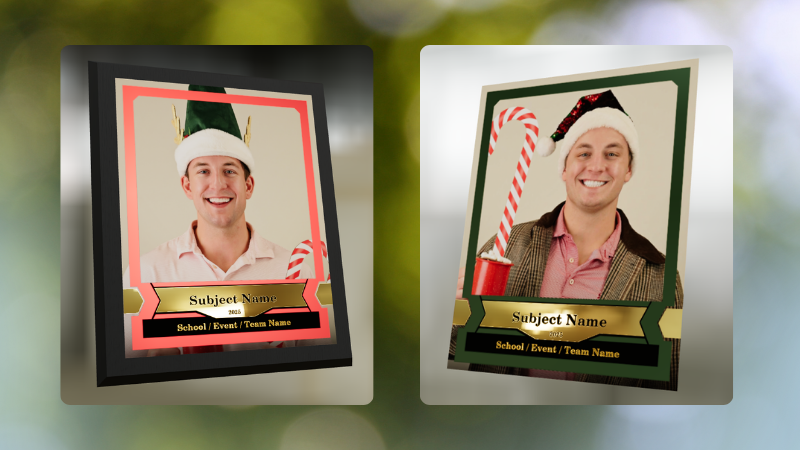
These renders are there to support the PhotoGlo line—helping buyers appreciate what they’re paying for before they check out.

Wanna take a closer look? Click here to view a demo! (app.nowcandid.com/3d/premium-plaque-print)

🛍️ Retail Tweaks

🧱 New desktop layout while customers customize products

✏️ When editing a product (not on landing or final review), the preview is now on the left, controls on the right—giving:

  • • Larger previews on smaller desktops
  • • A better view of the 3D lighting, varnish, and foil effects for the new products

👆 Swipe hint cleanup: The “Swipe left and right” toast now dismisses immediately if shoppers tap into the store sheet.

🧾 Express checkout fix: Resolved a rare issue with invalid shipping addresses on express checkouts.

🖥️ Dashboard Improvements

Faster image loading on events with very large image counts.

🧰 Manage Images – Tools & Extras popup:

  • • Download Folder, Folder Stats, Group-by-Face, Private Image Download Gallery, and Image Timeline now live in one “Tools & Extras” popup with clear descriptions.

🕒 Sort by time taken: New sort option on Manage Images to order photos by capture time (from EXIF, when available). Images without a timestamp are hidden from this specific sort view.

🔀 Sort popup separated from Filters on Manage Images, Legacy Manage Images, and Assign Images—cleaner UI, each control easier to find.

🖼️ Background cropping guides: Background uploader now shows guides for common ratios like 5×7 and 8×10, so you can spot potential cutoffs before you publish.

📊 Event sales & stats modal:

  • • Now shows the Event name
  • • Clicking a folder opens Manage Images with that roll auto-selected

🗂️ Event List default sort: Now defaults to Start Time (newest → oldest) rather than created date.

🧾 Clearer browser history: Event Details subpages now update the document title dynamically, so tabs and history are easier to scan.

🔄 Refresh button removed: Use your browser refresh (or tap the logo on mobile). One less button, same control.

That’s the scoop for this week!

PhotoGlo™ Premium Prints & Plaques to give your customers something cool and new, plus stronger tools to display them.

Keep creating beautiful things,
Candy 🍬

Related articles

Helpful Tips: Using QuicPics at your Proms
QuicPics
April 19, 2023

Helpful Tips: Using QuicPics at your Proms

6
 minutes read

QuicPics is an innovative photo booth alternative designed to enhance the photo-taking experience at events like proms. As a photographer, QuicPics allows you to offer a modern, fun, and interactive experience for prom attendees, while you get paid upfront for your services. It can be sold as a “mobile photo booth” service, as a manned portrait station akin to traditional photo booths, or as a service where you provide both! Thanks to our cloud, no matter how many photographers or photo stations you have, they’ll all talk to each other, meaning guests only have to provide their contact info once. 

This short guide will walk you through how to effectively use QuicPics for a prom night:

  1. First, Understanding QuicPics:
    QuicPics is quite different from NowCandid’s other programs, it texts image files directly to guests in addition to a link to their online gallery. With NowCandid’s other programs, only links to online galleries of images are delivered. QuicPics also charges the photographer for each image they take and upload to the cloud, making it the only NowCandid feature that charges the photographer in any way.
  2. QuicPics’ Advantage:
    QuicPics is a perfect alternative to traditional photo booths. It's a mobile, modern, interactive, and engaging way to capture memories at proms. With instant texting of images to attendees, QuicPics ensures a seamless experience for everyone involved.
  3. Create a Unique Photo Station:
    Make your photo station stand out by offering themed backdrops, fun props, and creative lighting. This will not only draw the prom-goers to your station but also encourage them to share their professional photos on social media, giving you free advertising and potentially attracting new clients.
  4. Pricing and Payment:
    As a photographer, it's essential to get paid upfront for your services. We recommend charging between $200 to $300 per photographer hour, possibly offering a discount if they are requesting a large number of photographers and/or hours. Alternatively, talk to the school or with involved parents about increasing the cost of prom tickets to pay for QuicPics services for the prom. Take payments using PayPal, Square, Venmo, via check, checkout on your own website, or whatever means are most convenient for you! Just ensure it looks professional to the school you’re dealing with.
  5. Planning your Workflow:
    To ensure a smooth process, have a tablet available for prom attendees to interact with the QuicPics platform. This will allow them to receive their photos via text message instantly thanks to the LTE connection of the tablets. We recommend using the Tap-A-Face workflow, which simplifies the process of collecting data and pairing it to their face, as well as being a fun addition to the prom already!
  6. Selling the Service:
    To promote your QuicPics services, create a compelling sales pitch that highlights the benefits of a mobile photo booth experience, the convenience of instant photo sharing, and the interactive nature of the platform. Showcase sample photos and emphasize the unique value QuicPics brings to a prom night.

QuicPics is a fun, interactive, and modern solution to traditional photo booths, making it an excellent addition to any prom night. By following these tips, hopefully you'll be able to provide a memorable experience for prom attendees while securing payment for your services. Happy snapping!

Proms: An Untapped Gold Mine
PartyPics
April 14, 2023

Proms: An Untapped Gold Mine

4
 minutes read

Plenty of photographers think photographing a prom is not worth their time and energy. They're not wrong to think that either... as that can often be the case! But, NowCandid's "PartyPics Now!" program has cracked the code and found a way to consistently monetize proms and other school dances!

We analyzed all the proms that took place in 2022 that had utilized PartyPics Now, and found that across dozens of proms, photographers averaged well over $2 per image taken and about $5 per guest at the prom. Not bad, considering the average number of students at any given prom was about 400 students!

The top performing proms well exceeded $2 per image and $5 per guest by doing some combination of the following things:

          • First, they used NowCandid's Selfie Check-In workflow, which gathered the guest's parent's contact data! Marketing the prom images to them as well.

          • Second, they utilized photo stations (sometimes with backdrops and/or props!) with photographer attendants in addition to roaming photographers.

          • And third, they sent 4 or more photographers to ensure they photographed every guest multiple times, making the guest's online galleries (and the larger photo packages) more appealing!

At proms where all three of those conditions were successfully met, the average sales per image was $3 and the average sales per event guest was almost $9!

So, while proms might not be quite as profitable as they were once upon a time, they can still be a great way to make some extra profit in your off season, expand your business, keep your photographers paid and busy, and more!

And... stay tuned! Because a new feature we're calling Group-by-Face rolls out in the very near future! Helping to take your online galleries for social events to the next level! 🎉

Have any questions? Feel free to contact us! We love to chat. 😃

Stay profitable, photographers! 📸

Cap and Gown Chronicles: Master the Art of Graduation Photography with These Expert Tips
GradPics
April 11, 2023

Cap and Gown Chronicles: Master the Art of Graduation Photography with These Expert Tips

4
 minutes read

Graduation day is a momentous occasion, marking the culmination of years of hard work, dedication, and the occasional all-nighter (we're looking at you, college students). As a photographer, you have the unique opportunity to capture these once-in-a-lifetime moments, and we're here to help you make the most of it. From technical know-how to creative flair, we've got you covered with expert tips for optimal graduation photography. And with NowCandid's Grad Pics Now program at your side, you'll be snapping insta-worthy shots in no time. So, ready your camera and let's get started!

  1. Scout the Location:
    Before the big day, visit the graduation venue to familiarize yourself with the layout and lighting conditions. Identify the best spots for group shots, candid moments, and the all-important diploma handoff. This prep work will ensure that you're in the right place at the right time to capture those precious memories.
  2. Use the Right Gear:
    Bring a telephoto lens for close-ups of the stage, a wide-angle lens for group shots, and a fast prime lens for low-light conditions. A monopod or tripod can also help steady your shots and reduce camera shake during those crucial moments and pre- or post-stage cross portraits.
  3. Find the Perfect Angle:
    Get creative with your angles to add depth and interest to your shots. But importantly, always find the right shot in order to get the graduate’s face in the photo! When using NowCandid’s face matching workflows, that’s a very important piece of the puzzle! When you can’t get a good angle, consider asking the school ahead of time to make sure the “handshaker” will always turn towards the camera and smile, prompting the graduates to do the same!
  4. Tell the Story:
    Graduation day is a rollercoaster of emotions, from anticipation to elation. Document the day's events, capturing candid moments and reactions that tell a compelling story. With NowCandid's Grad Pics Now program, you can easily organize and share these images in a personalized gallery, allowing graduates and their families to relive the day for years to come.
  5. Get Creative with Portraits:
    Graduation portraits don't have to be stiff and formal. Encourage the graduates to express themselves, whether it's a celebratory jump or a quirky pose with their diploma. These fun shots will stand out and make lasting memories.

With these expert tips and NowCandid's Grad Pics Now program in your toolkit, you'll be well-equipped to master the art of graduation photography. So, channel your inner photographer and capture the magic of the big day – because, as Ferris Bueller once said, "Life moves pretty fast. If you don't stop and look around once in a while, you could miss it." And no one wants to miss a moment as special as graduation day. Happy snapping!

Let’s get in touch

If you’re a photographer looking to add NowCandid services to your wheelhouse – set up a call by clicking the button below.

How to customize formatting for each rich text

How to customize formatting for each rich text

How to customize formatting for each rich text

How to customize formatting for each rich text

How to customize formatting for each rich text

What’s a Rich Text element?

The rich text element allows you to create and format headings, paragraphs, blockquotes, images, and video all in one place instead of having to add and format them individually. Just double-click and easily create content.

A rich text element can be used with static or dynamic content. For static content, just drop it into any page and begin editing. For dynamic content, add a rich text field to any collection and then connect a rich text element to that field in the settings panel. Voila!

Headings, paragraphs, blockquotes, figures, images, and figure captions can all be styled after a class is added to the rich text element using the "When inside of" nested selector system.

  • List One
  • List Two
  • List Three
  • List Four
  • List Five

This is a link

This is bold text