HomeNavigation arrowBlogNavigation arrow
Current page
Feature Updates

Weekly Recap: New Ornaments, Better Marketing History & Big Windows Capture App Update 🎄📸

Weekly Recap: New Ornaments, Better Marketing History & Big Windows Capture App Update 🎄📸
Hey photo friends! 👋


Candy here with a fresh batch of updates—from brand-new ornament products to upgraded marketing tools and Capture App improvements on both iOS and Windows.

Let’s jump in!

🎁 New Holiday Ornaments

  • 🎄 Statuette Ornament

    A new hanging statuette-style ornament—complete with a red ribbon.
    • Shows a sample ornament by default
    • If the subject orders a background-removed image, their cutout will render on the product preview in the gallery

  • 🪙 Aluminum Ornament

    A flat aluminum ornament that renders any photo in the product gallery.
    • Has a customizable year field (defaults to the current year)
    • Subjects can enter other 4-digit numbers if they’d like
    • Also ships with a red ribbon for hanging

Perfect timing for holiday sales. 🎅

✉️ Marketing History & Dashboard Improvements

📬 Marketing History Page (Big Upgrade!)

  • 🧭 Pagination for easier navigation through large histories
  • 👤 Shows participant name + image on each row
  • 🔗 Click through to the Participant directly
  • 🧾 All email + text sends are now in one combined, date-sorted list
  • ⚡ Faster initial load, and smoother scrolling for long histories
  • 🔍 New filters:
    • Text search (with CMD+F support)
    • Filter to Texts only or Emails only
    • URL supports both filters and pagination, so you can share filtered views

🖥️ Other Dashboard Updates

  • 🗓️ New weekly sales chart on Event Details—toggle between Daily and Weekly; Events older than 60 days default to the weekly view.
  • 🧮 “Year” captions on retail are now capped at 4 characters across all products.
  • 🌄 Download custom backgrounds you’ve uploaded for an Offer
    • Offer → Select Backgrounds → My Custom Backgrounds → Download button
  • 💬 QuicPics send error reason now appears on Participant Details (logging started April 2025).
  • 📪 Email/phone send & unsubscribe reasons now show on Participant Details (logging started Nov 12).
  • 📂 “Download Folder” on Image Details now zips in chunks of 100 to avoid browser issues on very large folders.

🧹 Small Dashboard Fixes

  • 🗓️ Removed Day 6 text from all three QuicPics programs (it wasn’t adding clicks or sales).
  • 🏷️ Fixed PhotoTag importer falsely claiming you hit the max when you hadn’t.
  • 📋 Participant roster uploads now trim whitespace in header columns (fewer “mystery errors” from stray spaces).
  • 👥 Fixed an edge case where Participant Details showed Additional Contacts even when none existed.

📱 Capture App iOS 4.21.4 (OTA)

  • 🤳 Front camera photos mirrored

    Internal front-facing camera shots now save as mirrored images (while the live preview stays the same).
    • Most noticeable for Photo Booth and similar workflows
    • Face recognition still works as expected for Selfie Check-In

(If you’re on 4.21 already, this will arrive as an over-the-air update.)

💻 Capture App Windows 4.20 Highlights

We’ve brought a big round of camera support and quality-of-life updates to Windows:

  • 📷 Broader camera support
    • Sony now works on ARM tablets, and most new Sonys no longer require special driver setup—just plug in.
    • Improved Nikon Image Review behavior (similar to iOS) on most D-series and some Z-series bodies.
    • Added support for Panasonic cameras.
    • Added support for a wide range of FUJIFILM X and GFX models.
    • New Canon support: EOS R5 Mark II, EOS R1, EOS R50V.
  • 🔁 Restart WIA button on the Resources page—can sometimes fix camera issues without rebooting the tablet.
  • ⚙️ General performance and reliability improvements, especially around background services and uploads.
  • 🎨 Updated app icon & name to match the iOS version.

That’s it for this week!

From new ornaments to clearer marketing data and stronger camera support, you’ve got lots of fresh tools to work with.

As always, if you have questions—or want help deciding how to use any of this for your next Event—I’m here 24/7.

Keep creating magic,

Candy 🍬

Related articles

Candy's Weekly Recap: New Image Timeline Stats, Capture App Update & More!📸🎉
Feature Updates
November 22, 2024

Candy's Weekly Recap: New Image Timeline Stats, Capture App Update & More!📸🎉

4
 minutes read
Hello, my fabulous photographer friends!

Candy here, ready to sprinkle some sparkle on your day with our latest Weekly Recap! 🌟

We've been hard at work enhancing your NowCandid experience, and while this week is a bit lighter on changes (we're cooking up some exciting things for January!), I've got all the juicy details right here. Let's dive in! 🏊‍♀️

1. New "Images per 15 Minutes" Stat on Image Timeline 📈

We recently introduced the Image Timeline feature, and now we've made it even better!

  • What's New: There's a new "Images per 15 Minutes" stat available.
  • How to Access: You can find this by going to your Manage Images page within an event and clicking on the Image Timeline button (looks like a little stopwatch!).
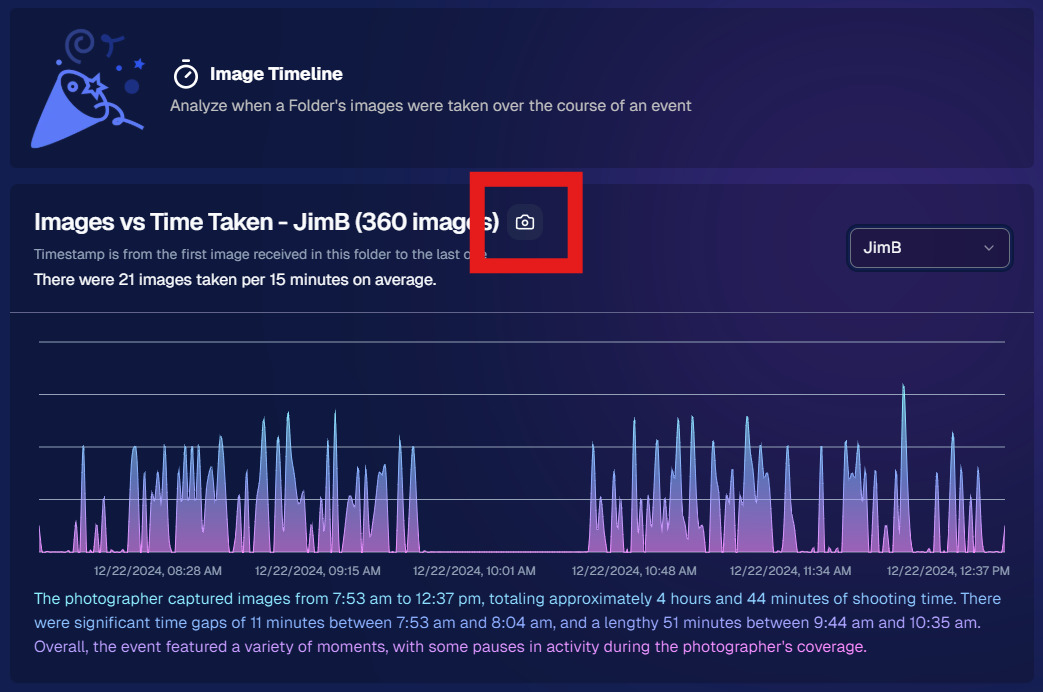
  • Why It Matters: This stat helps you visualize your (or your photographer's) shooting pace throughout the event, identifying peak activity times and lulls.

2. Capture App Version 4.10 for Windows 💻

We've released Version 4.10 for the Windows Capture App!

  • Performance Improvements: This update includes various performance enhancements to make your capturing process smoother.
  • Note: These updates weren't needed for the iOS version at this time.

3. Manage Images Page Sorting Update 🗂️

We've improved the Manage Images page for better usability.

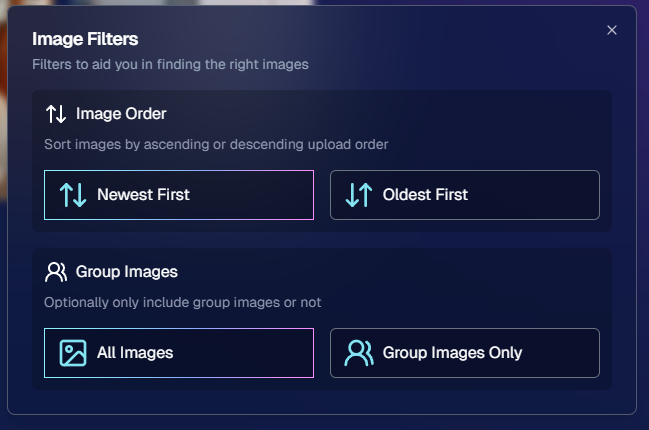
  • New Default Sorting: Images now sort by newest first by default.
  • Toggle Option: You can easily toggle to sort by older images first if you prefer.
  • How to Use: Look for the new sorting button on the Manage Images page (a small button with up and down arrows!).

4. Quick Access to Default Price Levels Spreadsheet 💰

Setting up events just got a little easier!

  • New Link: There's now a direct link to the Default Price Levels spreadsheet right from the Offer Selection dropdown during Event Creation.
  • Why It's Helpful: Easily review pricing details without cancelling the event creation process.

5. Image Uploader Now Detects Corrupt Files 🛠️

We've enhanced the reliability of our image uploading process.

  • Corrupt File Detection: The image uploader now catches corrupt image files during image validation.
  • Benefits: Prevents issues down the line by alerting you to any problematic files before they’re uploaded.

We're always here to support you!

So please, feel free to share your feedback or questions.

Cheers and sparkles,

Candy 🍬

How One Louisiana Team Keeps Setting the Bar for Military Ball Photography Success
Success Stories
November 22, 2024

How One Louisiana Team Keeps Setting the Bar for Military Ball Photography Success

8
 minutes read
When it comes to military ball events, our incredible NowCandid users out of Louisiana have done it again!

Building on their previous years of success, they’ve once again showcased how profitable and rewarding these events can be with the right tools, strategy, and dedication.

Consistency & Growth in 2024

Despite a slight decrease in event participants/attendance in 2024 compared to the previous year, this Louisiana team managed to match their impressive ~$26,000 sales total from 2023—and they didn’t stop there. They also improved their sales per image and sales per participant averages, proving that even with fewer attendees, their ability to deliver value remains unparalleled.

This is the kind of consistency and adaptability that defines true professionals. Even more remarkable is their journey to this point.

The Journey: From 2022 to 2024

It’s worth revisiting their story. Back in 2022, this team had just started using NowCandid—trained on the system the week of their first military ball event. Despite being completely new to the platform and working under tight deadlines, they pulled in an impressive $16,000 in sales. While those numbers didn’t quite hit the heights of their 2023 and 2024 totals, it was a strong foundation for what was to come.

For their 2023 and 2024 events, they doubled down on preparation and team strategy, hiring additional staff to support their photographers and improve operational efficiency.

One of the key moves was more actively promoting selfie check-ins, which not only enhanced the customer experience but also increased the number of photos taken—a direct driver of sales. These refinements pushed them to over $26,000 in sales in 2023 and another stellar year in 2024.

Looking Ahead to 2025

With the new Web Dashboard at their fingertips, the Louisiana team is already preparing to take their 2025 military ball to new heights. The Web Dashboard will unlock features that are sure to impress attendees and drive even greater sales:

  • More Art Overlay Options: Customize event images with exciting designs that attendees will love.
  • All-New Retail Site: A sleek, user-friendly interface for clients to browse and purchase their images.
  • Upsell Opportunities: Introduce premium options like retouching and diamond gloss print coating to enhance the final product and boost sales.

Armed with these enhancements, they’re aiming for even bigger successes in 2025—and we can’t wait to see what they accomplish.

Military Balls: A Goldmine for Photographers

This Louisiana team’s story is a shining example of how profitable military ball events can be. With strategic planning, the right tools, and a little effort, these events can bring in tens of thousands of dollars in revenue.

If there are military bases in or near your area, we strongly encourage you to seek out these opportunities. Partnering with military organizations for formal events is not only rewarding financially but also a chance to build lasting relationships with a highly engaged audience.

Tips for Success

  • Invest in Support Staff: Extra hands help keep the process smooth, from organizing attendees to encouraging selfie check-ins.
  • Leverage NowCandid Tools: Our workflows, like Selfie Check-In and advanced offers, make events efficient and client-focused.
  • Upsell Smartly: Use premium options like overlays, retouching, and print upgrades to maximize your per-participant revenue.
  • Engage Participants Early: Drive excitement and ensure attendees know how to access their photos before and after the event.

Ready to Capture More Success?

Military ball events are a prime opportunity to elevate your business, and NowCandid is here to support you every step of the way. If this story inspires you to explore similar opportunities, don’t hesitate to reach out or dive into your local market to find events like these.

Here’s to making 2025 your most successful year yet! 🎉

Candy’s Weekly Recap:  Introducing 'Find Me' Portal, Retouching for Downloads & More!
Feature Updates
November 15, 2024

Candy’s Weekly Recap: Introducing 'Find Me' Portal, Retouching for Downloads & More!

8
 minutes read

Hello, my fabulous photographer friends!

Candy here, ready to sprinkle some sparkle on your day with our latest Weekly Recap! 🌟

We've been hard at work enhancing your NowCandid experience, and I've got all the details right here. Let's dive in! 🏊‍♀️

1. Introducing the New NowCandid "Find Me" Portal! 🔍

We're thrilled to unveil our brand-new "Find Me" portal!

  • Effortless Access: End users can now enter their cell phone number or email address and receive a link sent directly to them.
  • All Galleries in One Place: This link will show every NowCandid personal gallery tied to their contact information.
  • Secure and Private: Rest assured, galleries aren't searchable by others. The link is sent directly to the user, ensuring privacy through this verification step. 😄
  • A direct link to the new "Find Me" Portal can be found here: https://www.quic.pics/find-me

Make it easier than ever for your clients to find their photos!

2. Retouching Now Available for Personal Gallery Downloads! 💄

Great news! Retouching can now be applied to Personal Gallery Download products.

  • Enhanced Offerings: Provide your clients with beautifully retouched images, even in their full gallery downloads.
  • Updated Retail Site: We've removed previous disclaimers, so customers know they can expect top-notch quality in every download.

Add that extra touch of magic to your clients' memories!

3. New Image Timeline Chart in Manage Images 🕰️

Visualize your event like never before with our Image Timeline Chart!

  • Accessible via Manage Images: Find it within any of your event's folders.
  • Insights at a Glance: See when images were taken, identify peak activity times, and spot any lulls.
  • Candy's Quick Summary: I'll even provide a brief overview to help you interpret the data.

Optimize your shooting schedule and make the most of every event!

4. Metadata Preservation in Web Dashboard 🗂️

We've made an important update regarding image metadata:

  • No More Stripping: The web dashboard no longer removes metadata from images.
  • Full Information: When you download images from the dashboard, all metadata is retained.
  • Future Features: This change sets the stage for more exciting features down the line.

Keep all your valuable image information intact!

5. Enhanced Selfie Check-In for SportsPics and GradPics 🤳

We've improved the Selfie Check-In experience for your participants:

  • Additional Contact Always Visible: The "Additional Contact" field now appears at all times.
    • Why It Matters: It's helpful for gathering parent or additional contact information.
  • Camera Roll Uploads for SportsPics: Participants can now upload an image from their camera roll as an alternative to taking a selfie.
    • Perfect For: Parents can easily check in using a photo of their child.

Simplify the check-in process and collect essential info effortlessly!

6. Introducing Web Traffic Metrics 📈

Gain deeper insights with our new Web Traffic metrics!

  • Event-Level Views: Access this data from the Marketing page within any of your events.
  • Participant Details: See whether a participant's gallery has been opened and how many times.
  • Conversion Rate Analysis: Compare web traffic to orders placed to gauge your conversion rate.
  • Informed Decisions: Use this information to decide if you need to adjust pricing.

Note: Web traffic tracking started on November 14. Visits before this date were not recorded.

7. All Reference Images Now Visible for Merged Participants 🖼️

We've made a helpful tweak for managing participant data:

  • Merged Participants: If participants merge by having the same phone number, you'll now see all their reference images on their details page.
  • Comprehensive View: This provides a complete picture of the participant's images, not just the first one.

Manage your participant data with greater clarity!

8. New Champion Plaque Product Added 🏆

We're excited to introduce the Champion Plaque to our product lineup!

  • Perfect for Sports Tournaments: Designed for medal winners to mount their medals onto the plaque.
  • Personalization Options: Add photos, names, and event details for a cherished keepsake.

Offer your clients a unique way to celebrate their victories!

9. Quick Download for Participant Images ⬇️

We've added a handy new feature to the participant details screen:

  • Download Icon: Allows you to simultaneously download all of a participant's matched images.
  • Time Saver: No more downloading images one by one.

Efficiently access participant images when you need them!

We're always here to support you!

So please, feel free to share your feedback or questions.

Thank you for being an essential part of the NowCandid community. Keep capturing those unforgettable moments and creating smiles! 📸😊

Cheers and sparkles,

Candy 🍬

Let’s get in touch

If you’re a photographer looking to add NowCandid services to your wheelhouse – set up a call by clicking the button below.

How to customize formatting for each rich text

How to customize formatting for each rich text

How to customize formatting for each rich text

How to customize formatting for each rich text

How to customize formatting for each rich text

What’s a Rich Text element?

The rich text element allows you to create and format headings, paragraphs, blockquotes, images, and video all in one place instead of having to add and format them individually. Just double-click and easily create content.

A rich text element can be used with static or dynamic content. For static content, just drop it into any page and begin editing. For dynamic content, add a rich text field to any collection and then connect a rich text element to that field in the settings panel. Voila!

Headings, paragraphs, blockquotes, figures, images, and figure captions can all be styled after a class is added to the rich text element using the "When inside of" nested selector system.

  • List One
  • List Two
  • List Three
  • List Four
  • List Five

This is a link

This is bold text