Weekly Recap: Retail Refinements, Product Pricing, and BGR Upgrades
By
Candy
on
June 27, 2025
|
6
minute read
Hey there, it’s Candy!
This week’s update brings smoother retail experiences, friendlier pricing on customer favorites like statuettes, and a full refresh of how background-removed images (BGR) work across the site.
Let’s dive into what’s new!
🖼️ BGR x Retail: A More Intuitive, Sellable Experience
Big changes have landed to make Background Removed (BGR) images shine where it matters... in your customers’ galleries and carts.
Here’s what changed:
✅ BGR Renders in Personal Gallery Downloads: Pre-rendered BGR images are now included in the downloadable gallery, making products more attractive and support calls less frequent.
🔄 Smarter Image Order in Retail Gallery:
Background 1 pre-renders
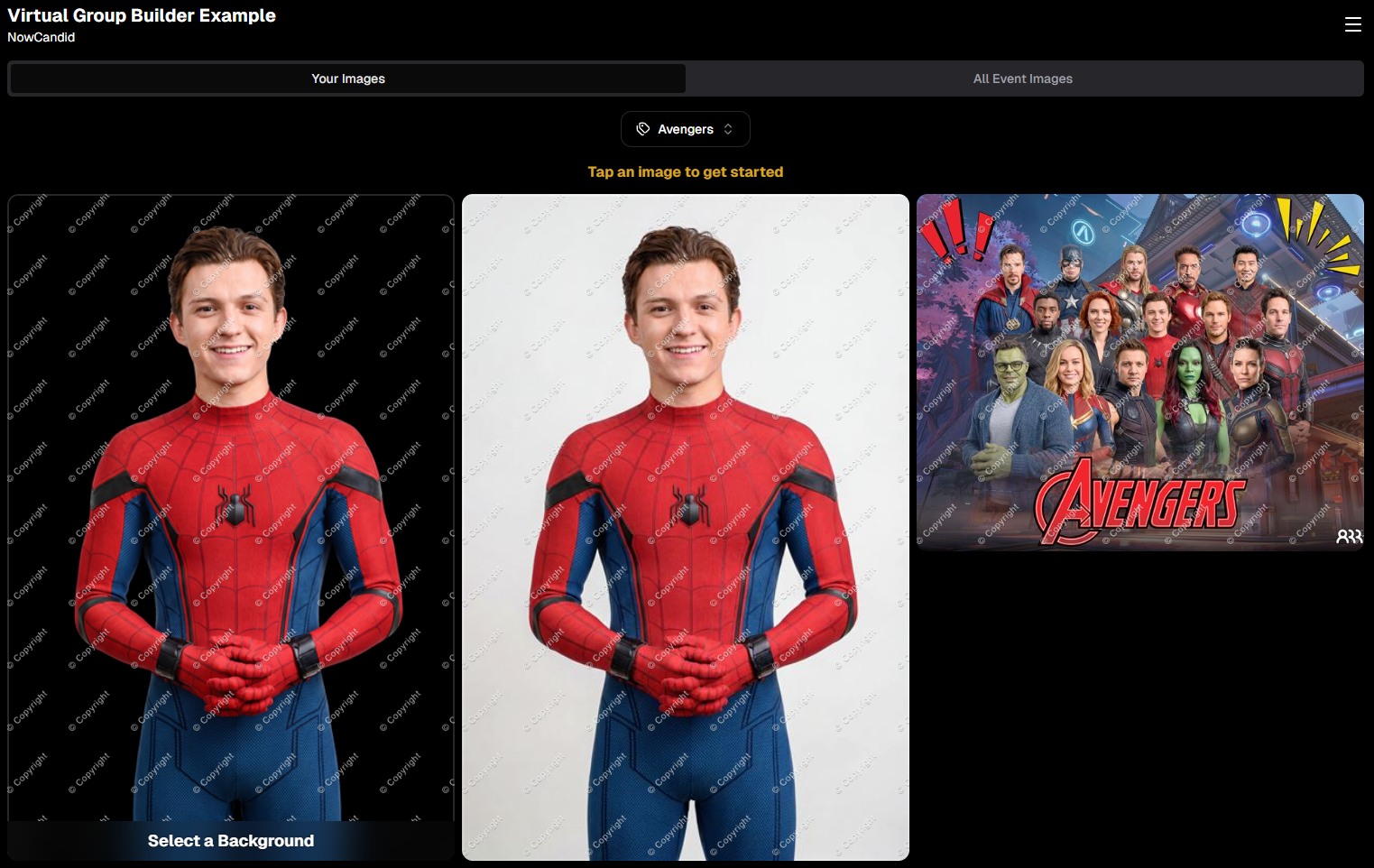
Cutouts with "Select a Background" labels
Original Images
Backgrounds 2–4 Pre-Rendered
Group Photos / PhotoTagged images
🛍️ Smarter Package Image Selection:
Pre-rendered BGR images now appear during image selection for packages.
Ordering of images follows the same flow as above, bringing consistency across the experience.
📱 Mobile Background Step Skipped:
Pre-renders act more like real images now, with background selection skipped on Mobile devices to reduce confusion.
Background selection still available on Desktop
💡 Visual Cue for BGRs:
BGR images now feature a subtle “Select a Background” overlay to help guide customer expectations and improve product engagement.
We've made changes to product pricing and shipping rates, with statuettes dropping over 40% in product cost!
Some costs have gone up slightly, but others went down—here’s a rundown of the biggest changes:
🧾 Highlights:
📉 5×7 Statuette: $12.24 → $6.97 (↓ 43.06%)
📉 8×10 Statuette: $17.21 → $9.97 (↓ 42.05%)
📈 Travel Mug: $11.09 → $12.19 (↑ 9.92%)
📈 16×20 Hanging Metal Print: $66.42 → $71.83 (↑ 8.15%)
📉 11×14 Group Print (Shipping): $7.25 → $7.00 (↓ 3.45%)
More detailed breakdown at the end of the post!
🧍♂️ Live Statuette Previews with Cutout Images
When a customer selects a BGR image, statuettes & acrylic cutout magnets will now render in real timeusing their PNG cutout—just like our other dynamically-rendering products!
No more generic preview. What they see is what they’ll get. 👌
Theme: Liquorice
🎆 New Retail Theme: Pop Rocks (Just in Time for the 4th of July!)
Get ready to light up your storefront! Our brand-new Pop Rocks retail theme has officially launched—a bold, dark mode layout featuring an eye-catching fireworks background.
It’s the perfect festive look for Independence Day events, summer festivals, or any celebration that deserves some extra sparkle.
This theme brings:
🌌 A sleek dark interface that makes photos pop
🎇 A dynamic fireworks background for an instant party vibe
🛍️ The same easy shopping experience with a more celebratory feel
Photographers can enable Pop Rocks from the Custom Offer Creator under Theme Settings—just in time to make your July events feel a little more explosive. 💥
Found via a Custom Offer's Editor
📚 Resources Page Reimagined
The Resources section has been split into five focused pages to remove clutter and confusion:
Every button is now better labeled with detailed descriptions so you know exactly what it does and why it matters.
Better clarity = better confidence!
🖼️ New Product Render Creator Tool
Found under Marketing Materials (in the new Resources section), this lets you:
Upload a sample image
Generate live product previews
Download and use those previews for your own promotional content
Perfect for flyers, social posts, or emails. 📣
Upload your own pics, and click the products to download them!
👥 Contact Stats Now More Accurate
Going forward, the system now tracks Participants vs Additional Contacts more accurately in new events. While this doesn’t retroactively change old events, future reports will give you a clearer picture of who engaged with your Event and how.
📝 Full List of Pricing Changes
Here’s the full breakdown of this week’s product/shipping adjustments:
That’s everything for this week!
The BGR improvements and new marketing tools are sure to make your Events feel sharper, simpler, and more sellable than ever.
This week’s updates include some helpful improvements across Virtual Group Builder, reporting, image conversion, participant management, and folder downloads.
The biggest highlight is a new Auto Headsize option in Virtual Group Builder, designed to give you a much better starting point when building virtual groups. We also added a new BGR Report to help you see which backgrounds are being ordered most, plus a few quality-of-life improvements throughout the Dashboard.
Let’s take a look!
🧑🤝🧑 Virtual Group Builder Improvements
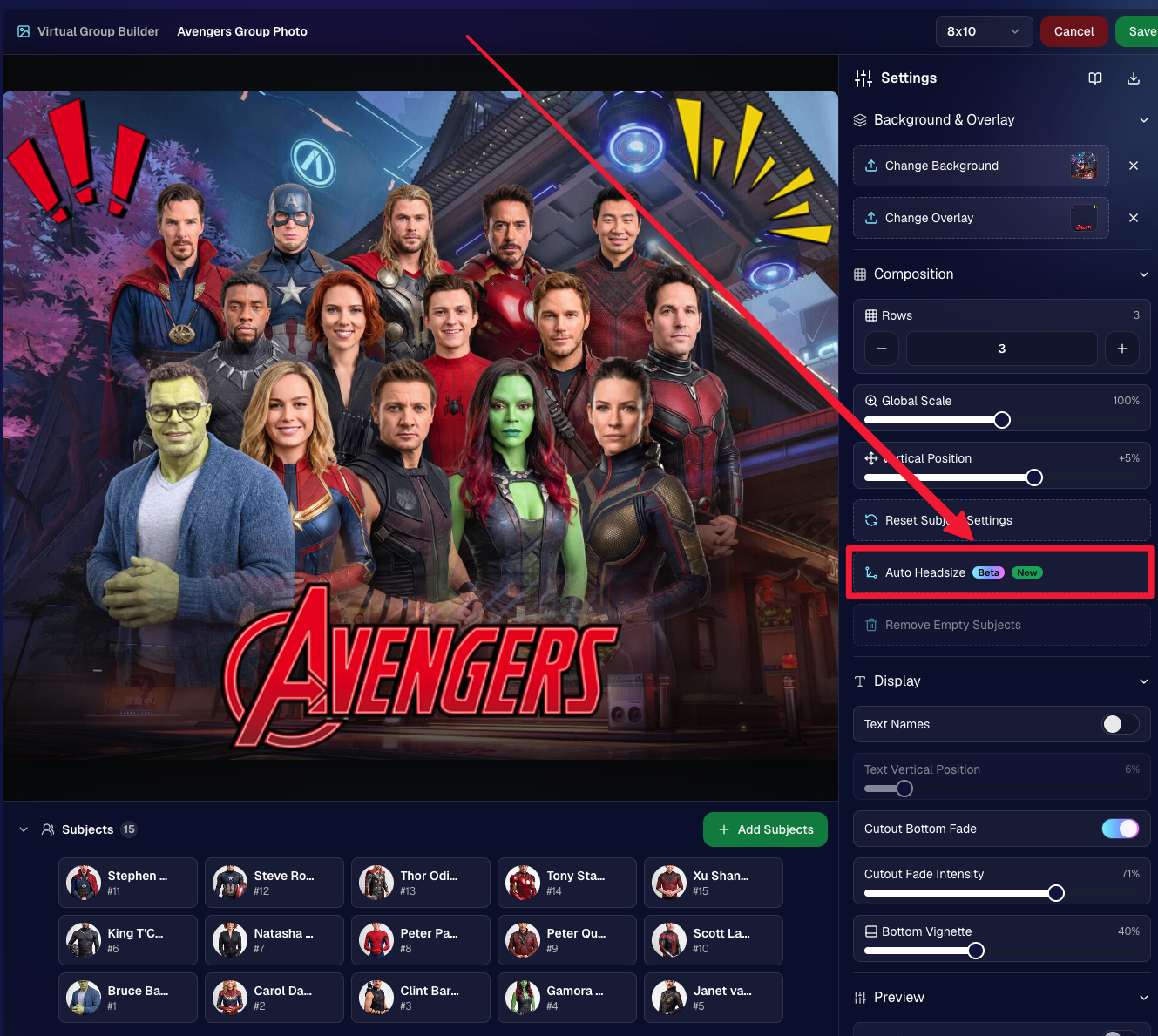
✨ New Auto Headsize button
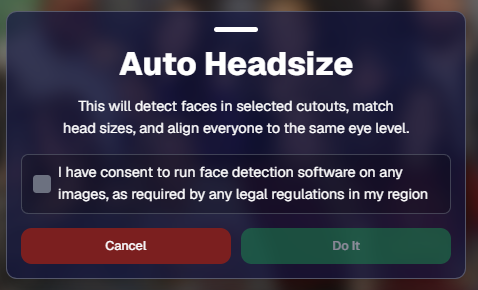
Virtual Group Builder now has a new Auto Headsize button.
This feature automatically detects faces and adjusts the scale and vertical offset of all cutouts so that subjects have roughly the same head size and are closer to eye level.
That means when you’re building a virtual group, you should have a much better starting point before making your final manual adjustments.
🏷️ Improved PhotoTag import behavior
We improved the behavior when importing a PhotoTag into Virtual Group Builder, helping that workflow feel smoother when adding subjects from a specific PhotoTag.
🚀 Upload fix for new from-scratch Virtual Groups
Fixed an issue where uploads were not uploading properly when working from /new on a from-scratch Virtual Group instead of an existing one.
👥 Smarter default subject behavior
Virtual Group Builder now skips the initial “add to group or replace group” popup when the only subjects in the group are the default 8 subjects.
🖼️ Bottom logo spacing improved
Bottom logos are now spaced the same distance from the bottom as top logos are from the top.
📊 Reporting Updates
📈 Events and Sales Report tables now have sortable columns
The Events Report and Sales Report tables now support sortable columns, making it easier to review and organize report data directly in the table.
🎨 New BGR Report
There is now a new BGR Report that shows the most ordered backgrounds for BGR images.
The report shows:
How many orders a background has
How many items a background has
Important note: if you upload the same background to multiple Events, those will show up as different backgrounds in the report. To avoid that, use the background import feature.
🖼️ Image Converter Update
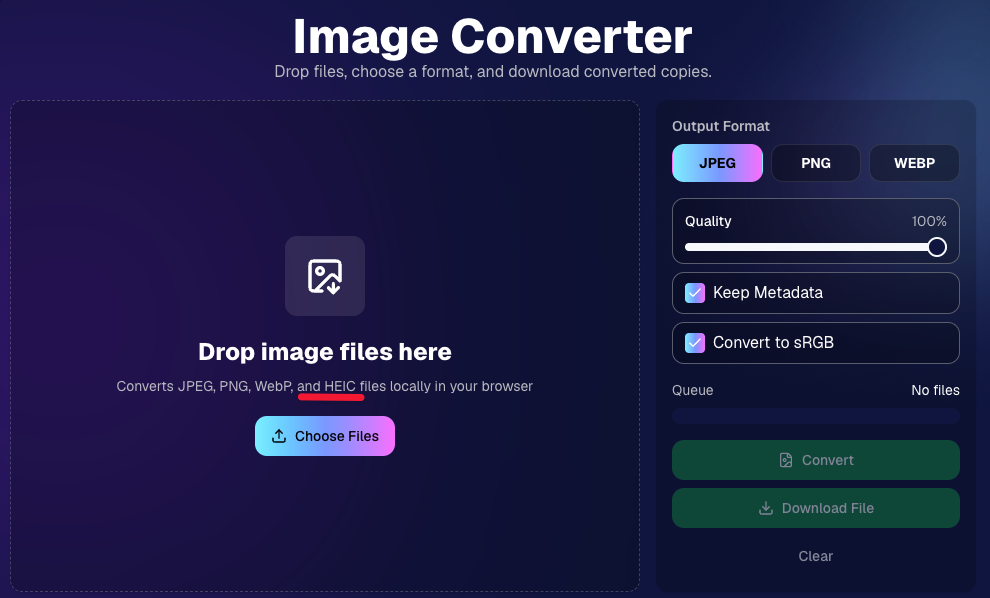
📱 HEIC conversion is now supported
The Image Convert page at tools/convert now supports converting from HEIC files.
This should be helpful when working with images from devices that commonly save in HEIC format.
👥 Participant List Update
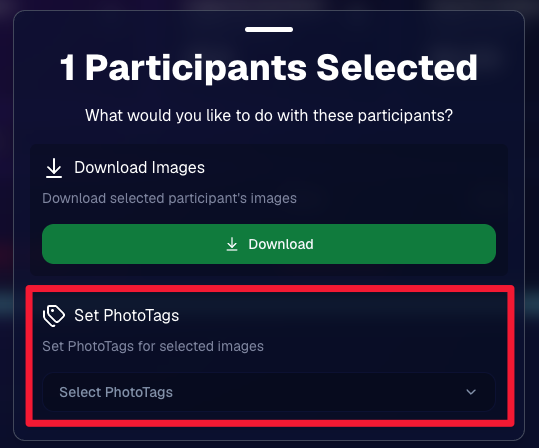
🏷️ Set PhotoTags for selected participants
On the Participant List page, the selected participants popup now includes a new option to set PhotoTags for those selected participants.
This gives you another way to update participant organization in bulk.
📂 Manage Images Update
⬇️ Download Folder improvements
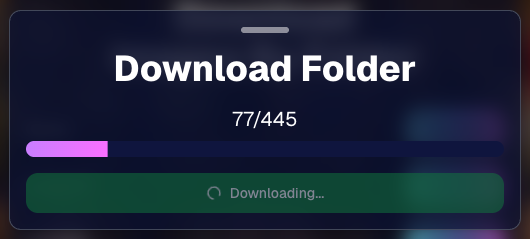
The Download Folder feature on the Manage Images page now includes an X/X counter while downloading.
We also improved the behavior when downloading a folder with hundreds of images, which should make larger folder downloads clearer and more manageable.
That’s the week!
This week’s updates should make several everyday workflows smoother: Virtual Group Builder now has a stronger starting point with Auto Headsize, BGR background performance is easier to review, HEIC files are easier to convert, participant PhotoTags are easier to update, and large folder downloads are clearer.
Virtual group photos can be incredibly valuable for photographers — but let’s be honest, they have not always been incredibly fun to make!
Traditionally, creating a virtual group means jumping between multiple tools. You photograph each subject, create cutouts, export files, open design software, place everyone manually, resize and align the group, add names, save the finished image, upload it somewhere else, and then reconnect that image to the right customers.
That is a lot of steps for one group photo!
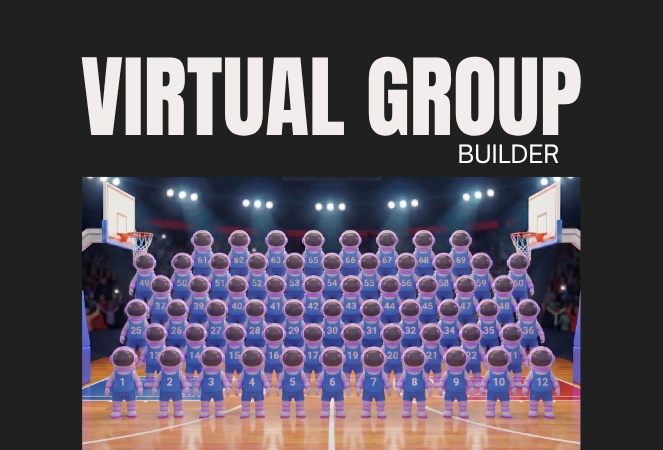
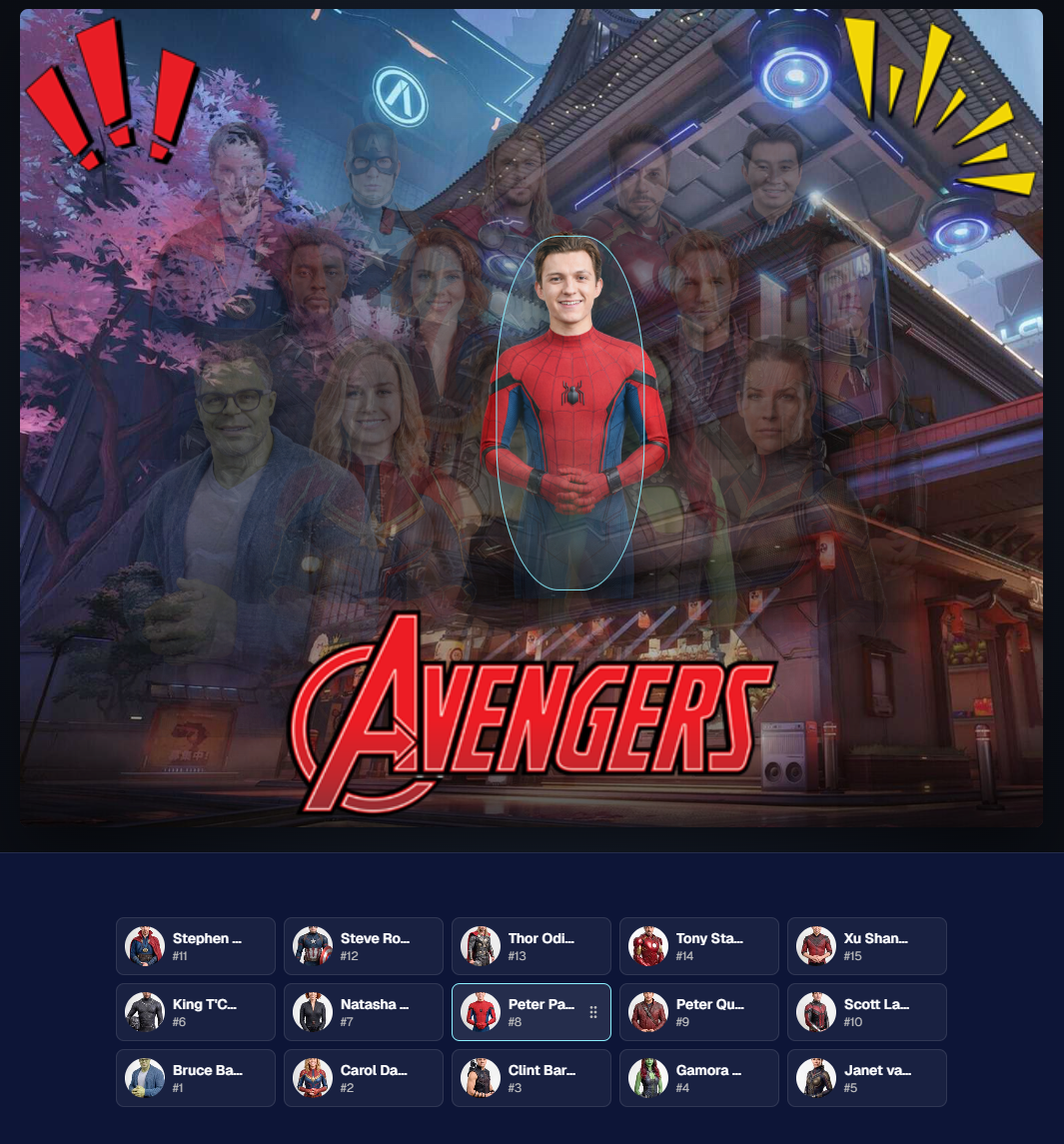
NowCandid’s Virtual Group Builder makes the process much simpler. Photographers can now create polished virtual group images directly inside the NowCandid Dashboard using the same Participants, cutouts, PhotoTags, backgrounds, and Event data already connected to their Event.
It is fast, flexible, and built to help photographers get virtual groups online and ready to sell with far less hassle. 🎉
A New Way to Build Virtual Group Photos
Virtual Group Builder is designed for photographers who want to offer professional group images when a traditional in-person group photo isn't possible.
That makes it especially useful for sports teams, schools, dance groups, cheer teams, clubs, all-star teams, and any Event where people are photographed individually but still need to appear together in a final group image.
Instead of needing every participant posed together at the exact same time, photographers can build a finished group photo from individual background-removed cutouts. If someone was photographed later, added after the fact, or missed the original group setup, they can still be included.
That flexibility can be a big deal for volume photography.
Built Directly Into the NowCandid Dashboard
Virtual Group Builder lives directly inside NowCandid. From an Event page, photographers can click Virtual Groups in the sidebar menu and start building using the Event data they already have.
The builder is not a disconnected design tool. It works alongside our existing tools, including participant data, PhotoTags, background removal, cutouts, custom backgrounds, overlays, logos, and everything else.
So instead of downloading files from one place, designing in another, and uploading it back to the dashboard afterward, photographers can keep the process inside NowCandid from start to finish.
Virtual Group Builder also supports the Mobile Dashboard! We don't necessarily recommend making Virtual Groups on your phone - but hey, could be nice in a pinch!
From Capture to Cutouts to Finished Group 🚀
Virtual Group Builder pairs especially well with NowCandid’s live-uploading and background removal capabilities.
A photographer can shoot participants individually, upload images to NowCandid live (or after the event) use NowCandid’s background removal to create clean cutouts, and then bring those cutouts straight into the Virtual Group Builder.
As a quick note for those unfamiliar with NowCandid's background removal, those same cutouts can also be used for shopping with alternate backgrounds! Making them multi-purpose across the Event.
For photographers shooting sports, schools, dance, cheer, or other volume Events, this can save a serious amount of time.
Add the Right Subjects Quickly 👥
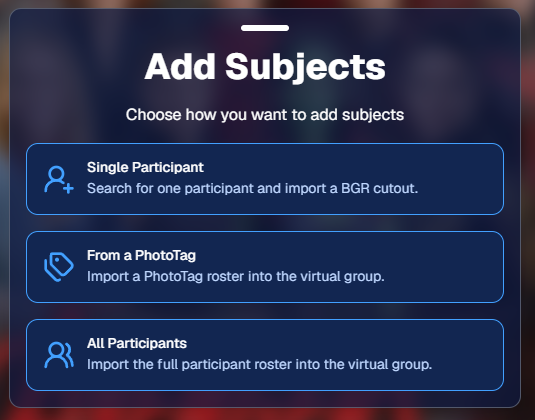
Virtual Group Builder gives photographers a few easy ways to add people to a group.
You can add one participant at a time, import everyone from a specific PhotoTag, or bring in all participants from the Event. This makes the builder flexible for both small custom groups and larger team or event-wide composites.
PhotoTags are especially powerful here. If your Event is organized by team, class, club, etc., you can use those PhotoTags to bring the right people into the group quickly.
For example, a sports photographer could import a single team. A school photographer could import a club or activity group. A graduation photographer could import participants from a specific ceremony.
Clean PhotoTags can turn what used to be a very manual process into just a few clicks. ✨
Helpful Safeguards for Missing Cutouts
Real-world events are messy. Sometimes a participant is missing a cutout. Sometimes a placeholder exists. Sometimes a photographer needs to know what is missing before moving forward.
Virtual Group Builder helps make that easier to catch.
When importing from a PhotoTag, photographers can see the participants in that PhotoTag before removing empty subjects. The Remove Empty Subjects option can remove participants with no cutouts as well as placeholders, but the workflow is designed to help photographers notice missing kids, players, or participants before finalizing the group.
That way, the tool keeps things fast without overlooking potential issues.
Smart Subject Ordering
Virtual Group Builder uses a practical ordering system to help preserve the order participants were photographed in.
Subjects are initially ordered from bottom left to top right based on the alphanumeric order of the first PNG filename. In plain English: if a photographer shoots and names files in a meaningful order, the builder can use that order as a helpful starting point.
This can be useful for sports teams photographed by jersey number, students photographed alphabetically, or groups photographed in a specific roster order.
And when the order needs to change, photographers can simply drag subjects into place.
Drag, Drop, Swap, and Adjust 🖱️
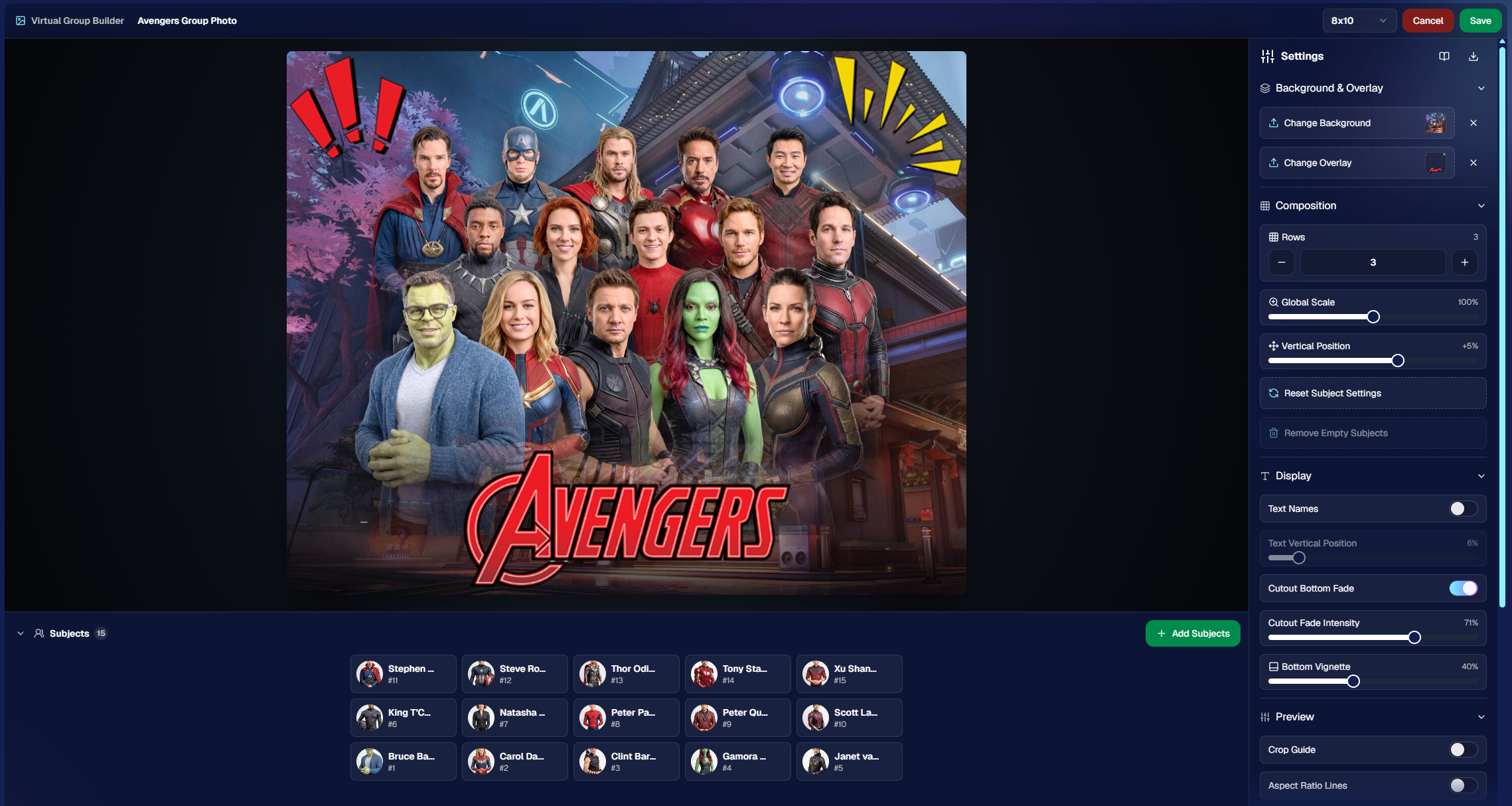
Reordering subjects is simple. Photographers can drag the cutouts directly on the group image or drag the subject tiles at the bottom of the page.
When a subject is dragged to a new location, it swaps with the destination Participant. This makes it easy to balance rows, adjust lineups, or move specific people into better positions.
The builder also includes group-level controls for layout and composition, including rows, global scale, vertical position, background, overlay, text names, crop guides, aspect ratio lines, bottom vignette, and cutout fade settings.
These controls help photographers quickly shape the whole group while still keeping the workflow approachable.
Fine-Tune Individual Subjects 🎛️
Sometimes one participant needs a small adjustment. Maybe they need to be slightly larger, shifted left or right, brightened, or swapped to a different PNG.
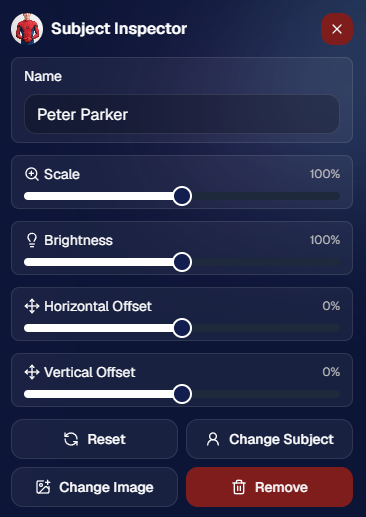
The Subject Inspector gives photographers individual control over each subject.
Photographers can adjust a subject’s name, scale, brightness, horizontal offset, and vertical offset. They can also reset the subject, change them to a different Participant, change the selected cutout, or remove the subject from the group entirely.
This is one of the biggest advantages of the builder: it is fast, but still gives you control when the final image needs a little extra polish.
Choose the Best Cutout for Each Participant 🖼️
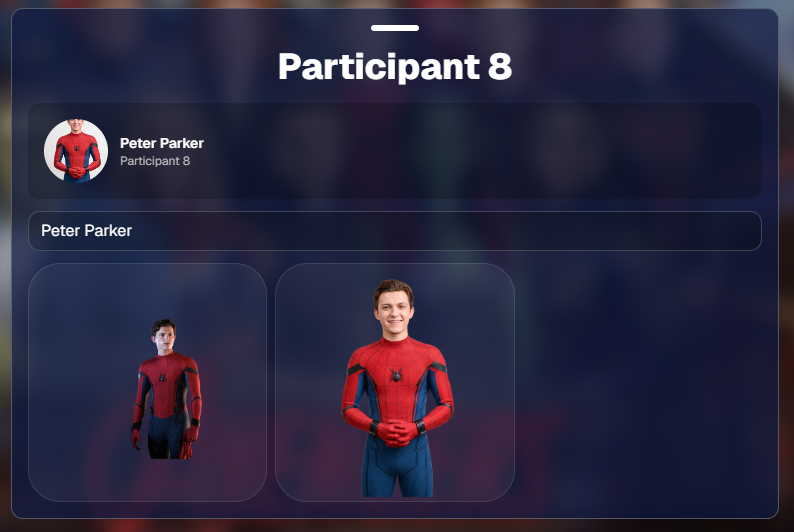
If a Participant has multiple cutouts available, photographers can choose which image works best for the group.
When adding subjects, photographers can also decide they want their incoming Participants to be using their first PNG or their latest PNG (alphanumerically determined using Folder Name and Image File Name).
Then subjects can also be selected to have their individual portrait swapped to a different one! This can be helpful when you want a variety of poses in your Virtual Group, or simply to swap a blinking kid's image to a
Backgrounds, Overlays, Logos, and Product Sizes 🎨
Virtual Group Builder gives photographers creative control over the final image.
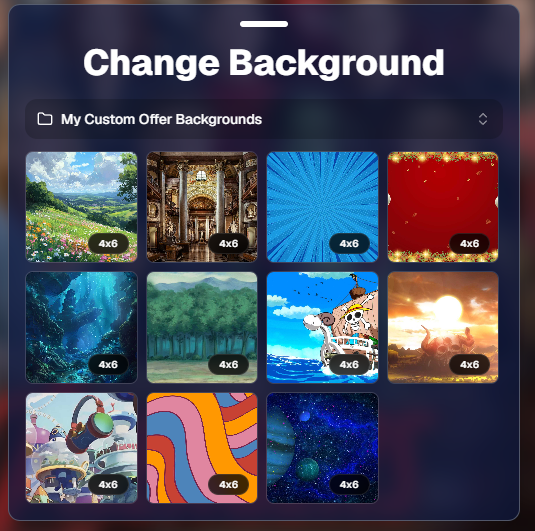
Photographers can choose from NowCandid default backgrounds, use custom offer backgrounds, upload their own backgrounds, add overlays, and place account logos in the corners. This makes it easy to create anything from a clean traditional group image to a bold sports graphic or school-branded composite.
The builder supports common product-friendly formats, including 4×6, 5×7, 8×10, and 11×14. Crop guides and aspect ratio lines help photographers preview how the final image will fit the selected size.
There are also display options for subject names, including toggling names on or off and adjusting their vertical position. For teams, senior groups, school clubs, all-star rosters, or small graduation groups, names can make the final product feel more complete and commemorative.
Upload the Finished Group Back to the Event 📤
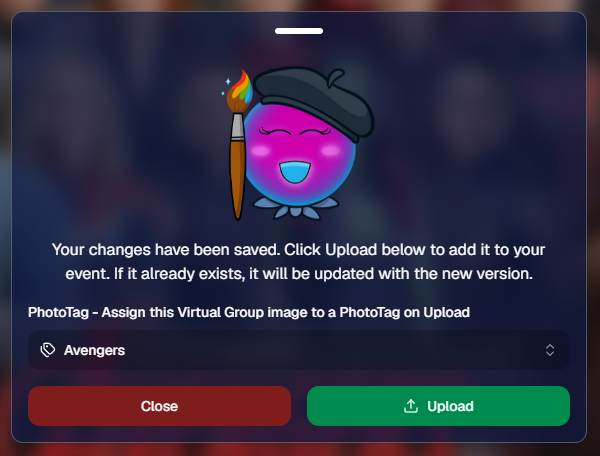
Once the virtual group is finished, photographers can save it and upload it back to the Event.
During upload, the group image can be assigned to a PhotoTag. This does two important things: it automatically shows the group image to participants with that same PhotoTag, and it makes the group photo searchable in the Event using that PhotoTag.
So if a photographer creates a group image for “Varsity Football,” they can assign it to that PhotoTag on upload. The image can then appear for the right participants and stay organized inside the Event.
That keeps the final product connected to the same Event structure used to build it.
Why This Is Such a Big Deal for Photographers
Virtual Group Builder is more than a design feature. It is a faster, more connected way to create and sell group photography products.
It helps photographers reduce manual design work, use the cutouts they already have, build from PhotoTags and participant data, add missing participants more easily, and get virtual group products online faster.
For volume photographers, that can mean less time spent assembling files and more time selling finished products. For customers, it means more group photo options. For events, it means group photography becomes more flexible, forgiving, and scalable.
Virtual Groups, Now Built Into the NowCandid Workflow ✨
Virtual Group Builder brings together live uploading, background removal, participant cutouts, PhotoTags, drag-and-drop group building, backgrounds, overlays, logos, subject names, crop previews, PhotoTag-based upload, and online selling.
When an Event is set up cleanly with consistent cutouts and PhotoTags, photographers can create a full virtual group in just a few clicks — then fine-tune it as needed.
It is simple, powerful, and built directly into NowCandid.
Whether you are creating a sports team composite, school group photo, graduation image, dance group, cheer team, all-star roster, or custom event product, Virtual Group Builder helps you get polished virtual group photos online faster.
Ready to try it?
Open an Event in your NowCandid Dashboard and click Virtual Groups in the sidebar menu to start building. 🎉
Candy here with a lighter update this week—but still plenty of handy improvements across the Dashboard and Retail site. This week’s changes focus on making participant data faster to work with, improving BGR/AI image visibility, and adding clearer product signals for shoppers.
Let’s take a look!
👥 Participant & Contact Improvements
⚡ Faster participant download sheets
• The participant download sheet on the Event Participant List page now generates much faster, especially for large Events.
🪪 Scan cards with images but no contact info are easier to find
• If an Event has scan cards that already have images but no contact information, they’ll now appear above the participant table.
• You can click one to view the images and add contact information, turning it into a full Participant!
🏷️ PhotoTags in Participant image lightboxes
• On the Participant Details page, image lightboxes now show PhotoTag assignments just like Manage Images does—with the ability to edit them right there.
📊 Order average on Event Overview
• The Event Overview page now shows order average on the Orders chart.
🖼️ BGR, AI & Image Detail Improvements
🔍 Preview Original now works for BGR images
• On Manage Images, you can now use Preview Original in the lightbox for BGR images, not just AI images.
• Pro tip: use the \ key to toggle original preview.
📂 Original Folder shown for BGR and AI images
• The lightbox now shows the original image’s folder for BGR and AI images.
🧾 Image Details now available for BGR images
• BGR images now support the Image Details page anywhere the lightbox previously showed Details, Participants, Logs.
👥 Original participant list shown for BGR/AI images
• For BGR images and AI images uploaded directly from Candy Image Studio or Auto Editor, Image Details now shows the participants from the original image.
📍 Face box positioning fix
• Fixed an edge case where face boxes could shift out of place after resizing the webpage or content.
🧑🤝🧑 Virtual Group Builder
🖼️ Improved logo placement
• Logo placement in Virtual Group Builder has been updated so logos fit better within the default crop across supported aspect ratios.
🧭 Dashboard Navigation & Reports
🔙 Better browser Back behavior
• When returning to the Event List page with filters applied, browser back navigation should now behave better and reapply your search/filter state.
📊 Report filters save in the URL
• Report filters now support refreshing, browser history, and shareable filtered views (they're now saved in the URL).
🏠 Recent Orders count fixed
• Fixed an item count issue in the Recent Orders section on the Home/Landing page.
🛍️ Retail Updates
🏷️ New “Customizable” badge
• Products that include meaningful customization (color or style choices available) now show a Customizable badge on the store sheet. Products where the only customization is captions are not included.
🖼️ Personal Gallery Download wording update
• The Personal Gallery Download sheet now says “Group Photos are not included” instead of “Team Photos are not included” for non-sports Events.
That’s the week!
A smaller update, but a useful one—faster participant exports, clearer BGR/AI image details, better filtered navigation, and improved product clarity for shoppers.
The rich text element allows you to create and format headings, paragraphs, blockquotes, images, and video all in one place instead of having to add and format them individually. Just double-click and easily create content.
A rich text element can be used with static or dynamic content. For static content, just drop it into any page and begin editing. For dynamic content, add a rich text field to any collection and then connect a rich text element to that field in the settings panel. Voila!
Headings, paragraphs, blockquotes, figures, images, and figure captions can all be styled after a class is added to the rich text element using the "When inside of" nested selector system.


.png)





.svg)


