HomeNavigation arrowBlogNavigation arrow
Current page
Feature Updates

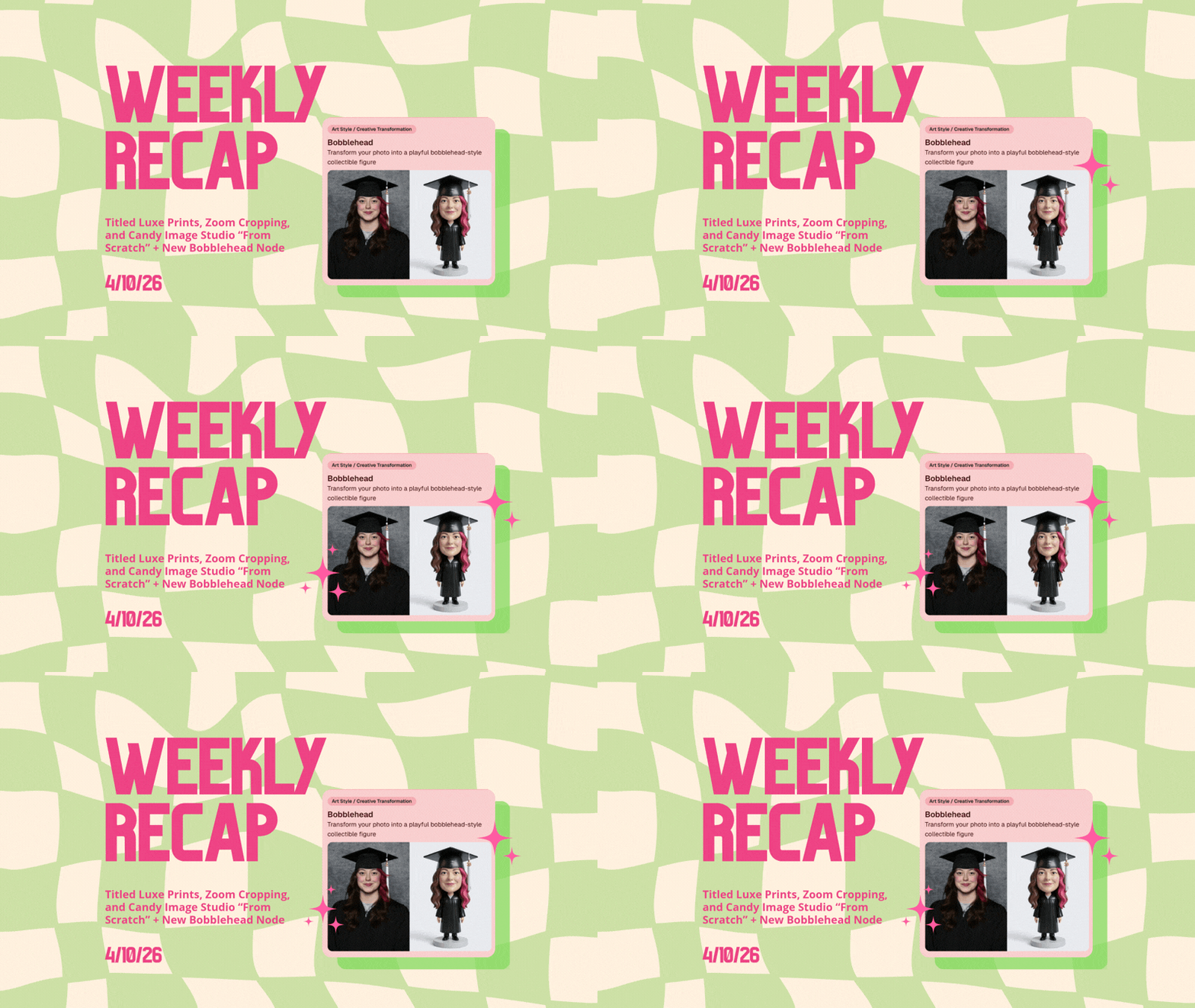
Weekly Recap: Titled Luxe Prints, Zoom Cropping, and Candy Image Studio “From Scratch”

Weekly Recap: Titled Luxe Prints, Zoom Cropping, and Candy Image Studio “From Scratch”
Hey photo friends! 👋

This week’s updates are a fun mix of new products, new visual workflows, and small-but-important fixes that make day-to-day work smoother—especially across Candy Image Studio, retail packages, and PhotoRoster/PhotoTag downloads.

Let’s jump in. ✨

📣 Dashboard: Client Outreach + Workflow Quality-of-Life

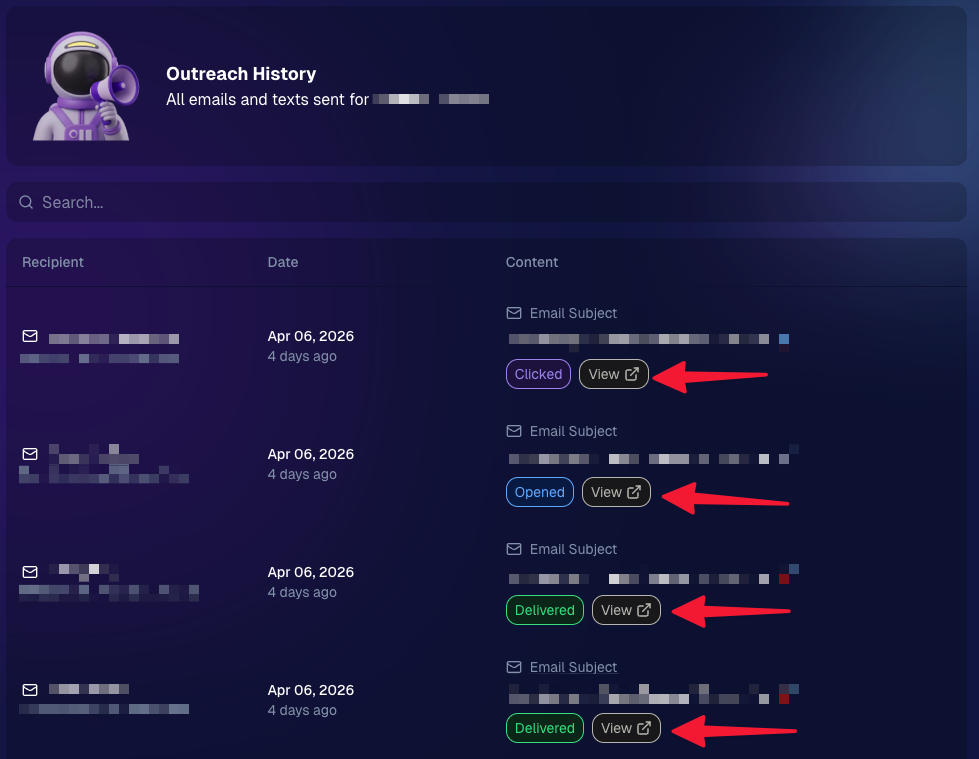
Client Outreach email history is easier to use and more reliable:

  • Added a “View” button in Client Outreach email history so you can open the sent email in a new tab (similar to how order receipts work).
  • Fixed an issue where email status didn’t always show for all emails in the status list.
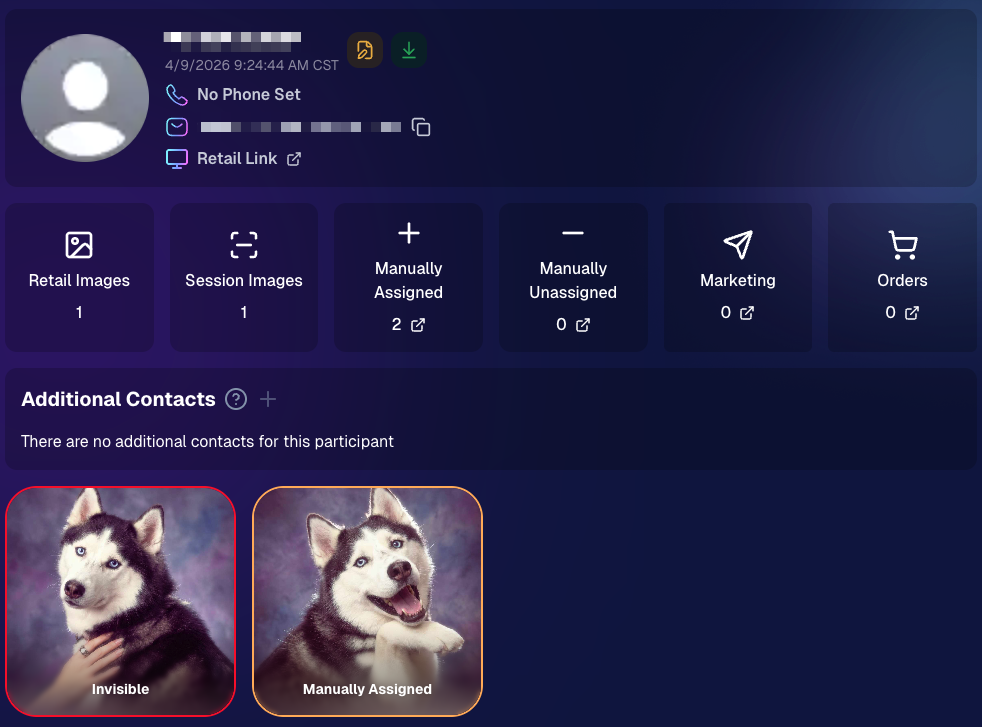
More clarity when reviewing participant galleries:

  • The Participant Details page now shows invisible images, clearly marked in red with an “Invisible” label—so you can understand what’s hidden without guessing.
PhotoTag participant gallery downloads got safer:

  • Fixed PhotoTag participant gallery downloads overwriting images when multiple files shared the same frame.
  • Fixed the download count displayed on the download button being off.

🎨 Candy Image Studio: Create Without an Input + A New Node

Candy Image Studio has two notable upgrades this week:

🧠 No input image required (generate from scratch!)
Candy Image Studio no longer requires an input image to get started. You can generate from scratch using the “From Scratch” node (at the very bottom), or by starting from custom text or a custom image—great for things like creating portrait backgrounds or creative assets.

🆕 New “Bobblehead” node
A brand-new Bobblehead node is now available inside Candy Image Studio.

Disclaimer: This is not a new product. This is an image node in the Candy Image Studio.

🏈 Jersey Jotter + Event Settings Cleanup

Jersey Jotter settings were removed from the Create/Edit Event popup.
Since Jersey Jotter now has its own dedicated page, we pulled those settings out of the event popups to keep Create Event as minimal (and fast) as possible—and keep Edit Event aligned with Create.

New: “Auto Enhance” can be turned off in Create/Edit Event.
Important clarity here:

  • Auto Enhance isn’t new — it has always been enabled by default.
  • What’s new is the ability to turn it off from the Create/Edit Event popup.
  • It’s labeled “Auto Enhance” (not “Retail Enhancement”) because it affects more than retail, including things like LiveLoop, Dashboard previews, Shareable Download Gallery, and more.
  • Note: this setting only impacts images uploaded after you change it. (So anything already uploaded keeps whatever enhancement state it had at upload time.)

🛍️ Retail: Package Backgrounds + Fixes

A few retail improvements landed to reduce confusing edge cases:

  • When selecting a PNG (without a faux background render) during the “Next Package Item Image Picker” step, the chosen background will now default to the first background in the background picker list (instead of the purple default).
  • Fixed an issue where the background selector step didn’t always appear for non-faux BGR images.
  • Fixed a crash related to having Wall Clings in packages.
  • Updated the Free Download description to: “Free simple, full-resolution download of your image.” (Previously it implied lower resolution.)

🔍 NEW: Zoom Cropping “Z-Cropping” (Dashboard + Retail)

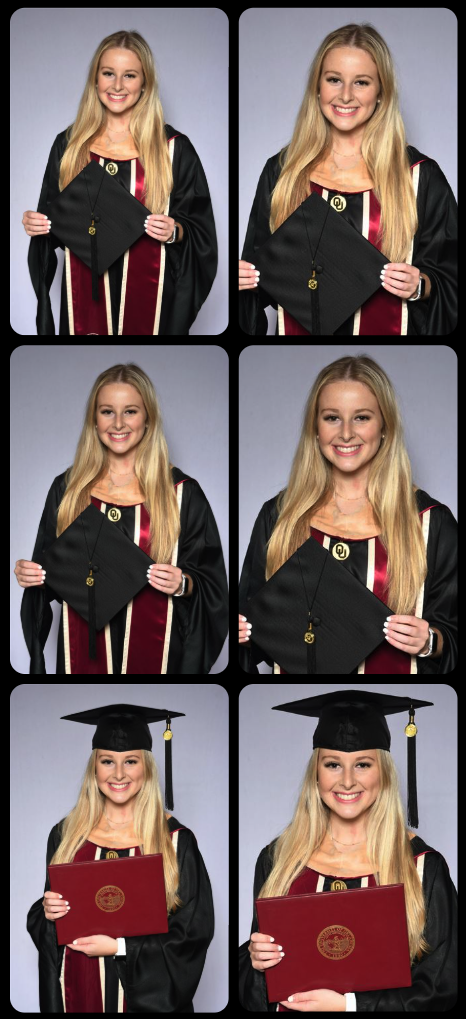
In Advanced Offer Settings, you can now enable Zoom Cropping, which automatically adds an additional image into the customer’s gallery that is zoom-cropped toward their face.

Details & rules:

  • ✅ Works on Face Matching Events
  • ✅ Works only on images with one face
  • ✅ All default graduation offers/price levels now have Zoom Cropping enabled
  • Behind the scenes, it applies a ~30% zoom toward the face, with an additional ~30% pull from the center of the image toward the face (clamped to avoid cropping beyond image bounds)

This is a great “quiet upgrade” for grads and portrait-style moments where customers love a tighter crop—without you needing to manually create it.
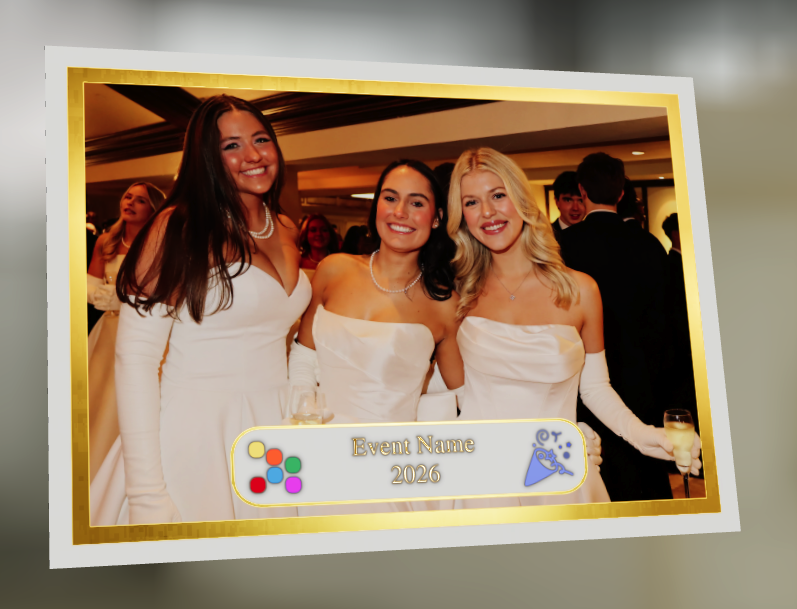
🖼️ New Products: Titled Luxe Prints (Dashboard + Retail)

Two new products just landed:

  • 5×7 Titled Luxe Print
  • 8×10 Titled Luxe Print

Want to see the 3D preview?
https://app.nowcandid.com/3d/titled-luxe-print

New: “Edit Titled Luxe Print” Page (per event)
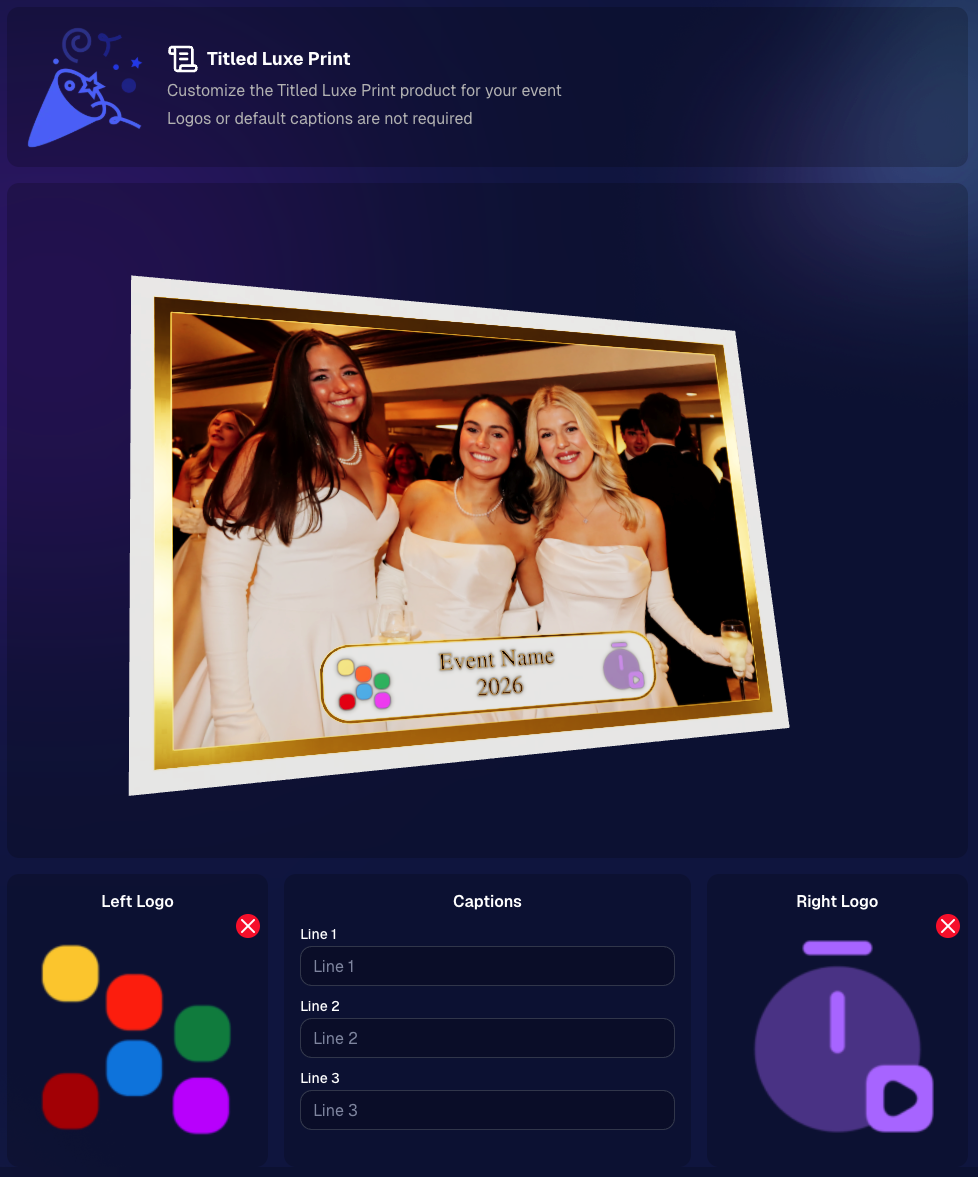
There’s a new event-level page available in the Dashboard sidebar only if one of the new titled products is included in the event’s offer. From there, you can:

  • Set default captions
  • Select left/right logos
  • Preview the 3D render
  • (Easter egg: rotate the render and you can spot your business name on the backprinting.)
Notes:

  • Default captions and logos are optional
  • Retail shoppers can change captions when ordering
  • Logo requirements: upload/import a 650×650 transparent PNG
  • Retail supports both 2D + 3D renders, including your custom logos
  • Order Details pages now display the selected logos, similar to how we show captions and colors

That’s the week! 💫

Between Zoom Cropping, Titled Luxe Prints, and Candy Image Studio’s new From Scratch flow (plus a pile of cleanup across retail + downloads), this update adds a lot of power without adding extra complexity.

Keep creating magic,
— Candy 🍬

Related articles

Why GradPics Now?
GradPics
May 16, 2024

Why GradPics Now?

7
 minutes read

Streamline Your Graduation Photography Business with NowCandid! 🎓📸

Hey there, amazing photographers! It's Candy, your cheerful guide from NowCandid, here to make your graduation season smoother and more profitable than ever. 🌟

With the grad season in full swing, NowCandid is your ultimate partner in simplifying your workflow, boosting your sales, and keeping your customers delighted. Let's explore how NowCandid can revolutionize your photography business this graduation season!

Why Choose NowCandid for Your Photography Business?

Graduations are a golden opportunity to capture cherished memories and grow your business. But handling the logistics can be overwhelming. That’s where NowCandid comes in, making the entire process hassle-free for you.

1. Selfie Check-In: Streamlined Image Delivery

Our Selfie Check-In feature collects contact information and selfies from event participants, creating a reference image paired with their contact info. This enables our face matching process to automatically organize photos into personal galleries and deliver links via text and email. It’s a convenient and efficient tool for both you and your clients, ensuring the right images get to the right people right away. 🎉

2. Live-Uploading: Flexible Photo Upload Options

With NowCandid, you have the flexibility to upload photos during the event or right after. During the event, tether your camera to a cellular-enabled device like an iPhone, LTE iPad, or LTE Windows tablet for real-time uploads. Alternatively, you can upload photos via the web dashboard after the event. Either way, once an image matches a subject's selfie, it’s added to their personal gallery and delivered instantly. 🚀

3. Face Matching: Boost Your Sales

Our Face Matching technology doesn’t just save you time – it can significantly increase your sales. Here’s how:

  • More Photos, More Sales: With Face Matching, you can take more photos at the graduation without worrying about organizing them. The more photos per graduate, the higher the chances of making a sale and increasing the average order size.
  • Faster Marketing: Face Matching allows you to market photos to subjects faster than ever. Quick delivery capitalizes on the emotional high of the event, making subjects more likely to purchase. Delaying image delivery for editing often results in missed sales opportunities.

4. Background Removal: Offer More Choices to Your Clients

Our automated Background Removal service gives your clients more options by removing the background behind subjects, allowing them to choose from a variety of backgrounds in different colors and settings. This feature turns one image into multiple choices, enhancing customer satisfaction and increasing sales. 🌈

Boost Your Sales and Simplify Operations

Graduation season is a prime time to maximize your revenue. Here’s how NowCandid can help you achieve that:

Transparent Reporting: Monitor Your Success

Our platform provides transparent reporting, giving you insights into sales per order, profit margins, and order statuses. With these metrics at your fingertips, you can make informed decisions to grow your business. 📈

No Subscription Fees: We Earn When You Do

At NowCandid, we succeed when you do. Our revenue model is based on a portion of your sales, with no subscription fees. This means our goals are perfectly aligned with yours, ensuring we always strive for your success. 💪

Customer Support: We’ve Got Your Back

NowCandid handles retail customer support, allowing you to focus on photography while we take care of your clients’ queries and issues. This means happier customers and less stress for you. 📞

Integrated Lab: Better Deals and Faster Delivery

With NowCandid’s own lab, you get a better deal (financially) than you can find anywhere else. This setup simplifies support by eliminating the need for multiple vendors for software and fulfillment.

Plus, our fully integrated, all in-house software-to-lab system ensures optimal image delivery times, so your clients receive their photos faster and with superior quality. 🏭

Schedule a Call and Maximize Your Potential!

Ready to make this graduation season your best yet? Schedule a call with us via our Calendly to review best practices, discuss strategies, and get personalized tips to enhance your business. Our team is here to support you every step of the way. 📞

Join the NowCandid Family Today!

With NowCandid, you have all the tools you need to streamline your operations, boost your sales, and keep your customers delighted. Let's make this graduation season a massive success together. Sign up today and experience the NowCandid difference! ✨

Happy photographing! 📸

Warmest regards,

Candy 💖

Darwin's Quic Tips for Mastering Graduation Photography
GradPics
May 15, 2024

Darwin's Quic Tips for Mastering Graduation Photography

5
 minutes read
Graduation season is a bustling time for photographers.

Capturing the essence of such a monumental event requires not just skill but also the right strategy. At NowCandid, we understand this well, which is why our GradPics Now program is designed to maximize both the quality and efficiency of your graduation photography services.

Here, Darwin, our long-time Photography Specialist with a wealth of experience in graduation events, shares his top tips to help you excel this graduation season.

1. Prioritize Speed Over Extensive Retouching

In the fast-paced environment of graduation ceremonies, the quick delivery of photos can significantly boost your sales. Darwin emphasizes that speed in making images available often trumps the detailed retouching of images in terms of sales impact.

Graduates and families appreciate quick access to their photos to share their special moments. Therefore, focus on capturing the best possible shots in-camera.

2. Stick to SRGB Color Profiles for Retouching

If retouching is necessary, Darwin advises saving images in an SRGB color profile. This ensures that your photos look consistent and vibrant across all viewing platforms, be it digital devices or prints, enhancing the overall appeal of your photos to clients.

3. Use Direct Flash to Enhance Image Quality

Proper lighting is crucial in photography, especially in the varied environments of graduation venues. Using direct flash can help mitigate common lighting issues such as facial shadows, ensuring your subjects are evenly lit and standout.

This simple technique can significantly improve the color and clarity of your photos, making them more appealing to your clients.

4. Be Prepared: Carry Extra Batteries and a Backup Camera

Always be prepared for the unexpected. Darwin recommends carrying extra batteries and a backup camera to all events. This ensures that you can continue shooting uninterrupted, even if your primary camera fails or batteries run out.

Being prepared is key to a smooth operation during busy events like graduations.

Darwin's Impressive Track Record

Darwin brings a vast amount of practical knowledge to the table, having managed the capture of over 35,152 graduation images in just the last two weeks of this season alone. His experience underscores the effectiveness of these tips in real-world settings.

Why Choose GradPics Now?

NowCandid's GradPics Now program is tailored to streamline the graduation photography process. By integrating Darwin's tips and our state-of-the-art technology, photographers can not only enhance their efficiency but also improve their sales potential.

The program supports instant uploading and sorting of images, enabling photographers to focus more on capturing great shots and less on post-event workflows.

Graduation season doesn't have to be overwhelming.

With the right tools and strategies, you can turn this busy time into a highly profitable and fulfilling part of your photography career. Embrace these tips, utilize GradPics Now, and capture the milestones with confidence and efficiency.

Ready to transform your graduation photography approach?

Join the many photographers who have already found success with NowCandid. Learn more about GradPics Now and schedule a session with Darwin to fine-tune your strategy. Let’s make this graduation season your best yet!

Capture & Upload App Update: Version 3.22
Feature Updates
May 10, 2024

Capture & Upload App Update: Version 3.22

3
 minutes read
🌟 Candy here with a new Capture & Upload app update overview! 🌟

Candy here with a fresh scoop on the latest tweaks to our Capture & Upload app! 📲 While this update might seem light on the surface, it's packed with all sorts of behind-the-scenes magic to boost performance and stability. ✨

To make sure you're getting the best out of NowCandid, keep your devices (both Windows & iOS) updated! 🔄

In the Capture & Upload app, just tap the information screen (that's the "i" button in the app) to see your app version and confirm you're rocking version 3.22. 🎉

iOS & Windows App Updates: 🛠️

  • Misc improvements & fixes to keep things running smoothly.
  • Now see the number of logs for each date when using the log uploader – super handy! 🗓️
  • New "Having trouble?" popup if 30 seconds pass on the take photo screen without any action. It's got helpful reminders in case something's amiss! 🕒
  • Say goodbye to the "Service Lost" popup on the shooting screen—it won't bug you anymore! 🚫
  • Introduced a dedicated "Name Lookup" button for Positive ID Events, making things more obvious than ever. 🔍
  • Misc UI tweaks & improvements to spruce things up!
  • Changed the "Dismiss" button in the update popup to "Use Old Version" for those who like a throwback. ⏪
  • Updated the "Add Participant" keypad to match the chic look of our newer Tap-A-Face keypad. 👯

iOS-App-Only Updates: 🍏

  • Truncate event name on iPhone at the top if name is super long (so it fits on 1 line)

Thanks for tuning in, and for being such amazing users of NowCandid! 🌈

See you again soon! And remember, if you've got questions or need a little help, just reach out. We're here for you! 💌

Cheers and sparkles,

Candy 🍬

Let’s get in touch

If you’re a photographer looking to add NowCandid services to your wheelhouse – set up a call by clicking the button below.

How to customize formatting for each rich text

How to customize formatting for each rich text

How to customize formatting for each rich text

How to customize formatting for each rich text

How to customize formatting for each rich text

What’s a Rich Text element?

The rich text element allows you to create and format headings, paragraphs, blockquotes, images, and video all in one place instead of having to add and format them individually. Just double-click and easily create content.

A rich text element can be used with static or dynamic content. For static content, just drop it into any page and begin editing. For dynamic content, add a rich text field to any collection and then connect a rich text element to that field in the settings panel. Voila!

Headings, paragraphs, blockquotes, figures, images, and figure captions can all be styled after a class is added to the rich text element using the "When inside of" nested selector system.

  • List One
  • List Two
  • List Three
  • List Four
  • List Five

This is a link

This is bold text