HomeNavigation arrowBlogNavigation arrow
Current page
Feature Updates

Weekly Recap: Virtual Group Builder, Client Outreach Updates & Smarter Retail Support 🎉📸

Weekly Recap: Virtual Group Builder, Client Outreach Updates & Smarter Retail Support 🎉📸
Hey photo friends! 👋

This is a big week! The headline feature is one many sports and volume photographers are going to love: An all-new Virtual Group Builder is now available directly on the Dashboard.

We’ve also added new Candy Image Studio tools, improved Client Outreach behavior, refreshed image assignment tools, and made retail support easier for shoppers and photographers alike.

Let’s jump in!

🧑‍🤝‍🧑 Big New Feature: Virtual Group Builder

You can now build Virtual Groups directly on the Dashboard — with Mobile Dashboard support too!

Find it from an Event page by clicking Virtual Groups in the sidebar menu.

With Virtual Group Builder, you can:

👥 Import participants from the full Event, one at a time, or everyone with a specific PhotoTag

✂️ Use participant cutouts to build polished group images

🏷️ Build groups quickly when your Event has consistent cutouts and participants tagged with PhotoTags

🖼️ Create Virtual Groups in 4×6, 5×7, 8×10, or 11×14 formats

🎨 Choose from NowCandid default backgrounds, upload custom backgrounds, and add overlays

🧢 Add account logos to the corners

🔤 Toggle subject names on or off

📐 Preview crop lines and aspect ratio lines

🖱️ Zoom, pan, drag, reorder, resize, brighten, and position subjects

You can also adjust group-level settings like background, overlay, overall scale, vertical position, bottom shadow falloff, and individual cutout fade to help hide cropped legs.

When your Event is set up cleanly with cutouts and PhotoTags, you can create a full Virtual Group in just a few clicks. ✨

Docs page: https://app.nowcandid.com/docs/image-management/virtual-groups
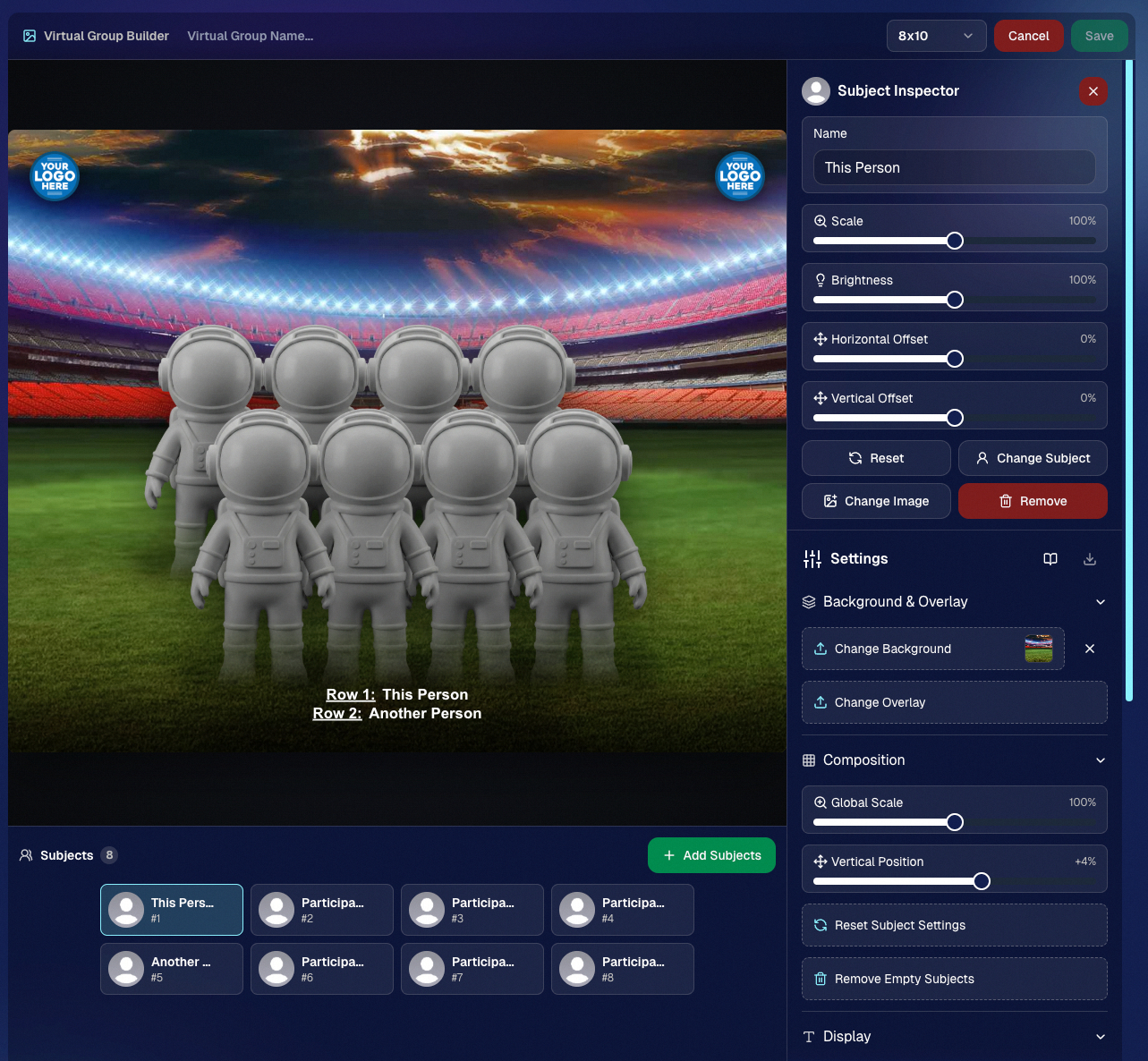
Desktop Dashboard view of the new Virtual Group Builder

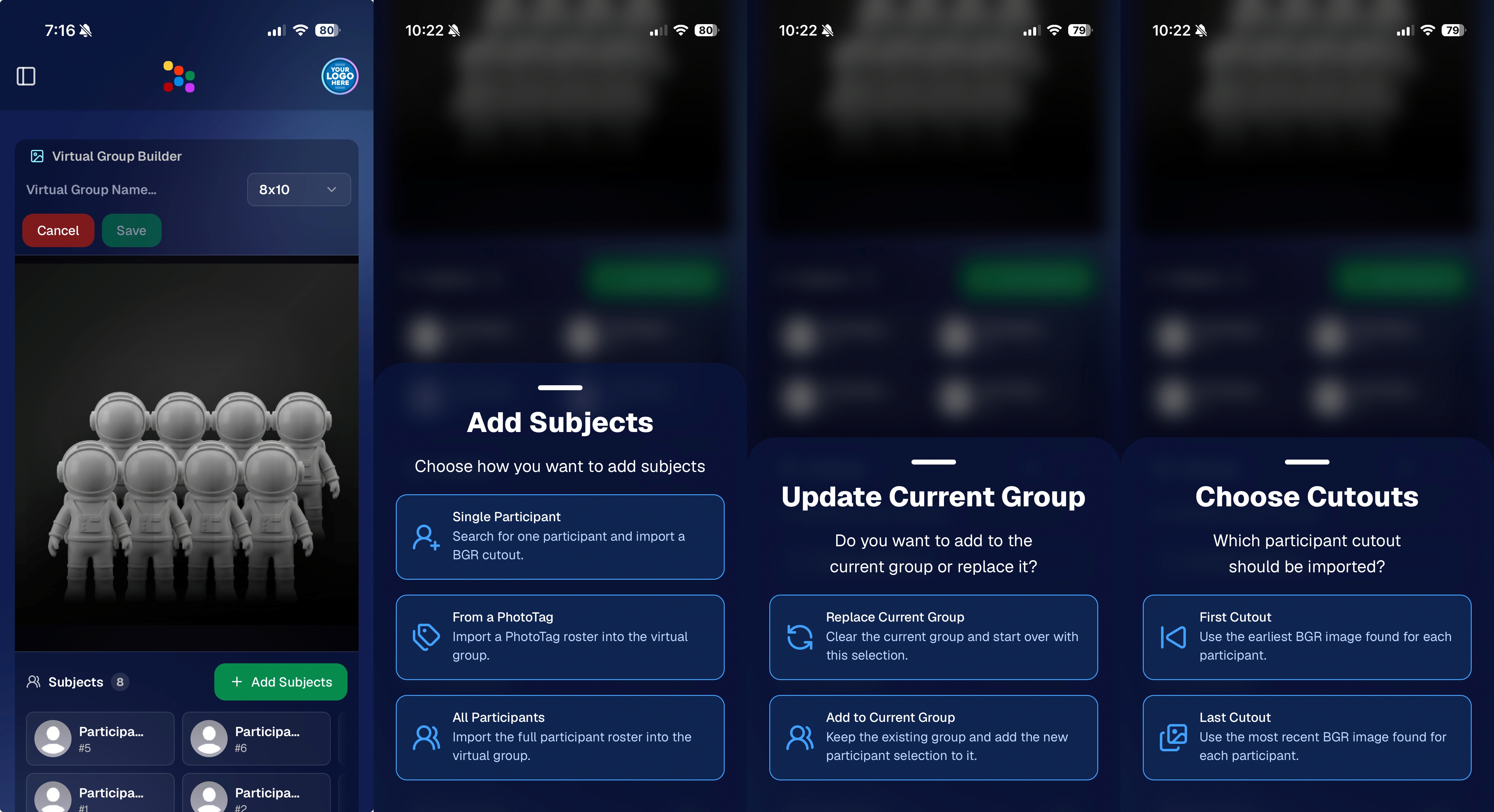
Mobile Dashboard view of the new Virtual Group Builder

🎓 Candy Image Studio: New Graduation Tools

Candy Image Studio got some very timely upgrades for graduation season:

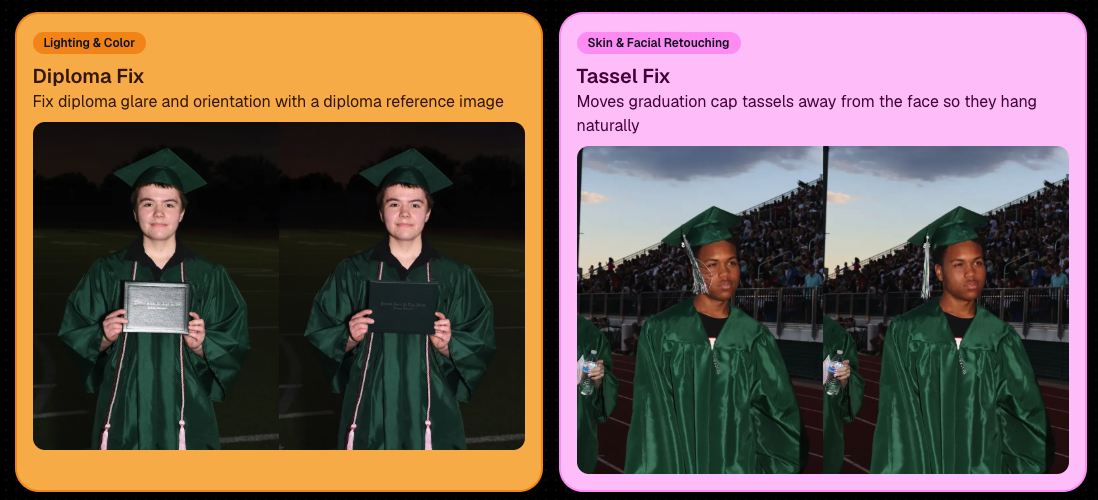
🎓 New “Diploma Fix” node

  • Helps fix diploma orientation and glare. You’ll need to upload a reference diploma so Candy knows what the diploma should look like, including details like school name, emblem, fonts, and colors.

🎗️ New “Tassel Fix” node

  • Helps adjust graduation tassels that are covering a subject’s face — similar to Stray Hair Removal, but tailored specifically for grad tassels.

👓 Improved Reduce Glass Glare

  • This node is now more reliable and less likely to accidentally add glasses to subjects who aren’t wearing them.
📣 Client Outreach Improvements

Client Outreach got a few useful updates to help save money and keep lists cleaner:

🚫 Unsubscribed contacts excluded by default

  • Imported Client Outreach contacts now exclude unsubscribed contacts unless you choose to include them.

🔘 New “Include unsubscribed contacts” toggle

  • You can still include them if needed, but the default helps avoid spending on contacts who can’t receive your outreach.

👀 Show Hidden on Client Lists

  • The Client Outreach list page now has a Show Hidden option, similar to Offers and PhotoRoster organizations.

🧭 Client List sidebar shortcut

  • The Client Outreach sidebar item now takes you back to the Client List page more clearly.

🖼️ Image Management & Dashboard Upgrades

🧩 Image Release Gallery redesign

  • The Image Release Gallery now uses a masonry layout like retail, supports lightboxes with arrow key navigation, has CMD/CTRL+F search support, and saves filters in the URL.

🧑‍💻 Manual Assignment page refresh

  • The Participant Manual Assignment page has a cleaner, more intuitive UI.

Camera star ratings on Image Details

  • If your camera includes star ratings, they now appear on the Image Details page.

⬇️ Image Details convenience buttons

  • Image Details now includes quick actions to download or open in Candy Image Studio.

🏷️ PhotoTag ampersand fix

  • PhotoTag names with ampersands now save correctly.

🧍 Merged participant name fix

  • Manual Assignment now shows the selected participant’s name instead of the first merged participant’s name.

🔙 Event sidebar remembers filters

  • When going back to the Event List from an Event Overview page, your filters are remembered as long as you haven’t refreshed.

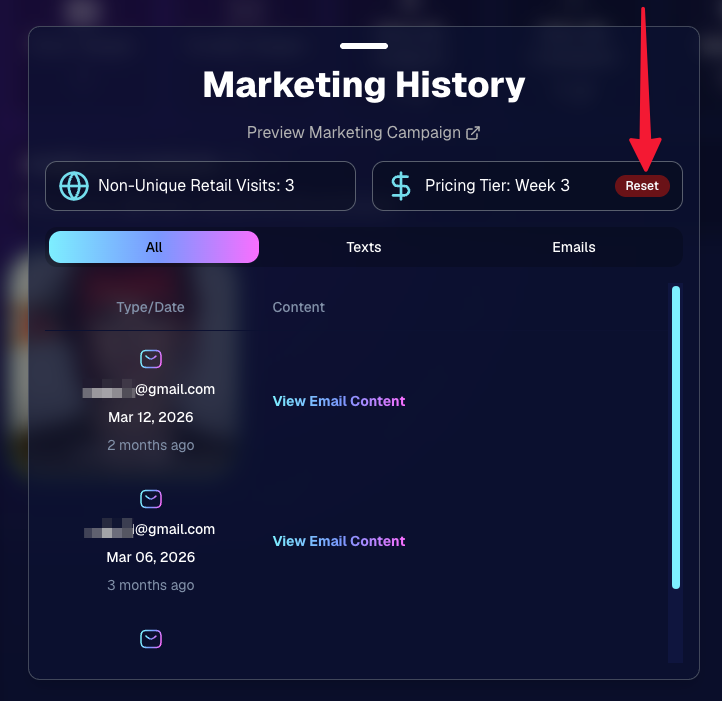
🔁 Pricing tier reset button

  • Participant marketing history now includes a button to reset a participant’s pricing tier start date, useful if support wants to re-offer first-week pricing.
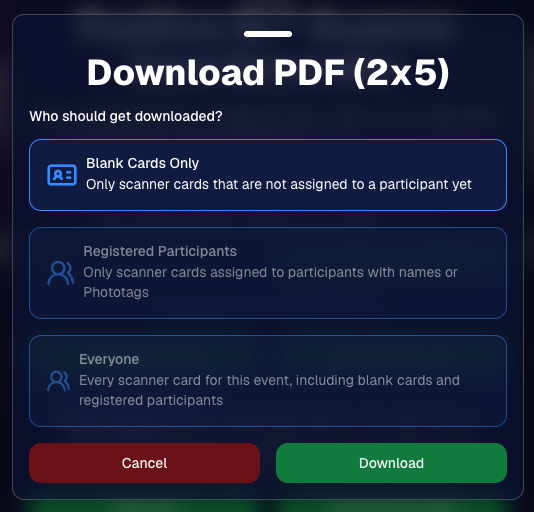
🪪 Positive ID QR Code downloader options

  • You can now download blank cards only, registered participants only, or everyone, making scan card PDFs easier to manage for multi-workflow sports events.
🛠️ New Tool: Image Converter

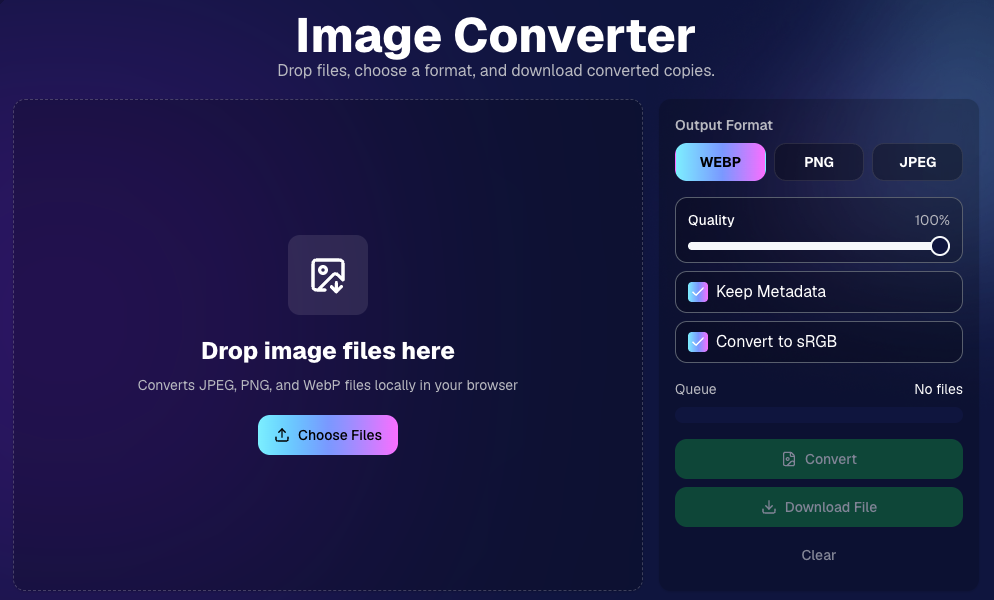
There’s a new tool under Tools & More → Image Converter.

Use it to:

🔄 Convert images to WEBP, PNG, or JPEG

🎨 Convert images to sRGB

Handy for preparing files before uploading them to NowCandid Events.
📚 New Capture App Camera Docs

We added a dedicated docs page for confirmed camera models that work with the Capture App.

More cameras may work than what’s listed, but this page focuses on models we’ve confirmed.

Docs page: https://app.nowcandid.com/docs/capture-app/cameras

🛍️ Retail Improvements

📬 New Contact Us form on retail

  • The Contact Us popup now includes a form that sends support an email with helpful details automatically included, such as browser info, window size, retail link, Event details, and order number when available. This should make support faster and reduce back-and-forth.

🖼️ Overlay step now comes before cropping

  • This prepares retail for future improvements while keeping product customization clearer.

🗓️ Smarter Year captions

  • Certain products now default the Year caption to the Event start year or participant Day 0 year instead of the current year. Helpful for late-December events or older graduation galleries.

🌍 International order fix

  • Fixed an edge case where some international orders could send multiple receipts and incorrectly show that the order wasn’t submitted.

🤳 Selfie Check-In & Capture App Updates

📶 Clearer Selfie Check-In upload errors

  • If a selfie upload fails, subjects now see a more specific error reason — like upload speed being too slow — so they know what to try next.

📱 Capture App 5.6.3 OTA update

  • Contact Info Settings now says Tap-A-Face or Type & Take based on the Event program
  • The 1000×1000 reference image requirement has been removed for Selfie Check-In Station and Roster Check-In, especially helpful for Android devices with lower-resolution cameras

That’s the week!

Virtual Group Builder is the big one, especially for sports and volume workflows — but between Client Outreach, Candy Image Studio, Image Converter, and retail support improvements, there’s a lot here to make your next Event easier to manage.

Keep creating magic,

Candy 🍬

Related articles

Weekly Recap: Candy Culler AI Image Culling & MUCH More! 🍬✨
Feature Updates
January 9, 2026

Weekly Recap: Candy Culler AI Image Culling & MUCH More! 🍬✨

6
 minutes read
Hey photo friends! 👋


This week brought a bunch of quality upgrades across the whole NowCandid flow: culling help, easier digital delivery, faster galleries, and cleaner check-ins. Here’s what’s new (organized by impact).

🧠 Big New Tool: Candy Culler (Manage Images → More Tools)

🍬 Candy Culler is rolling out!!!

Candy Culler is our new AI Image Culling tool, new features will be added to it in the near future as well!


I can now help flag common issues on your images like:

  • 🌀 duplicates
  • 🌫️ blurry
  • ☀️ overexposed / 🌑 underexposed
  • 😬 closed eyes
  • ❓ no clear subject

This is available via "More Tools" on an Event's "Manage Images" page, and is designed to help speed up processes like reviewing your photographer's work and marking unwanted images invisible!

Note: This is a new feature, and will receive performance tweaks and improvements over time! But we hope you like it! :D

📦 Digital Delivery Upgrade: Web Receipt Download Page

📧 Receipt email now includes a “Download All Images” button

  • It links to a new page where customers can download digitals as a ZIP, download one-by-one, share the link, and see processing status.

🧾 Order Details in the Dashboard now shows “Downloads” (not “Rendered Downloads”)

  • And includes Personal Gallery Download links where relevant.

🔗 Order Details now link to the Web Receipt Download Page

  • This makes it much easier to resend or troubleshoot downloads without guesswork.

🖼️ Faster Reviewing: Lightbox Keyboard Navigation + Performance

⬅️➡️ Left/Right arrow keys now move through images

  • Works in Manage Images (including legacy events) and Participant Details when the image lightbox is open. Great for quickly scanning through images.

Lightbox performance improved

  • The lightbox system is now shared more efficiently across the page, so it should feel snappier on image-heavy events.

✅ Check-In Improvements (Face Matching Events)

🛑 New red “No Thank You” button for Image Release opt-in

  • (Only appears if opt-in is enabled in the Offer's Advanced Settings.)

🖼️ Camera roll stability improved

  • Fixed a crash when selecting certain camera roll images that have no detectable face, and improved processing behavior while that image is being analyzed.

🔁 Old check-in import edge case fixed

  • Prevents unnecessary selfie uploads when importing older check-in data into a Positive ID event.

📱 Capture App iOS OTA Updates (4.22.2 + 4.22.3)

🔐 Restore Session safety and convenience (OTA Jan 5)

🔒 Restore Session won’t cross accounts

  • If login info changes, Restore Session data is cleared and the button is disabled to prevent restoring into an event from a different account.

Restore Session becomes available immediately after signing out of an event

  • No restart needed.

🧾 Face Matching Roster Check-In stat accuracy (OTA Jan 7)

📊 Event overview image stats now include “ref” folder images

  • Helpful for tracking reference images in Face Matching Events.

🛠️ Misc fix

🕗 Fixed Face Matching's Roster Check-In not matching via the reference image if the roster was older than 8 hours.

🛍️ Retail Experience Improvements

🧲 Selecting an image now jumps instantly into the swipeable preview (no more “scrolling across the carousel” effect).

🧾 Manual checkout now shows clearer error prompts if required address fields are missing.

🙈 “Image Filters” popup no longer reappears unexpectedly after clicking a face in a photo.

🛡️ GalleryGuard is enabled again on iPad after a short break.

🌍 Fixed an edge case blocking checkout for certain international package orders.

🖥️ Dashboard Updates

🔁 Assign Images: new “participant gallery” filter

  • Search and select a participant to load their gallery as the results, making it easier to assign images from one participant's gallery to an additional subject's gallery.

🏷️ PhotoTag Import edge case fixed

  • Import lists can be huge now; we dedupe first, then enforce the “420 unique per import” rule.

📊 Event mini report column clarified

  • “Images” is now labeled “Visible” and reflects visible images per folder.

📄 Reports date picker fixed

  • Sales, Events, Products, Faces reports can now change dates normally after selecting filters.

🧑‍🤝‍🧑 Participant creation limited after 60 days

  • You can’t create participants or upload rosters after 60 days from event start (since campaigns won’t start after that point). The UI will show an error popup instead of letting it happen silently.

Event List loads faster

  • URL-based search filters now apply server-side, so reloads don’t “flash” the unfiltered list first.

🔐 Better sign-in redirecting

  • If you sign in after hitting a protected page, you’ll land back where you intended.

🍬 Candy can now report things to the team

  • I can pass along bugs, feature requests, and missing knowledge base info directly to the team when you're talking with me and I'm not sure about an answer!

That’s the week!

Cheers,

Candy 🍬

Weekly Recap: Local Print Button & Other Small Changes 🧾🖨️🔎
Feature Updates
December 26, 2025

Weekly Recap: Local Print Button & Other Small Changes 🧾🖨️🔎

2
 minutes read
Hey photo friends! 👋


Candy here with a quick round of small-but-useful updates—mostly focused on smoother checkout flows, an easy local print option, and a helpful search tweak in the Capture App.

🛍️ Retail Updates

🛑 Quic-Events download edge case prevented

  • Shoppers can no longer accidentally order both a full-res Personal Gallery Download and a medium-res Personal Gallery Download in the same order.

🧹 Manual checkout: trims trailing spaces

  • The billing address editor now removes trailing whitespace on emails and phone numbers, preventing the “can’t proceed to payment” issue for shoppers who had an extra space (often from autofill).

🧩 Packages: clearer image picker wording

The package item image-picker now uses cleaner language:

  • Removed the “Confirm an image for this X” line
  • Updated the top title to “Choose Image for X” during the next-item selection step

🖥️ Dashboard

🖨️ New “Print locally” button in lightboxes

  • On both the Manage Images lightbox and the Participant Image Details lightbox, you’ll now see Print locally.
    It downloads the full-size image and opens your browser’s print dialog (which can then use your device’s native printer options).

📱 Capture App iOS 4.22.1 (OTA)

🔎 Smarter Name Lookup search results

  • Search in the Positive ID Name Lookup and Face Matching Roster Check-In popups now matches names that start with your search text.
  • Example: typing “AL” finds Albert without also pulling up Hal.

(As usual, OTA update = restart the app or use Check for updates.)

That’s the scoop for this week!

Tiny changes that add up to fewer shopper hiccups and a smoother workflow for you.

Keep creating magic,
Candy 🍬

Weekly Recap: Apple Pay Everywhere, Capture App 4.22 & Clearer Check-Ins 🍬📱
Feature Updates
December 19, 2025

Weekly Recap: Apple Pay Everywhere, Capture App 4.22 & Clearer Check-Ins 🍬📱

3
 minutes read

Hey photo friends! 👋


Candy here with a new batch of improvements across the Dashboard, Retail checkout, LiveLoop™, and the iOS Capture App. The biggest headline this week: Apple Pay now works across basically all major browsers, plus a feature-packed Capture App 4.22.

🛍️ Retail: Apple Pay in More Browsers

🍎 Apple Pay is now supported on Chrome, Edge, and Firefox

  • 🍎 Including on Windows and Chromebooks. More shoppers can check out faster with fewer steps.

🧾 Manual checkout fixes

  • ✅ Fixed an edge case where “Shipping address is same as billing” still forced shipping entry
  • 🧹 Fixed an edge case where a prefilled participant email had trailing whitespace and blocked checkout

📱 Capture App iOS 4.22

📷 Fujifilm file names now match the camera’s file name

  • Helpful for keeping filenames consistent with what you see on-camera.

📺 AirPlay shows the latest/selected image by default

  • Think of it like a one-device, real-time mini slideshow. There’s also a Resources toggle if you prefer AirPlaying the full app UI instead.

🧩 Folder naming rule update: No underscores in folder names

  • Underscores are now reserved internally, so the app will prevent using them in folder names going forward.

🏷️ Selfie Check-In Station can require PhotoTag check-in

  • Matches the web behavior and is controlled via your Custom Offer Advanced Settings.

🫥 Check-in reference images hidden from the shooting strip

  • Keeps the strip cleaner and focused on the images that matter for sales.

🖥️ Dashboard: Clarity & Capability Updates

🏷️ Additional Contact badges on PhotoRoster page

  • Additional contacts now show a badge there, just like on the Participant List page.

🚫 Legacy Events can be marked invisible

  • The visibility toggle is now available on legacy event details pages too.

🍬 Candy got smarter and more capable

  • Improvements across: main Candy, Compare Report Candy, Image Timeline Candy, and Mini Candy.

📊 Compare Report improvements

  • ✍️ Fixed a typo
  • 🧠 More intelligent summary output

🧾 Reports fix: Hidden events no longer appear in the specific event selector

🌀 LiveLoop™ Fix

🧼 Cutout preview edge case fixed

  • Cutouts won’t show with a checkered background during the “in-progress” phase. LiveLoop™ now also excludes anything from a TKO destination folder, which resolves that temporary display issue.

✅ Check-In Label Updates

🧑‍🏫 Non-sports Events now use clearer labels

  • “First Name” → Photo Subject’s First Name
  • “Last Name” → Photo Subject’s Last Name

That’s the scoop for this week!

Between broader Apple Pay support, a stronger Capture App release, and clearer participant tools, a lot of little friction points just got cleaned up.

Keep creating magic,
Candy 🍬

Let’s get in touch

If you’re a photographer looking to add NowCandid services to your wheelhouse – set up a call by clicking the button below.

How to customize formatting for each rich text

How to customize formatting for each rich text

How to customize formatting for each rich text

How to customize formatting for each rich text

How to customize formatting for each rich text

What’s a Rich Text element?

The rich text element allows you to create and format headings, paragraphs, blockquotes, images, and video all in one place instead of having to add and format them individually. Just double-click and easily create content.

A rich text element can be used with static or dynamic content. For static content, just drop it into any page and begin editing. For dynamic content, add a rich text field to any collection and then connect a rich text element to that field in the settings panel. Voila!

Headings, paragraphs, blockquotes, figures, images, and figure captions can all be styled after a class is added to the rich text element using the "When inside of" nested selector system.

  • List One
  • List Two
  • List Three
  • List Four
  • List Five

This is a link

This is bold text