HomeNavigation arrowBlogNavigation arrow
Current page
Feature Updates

Weekly Recap: Virtual Group Builder, Client Outreach Updates & Smarter Retail Support 🎉📸

Weekly Recap: Virtual Group Builder, Client Outreach Updates & Smarter Retail Support 🎉📸
Hey photo friends! 👋

This is a big week! The headline feature is one many sports and volume photographers are going to love: An all-new Virtual Group Builder is now available directly on the Dashboard.

We’ve also added new Candy Image Studio tools, improved Client Outreach behavior, refreshed image assignment tools, and made retail support easier for shoppers and photographers alike.

Let’s jump in!

🧑‍🤝‍🧑 Big New Feature: Virtual Group Builder

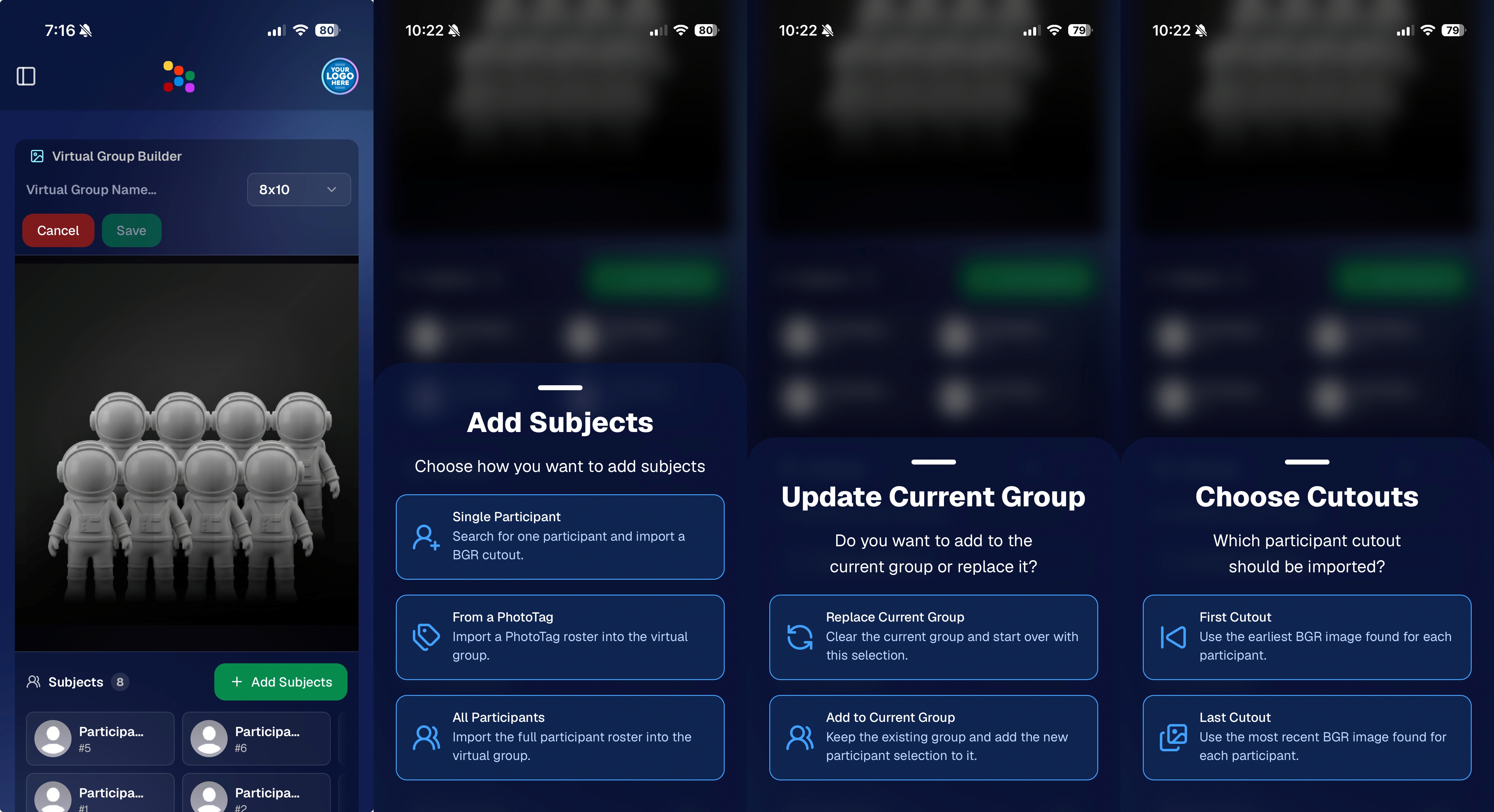
You can now build Virtual Groups directly on the Dashboard — with Mobile Dashboard support too!

Find it from an Event page by clicking Virtual Groups in the sidebar menu.

With Virtual Group Builder, you can:

👥 Import participants from the full Event, one at a time, or everyone with a specific PhotoTag

✂️ Use participant cutouts to build polished group images

🏷️ Build groups quickly when your Event has consistent cutouts and participants tagged with PhotoTags

🖼️ Create Virtual Groups in 4×6, 5×7, 8×10, or 11×14 formats

🎨 Choose from NowCandid default backgrounds, upload custom backgrounds, and add overlays

🧢 Add account logos to the corners

🔤 Toggle subject names on or off

📐 Preview crop lines and aspect ratio lines

🖱️ Zoom, pan, drag, reorder, resize, brighten, and position subjects

You can also adjust group-level settings like background, overlay, overall scale, vertical position, bottom shadow falloff, and individual cutout fade to help hide cropped legs.

When your Event is set up cleanly with cutouts and PhotoTags, you can create a full Virtual Group in just a few clicks. ✨

Docs page: https://app.nowcandid.com/docs/image-management/virtual-groups
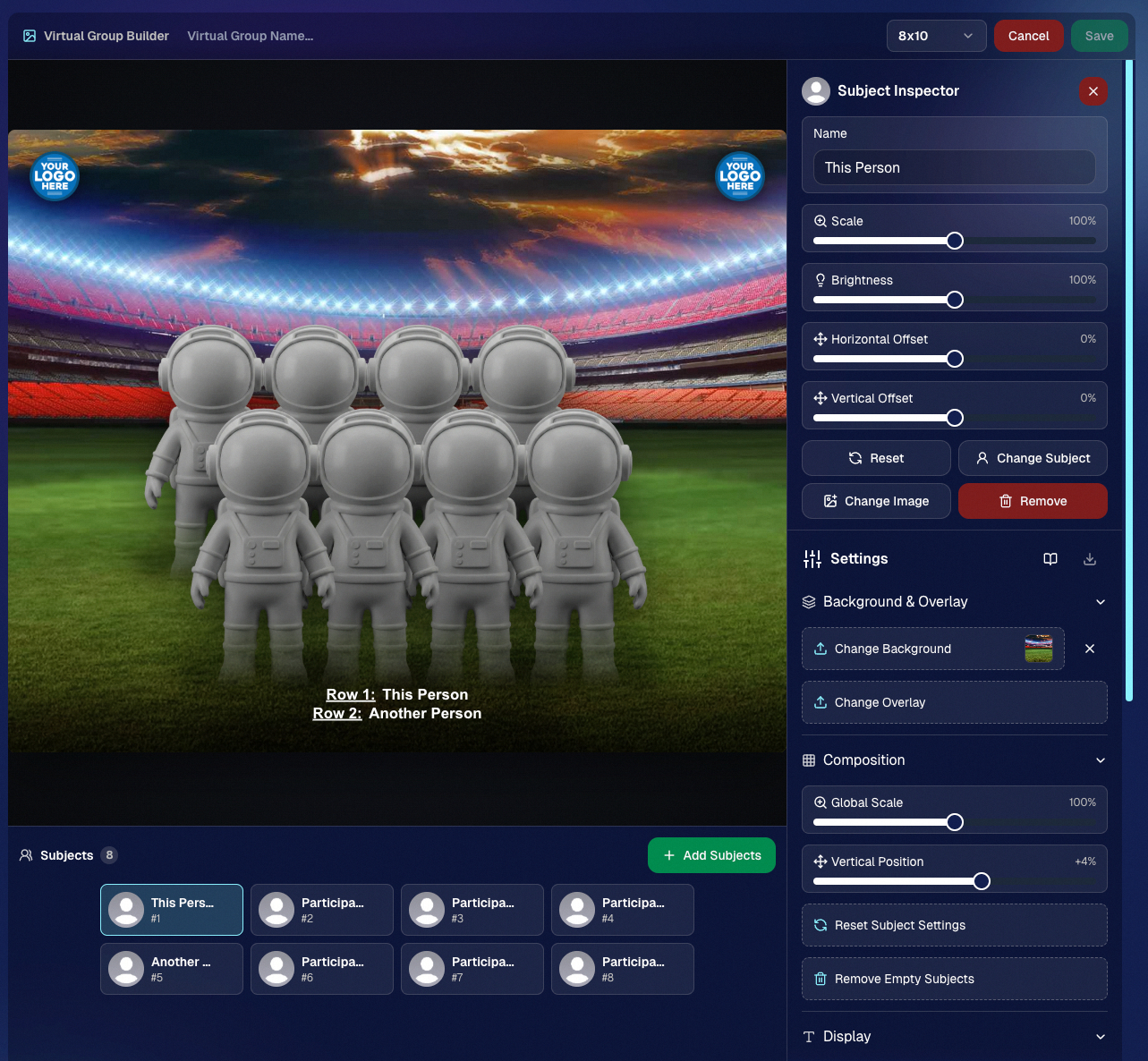
Desktop Dashboard view of the new Virtual Group Builder

Mobile Dashboard view of the new Virtual Group Builder

🎓 Candy Image Studio: New Graduation Tools

Candy Image Studio got some very timely upgrades for graduation season:

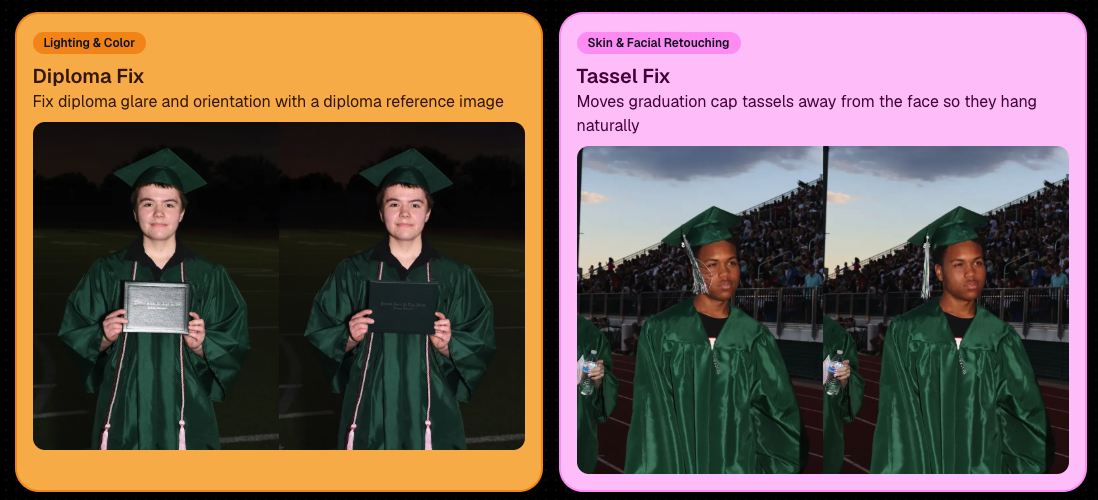
🎓 New “Diploma Fix” node

  • Helps fix diploma orientation and glare. You’ll need to upload a reference diploma so Candy knows what the diploma should look like, including details like school name, emblem, fonts, and colors.

🎗️ New “Tassel Fix” node

  • Helps adjust graduation tassels that are covering a subject’s face — similar to Stray Hair Removal, but tailored specifically for grad tassels.

👓 Improved Reduce Glass Glare

  • This node is now more reliable and less likely to accidentally add glasses to subjects who aren’t wearing them.
📣 Client Outreach Improvements

Client Outreach got a few useful updates to help save money and keep lists cleaner:

🚫 Unsubscribed contacts excluded by default

  • Imported Client Outreach contacts now exclude unsubscribed contacts unless you choose to include them.

🔘 New “Include unsubscribed contacts” toggle

  • You can still include them if needed, but the default helps avoid spending on contacts who can’t receive your outreach.

👀 Show Hidden on Client Lists

  • The Client Outreach list page now has a Show Hidden option, similar to Offers and PhotoRoster organizations.

🧭 Client List sidebar shortcut

  • The Client Outreach sidebar item now takes you back to the Client List page more clearly.

🖼️ Image Management & Dashboard Upgrades

🧩 Image Release Gallery redesign

  • The Image Release Gallery now uses a masonry layout like retail, supports lightboxes with arrow key navigation, has CMD/CTRL+F search support, and saves filters in the URL.

🧑‍💻 Manual Assignment page refresh

  • The Participant Manual Assignment page has a cleaner, more intuitive UI.

Camera star ratings on Image Details

  • If your camera includes star ratings, they now appear on the Image Details page.

⬇️ Image Details convenience buttons

  • Image Details now includes quick actions to download or open in Candy Image Studio.

🏷️ PhotoTag ampersand fix

  • PhotoTag names with ampersands now save correctly.

🧍 Merged participant name fix

  • Manual Assignment now shows the selected participant’s name instead of the first merged participant’s name.

🔙 Event sidebar remembers filters

  • When going back to the Event List from an Event Overview page, your filters are remembered as long as you haven’t refreshed.

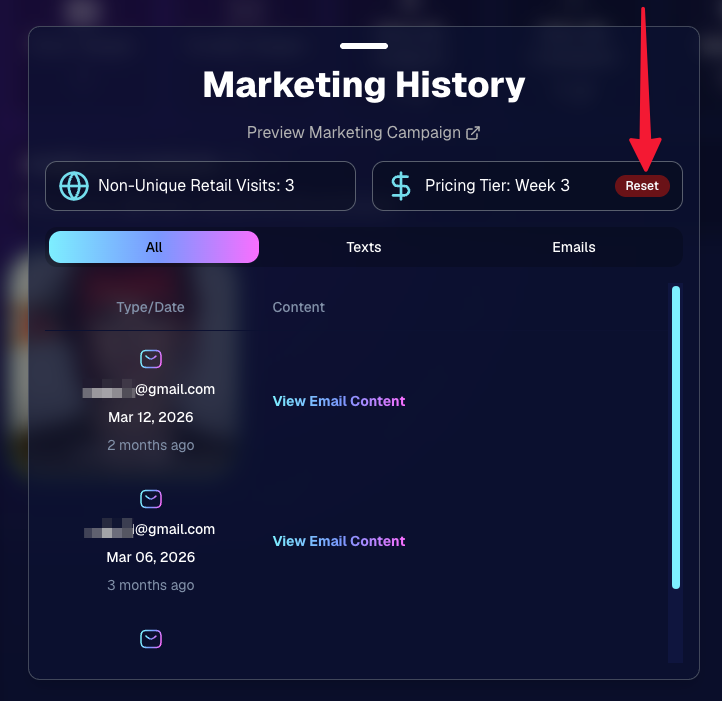
🔁 Pricing tier reset button

  • Participant marketing history now includes a button to reset a participant’s pricing tier start date, useful if support wants to re-offer first-week pricing.
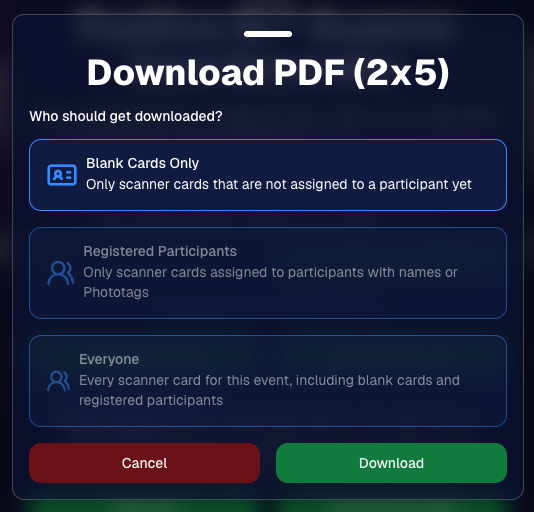
🪪 Positive ID QR Code downloader options

  • You can now download blank cards only, registered participants only, or everyone, making scan card PDFs easier to manage for multi-workflow sports events.
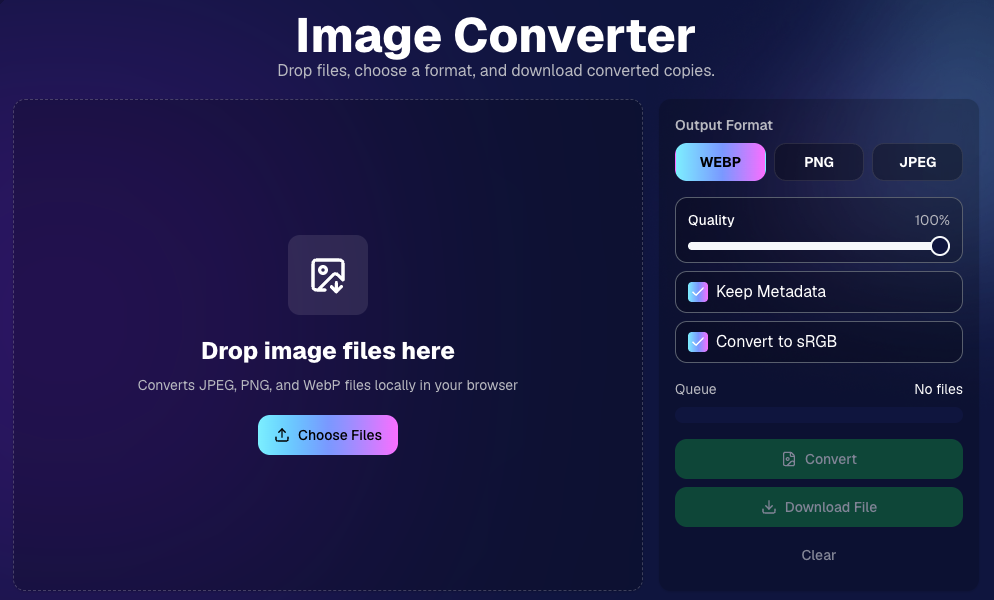
🛠️ New Tool: Image Converter

There’s a new tool under Tools & More → Image Converter.

Use it to:

🔄 Convert images to WEBP, PNG, or JPEG

🎨 Convert images to sRGB

Handy for preparing files before uploading them to NowCandid Events.
📚 New Capture App Camera Docs

We added a dedicated docs page for confirmed camera models that work with the Capture App.

More cameras may work than what’s listed, but this page focuses on models we’ve confirmed.

Docs page: https://app.nowcandid.com/docs/capture-app/cameras

🛍️ Retail Improvements

📬 New Contact Us form on retail

  • The Contact Us popup now includes a form that sends support an email with helpful details automatically included, such as browser info, window size, retail link, Event details, and order number when available. This should make support faster and reduce back-and-forth.

🖼️ Overlay step now comes before cropping

  • This prepares retail for future improvements while keeping product customization clearer.

🗓️ Smarter Year captions

  • Certain products now default the Year caption to the Event start year or participant Day 0 year instead of the current year. Helpful for late-December events or older graduation galleries.

🌍 International order fix

  • Fixed an edge case where some international orders could send multiple receipts and incorrectly show that the order wasn’t submitted.

🤳 Selfie Check-In & Capture App Updates

📶 Clearer Selfie Check-In upload errors

  • If a selfie upload fails, subjects now see a more specific error reason — like upload speed being too slow — so they know what to try next.

📱 Capture App 5.6.3 OTA update

  • Contact Info Settings now says Tap-A-Face or Type & Take based on the Event program
  • The 1000×1000 reference image requirement has been removed for Selfie Check-In Station and Roster Check-In, especially helpful for Android devices with lower-resolution cameras

That’s the week!

Virtual Group Builder is the big one, especially for sports and volume workflows — but between Client Outreach, Candy Image Studio, Image Converter, and retail support improvements, there’s a lot here to make your next Event easier to manage.

Keep creating magic,

Candy 🍬

Related articles

Weekly Recap: Longer Face Matching™, New PhotoRoster Tools & Retail Tweaks!🗓
Feature Updates
June 6, 2025

Weekly Recap: Longer Face Matching™, New PhotoRoster Tools & Retail Tweaks!🗓

5
 minutes read
Hey friends! 📸

Candy here with another round of updates from the NowCandid™ world.

This week brings big improvements for Face Matching™ Events, new ways to re-use your check-ins across Events, and a couple of helpful tweaks to the retail site and image management tools.

Let’s dive in! 👇

⏳ Face Matching™ Now Lasts 60 Days!

That’s right—your Face Matching™ window has now doubled from 30 to 60 days from your Event's Start Date! 🙌

This means even more time for:

  • • Late uploads to still get matched 🔄
  • • Schools to send out the Selfie Check-In™ link after the Event 📬
  • Stragglers to find their photos 🧍‍♀️🧍‍♂️🧍

But here’s your friendly reminder: the faster you upload, the better your sales! 🏃‍♂️💸

📸 Every image uploaded goes through:

  • • Exposure correction automatically
  • • Optional cart-wide light retouching for customers
  • • Manual review for print color accuracy
  • • Intuitive cropping tools for end users

So don’t sit on your images to batch-edit them all—uploading sooner = more sales.

Every day that passes = potential sales slipping by. Speed matters!

🔁 Create PhotoRosters™ from Selfie Check-Ins!

This one’s a fun one for graduation season! 🎓

Now you can create a PhotoRoster™ directly from the Selfie Check-Ins™ of a previous Event.

Here’s why it’s awesome:

  • • Ran a great Prom with tons of Check-Ins? ✅
  • Reuse that same data to auto-create your graduation PhotoRoster™! 🎓
  • If participants Check-In again or get added via Tap-A-Face™, NowCandid™ automatically merges based on contact info = no duplicate galleries, no confusion!

Perfect for client relationships where you cater to all of their school's Events!

🧰 Misc. Improvements & Fixes

A few extra goodies for your workflow this week:

  • 🔠 New image name sort option on the Manage Images page (great for keeping sequences clean).
  • 📲 Prominent Selfie Check-In™ button added to All Images galleries (so folks can find their pics even faster!).
  • 🧾 A “non-refundable” tag has been added to the shopping cart & receipt for digital items to help set better expectations.
    • (Digital photography = no take-backs! This helps avoid confusion.)

That’s all for now! 🎉

If you have any questions about the new features, you can always reach me from your dashboard! 💬

See you next week for more enhancements and pro tips!

Cheers,

Candy

Weekly Recap: Easier Shopping, Bilingual Check-Ins & More!
Feature Updates
May 30, 2025

Weekly Recap: Easier Shopping, Bilingual Check-Ins & More!

2
 minutes read
Hey there! 👋

Candy here with your weekly dose of NowCandid™ updates!

We’ve rolled out some helpful new features to make check-ins smoother, shopping more intuitive, and checkouts faster. Let’s take a peek! 👀

🌍 ¡Check-In en Español!

We’ve added Spanish language support for all customer check-in pages, including:

  • • Selfie Check-In™
  • • Simple Check-In
  • • Scan Card Check-In

The system will auto-detect the user’s browser language and serve the Spanish version when appropriate.

More languages are planned in the future, so stay tuned! 🌐

Bonus: We also have added Spanish versions of the Privacy Policy & Terms of Use for end customers to use!

🛍 Easier Package Shopping 🖼️

Package selection just got a serious upgrade! 🎁

When a customer is picking images for each item in a Package, they’ll now see:

  • • Tabs to toggle between All Images and their Personal Gallery
  • • Pagination to easily flip through the All Images Tab

This is especially useful when customers are shopping for Packages directly from a link to the All Images Gallery — now it’s easier to browse and find their perfect shot! 💫

🛠 Miscellaneous Fixes & Tweaks

Here’s a quick roundup of other small (but mighty!) improvements this week:

  • 🏷️ Empty PhotoTags™ no longer appear on the retail site — cleaner and simpler for your customers!
  • 💸 Venmo now shows up more consistently as an express checkout option.
  • 📅 Interested in attending Summer Seminar 2025 in OKC? Head to the Profile Page in your dashboard for the invite and sign-up link!
  • 🐞 Tons of small bug fixes and polish across the platform. We’re always working to keep things speedy, intuitive, and delightful!

See you next week with more exciting improvements!

As always, if you need anything — just ask me!😄

Cheers,

Candy

Weekly Recap: Clarity Campaign, Offer Previews & Fresh Fixes!🎯
Feature Updates
May 23, 2025

Weekly Recap: Clarity Campaign, Offer Previews & Fresh Fixes!🎯

4
 minutes read
Hey there, photography superheroes! 🦸‍♀️📸

This week, we've launched a wave of updates designed to make the NowCandid™ experience smoother, clearer, and even more photographer-friendly.

From helpful interface changes to new sharing tools and fixes to long-standing quirks—there’s a lot to cover, so let’s jump in!

💡 The Clarity Campaign: Making Things Make More Sense™

We’ve been listening to feedback and noticed some common points of confusion around terminology in the dashboard, reports, and app. So, we’re making some well-needed name changes that we think will make life easier for everyone—especially new users just getting started.

Here’s what’s changing:

  • • GroupTag(s)PhotoTag(s)

    A more intuitive name to describe this helpful organization tool!
  • • FaceMatch ImportPhotoRosters™
    • “FaceMatch Import” is now “PhotoRosters”
    • “FaceGroups” are now “PhotoRosters”
    • “Organizations” remain the same
  • • Participant(s)Contact(s) (most places)
    • On reports and list pages, you'll now see “Contacts” or "Participants & Contacts" instead
    • “Participants” now refers only to Contacts with matched or assigned images
  • • Home tabReports tab

    Plus, “Events” is now the first tab in the dashboard navigation, making the flow easier for new users!

These aren’t just name changes—they’re clarity boosters designed to help everyone understand the platform faster and more fully. 💡

Reports will be updated next week as well to reflect this changes, hopefully making them even more accurate & helpful! We love reporting & analytics around here.

🔍 Price & Product Preview Pages

Photographers can now generate read-only URLs of their Offers to share with school officials, parents, or event organizers ahead of time.

✅ What this means:

  • • You can preview exactly what the pricing and product lineups will look like
  • • Share a clean, professional view of your Offer—no dashboard access required
  • • Useful for gatekeepers who need to approve pricing or product options in advance

Find this option in the Offers tab today! 🚀

Found via the Offers tab on the Web Dashboard

Or check out the preview for yourself, using this link here!

⚙️ Dashboard Tweaks & Tools

Small changes = big improvements to your workflow. Here's what's new:

  • ✉️ You can now edit your Business Email in Profile Settings (this affects retail site contact and backprinting!)
Editable via "Business Info" within your Profile Settings on the Web Dashboard!
  • 🧮 Unassigned Image Count added to the image count popup in Manage Images
Found via the graph icon near the top of an Event's Manage Images page!
  • 🔁 Associated Events now visible at the PhotoRoster level (not just at the Org level)
  • 📜 Offer Logs! You can now view an edit history of each Custom Offer, including edits made by you or the NowCandid™ team

🔧 Notable Fixes

We’ve patched some common hiccups:

  • 📱 Selfie Check-In bugs on newer Samsung phones
  • 📷 Fixes for uploading from camera roll on iOS
  • 🖼️ Memory Mate product bug affecting custom background rendering
  • 🚫 Express Checkout bug fix: clearer error when customers enter short names (like initials)

That’s all for this week, friends! 🥳

We're making NowCandid™ easier to use and even more powerful than ever. Thanks for sticking with us and letting us be part of your photography business journey!

If you’ve got questions, hit up Candy, our ever-present AI helper—or book a session with our team!

Until next time, keep capturing those unforgettable moments. 📸✨

Cheers and sparkles,

Candy 🍬

Let’s get in touch

If you’re a photographer looking to add NowCandid services to your wheelhouse – set up a call by clicking the button below.

How to customize formatting for each rich text

How to customize formatting for each rich text

How to customize formatting for each rich text

How to customize formatting for each rich text

How to customize formatting for each rich text

What’s a Rich Text element?

The rich text element allows you to create and format headings, paragraphs, blockquotes, images, and video all in one place instead of having to add and format them individually. Just double-click and easily create content.

A rich text element can be used with static or dynamic content. For static content, just drop it into any page and begin editing. For dynamic content, add a rich text field to any collection and then connect a rich text element to that field in the settings panel. Voila!

Headings, paragraphs, blockquotes, figures, images, and figure captions can all be styled after a class is added to the rich text element using the "When inside of" nested selector system.

  • List One
  • List Two
  • List Three
  • List Four
  • List Five

This is a link

This is bold text