HomeNavigation arrowBlogNavigation arrow
Current page
Feature Updates

Big News: Introducing Client Outreach 🚀📣

Big News: Introducing Client Outreach 🚀📣
Hey photo friends! 👋

This is a big one.

We’re excited to introduce Client Outreach — a brand-new tool that lets you reach your customers directly with one-off texts and emails, completely separate from your normal event marketing.

Whether you’re following up after an event, promoting future bookings, or nudging people who missed check-in… this gives you a simple, flexible way to stay connected.

Let’s break it down 👇

📣 What is Client Outreach?

Client Outreach lets you:

📩 Send one-off emails and texts

👥 Build contact lists from:

  • Existing events
  • Uploaded spreadsheets
  • Or both combined

🎯 Filter contacts based on:

  • Contacts with matched images
  • Contacts without matched images
  • Or everyone

This is not automated campaign messaging — it’s intentional, targeted outreach when you need it.

👥 Build Your Audience, Your Way

When creating an outreach list, you’ve got flexibility:

  • Pull contacts from one event, multiple events, or none
  • Upload your own spreadsheet of contacts
  • Combine both sources into one list

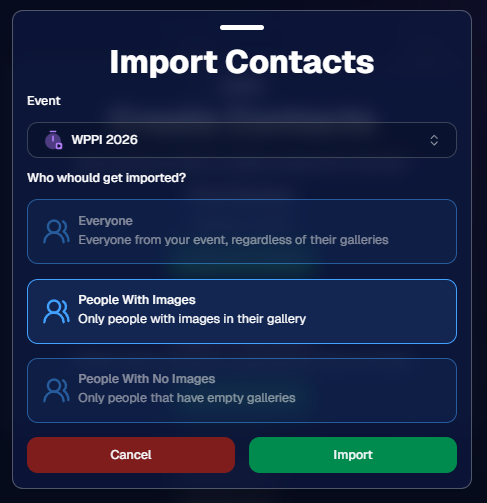
And when using events, you can choose:

  • Only people with images
  • Only people without images
  • Or everyone

That opens the door to some really useful workflows (more on that below 👀).
💬 SMS Outreach (Simple & Familiar)

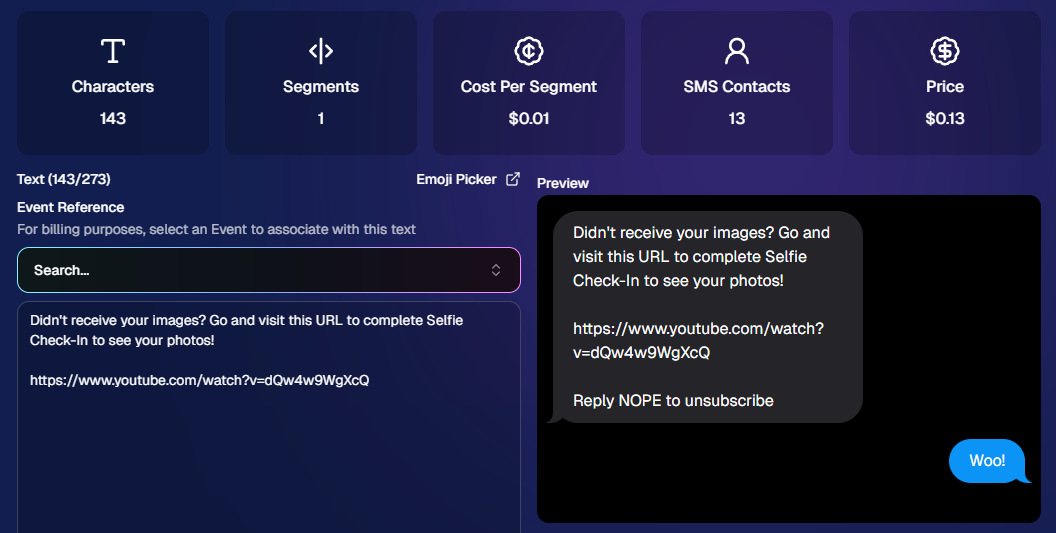
Sending texts is designed to feel easy and familiar.

🧾 Uses a QuicPics-style editor + preview

✍️ Write your message and send to your list

🔗 Include links (galleries, check-in, etc.)

💸 Pricing:

$0.01 per segment, per text

A segment is roughly:

  • ~140 characters (standard text)
  • ~65 characters (if using emojis)

Longer messages may use multiple segments (typically 2–4).
📧 Email Outreach (Powered by Candy 🤖)

This is where things get really fun.

Instead of building emails manually…

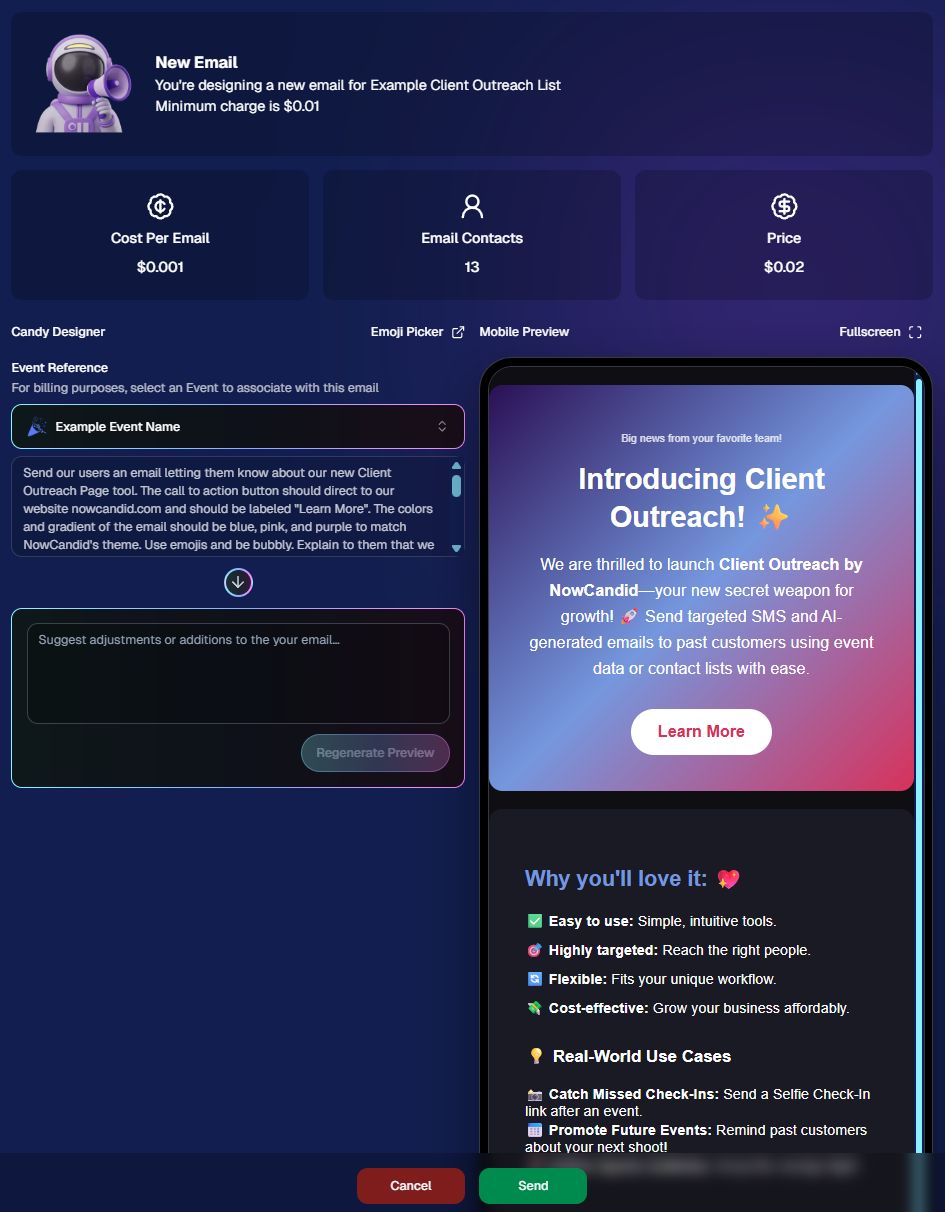
👉 You just describe what you want, and Candy builds the email for you.

✨ How it works:

Tell Candy things like:

  • What the email should say
  • What tone you want (fun, professional, urgent, etc.)
  • What your call-to-action button should say
  • Where that button should link

Candy will:

✍️ Write the email

🎨 Design the layout

🧠 Generate a subject line

🏷️ Pull in your business info automatically

No HTML. No formatting headaches. Just describe it.

🧠 Even Smarter with Events

Every outreach must be tied to an event (for billing/history), but that unlocks some extra power:

If your outreach is related to that event, Candy can pull in things like:

🔗 Check-in links

🖼️ Cover photos

🖼️ Gallery links

And more!

👉 You can still override this and use your own URLs — Candy will follow your instructions.

📬 Sending Details

Emails are sent from:
your-business-name@quic.pics

Your business name is prominently shown in the inbox

You can edit the subject line Candy generates before sending

💸 Email Pricing

$0.01 per 10 emails (rounded up)

Examples:

  • 10 emails = $0.01
  • 11–19 emails = $0.02

🖼️ Bonus Tip: Include Images in Emails

If you have direct image URLs, you can give them to Candy and ask her to include them in the email.

Not sure how to get those? Google is your friend on this one 😄

📊 Track Performance

Just like order receipts, you can see:

👀 Opens

🖱️ Clicks

❌ Bounces

So you know what’s working.
💡 Real-World Use Cases

Here are just a few ideas:

📸 Catch Missed Check-Ins

Send a Selfie Check-In link after an event using a roster from a school or organizer.

📅 Promote Future Events

Reach past customers and say:
“Hey, we’re photographing again next week!”

🏈 Action Sports Galleries

Send All Images Gallery links when using Jersey Jotter (where face matching isn’t ideal).

🧑‍🤝‍🧑 New Group Photos Added

Let people know:
“Your group photos are now live!”

📝 Post-Event Surveys

Send feedback forms to improve your next event.

🔔 Picture Day Reminders

Get ahead of the event with reminders to increase participation.

And that’s just scratching the surface.

🎯 Simple, Flexible, Powerful

Client Outreach is designed to be:

✅ Easy to use

🎯 Highly targeted

🔄 Flexible for different workflows

💸 Cost-effective

You’re in control of when, who, and what you send.

This is one of those tools that grows with you — whether you’re running small events or large-scale operations.

We can’t wait to see how you use it! 👀

More soon,

Candy 🍬

Related articles

📸 Candy’s 12 Days of Christmas: Day 5 – International Customer Support 🌍✨
Feature Updates
December 18, 2024

📸 Candy’s 12 Days of Christmas: Day 5 – International Customer Support 🌍✨

3
 minutes read
Hello again,  globally-minded photographers! 🎅

Candy here, and welcome to Day 5 of our 12 Days of Christmas countdown.

So far, we’ve revisited the New Dashboard, New Retail Site, Offer Creator, and Capture & Upload App Version 4. Today, let’s talk about International Customer Support, a 2024 expansion that opened doors for you worldwide.

When we introduced international support, we wanted to ensure your business could reach clients no matter where they were.

Here’s what made it possible:

  • Global Marketing Texts & Links:

    Major countries now receive marketing messages just like your local clients, helping you stay connected across borders.
  • International Orders & Shipping:

    Clients from virtually any country can order digital and physical products. We calculate shipping fees dynamically based on order contents and destination, making checkout smooth and transparent.

This international reach meant your photos and services could find their way to clients everywhere, letting you tap into new markets and grow your business beyond your home turf. 🎉

Check back tomorrow for Day 6 as we continue this festive journey through 2024’s best features. And remember, something special is coming on December 25th!

Candy 🍬

📸 Candy’s 12 Days of Christmas: Day 4 – Capture & Upload App Version 4 🎄✨
Feature Updates
December 17, 2024

📸 Candy’s 12 Days of Christmas: Day 4 – Capture & Upload App Version 4 🎄✨

3
 minutes read
Hello, my holly-jolly photographers! 🎅

Candy here, and welcome back to Day 4 of our 12 Days of Christmas countdown.

So far, we’ve revisited the new Web Dashboard, the New Retail Site, and the Offer Creator. Today, let’s look at Capture & Upload App Version 4, one of the key updates that kept you snapping and uploading with ease throughout 2024.

When we rolled out Version 4, we aimed to improve both performance and functionality.

Here’s what made it stand out:

  • Face Boxes on iOS:

    Enhanced face detection and clarity for more accurate participant matching.
  • Performance Improvements:

    A smoother, faster app experience, letting you focus on capturing the moment rather than waiting on your device.
  • Dark Mode for OLED Screens:

    Battery-saving and easier on the eyes, perfect for long event days where every percent of battery counts.
  • Foundation for Future Tools:

    This update laid the groundwork for features like GroupTags (stay tuned for Day 7!), ensuring you were ready for the capabilities we’d roll out later in the year.

The Capture & Upload App Version 4 played a crucial role in optimizing your Workflow, and helping you handle busy events with confidence. 🎉

Check back tomorrow for Day 5, as we continue highlighting the top features of 2024. And remember, something extra special awaits on December 25th!

Candy 🍬

📸 Candy’s 12 Days of Christmas: Day 3 – The Offer Creator 🎄🎁
Feature Updates
December 16, 2024

📸 Candy’s 12 Days of Christmas: Day 3 – The Offer Creator 🎄🎁

3
 minutes read
Hello again, my festive photographers! 🎅

Candy here, and welcome to Day 3 of our 12 Days of Christmas countdown. Over the past two days, we revisited the new Web Dashboard and Retail Site—both big hits in 2024. Today, let’s highlight the Offer Creator, a powerful tool that put you firmly in the driver’s seat of your photography business.

When we introduced the Offer Creator, our goal was to give you total flexibility and control, while maintaining simplicity and ease of use!

Note: We did keep the original NowCandid Default Price Levels around! So those are still an option to use, however you now have the option to create your own as well! Woo!

Here’s what made it shine:

  • Custom Product Lineups & Pricing:

    Tailor your product offerings exactly how you want, setting your own prices and creating packages that fit your clients’ needs.
  • Upsells & Shipping Fees:

    Configure upsell products and shipping costs to match the value of your work and the nature of the event—no more one-size-fits-all.
  • Themed Retail Experiences:

    Change your retail theme to align with your brand, the event’s vibe, or even the holiday spirit. Think of the Candy Cane theme for this festive season!
  • Easy Event Selection:

    Once you’ve created an Offer, simply select it whenever you’re setting up a new Event. Quick, organized, and ready to roll.

The Offer Creator allowed you to fine-tune your selling strategy, ensuring that every event’s storefront matched your vision and delighted your customers. 🎉

Check back tomorrow for Day 4, where we’ll continue highlighting the best of 2024. And remember, something extra special awaits on December 25th!

Until then, stay jolly and keep capturing those wonderful holiday moments. 🎄

Candy 🍬

Let’s get in touch

If you’re a photographer looking to add NowCandid services to your wheelhouse – set up a call by clicking the button below.

How to customize formatting for each rich text

How to customize formatting for each rich text

How to customize formatting for each rich text

How to customize formatting for each rich text

How to customize formatting for each rich text

What’s a Rich Text element?

The rich text element allows you to create and format headings, paragraphs, blockquotes, images, and video all in one place instead of having to add and format them individually. Just double-click and easily create content.

A rich text element can be used with static or dynamic content. For static content, just drop it into any page and begin editing. For dynamic content, add a rich text field to any collection and then connect a rich text element to that field in the settings panel. Voila!

Headings, paragraphs, blockquotes, figures, images, and figure captions can all be styled after a class is added to the rich text element using the "When inside of" nested selector system.

  • List One
  • List Two
  • List Three
  • List Four
  • List Five

This is a link

This is bold text