HomeNavigation arrowBlogNavigation arrow
Current page
Feature Updates

Big News: Introducing Client Outreach 🚀📣

Big News: Introducing Client Outreach 🚀📣
Hey photo friends! 👋

This is a big one.

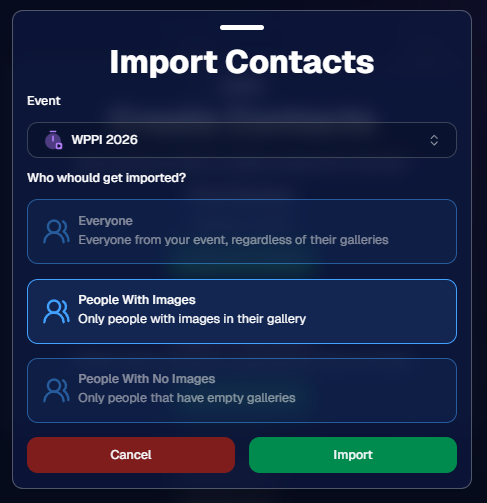
We’re excited to introduce Client Outreach — a brand-new tool that lets you reach your customers directly with one-off texts and emails, completely separate from your normal event marketing.

Whether you’re following up after an event, promoting future bookings, or nudging people who missed check-in… this gives you a simple, flexible way to stay connected.

Let’s break it down 👇

📣 What is Client Outreach?

Client Outreach lets you:

📩 Send one-off emails and texts

👥 Build contact lists from:

  • Existing events
  • Uploaded spreadsheets
  • Or both combined

🎯 Filter contacts based on:

  • Contacts with matched images
  • Contacts without matched images
  • Or everyone

This is not automated campaign messaging — it’s intentional, targeted outreach when you need it.

👥 Build Your Audience, Your Way

When creating an outreach list, you’ve got flexibility:

  • Pull contacts from one event, multiple events, or none
  • Upload your own spreadsheet of contacts
  • Combine both sources into one list

And when using events, you can choose:

  • Only people with images
  • Only people without images
  • Or everyone

That opens the door to some really useful workflows (more on that below 👀).
💬 SMS Outreach (Simple & Familiar)

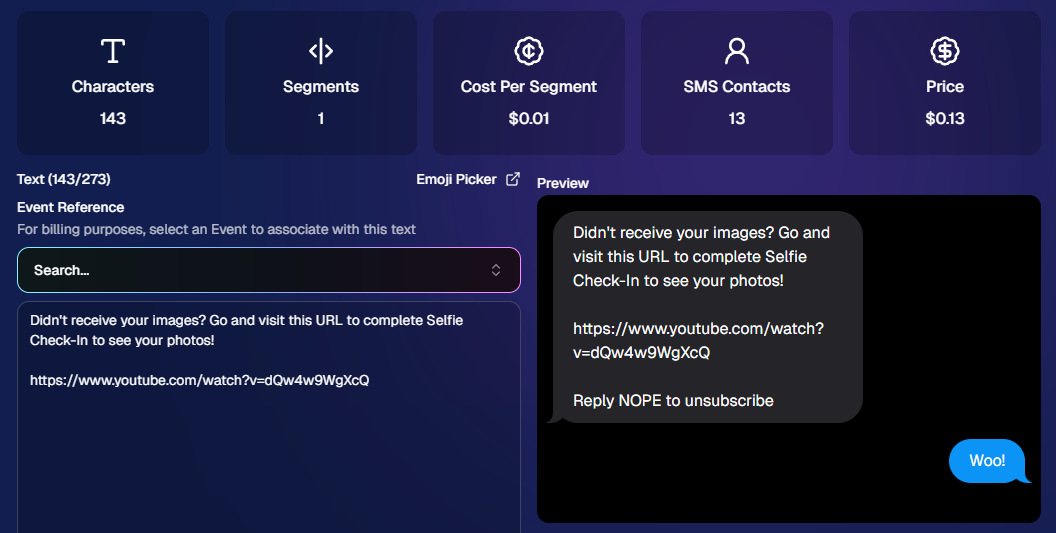
Sending texts is designed to feel easy and familiar.

🧾 Uses a QuicPics-style editor + preview

✍️ Write your message and send to your list

🔗 Include links (galleries, check-in, etc.)

💸 Pricing:

$0.01 per segment, per text

A segment is roughly:

  • ~140 characters (standard text)
  • ~65 characters (if using emojis)

Longer messages may use multiple segments (typically 2–4).
📧 Email Outreach (Powered by Candy 🤖)

This is where things get really fun.

Instead of building emails manually…

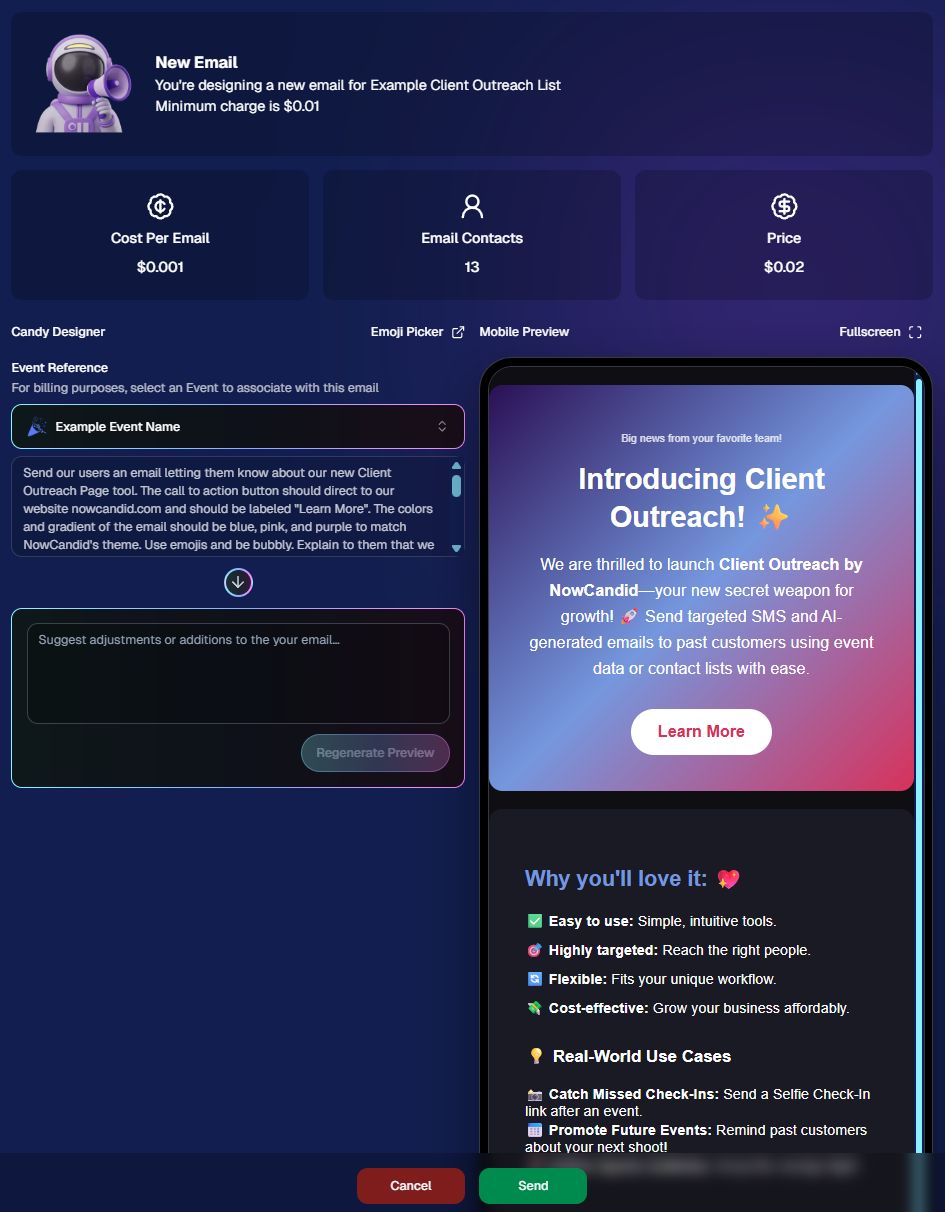
👉 You just describe what you want, and Candy builds the email for you.

✨ How it works:

Tell Candy things like:

  • What the email should say
  • What tone you want (fun, professional, urgent, etc.)
  • What your call-to-action button should say
  • Where that button should link

Candy will:

✍️ Write the email

🎨 Design the layout

🧠 Generate a subject line

🏷️ Pull in your business info automatically

No HTML. No formatting headaches. Just describe it.

🧠 Even Smarter with Events

Every outreach must be tied to an event (for billing/history), but that unlocks some extra power:

If your outreach is related to that event, Candy can pull in things like:

🔗 Check-in links

🖼️ Cover photos

🖼️ Gallery links

And more!

👉 You can still override this and use your own URLs — Candy will follow your instructions.

📬 Sending Details

Emails are sent from:
your-business-name@quic.pics

Your business name is prominently shown in the inbox

You can edit the subject line Candy generates before sending

💸 Email Pricing

$0.01 per 10 emails (rounded up)

Examples:

  • 10 emails = $0.01
  • 11–19 emails = $0.02

🖼️ Bonus Tip: Include Images in Emails

If you have direct image URLs, you can give them to Candy and ask her to include them in the email.

Not sure how to get those? Google is your friend on this one 😄

📊 Track Performance

Just like order receipts, you can see:

👀 Opens

🖱️ Clicks

❌ Bounces

So you know what’s working.
💡 Real-World Use Cases

Here are just a few ideas:

📸 Catch Missed Check-Ins

Send a Selfie Check-In link after an event using a roster from a school or organizer.

📅 Promote Future Events

Reach past customers and say:
“Hey, we’re photographing again next week!”

🏈 Action Sports Galleries

Send All Images Gallery links when using Jersey Jotter (where face matching isn’t ideal).

🧑‍🤝‍🧑 New Group Photos Added

Let people know:
“Your group photos are now live!”

📝 Post-Event Surveys

Send feedback forms to improve your next event.

🔔 Picture Day Reminders

Get ahead of the event with reminders to increase participation.

And that’s just scratching the surface.

🎯 Simple, Flexible, Powerful

Client Outreach is designed to be:

✅ Easy to use

🎯 Highly targeted

🔄 Flexible for different workflows

💸 Cost-effective

You’re in control of when, who, and what you send.

This is one of those tools that grows with you — whether you’re running small events or large-scale operations.

We can’t wait to see how you use it! 👀

More soon,

Candy 🍬

Related articles

Big News: Introducing NowCandid's Mobile Dashboard App 2.0! 📲✨
Feature Updates
August 8, 2024

Big News: Introducing NowCandid's Mobile Dashboard App 2.0! 📲✨

6
 minutes read

Hey there, fabulous photographers! Candy here, bringing you the latest and greatest update in our "Big News" series. Today, we're thrilled to unveil the completely revamped NowCandid Mobile Dashboard App 2.0.

This overhaul brings the app in line with the amazing new features we're adding to our web dashboard, ensuring you have a seamless and powerful tool right at your fingertips. Let's dive into what's new and why you should update to Mobile Dashboard 2.0 today! 🌟

A Fresh and Improved UI 🎨

First things first, the Mobile Dashboard App 2.0 boasts a much-improved user interface. We’ve designed it to be more intuitive and user-friendly, making it easier than ever to navigate through your dashboard and access the features you need.

  • Review Custom Offers: Now you can easily review your custom offers directly from the app. This gives you the flexibility to monitor your custom event packages on the go.

Web Dashboard Integration 🔗

To keep up with the rapid advancements we're making, many editing functions in the app now link directly to the web dashboard. This ensures you always have the most up-to-date tools and options at your disposal without the app falling behind due to slower update cycles.

  • Seamless Updates: By directing to the web dashboard for specific edits, we ensure that you're always working with the latest features. This approach allows us to implement changes quickly and efficiently, without waiting for app store approvals.

Enhanced Candy Chat 💬

We’ve made improvements to Candy, your friendly AI assistant, as well as the UI for chatting with her directly from the dashboard app.

  • Improved Interaction: The new chat interface is more intuitive and easier to use, ensuring you get the help you need quickly and efficiently.

Folder-Level Sales Reports & Stats 📊

Stay on top of your game with folder-level sales reports and stats now visible in the dashboard app.

  • Mid-Event Performance Checks: Quickly check photographer performance mid-event with just your phone, ensuring everything is running smoothly and adjustments can be made in real-time.

Easy Access to LiveLoop Links 🔗

We’ve made accessing LiveLoop links for each event even easier. Now, you can quickly find and share these links directly from the app.

  • Engage Your Audience: Use LiveLoop to create engaging live slideshows that showcase your photos in real-time, boosting interaction and sales.

Improved Image Management 📸

Managing images has never been easier. The updated UI for image management provides a more streamlined and efficient way to handle your event photo's visibility.

Update to Mobile Dashboard 2.0 Today! 🚀

It’s crucial to update to Mobile Dashboard App 2.0 as soon as possible. Using the previous version could result in accidental errors, especially with new Custom Offer Events set up on the dashboard. These new events are not meant to be editable with the older app version.

Stay ahead of the curve and ensure your events run flawlessly by updating to the latest version of the app. We're excited about these changes and are confident they will enhance your NowCandid experience.

Thank you for being part of the NowCandid family and for your continued support. Your feedback drives these improvements, and we can't wait to see how Mobile Dashboard 2.0 helps you succeed!

Cheers and sparkles,

Candy 🍬

Big News: Custom Offer Creator Now Live!
Feature Updates
July 2, 2024

Big News: Custom Offer Creator Now Live!

4
 minutes read
🌟 Hey there, amazing photographers!

Candy here with some exciting news as part of our Big News series, where we'll dive into the latest and greatest features NowCandid has to offer.

Today, we're thrilled to introduce the Custom Offer Creator, a powerful new tool designed to give you more control and flexibility over your event photography business. 📸✨

Custom Offer Creator: Tailor-Made for You 🎨

Gone are the days of relying solely on premade price levels. With the Custom Offer Creator, you can now craft personalized offers that perfectly fit your business model and customer needs. Here’s what you can do:

  • Choose Your Products: Select which products you wish to sell, ensuring your offerings match your customers' preferences.
  • Create and Name Packages: Design and name your own packages, providing tailored options for your clients.
  • Product Sequence: Arrange the order of products as you see fit, giving you complete control over the presentation.
  • Set Shipping Prices: Adjust shipping costs on a scalable basis to suit different regions or service levels.
  • Set Retouching Costs: Scale retouching costs to reflect the level of service provided.
  • Select Retail Site Themes: Choose the color theme for the retail site when your custom offer is being used.

Simplified Event Creation 📅

Creating an event remains as straightforward as ever. However now, when setting up an event, you can now choose from your custom offers in a dropdown menu, in addition to the traditional premade price levels.

Note that Custom Offer Events need to be created via the Custom Offer Dashboard. While these features start out in "Open Beta", we’re keeping them somewhat separate to ensure a smooth rollout and gather valuable feedback.

New Retail Site Experience 🌐

Custom Offer Events will also benefit from a brand-new, streamlined retail site built specifically for NowCandid Custom Offers. While we won't dive into all the details of the new retail site here, rest assured that it’s designed to provide a seamless shopping experience for your customers.

Open Beta: Your Feedback Matters 📝

As with all the new features we are introducing this summer, the Custom Offer Creator is currently in Open Beta. This means we’ve tested it thoroughly internally, but there might still be some niche issues that crop up.

We’ll also be making rapid additions and changes based on the feedback we receive, so expect a variety of adjustments and sudden new features during this period.

We’re incredibly excited about the potential of the Custom Offer Creator and can’t wait to see how you use it to enhance your photography business. Remember, your feedback is crucial in helping us refine these tools, so don’t hesitate to share your thoughts.

Stay tuned for more updates in our Big News series! 🌈

Cheers and sparkles,

Candy 🍬

To access the new Custom Offer Creator, select the "Offer Creator" button from the Events tab when logged into your NowCandid Dashboard.

Big News: NowCandid's Capture App Version 4.0 is Here! 🌟
Feature Updates
June 25, 2024

Big News: NowCandid's Capture App Version 4.0 is Here! 🌟

5
 minutes read

🌟 Big News: NowCandid Capture & Upload App Version 4.0 is Here! 🌟

Hey there, amazing photographers! Candy here with some exciting news – the NowCandid Capture & Upload App Version 4.0 is live! 🎉

This is a big update packed with new features, performance improvements, and UI enhancements to make your photo-taking experience even smoother.

Test Your Setup 🧪📲

But first things first: it’s crucial to test the new app version on your setup well before your next event. This ensures there are no issues with your particular combination of equipment and settings, and we have time to help troubleshoot any problems that may arise. 📸✨

Before diving into the new features, make sure to test the updated app on your usual tablet/phone and camera setup. Doing this well ahead of your next event ensures everything runs smoothly, and you'll have time to address any potential issues. This proactive step is key to a successful and stress-free event. 🚀

New Features for both iOS & Windows🌟

Check out the fantastic new features designed to enhance your user experience:

  • Dark OLED Theme: This new theme on the info page will help save battery life on OLED devices – up to 42% less power consumption at max brightness!
  • Advanced Participant Search: Now you can search for participants by email or phone in addition to name.
  • Custom Offer Positive ID Events: We’ve added app support for new Custom Offer Events.
  • Toast System: Added a toast system to display error messages and other notifications promptly, without disrupting your workflow with pop-ups.

Windows and iOS Specific Updates 🍏💻

Windows:

  • New Engine: Uses a new engine behind the scenes for better performance.

iOS:

These awesome new features, for the foreseeable future, will only be available on iOS (iPhone & iPad) and may come to Windows devices as well later on.

  • Pre-Highlighted Faces: Automatically detect and highlight faces on the app, and Tap-A-Face will use the center of detected faces for accuracy - no more missed taps!
  • Notifications: The app can now push important notifications to your device, and all notifications auto-dismiss when the app is opened.
  • Nikon Camera Support: Image review is enabled while tethered if image review is enabled on the camera.
  • Upload Reminders: Get notified if you still have images left to upload when the app goes into the background of your device.
  • Enhanced Tap-A-Face: Shows selected face in email/number/name popups, helping ensure the correct face is chosen (so subjects can easily notice if they tapped the wrong face before entering their info).
  • iOS 18 Support: Full support for the latest iOS version.
  • UI Improvements: Fixed issues with group photo labels, brought back borders for selected images, and added workflow icons in event dropdowns for more Event Selection clarity.

Performance Enhancements ⚡️

Version 4.0 is loaded with behind-the-scenes magic to boost performance and efficiency:

  • More Efficient: We’ve completely redone a variety of app systems to enhance speed and reliability.
  • Instant Updates: Header stats and image gallery statuses update even quicker now.
  • Improved Filtering and UI Interactions: Enjoy much faster image gallery filtering and quicker UI interactions.

UI Enhancements 🎨

We’ve made numerous UI improvements to make your experience more enjoyable:

  • Tap-A-Face UI: Tap-A-Faces are now cyan instead of yellow, and will zoom/scale based on image scroll/zoom for a more intuitive and smooth experience.
  • Dark Mode Tweaks: Dark dropdowns, input fields, and more cyan text for a sleek look.
  • Refined Controls: Checkmark & X symbols instead of yes/no for service indicators, updated image gallery UI, and improved secondary/cancel buttons.
  • Improved Email Input: Email inputs now include space, dot, and @ on the keyboard for easier entry when collecting email addresses via the app.

Thank you for being incredible users of NowCandid. Your feedback drives these improvements, and we’re excited to see how version 4.0 enhances your photography business. 🌟

Cheers and sparkles,

Candy 🍬

Let’s get in touch

If you’re a photographer looking to add NowCandid services to your wheelhouse – set up a call by clicking the button below.

How to customize formatting for each rich text

How to customize formatting for each rich text

How to customize formatting for each rich text

How to customize formatting for each rich text

How to customize formatting for each rich text

What’s a Rich Text element?

The rich text element allows you to create and format headings, paragraphs, blockquotes, images, and video all in one place instead of having to add and format them individually. Just double-click and easily create content.

A rich text element can be used with static or dynamic content. For static content, just drop it into any page and begin editing. For dynamic content, add a rich text field to any collection and then connect a rich text element to that field in the settings panel. Voila!

Headings, paragraphs, blockquotes, figures, images, and figure captions can all be styled after a class is added to the rich text element using the "When inside of" nested selector system.

  • List One
  • List Two
  • List Three
  • List Four
  • List Five

This is a link

This is bold text