HomeNavigation arrowBlogNavigation arrow
Current page
Feature Updates

Weekly Recap: Auto Headsize for Virtual Groups, New BGR Report, HEIC Conversion & More


Weekly Recap: Auto Headsize for Virtual Groups, New BGR Report, HEIC Conversion & More

This week’s updates include some helpful improvements across Virtual Group Builder, reporting, image conversion, participant management, and folder downloads.

The biggest highlight is a new Auto Headsize option in Virtual Group Builder, designed to give you a much better starting point when building virtual groups. We also added a new BGR Report to help you see which backgrounds are being ordered most, plus a few quality-of-life improvements throughout the Dashboard.

Let’s take a look!

🧑‍🤝‍🧑 Virtual Group Builder Improvements

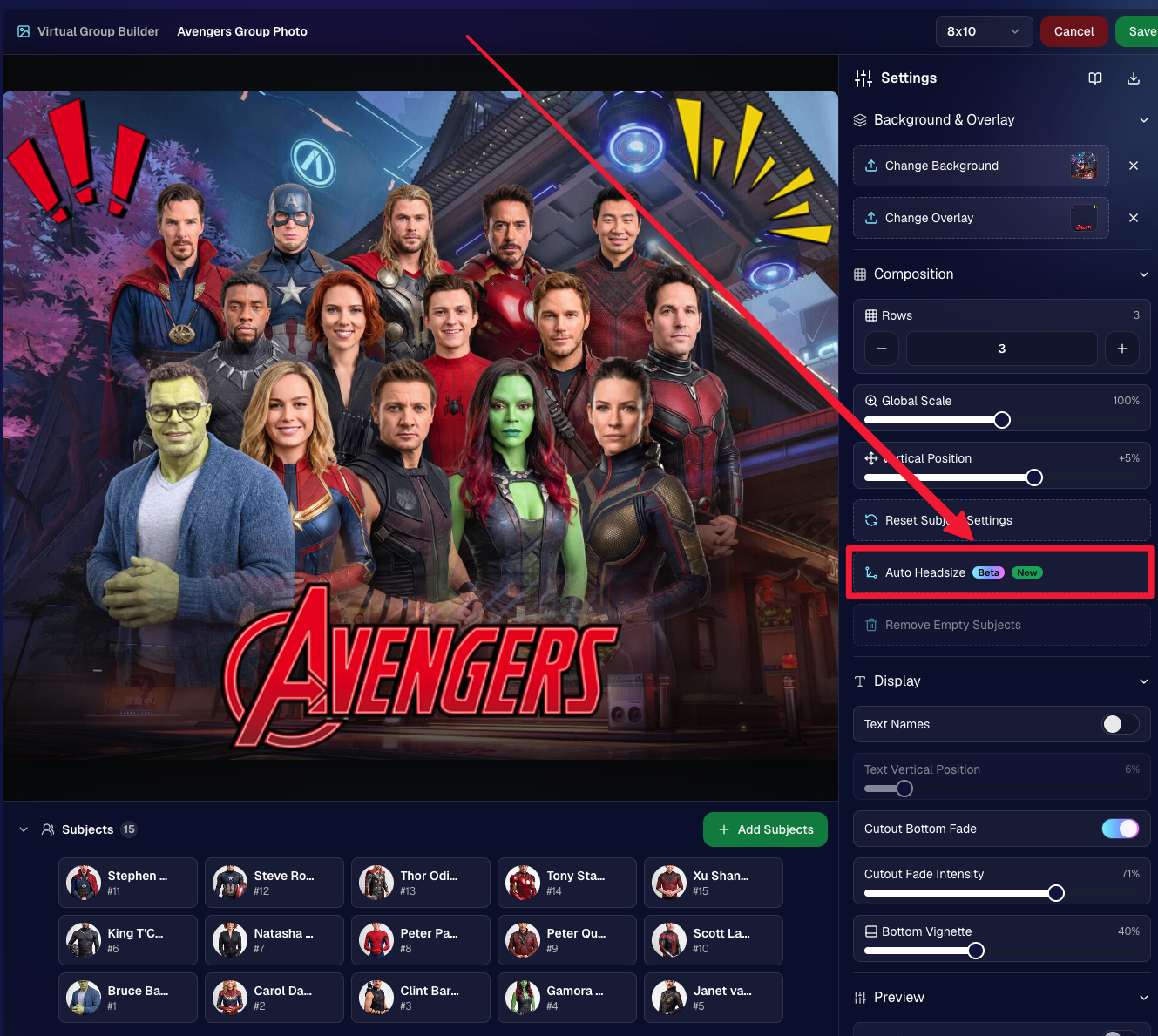
✨ New Auto Headsize button

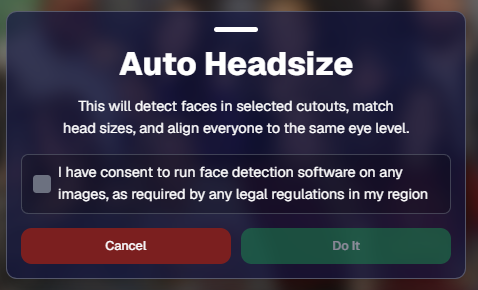
Virtual Group Builder now has a new Auto Headsize button.

This feature automatically detects faces and adjusts the scale and vertical offset of all cutouts so that subjects have roughly the same head size and are closer to eye level.

That means when you’re building a virtual group, you should have a much better starting point before making your final manual adjustments.
🏷️ Improved PhotoTag import behavior

We improved the behavior when importing a PhotoTag into Virtual Group Builder, helping that workflow feel smoother when adding subjects from a specific PhotoTag.

🚀 Upload fix for new from-scratch Virtual Groups

Fixed an issue where uploads were not uploading properly when working from /new on a from-scratch Virtual Group instead of an existing one.

👥 Smarter default subject behavior

Virtual Group Builder now skips the initial “add to group or replace group” popup when the only subjects in the group are the default 8 subjects.

🖼️ Bottom logo spacing improved

Bottom logos are now spaced the same distance from the bottom as top logos are from the top.

📊 Reporting Updates

📈 Events and Sales Report tables now have sortable columns

The Events Report and Sales Report tables now support sortable columns, making it easier to review and organize report data directly in the table.

🎨 New BGR Report

There is now a new BGR Report that shows the most ordered backgrounds for BGR images.

The report shows:

  • How many orders a background has
  • How many items a background has

Important note: if you upload the same background to multiple Events, those will show up as different backgrounds in the report. To avoid that, use the background import feature.

🖼️ Image Converter Update

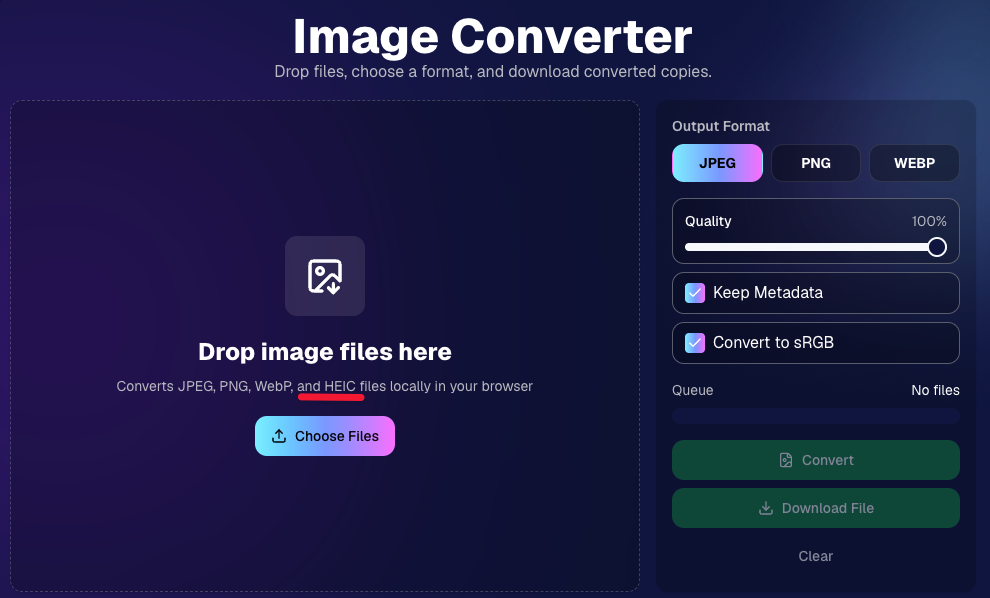
📱 HEIC conversion is now supported

The Image Convert page at tools/convert now supports converting from HEIC files.

This should be helpful when working with images from devices that commonly save in HEIC format.
👥 Participant List Update

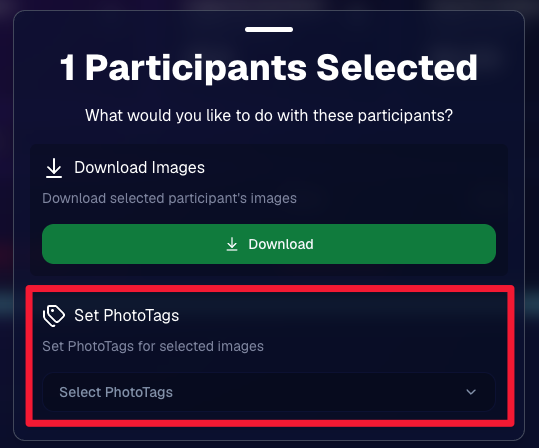
🏷️ Set PhotoTags for selected participants

On the Participant List page, the selected participants popup now includes a new option to set PhotoTags for those selected participants.

This gives you another way to update participant organization in bulk.
📂 Manage Images Update

⬇️ Download Folder improvements

The Download Folder feature on the Manage Images page now includes an X/X counter while downloading.

We also improved the behavior when downloading a folder with hundreds of images, which should make larger folder downloads clearer and more manageable.

That’s the week!

This week’s updates should make several everyday workflows smoother: Virtual Group Builder now has a stronger starting point with Auto Headsize, BGR background performance is easier to review, HEIC files are easier to convert, participant PhotoTags are easier to update, and large folder downloads are clearer.

Keep creating magic,
Candy 🍬

Related articles

School’s Out, Earnings In: A Teacher's GradPics Now Success
Success Stories
July 27, 2023

School’s Out, Earnings In: A Teacher's GradPics Now Success

8
 minutes read
Time for another success story!

For years, graduation photography has played a crucial role in capturing the pivotal moments of grads. Not only are these professional photos treasured keepsakes, but they also present substantial income opportunities for photographers.

Consider the story of Eric, a high school photography teacher and small business owner. Eric ventured into a graduation event with NowCandid's platform, intending to photograph around 500 graduates. He had modest expectations, aiming to generate about $1,200 in sales. What unfolded next, however, far exceeded even his most optimistic projections.

In his very first event using NowCandid, the earnings soared past expectations!

Almost reaching an astounding $12,000 within only seven days after the event. Such a windfall was not only a personal victory for the teacher but also a testament to NowCandid's potential to transform event photography. So far (as of publishing this article), the event has reached well over $15,000. A far cry from his initially predicted $1,200.


Sharing his success in an email to his onboarding trainer, Darwin Drake, the photography teacher expressed his profound amazement and gratitude. "I am at $6,700 earned and counting. I am beyond speechless. I'm gobsmacked. I'm overjoyed. I am stunned." (And that reaction was before it hit $12,000 days later!)


A friends & family photo taken after the ceremony by Eric & his photographers.

But the triumph of this story goes beyond the impressive earnings.

As a teacher, Eric was able to bring his students onboard, teaching them practical skills while also providing them with paid experience. "I hired 4 of my current and former photography students for this event," he wrote, "and as a teacher and small business owner I am so profoundly thankful to be able to teach them and pay them."


Eric and some students in Berlin at a graffiti workshop just days after their successful graduation ceremony.

This story highlights the remarkable opportunities that NowCandid can bring to photographers and entrepreneurs.

Whether you're a professional photographer seeking to maximize your earnings, a teacher nurturing the next generation of photographers, or a business owner eager to expand your reach, NowCandid can provide the platform and tools you need to achieve your goals.

In event photography, moments become memories, and for a photographer: memories are opportunities!

Eric's experience shows, that with the right tools and workflow, it is more possible (and easier!) than ever before to monetize your photography in a big way.

Enjoy some more photos taken by Eric & his photographers below!

NowCandid Event Settings & Numbers Breakdown

Program: GradPics Now

Workflow: Selfie Check-In

Price Level: Price Level 8

Title Option: Simple Text Title

Staff: 4 Photographers (doing some Selfie Check-In work as well) and 1 Dedicated Selfie Check-In Attendant

Participants: 500+ Participants via Selfie Check-In

Total Images Taken: 1944

Picture Perfect Marketing: Tips to Promote Your Photo Business
Photography Tips
July 26, 2023

Picture Perfect Marketing: Tips to Promote Your Photo Business

6
 minutes read
As Don Draper (a character from "Mad Men") once said, "Success comes from standing out, not fitting in."

In the competitive world of photography, marketing your photo business to stand out is just as important for your business as capturing stunning images. In this blog post, we'll share some tips to help you market your business effectively and stand out from the crowd. And with a little help from NowCandid, making your brand stand out can be even easier.

1. Identify Your Target Audience:


To effectively market your photo business, it's crucial to first identify your target audience. Are you specializing in weddings, graduations, corporate events, parties, or headshots? Once you know your niche, you can tailor your marketing efforts to reach the right clients.

2. Build a Strong Online Presence:


Your website and social media profiles are essential tools for showcasing your work and connecting with potential clients. Ensure your website is visually appealing, easy to navigate, and optimized for search engines. Update your social media platforms regularly with captivating images, behind-the-scenes content, and engaging stories that will get the attention of potential customers and get them reaching out to you for future events.

3. Utilize NowCandid's White-Label Services:

NowCandid is completely white-label by default and focuses on features that put your branding front and center. From backprinting your business info on photo prints to providing a library of Canva templates for your marketing materials, NowCandid helps you maintain a consistent brand image without stealing the spotlight.

4. Collaborate with Local Businesses and Vendors:


Partner with local businesses and vendors to cross-promote each other's services. This can include collaborating with event planners, florists, and catering companies, or exchanging promotional materials with complementary businesses.

5. Offer QuicPics Events for Promotion:


Hosting a QuicPics event for free is an excellent way to showcase your talents and promote your business. The marketing texts for QuicPics include your business name and contact info, providing a direct line of communication between you and potential clients.

6. Attend Networking Events and Trade Shows:


Networking is key to building relationships and finding new clients. Attend local events, trade shows, and photography conferences to connect with industry professionals and potential customers.

7. Encourage Referrals and Testimonials:


Word of mouth is a powerful marketing tool. Encourage satisfied clients to refer friends and family, and ask them to write testimonials for your website or review platforms. As the Ghostbusters famously said, "Who you gonna call?" Make sure your clients are calling you for their photography needs!

Marketing your photo business is essential for growth and success.

By identifying your target audience, building a strong online presence, and utilizing tools like NowCandid's white-label services, you can effectively promote your brand and stand out in the competitive photography industry. We hope these tips help you make your photo business truly picture-perfect!

NowCandid + Apple Pay! 🎉
Feature Updates
July 25, 2023

NowCandid + Apple Pay! 🎉

2
 minutes read
Hey, Candy here! Let’s dive into some exciting news!

Speedy Transactions ⚡

Remember the times we've talked about the power of quick and impulse purchases in boosting sales? Well, it just got a whole lot better. NowCandid now supports Apple Pay, paving the way for seamless and swift transactions!

Say Goodbye to Cart Abandonment 🛒

A smooth and easy checkout process:

  • • Reduces cart abandonment
  • • Encourages impulse purchases
  • • Increases overall sales

With Apple Pay, checking out is as easy as it gets!

Keeping It Professional 📊

Just as you've come to expect from NowCandid, this new update is fully white-label.

  • • Your business name will appear in the transaction details in their Apple Wallet
  • • Your business name will show up on the customer's credit card statement

What’s Next? 🚀

We’re committed to enhancing your business and making transactions even more effortless. Our next task? Integrating Venmo into NowCandid's checkout process.

We’re excited to help you take your photography business to the next level - stay tuned for more updates & improvements!

- Candy 🍭

Let’s get in touch

If you’re a photographer looking to add NowCandid services to your wheelhouse – set up a call by clicking the button below.

How to customize formatting for each rich text

How to customize formatting for each rich text

How to customize formatting for each rich text

How to customize formatting for each rich text

How to customize formatting for each rich text

What’s a Rich Text element?

The rich text element allows you to create and format headings, paragraphs, blockquotes, images, and video all in one place instead of having to add and format them individually. Just double-click and easily create content.

A rich text element can be used with static or dynamic content. For static content, just drop it into any page and begin editing. For dynamic content, add a rich text field to any collection and then connect a rich text element to that field in the settings panel. Voila!

Headings, paragraphs, blockquotes, figures, images, and figure captions can all be styled after a class is added to the rich text element using the "When inside of" nested selector system.

  • List One
  • List Two
  • List Three
  • List Four
  • List Five

This is a link

This is bold text