HomeNavigation arrowBlogNavigation arrow
Current page
Feature Updates

Weekly Recap: Express Checkout Confirmations, Capture App Speed Testing, and a New Lightroom Classic Plugin

Weekly Recap: Express Checkout Confirmations, Capture App Speed Testing, and a New Lightroom Classic Plugin
Hey photo friends! 👋


This week’s updates are all about clearer customer actions, smoother retail performance, and new tools that speed up upload workflows. Plus, a strong round of Capture App polish (iOS & Android OTA) and some important Dashboard + Marketing fixes.

Let’s jump in. ✨

🛍️ Retail: Fewer Mis-clicks, Better Previews, Faster Feel

✅ Express Checkout confirmation (all express checkouts)

All express checkout flows now show a confirmation popup that clearly displays the shipping address selected, with options to place the order or go back. It also includes an invalid address popup.

Previously, people would sometimes purchase without double checking their express-checkout-method's default shipping address. So, this change is designed to reduce address mistakes and improve customer experience!
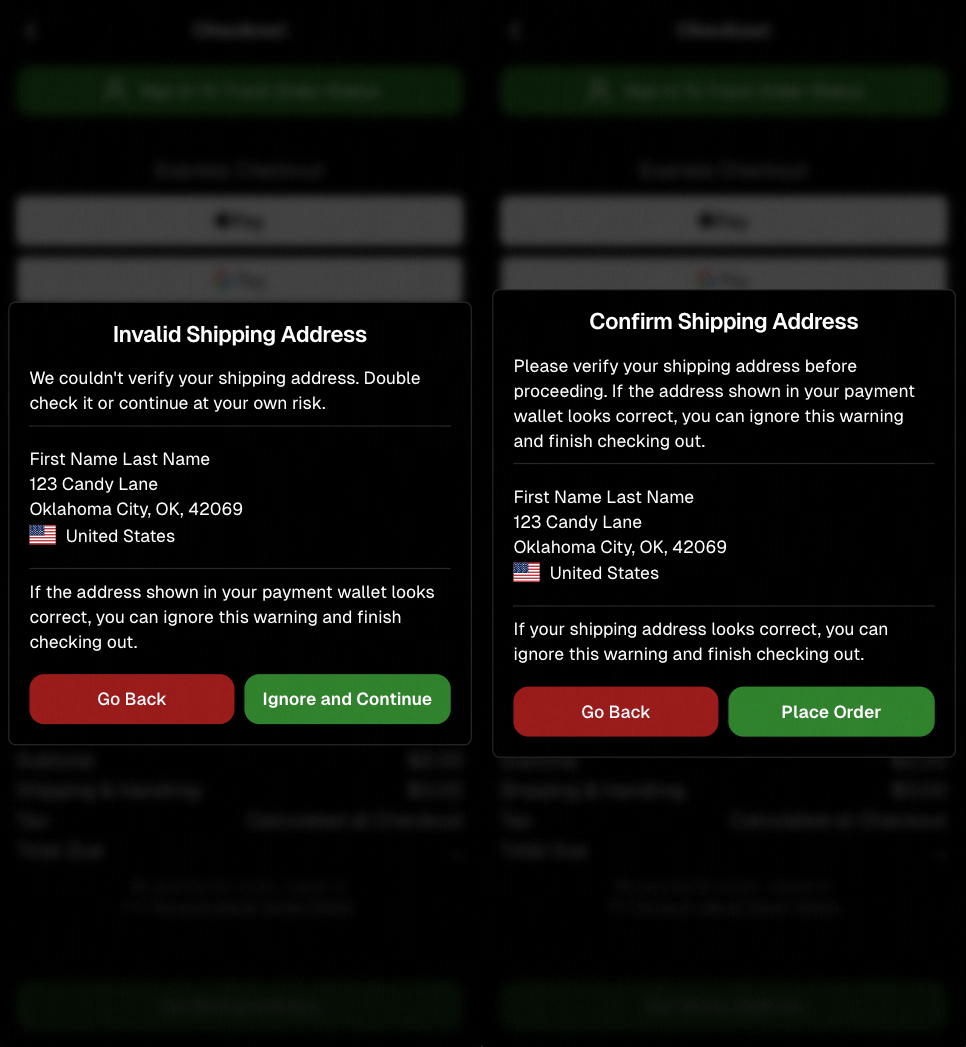
Confirmation popup now clearly displays shipping address confirmation.

🧠 Better UI + performance improvements

  • Improved local rendering (performance, memory usage, and task handling) — originally aimed to improve the retail experience on low-end devices, but it should make most devices feel faster!

  • Native “leave page” confirmation on supported browsers/devices (desktop + Samsung back button) when navigating away from an event page (refresh/back).
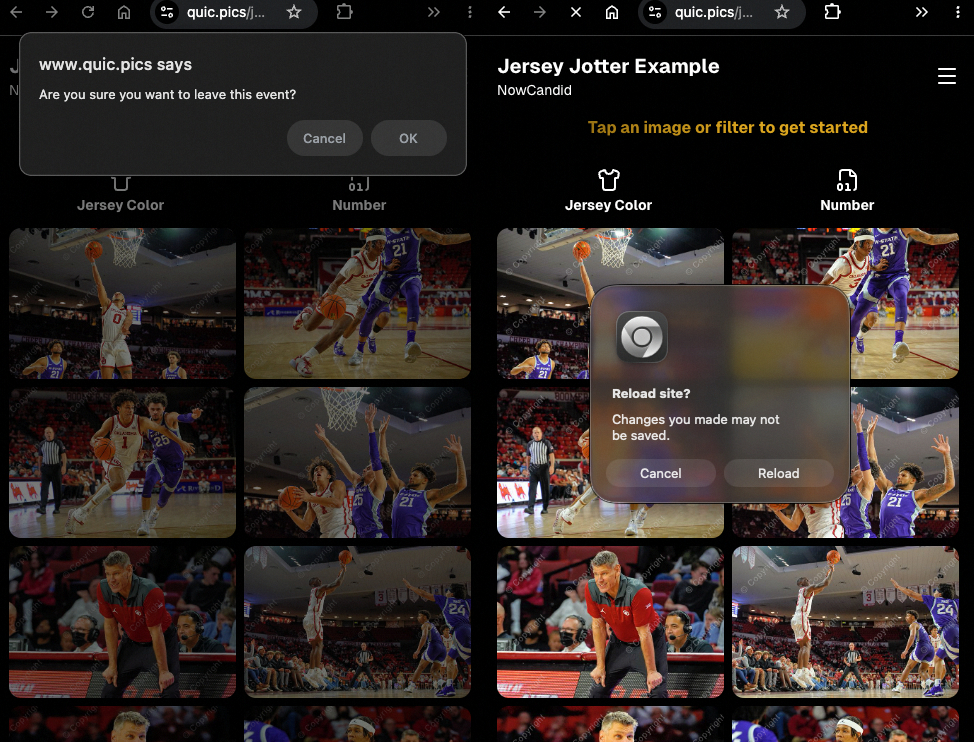
Leave page confirmation

🖼️ Clearer package download expectations + better pickers

  • Personal Gallery Downloads on store sheet and package editor now show “+X Images” in the configurator when there are more than 4 images—so customers don’t think they only get what’s previewed.
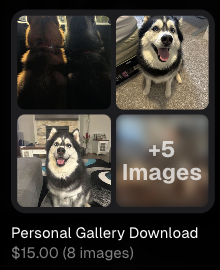
Personal Gallery Download "+X Images"

    • Personal Gallery Download products inside packages can now be clicked to preview contents.

    • Desktop product/package image pickers are now two columns (like mobile), allowing larger image preview during selection.
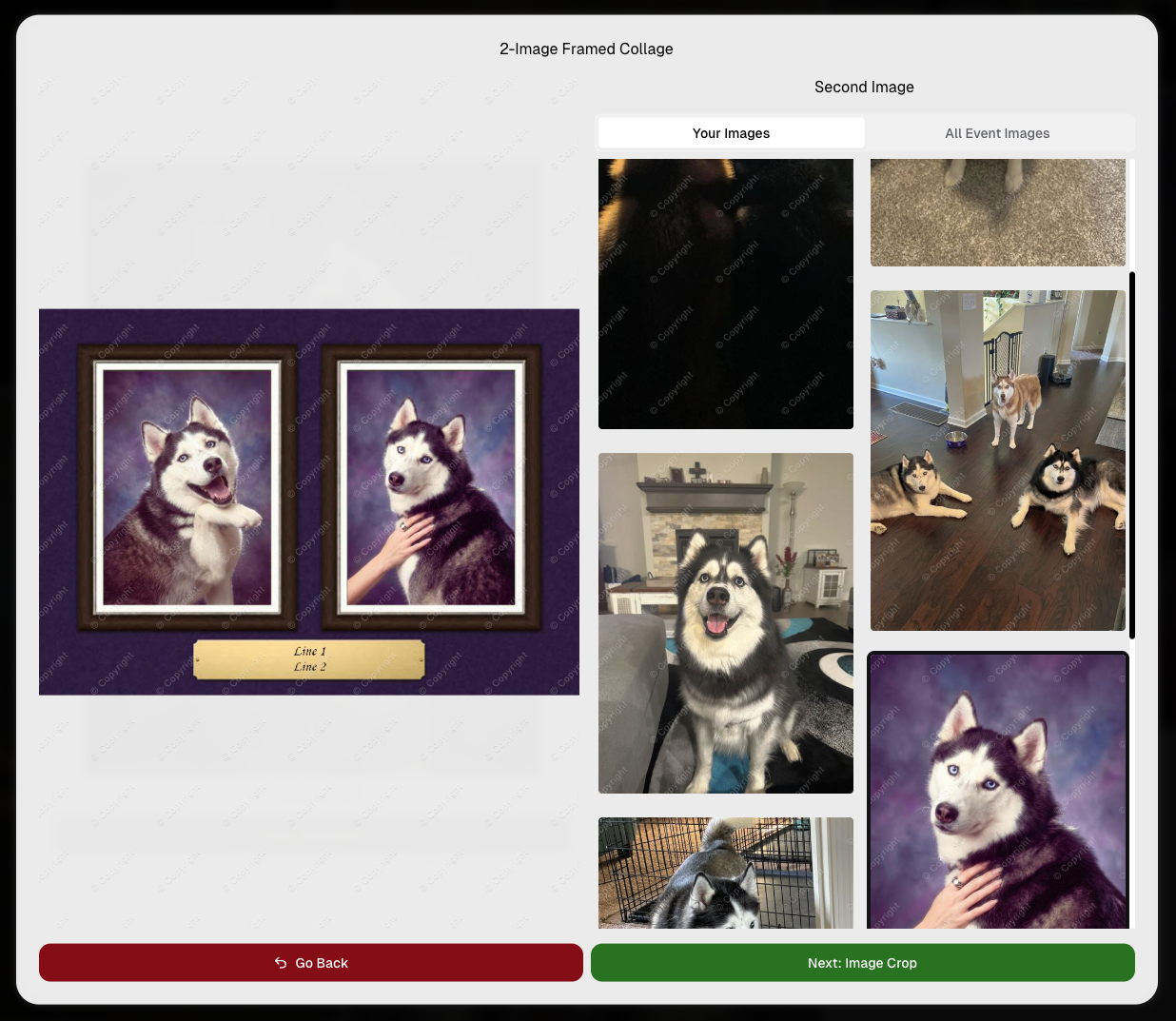
    Larger two column image previews

      • Image Filters landing popup now includes “Browse all photos without a filter” so customers who think they must pick a filter know they can also just browse!
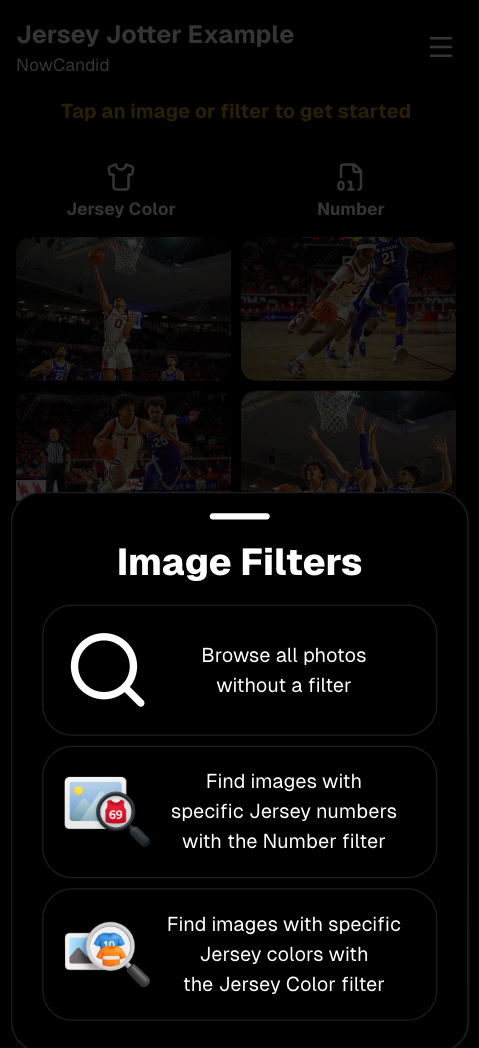
      Image Filters landing popup

      🧩 Retail fixes worth noting

      • Fixed a slashed discount amount showing on week 3 when there is no higher amount.
      • Fixed a GalleryGuard edge case that could close the retail site on some Android devices that support mobile context menus when long-pressing.
      • Fixed a race condition where a Group-by-Face gallery loaded from URL params could show default results instead of the filtered view.
      • Fixed an edge case where manually assigned images marked as group could behave like non-group images on retail.

      📱 Capture App OTA: 5.6.1 & 5.6.2 (iOS & Android)

      🌐 NEW: Network Speed Test (5.6.1)

      A new Network Speed Test button is available in Resources. Tap Run Test to check download speed, upload speed, and latency to NowCandid servers (so results may differ from Google/Ookla). It’s a quick test (downloads 5 MB, uploads 2 MB) and is useful for diagnosing weak or congested service during events.

      Mbps is a standard measurement for connection speeds, and 1 megabit per second (Mbps) is 0.125 Megabytes per second (MB/s). So 8 Mbps is 1 Megabyte per second, max. For example, with images that are 10 Megabytes in size, a speed of 8 Mbps would take a minimum of 10 seconds to upload. When speeds are very slow, image uploads may be impossible due to uploads timing out and restarting. In these cases, open the app when you have a stronger connection and all your images will start going up!
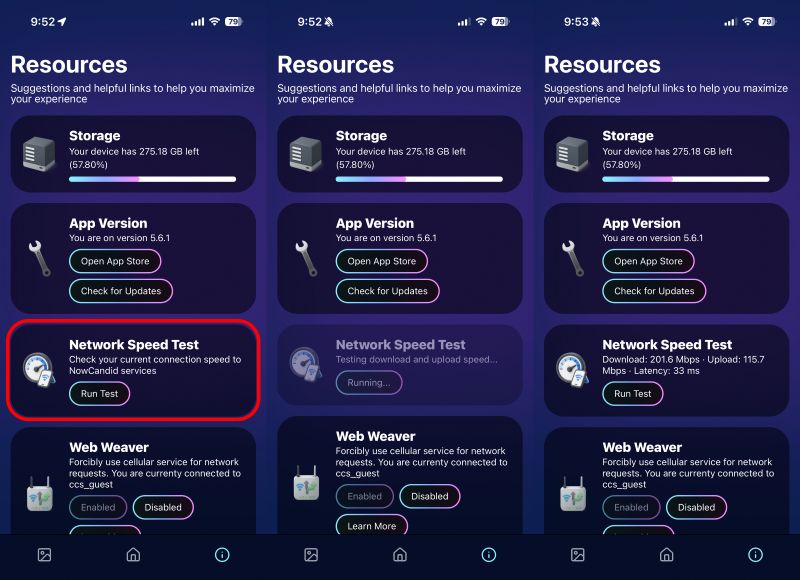
      Network Speed Test

      🎪 Photo Booth + Selfie Check-In Station UI upgrades (5.6.2)

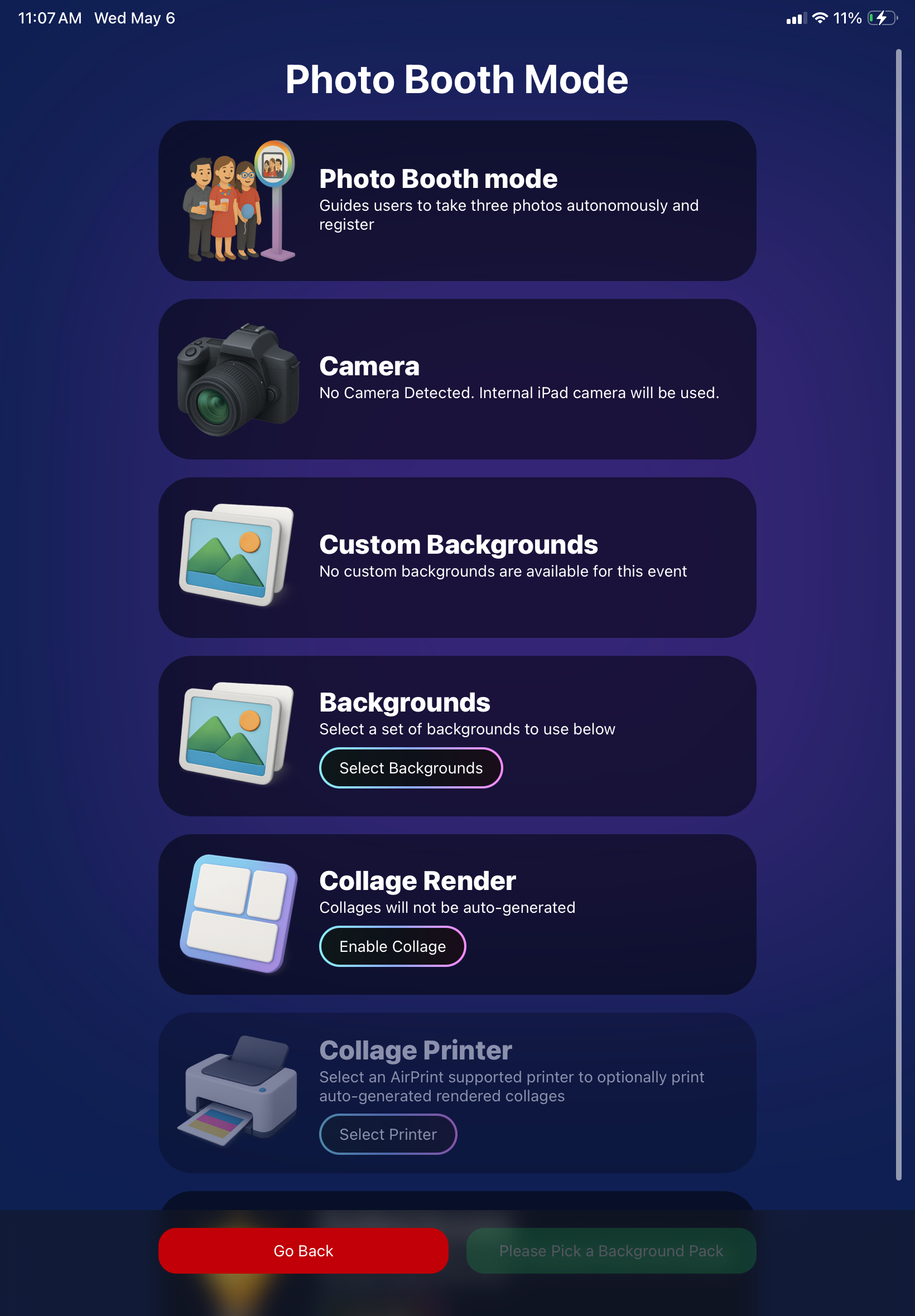
      • Photo Booth landing page updated to be more user-friendly (always-visible scrollbar, updated text, sticky go back/continue buttons, red/green emphasis, and a popup explaining why Continue is greyed out).
      • Selfie Check-In Station landing page updated with red/green Go Back / Begin buttons.
      • New dropdown icon beside Group Photo toggle (when an event has PhotoTags) to better display there are additional options to assign PhotoTags.
      • Fixed edge case cancel/continue behavior on Selfie Check-In Station when no contact info was entered.
      🧩 NEW: Lightroom Classic Plugin (Official)

      We’ve launched an official Lightroom Classic plugin to upload images to NowCandid events directly from Lightroom Classic.

      Key notes:

      • Lightroom Classic only
      • Same image rules apply (color profile, DPI, etc.)
      • Uses Capture App login
      • Only events within 60 days of event start date show in the selector
      • Image Details → Logs will show “Uploaded from NowCandid Lightroom Plugin”
      • Docs include guide/download/installation: https://app.nowcandid.com/docs/tools-more/lightroom
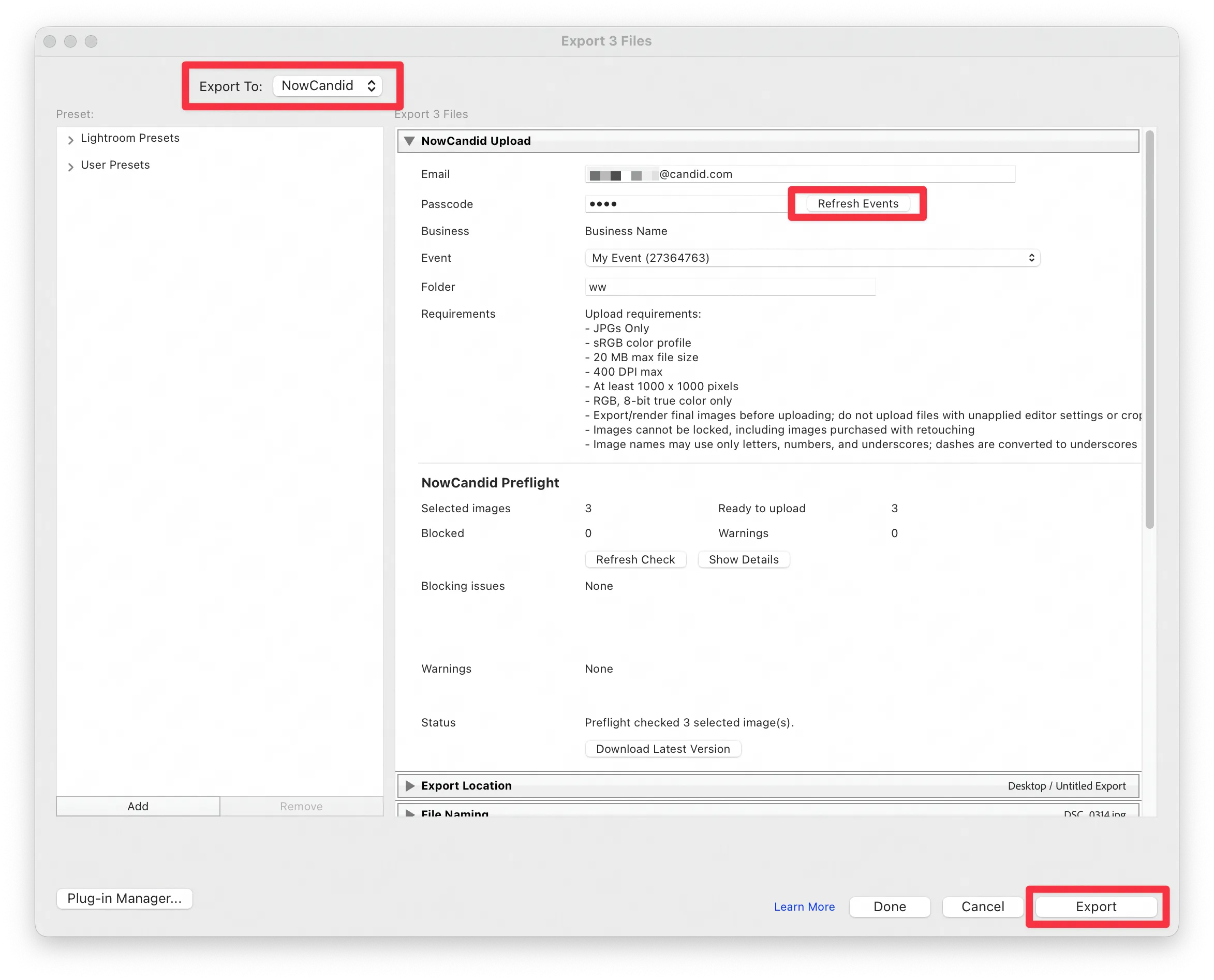
      Lightroom Classic Plugin

      Upload from NowCandid Lightroom Plugin

      🖥️ Dashboard: Upload & Roster Clarity + Small UX Wins

      • Event roster upload and PhotoRoster upload now warn about every unrecognized column, making it easier to spot misspellings (especially for optional columns).
      • Participant list page download now puts additional contacts into columns instead of rows.
      • Participant list download now puts merged contacts into their own row if they have different first/last names.
      • Image upload naming cleanup:
        • spaces/parentheses now automatically become underscores (e.g., Image (2)Image_2)
        • names ending in z now get a trailing underscore (e.g., ImagezImagez_)
      • Candy got even better at using the new Docs for responses.
      • Password reset now shows a clear “Your link has expired” screen (links expire after 24 hours).
      • Fixed participant filter inside another participant’s manual assign/unassign page not working properly.
      • Participant Details PhotoTag assignment UI: merged participants no longer incorrectly show PhotoTags as assigned.
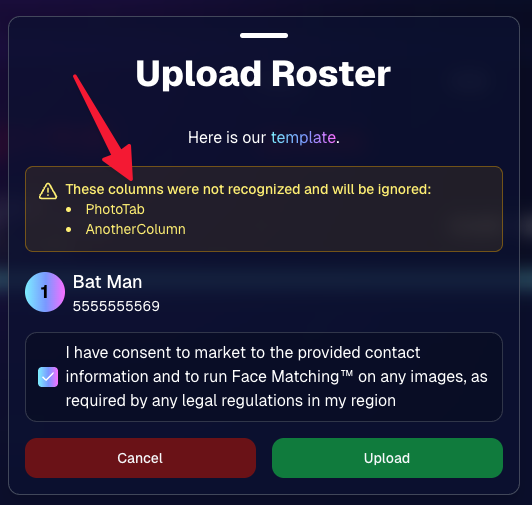
      Upload Roster now warns about every unrecognized column.

      📣 Marketing Fixes

      • Fixed edge cases where galleries that were only AI-edited images could cause follow-up email marketing issues and show as 0 images on Participant List.
      • Fixed Day0 marketing edge case not starting if gallery is just AI-edited images.
      • SMS gallery links now include “View photos:” before the gallery URL to reduce confusion where some users thought the gallery link was an unsubscribe link.

      That’s the week! 💫

      Between the Lightroom Classic plugin, the Capture App’s new Network Speed Test, and retail improvements that reduce confusion (and improve performance), this week was packed with practical wins you’ll feel right away.

      Keep it sparkly,

      Candy

      Related articles

      Prom Night Profits: How to Rock Prom Photography in the Age of Smartphones
      PartyPics
      April 10, 2023

      Prom Night Profits: How to Rock Prom Photography in the Age of Smartphones

      6
       minutes read

      Prom night is a rite of passage, filled with teenage dreams, extravagant dresses, and Insta-worthy moments. But as a photographer, you might be wondering if prom photography is still a profitable gig in the era of smartphones and selfies. Fear not, fellow camera enthusiasts! With a few clever strategies and the help of NowCandid's Party Pics Now program, you can turn prom night into a money-making opportunity. So, grab your camera and let's dive into the world of prom photography!

      1. Adapt and Thrive:
        The rise of smartphones has indeed changed the game, but savvy photographers can adapt by focusing on what they do best: capturing high-quality, professional images. Offer your clients a mix of posed pictures and candid shots, using the Selfie Check-In and Tap-A-Face workflows from NowCandid's Party Pics Now program to streamline the process and ensure a smooth experience for everyone involved.
      2. More Photographers, More Profit:
        Increase your revenue potential by sending multiple photographers to cover the event. Assign one to a dedicated photo station for portraits, while others roam the venue capturing quick posed photos of friends and group pictures. This approach ensures that you capture a wide variety of sellable frames, making the most of your time on-site.
      3. Create a Unique Photo Station:
        Make your photo station stand out by offering themed backdrops, fun props, and creative lighting. This will not only draw the prom-goers to your station but also encourage them to share their professional photos on social media, giving you free advertising and potentially attracting new clients.
      4. Network with Schools and Event Planners:
        Build relationships with schools, event planners, and other key stakeholders to secure more prom photography gigs. Offer special deals, referral incentives, or donate a portion of your profits to the school as a way to give back and establish a positive reputation in the community.
      5. Promote Your Services:
        Use social media, your website, and local advertising to promote your prom photography services. Share examples of your work, highlight special offers, and showcase testimonials from satisfied clients to build credibility and attract new business.
      6. Capture the Essence of Prom Night:
        Prom is a night of glitz, glamor, and teenage dreams come true. To create images that truly resonate, focus on capturing the energy, emotion, and excitement of the event. Channel your inner photographer and make every shot a visual feast that transports the viewer to a world of prom night magic.

      Prom photography can still be a profitable venture for professional photographers willing to adapt and innovate. By combining the power of NowCandid's Party Pics Now program with smart strategies and a touch of creativity, you can turn prom night into a lucrative opportunity that'll have you dancing all the way to the bank. And hey, who knows? You might even get a chance to bust a move on the dance floor while you're at it – just remember to keep your camera handy, because you never know when that perfect shot will present itself. Happy shooting!

      Capturing Success: How to Book Graduation Ceremony Photography Jobs Like a Pro
      GradPics
      April 4, 2023

      Capturing Success: How to Book Graduation Ceremony Photography Jobs Like a Pro

      4
       minutes read

      Graduation ceremonies are a golden opportunity for photographers. With proud parents, beaming graduates, and memories to last a lifetime, these events are the perfect stage for capturing unforgettable moments. But how do you land these lucrative gigs? In this blog post, we'll share insider tips on how to book graduation ceremony photography jobs and create lasting success. And with NowCandid by your side, you'll have the support and tools you need to shine in the academic spotlight.

      1. Build a Stellar Portfolio:
        First things first, you need to showcase your skills as a graduation photographer. Create a specialized portfolio featuring your best work from past graduation ceremonies. If you're just starting out, consider offering your services for free or at a discounted rate to build your experience and gain valuable client testimonials. Or, try starting out with some smaller graduation ceremonies that are not as contested by competing photographers!
      2. Network with Schools and Universities:
        Build relationships with school administrators, counselors, and event coordinators. Attend school events, join local education associations, and engage in conversations on social media platforms. Establishing connections in the education community will help open doors to potential photography opportunities.
      3. Leverage Social Media and Online Marketing:
        Create a strong online presence to showcase your work and attract clients. Use social media platforms, SEO, and email marketing to promote your services and drive traffic to your website. Share captivating images from past graduation ceremonies, client testimonials, and behind-the-scenes content to engage your audience and demonstrate your expertise. 
      4. Partner with Local Businesses:
        Collaborate with local businesses that cater to graduates, such as cap & gown vendors, school ring vendors, or varsity jacket vendors as a couple examples. These partnerships can lead to valuable referrals and create a network of resources that benefits all parties involved.
      5. Provide Exceptional Customer Service:
        Go above and beyond to make your clients feel special. Be responsive, professional, and attentive to their needs. Offer personalized consultations, accommodate special requests, and deliver a memorable experience that will leave them singing your praises. NowCandid's platform can help you streamline your workflow and ensure a smooth customer experience from start to finish.
      6. Ask for Referrals and Testimonials:
        Word of mouth is a powerful marketing tool. Encourage satisfied clients to refer you to their friends and colleagues, and request testimonials for your website and marketing materials. A strong reputation will keep the bookings rolling in.

      Booking graduation ceremony photography jobs can be both rewarding and profitable. By building a compelling portfolio, networking with schools and universities, and leveraging the power of NowCandid, you'll be well on your way to capturing success in the world of academic photography. So, put on your metaphorical cap and gown, and get ready to celebrate your achievements in the graduation photography business!

      New Reporting Feature
      Feature Updates
      March 7, 2023

      New Reporting Feature

      2
       minutes read
      Recently, we rolled out a much-needed reporting tool for our NowCandid™ users!

      Two new reporting tools that will be able to give you a macro view into your business’s performance, as well as a lot of helpful data and analytics on your events!


      Tool #1, the Sales Report:

      This report focuses on reporting all your sales within a date range! It’s filterable by which NowCandid™ program you’re using as well and can report your sales by day or your sales by month. Once you have your date range, filters, and date format set, you’ll get a reactive bar graph as well as a series of totals and averages for your sales performance within that date range! This report is great for quickly getting an idea of your overall income and margin.


      Tool #2, the Events Report:

      This second report is where you can really dig into your various metrics. Instead of reporting on all sales during a date range, when you choose a date range, you’re selecting all the events that have a Start Date within that date range. Those events and their totals will be what’s included in this report! So residual sales on older events would not be included like they would be in the Sales Report. After you choose a date range, this report can also be filtered by NowCandid™ program!

      You can also choose whether to include $0 sale test events you may have made, so that you don’t drag down your averages on this report. If there are any non-$0 sale events you don’t want included, you can click the checkbox by the event to remove it from your total and averages as well! And lastly, once the information you are interested in is being displayed to you, you can export the data to preserve as a spreadsheet on your own device.


      With several ways to look at your business’s performance, we believe these tools will be a great benefit to our users and help them make the most of their account with NowCandid™.

      Our users will no longer have to guess or run a separate spreadsheet to understand their business’ performance or their overall margins.

      Let us know if you have any questions or feedback!

      Let’s get in touch

      If you’re a photographer looking to add NowCandid services to your wheelhouse – set up a call by clicking the button below.

      How to customize formatting for each rich text

      How to customize formatting for each rich text

      How to customize formatting for each rich text

      How to customize formatting for each rich text

      How to customize formatting for each rich text
      How to customize formatting for each rich text

      What’s a Rich Text element?

      The rich text element allows you to create and format headings, paragraphs, blockquotes, images, and video all in one place instead of having to add and format them individually. Just double-click and easily create content.

      A rich text element can be used with static or dynamic content. For static content, just drop it into any page and begin editing. For dynamic content, add a rich text field to any collection and then connect a rich text element to that field in the settings panel. Voila!

      Headings, paragraphs, blockquotes, figures, images, and figure captions can all be styled after a class is added to the rich text element using the "When inside of" nested selector system.

      • List One
      • List Two
      • List Three
      • List Four
      • List Five

      This is a link

      This is bold text