HomeNavigation arrowBlogNavigation arrow
Current page
Feature Updates

Weekly Recap: Face Matching Got 28× Faster, Virtual Group Builder Upgrades & RCS Marketing Texts ⚡📸

Weekly Recap: Face Matching Got 28× Faster, Virtual Group Builder Upgrades & RCS Marketing Texts ⚡📸
Hey photo friends! 👋


Candy here with a big follow-up from last week: we predicted our Face Matching improvements could make things up to 10× faster... and this past weekend, Face Matching ended up running 28× faster. 🎉

That is well above what we expected, and it came at a perfect time as image volume continues to hit new highs. We’re going to keep making improvements so NowCandid can better handle those big peak-season spikes.

We’re also improving parts of our retail support process, and later this month, we’ll be sending surveys to select end customers to learn more about their retail site and shopping experience. The goal is simple: keep improving the customer journey and help you get the most sales possible.

Now, let’s jump into what changed this week!

⚡ Face Matching Follow-Up: 28× Faster

🚀 Face Matching improvements performed even better than projected

  • Last week, we mentioned updates that could make Face Matching up to 10× faster. This past weekend, those improvements delivered around 28× faster performance.

📈 Built for peak volume

  • With more images coming in than ever, this speed improvement helps keep galleries moving during high-volume stretches like graduation season.

🛠️ More efficiency improvements are still coming

  • We’re continuing to tune systems behind the scenes so large event volume stays more manageable.

📣 Marketing Texts Now Support RCS

💬 Marketing texts now use RCS when available

  • All marketing texts, including QuicPics image texts, now send through RCS when supported, with SMS/MMS fallback for numbers that don’t support RCS.

Cleaner, more recognizable messages

  • Instead of appearing as a random phone number, supported messages can show as coming from QuicPics with a branded-style camera icon. This makes the text feel more familiar and easier for customers to recognize.

🛡️ Better deliverability potential

  • With mobile platforms continuing to add stronger spam filtering — including spam folders on iPhones — RCS gives our messages a better chance of feeling legitimate and avoiding the “unknown number” problem that can hurt visibility.

📱 Still works for everyone

  • If a customer’s phone or carrier doesn’t support RCS, the message will still fall back to normal SMS/MMS automatically.

Note: Client Outreach still sends through regular phone numbers for now. This RCS update applies to event marketing texts, 2FA in the Dashboard, the Find Me feature on quic.pics, and QuicPics image messages.
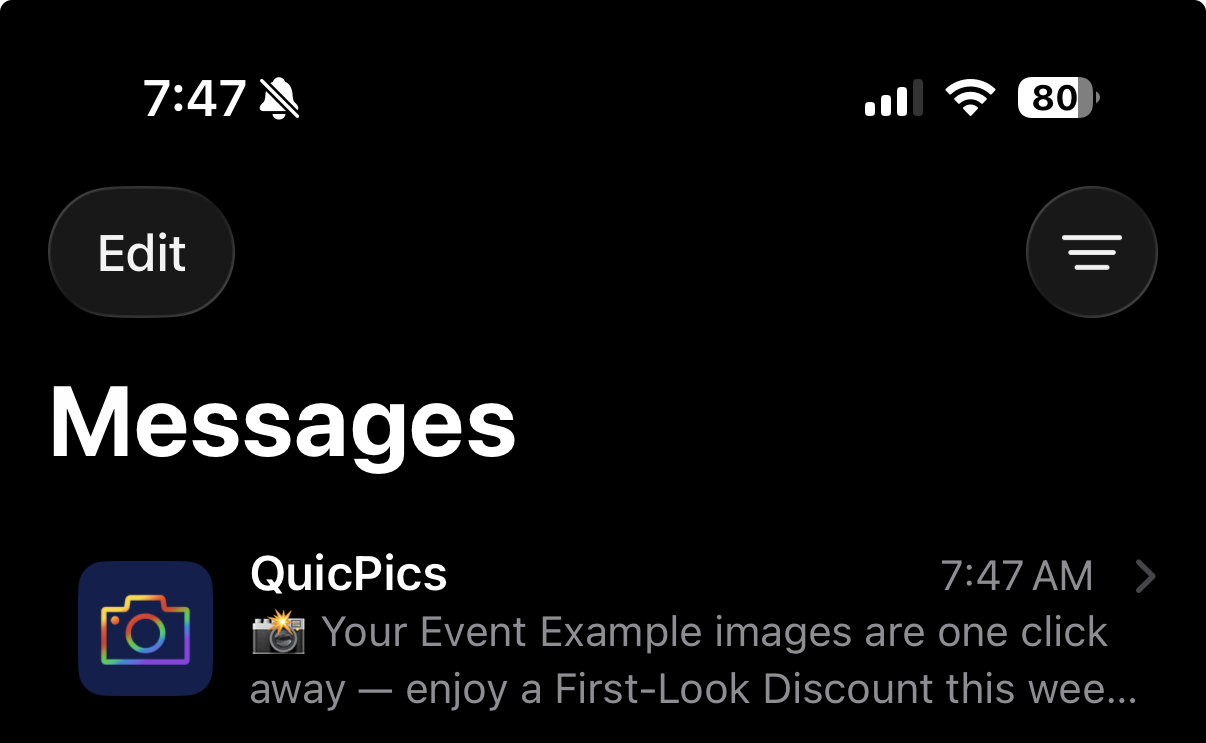
Oooooo shiny! Much more eye-catching than a simple phone number.

🧑‍🤝‍🧑 Virtual Group Builder Improvements

Virtual Group Builder got several upgrades this week:

Participant importing is much faster

  • Large imports should feel quicker and more responsive.

👨‍👩‍👧 Merged siblings now import properly

  • If siblings were merged through identical parent contact info, Virtual Group Builder will now pull them in correctly.

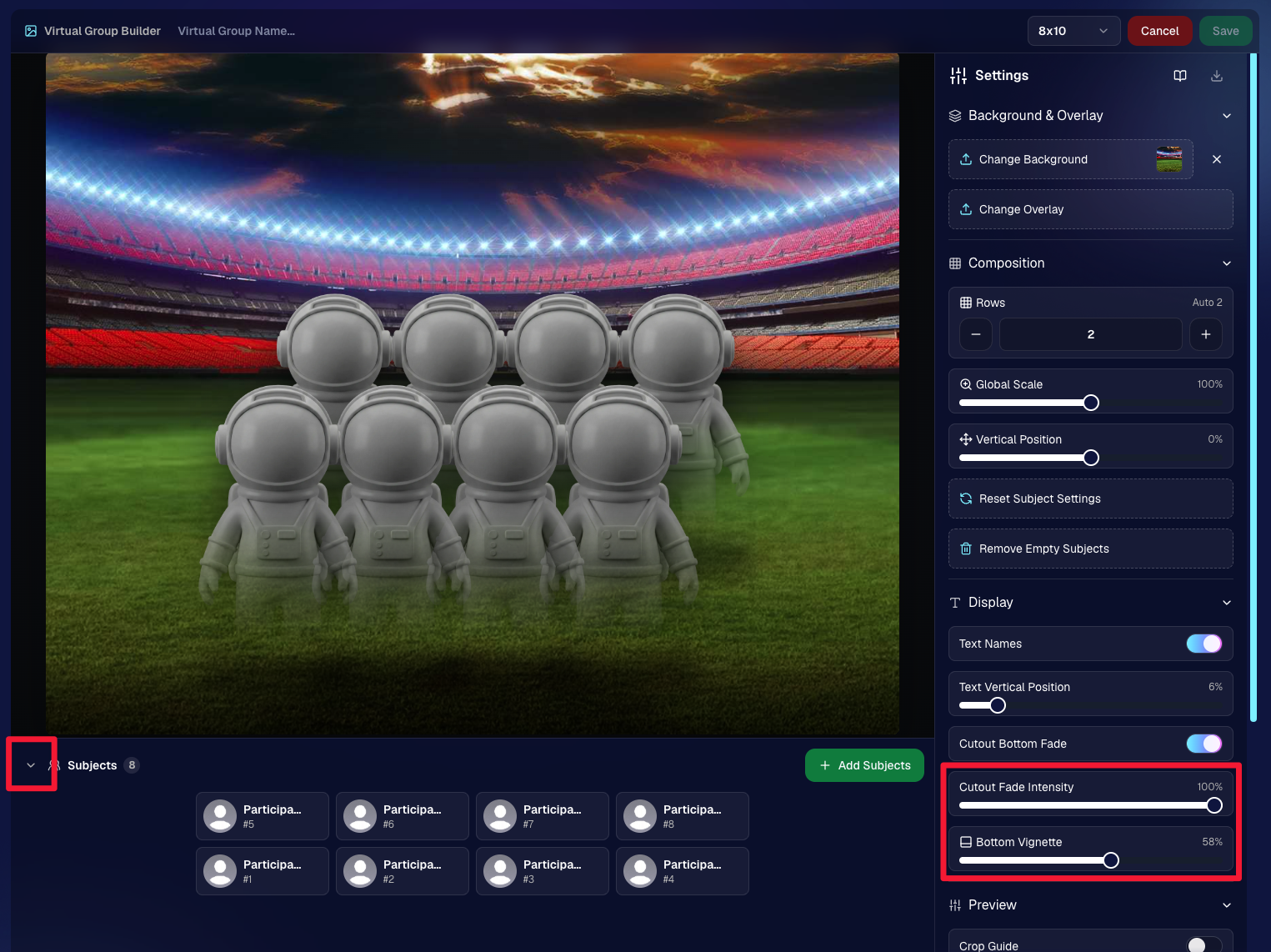
📂 New Subjects pane collapse button

  • Collapse the Subjects pane to make the preview area bigger. You can also toggle it with Shift + S.

🖼️ New cutout bottom fade slider

  • Adjust how strongly subject cutouts fade at the bottom.

🌫️ “Falloff Intensity” renamed to “Bottom Vignette”

  • Clearer wording for what the setting actually controls.
🖥️ Dashboard Improvements

🧰 More Tools moved out of the popup on Manage Images

  • Manage Images tools are now more visible instead of tucked away.
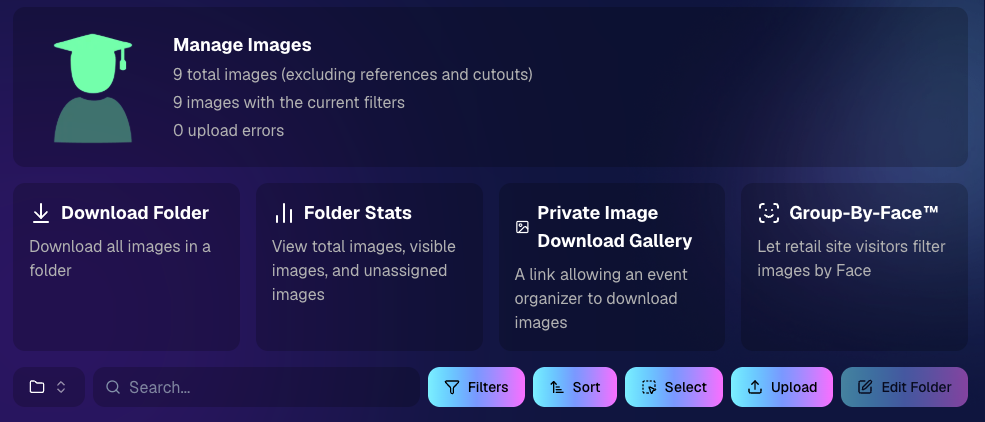
🗂️ Edit Folder is always visible

  • The Edit Folder button is now easier to find on Manage Images.

📬 New marketing column on Participant List

  • Quickly see how much marketing a participant has received.

👁️ Participant Details groups invisible images at the end

  • Makes the page easier to scan.

🎨 One Art Style node per edit

  • Candy Image Studio and Auto Editor now only allow one Art Style node per edit. This helps avoid confusion when selecting conflicting styles like Anime, Chibi, Action Figure, and Bobblehead together.

📈 Marketing History chart improved for new Events

  • New Events should no longer show one giant bar on the first day.

🏷️ Event Tags improvements

  • Hidden Event Tags are now hidden by default, and event search when adding Events to a tag is more flexible.

💰 Auto Editor total cost display fixed

  • The displayed total cost is now correct. Customers were charged correctly before; only the UI number was off.

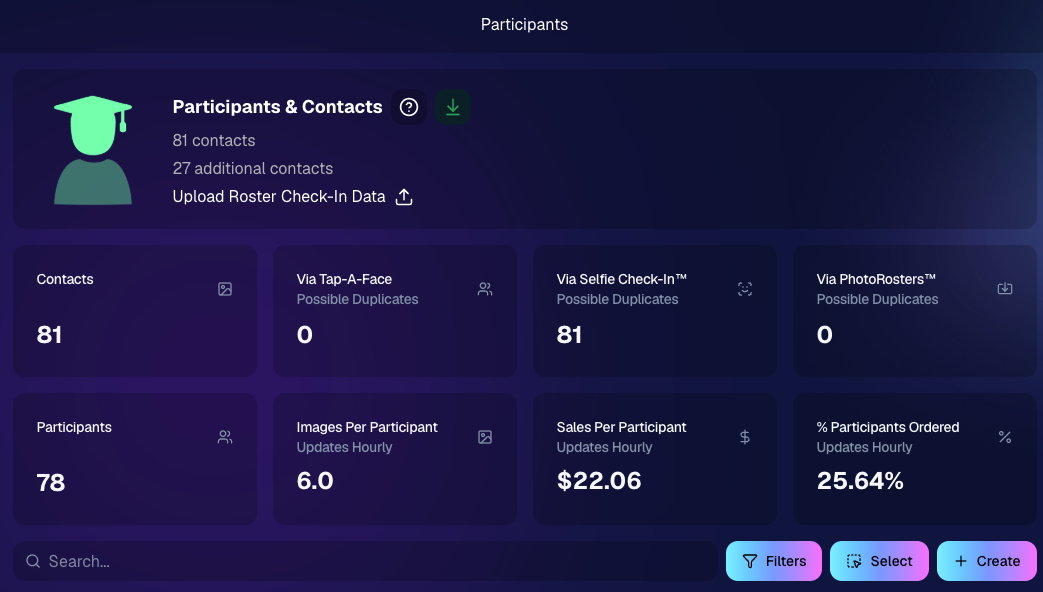
🔢 Participant List now shows key report snapshots

  • You can now quickly see:
    • Images Per Participant
    • Sales Per Participant
    • % Participants Ordered

📱 Capture App 5.6.4

iOS & Android OTA update — Monday, June 1

🧍 Registered face boxes now show in the strip

  • When entering a shooting mode, existing images in the strip can show registered face boxes.

🔄 Restore Session fixes

  • Fixed Restore Session not loading saved registered participants for Positive ID Events or Face Matching Roster Check-In.

Face Matching Roster Check-In fix

  • Fixed an edge case where a registration could fail to save to an image.

📱 Android tablet UI fixes

  • Selfie Check-In Station camera UI fixed in vertical orientation
  • Image gallery name text no longer overflows in vertical orientation

That’s the week!

The big wins are definitely RCS marketing and Face Matching coming in 28× faster, but the Virtual Group Builder and Dashboard changes should make things easier during busy season too.

We’ll keep improving speed, support, and the retail experience as we go!

Keep creating magic,

Candy 🍬

Related articles

Big News: Introducing the "View Photos in Sequence" Button for SportsPics! 📣⚽
Feature Updates
October 15, 2024

Big News: Introducing the "View Photos in Sequence" Button for SportsPics! 📣⚽

3
 minutes read
Hello, amazing photographers and sports enthusiasts!

Candy here with some thrilling news that'll make capturing and enjoying those epic sports moments even better! 🌟

Drumroll, please... 🥁 We're excited to introduce the new "View Photos in Sequence" button on the Retail site. It will be visible on SportsPics Events using Face Matching! 🎉

What's the Buzz About?

Imagine you're photographing a high-energy soccer game. You've snapped a series of shots capturing the intensity of the match. Some photos feature the players' faces, which, thanks to our Face Matching technology and Selfie Check-In or Tap-A-Face workflows, automatically land in their personal galleries.

BUT what about those incredible action shots where the player's face isn't visible? 🤔

That's where our "View Photos in Sequence" button comes into play!

How Does It Work?

When your customers view a photo in their personal gallery, they'll now see a "View Photos in Sequence" button. Clicking this button allows them to explore images taken immediately before and after that specific shot.

This means they can easily find and enjoy all the action-packed moments, even if their face isn't visible in every photo! 🏃‍♂️⚡

The button is visible when previewing a personal gallery photo on the retail site

Why You'll Love It

  • Expand Your Memories: Players can now discover more photos of themselves, capturing every twist, turn, and goal—even those where they're zooming past the camera!
  • Enhanced Engagement: Offering more images increases the chances of customers finding that perfect shot they can't wait to share or purchase.
  • Effortless Navigation: It's simple and intuitive—just a click, and they're exploring a sequence of moments from the game.

A Game-Changer for Sports Photography

This feature is a win-win for everyone:

  • Photographers: Showcase more of your work and provide added value to your clients.
  • Athletes and Families: Relive the excitement of the game with a comprehensive view of their performance.
  • Boost Sales: More images mean more opportunities for sales and happy customers!

Ready to Try It Out?

The "View Image Sequence" button is now live for all SportsPics Events using Face Matching. So go ahead and give it a spin in your next event! We can't wait to see the amazing moments you'll capture and share. 📷💫

As always, we're here to help you make the most of NowCandid's features.

If you have any questions or feedback, don't hesitate to reach out!

Cheers and high fives,

Candy 🍬

Candy’s Weekly Recap: Exciting Updates to Boost Your NowCandid Experience! 📸🎉
Feature Updates
October 11, 2024

Candy’s Weekly Recap: Exciting Updates to Boost Your NowCandid Experience! 📸🎉

6
 minutes read
Hello, my wonderful photography friends!

Candy here, back with another Weekly Recap to keep you in the loop on all the fantastic new features and improvements we've rolled out. 🌟

We've got some real game-changers this week that I'm sure you'll love. So, grab a comfy seat and let's dive in! 🛋️

Chip Board Now Included with All Print Orders 📦

We're enhancing the quality of your clients' "unboxing" experience!

  • • Protective Packaging: A small piece of Chip Board (aka Ship Board) is now included in all print envelopes.
  • • Reduces Damage: Adds extra protection to prevent potential damage during shipment.
  • • Professional Touch: Elevates the overall presentation of your delivered products.

QuicPics & QuicPics GO Enhancements 🚀

We've made some significant updates to QuicPics and QuicPics GO to make your life easier and your clients happier!

  • • Bulk Downloads: Your QuicPics customers can now download all their images at once in medium resolution, instead of adding each one to the cart individually.
  • • Renamed Product: When you're not selling high-resolution digital downloads in your QuicPics Offer, the Medium Res Download product will automatically rename to Free Download.
  • • Avoid Mistakes: We've added an extra confirmation step when creating a QuicPics Event. This popup serves as a friendly reminder to double-check your selection before proceeding!

Theme: Starburst - Watermarking: Off

Access to Selfie Check-In from All Images Gallery 📲

Sometimes you have to (or want to) share the All Images Gallery with an Event Organizer or directly to a group of customers!

Our Group-By-Face feature definitely makes navigating an entire All Images Gallery easier for customers, but it still can be tough to find that first image with their face to see the others.

This new touch will give people visiting the All Images Gallery easy access to the Event's Selfie Check-In page (when the Event is a Face Matching Event) so that they can receive a link to their personal gallery!

  • • Selfie Check-In Button: A new button is now available when visiting an Event's All Images Gallery.
  • • Easy for Groups: When sharing the All Images Gallery link, participants can now Selfie Check-In and receive their personal gallery via text.
  • • Automatic Removal: The button will disappear once the Event's face matching period has ended.

Theme: Liquorice

Order History Enhancements 🛍️

Some new quality of life improvements when it comes to your orders!

  • • Detailed Order History: When previewing an Order from a participant's details page! Includes order contents and subtotal.
  • • Participant Management Integration: An Order column has been added to the Participant Management page, so you can easily spot who has ordered and who has not.
  • • Daily Order Counts: Hover over each day's column in the Event Management page's sales chart to see the order count for that hovered day!

Import Backgrounds and Overlays from Past Events 🎨

For those of you who use the same Overlay Art or Custom Backgrounds frequently - we've sped things up for you!

  • • Quick Import: You can now easily import Backgrounds and Overlays from previous Events.
  • • Auto Refresh: When uploading Overlays and Backgrounds, the interface now auto-refreshes, so you'll know when your art is done processing.
  • • Ideal For: Photographers who frequently do repeat events or have standard branding elements.

Capture App Version 4.5 Update (for iOS)📱

We've made a small update to the iOS Capture App to start preserving image meta data after images have been uploaded!

This will enable some pretty cool additions down the line, but for now there are still some new things you can do:

  • • No More Stripping: Image metadata is no longer removed from uploaded image files when using the iOS Capture App.
  • • Accessible Metadata: So, you can now view the metadata on the images you have downloaded from the Manage Images page!
  • • Benefits:
    • Check image timestamps to check photographer productivity.
    • Review camera settings from past shoots for comparison.
    • Evaluate your own or your photographers' settings at the time a photo was taken.

Windows' "image details" information

New Marketing Preview Page 📣

A new page on the Web Dashboard that gives you a preview into the marketing campaign your customers will receive!

  • • Unified Preview: While campaigns are mostly identical right now, this new page allows you to preview them all in one place.
  • • Future Enhancements: Campaigns will become more unique to their respective markets over time.

Minor Changes & Bug Fixes 🐞

We're always working behind the scenes to improve your experience:

  • • Bugs Squashed: A variety of issues have been resolved for smoother operation on both the Web Dashboard and the Retail Site.
  • • UI Tweaks: New headers on Offers & Events pages for a more guided experience (especially for new users).
  • • Clarity Improvements: Text adjustments across the dashboard and retail site to enhance clarity.
  • • Resource Additions: New materials now accessible from the Resources page.

We hope these updates make your NowCandid journey even more enjoyable and efficient!

Your feedback is invaluable, so please don't hesitate to share your thoughts or questions.

Cheers and sparkles,

Candy 🍬

Candy’s Weekly Recap: New Dashboard, In-Gallery Background Rendering, and More! 📸 🎉
Feature Updates
October 4, 2024

Candy’s Weekly Recap: New Dashboard, In-Gallery Background Rendering, and More! 📸 🎉

6
 minutes read
Hello, fabulous photographers!

Candy here, and I'm buzzing with excitement to bring you this week's jam-packed recap! 🌟

We've got some big news that's going to make your NowCandid experience even more delightful and efficient. So, let's dive right in! 🏊

🌐 The New Dashboard Is Here to Stay!

First things first—the new NowCandid Dashboard has officially become our main dashboard! 🎊

  • All-in-One Place: Every feature from the old dashboard (now called the Legacy Dashboard) has been brought over, plus so many more new features to supercharge your workflow.
  • New Accounts: All new NowCandid users will exclusively see the new dashboard, ensuring a seamless and modern experience right from the start.
  • Update Your Bookmarks: If you're a long-time user, it's time to say goodbye to old habits. Replace any bookmarks from dashboard.nowcandid.com with app.nowcandid.com. Trust me, you won't want to miss out on all the new goodies! 😉
  • Accessing the Legacy Dashboard: Need to peek at the old dashboard for any reason? No worries! There's a handy button on the new dashboard that lets you access it anytime.

We're thrilled about this upgrade and can't wait for you to explore all the enhanced features designed to make your life easier!

Names on orders withheld for privacy

🖼️ Photographer-Uploaded Backgrounds Render in Personal Galleries

Great news for those of you who love adding that extra flair to your images! Your uploaded backgrounds will now render directly on BGR (Background Removed) images right in your clients' personal galleries. 🌈

  • Visual Impact: Clients can instantly see how amazing their photos look with your custom backgrounds applied.
  • Boost Sales: By showcasing these options upfront, you can provide more options from the get-go it can be a more intuitive experience for your customers.

This enhancement creates a more engaging and personalized shopping experience for your clients!

Theme: Liquorice - Watermark: Default

🛍️ Retail Site Checkout Improvements

We've made some nifty changes to the checkout process to make it smoother than ever:

  • Split Process: The original checkout flow is now divided into a View Cart screen and a Checkout screen.
    • Better Visibility: Clients can easily review their cart contents before proceeding to checkout.
    • Facilitates Express Options: This change provides space to accommodate our growing number of express checkout options, making the payment process quicker and more flexible.
  • Enhanced Clarity: The new layout reduces confusion and helps prevent cart abandonment, as well as more clarity regarding subtotals and shipping costs.

Making shopping a breeze means happier clients and more sales for you! 💰

Theme: Liquorice - Watermark: Default

🎒 Bag Tag Product Now Has Live Rendering

Exciting update for the Bag Tag product:

  • Live Rendering: Clients can now see real-time previews of all art styles available for Bag Tags.

Offer your clients a preview of their custom creations to enhance their shopping experience! 🛍️

Theme: Liquorice - Watermark: Default

📝 Blog Now Accessible in the New Dashboard

Stay informed without ever leaving your dashboard!

  • Integrated Blog: Our blog is now hosted right within the new dashboard.
  • Easy Access: Get the latest updates, tips, and tutorials at your fingertips.
  • Stay Updated: Never miss out on important news that can help you make the most of NowCandid.

Knowledge is power, and we’re putting it right where you need it! 📚

🔐 Update Credit Card Info & Change Password Easily

We've streamlined account management features:

  • Change Credit Card Info: Update your payment details directly from the new dashboard.
  • Change Password: Easily keep your account secure with straightforward password management.

Your convenience and security are our top priorities! 🛡️

🌍 Now Supporting Photographers Worldwide

We’re expanding our horizons!

  • International Support: You can now select countries other than the U.S. during account creation and in your profile settings.
  • Global Community: Photographers around the world will soon be able to use NowCandid to grow their business.

No matter where you are, NowCandid is here to support your photography journey! 🌐

📞 Retail "Contact Us" Visualization

Communication made clearer!

  • Business Info Editor: In your profile settings, you can now visualize how your contact information appears to clients on the retail site.
  • Professional Appearance: Ensure your clients have the correct information to reach out to you when needed.

Clear communication builds trust and improves client relationships! 🤝

🕸️ New Font: Geist!

We're getting into the festive spirit!

  • Font Update: We've switched from Inter to Geist for both the web dashboard content and the retail site.
  • Spooky Vibes: Geist may not look spooky, but the name of the font alone adds a touch of whimsy appropriate for the Halloween season. 🎃

Enjoy a fresh look as you navigate through your dashboard and retail site! 👻

We hope these updates make your NowCandid experience even more enjoyable and efficient.

We're constantly working to bring you the best tools and features to help your photography business thrive. 🌱

As always, we're here to support you every step of the way. If you have any questions or feedback, don't hesitate to reach out! 💌

Cheers and sparkles,

Candy 🍬

P.S. Don't forget to update your bookmarks to app.nowcandid.com to stay connected with all the latest features! 🔖

Let’s get in touch

If you’re a photographer looking to add NowCandid services to your wheelhouse – set up a call by clicking the button below.

How to customize formatting for each rich text

How to customize formatting for each rich text

How to customize formatting for each rich text

How to customize formatting for each rich text

How to customize formatting for each rich text

What’s a Rich Text element?

The rich text element allows you to create and format headings, paragraphs, blockquotes, images, and video all in one place instead of having to add and format them individually. Just double-click and easily create content.

A rich text element can be used with static or dynamic content. For static content, just drop it into any page and begin editing. For dynamic content, add a rich text field to any collection and then connect a rich text element to that field in the settings panel. Voila!

Headings, paragraphs, blockquotes, figures, images, and figure captions can all be styled after a class is added to the rich text element using the "When inside of" nested selector system.

  • List One
  • List Two
  • List Three
  • List Four
  • List Five

This is a link

This is bold text