HomeNavigation arrowBlogNavigation arrow
Current page
Feature Updates

Weekly Recap: Faster Background Removal, Smarter Digital Downloads & New AI Editing Tools 📸✨

Weekly Recap: Faster Background Removal, Smarter Digital Downloads & New AI Editing Tools 📸✨
Hey photo friends! 👋

Last week, we were busy hosting our annual Summer Seminar in Denver, Colorado—and we had a great time with everyone who joined us!

That means this week’s recap includes two weeks of updates. Nothing too wild, but plenty of useful improvements across Retail, the Dashboard, Auto Editor, Capture App, and more while we continue working on some bigger changes behind the scenes.

Let’s catch up!

⚡ Faster Background Removal

✂️ Background Removal processing is faster

  • We made multiple speed improvements over the past two weeks to help cutouts finish sooner, especially during higher-volume periods.

📥 Smarter Digital Download Delivery

Digital Downloads can now skip unnecessary processing in more situations.

Some downloads are now available immediately

  • If a customer selects No Overlay, the Event has no artwork, and/the image is not a BGR image, the customer will skip the cropping step on the retail site and receive the full-resolution image without waiting for an 8×12 rendered version.

🖼️ Full aspect ratio is preserved

  • These downloads bypass the cropping step and work more like Personal Gallery Download products.

🆓 Also applies to Medium Res and Free Downloads

  • This includes cases where those downloads are automatically upgraded to full resolution.

📧 Clearer receipt messaging for custom renders

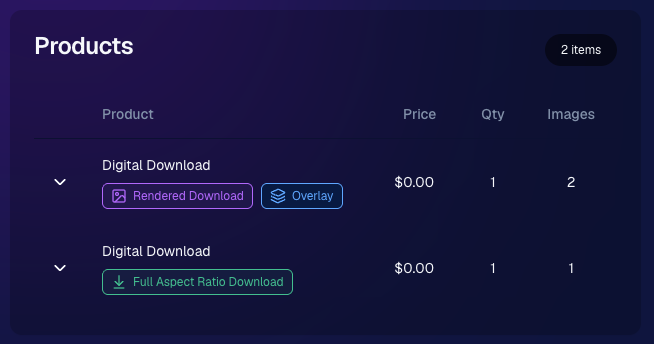
🧾 Order Details now identifies each download type

  • Digital Downloads can now show a Rendered Download or a Full Aspect Ratio Download badge, making it clearer which version was delivered to your customers.
🎨 Auto Editor & Candy Image Studio Updates

🧩 Auto Editor now supports image-input nodes

  • You can now use nodes such as:
    • Custom Image
    • Copy Style
    • Diploma Fix

🙈 Auto Edit originals won’t be texted too early

  • QuicPics and QuicPortraits will no longer send the original image by MMS when it belongs to an active Auto Edit with Hide Originals enabled. The system will wait for the edited version instead.

🕺 New Retro Pop node

  • Give images a colorful, retro-inspired treatment.

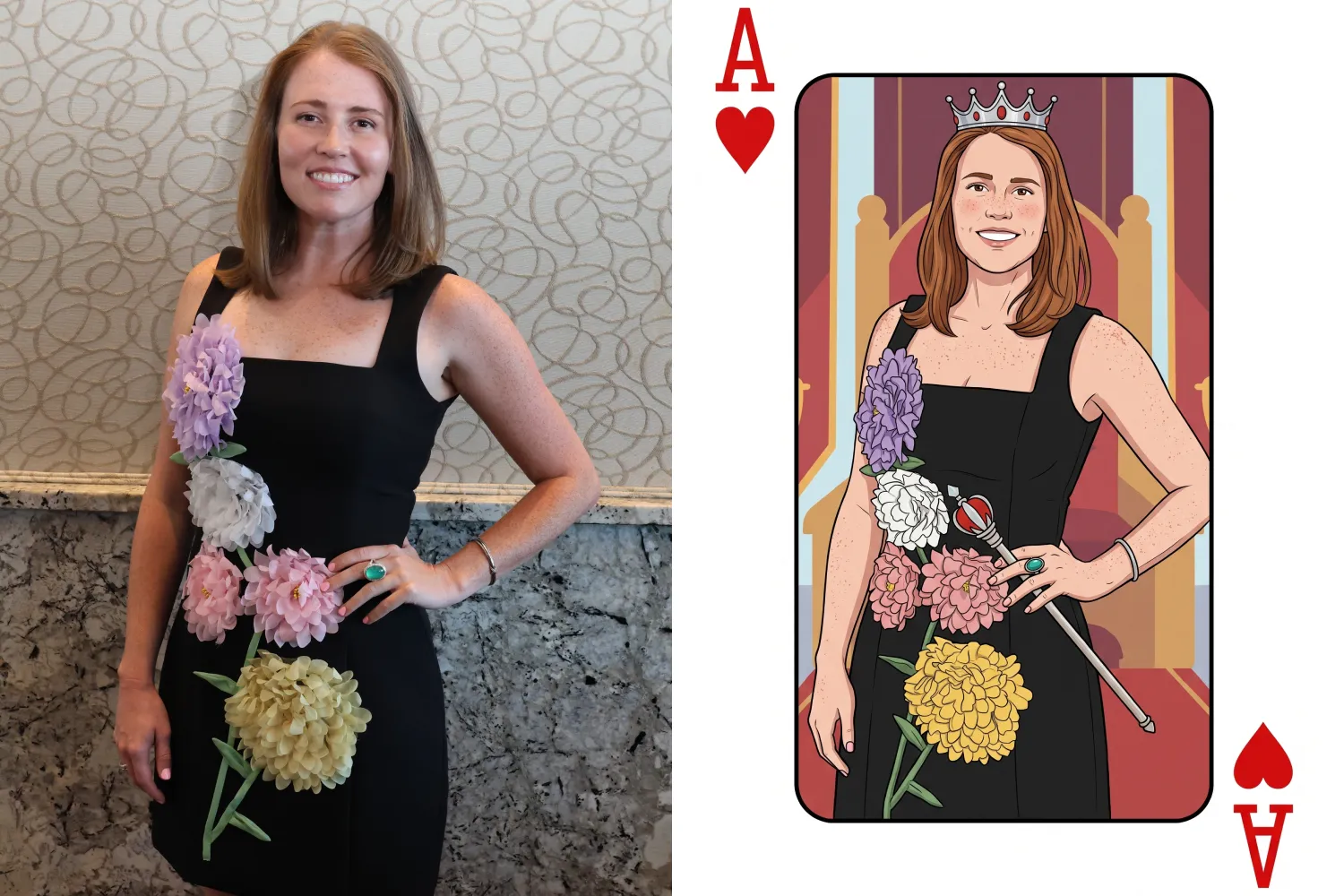
🂡 New Ace Card node

  • Turn subjects into a bold playing-card-style design.

💬 QuicPics & Marketing Improvements

👥 QuicPics can now send to multiple contacts on merged participants

  • If merged participant records contain different phone numbers or email addresses, regular QuicPics can now send to each unique contact.

✉️ Marketing startup fix for BGR cutouts

  • Fixed an edge case where marketing would not begin if the only visible images were cutouts from the newer Background Removal system.

🔗 Hot Links now better respect Hide Originals

  • Fixed an issue where the preview could temporarily show the original image before an Auto Edit finished generating.

📱 Capture App Updates

Capture App 5.8.1

iOS and Android OTA updates

🎨 Updated Event artwork is refreshed at login

  • If artwork changed, the latest file is pulled when logging into the Event normally.

🛠️ Small follow-up fix

  • An additional 5.8.1 update was released to address a minor issue.

Capture App 5.9

iOS and Android App Store update

📲 iOS OTA updates are easier to install

  • You no longer need to completely restart the app or return to the Home Screen to install an available Over-the-Air update.

🤖 Android compatibility updates

  • Required updates were made to stay current with new Google Play requirements.

🛍️ Retail Download Fixes

📱 Safari share sheet reliability improved

  • Press-and-hold downloads should now open the native share sheet more consistently on Safari.

🖼️ Virtual Group download cleanup

  • Virtual Groups in QuicPics no longer offer a Download with Art option.

🎨 Background selection fixes

  • Fixed cases where:
    • A PNG could be downloaded without selecting a background and receive an incorrect blue background
    • Faux renders showed no selected background in the download popup

🔐 Facebook login works again

🖥️ Dashboard Improvements

📊 Image Timeline cleanup

  • Fixed chart display issues, removed folders that were not useful in the timeline, and prevented multiple summaries from appearing when switching folders quickly.

🌾 Candy Culler controls are clearer

  • Filter visibility and report controls now use more descriptive buttons, similar to Manage Images.

📈 BGR Folder Stats fixed

  • Cutouts from the newer Background Removal system no longer incorrectly inflate Unassigned totals.

📱 Mobile Dashboard

🔗 More reliable deep linking

  • Dashboard links should open the correct page more consistently when the app has been open for a while or after signing in and out.

That’s the two-week update!

Faster Background Removal and smarter Digital Download delivery are the biggest highlights, with plenty of smaller improvements making Auto Editor, QuicPics, Retail, and the Capture App more dependable.

Thanks again to everyone who joined us in Denver for Summer Seminar—we loved seeing you!

Keep creating magic,

Candy 🍬

Related articles

Candy's September Recap: New Features from Last Month!📸🎉
Feature Updates
October 1, 2024

Candy's September Recap: New Features from Last Month!📸🎉

10
 minutes read
Hello, wonderful photographers!

Candy here, bringing you the first edition of our Recap series! 🌟

This blog post will cover alllllll of September's new features and changes worth mentioning! But going forward, we will be doing Weekly Recaps to keep you in the loop even faster.

We've been busy bees these past few weeks, and I can't wait to share all the fantastic new features and improvements we've made to help you shine even brighter. ✨

Psst... since this is our inaugural recap, we're covering updates from all of September, so grab a comfy seat—it's a bit longer than usual! Going forward, these recaps will be weekly and shorter, but just as sweet. 😉

1. Manual Gallery Assignment & Participant Creation 🛠️

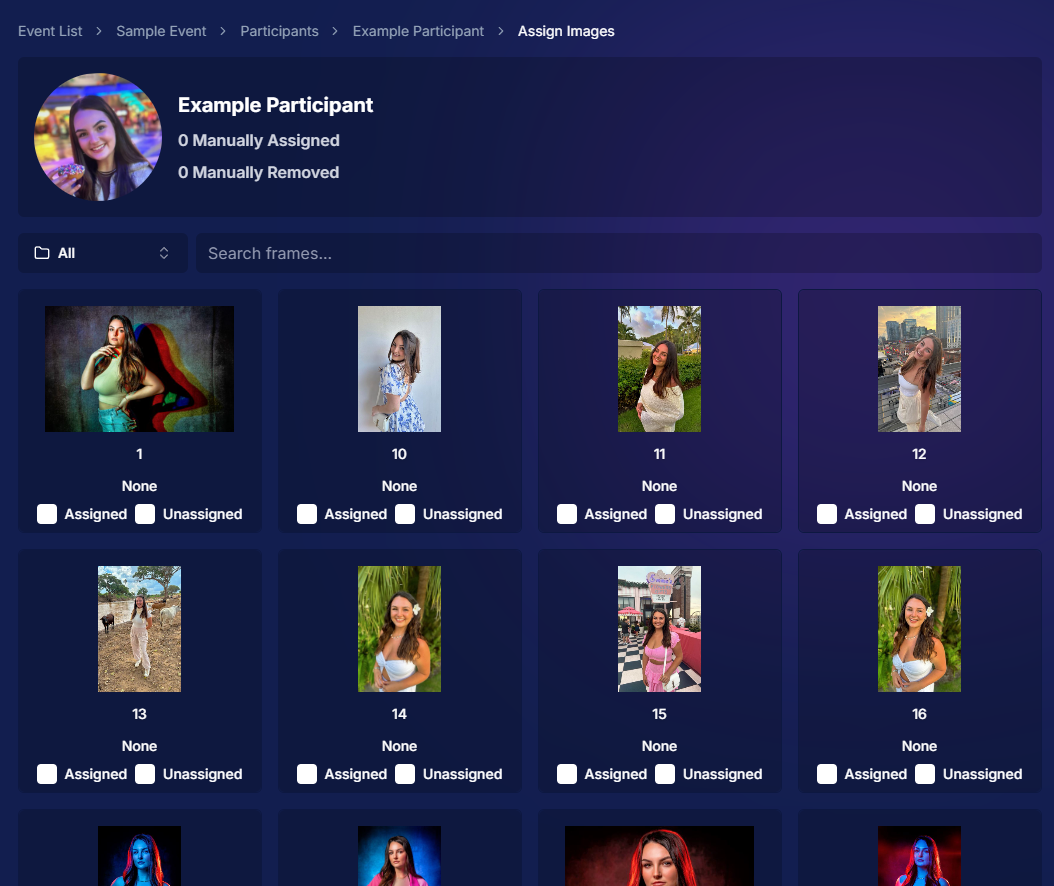
We're thrilled to announce that manual gallery assignment and participant creation are now live! This means you can:

  • ○ Assign images to someone's personal gallery manually—perfect for those shots where the subject wasn't facing the camera, and face recognition didn't pick them up.
  • ○ Create participants manually, either one at a time or by uploading a spreadsheet.
  • ○ Instantly trigger marketing campaigns to individuals when you assign images to them, ensuring they receive their photos promptly.

We believe this will greatly enhance your workflow and support needs. Let us know how it helps you during your next event!

2. Tweaks to the Retail Site for a Smoother Experience 🛍️

We've made several improvements to our retail site to enhance the shopping experience for your clients:

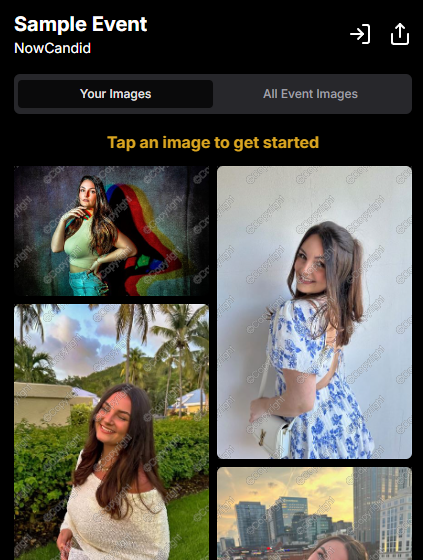
  • ○ "Tap image to get started" text now shimmers on the initial gallery screen to guide users who aren't sure what to do next.
  • ○ Package creation improvements make it more intuitive for customers to customize their packages and select photos.
  • ○ Product renders in the cart: The view cart screen now displays product images next to every item, including items within multi-item packages, for increased clarity.
  • ○ Updated header and footer: Clear guidance on when to contact our retail support or reach out to you, the photographer, for assistance.

These tweaks aim to make the purchasing process as seamless and enjoyable as possible for your clients!

Theme: Liquorice - Watermarking: Default

3. Default Price Levels Are Back! 💰

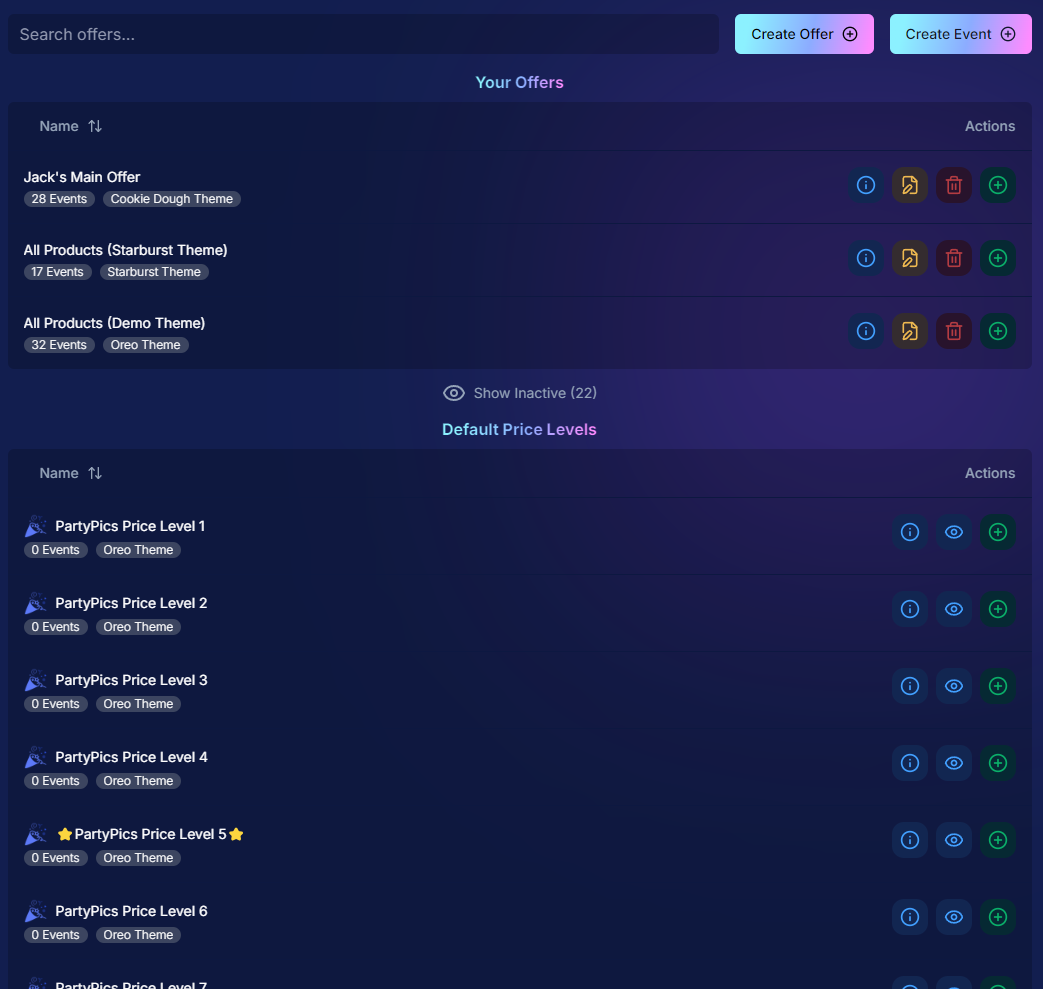
Great news! The Default Price Levels from our previous NowCandid system are back and better than ever.

While you can still create custom offers, these ready-made Price Levels are optimized to help you maximize sales in various situations.

  • ○ Optimized for success: Designed to boost your sales potential.
  • ○ Versatile options: Suitable for a wide range of events and client needs.
  • ○ Easy to access: Gives you good Offer options in a pinch or when entering a new market.

For a detailed breakdown, click here.

4. New Image Notifications for Previous Purchasers 🛎️

We've improved our marketing system to better serve your clients and help keep those sales up:

  • ○ If someone purchases on Day 1 and is photographed again on Day 2, they will now receive a notification about the new images added to their gallery.
  • ○ Enhances customer engagement: Keeps clients informed and encourages additional purchases.
  • ○ Prevents missed opportunities: Even early buyers stay in the loop for new content.

This ensures your clients never miss out on their special moments!

5. Google Pay Added to Express Checkout Options 💳

We're excited to introduce Google Pay as a new express checkout option!

Our available payment methods now include:

  • ○ Traditional credit/debit card checkout
  • ○ Apple Pay
  • ○ Google Pay
  • ○ PayPal (and PayPal Pay Later)
  • ○ Venmo

And guess what? We have one more express checkout option coming soon! Stay tuned. 📢

Theme: Liquorice - Watermarking: Default

6. Capture App Version 4.4 for iOS & Windows 📱💻

The latest Capture App Version 4.4 is now available for both iOS and Windows, featuring:

  • ○ Keyboard support for Windows: Windows laptop users can now input phone numbers using the keyboard when using the Tap-A-Face Workflow.
  • ○ Performance improvements: Smoother and faster app experience.
  • ○ sRGB color checking: The app now ensures images are in sRGB format, preventing issues caused by Adobe RGB images.
  • ○ Event Selfie Check-In QR code display: Access the QR code directly from your device when needed.

Upgrade now to enjoy these enhancements!

7. Enhanced Folders Report 📊

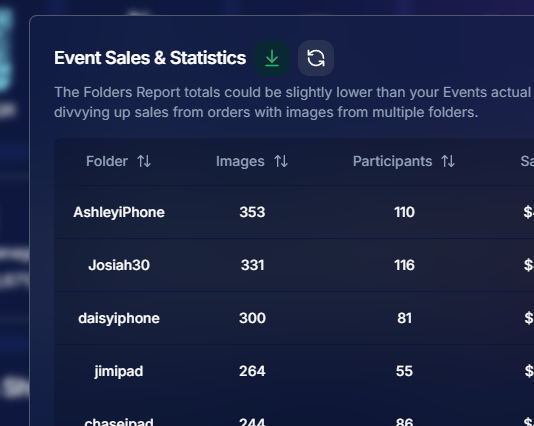
Our Folders Report (which you can find using the Graph button on an Event's Management Page) just got more powerful:

  • ○ Sortable columns: Organize by images, participants, sales, and more.
  • ○ Real-time insights: Works live during events, allowing you to identify your best-performing photographers, mid-event.
  • ○ Actionable data: Mid-event reporting helps you provide immediate feedback to your team to boost performance.
  • ○ Download button: This report is now downloadable via the green button in the screenshot below as well!

Optimize your event management like never before!

8. Bulk Visibility Control for Image Folders 📁

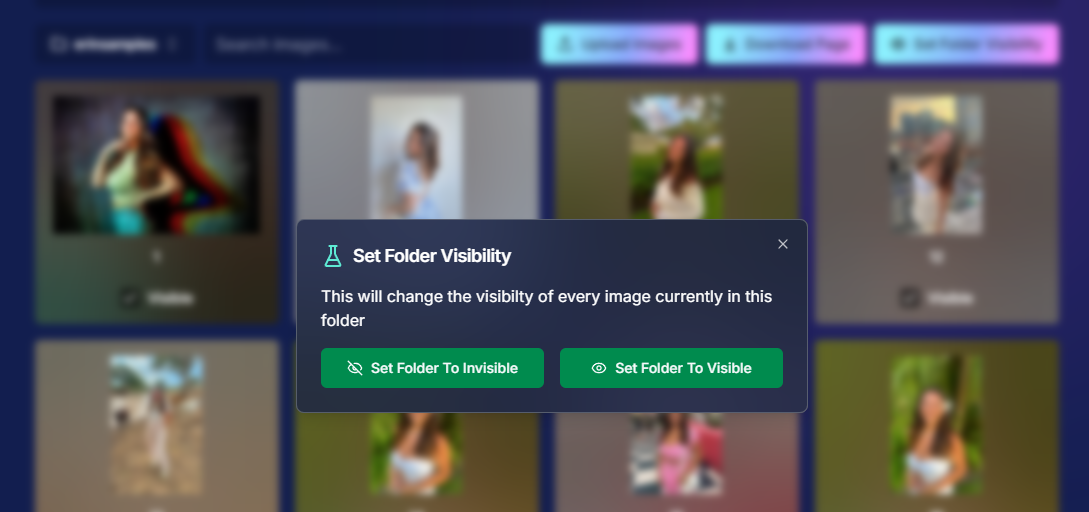
We've added a handy button in the Manage Images page, when you have a folder selected:

  • ○ Mark entire folders as visible or invisible with one click.
  • ○ Use cases: Quickly hide a batch of images that need reworking, such as a blurry set.
  • ○ Saves time: Streamlines the process of managing large numbers of images.

Sometimes, mistakes happen! Now you can use this button to quickly hide images in bulk as you work to correct issues.

9. Customize "All Event Images" Gallery Settings 🖼️

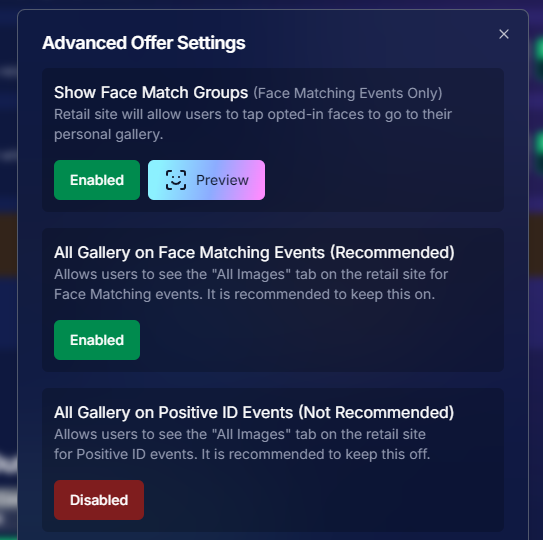
You now have more control over the All Event Images gallery:

  • ○ Override default settings at the Offer level.
  • ○ Options:
    • Turn off the All Event Images gallery for Face Matching Events.
    • Turn on the All Event Images gallery for Positive ID Events.
  • ○ Recommendation: We suggest sticking with the defaults, but if you'd like to explore the pros and cons, click here to schedule a chat with us!

Tailor the gallery experience to suit any event's needs!

10. Simplified Selfie Check-In 📲

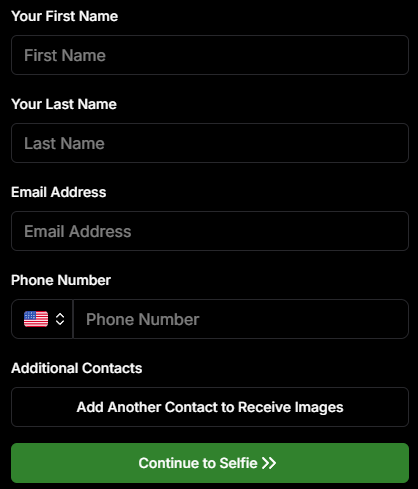
We've made the Selfie Check-In process even more user-friendly:

  • ○ Only requires a cell number OR email address.
  • ○ Encourages participation: Even though neither field says "optional," most people still provide both.
  • ○ Addresses Fringe Issues: Every now and then, someone doesn't have (or refuses to provide) a cell or email address. This change will account for those individuals!

Enhances guest engagement and reduces fringe support issues, with no changes on your part!

Theme: Liquorice

11. New Unsubscribe Keyword: "NOPE"! 🚫

We've introduced a new, fun way for clients to manage their marketing preferences:

  • "NOPE": Clients can reply with this word to opt out of marketing for a specific event.
  • Future communications: They will still receive messages for future events unless they opt out again.
  • Accidental "STOP" replies: If someone replies "STOP" though, they'll need to send "START" to our marketing number to resume receiving texts.

This gives your clients more control while still keeping communication lines open for future events.

12. Seasonal Retail Themes: Apple Crumble & Candy Corn 🍂🎃

Get into the festive spirit with our new retail site themes:

  • Apple Crumble:
    • Autumn colors: Warm and inviting hues.
    • Falling leaves: Adorable "leaves falling" animation upon gallery arrival, check-in completion, and after checkout.
  • Candy Corn:
    • Halloween vibes: Shades of black and bright orange.
    • Candy corn confetti: Fun "candy corn toss" animation to celebrate the spooky season upon gallery arrival, check-in completion, and after checkout.
    • Haunted Retail Site: A few ghosts frequently fly across your customer's screens as they shop!

Delight your clients with these charming themes!

Note: the Leaves & Candy Corn only fall across the screen upon gallery arrival, check-in completion, and after checkout - these GIFs are simply showing it in a loop :)

Theme: Apple Crumble - Watermarking: Off

Theme: Candy Corn - Watermarking: Off

We hope these updates make your experience with NowCandid even more enjoyable and efficient.

Your success is our top priority, and we're always here to support you. 💖

As always, if you have any questions or feedback, don't hesitate to reach out. We're all ears! 👂

Until next week, keep capturing those amazing moments!

Cheers and sparkles,

Candy 🍬

Jowdy Photography Scores Big with NowCandid 🏈📸
Success Stories
September 26, 2024

Jowdy Photography Scores Big with NowCandid 🏈📸

5
 minutes read
Hey there, photography enthusiasts!

We've got an exciting success story that combines the thrill of NFL action with the power of NowCandid's innovative software. 📷✨

Touchdown for Jowdy Photography and NowCandid!

Jowdy Photography, the Official Photographers of the Dallas Cowboys, recently took their game day photography to the next level by integrating NowCandid into their operations.

The result? An astounding 103% increase in sales per image at their very first game day event using our platform! 🏆

"We saw a huge increase in sales per image at our first game with NowCandid, and we're planning to continue using it for every game moving forward," said Jeff Jowdy, Founder of Jowdy Photography. "The software has completely changed our approach to game day photography."

Game-Changing Technology

By leveraging NowCandid's cutting-edge features, Jowdy Photography streamlined their workflow and delivered a seamless experience for fans.

Our platform's real-time image delivery and flexible workflows gave fans instant access to their photos through private, user-friendly galleries.

Not only did this enhance the fan experience, but it also significantly reduced post-event labor costs. Talk about a win-win! 🎉

Unlocking New Opportunities

With NowCandid, Jowdy Photography has opened doors to new ventures that were previously off the table. "There were business opportunities that we didn’t pursue before because they weren’t profitable or photographable," Jeff explained. "Now, with NowCandid's tools and workflows, those ventures have become entirely possible."

From high school graduations to corporate events, our flexible and intuitive platform allows photographers to handle events of all sizes and types. This versatility is what drew Jowdy Photography to integrate NowCandid into more aspects of their business.

Looking Ahead

We're thrilled to see Jowdy Photography's continued success as they capture unforgettable moments at game days and beyond. Their partnership with NowCandid highlights the power of innovative photography solutions in revolutionizing the fan experience while driving business growth. 🚀

Join the Winning Team!

Are you ready to elevate your photography business like Jowdy Photography did?

Discover how NowCandid can transform your workflow, boost your sales, and delight your clients.

Visit NowCandid.com to learn more!

About Jowdy Photography

Founded in 1987, Jowdy Photography has become a leader in digital photography for corporations, associations, special events, and large venues.

Their extensive knowledge of photography, coupled with their utilization of the latest technology, enables them to deliver a unique blend of quality, creativity, and personalization to their customers' finished products.

Stay tuned for more success stories and tips on how NowCandid can help you capture life's best moments while growing your business.

Happy shooting! 📸💕

Big News: Introducing GroupTags for SportsPics! 🌟
Feature Updates
September 12, 2024

Big News: Introducing GroupTags for SportsPics! 🌟

5
 minutes read
Hey, sports photographers!

Candy here, and I’m super excited to share a brand-new feature designed to make your SportsPics Events even easier to manage—introducing GroupTags! 🎉⚽🏀⚾

So, what exactly are GroupTags? 🤔


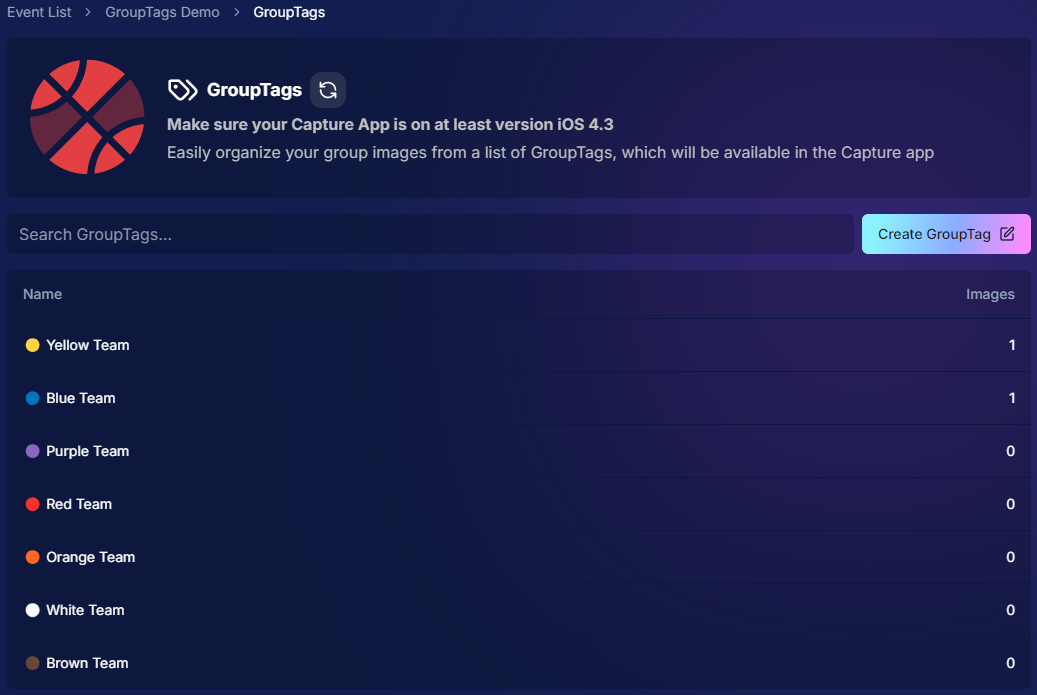
GroupTags is a feature made specifically for our SportsPics Program!

When you’re managing a big sports shoot with group photos, GroupTags helps you stay organized and deliver a smoother experience for your clients.

Here’s how it works:

1. Before your Event

You can set up as many GroupTags as you need within an Event. These GroupTags could be team names, league divisions, or even different sports if you're covering all of one school's teams over the same weekend. 🏆

2. Once you’ve started photographing

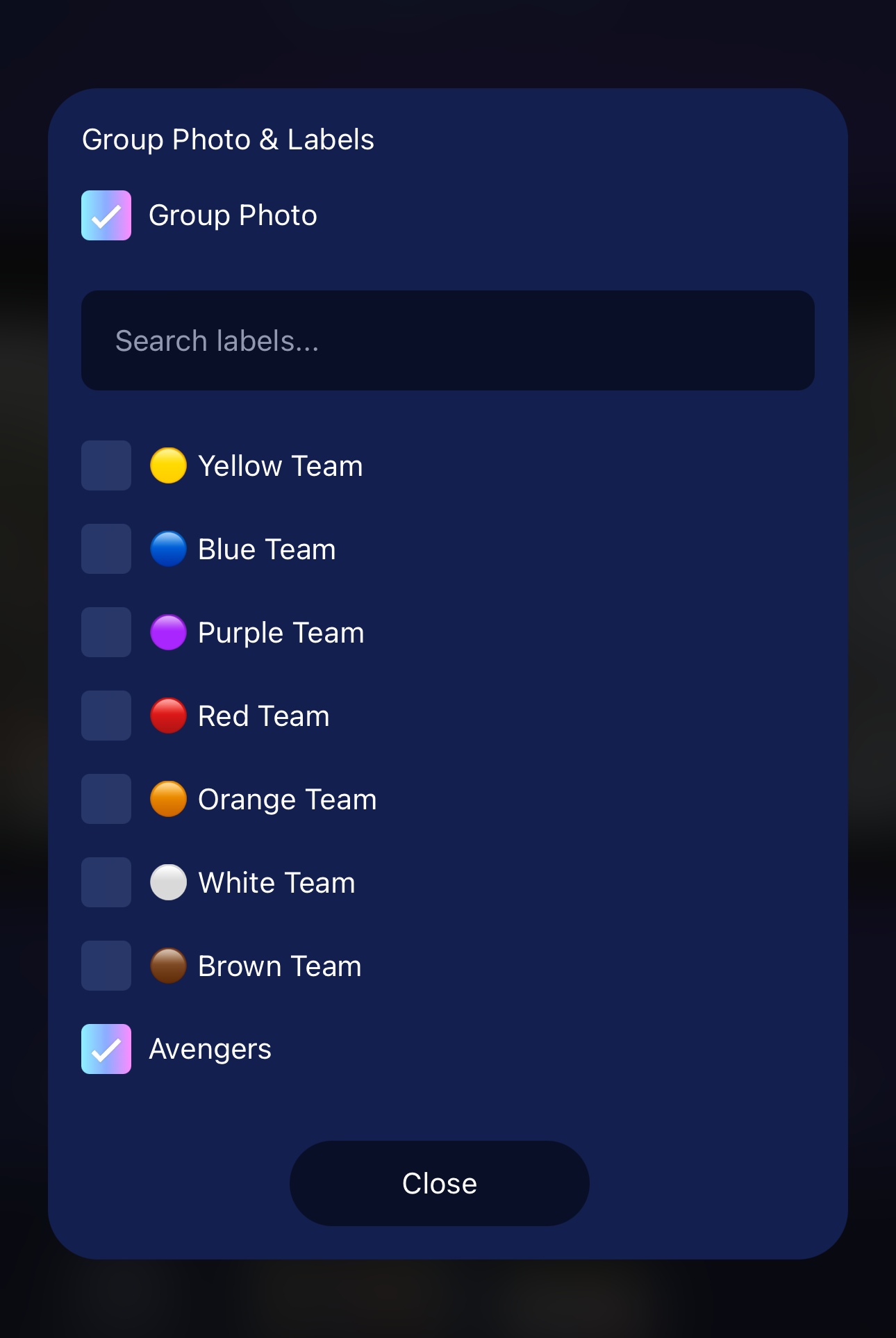
Anytime you mark a photo as a Group Photo (either on the Capture & Upload App, or on the Web Dashboard), you’ll have the option to assign a GroupTag to it. 📸

3. Once They Visit the Retail Site

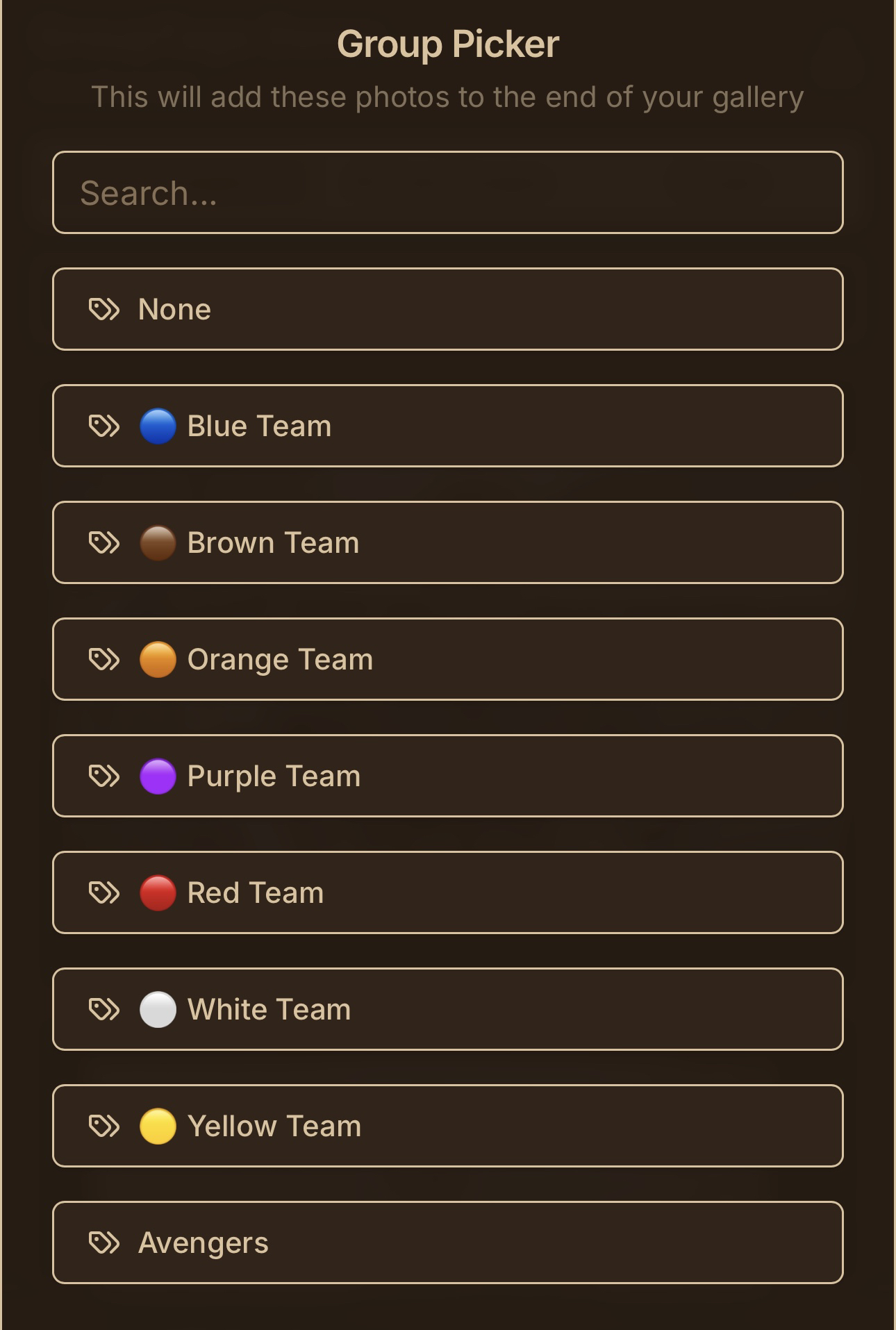
Your subjects will be able to choose from the GroupTags you set up, and easily find their group shots!

As soon as they arrive to the retail site via their person gallery link, they'll be prompted to choose a GroupTag.

4. Mission Accomplished!

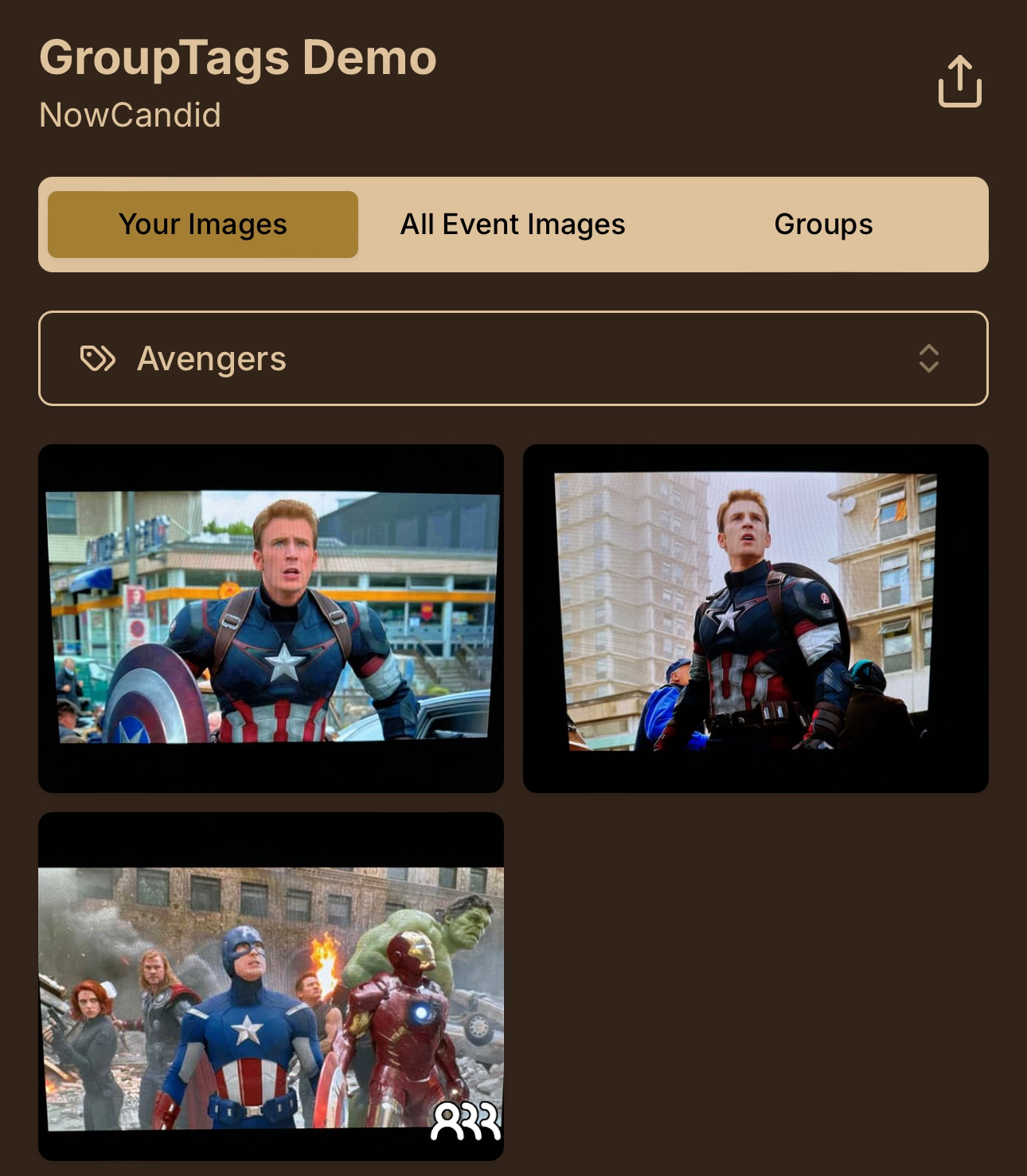
And once they select a GroupTag, they'll see their personal images, in addition to their Group Photos!

How does this help your clients?

To recap:


When your customers open the link to their personal gallery, they’ll be prompted to select their GroupTag—whether that’s a team name, division, or whatever you’ve set up for the Event.

With their GroupTag selected, their Group Photos will show up right alongside their individual images, making it super easy for them to see everything at once! 🖼️

Plus! GroupTags automatically fill in the GroupTag Name on products like Memory Mates, Bag Tags, and more when ordering. How cool is that? ✨

Need to make changes? No problem!


GroupTags are easy to edit after the Event if you need to fix a mistake or assign a Group Photo to multiple GroupTags. And don’t worry—if there’s ever a typo or minor error, your customers can still browse and shop while you fix it in the background! 🛍️

Works with all Workflows!


Whether you’re using Face Matching or Positive ID Workflows, GroupTags are a fantastic way to organize your Group Photos for large sports leagues or any big SportsPics Event. ⚡

Quick Recap:

As a reminder, marking a photo as a Group Photo will only allow it to be purchased on Group Photo Products, allowing you to sell them on different prints at different prices, prevent the sale of digital downloads for Group Photos, and allow them to be selected on multi-image products like Memory Mates.

We hope GroupTags makes your next SportsPics Event even smoother!

As always, feel free to reach out with any questions. 💌

Until next time, happy shooting! 🏅📸

Cheers and sparkles,


Candy 🍬

Let’s get in touch

If you’re a photographer looking to add NowCandid services to your wheelhouse – set up a call by clicking the button below.

How to customize formatting for each rich text

How to customize formatting for each rich text

How to customize formatting for each rich text

How to customize formatting for each rich text

How to customize formatting for each rich text

What’s a Rich Text element?

The rich text element allows you to create and format headings, paragraphs, blockquotes, images, and video all in one place instead of having to add and format them individually. Just double-click and easily create content.

A rich text element can be used with static or dynamic content. For static content, just drop it into any page and begin editing. For dynamic content, add a rich text field to any collection and then connect a rich text element to that field in the settings panel. Voila!

Headings, paragraphs, blockquotes, figures, images, and figure captions can all be styled after a class is added to the rich text element using the "When inside of" nested selector system.

  • List One
  • List Two
  • List Three
  • List Four
  • List Five

This is a link

This is bold text