HomeNavigation arrowBlogNavigation arrow
Current page
Feature Updates

Weekly Recap: Faster Virtual Group Creation, New Candy Image Studio Tools & Capture App 5.7 Updates ✨📸

Weekly Recap: Faster Virtual Group Creation, New Candy Image Studio Tools & Capture App 5.7 Updates ✨📸
Hey photo friends! 👋

Candy here with another weekly recap! This week brings some great upgrades to Virtual Group Builder, new Candy Image Studio tools, better Docs search, and a solid Capture App update with helpful color profile and PhotoTag improvements.

Let’s take a look!

🧑‍🤝‍🧑 Virtual Group Builder Improvements

Virtual Group Builder got a nice set of workflow upgrades this week:

🏷️ Create Virtual Groups directly from PhotoTags

  • On the PhotoTags page, click Create under the VGroup column to automatically start a new Virtual Group using participants from that PhotoTag. You’ll also get a popup asking whether to use each participant’s first or last cutout.

🚀 Save works-in-progress with placeholders

  • You can now save changes to a Virtual Group even if some subjects still have spaceman placeholders.
  • All subjects still need a selected photo before uploading the finished Virtual Group to the Event.

🖼️ Overlay uploads can now be named

  • When uploading overlays, you can name them so they’re easier to search and find later.

🔤 More control over subject name styling

  • Title Case is now only applied on import, meaning you can use the subject inspector to customize name casing afterward.

📐 New text display option

  • There’s a new Display setting to disable justified text.

🌫️ Bottom Vignette improvements

  • Bottom Vignette rendering has been reworked for better results.

🔎 More flexible scaling

  • Max global scale is now 200%.

🎨 Candy Image Studio: New Editing Nodes

Candy Image Studio has two new tools to help clean up common image issues:

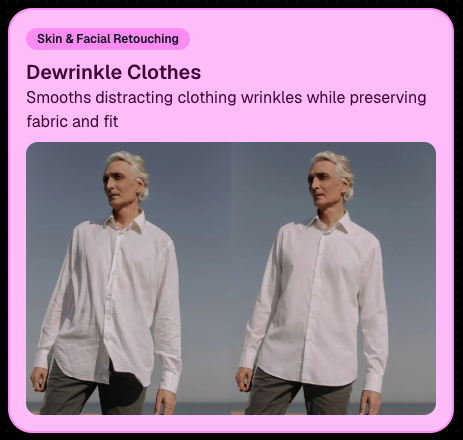
👔 Dewrinkle Clothes

  • Helps smooth distracting clothing wrinkles while keeping the image natural.

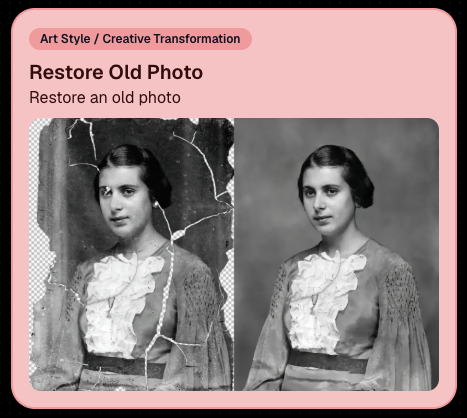
🖼️ Restore Old Photo

  • A new restoration-style node for improving older or damaged images.
📱 Capture App 5.7 Updates

App Store update released Monday, June 22

Capture App 5.7 includes some meaningful workflow and compatibility improvements:

🎨 Automatic sRGB conversion

  • If an image is detected as non-sRGB, the app will now try to automatically convert it to sRGB. If it can’t, you’ll still get the existing invalid color profile warning.
  • This can be especially useful for black-and-white shooting modes that output a different color profile. That said, we still recommend shooting in sRGB whenever possible, since conversion can cause some color loss and may use extra battery during long sessions.

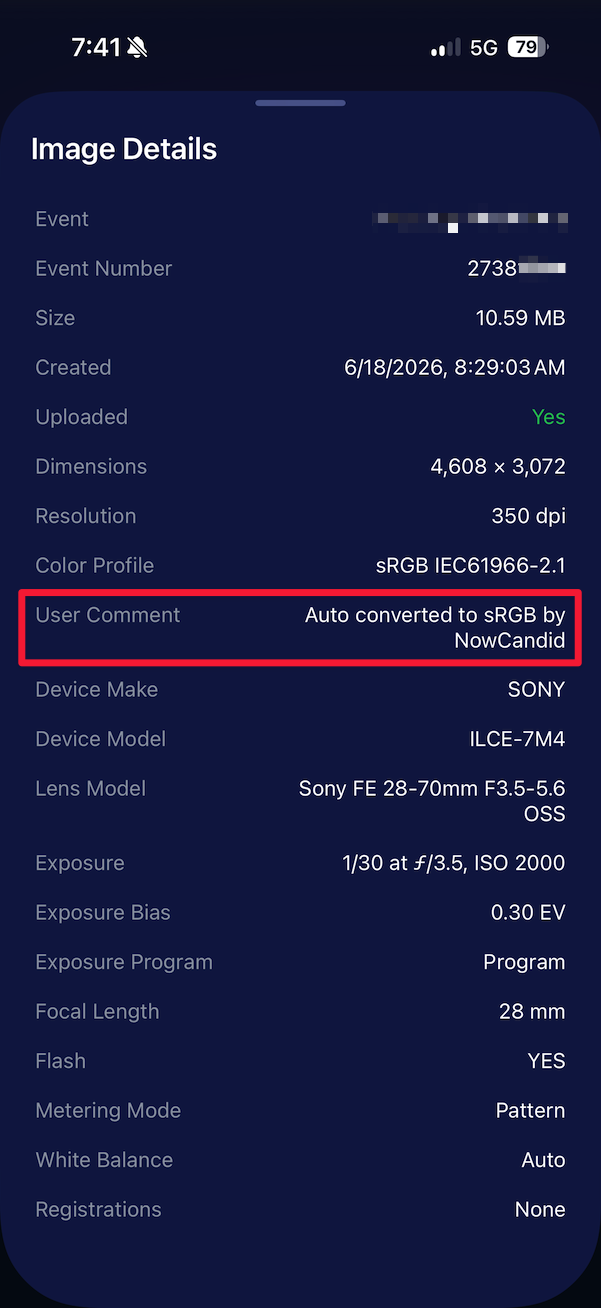
🧾 User Comment shown in EXIF details

  • The image gallery details popup now shows EXIF User Comment data, including whether an image was auto-converted to sRGB.
✂️ BGR visibility sync

  • Visibility changes in BGR folders now affect the cutout too. Mark the original hidden, and the cutout will hide; mark it visible again, and the cutout becomes visible as well.

🏢 Business logo support

  • Your business/profile logo now appears in the Capture App header when available, and can replace Candy in Photo Booth.

⚙️ Contact collection settings moved

  • Number, email, and name collection settings now live on the Event Overview instead of the Event login sheet, so you don’t need to re-log to change them.

🏷️ Event picker shows PhotoTag attribute

  • If an Event has PhotoTags, the Event picker now makes that easier to spot.

📱 Android UI fixes

  • Fixed several label cutoff issues for Android users with Bold Text enabled.

🔁 Restore Session fix

  • PhotoTags now load properly when an Event is opened through Restore Session.

🎨 Adobe RGB handling fixed on Android

  • Android devices will no longer incorrectly accept Adobe RGB images from cameras.

🍎 iOS 27 support tested

  • iOS 27 has been tested, and no issues were found. The app also respects the latest Liquid Glass device settings.
  • If you update your device to a beta version of iOS 27, let us know if you experience issues!

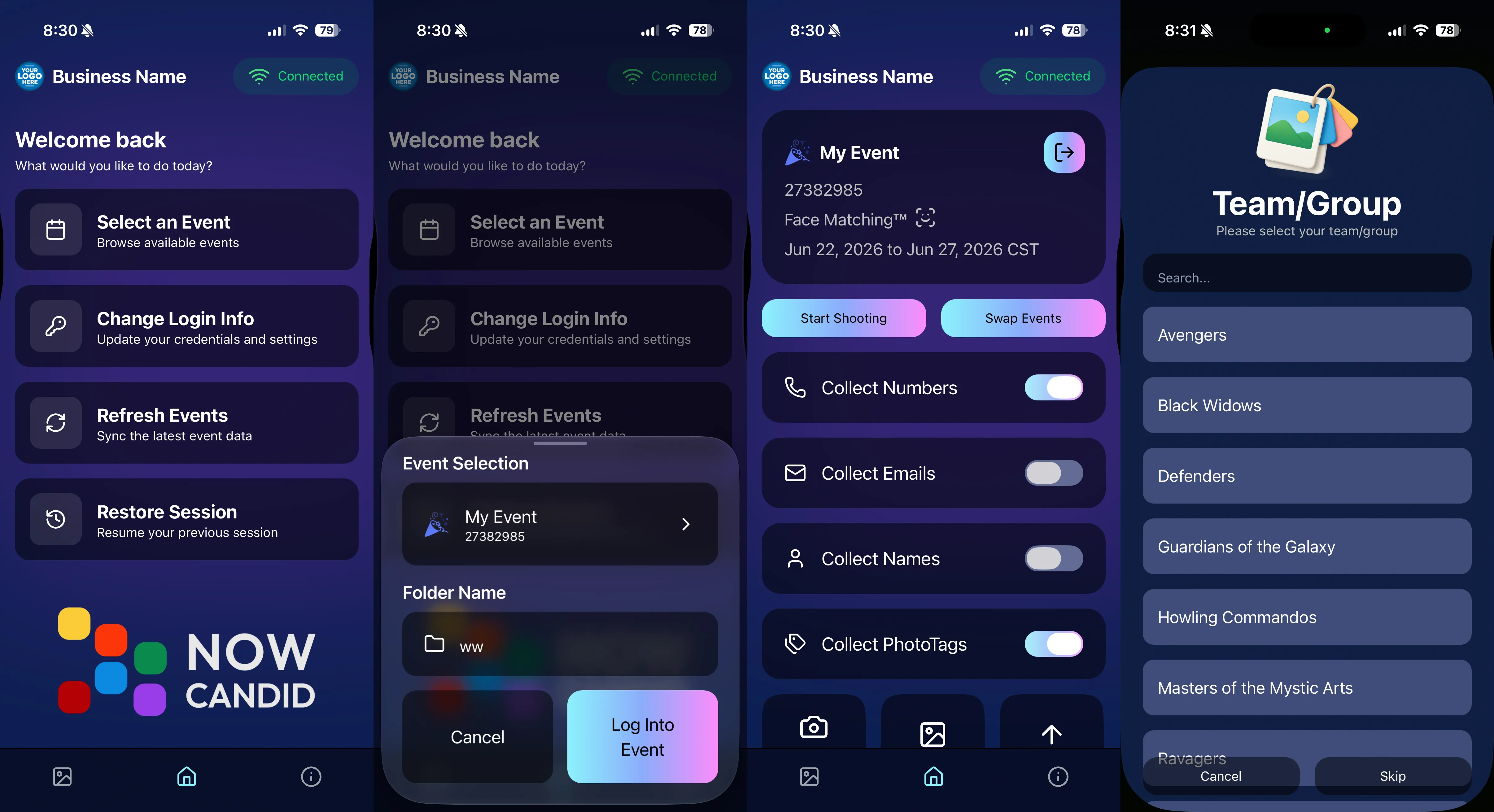
🏷️ Collect PhotoTags during check-in

  • Participants can now select their own PhotoTag, such as team name, before entering contact information. This option appears when the Event has PhotoTags.
  • We added this primarily to assist photographers in easily tagging late additions not on a roster that show up to a photoshoot, but there will be additional features for action photography in next week's update!
📱 Capture App 5.7.1

OTA update released Friday, June 26

🛠️ Miscellaneous UI fixes

  • A small OTA update with additional interface polish and cleanup.

🖥️ Dashboard Improvements

🔎 Docs Search is here

  • Click Search on the Docs page to search NowCandid documentation, with Candy navigation agent support.

📂 PhotoRoster image name cleanup

  • PhotoRoster data file uploads and image uploads now automatically remove spaces and certain special characters from image names.

🖼️ Full-frame overlay previews are downloadable

  • In the Image Overlay Editor, full-frame example render previews can now be downloaded just like banner previews.

🛍️ Retail Update

🪟 Better desktop popup behavior

  • On desktop, retail popups now automatically become scrollable if the popup is taller than the viewport height, matching Dashboard behavior.

📣 Marketing Fix

✉️ Email campaigns fixed for email-only PhotoRoster participants

  • Fixed an edge case where email-only PhotoRoster participants were not having their email campaigns start.

That’s the week!

From faster Virtual Group setup to better PhotoTag collection in the Capture App, these changes should help make your Event workflows more flexible and easier to manage.

Keep creating magic,

Candy 🍬

Related articles

Big News: JerseyJotter™, Your New MVP for Sports Galleries
SportPics
June 24, 2025

Big News: JerseyJotter™, Your New MVP for Sports Galleries

5
 minutes read
Let’s be real—sports events can be chaotic.

You’re out there capturing incredible moments: diving saves, finish line sprints, sideline smiles… and by the time you upload your gallery, it’s packed to the brim with action shots.

But then comes the big question: How will parents, athletes, and coaches find their photos quickly and easily?

That’s where JerseyJotter™ comes in to save the day—and your gallery.

💡 What Is JerseyJotter™?

JerseyJotter™ is NowCandid’s brand-new feature that automatically adds searchable filters to the All Images Gallery of SportsPics Events.

It does two things:

🎽 Color Recognition

Detects the primary shirt or jersey color worn in each image.

🔢 Number Recognition

Pulls jersey numbers or racing bibs straight from the photo.

🛠️ Total Control at Your Fingertips

You choose how JerseyJotter™ works for each event:

✅ Turn on Color only
✅ Turn on Number only
✅ Or use both for the dream team combo
✅ And yes—you can toggle them off if needed

It works with both Positive ID and Face Matching Events... just make sure your All Images Gallery is turned on!

🔍 Why You’ll Love It

With JerseyJotter™, customers can:

  • • Instantly filter photos by jersey number or color
  • • Zero in on their athlete without wading through hundreds of lookalikes
  • • Enjoy a more personal, efficient shopping experience (when they don't have a personal gallery)

And for you? Less “Can you help me find #22?” emails. 🎉

📸 Who’s It For?

JerseyJotter™ is a game-changer for:

  • • Sports leagues
  • • School teams
  • • Track meets
  • • Dance competitions
  • • Martial arts tournaments
  • • Basically any event where participants wear numbers or uniforms

⚡ Final Whistle

We built JerseyJotter™ to help you deliver better All Image galleries. It’s smart, seamless, and designed with real photographers (and real parents) in mind.

Ready to see it in action? Log into your NowCandid Dashboard and try it out on your next SportsPics Event!

The NowCandid™ Team
Smarter Tools. Sharper Galleries. Happy Parents.

Weekly Recap: JerseyJotter™, SportsPics Action Pricing, and Smarter Gallery Sharing🏷️
Feature Updates
June 20, 2025

Weekly Recap: JerseyJotter™, SportsPics Action Pricing, and Smarter Gallery Sharing🏷️

7
 minutes read
Hey there, it’s Candy!

This week, we’re bringing the action with jersey recognition, fresh new price levels for sports events, and a sleek gallery-sharing upgrade that makes your links pop.

Let’s dive in! 💦

🧢 Introducing: JerseyJotter™

Your new MVP for sports galleries has arrived!

JerseyJotter™ automatically adds searchable filters to the All Images gallery for SportsPics Events:

  • 🎽 Color Recognition – identifies the primary shirt/jersey color worn in the photo.
  • 🔢 Number Recognition – picks up numbers from jerseys or racing bibs

You can toggle:

  • ✅ Both on
  • ✅ Only one
  • ✅ Or turn them both off

✅ Color & Number Recognition will work for both Positive ID and Face Matching Events (as long as the All Images Gallery is turned on)


🔍 Customers can filter using either filter independently, or both filters at once!

It’s your new best friend for organizing crowded team galleries!

💸 New SportsPics (Action) Price Levels + Offer Template

We’ve added new price levels and a recommended offer template for action-packed sports coverage. These are designed to complement JerseyJotter™ and better suit high-volume, high-energy photo galleries.

Perfect for:

  • 🏃‍♂️ Race day events
  • 🏈 Game-day action
  • 🏀 Sideline candids

If you’re used to SportsPics Portrait pricing, give this new setup a look—it might be a better fit for your action photgraphy Events!

🔗 Gallery Sharing Just Got an Upgrade

Now when you share your NowCandid Gallery Links via:

  • 📱 iMessage
  • 💬 Discord
  • ✉️ Other messaging platforms

They’ll automatically preview using your Event’s retail cover photo (if one’s set) — or fall back to the first image in the gallery, now complete with copyright-watermarking.

📸 Cleaner. Sharper. Way more pro.

🔍 Dashboard Search Boost

  • Hit Control + K (or find it in the Extras dropdown) to search Orders and Events
  • Because finding stuff fast should feel like magic 🪄

✨ Tiny Changes & Bug Splatting

  • 🧵 View Sequence logic now uses image names for better chronological accuracy
  • 🪲 Smashed a bajillion bugs (yes, bajillion is a real number)
    • Including quirks with email marketing
    • And rare background removal issues in relation to group photos & group products

That’s it for this week! If you're capturing athletes, races, or energetic action shots, this update was made just for you. 💪

Until next time,


📣 Candy

Graduation Was Great… But What If You Missed the Selfie Check-Ins™?🎓
GradPics
June 18, 2025

Graduation Was Great… But What If You Missed the Selfie Check-Ins™?🎓

7
 minutes read
Hey there, grad photographers! 👋

Candy here from NowCandid, and we need to talk about a common situation we’ve been hearing a lot about:

“I didn’t get enough graduates to do Selfie Check-In™… now what?!”

We get it. When you're new to the Selfie Check-In™ system, it’s easy to be a little too passive — maybe you just printed QR codes on handouts or stuck signs around the venue. That’s a decent start, and sure, it’ll get you some check-ins… but not nearly enough to maximize your reach (and sales 💸).

So what should have happened? Ideally, you have staff at the entrance — where all the grads arrive — actively guiding them through Selfie Check-In™ before they even get to the ceremony space. Yes, it may feel pushy at first, but schools usually love that you’re making sure families get the photos they want. Some schools even appreciate the contact info you collect, because it helps them stay connected with their new alumni! 🎓💌

But that’s beside the point. Graduation season is winding down now. You can’t go back in time and be more assertive with check-ins. So the question is:

😰 You Missed the Selfie Check-Ins™… What Now?

Good news: All is not lost! 🙌

We just added a set of brand-new post-graduation email templates to our Digital Marketing Materials, accessible via our Resources Page.

These are customizable Word docs you can quickly edit and send to the school — making it super easy for them to email students and parents the Selfie Check-In™ URL.

These emails invite grads and families to check in after the event, so they can still receive their images. We even included:

  • ✅ A version you can send to the school to make the ask
  • ✅ A version the school can send to grads & families directly
  • ✅ Language that’s clear, warm, and action-driven

By doing this, you’ll reach a bunch of people who want their photos but never knew how to access them. It means:

📸 More participants tagged

🧑‍🤝‍🧑 More happy families

💰 More sales coming your way!

📈 Real Results: One Photographer's Experience

One photographer we worked with saw many graduates did not complete their Selfie Check-In™ by the day of the event. So, after the ceremony, the photographer asked the school to send a follow-up message using our post-event template.

The result?


Participation is up 12% so far! Between additional participation and continued marketing campaigns - Event revenue has increased significantly since the photographer asked the schools to send out these emails for the stragglers!

📬 Let’s Hear From You!

Whether this graduation season was a smashing success or a learning experience, we want to hear from you.

Got feedback? Success stories? Questions? Rants? Raves? We’re all ears. 👂💕

Drop us a note right here: nowcandid.com/contact

Your feedback helps us grow — and we’re always looking to celebrate wins or learn how we can make your job easier next year!

Until next grad season,


💖 Candy from NowCandid

Let’s get in touch

If you’re a photographer looking to add NowCandid services to your wheelhouse – set up a call by clicking the button below.

How to customize formatting for each rich text

How to customize formatting for each rich text

How to customize formatting for each rich text

How to customize formatting for each rich text

How to customize formatting for each rich text

What’s a Rich Text element?

The rich text element allows you to create and format headings, paragraphs, blockquotes, images, and video all in one place instead of having to add and format them individually. Just double-click and easily create content.

A rich text element can be used with static or dynamic content. For static content, just drop it into any page and begin editing. For dynamic content, add a rich text field to any collection and then connect a rich text element to that field in the settings panel. Voila!

Headings, paragraphs, blockquotes, figures, images, and figure captions can all be styled after a class is added to the rich text element using the "When inside of" nested selector system.

  • List One
  • List Two
  • List Three
  • List Four
  • List Five

This is a link

This is bold text