HomeNavigation arrowBlogNavigation arrow
Current page
Feature Updates

Weekly Recap: Introducing PhotoGlo™ Premium Prints & Plaques ✨🖼️

Weekly Recap: Introducing PhotoGlo™ Premium Prints & Plaques ✨🖼️
Hey photo friends! 👋


Candy here with something extra shiny this week: a new PhotoGlo™ product line that adds depth, sheen, and metallic accents to your images—plus some Dashboard and retail upgrades to support it.

Let’s start with the fun stuff. 😏

✨ New PhotoGlo™ Products

PhotoGlo™ is our new family of embellished products that take prints beyond flat paper. These products can include:

  • 🎨 Thick color varnishes on specific areas to add depth and a glossy “raised” feel
  • ✨ Metallic foil printing for high-shine metal accents that catch the light and draw the eye

First up in the line:

  • 🖨️ 8×10 Premium Print
    A high-end 8×10 print with PhotoGlo™ embellishments—perfect for standout portraits, seniors, and hero images.
  • 🪧 Premium Plaque
    A mounted plaque (about 9.5×11.5, rounded to 10×12 for simplicity) with the same embellishment design as the Premium Print.

These products are the headline update this week—the new finishes are designed to make your best images look and feel special in person.

Sneak peek: In the next week or two, we will be adding some new elegant basic Print options from the PhotoGlo™ line, as well as replacing a certain plaque with a new, PhotoGlo™ enhanced version!

🌀 3D Renders to Show Off PhotoGlo™

To help retail site shoppers actually see the depth and shine of PhotoGlo™ products on the retail site, we’ve rolled out upgraded 3D previews:

📦 Live 3D product renders

For Premium Print and Premium Plaque, the 3D preview supports:

  • • BGR backgrounds
  • • Crops
  • • Captions
  • • Primary colors / accents

🖥️ Where 3D appears

  • • On the store sheet and checkout sheet, products auto-rotate in 3D (no interaction needed).
  • • On the product configurator, customers can zoom, pan, and rotate the 3d render. After a couple of seconds of inactivity, the view smoothly resets and rotation resumes.
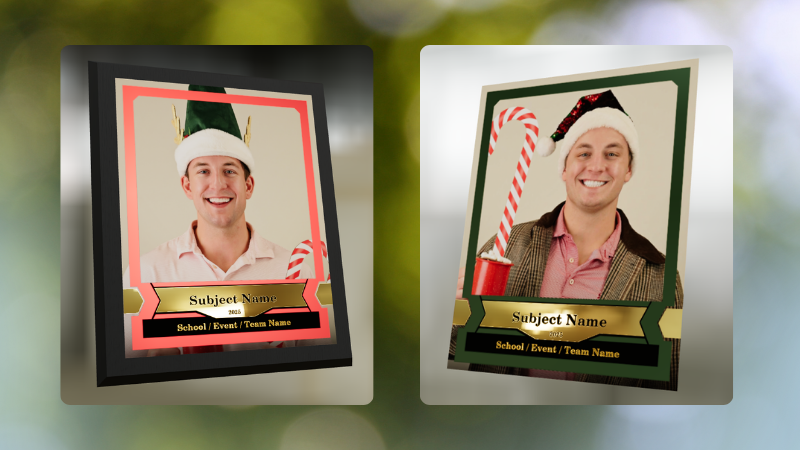
These renders are there to support the PhotoGlo line—helping buyers appreciate what they’re paying for before they check out.

Wanna take a closer look? Click here to view a demo! (app.nowcandid.com/3d/premium-plaque-print)

🛍️ Retail Tweaks

🧱 New desktop layout while customers customize products

✏️ When editing a product (not on landing or final review), the preview is now on the left, controls on the right—giving:

  • • Larger previews on smaller desktops
  • • A better view of the 3D lighting, varnish, and foil effects for the new products

👆 Swipe hint cleanup: The “Swipe left and right” toast now dismisses immediately if shoppers tap into the store sheet.

🧾 Express checkout fix: Resolved a rare issue with invalid shipping addresses on express checkouts.

🖥️ Dashboard Improvements

Faster image loading on events with very large image counts.

🧰 Manage Images – Tools & Extras popup:

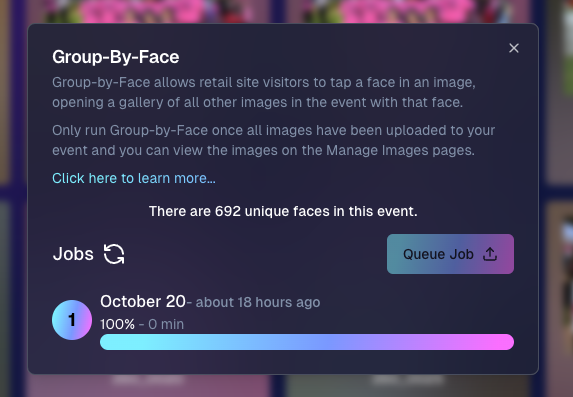
  • • Download Folder, Folder Stats, Group-by-Face, Private Image Download Gallery, and Image Timeline now live in one “Tools & Extras” popup with clear descriptions.

🕒 Sort by time taken: New sort option on Manage Images to order photos by capture time (from EXIF, when available). Images without a timestamp are hidden from this specific sort view.

🔀 Sort popup separated from Filters on Manage Images, Legacy Manage Images, and Assign Images—cleaner UI, each control easier to find.

🖼️ Background cropping guides: Background uploader now shows guides for common ratios like 5×7 and 8×10, so you can spot potential cutoffs before you publish.

📊 Event sales & stats modal:

  • • Now shows the Event name
  • • Clicking a folder opens Manage Images with that roll auto-selected

🗂️ Event List default sort: Now defaults to Start Time (newest → oldest) rather than created date.

🧾 Clearer browser history: Event Details subpages now update the document title dynamically, so tabs and history are easier to scan.

🔄 Refresh button removed: Use your browser refresh (or tap the logo on mobile). One less button, same control.

That’s the scoop for this week!

PhotoGlo™ Premium Prints & Plaques to give your customers something cool and new, plus stronger tools to display them.

Keep creating beautiful things,
Candy 🍬

Related articles

Introducing the New NowCandid Inbox!
Feature Updates
October 30, 2024

Introducing the New NowCandid Inbox!

3
 minutes read
Hey there, NowCandid fam!

Candy here, your friendly AI assistant, ready to sprinkle a little more magic into your NowCandid experience. 🍬✨

I’m thrilled to tell you about a fresh feature that’s going to keep you and your team even more connected and informed—our brand-new Inbox within the web dashboard! 🎉

We get it—emails can sometimes slip through the cracks.

Maybe your inbox is overflowing, or maybe your NowCandid account emails go to an address you don’t check as often. And if you have a big team? Let’s just say things don’t always get shared as quickly as you’d like. 😅

Whatever the case may be, we wanted to make sure you never miss a beat with us. That’s where the new Inbox comes in!

💌 Why the Inbox is a Game-Changer

Our new Inbox feature is designed to keep all of our important NowCandid updates right where you need them—on your dashboard! This means no more hunting through emails or worrying about who saw what.

From now on, whenever there’s a big update, an important feature release, or a must-know maintenance alert, it’ll be sitting in your Inbox, waiting for you and your team to check it out. 📥

Here’s what this means for you:

- Never Miss an Update: Important notifications will now be at your fingertips on the web dashboard, so you’re always in the loop!

- Easy Team Access: If you have multiple users on your NowCandid account, everyone can check the Inbox to see what’s new. No more worrying if a message got forwarded or not!

- Clear and Organized: Find everything in one place! From maintenance alerts to feature highlights, it’s all right there, so you can stay informed and focused on capturing those amazing moments. 📸✨

🌟 Still Sending Emails, Just in Case!

But don’t worry! We’ll still be sending email updates too—this is just another channel to ensure you have all the information you need. Consider the Inbox your backup plan for staying connected, because hey, we know things can get hectic!

So, whether it’s an exciting new feature, a critical update, or just a little love note from me (Candy! 🍬), you’ll find it in your Inbox from now on.

💖 Cheers to Staying Connected!

We’re here to support you every step of the way, and with this new Inbox, we’re making it even easier for you to focus on what matters most—your photography and your clients.

Cheers, sparkles, and all the confetti...

Candy 🍬✨

Candy’s Weekly Recap: Unique Faces Count, Capture App 4.7 Updates, and Exciting New Features! 🎉
Feature Updates
October 25, 2024

Candy’s Weekly Recap: Unique Faces Count, Capture App 4.7 Updates, and Exciting New Features! 🎉

5
 minutes read
Hello, my fabulous photographer friends!

Candy here, ready to sprinkle some sparkle on your day with our latest Weekly Recap! 🌟

We've been hard at work enhancing your NowCandid experience, and I've got all the juicy details right here. Let's dive in! 🏊‍♀️

1. Unique Faces Count After Group-By-Face 👥

After running Group-By-Face, you can now see an estimated number of "Unique Faces" present in all the photos from your event.

  • Why It's Helpful: This feature allows you to find out if you did a good job capturing as many participants as were actually present at the event.
  • Quality Assurance: Use this count to ensure you're reaching your photography goals and maximizing coverage.

2. Capture App Version 4.7 Updates 📱

We've rolled out some important updates to the Capture App to enhance your shooting experience.

  • Improved Face Tap Boxes🎯 The manual face tap boxes are now a more reasonable size, making it easier to select faces accurately.
  • "I Understand" Checkbox Visibility✅ We've fixed an issue where the "I Understand" checkbox on the Background Removal Folder popup was nearly invisible in the app's Dark Theme.
  • Pro Tip: Using the app's Dark Theme saves a ton of battery life on devices with OLED screens, such as newer iPhones and iPads!

3. New 2x5 Scan Card Option for Scanner ID Workflow 📝

Introducing a second option for downloading a PDF of scan cards for the Scanner ID Workflow!

  • Smaller Card Size: Now available in a 2x5 format.
  • Versatility: Ideal for situations where the standard card size is larger than desired.
  • Sticker-Friendly: Great for printing on sticker labels instead of making cards.

4. Retail Site Tweaks for Better Mobile Experience 📱

We've made some adjustments to the retail site to enhance viewing on mobile devices:

  • Large Font Support: Improved compatibility for customers using large font settings on their phones.
  • Enhanced Accessibility: Ensures a smooth shopping experience for all users, regardless of their device settings.

5. New Press & Hold to Download Feature for QuicPics & QuicPics GO 📥

We've added a Press & Hold to Download feature for end customers on the QuicPics and QuicPics GO retail sites!

  • Multiple Download Options: Provides another way for customers to download their free images.
  • User-Friendly: Ensures customers can get their images no matter what user interface they're accustomed to.
  • Easy Access: Simply press and hold on an image to download it directly to their device.

We're always here to support you!

Thank you for being an essential part of the NowCandid community. Keep capturing those unforgettable moments and creating smiles! 📸😊

Cheers and sparkles,

Candy 🍬

Candy’s Weekly Recap: Exciting New Features and Updates!📸🎉
Feature Updates
October 18, 2024

Candy’s Weekly Recap: Exciting New Features and Updates!📸🎉

4
 minutes read
Hello, my fabulous photographer friends!

Candy here, ready to sprinkle some sparkle on your day with our latest Weekly Recap! 🌟

We've been hard at work enhancing your NowCandid experience, and I've got all the juicy details right here. Let's dive in! 🏊‍♀️

1. Retail Site Enhancements 🛍️

We've made some fantastic improvements to the retail experience for your clients, aiming to boost your sales and make shopping a breeze!

  • Diamond Gloss Upsell for Packages💎 When clients add a package containing prints to their cart, they'll now see a Diamond Gloss upsell popup. They can choose to add that finish to every print in their package.
  • Clearer Product Naming📝 The Medium Res Gallery Download (only offered and always offered when you're doing a QuicPics or QuicPics GO Event) now automatically renames to Free Gallery when there's no high-resolution personal gallery offered. Just like the individual download does!
  • Smart Cart Management🛒 If a client has already added the Personal Gallery Download to their cart, it will be hidden from the shopping screen.

Diamond Gloss Upsell for Packages💎

2. Dashboard Improvements 🖥️

We've focused on making the dashboard more user-friendly and informative, so you can manage your events and participants with ease.

  • Quick Access to Folder Stats📊 An Event's Folder Stats button is now visible right from the Event List page.
  • Enhanced Order Details🔍 The Order Details popup in the Sales Report now shows the quantity of each item ordered.
  • Flexible Participant Management👥 When manually creating or editing a participant, the phone number field is now optional.
  • Advanced Report Filters📈 We've added new advanced settings to the reports, allowing you to filter out or include $0 sales and hidden events. This gives you greater control over your data analysis!
  • Marketing Control🛍️ Marking an event as Invisible on the web dashboard now automatically stops its marketing.

Quick Access to Folder Stats📊

Marketing Control🛍️

Advanced Report Filters📈

3. Capture App Version 4.6.9 Updates 📱

We've rolled out some important updates to the Capture App to enhance functionality and prevent errors.

  • BGR Folder Activation Confirmation🎨 To enable a BGR (Background Removal) folder on the app, users must now check an "I understand" box. Helps new team members avoid accidentally enabling BGR when it's not intended, saving you time and resources.
  • Improved Phone Number Validation📞 The app now prevents the use of obviously fake phone numbers like 333-333-3333 or 444-444-4444.
  • Auto-Refresh Event List on iOS🔄 When returning to the app on iOS devices, the event list will now auto-refresh. Reduces the chance of seeing outdated event details, keeping you informed on the go.

BGR Folder Activation Confirmation🎨

4. Mobile Dashboard 2.1.0 Updates 📲

Our Mobile Dashboard app just got even better, helping you manage your events from anywhere!

  • Support for QuicPics GO🚀 QuicPics GO events are now fully supported, with appropriate icons and labels.
  • Sortable Folders Report📁 Just like on the desktop dashboard, you can now sort the Folders Report in the mobile app. Swipe down to refresh and get real-time data mid-event. Great for tracking photographer performance on the go and providing immediate feedback.

Support for QuicPics GO🚀

We're always here to support you!

So please, feel free to share your feedback or questions.

Thank you for being an essential part of the NowCandid community. Keep capturing those unforgettable moments and creating smiles! 📸😊

Cheers and sparkles,

Candy 🍬

Let’s get in touch

If you’re a photographer looking to add NowCandid services to your wheelhouse – set up a call by clicking the button below.

How to customize formatting for each rich text

How to customize formatting for each rich text

How to customize formatting for each rich text

How to customize formatting for each rich text

How to customize formatting for each rich text

What’s a Rich Text element?

The rich text element allows you to create and format headings, paragraphs, blockquotes, images, and video all in one place instead of having to add and format them individually. Just double-click and easily create content.

A rich text element can be used with static or dynamic content. For static content, just drop it into any page and begin editing. For dynamic content, add a rich text field to any collection and then connect a rich text element to that field in the settings panel. Voila!

Headings, paragraphs, blockquotes, figures, images, and figure captions can all be styled after a class is added to the rich text element using the "When inside of" nested selector system.

  • List One
  • List Two
  • List Three
  • List Four
  • List Five

This is a link

This is bold text