HomeNavigation arrowBlogNavigation arrow
Current page
Feature Updates

Weekly Recap: Jersey Jotter Page, Smarter AI Edits & Android Improvements 🍬📸

Weekly Recap: Jersey Jotter Page, Smarter AI Edits & Android Improvements 🍬📸
Hey photo friends! 👋

This week brings a mix of sports-focused tools, AI editing upgrades, and performance improvements across the Dashboard and Capture App.

Let’s get into it.

🏈 New: Dedicated Jersey Jotter Page (Sports Events)

Jersey Jotter just got a big usability upgrade with its own dedicated page:

🔢 Search images by jersey number or color (just like retail search)

🎛️ Easily enable/disable number & color recognition

📊 View totals for detected numbers and colors

📍 Automatically appears for Sports events only

If you’re working high-volume sports, this should make organizing and finding images much faster.
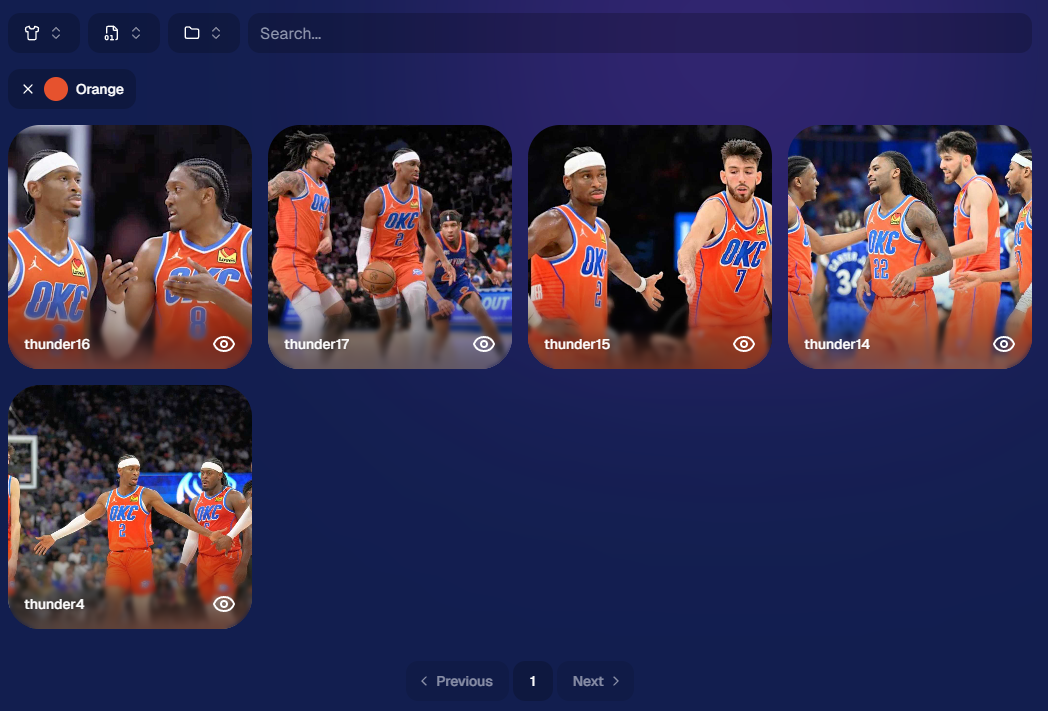
Same filters your customers have come to expect, right in the Dashboard!

🎨 Candy Image Studio: Better Results + New Styles

Candy Image Studio continues to level up:

Improved edit quality across multiple nodes

🛡️ Smarter safety system for safer outputs

🖼️ Example thumbnails added to many nodes (so you know what to expect)

🆕 New AI Styles:

🧸 Chibi

🧍 3D Cartoon

🦸 Action Figure

Not sure when this one specifically would be helpful, but it's cool isn't it!

⚡ Dashboard Improvements

🚀 Faster overall performance across the Dashboard

🎬 Smoother transitions (faster, and some now morph instead of just fading)

🧹 Roster uploads now auto-clean whitespace
Prevents frustrating validation errors from accidental empty spaces in spreadsheets

🔎 Fixed “Find a Participant” link in Sidebar Find

🧪 Fixed false positives in Image Tester filename validation

🏷️ Data & Upload Improvements

📄 CORE spreadsheets now supported in roster and PhotoRoster uploads (for those working across CORE workflows)

🛠️ Marketing & Check-In Fixes

📩 Fixed duplicate text message edge cases

🤳 Fixed “Upload From Camera Roll” issue on Check-In

🤖 Capture App 5.4 (Android Improvements)

This update focuses on improving the Android experience:

📱 Immersive mode UI

  • Reduces accidental navigation and keeps the app more stable on devices like Samsung

🎨 Dark-themed native dialogs for alerts and messages

🔒 Orientation locked to vertical (matching iOS behavior)

App size reduced ~20% (faster downloads, less storage)

🔌 Fixed devices showing as generic “USB Camera Device” instead of model name

🔄 Fixed Over-The-Air updates not working on some devices

That’s the week!

A strong mix of sports workflow improvements, better AI editing tools, and faster, cleaner performance across the board.

See you next week,

Candy 🍬

Related articles

NowCandid's Microsoft App: Out Now!
Feature Updates
March 9, 2022

NowCandid's Microsoft App: Out Now!

3
 minutes read

New features you'll find in the app:

  • Supports several new Nikon and Canon models that the previous NOW Candid app did not
  • Customizable App Passcode - ensures you are uploading directly to events in your account & is protected from other user's image uploads
  • New modern design for ease of use
  • More event information now available right from the tablet when logged in
  • Choose between dark or light mode (dark mode looks pretty slick! Try it out!)
  • Added button in settings that instantly pulls up the image hot folder
  • Easier installation and less issues with Window Defender
  • Smarter log out protocols (warnings if all images have not been uploaded)
  • "Upload from SD card" to manually add all images from an SD card to an event.
  • Useful if a camera was not connected to a tablet when images were shot, this provides another way to manually upload
  • OR if you had a second photographer on site without a tablet, they could upload their images through a tablet/laptop before leaving the event

How to uninstall the previous version of the app:

If you have previous versions of the Party Pics® Now app or Now Candid app installed on your device, you will want to uninstall them. Make sure all data and images from any previous events have been transferred prior to uninstalling.

1. Navigate to "Add or remove programs"

2. Search for NowCandid to uninstall

    a. This can be done for "Party Pics Now" or SNAP as well

How to install the new version of the NowCandid app:

You can install the new app by going directly to the Microsoft App Store using this direct link: www.microsoft.com/store/apps. Alternatively,  you can find a link to the store on NowCandid.com/download (must be logged into account to access this page).

How to find your App Passcode to log in on the new tablet:

1. Log in to your account on NowCandid.com

2. Click on App Settings

3. Find or change your App Passcode

Let’s get in touch

If you’re a photographer looking to add NowCandid services to your wheelhouse – set up a call by clicking the button below.

How to customize formatting for each rich text

How to customize formatting for each rich text

How to customize formatting for each rich text

How to customize formatting for each rich text

How to customize formatting for each rich text

What’s a Rich Text element?

The rich text element allows you to create and format headings, paragraphs, blockquotes, images, and video all in one place instead of having to add and format them individually. Just double-click and easily create content.

A rich text element can be used with static or dynamic content. For static content, just drop it into any page and begin editing. For dynamic content, add a rich text field to any collection and then connect a rich text element to that field in the settings panel. Voila!

Headings, paragraphs, blockquotes, figures, images, and figure captions can all be styled after a class is added to the rich text element using the "When inside of" nested selector system.

  • List One
  • List Two
  • List Three
  • List Four
  • List Five

This is a link

This is bold text