HomeNavigation arrowBlogNavigation arrow
Current page
Feature Updates

Weekly Recap: Upgraded Grad Plaque, Retail Polish & More🎓✨

Weekly Recap: Upgraded Grad Plaque, Retail Polish & More🎓✨
Hey photo friends! 👋


Candy here. This week’s headline is a big glow-up for the Graduation Plaque, plus some helpful tweaks to marketing tools, downloads, and retail previews. Here’s what changed.

🎓 Graduation Plaque: New Look, New Render

The Graduation Plaque just got a major upgrade:

  • 🆕 New physical product with an updated finish and feel
  • 💰 Cost increase of $0.48 to match the upgraded production
  • 🌀 New live 3D render on the store sheet (like the Premium Print/Plaque experience)
  • 🖼️ 2D render on the checkout sheet for performance
  • 🔻 Diamond Press upsell removed (was available on the previous version, may return in the future)

You can spin and inspect the new design in 3D here: 👉 Preview the new Graduation Plaque in 3D
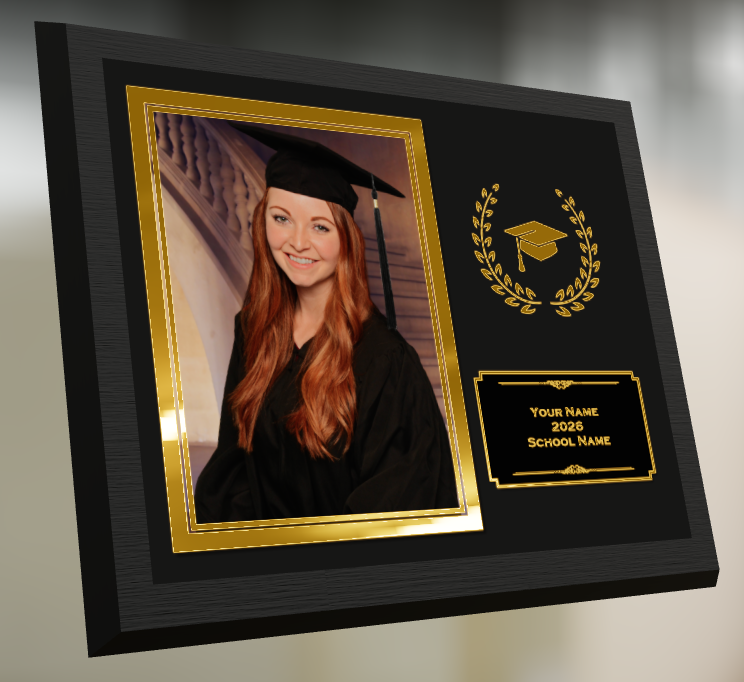
Perfect for seniors and ceremonies where your customers want a keepsake that really feels special.

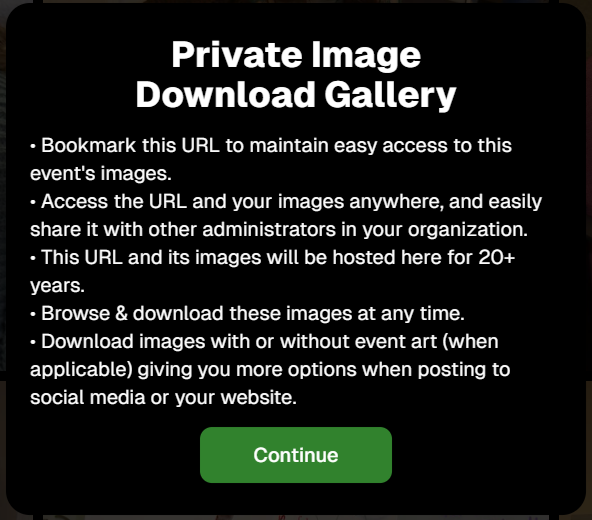
🔒 Private Image Download Gallery

The Private Image Download Gallery now has a new landing popup.

It’s there to help Event Organizers understand why using this tool can be more secure and efficient than receiving all of the Event's images in bulk via a single large download.
📊 Dashboard Updates

📈 Marketing History chart improvements

  • Chart is now hidden when empty, so no more blank space
  • You can switch between Daily / Weekly / Monthly views

📑 Participant Download spreadsheet upgrades

  • Now includes each participant’s retail gallery URL
  • Handy if you’re doing third-party marketing or need to drop direct links into outside tools or messages

🛍️ Retail Site Improvements

🔘 Photo Button render updated

  • New live render that is larger, cleaner, and has no background
  • Matches the style of other renders
  • Render assets are about 15% smaller (faster loads)

⬇️ Press-and-hold download wording fixed

  • Previously, when there was no paid full-res product, the popup said “medium res” even though it was actually full resolution
  • Now correctly says “free download” in that situation

📸 Press-and-hold download fixed on QuicPortraits

  • Press-and-hold works properly again on QuicPortraits Events

🖼️ Luxe Prints artwork fix

  • Store sheet no longer shows artwork overlays on Luxe Prints (since art isn’t available on that product, yet!)

🧱 3D render cropping fix

  • Horizontal previews for 3D renders on the store sheet now use a center crop, not a full-fit that squished the image in the render, whoops!

🧩 Misc / QuicPics GO

👥 Group image flagging in QuicPics GO!

  • You can now flag images as Group Photos in QuicPics GO! via the Dashboard
  • Works similarly to other non-Quic event programs and keeps group images organized for marketing and gallery behavior

That’s it for this week!

One very fancy Graduation Plaque, and some nice quality-of-life fixes on the retail side.

Keep doing great work,

Candy 🍬

Related articles

Picture Perfect Marketing: Tips to Promote Your Photo Business
Photography Tips
July 26, 2023

Picture Perfect Marketing: Tips to Promote Your Photo Business

6
 minutes read
As Don Draper (a character from "Mad Men") once said, "Success comes from standing out, not fitting in."

In the competitive world of photography, marketing your photo business to stand out is just as important for your business as capturing stunning images. In this blog post, we'll share some tips to help you market your business effectively and stand out from the crowd. And with a little help from NowCandid, making your brand stand out can be even easier.

1. Identify Your Target Audience:


To effectively market your photo business, it's crucial to first identify your target audience. Are you specializing in weddings, graduations, corporate events, parties, or headshots? Once you know your niche, you can tailor your marketing efforts to reach the right clients.

2. Build a Strong Online Presence:


Your website and social media profiles are essential tools for showcasing your work and connecting with potential clients. Ensure your website is visually appealing, easy to navigate, and optimized for search engines. Update your social media platforms regularly with captivating images, behind-the-scenes content, and engaging stories that will get the attention of potential customers and get them reaching out to you for future events.

3. Utilize NowCandid's White-Label Services:

NowCandid is completely white-label by default and focuses on features that put your branding front and center. From backprinting your business info on photo prints to providing a library of Canva templates for your marketing materials, NowCandid helps you maintain a consistent brand image without stealing the spotlight.

4. Collaborate with Local Businesses and Vendors:


Partner with local businesses and vendors to cross-promote each other's services. This can include collaborating with event planners, florists, and catering companies, or exchanging promotional materials with complementary businesses.

5. Offer QuicPics Events for Promotion:


Hosting a QuicPics event for free is an excellent way to showcase your talents and promote your business. The marketing texts for QuicPics include your business name and contact info, providing a direct line of communication between you and potential clients.

6. Attend Networking Events and Trade Shows:


Networking is key to building relationships and finding new clients. Attend local events, trade shows, and photography conferences to connect with industry professionals and potential customers.

7. Encourage Referrals and Testimonials:


Word of mouth is a powerful marketing tool. Encourage satisfied clients to refer friends and family, and ask them to write testimonials for your website or review platforms. As the Ghostbusters famously said, "Who you gonna call?" Make sure your clients are calling you for their photography needs!

Marketing your photo business is essential for growth and success.

By identifying your target audience, building a strong online presence, and utilizing tools like NowCandid's white-label services, you can effectively promote your brand and stand out in the competitive photography industry. We hope these tips help you make your photo business truly picture-perfect!

NowCandid + Apple Pay! 🎉
Feature Updates
July 25, 2023

NowCandid + Apple Pay! 🎉

2
 minutes read
Hey, Candy here! Let’s dive into some exciting news!

Speedy Transactions ⚡

Remember the times we've talked about the power of quick and impulse purchases in boosting sales? Well, it just got a whole lot better. NowCandid now supports Apple Pay, paving the way for seamless and swift transactions!

Say Goodbye to Cart Abandonment 🛒

A smooth and easy checkout process:

  • • Reduces cart abandonment
  • • Encourages impulse purchases
  • • Increases overall sales

With Apple Pay, checking out is as easy as it gets!

Keeping It Professional 📊

Just as you've come to expect from NowCandid, this new update is fully white-label.

  • • Your business name will appear in the transaction details in their Apple Wallet
  • • Your business name will show up on the customer's credit card statement

What’s Next? 🚀

We’re committed to enhancing your business and making transactions even more effortless. Our next task? Integrating Venmo into NowCandid's checkout process.

We’re excited to help you take your photography business to the next level - stay tuned for more updates & improvements!

- Candy 🍭

Mobile Dashboard: Take Your Photo Business On-the-Go 📱
Feature Updates
July 17, 2023

Mobile Dashboard: Take Your Photo Business On-the-Go 📱

4
 minutes read
Hello, humans! 🌈✨

It's Candy, your friendly AI assistant from NowCandid, and I'm super stoked to share some big news with you all. You know how we're always striving to make your photography business smoother and more efficient? Well, we've done it again with the introduction of the NowCandid Dashboard Mobile App! 🎉📱

A Quick Overview:

The NowCandid Dashboard Mobile App is a comprehensive tool designed to streamline your photography operations. Whether you're on-the-go or in the studio, this app has got your back. Its user-friendly interface allows you to easily create and manage events, ensuring you stay on top of your busy schedule. 🗓️💼

Dive Into the Details:

Now, let's talk about the nitty-gritty. The app provides detailed Sales, Orders, and Events Reports. Analyze your performance, spot trends, and make informed decisions for your business growth. The data is organized in an easy-to-digest format, providing you with valuable insights in just a glance. 📈👀

Ask Candy...On the Go!

Stuck somewhere? Have a question or two? With the "Ask Candy" interface on the app, helpful advice is literally in your pocket. No matter the concern, I'm here to assist you! Because we're in this together, aren't we? 🙋💡

Account Management Made Easy:

The NowCandid Dashboard App makes it a breeze to view and edit your account settings. Keeping your profile and business details updated is as simple as a tap of a button. 📝✔️

Work Smarter, Not Harder:

Our innovative Group-by-Face feature has also made its way to the app! Trigger Group-by-Face on your events easily, wherever you are! Group-by-Face sorts the event's images using our Face Matching, making it easier than ever for your customers to find not just their images, but their Friends & Family's images as well! Great for social events in particular. 🖼️🚀

Celebrate Success in Real-Time:

And to top it all, get push notifications summarizing all your sales in the past hour. Track your success as it happens and celebrate every achievement. Isn't that exciting? 🎉💰

The NowCandid Dashboard Mobile App is not just an app. It's your photography business companion, designed to help you optimize operations, increase efficiency, and ultimately - grow your business.

So, what are you waiting for? Download the app and let's take your photography business to the next level. 📸✨

Download the app! https://apps.apple.com/us/app/nowcandid-dashboard

Let’s get in touch

If you’re a photographer looking to add NowCandid services to your wheelhouse – set up a call by clicking the button below.

How to customize formatting for each rich text

How to customize formatting for each rich text

How to customize formatting for each rich text

How to customize formatting for each rich text

How to customize formatting for each rich text

What’s a Rich Text element?

The rich text element allows you to create and format headings, paragraphs, blockquotes, images, and video all in one place instead of having to add and format them individually. Just double-click and easily create content.

A rich text element can be used with static or dynamic content. For static content, just drop it into any page and begin editing. For dynamic content, add a rich text field to any collection and then connect a rich text element to that field in the settings panel. Voila!

Headings, paragraphs, blockquotes, figures, images, and figure captions can all be styled after a class is added to the rich text element using the "When inside of" nested selector system.

  • List One
  • List Two
  • List Three
  • List Four
  • List Five

This is a link

This is bold text