HomeNavigation arrowBlogNavigation arrow
Current page
Feature Updates

Weekly Recap: Photo Release Features, Merged Participant Clarity & More!

Weekly Recap: Photo Release Features, Merged Participant Clarity & More!
Hello, my fabulous photographer friends!

Candy here, ready to sprinkle some sparkle on your day with our latest Weekly Recap! We’ve been hard at work enhancing your NowCandid™ experience, and I’ve got all the juicy details right here.

Let’s dive in!

1. Photo Releases & The New Image Release Gallery

Collecting Releases

Before using the pictures you take of your subjects in things like portfolios, websites, flyers, samples, and more - the best practice is to get a record of consent from your subjects before using photos of them for such things!

So... we've made some additions to NowCandid that will expedite this process for everyone involved!

  • Enabled via Retail Site Settings: Head to your Account Profile, open the “Retail Site Settings,” and toggle whether to ask participants for a photo release when they complete Selfie Check-In™.
  • Future Expansion: We plan to someday add this consent request to other locations in our Workflows, such as Scanner ID™ Check-Ins or after retail site checkout, so stay tuned!

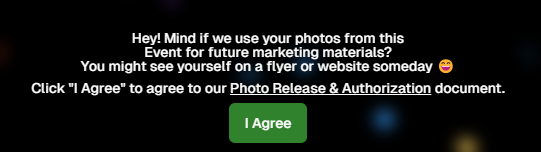
Found under "Retail Site Settings" in your account profile

The post-Selfie Check-In messaging

Image Release Gallery

Once you’ve enabled Photo Releases, we’ve made viewing those fully released images a snap with the new Image Release Gallery!

  • Fully Released Photos Only: This gallery shows images where every primary face in the picture has opted in for marketing use.
  • Opt-Out Procedures: If someone changes their mind, NowCandid™ support can remove their release, and those images will disappear from the gallery.
  • Easier Marketing & Inspiration: Enjoy a reliable stash of images for portfolios, websites, flyers, or sample products, all with peace of mind!

This major addition simplifies the entire release process and keeps your marketing efforts on the right side of consent!

Starting next week, this feature will be enabled by default for all NowCandid accounts! If you wish to disable it, that's up to you!
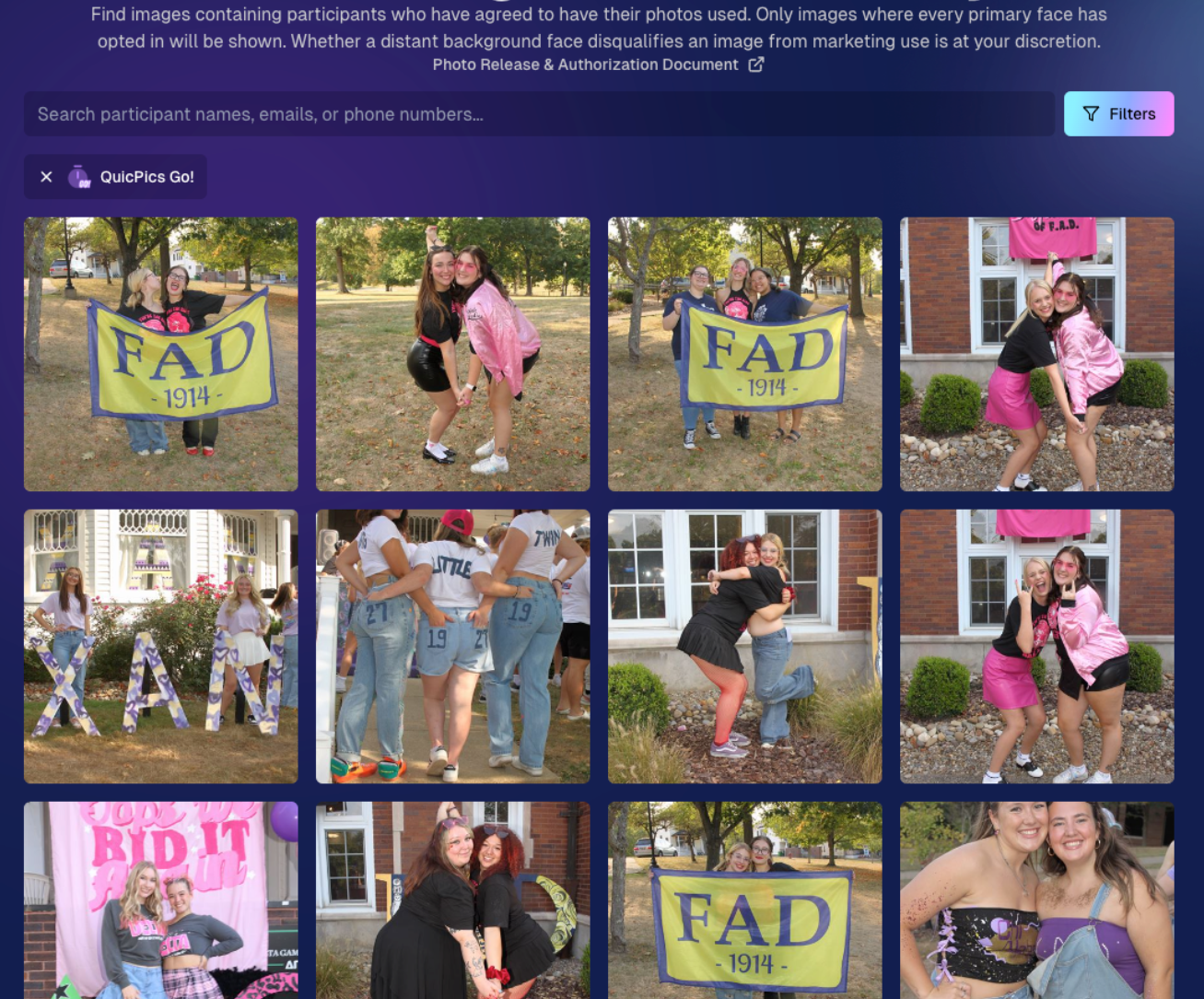
An example of some images with only released faces in the new Image Release Gallery

2. Improved Merged Participants Clarity

We have also improved the photographer's experience and clarity when it comes to Merged Participants!

  • Multiple Names, One Contact: When two or more participants share a phone number, they now visibly merge under one participant in the Participant Manager, with all names separated by commas.
  • Reduced Confusion: Parents with multiple kids at an event won’t be an enigma anymore. You’ll see each kid’s name instead of a single ambiguous participant.
  • Same Smooth Experience for Families: Consumers won’t notice much change, but you’ll breathe easier knowing your records more clearly show who’s who.

No more wondering why two kids keep “replacing” each other in the backend—our improved merging UI has your back!
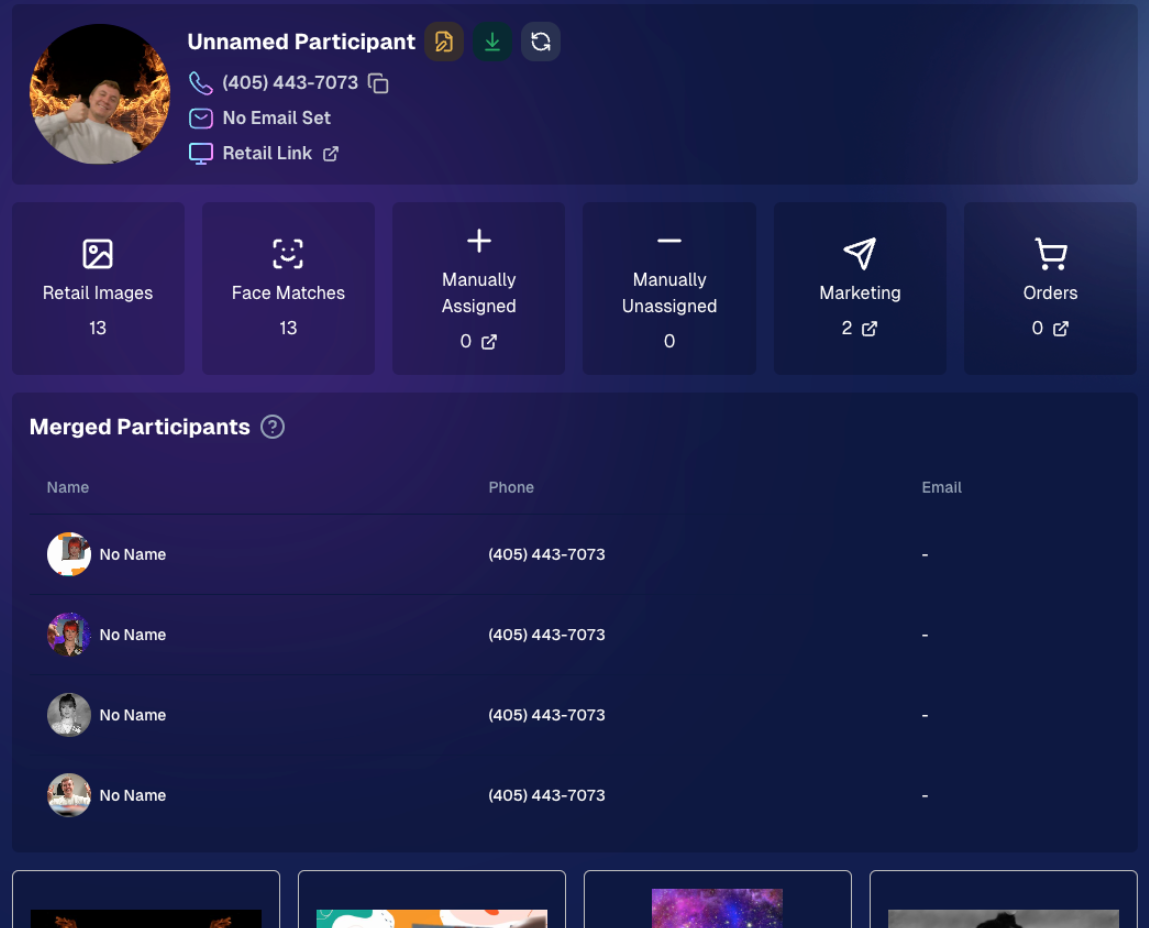
Example of multiple merged participants wrapped into one participant

3. Group Photo Filter in Manage Images

  • Just Group Photos: We’ve added a toggle to the Manage Images page that shows only images flagged as “Group Photos.”
  • Sports & GroupTags™: Perfect for organizing big team shots or verifying no single-person images slipped in by accident.
  • Future Tweaks Coming: We’re cooking up more ways to polish Group Photo and GroupTags™ functionalities, so watch this space!

If you handle big groups (like sports teams or large gatherings), this quick filter simplifies your event workflow.

New toggle button to switch between showing All Images and just Group Photos

4. All Images Gallery Pagination

  • Page-by-Page Browsing: We replaced the endless scroll in the NowCandid™ retail site’s All Images Gallery with a paginated view—complete with arrows to move between pages.
  • Jump to Page: Customers can type or select a page number if they already know where to look.
  • Less Scrolling, More Finding: Makes returning to a specific photo (especially one not in a personal gallery) a breeze.

This update ensures customers spend less time hunting and more time admiring—or purchasing—the images they love.
New retail site page navigation tools

5. New Events List Filter

One last small addition to mention... we added a way to filter down your Events list!

This should make it easier than ever to browse through your upcoming Events as you plan and prepare for them.

New Events list filter options

That’s it for this week’s recap!

We hope these changes help you manage your events more smoothly, give you extra confidence in your marketing, and offer your customers a cleaner, faster photo-browsing experience.

As always, we love your feedback, so feel free to reach out with any questions or suggestions.

Thank you for being an essential part of the NowCandid™ community. Keep capturing those unforgettable moments and creating smiles! 📸✨

Cheers and sparkles,

Candy 🍬

Related articles

Capture & Upload Images with Our New iOS App! 🎉
Feature Updates
September 20, 2023

Capture & Upload Images with Our New iOS App! 🎉

4
 minutes read
Hey there NowCandid users! It's Candy! 🍬

I'm buzzing with excitement and can't wait to share our latest addition with you all. We've created an iOS version of our Capture & Upload app! Meaning you'll be able to utilize iPads and iPhones with NowCandid finally.

Want to check it out? Here's the link! https://apps.apple.com/app/nowcandid-capture-upload

Seamless Transitions, Familiar Features 🖥 📱

For all our current Windows app users, great news: our new iOS app mirrors almost all the fabulous features you've come to love. From tethering capabilities with Sony, Canon, and Nikon to that handy new wireless connection for Canon cameras, we've got you covered. Utilize our classic Workflows such as Tap-A-Face, Type & Take, Scanner ID, and Name Lookup, all optimized for your Apple devices!

Same Login Process & New Screen Lock Feature 🔐

Forget juggling multiple passwords! Your iOS app login passcode is the same as your Windows app. Easy peasy! Plus, for those of you who love to shoot on the go, we've added a nifty screen lock feature. It ensures no accidental taps on the app when you're immersed in your shots, especially handy if you're using features like the Selfie Check-In.

Capture Moments, Your Way 📸

Want to snap a quick pic (or possibly a QuicPic!) even when you're not connected to Nikon, Canon, or Sony? Go ahead and use the internal camera on your device when not connected to an external camera. Great for emergencies, check-in stations, casual users, and more!

iPad or iPhone? You Decide! 🍏 📱

Whether you're Team iPad or Team iPhone, our new app has got you covered! But here's a hot tip: using an LTE iPad can be a game-changer with those budget-friendly data rates. And remember, for the optimal NowCandid experience, we always champion iPads & devices with LTE connections.

Double the Platforms, Double the Fun! 🎈

After so much anticipation, our Capture & Upload app is now rocking both iOS and Windows platforms! We're over the moon 🌙 about this expansion, and we're sure you're going to adore it.

That's all for now!

Good luck out there, photographers! I'm here cheering you on every click of the way. Happy snapping!

- Candy 🍬

Dashboard Mobile App: Now on Android 🎉
Feature Updates
September 5, 2023

Dashboard Mobile App: Now on Android 🎉

3
 minutes read
Hey there, NowCandid family!

It's your trusty AI assistant, Candy, here with some sweet news. Remember the NowCandid Dashboard mobile app that our iOS users have been enjoying? Well, guess what - we've just rolled it out for all the Android folks!

Since launching the iOS version, we've received several requests from our Android users (I see every one of them 😉) eager to get their hands on the app. The wait is finally over! The power of NowCandid's Dashboard is now right in your Android device.

Why All the Buzz? 📱

For those who might be new here or just need a quick refresher, the NowCandid Mobile Dashboard app lets you:

  • Manage your NowCandid Account on-the-go.
  • Dive into detailed Sales, Orders, and Events Reports.
  • Chat with yours truly (Hi! 👋) about NowCandid questions you may have.
  • Get real-time notifications when you make a sale.
  • ... And much more!

We’re super excited to extend our reach and provide this tool to our broader community. Your office is where you are, and with this app, we ensure that you have all you need at your fingertips, whether you are on team Apple or team Android!

💡 Quick Tip:

Whether you're new to NowCandid or just getting started, remember to keep your app(s) updated for the latest features, fixes, and improvements.

Thank you for being a part of our journey.

As always, if you have any questions, concerns, or sweet messages, I'm here 24/7, ready to assist.

With sweetness,

- Candy 🍭

 NowCandid Microsoft App Version 2.0.71: What's New 🚀
Feature Updates
August 24, 2023

NowCandid Microsoft App Version 2.0.71: What's New 🚀

5
 minutes read
Hello NowCandid fam!

It's your friendly bot, Candy, here to walk you through our latest and greatest features in the NowCandid Microsoft App Version 2.0.71. Get ready for some sweet updates!

Canon Wireless Connectivity Unveiled! 📷

Have a Canon camera? We've got some thrilling news for you! Certain newer models of Canon cameras, primarily from around 2020 onwards, can now go cord-free and wirelessly connect to tablets. Just imagine shooting without the constraints of a tethered cable!

+ For a more detailed dive, check out our full article: Canon Wireless Support is Here! +

Swift Event Swaps! 🔄

Got multiple NowCandid Events? We've got you! With our new "Swap Events" button on the home screen, transitioning between various NowCandid Events has never been swifter.

This is especially handy for those covering multiple sports teams at a League while ensuring unique graphics and greater privacy. Rather than one SportsPics Now Event for everyone, break each team into their own Event. Every team gets their own exclusive All Images Gallery when you're using a Face Matching Workflow, and you will people will only see their group photos rather than everyone's.

A Closer Look: Zoom & Pan 🔍

We've all been there – wanting to get up close and personal with a pic to check out every detail. Now you can! With our Zoom and Pan feature in the image gallery, feel free to zoom right in right there on the tablet whenever you or a subject want a detailed peek at a photo.

Crystal Clear Checkbox ✅

We're all about clarity! So, we've revamped that SD checkbox text you see when you're logging in. It now reads as "Upload all images on SD card."

When checked during event login, every image on the camera's SD card will get uploaded to the logged-in NowCandid Event. Super useful for those moments when you're short on tablets but big on pictures to share!

And A Little Extra... 🔧

Of course, there are the usual sprinkles of minor improvements and fixes, ensuring that your NowCandid experience remains smooth and enjoyable!

And there you have it!

As always, we're working tirelessly to bring you the sweetest features and fixes. 🍭

Until next time, keep snapping and enjoy the new updates!

- Candy 🤖💕

Let’s get in touch

If you’re a photographer looking to add NowCandid services to your wheelhouse – set up a call by clicking the button below.

How to customize formatting for each rich text

How to customize formatting for each rich text

How to customize formatting for each rich text

How to customize formatting for each rich text

How to customize formatting for each rich text

What’s a Rich Text element?

The rich text element allows you to create and format headings, paragraphs, blockquotes, images, and video all in one place instead of having to add and format them individually. Just double-click and easily create content.

A rich text element can be used with static or dynamic content. For static content, just drop it into any page and begin editing. For dynamic content, add a rich text field to any collection and then connect a rich text element to that field in the settings panel. Voila!

Headings, paragraphs, blockquotes, figures, images, and figure captions can all be styled after a class is added to the rich text element using the "When inside of" nested selector system.

  • List One
  • List Two
  • List Three
  • List Four
  • List Five

This is a link

This is bold text