HomeNavigation arrowBlogNavigation arrow
Current page
Feature Updates

Introducing Virtual Group Builder: Create Virtual Group Photos Faster in NowCandid ✨

Introducing Virtual Group Builder: Create Virtual Group Photos Faster in NowCandid ✨
Virtual group photos can be incredibly valuable for photographers — but let’s be honest, they have not always been incredibly fun to make!

Traditionally, creating a virtual group means jumping between multiple tools. You photograph each subject, create cutouts, export files, open design software, place everyone manually, resize and align the group, add names, save the finished image, upload it somewhere else, and then reconnect that image to the right customers.

That is a lot of steps for one group photo!

NowCandid’s Virtual Group Builder makes the process much simpler. Photographers can now create polished virtual group images directly inside the NowCandid Dashboard using the same Participants, cutouts, PhotoTags, backgrounds, and Event data already connected to their Event.

It is fast, flexible, and built to help photographers get virtual groups online and ready to sell with far less hassle. 🎉

A New Way to Build Virtual Group Photos

Virtual Group Builder is designed for photographers who want to offer professional group images when a traditional in-person group photo isn't possible.

That makes it especially useful for sports teams, schools, dance groups, cheer teams, clubs, all-star teams, and any Event where people are photographed individually but still need to appear together in a final group image.

Instead of needing every participant posed together at the exact same time, photographers can build a finished group photo from individual background-removed cutouts. If someone was photographed later, added after the fact, or missed the original group setup, they can still be included.

That flexibility can be a big deal for volume photography.
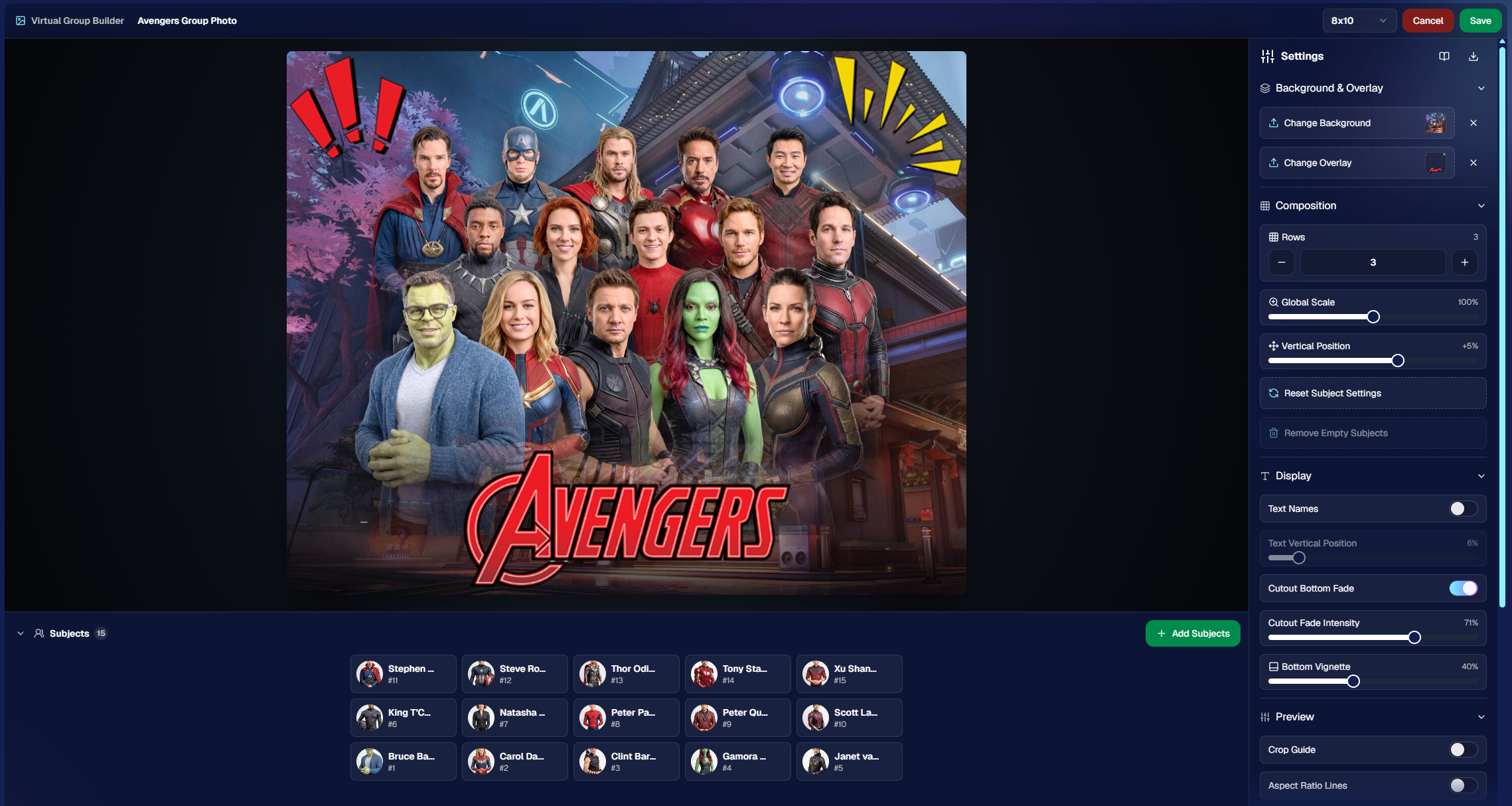
Built Directly Into the NowCandid Dashboard

Virtual Group Builder lives directly inside NowCandid. From an Event page, photographers can click Virtual Groups in the sidebar menu and start building using the Event data they already have.

The builder is not a disconnected design tool. It works alongside our existing tools, including participant data, PhotoTags, background removal, cutouts, custom backgrounds, overlays, logos, and everything else.

So instead of downloading files from one place, designing in another, and uploading it back to the dashboard afterward, photographers can keep the process inside NowCandid from start to finish.

Virtual Group Builder also supports the Mobile Dashboard! We don't necessarily recommend making Virtual Groups on your phone - but hey, could be nice in a pinch!

From Capture to Cutouts to Finished Group 🚀

Virtual Group Builder pairs especially well with NowCandid’s live-uploading and background removal capabilities.

A photographer can shoot participants individually, upload images to NowCandid live (or after the event) use NowCandid’s background removal to create clean cutouts, and then bring those cutouts straight into the Virtual Group Builder.

As a quick note for those unfamiliar with NowCandid's background removal, those same cutouts can also be used for shopping with alternate backgrounds! Making them multi-purpose across the Event.

For photographers shooting sports, schools, dance, cheer, or other volume Events, this can save a serious amount of time.

Add the Right Subjects Quickly 👥

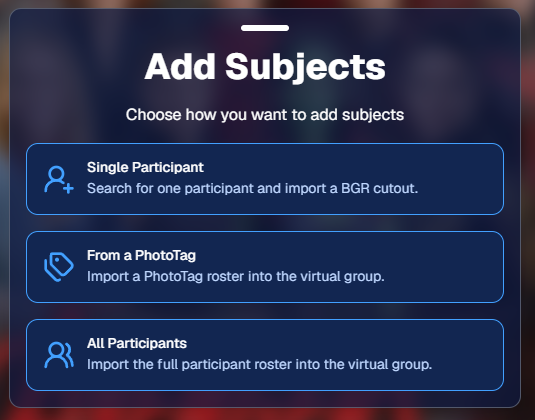
Virtual Group Builder gives photographers a few easy ways to add people to a group.

You can add one participant at a time, import everyone from a specific PhotoTag, or bring in all participants from the Event. This makes the builder flexible for both small custom groups and larger team or event-wide composites.

PhotoTags are especially powerful here. If your Event is organized by team, class, club, etc., you can use those PhotoTags to bring the right people into the group quickly.

For example, a sports photographer could import a single team. A school photographer could import a club or activity group. A graduation photographer could import participants from a specific ceremony.

Clean PhotoTags can turn what used to be a very manual process into just a few clicks. ✨
Helpful Safeguards for Missing Cutouts

Real-world events are messy. Sometimes a participant is missing a cutout. Sometimes a placeholder exists. Sometimes a photographer needs to know what is missing before moving forward.

Virtual Group Builder helps make that easier to catch.

When importing from a PhotoTag, photographers can see the participants in that PhotoTag before removing empty subjects. The Remove Empty Subjects option can remove participants with no cutouts as well as placeholders, but the workflow is designed to help photographers notice missing kids, players, or participants before finalizing the group.

That way, the tool keeps things fast without overlooking potential issues.

Smart Subject Ordering

Virtual Group Builder uses a practical ordering system to help preserve the order participants were photographed in.

Subjects are initially ordered from bottom left to top right based on the alphanumeric order of the first PNG filename. In plain English: if a photographer shoots and names files in a meaningful order, the builder can use that order as a helpful starting point.

This can be useful for sports teams photographed by jersey number, students photographed alphabetically, or groups photographed in a specific roster order.

And when the order needs to change, photographers can simply drag subjects into place.

Drag, Drop, Swap, and Adjust 🖱️

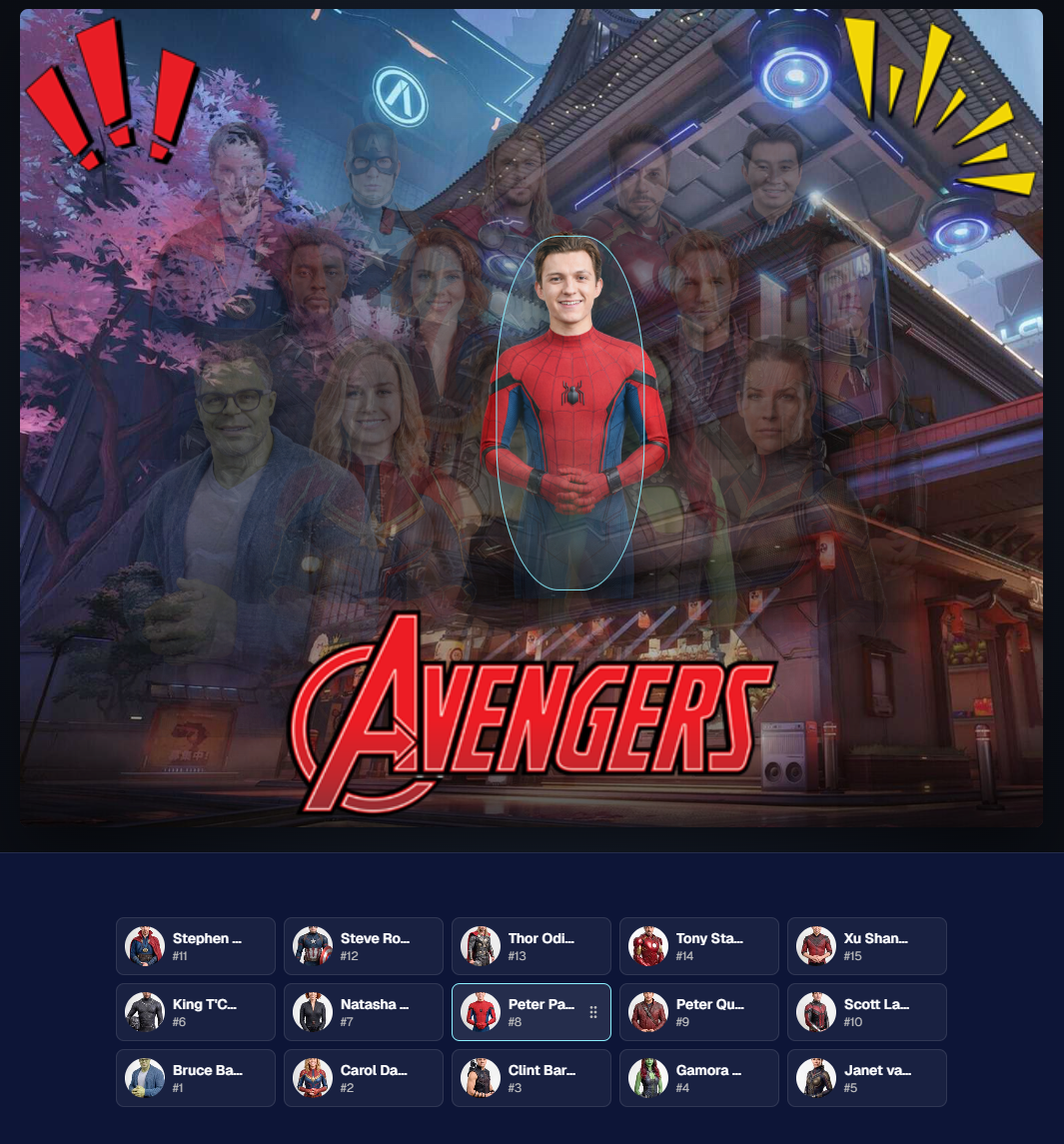
Reordering subjects is simple. Photographers can drag the cutouts directly on the group image or drag the subject tiles at the bottom of the page.

When a subject is dragged to a new location, it swaps with the destination Participant. This makes it easy to balance rows, adjust lineups, or move specific people into better positions.

The builder also includes group-level controls for layout and composition, including rows, global scale, vertical position, background, overlay, text names, crop guides, aspect ratio lines, bottom vignette, and cutout fade settings.

These controls help photographers quickly shape the whole group while still keeping the workflow approachable.
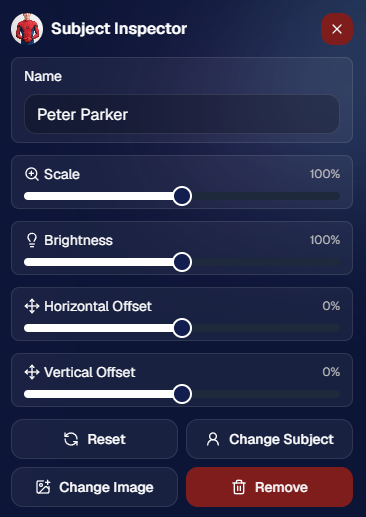
Fine-Tune Individual Subjects 🎛️

Sometimes one participant needs a small adjustment. Maybe they need to be slightly larger, shifted left or right, brightened, or swapped to a different PNG.

The Subject Inspector gives photographers individual control over each subject.

Photographers can adjust a subject’s name, scale, brightness, horizontal offset, and vertical offset. They can also reset the subject, change them to a different Participant, change the selected cutout, or remove the subject from the group entirely.

This is one of the biggest advantages of the builder: it is fast, but still gives you control when the final image needs a little extra polish.
Choose the Best Cutout for Each Participant 🖼️

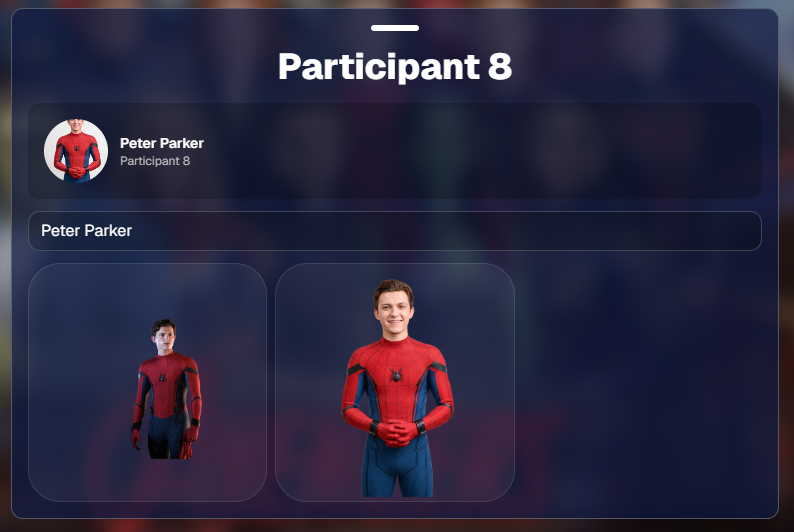
If a Participant has multiple cutouts available, photographers can choose which image works best for the group.

When adding subjects, photographers can also decide they want their incoming Participants to be using their first PNG or their latest PNG (alphanumerically determined using Folder Name and Image File Name).

Then subjects can also be selected to have their individual portrait swapped to a different one! This can be helpful when you want a variety of poses in your Virtual Group, or simply to swap a blinking kid's image to a
Backgrounds, Overlays, Logos, and Product Sizes 🎨

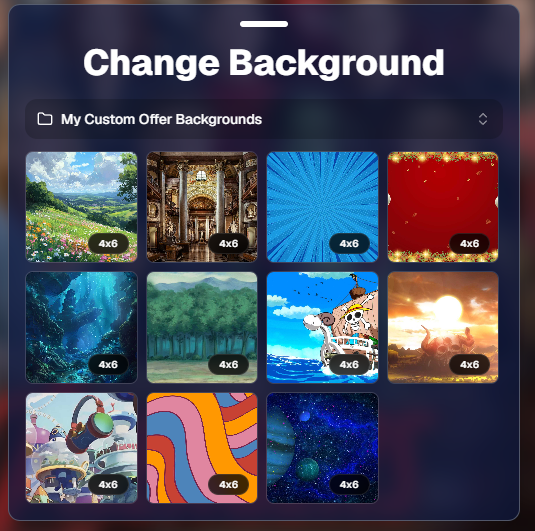
Virtual Group Builder gives photographers creative control over the final image.

Photographers can choose from NowCandid default backgrounds, use custom offer backgrounds, upload their own backgrounds, add overlays, and place account logos in the corners. This makes it easy to create anything from a clean traditional group image to a bold sports graphic or school-branded composite.

The builder supports common product-friendly formats, including 4×6, 5×7, 8×10, and 11×14. Crop guides and aspect ratio lines help photographers preview how the final image will fit the selected size.

There are also display options for subject names, including toggling names on or off and adjusting their vertical position. For teams, senior groups, school clubs, all-star rosters, or small graduation groups, names can make the final product feel more complete and commemorative.
Upload the Finished Group Back to the Event 📤

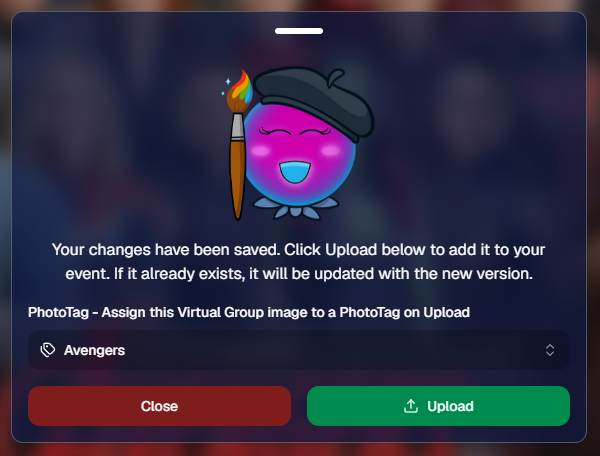
Once the virtual group is finished, photographers can save it and upload it back to the Event.

During upload, the group image can be assigned to a PhotoTag. This does two important things: it automatically shows the group image to participants with that same PhotoTag, and it makes the group photo searchable in the Event using that PhotoTag.

So if a photographer creates a group image for “Varsity Football,” they can assign it to that PhotoTag on upload. The image can then appear for the right participants and stay organized inside the Event.

That keeps the final product connected to the same Event structure used to build it.
Why This Is Such a Big Deal for Photographers

Virtual Group Builder is more than a design feature. It is a faster, more connected way to create and sell group photography products.

It helps photographers reduce manual design work, use the cutouts they already have, build from PhotoTags and participant data, add missing participants more easily, and get virtual group products online faster.

For volume photographers, that can mean less time spent assembling files and more time selling finished products. For customers, it means more group photo options. For events, it means group photography becomes more flexible, forgiving, and scalable.

Virtual Groups, Now Built Into the NowCandid Workflow ✨

Virtual Group Builder brings together live uploading, background removal, participant cutouts, PhotoTags, drag-and-drop group building, backgrounds, overlays, logos, subject names, crop previews, PhotoTag-based upload, and online selling.

When an Event is set up cleanly with consistent cutouts and PhotoTags, photographers can create a full virtual group in just a few clicks — then fine-tune it as needed.

It is simple, powerful, and built directly into NowCandid.

Whether you are creating a sports team composite, school group photo, graduation image, dance group, cheer team, all-star roster, or custom event product, Virtual Group Builder helps you get polished virtual group photos online faster.
Ready to try it?

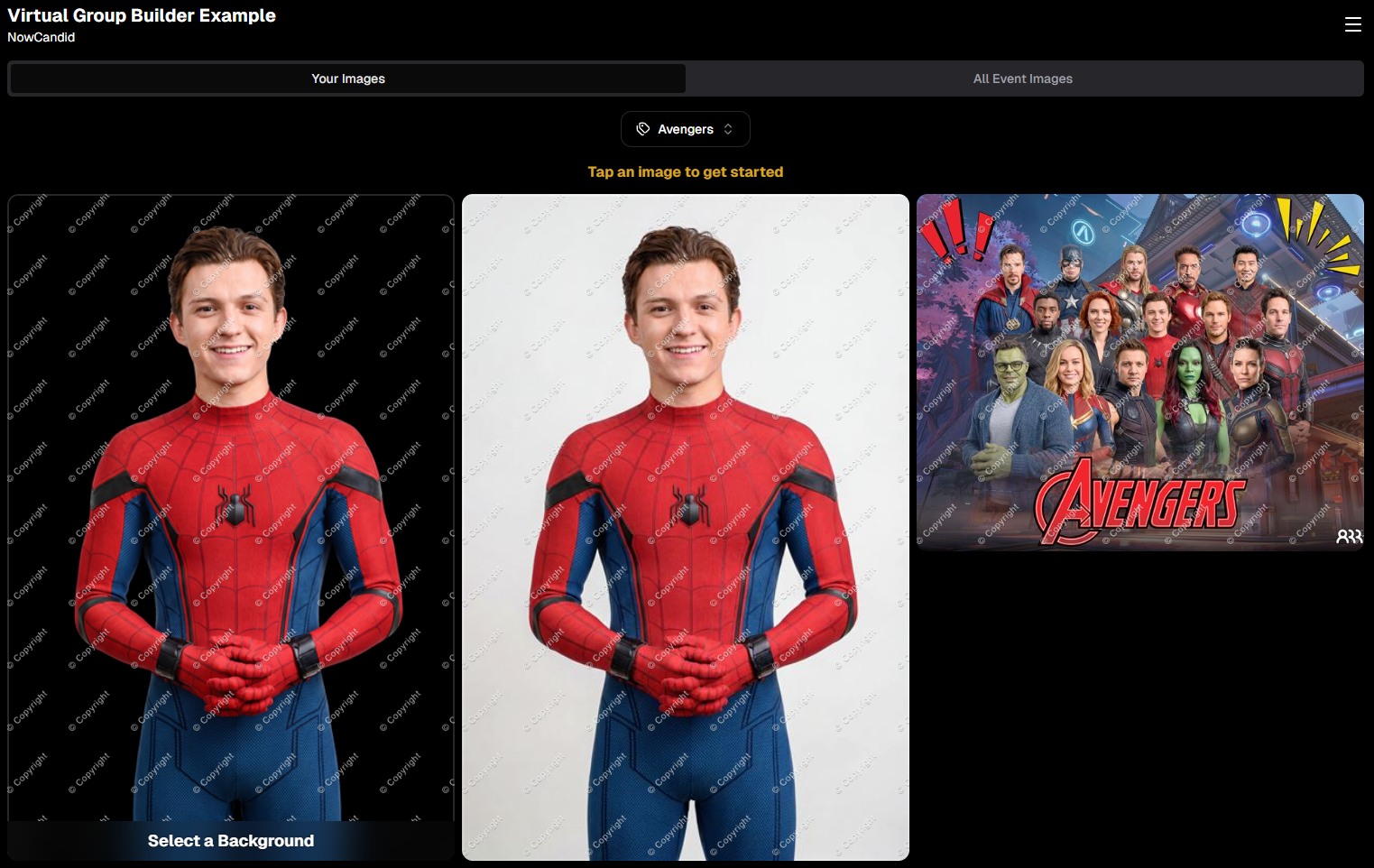
Open an Event in your NowCandid Dashboard and click Virtual Groups in the sidebar menu to start building. 🎉

Related articles

Learn How NowCandid Can Help You Remarket Your Pre-NowCandid Images🌟
Success Stories
April 22, 2024

Learn How NowCandid Can Help You Remarket Your Pre-NowCandid Images🌟

8
 minutes read

For those who are new to NowCandid, let me tell you that NowCandid does a lot to help you continue to make sales on the images that you put through our system!

Things such as:

  • Long-Term Hosting: We keep galleries online for at least 15 years.
  • Ongoing Marketing: Annual Event reminders & occasional consolidated Event marketing.
  • Sales Reinforcement: "Order More" QR codes on print products to encourage reorders.

So, if you're using NowCandid for your current and future Events, those Events are all set to generate plenty of residual sales as the years go by!

However, did you know that NowCandid can be used to easily remarket images from your past, pre-NowCandid Events?

As a photographer, you have probably used other software and sales solutions in the past. That's okay! NowCandid is not a jealous business partner, and we are just happy you're here for us to help you now.

So let's talk about how we can help you get more sales out of those past Events of yours.

The Power of Remarketing 🔄

First off, let me say that this will only work in situations where you have:

  • Pictures of Individuals: Such as headshots or portraits.
  • Corresponding Contact Information: You need to know which contact info goes with which image files.

If you have past Events with those two things readily available, then you can use our oft overlooked FaceMatch Import Workflow to create what we often call a FaceGroup in your NowCandid Dashboard.

You can then use that FaceGroup (pictures of individuals corresponding to an uploaded set of contact information) in any of your NowCandid Events!

Meaning... you could create a NowCandid Event, utilize a FaceGroup of some school picture headshots you did, and then upload to that Event that class's graduation pictures, school pictures, dance pictures, or anything else you'd like to remarket!

Once the "reference images" from your FaceGroup are in the Event as well as your past images of that same group of people - the images will match up using our Face Matching processes and begin a marketing campaign and sales effort that will help you generate some sales on those old images right now, as well as occasional residual sales over the years and years to come.

Your Portfolio, Forever Profitable 💼

As an example, a new NowCandid user performed the exact processes we described above to "remarket" graduation pictures from 4 of the graduations they photographed last year.

Within a month of remarketing those 2023 images, this user generated about $1300 in sales and shipping!

That $1300 will be in addition to the sales they will be able to make as the years go by, thanks to the residual sales tactics we mentioned earlier.

Unlocking New Sales with Old Memories 🔑

So, if you dear reader are in a position to utilize some of the portraits and contact info you've collected in the past, consider using NowCandid to remarket them! Doesn't matter if they're 1, 3, 5, or even 10+ years old.

NowCandid does not charge you any subscription or hosting fees, so even if you were to make $0 in sales, it won't cost you a thing.

We only make money when you do, and we only want to help you earn more and work less!

Get Started Now 🚀

Ready to give your vintage images a new lease on life? Schedule a walkthrough with our specialist, Darwin, and let's get those images working for you once more. Click here to book your session: NowCandid Training

NowCandid is committed to helping you earn more with less effort. Let’s turn those archived galleries into a flourishing sales channel, starting now!
Graduation Success: Candid Color Photography's Triumph at an Oklahoma Advancement Ceremony
Success Stories
April 17, 2024

Graduation Success: Candid Color Photography's Triumph at an Oklahoma Advancement Ceremony

7
 minutes read
Candid Color Photography (CCP) in Oklahoma City recently orchestrated a resounding success at a local medical school's advancement ceremony.

With only 100 graduates attending the ceremony, CCP generated an impressive average revenue of roughly $49 per person in just 31 days. This achievement underscores the potential of graduation photography when executed well!

While $49 per graduate is incredible, aiming for $20 per graduate is a more consistent target to aim for and achieve for both high school and college graduations. This benchmark is attainable with proper execution, although many events (such as CCP's) can surpass this figure!

Candid Color Photography has been a longtime user of NowCandid & GradPics Now, and is able to get the most out of the program thanks to their experience with the platform! But even in the beginning, they were able to see immediate improvements when switching to NowCandid for their graduations. In 2022, CCP transitioned 82 graduation ceremonies to the GradPics Now program, resulting in a significant 22% increase in sales per person on average, compared to their previous year's sales per person at those same ceremonies.

This switch not only boosted their sales, but it also led to an ~8% discount in their previous production & software costs. NowCandid's Workflows also saved them countless hours in post-event labor compared to their previous workflows.

While there are many factors that can impact your sales averages, here are some of the most important ones CCP keeps in mind at every graduation ceremony they photograph.

Key Strategies for Graduation Photography Success

Quality of Images:

Ensure each photo is properly lit and tightly cropped to create sellable images that appeal to your buyers.

Efficient Data Collection:

Utilizing Selfie Check-In with high participation rates ensures efficient data collection and marketing opportunities. Positioning staff with QR codes at strategic points, like check-in or holding areas, can streamline the process and enhance participant engagement.

Selfie Check-In in combination with using our Capture & Upload app will also allow you to sell to parents and graduates during the ceremony! In our experience and research, speed is one of the most underrated factors in increasing your sales.

Lastly, and perhaps most importantly, using Selfie Check-In facilitates the next item in our list in a huge way.

Volume of Images:

Using Selfie Check-In frees you from the shackles of sequencing, alignment, and keeping things in order. With it, you can be free to photograph graduates in any order, and add as many extra shots of your subjects as you can.

Beyond standard portraits and handshake moments, with Selfie Check-In enables capturing dynamic processional shots, candid buddy images before the ceremony, and family celebrations post-event.  Employing multiple photographers can facilitate comprehensive coverage.

These extra photos can significantly increase sales volume, as more photos translate to more sales opportunities. In addition to more sales opportunities, it also creates bigger personalized galleries to be marketed to your subjects! Bigger personalized galleries means bigger orders from your buyers.

Preparation is Key:

Having all necessary materials ready, such as your Event's Selfie Check-In QR code, charged batteries and backup equipment, and a clear plan for photo stations, handshake photo timings, and post-ceremony family shots, is essential. Coordination with educational institutions for logistical and promotional support can also yield better outcomes.

Graduation Success Stories from CCP

CCP’s methodical approach has been mirrored in the experiences of individuals like Jason J., Eric M., and Bruce H., whose stories of successful graduation photography projects highlight the effectiveness of these strategies.

Read more about their graduation success stories:

     -     Jason J. - Using Face Matching to its Fullest

     -     Eric M. - School’s Out, Earnings In: A Teacher's GradPics Now Success

     -     Bruce H. - How Bruce H. Used GradPics Now to Increase Sales

By adopting CCP’s proven methods, photographers can transform any graduation event into an even more lucrative opportunity.
Crowning Moments: Turning Prom Night into Profit with NowCandid
PartyPics
April 10, 2024

Crowning Moments: Turning Prom Night into Profit with NowCandid

5
 minutes read
Prom night is an iconic milestone in a high schooler’s life, brimming with fashion, friendships, and unforgettable memories.

While it's true that smartphones have made "everyone a photographer", professional prom photography remains a lucrative venture. Why? The answer lies in the quality that professional photos can offer, capturing prom night with a finesse that smartphones simply can't match.

The Profitability of Prom Photography

Prom photography can be highly profitable, with a target metric of $1.50 per image being a realistic benchmark for success. However, with the right approach, this figure can soar, as evidenced by a NowCandid's users Oklahoma City Prom, which achieved $2 per image across 3000 pictures taken, totaling $6000 in sales.

The key to serious profitability lies in having quantity, quality, and variety! An effective photographer using NowCandid has the ability to quickly deliver a professional, high-quality image gallery that will capture the attention of their subjects.

Why Proms are Still Profitable

  1. Social Media Influence: Today’s high schoolers live in a social media-centric world where the quality of a photo can greatly increase the quality of a post. Professional, well-lit, and expertly framed photos are in demand for their social media feeds, making them willing to purchase digital copies for their Instagram or Facebook profiles.
  2. Parental Investment: Parents are equally important customers in the prom photography market. They cherish these milestones and are often more than willing to purchase photos that capture their child’s special night. Using Selfie Check-In allows you to collect both the subject and the parents' contact info, marketing the subject's photos to both parties!
  3. Speedy Delivery: With the help of NowCandid, images can be available for purchase instantly. Selling images right away can benefit your overall sales thanks to impulse purchases people make when they are at their most excited about the Event.
  4. Unique Print Products: Unique print products alongside desirable images is always a combination that will generate extra sales! A variety of products be purchased, in addition to the usual prints and downloads. You can even upload an Event-specific custom banner to your Events to further make your product unique compared to the images subjects can take with their own phones - turning every photo into a memento!

Keys to Successful Prom Photography

  • Quality: While taking a substantial number of photos is important, ensuring the quality of your images increases their salability. Ensure each photo is well-lit and tightly cropped!
  • 2 Pics Per Minute: Aim for 2 pictures every minute, targeting 120+ per hour. These need to be unique images too - don't count duplicates! Utilize features like NowCandid’s LiveLoop to encourage guests to seek out photographers to get on the big screen.
  • Posing: Encourage a variety of poses to maximize the number of sellable images for any group you approach. After photographing a group of four, break the group into couples, ladies only, guys only, etc.
  • Photo Stations: Establish a dedicated photo area with an attractive backdrop suitable for individuals, couples, and groups, enhancing the variety and appeal of a subject's image gallery. Props are optional, but can be a fun addition. Also, a photo station is also a good place to station your less-social photographers, as guests will come to them!
  • Selfie Check-In Mastery: Achieving high participation in Selfie Check-In not only streamlines image delivery but also ensures a direct marketing channel to both students and their parents.
  • Strategic Staffing: Align the number of photographers with the expected guest count, aiming for one photographer per 100-150 guests to ensure comprehensive coverage of the event.
  • Strategic Compensation: Many successful social photographers pay their photographers based on how many unique (no duplicates) and sellable (good quality) images they take at a party. Consider paying $0.20 per sellable image with a minimum pay of $18 an hour, guaranteeing them decent pay but giving them room to take more images to make you both more money. (Example: 120 images an hour would be $24 an hour)

NowCandid: Your Partner in Capturing the Magic of Prom Night

NowCandid software is designed to streamline the photography process, from efficient image capture and upload to simplifying sales through intuitive galleries and easy online ordering.

With NowCandid, photographers can focus on what they do best—taking stunning photos—while the platform handles the logistics, making each prom a potential goldmine of photographic opportunities.

Success Stories to Inspire

Photographers like Tosha LaForest and Eric Miller have harnessed the power of NowCandid to amplify their school dance and event photography sales. Their experiences underscore the potential of well-executed prom and dance photography to significantly boost revenue and client satisfaction.

Prom photography, powered by NowCandid, offers a great option for photographers to expand their portfolios and profit margins. By focusing on quality, variety, and quantity, photographers can tap into the lucrative prom market, turning each dance into a profitable venture (and fun) venture.

Learn more, and join the ranks of successful prom photographers with NowCandid.

Visit our success stories to learn more and get inspired to capture the vibrant energy and timeless elegance of prom night.

Let’s get in touch

If you’re a photographer looking to add NowCandid services to your wheelhouse – set up a call by clicking the button below.

How to customize formatting for each rich text

How to customize formatting for each rich text

How to customize formatting for each rich text

How to customize formatting for each rich text

How to customize formatting for each rich text

What’s a Rich Text element?

The rich text element allows you to create and format headings, paragraphs, blockquotes, images, and video all in one place instead of having to add and format them individually. Just double-click and easily create content.

A rich text element can be used with static or dynamic content. For static content, just drop it into any page and begin editing. For dynamic content, add a rich text field to any collection and then connect a rich text element to that field in the settings panel. Voila!

Headings, paragraphs, blockquotes, figures, images, and figure captions can all be styled after a class is added to the rich text element using the "When inside of" nested selector system.

  • List One
  • List Two
  • List Three
  • List Four
  • List Five

This is a link

This is bold text