HomeNavigation arrowBlogNavigation arrow
Current page
Feature Updates

Weekly Recap: Client Outreach, Better Renders & Faster Tools 🍬📣

Weekly Recap: Client Outreach, Better Renders & Faster Tools 🍬📣
Hey photo friends! 👋

This week’s headline is a big one: Client Outreach is here. It’s a powerful new way to connect with your customers outside of event-based marketing—and it opens up a ton of new possibilities for growing your business.

We’ll keep this recap focused on what it does at a high level, and we’ll link out to a full deep-dive guide so you can see exactly how to use it.

📣 NEW: Client Outreach (SMS + Email)

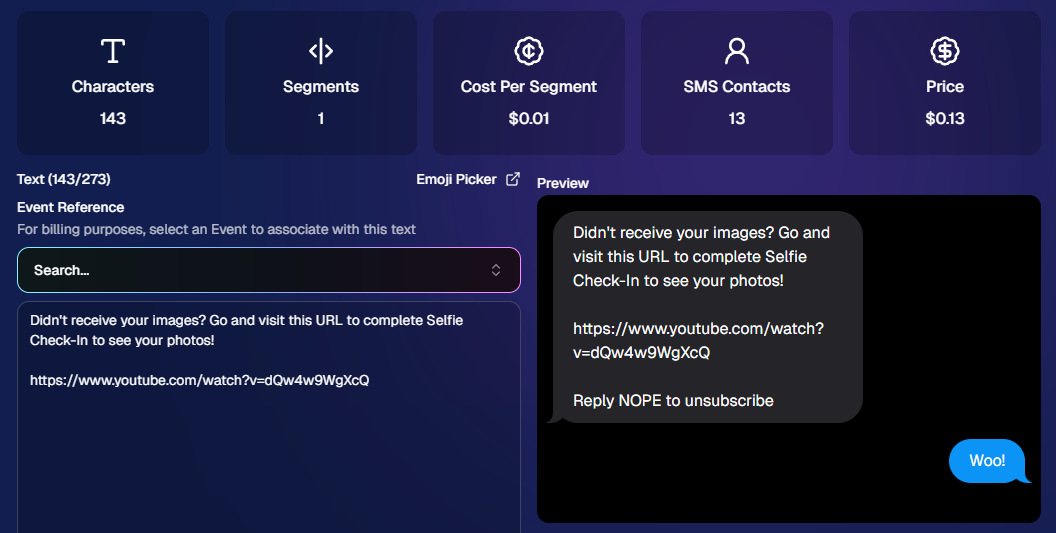
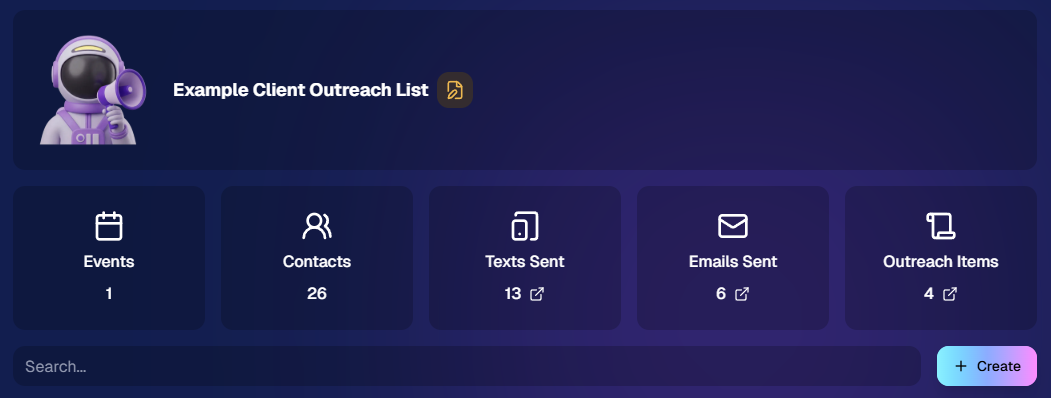
Client Outreach is a brand-new messaging system that lets you send texts and emails outside of your event campaigns.

👉 Learn more here: www.nowcandid.com/blogs/big-news-introducing-client-outreach-sms-email

What it can do:

📩 Send one-off emails and texts to past customers

📊 Track engagement (opens, clicks, bounces, etc.)

📂 Build contact lists from:

  • Events (with or without matched images)
  • Uploaded spreadsheets
  • Or both combined

🤖 Candy-powered email creation

  • Candy can write and design your outreach emails for you—including subject lines—so you don’t have to mess with formatting or HTML.

Why it matters:

This unlocks a ton of real-world use cases, like:

  • Sending Selfie Check-In links after an event
  • Promoting future bookings to past customers
  • Sharing All Images Galleries for action/sports events
  • Notifying customers about new uploads (like group photos)
  • Sending surveys or follow-ups

💸 Pricing is simple:

  • $0.01 per 10 emails
  • $0.01 per SMS (per segment, and longer texts may be 2–4 segments)

This is one of the most powerful tools we’ve added in a while!
🛍️ Retail: Better Products & Previews

✨ The following products will now always have the SoftTouch finish

  • Premium Prints
  • Premium Plaques
  • Luxe Prints
  • Titled Luxe Prints (coming soon)

🖼️ Improved 2D & 3D renders (especially Luxe)

  • More accurate lighting and better overall presentation.

🎯 3D renders prioritized in store sheet

  • The first three supported products now show as 3D when available.
  • Premium products take priority, but Luxe can now appear too depending on your offer.

Faster, higher-quality background generation

  • Better results, quicker turnaround.

📝 Caption fields no longer require every line

  • Customers can fill what you want, skip what they don’t.

🖥️ Dashboard Improvements

🔎 Smarter search across events & reports

  • Partial matches now work helping you search your events when you can't remember their exact names.
  • E.g. “mustang prom” will let you find “Mustang High School Prom 2025”.

Faster reports & charts

  • Reports pages and dashboard landing load quicker and use fewer resources.

🎨 New “Green Screen” node in Candy Image Studio

  • Instantly convert backgrounds into a green screen for use with your other editing workflows.

🧾 More flexible Offer creation

  • You can now duplicate any existing Price Level when creating an Offer, not just your own or prebuilt ones.

💳 Accounts must now have ACH set up before creating events

  • This has been a point of confusion for some users for some time.
  • By simply requiring ACH info, we can avoid a lot of accounting confusion for photographers down the line!

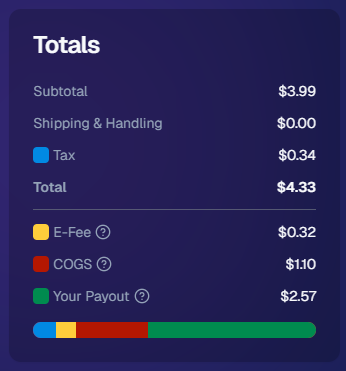
💰 New “Payout Breakdown” on Order Details

  • Visual, color-coded breakdown of order totals for better clarity.
📱 Capture App 5.4.2 (iOS & Android)

🛠️ Fixed an issue where the background removal popup would reappear after confirming and exiting shooting mode.

That’s the week!

Client Outreach is the star of the show here—it gives you a whole new way to stay connected with your customers beyond the event itself.

Pair that with better product presentation and faster tools, and you’ve got a strong upgrade across the board.

More coming soon! 👀

Candy 🍬

Related articles

Weekly Recap: Retail Refinements, Product Pricing, and BGR Upgrades
Feature Updates
June 27, 2025

Weekly Recap: Retail Refinements, Product Pricing, and BGR Upgrades

6
 minutes read
Hey there, it’s Candy!

This week’s update brings smoother retail experiences, friendlier pricing on customer favorites like statuettes, and a full refresh of how background-removed images (BGR) work across the site.

Let’s dive into what’s new!

🖼️ BGR x Retail: A More Intuitive, Sellable Experience

Big changes have landed to make Background Removed (BGR) images shine where it matters... in your customers’ galleries and carts.

Here’s what changed:

  • BGR Renders in Personal Gallery Downloads: Pre-rendered BGR images are now included in the downloadable gallery, making products more attractive and support calls less frequent.
  • 🔄 Smarter Image Order in Retail Gallery:
    1. Background 1 pre-renders
    2. Cutouts with "Select a Background" labels
    3. Original Images
    4. Backgrounds 2–4 Pre-Rendered
    5. Group Photos / PhotoTagged images
  • 🛍️ Smarter Package Image Selection:
    • Pre-rendered BGR images now appear during image selection for packages.
    • Ordering of images follows the same flow as above, bringing consistency across the experience.
  • 📱 Mobile Background Step Skipped:
    • Pre-renders act more like real images now, with background selection skipped on Mobile devices to reduce confusion.
    • Background selection still available on Desktop
  • 💡 Visual Cue for BGRs:
    • BGR images now feature a subtle “Select a Background” overlay to help guide customer expectations and improve product engagement.

Theme: Liquorice

🏷️ Product Pricing Updates (Including Lower Statuette Costs!)

We've made changes to product pricing and shipping rates, with statuettes dropping over 40% in product cost!

Some costs have gone up slightly, but others went down—here’s a rundown of the biggest changes:

🧾 Highlights:

  • 📉 5×7 Statuette: $12.24 → $6.97 (↓ 43.06%)
  • 📉 8×10 Statuette: $17.21 → $9.97 (↓ 42.05%)
  • 📈 Travel Mug: $11.09 → $12.19 (↑ 9.92%)
  • 📈 16×20 Hanging Metal Print: $66.42 → $71.83 (↑ 8.15%)
  • 📉 11×14 Group Print (Shipping): $7.25 → $7.00 (↓ 3.45%)

More detailed breakdown at the end of the post!

🧍‍♂️ Live Statuette Previews with Cutout Images

When a customer selects a BGR image, statuettes & acrylic cutout magnets will now render in real time using their PNG cutout—just like our other dynamically-rendering products!

No more generic preview. What they see is what they’ll get. 👌

Theme: Liquorice

🎆 New Retail Theme: Pop Rocks (Just in Time for the 4th of July!)

Get ready to light up your storefront! Our brand-new Pop Rocks retail theme has officially launched—a bold, dark mode layout featuring an eye-catching fireworks background.

It’s the perfect festive look for Independence Day events, summer festivals, or any celebration that deserves some extra sparkle.

This theme brings:

  • 🌌 A sleek dark interface that makes photos pop
  • 🎇 A dynamic fireworks background for an instant party vibe
  • 🛍️ The same easy shopping experience with a more celebratory feel

Photographers can enable Pop Rocks from the Custom Offer Creator under Theme Settings—just in time to make your July events feel a little more explosive. 💥

Found via a Custom Offer's Editor

📚 Resources Page Reimagined

The Resources section has been split into five focused pages to remove clutter and confusion:

  • Every button is now better labeled with detailed descriptions so you know exactly what it does and why it matters.

Better clarity = better confidence!

🖼️ New Product Render Creator Tool

Found under Marketing Materials (in the new Resources section), this lets you:

  • Upload a sample image
  • Generate live product previews
  • Download and use those previews for your own promotional content

Perfect for flyers, social posts, or emails. 📣

Upload your own pics, and click the products to download them!

👥 Contact Stats Now More Accurate

Going forward, the system now tracks Participants vs Additional Contacts more accurately in new events. While this doesn’t retroactively change old events, future reports will give you a clearer picture of who engaged with your Event and how.

📝 Full List of Pricing Changes

Here’s the full breakdown of this week’s product/shipping adjustments:

That’s everything for this week!

The BGR improvements and new marketing tools are sure to make your Events feel sharper, simpler, and more sellable than ever.

Until next time,

📣 Candy

Big News: JerseyJotter™, Your New MVP for Sports Galleries
SportPics
June 24, 2025

Big News: JerseyJotter™, Your New MVP for Sports Galleries

5
 minutes read
Let’s be real—sports events can be chaotic.

You’re out there capturing incredible moments: diving saves, finish line sprints, sideline smiles… and by the time you upload your gallery, it’s packed to the brim with action shots.

But then comes the big question: How will parents, athletes, and coaches find their photos quickly and easily?

That’s where JerseyJotter™ comes in to save the day—and your gallery.

💡 What Is JerseyJotter™?

JerseyJotter™ is NowCandid’s brand-new feature that automatically adds searchable filters to the All Images Gallery of SportsPics Events.

It does two things:

🎽 Color Recognition

Detects the primary shirt or jersey color worn in each image.

🔢 Number Recognition

Pulls jersey numbers or racing bibs straight from the photo.

🛠️ Total Control at Your Fingertips

You choose how JerseyJotter™ works for each event:

✅ Turn on Color only
✅ Turn on Number only
✅ Or use both for the dream team combo
✅ And yes—you can toggle them off if needed

It works with both Positive ID and Face Matching Events... just make sure your All Images Gallery is turned on!

🔍 Why You’ll Love It

With JerseyJotter™, customers can:

  • • Instantly filter photos by jersey number or color
  • • Zero in on their athlete without wading through hundreds of lookalikes
  • • Enjoy a more personal, efficient shopping experience (when they don't have a personal gallery)

And for you? Less “Can you help me find #22?” emails. 🎉

📸 Who’s It For?

JerseyJotter™ is a game-changer for:

  • • Sports leagues
  • • School teams
  • • Track meets
  • • Dance competitions
  • • Martial arts tournaments
  • • Basically any event where participants wear numbers or uniforms

⚡ Final Whistle

We built JerseyJotter™ to help you deliver better All Image galleries. It’s smart, seamless, and designed with real photographers (and real parents) in mind.

Ready to see it in action? Log into your NowCandid Dashboard and try it out on your next SportsPics Event!

The NowCandid™ Team
Smarter Tools. Sharper Galleries. Happy Parents.

Weekly Recap: JerseyJotter™, SportsPics Action Pricing, and Smarter Gallery Sharing🏷️
Feature Updates
June 20, 2025

Weekly Recap: JerseyJotter™, SportsPics Action Pricing, and Smarter Gallery Sharing🏷️

7
 minutes read
Hey there, it’s Candy!

This week, we’re bringing the action with jersey recognition, fresh new price levels for sports events, and a sleek gallery-sharing upgrade that makes your links pop.

Let’s dive in! 💦

🧢 Introducing: JerseyJotter™

Your new MVP for sports galleries has arrived!

JerseyJotter™ automatically adds searchable filters to the All Images gallery for SportsPics Events:

  • 🎽 Color Recognition – identifies the primary shirt/jersey color worn in the photo.
  • 🔢 Number Recognition – picks up numbers from jerseys or racing bibs

You can toggle:

  • ✅ Both on
  • ✅ Only one
  • ✅ Or turn them both off

✅ Color & Number Recognition will work for both Positive ID and Face Matching Events (as long as the All Images Gallery is turned on)


🔍 Customers can filter using either filter independently, or both filters at once!

It’s your new best friend for organizing crowded team galleries!

💸 New SportsPics (Action) Price Levels + Offer Template

We’ve added new price levels and a recommended offer template for action-packed sports coverage. These are designed to complement JerseyJotter™ and better suit high-volume, high-energy photo galleries.

Perfect for:

  • 🏃‍♂️ Race day events
  • 🏈 Game-day action
  • 🏀 Sideline candids

If you’re used to SportsPics Portrait pricing, give this new setup a look—it might be a better fit for your action photgraphy Events!

🔗 Gallery Sharing Just Got an Upgrade

Now when you share your NowCandid Gallery Links via:

  • 📱 iMessage
  • 💬 Discord
  • ✉️ Other messaging platforms

They’ll automatically preview using your Event’s retail cover photo (if one’s set) — or fall back to the first image in the gallery, now complete with copyright-watermarking.

📸 Cleaner. Sharper. Way more pro.

🔍 Dashboard Search Boost

  • Hit Control + K (or find it in the Extras dropdown) to search Orders and Events
  • Because finding stuff fast should feel like magic 🪄

✨ Tiny Changes & Bug Splatting

  • 🧵 View Sequence logic now uses image names for better chronological accuracy
  • 🪲 Smashed a bajillion bugs (yes, bajillion is a real number)
    • Including quirks with email marketing
    • And rare background removal issues in relation to group photos & group products

That’s it for this week! If you're capturing athletes, races, or energetic action shots, this update was made just for you. 💪

Until next time,


📣 Candy

Let’s get in touch

If you’re a photographer looking to add NowCandid services to your wheelhouse – set up a call by clicking the button below.

How to customize formatting for each rich text

How to customize formatting for each rich text

How to customize formatting for each rich text

How to customize formatting for each rich text

How to customize formatting for each rich text

What’s a Rich Text element?

The rich text element allows you to create and format headings, paragraphs, blockquotes, images, and video all in one place instead of having to add and format them individually. Just double-click and easily create content.

A rich text element can be used with static or dynamic content. For static content, just drop it into any page and begin editing. For dynamic content, add a rich text field to any collection and then connect a rich text element to that field in the settings panel. Voila!

Headings, paragraphs, blockquotes, figures, images, and figure captions can all be styled after a class is added to the rich text element using the "When inside of" nested selector system.

  • List One
  • List Two
  • List Three
  • List Four
  • List Five

This is a link

This is bold text