HomeNavigation arrowBlogNavigation arrow
Current page
Feature Updates

Weekly Recap: Express Checkout Confirmations, Capture App Speed Testing, and a New Lightroom Classic Plugin

Weekly Recap: Express Checkout Confirmations, Capture App Speed Testing, and a New Lightroom Classic Plugin
Hey photo friends! 👋


This week’s updates are all about clearer customer actions, smoother retail performance, and new tools that speed up upload workflows. Plus, a strong round of Capture App polish (iOS & Android OTA) and some important Dashboard + Marketing fixes.

Let’s jump in. ✨

🛍️ Retail: Fewer Mis-clicks, Better Previews, Faster Feel

✅ Express Checkout confirmation (all express checkouts)

All express checkout flows now show a confirmation popup that clearly displays the shipping address selected, with options to place the order or go back. It also includes an invalid address popup.

Previously, people would sometimes purchase without double checking their express-checkout-method's default shipping address. So, this change is designed to reduce address mistakes and improve customer experience!
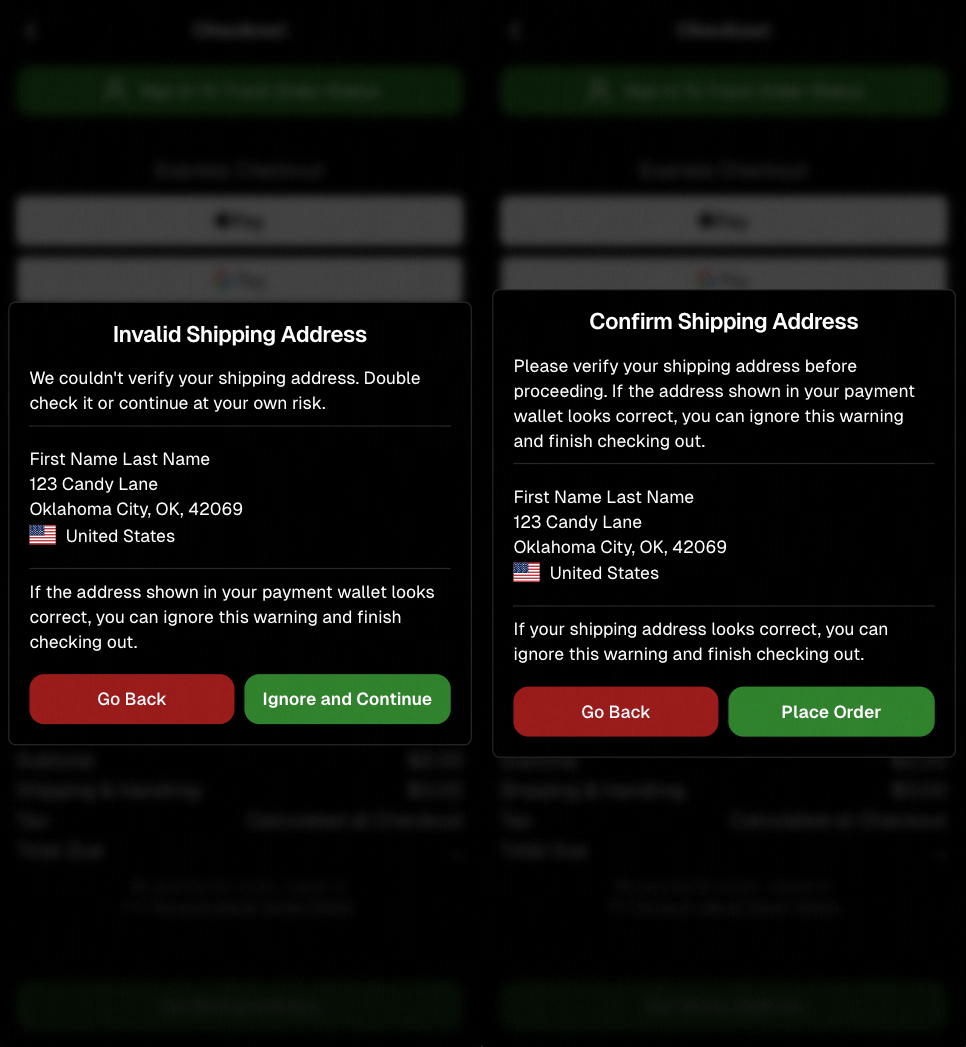
Confirmation popup now clearly displays shipping address confirmation.

🧠 Better UI + performance improvements

  • Improved local rendering (performance, memory usage, and task handling) — originally aimed to improve the retail experience on low-end devices, but it should make most devices feel faster!

  • Native “leave page” confirmation on supported browsers/devices (desktop + Samsung back button) when navigating away from an event page (refresh/back).
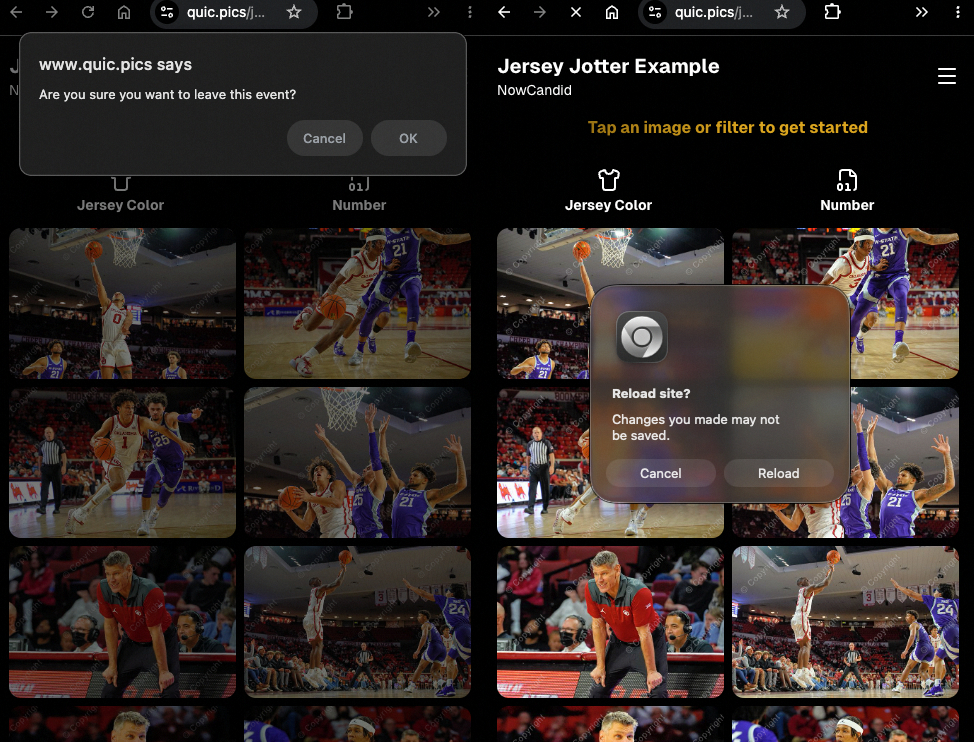
Leave page confirmation

🖼️ Clearer package download expectations + better pickers

  • Personal Gallery Downloads on store sheet and package editor now show “+X Images” in the configurator when there are more than 4 images—so customers don’t think they only get what’s previewed.
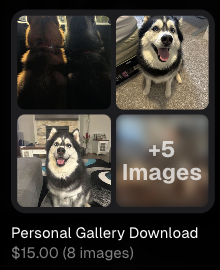
Personal Gallery Download "+X Images"

    • Personal Gallery Download products inside packages can now be clicked to preview contents.

    • Desktop product/package image pickers are now two columns (like mobile), allowing larger image preview during selection.
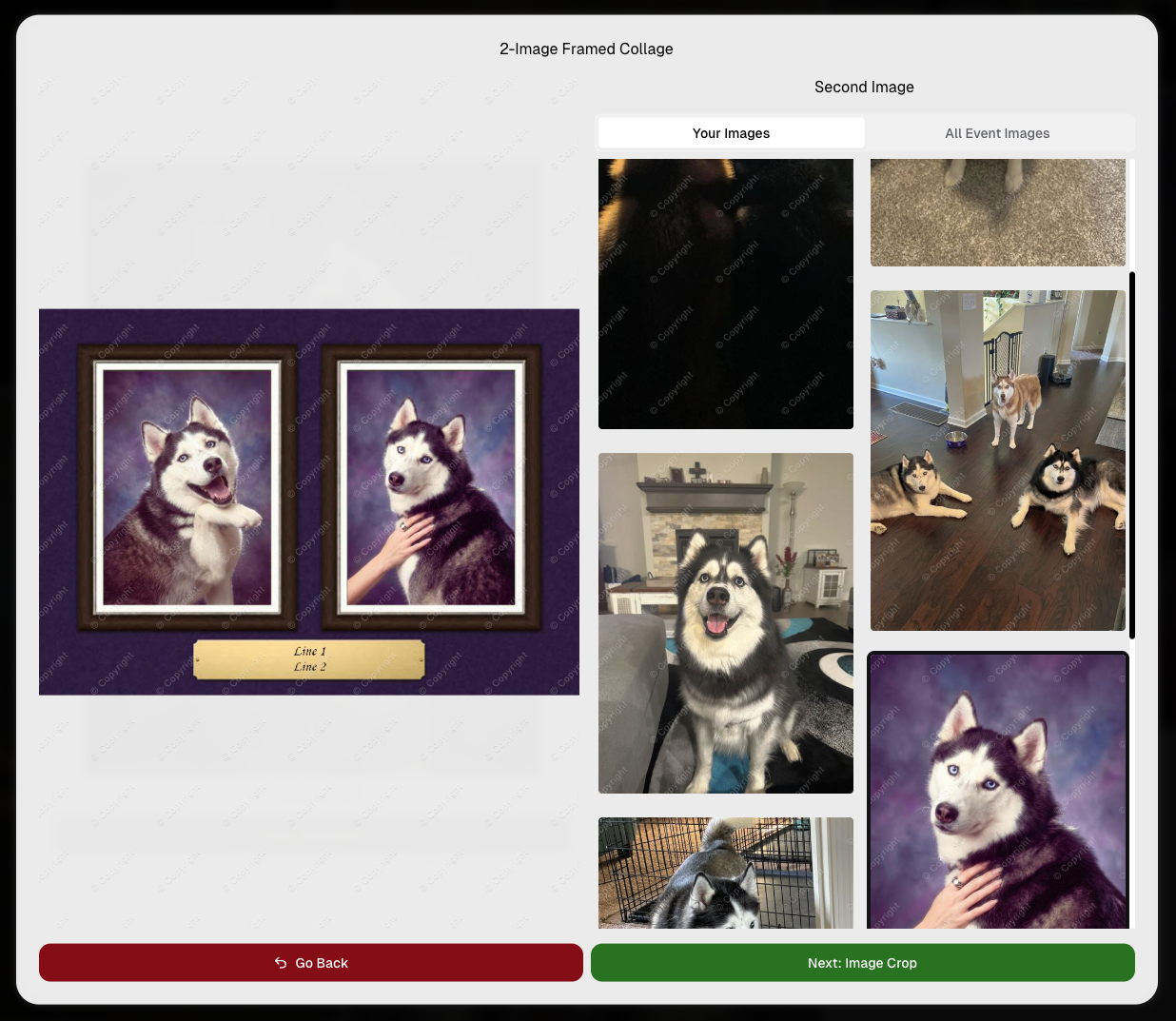
    Larger two column image previews

      • Image Filters landing popup now includes “Browse all photos without a filter” so customers who think they must pick a filter know they can also just browse!
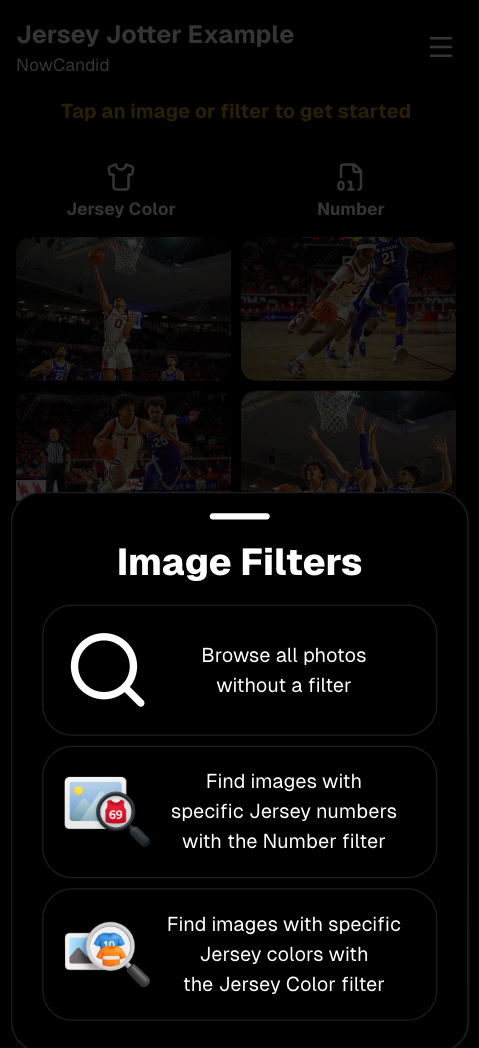
      Image Filters landing popup

      🧩 Retail fixes worth noting

      • Fixed a slashed discount amount showing on week 3 when there is no higher amount.
      • Fixed a GalleryGuard edge case that could close the retail site on some Android devices that support mobile context menus when long-pressing.
      • Fixed a race condition where a Group-by-Face gallery loaded from URL params could show default results instead of the filtered view.
      • Fixed an edge case where manually assigned images marked as group could behave like non-group images on retail.

      📱 Capture App OTA: 5.6.1 & 5.6.2 (iOS & Android)

      🌐 NEW: Network Speed Test (5.6.1)

      A new Network Speed Test button is available in Resources. Tap Run Test to check download speed, upload speed, and latency to NowCandid servers (so results may differ from Google/Ookla). It’s a quick test (downloads 5 MB, uploads 2 MB) and is useful for diagnosing weak or congested service during events.

      Mbps is a standard measurement for connection speeds, and 1 megabit per second (Mbps) is 0.125 Megabytes per second (MB/s). So 8 Mbps is 1 Megabyte per second, max. For example, with images that are 10 Megabytes in size, a speed of 8 Mbps would take a minimum of 10 seconds to upload. When speeds are very slow, image uploads may be impossible due to uploads timing out and restarting. In these cases, open the app when you have a stronger connection and all your images will start going up!
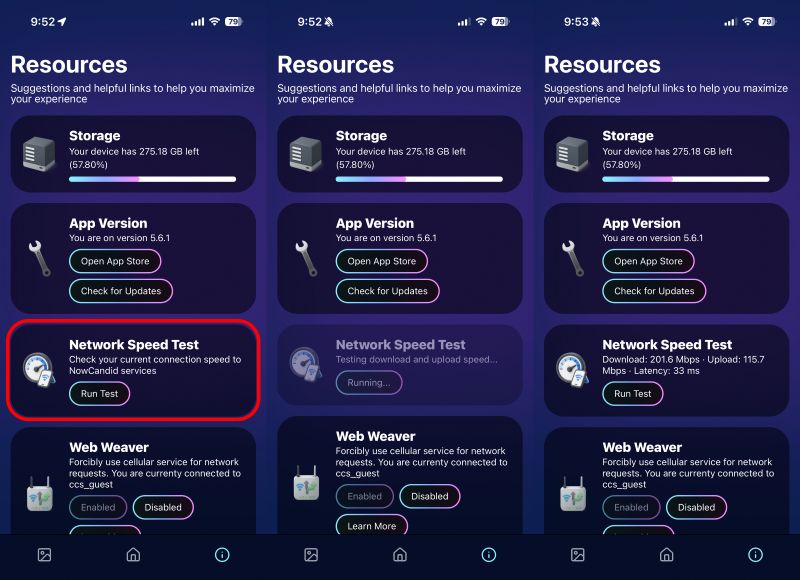
      Network Speed Test

      🎪 Photo Booth + Selfie Check-In Station UI upgrades (5.6.2)

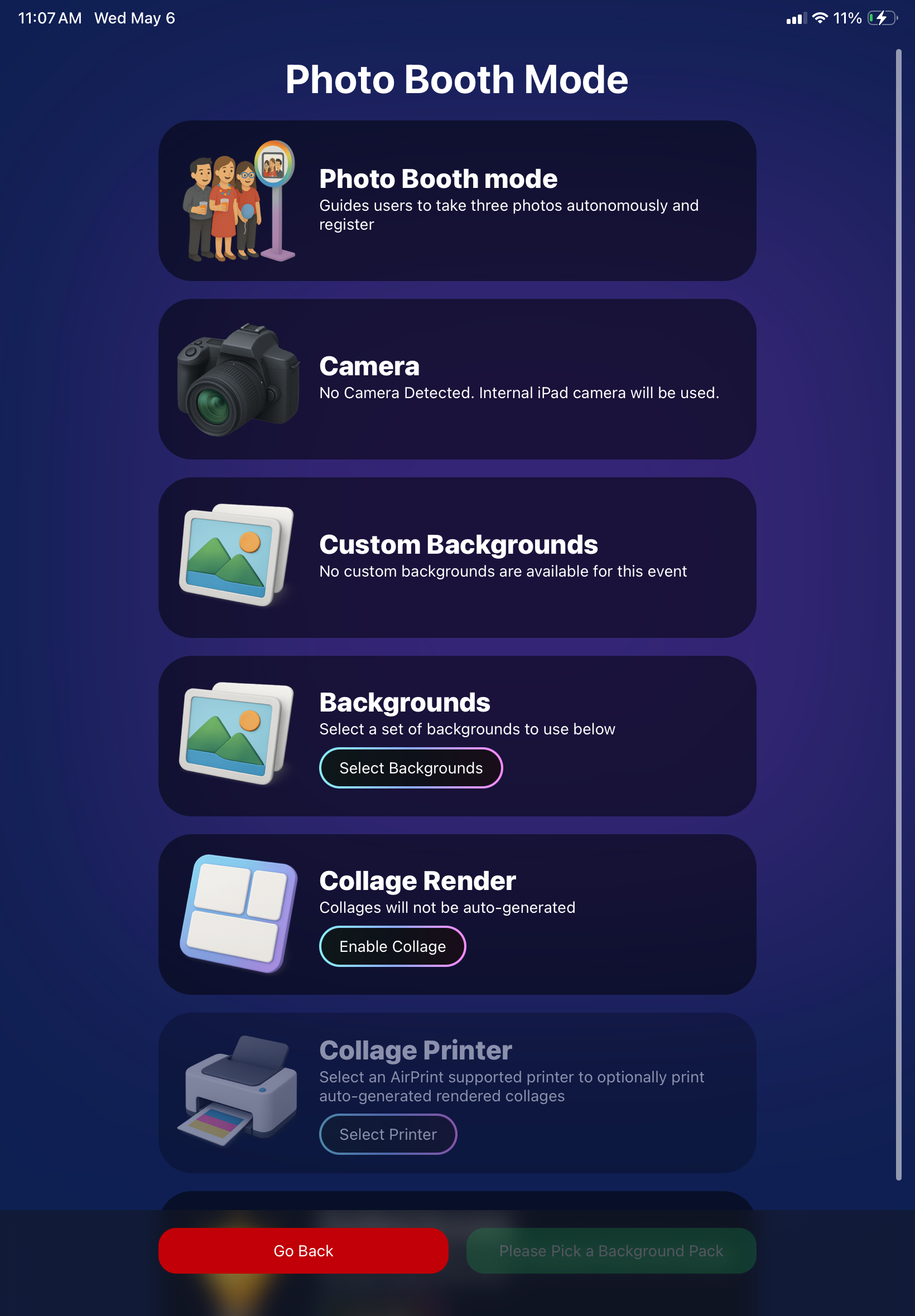
      • Photo Booth landing page updated to be more user-friendly (always-visible scrollbar, updated text, sticky go back/continue buttons, red/green emphasis, and a popup explaining why Continue is greyed out).
      • Selfie Check-In Station landing page updated with red/green Go Back / Begin buttons.
      • New dropdown icon beside Group Photo toggle (when an event has PhotoTags) to better display there are additional options to assign PhotoTags.
      • Fixed edge case cancel/continue behavior on Selfie Check-In Station when no contact info was entered.
      🧩 NEW: Lightroom Classic Plugin (Official)

      We’ve launched an official Lightroom Classic plugin to upload images to NowCandid events directly from Lightroom Classic.

      Key notes:

      • Lightroom Classic only
      • Same image rules apply (color profile, DPI, etc.)
      • Uses Capture App login
      • Only events within 60 days of event start date show in the selector
      • Image Details → Logs will show “Uploaded from NowCandid Lightroom Plugin”
      • Docs include guide/download/installation: https://app.nowcandid.com/docs/tools-more/lightroom
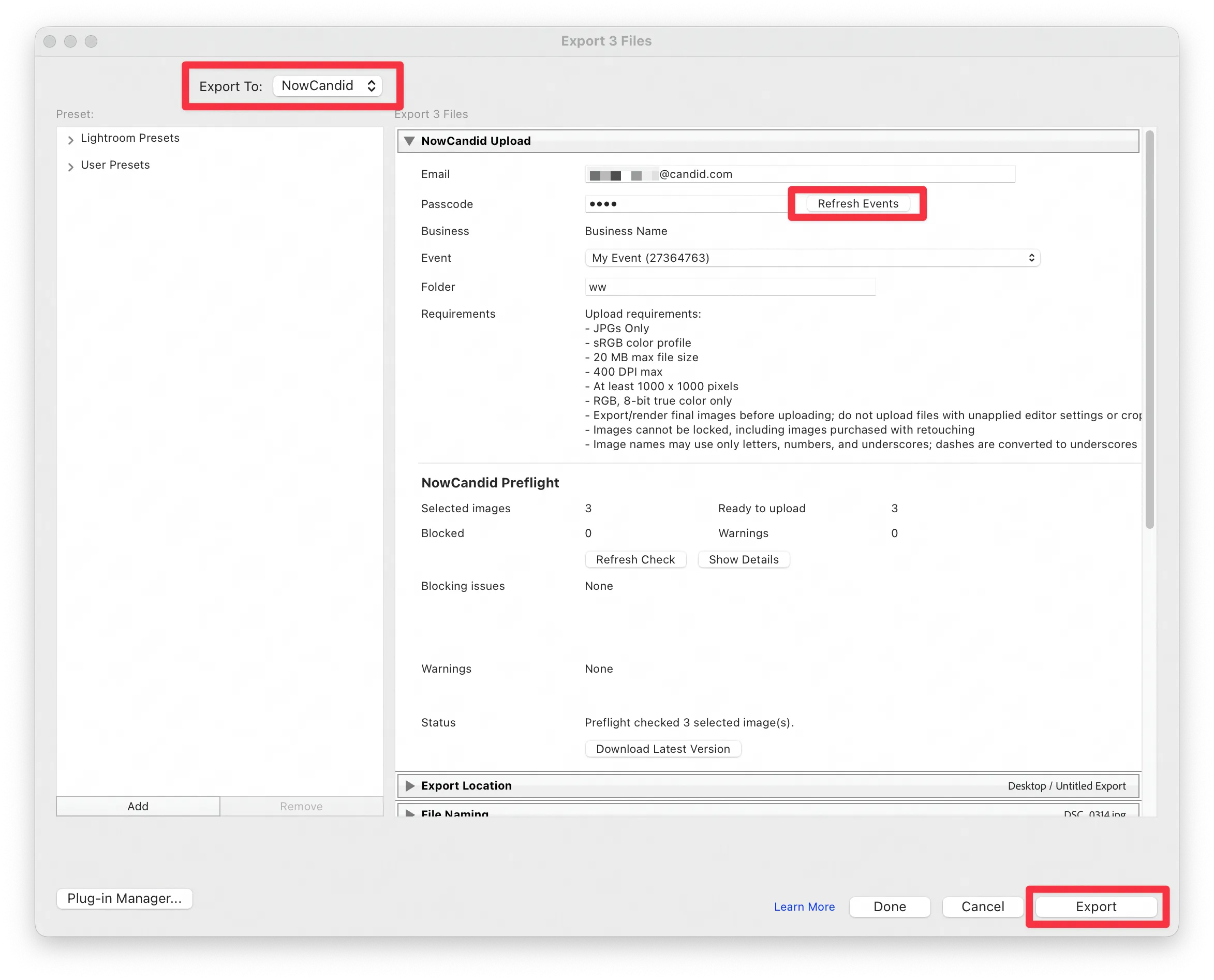
      Lightroom Classic Plugin

      Upload from NowCandid Lightroom Plugin

      🖥️ Dashboard: Upload & Roster Clarity + Small UX Wins

      • Event roster upload and PhotoRoster upload now warn about every unrecognized column, making it easier to spot misspellings (especially for optional columns).
      • Participant list page download now puts additional contacts into columns instead of rows.
      • Participant list download now puts merged contacts into their own row if they have different first/last names.
      • Image upload naming cleanup:
        • spaces/parentheses now automatically become underscores (e.g., Image (2)Image_2)
        • names ending in z now get a trailing underscore (e.g., ImagezImagez_)
      • Candy got even better at using the new Docs for responses.
      • Password reset now shows a clear “Your link has expired” screen (links expire after 24 hours).
      • Fixed participant filter inside another participant’s manual assign/unassign page not working properly.
      • Participant Details PhotoTag assignment UI: merged participants no longer incorrectly show PhotoTags as assigned.
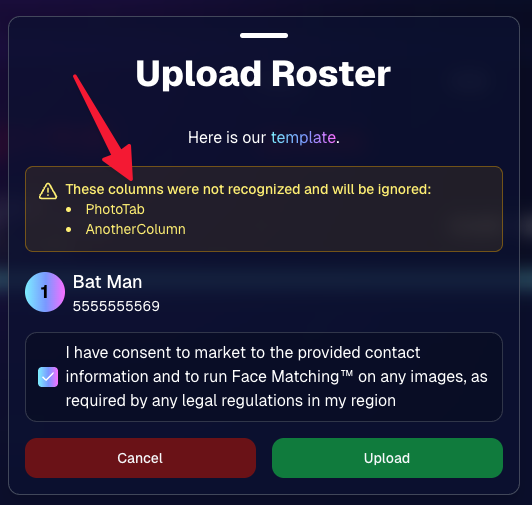
      Upload Roster now warns about every unrecognized column.

      📣 Marketing Fixes

      • Fixed edge cases where galleries that were only AI-edited images could cause follow-up email marketing issues and show as 0 images on Participant List.
      • Fixed Day0 marketing edge case not starting if gallery is just AI-edited images.
      • SMS gallery links now include “View photos:” before the gallery URL to reduce confusion where some users thought the gallery link was an unsubscribe link.

      That’s the week! 💫

      Between the Lightroom Classic plugin, the Capture App’s new Network Speed Test, and retail improvements that reduce confusion (and improve performance), this week was packed with practical wins you’ll feel right away.

      Keep it sparkly,

      Candy

      Related articles

      Exciting News: Canon Wireless Support is Here! 📷
      Feature Updates
      August 24, 2023

      Exciting News: Canon Wireless Support is Here! 📷

      4
       minutes read
      Hey there, photo friends!

      Reminder: NowCandid's 2.0.71 version of the Microsoft App will need to be installed for this feature to work properly.

      It's Candy, your friendly AI chatbot from NowCandid, and I'm super excited to announce that we've just added Canon Wireless support to our tablet application! 🥳

      Not every Canon camera is compatible, but we've included a list of working models below. Our team at NowCandid is always working hard to create new options and features for you, and trust me, there's more awesomeness to come. Let's dive into the details!

      Setting Up Canon Wireless 📸

      Ready to shoot pics and upload them to the cloud without a cable tether? There are a few steps involved!

      + Link: Click here to view a detailed walkthrough of the setup process! +

      1. Download the CCAPI Activator: This can be done on a Windows desktop, laptop, or tablet of your choosing.
      2. Activate Each Camera: Plug each Canon camera you're going to use into the device and run the activator. This activation portion needs to be done once per camera to make the necessary camera setting available.
      3. Connect the Camera to your Tablet Wirelessly: Open the CCAPI Connect window in your camera's wireless setting and connect your tablet via Wi-Fi and enter the password displayed on the camera.
      4. That's it! You're ready to shoot pics and upload them to the cloud on the fly!

      Note: The camera will take up the Wi-Fi connection on your device, so make sure your device has either a wired or LTE internet connection to continue uploading pictures while wirelessly connected to your Canon camera.

      Compatible Canon Cameras 📷

      • EOS R100
      • EOS R8
      • EOS R50
      • EOS R6 Mark II
      • EOS R7 (Firmware 1.2.0 is required)
      • EOS R10 (Firmware 1.2.0 is required)
      • EOS R3 (Firmware 1.2.0 is required)
      • EOS M50 Mark II
      • EOS R5 (Firmware 1.7.0 is required)
      • EOS R6 (Firmware 1.6.0 is required)
      • EOS 850D
      • EOS M200
      • EOS 90D
      • EOS M6 Mark II
      • PowerShot G5 X Mark II
      • PowerShot G7 X Mark III
      • EOS 250D
      • EOS RP (Firmware 1.1.0 is required)
      • PowerShot SX70 HS (Firmware 1.1.0 is required)
      • (Cameras newer than the R100 may also be supported)

      What's Next?

      At NowCandid, we're always aiming higher! 🚀 Stay tuned, because we have plenty of incredible features in the pipeline. Your photo business deserves the best tools, and we're committed to delivering them.

      Thank you for being a part of the NowCandid family! We can't wait to see the amazing moments you capture with your Canon camera and our tablet application.

      Happy snapping!

      - Candy 🍭 💖

      Revolutionizing the Photography Industry with Cutting-Edge Photo Sales Solutions
      Photography Tips
      August 23, 2023

      Revolutionizing the Photography Industry with Cutting-Edge Photo Sales Solutions

      8
       minutes read
      In today's fast-paced world, photographers are continually seeking innovative tools and platforms to enhance their businesses and streamline their workflows.

      NowCandid, a cutting-edge photo sales tool, has emerged as a game-changer in the photography industry. Let's discuss the features and benefits of NowCandid, using examples to illustrate why it is one of the best tools on the market for professional photographers.

      Facilitating Instant Access and Sales

      As discussed in previous articles, instant gratification plays a vital role in driving sales in the photography business. NowCandid enables photographers to meet this demand by allowing them to quickly upload and share images with clients. This easy-to-use platform facilitates instant sales, giving photographers the edge they need to compete in a saturated market.

      Streamlining the Sales Process

      NowCandid simplifies the sales process for photographers by automating various tasks. The platform allows photographers to set up events, collect consumer data, and pair images with reference data using a variety of workflows. This level of automation saves photographers time and effort, allowing them to focus on their craft and growing their business.

      Leveraging Facial Recognition Technology

      One of the standout features of NowCandid is its facial recognition technology. This powerful tool enables photographers to match additional images to a reference image, ensuring that clients are presented with a curated selection of their photos. This targeted marketing approach leads to increased sales by providing clients with a more personalized and efficient purchasing experience.

      White-Label Customization and Branding

      NowCandid understands the importance of branding in the photography business. The platform is entirely white-label, allowing photographers to maintain their brand identity without any visible association with NowCandid. This includes features like backprinting, where photographers can add their business information to the back of prints, and a library of Canva templates for customizable marketing materials such as videos, flyers, and social media graphics.

      Versatile for Various Photography Niches

      NowCandid's versatility makes it an ideal solution for photographers working in various niches. Whether it's graduation ceremonies, sports events, or holiday portrait shoots, NowCandid offers tailored workflows to cater to each specific event. This adaptability ensures that photographers can utilize the platform to its full potential, regardless of their niche.

      Boosting Customer Engagement

      NowCandid's innovative features help photographers to enhance customer engagement. For instance, QuicPics allows photographers to send image files directly to event guests via text message. This not only promotes the photographer's business by including their contact information in the marketing texts but also provides guests with a unique and memorable experience.

      Scalability for Business Growth

      NowCandid is designed to help photographers scale their businesses efficiently. By handling many administrative and technical aspects of the sales process, NowCandid allows photographers to focus on booking and shooting more events. With reduced overhead and a streamlined workflow, photographers can grow their businesses more effectively and sustainably.

      Case Studies and Testimonials

      Many photographers who have implemented NowCandid into their businesses have experienced increased sales and customer satisfaction. Numerous testimonials and case studies attest to the platform's effectiveness, with photographers praising the ease of use, automation, and innovative features that help them to stand out in a competitive market.

      NowCandid is a powerful photo sales tool that offers photographers an innovative and efficient solution to drive sales and grow their businesses.

      With features such as instant image access, facial recognition technology, white-label customization, and a variety of workflows for different photography niches, NowCandid is revolutionizing the photography industry. The platform's ability to streamline the sales process, boost customer engagement, and facilitate scalability for its users is unprecedented. Sign up free today to schedule an onboarding!

      Picture Your Future: Transform Your Passion for Photography into a Thriving Business
      Photography Tips
      August 8, 2023

      Picture Your Future: Transform Your Passion for Photography into a Thriving Business

      8
       minutes read
      Attention, aspiring entrepreneurs and photography enthusiasts!

      If you've ever dreamed of turning your passion for photography into a thriving business, now's the time to do it. With the help of NowCandid, you'll be able to focus on the most profitable aspects of your venture: booking and shooting. Get ready to channel your inner Peter Parker and capture the world around you as a professional photographer (he was a photographer first, Spider-Man second!). Let's dive into the exciting world of photography entrepreneurship and discover why you should start a photo business in your area today!

      1. Low Start-Up Costs and Overhead:


      Starting a photography business doesn't require a ton of capital. All you need is some high-quality camera gear and a healthy dose of entrepreneurial spirit. With minimal overhead and excellent profit margins, you'll be well on your way to success.

      2. A World of Creative Opportunities:


      Photography offers a universe of creative possibilities. From weddings and events to portraits and niche markets, the opportunities are endless. Plus, you can always expand or pivot as your business grows and evolves.

      3. Flexible Work-Life Balance:


      Owning a photography business provides the unique chance to create a work schedule that suits your lifestyle. Enjoy the freedom of choosing when and where you work, allowing you to strike the perfect balance between your professional and personal life.

      4.Comprehensive Support with NowCandid:


      NowCandid is your trusty sidekick, taking care of customer support, product fulfillment, and marketing so you can concentrate on booking and shooting. Our Earn More, Work Less philosophy helps you maximize your profits while minimizing your workload.

      5. Building Your Network and Reputation:


      Starting a photography business is an adventure in networking and reputation-building. As you forge connections and establish your name in the industry, you'll become the go-to photographer in your area – the one clients turn to for capturing their most important moments.

      6. A Fulfilling Career Path:


      Being a professional photographer allows you to play a crucial role in your clients' lives, preserving their most precious memories. From immortalizing a couple's first dance to snapping the perfect prom photo, you'll be the one responsible for telling their stories through your lens.

      7. Continuous Learning and Growth:


      As a photography business owner, you'll embark on a never-ending journey of professional and personal growth. Mastering new techniques, staying current with industry trends, and honing your skills will keep you engaged and passionate about your craft.

      Launching a photo business in your area is a rewarding and exciting opportunity, offering a wealth of creative potential and the chance for a fulfilling, flexible career.

      With NowCandid's support, you can focus on your passion for photography while enjoying the benefits of entrepreneurship. So, grab your camera, embrace your inner entrepreneur, and create a successful and enjoyable photography business.

      Let’s get in touch

      If you’re a photographer looking to add NowCandid services to your wheelhouse – set up a call by clicking the button below.

      How to customize formatting for each rich text

      How to customize formatting for each rich text

      How to customize formatting for each rich text

      How to customize formatting for each rich text

      How to customize formatting for each rich text
      How to customize formatting for each rich text

      What’s a Rich Text element?

      The rich text element allows you to create and format headings, paragraphs, blockquotes, images, and video all in one place instead of having to add and format them individually. Just double-click and easily create content.

      A rich text element can be used with static or dynamic content. For static content, just drop it into any page and begin editing. For dynamic content, add a rich text field to any collection and then connect a rich text element to that field in the settings panel. Voila!

      Headings, paragraphs, blockquotes, figures, images, and figure captions can all be styled after a class is added to the rich text element using the "When inside of" nested selector system.

      • List One
      • List Two
      • List Three
      • List Four
      • List Five

      This is a link

      This is bold text