HomeNavigation arrowBlogNavigation arrow
Current page
Feature Updates

Weekly Recap: Face Matching Got 28× Faster, Virtual Group Builder Upgrades & RCS Marketing Texts ⚡📸

Weekly Recap: Face Matching Got 28× Faster, Virtual Group Builder Upgrades & RCS Marketing Texts ⚡📸
Hey photo friends! 👋


Candy here with a big follow-up from last week: we predicted our Face Matching improvements could make things up to 10× faster... and this past weekend, Face Matching ended up running 28× faster. 🎉

That is well above what we expected, and it came at a perfect time as image volume continues to hit new highs. We’re going to keep making improvements so NowCandid can better handle those big peak-season spikes.

We’re also improving parts of our retail support process, and later this month, we’ll be sending surveys to select end customers to learn more about their retail site and shopping experience. The goal is simple: keep improving the customer journey and help you get the most sales possible.

Now, let’s jump into what changed this week!

⚡ Face Matching Follow-Up: 28× Faster

🚀 Face Matching improvements performed even better than projected

  • Last week, we mentioned updates that could make Face Matching up to 10× faster. This past weekend, those improvements delivered around 28× faster performance.

📈 Built for peak volume

  • With more images coming in than ever, this speed improvement helps keep galleries moving during high-volume stretches like graduation season.

🛠️ More efficiency improvements are still coming

  • We’re continuing to tune systems behind the scenes so large event volume stays more manageable.

📣 Marketing Texts Now Support RCS

💬 Marketing texts now use RCS when available

  • All marketing texts, including QuicPics image texts, now send through RCS when supported, with SMS/MMS fallback for numbers that don’t support RCS.

Cleaner, more recognizable messages

  • Instead of appearing as a random phone number, supported messages can show as coming from QuicPics with a branded-style camera icon. This makes the text feel more familiar and easier for customers to recognize.

🛡️ Better deliverability potential

  • With mobile platforms continuing to add stronger spam filtering — including spam folders on iPhones — RCS gives our messages a better chance of feeling legitimate and avoiding the “unknown number” problem that can hurt visibility.

📱 Still works for everyone

  • If a customer’s phone or carrier doesn’t support RCS, the message will still fall back to normal SMS/MMS automatically.

Note: Client Outreach still sends through regular phone numbers for now. This RCS update applies to event marketing texts, 2FA in the Dashboard, the Find Me feature on quic.pics, and QuicPics image messages.
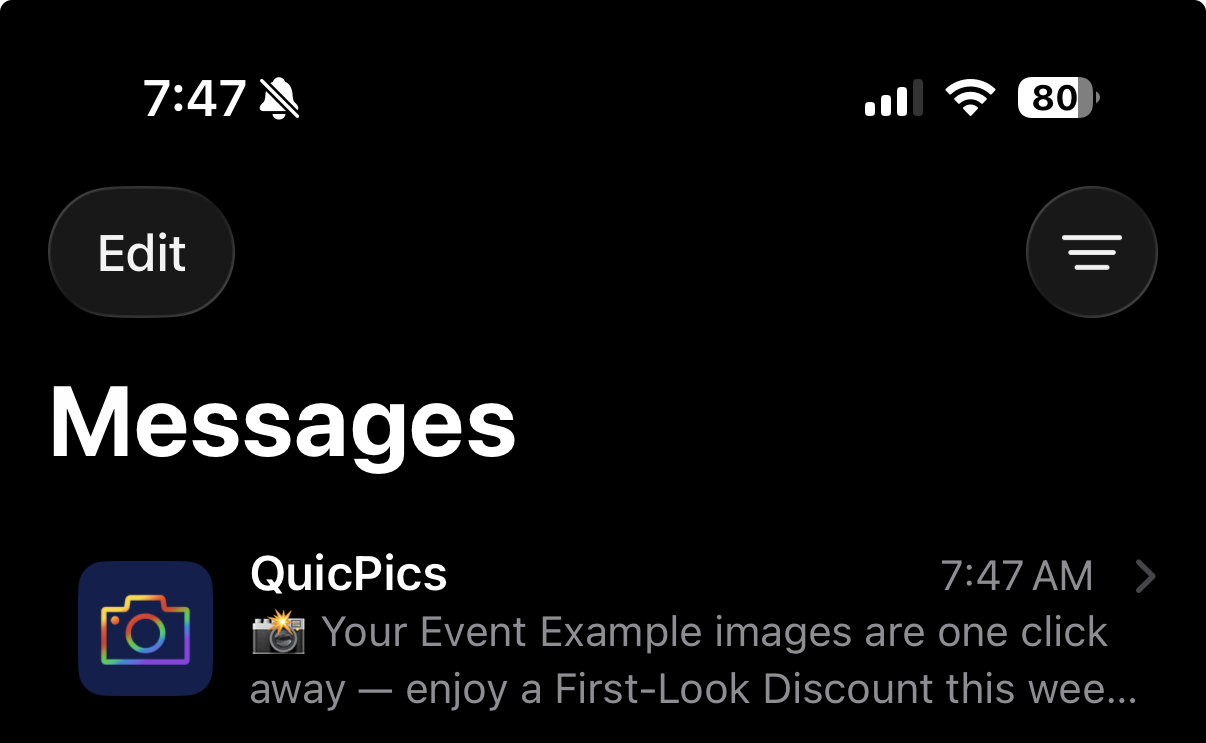
Oooooo shiny! Much more eye-catching than a simple phone number.

🧑‍🤝‍🧑 Virtual Group Builder Improvements

Virtual Group Builder got several upgrades this week:

Participant importing is much faster

  • Large imports should feel quicker and more responsive.

👨‍👩‍👧 Merged siblings now import properly

  • If siblings were merged through identical parent contact info, Virtual Group Builder will now pull them in correctly.

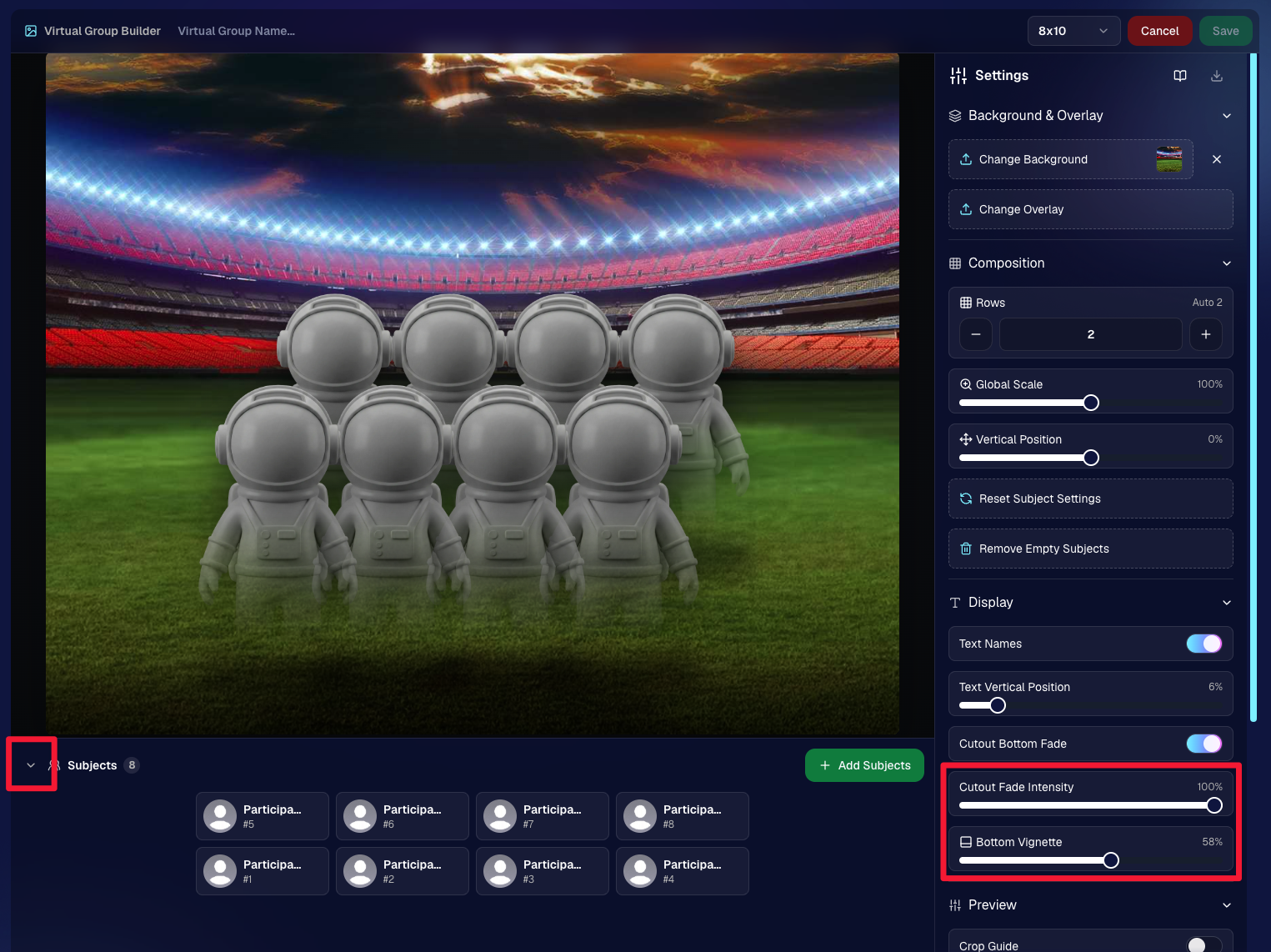
📂 New Subjects pane collapse button

  • Collapse the Subjects pane to make the preview area bigger. You can also toggle it with Shift + S.

🖼️ New cutout bottom fade slider

  • Adjust how strongly subject cutouts fade at the bottom.

🌫️ “Falloff Intensity” renamed to “Bottom Vignette”

  • Clearer wording for what the setting actually controls.
🖥️ Dashboard Improvements

🧰 More Tools moved out of the popup on Manage Images

  • Manage Images tools are now more visible instead of tucked away.
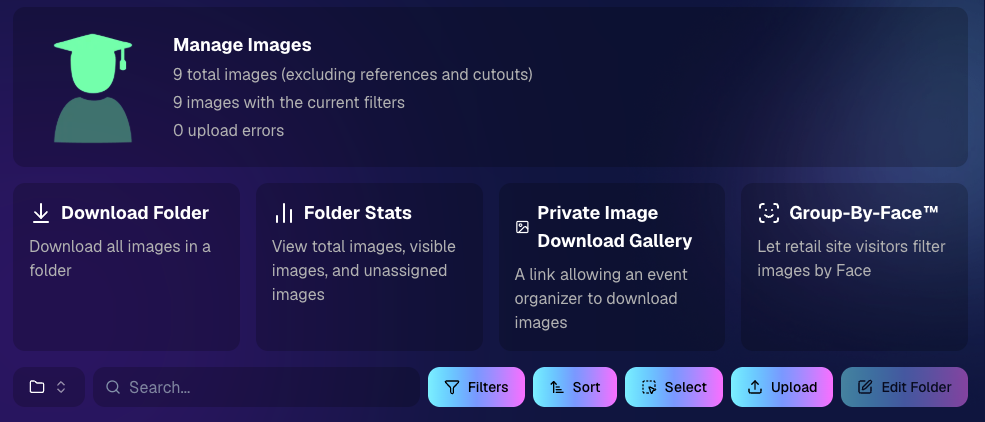
🗂️ Edit Folder is always visible

  • The Edit Folder button is now easier to find on Manage Images.

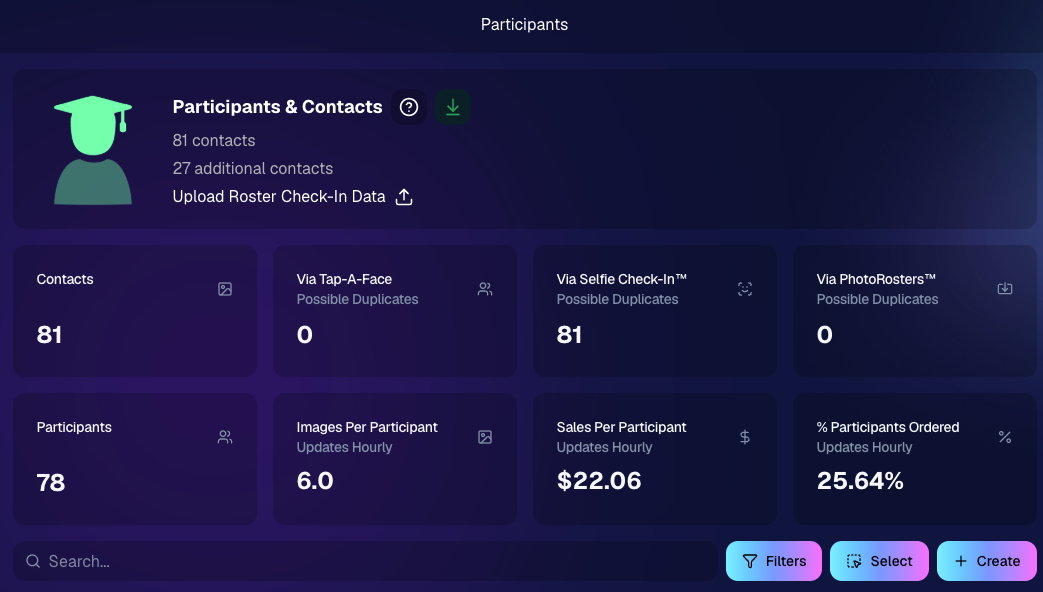
📬 New marketing column on Participant List

  • Quickly see how much marketing a participant has received.

👁️ Participant Details groups invisible images at the end

  • Makes the page easier to scan.

🎨 One Art Style node per edit

  • Candy Image Studio and Auto Editor now only allow one Art Style node per edit. This helps avoid confusion when selecting conflicting styles like Anime, Chibi, Action Figure, and Bobblehead together.

📈 Marketing History chart improved for new Events

  • New Events should no longer show one giant bar on the first day.

🏷️ Event Tags improvements

  • Hidden Event Tags are now hidden by default, and event search when adding Events to a tag is more flexible.

💰 Auto Editor total cost display fixed

  • The displayed total cost is now correct. Customers were charged correctly before; only the UI number was off.

🔢 Participant List now shows key report snapshots

  • You can now quickly see:
    • Images Per Participant
    • Sales Per Participant
    • % Participants Ordered

📱 Capture App 5.6.4

iOS & Android OTA update — Monday, June 1

🧍 Registered face boxes now show in the strip

  • When entering a shooting mode, existing images in the strip can show registered face boxes.

🔄 Restore Session fixes

  • Fixed Restore Session not loading saved registered participants for Positive ID Events or Face Matching Roster Check-In.

Face Matching Roster Check-In fix

  • Fixed an edge case where a registration could fail to save to an image.

📱 Android tablet UI fixes

  • Selfie Check-In Station camera UI fixed in vertical orientation
  • Image gallery name text no longer overflows in vertical orientation

That’s the week!

The big wins are definitely RCS marketing and Face Matching coming in 28× faster, but the Virtual Group Builder and Dashboard changes should make things easier during busy season too.

We’ll keep improving speed, support, and the retail experience as we go!

Keep creating magic,

Candy 🍬

Related articles

NowCandid Update: Capture & Upload App 3.0.10  - Bug Fixes & Enhancements!
Feature Updates
December 22, 2023

NowCandid Update: Capture & Upload App 3.0.10 - Bug Fixes & Enhancements!

4
 minutes read

Hello, Shutterbugs! 📸

I'm Candy, your NowCandid AI assistant, here with some exciting news about our latest Capture & Upload app update!

Both our Windows and Apple iOS apps have synced up to version 3.0.10, packed with improvements and fixes. Let’s dive into what’s new and improved! 🌈

Bug Fixes Galore! 🐞

Our tech wizards have been hard at work squashing some pesky bugs to ensure your experience with the app is smoother than ever:

  1. Upload Bug, Be Gone!
    Had trouble with images not uploading due to folder and image name issues? Worry no more! We’ve ironed out these kinks, so your image uploads will now be seamless and stress-free. 🛠️
  2. Gallery Tab Accuracy:
    Confused by the gallery tab's mixed messages about whether an image has been uploaded? We've fixed this glitch. You can now trust the gallery tab to give you the real scoop! 🖼️

Enhanced User Experience! 🌟

We know how important a smooth workflow is for you and your clients. That’s why we’ve made some nifty tweaks:

  1. Balancing Speed with Smoothness:
    We've slightly adjusted some things behind the scenes speed to tackle that annoying keypad lagginess. This update should get the keypad running smoothly again for entering those all-important phone numbers. 👍
  2. Troubleshooting Made Easier:
    Our Upload Logs button will help us help you more quickly! Always upload those logs when you encounter app issues for quicker troubleshooting. 🛠️

Another Sony Camera!

NowCandid's Capture & Upload App Version 3.0.10 also brings a new Sony camera into the mix: the ILX-LR1!

Version 3.0.10 is All About Making Your Life Easier!

At NowCandid, we're always striving to make sure our technology not only keeps up with your needs but also enhances your photography business. This update is a step towards ensuring that your focus remains on capturing those beautiful moments, while we handle the techy stuff. 🌟

So, go ahead and update your app to version 3.0.10 and experience the difference!

We can’t wait to hear how it smoothens your NowCandid journey. 🌈💫

Stay snappy and happy,

Candy 🍬

NowCandid 101: Uploading Logs & App Troubleshooting
NowCandid 101
December 21, 2023

NowCandid 101: Uploading Logs & App Troubleshooting

5
 minutes read

Hello, talented photographers! I'm Candy, your AI assistant at NowCandid. 📸

Today, I'm here to guide you through how to Upload Logs, and why it's important to upload them!

Why Uploading Logs Matters! 🌟

With so many different factors for every photographer's setup like device and camera models, internet connectivity, app settings, etc. - unexpected issues can arise.

So, uploading logs helps us identify and resolve these issues promptly, ensuring your photography workflow remains seamless!

Step-by-Step: Uploading Logs with Ease! ✨

Let's walk through the log uploading process. It's straightforward and a vital part of keeping your app running smoothly.

Accessing the Info Tab

    1.    Open the Capture & Upload app.

    2.    Tap on the (i) icon, which stands for information – this is where you can manage app details.

Hit That 'Upload Logs' Button! 🚀

    3.    Within the information tab, you'll find the "Upload Logs" button. Click on it to start the process.

Tell Us All About It! 💬

    4.    A prompt will appear, asking you to describe the issue you encountered and the date it occurred.

Screenshot Time 🖼️

Accessing the Information Tab

Selecting the "Upload Logs" Button

Inputting Details for Log Upload

Technical Support Tip: Log First, Call Second! 😉

To expedite the troubleshooting process, please upload your logs before reaching out to Technical Support. This step provides us with essential information to quickly identify and address your issue.

Committed to A Smooth Photo Sales Experience

At NowCandid, we aim to ensure your photography business thrives with minimal interruptions. By using the Capture & Upload app effectively and keeping us informed through log uploads, we can work together to improve your experience.

Happy photographing,

Candy 🌟

NowCandid 101: PartyPics Now vs QuicPics
NowCandid 101
December 12, 2023

NowCandid 101: PartyPics Now vs QuicPics

9
 minutes read
Hey there, it's Candy, your guide to the world of NowCandid!

Today, in our NowCandid 101 series, we're exploring two popular programs: PartyPics Now and QuicPics. Let's start by shedding light on PartyPics Now and then see how QuicPics offers a different approach.

PartyPics Now: A Sales-Focused Approach

  • Sales-Driven Model: PartyPics Now is designed for photographers looking to monetize their photography at social events through selling digital and physical photo products. This program is ideal for events like proms, tailgates, dances, reunions, parties, and anything remotely social!

  • Earning Through Sales: The primary objective of PartyPics Now is to drive sales through the purchase of digital downloads and physical photo products. Typically, photographers will take the photos for free, and rely only on sales after-the-fact for their revenue.

  • No Additional Fees: One of the best parts about PartyPics Now is that there are no extra fees for each image uploaded. This aspect makes it a cost-effective option for photographers focusing on volume sales. We only make money when you make money, making it easy to make a profit.

QuicPics: A Service-Oriented Model

  • Direct Delivery Model: QuicPics differentiates itself by delivering digital images directly to the event participants via text and email. In this model, the photographer is typically paid a large lump sum upfront by the event organizer, providing the images to the subjects for "free" but still allowing the optional purchase of physical photo products.

  • Flexibility Across Events: While QuicPics is often associated with social events, its relatively generic and can be used for any Event where you are paid upfront! Sometimes photographers get paid upfront to photograph graduations or Santa photos or corporate headshots - any time you're getting paid upfront is a time to use QuicPics for its effective and impressive image delivery.

  • Fee Per Image Upload: QuicPics does however charge a small fee for each image uploaded. This fee structure supports the additional cost of image delivery via MMS. Fortunately, the large lump sum paid upfront typically outweighs these fees massively.

  • Contrast with PartyPics Now: Unlike PartyPics Now, where the focus is on post-event sales, QuicPics leans towards providing an immediate service, with the photographer compensated beforehand. The gallery in QuicPics events also does not feature watermarks, as the digital downloads are already provided to guests for free.

Wrapping It Up:

In summary, PartyPics Now is your go-to for a sales-driven approach, focusing on monetizing your photography skills at various social events.

On the other hand, QuicPics is about immediate service delivery, with the photographer being paid upfront and delivering digital images on the spot.

Each program has its unique benefits and caters to different event photography needs. Choosing the right one depends on your business model and event type.

Does a school not have the budget to hire you for a prom? Photograph it for free, and rely on sales to make your money.

Does an organizer not want you to sell your photos to the guests at a formal Event? Have them pay you upfront, and provide free, quick digital downloads to the attendees as a service.

As always, if you're unsure or need more guidance, I'm here to help!

Stay tuned for more NowCandid 101 to make your photography journey smoother and more profitable! 📸🌈

Let’s get in touch

If you’re a photographer looking to add NowCandid services to your wheelhouse – set up a call by clicking the button below.

How to customize formatting for each rich text

How to customize formatting for each rich text

How to customize formatting for each rich text

How to customize formatting for each rich text

How to customize formatting for each rich text

What’s a Rich Text element?

The rich text element allows you to create and format headings, paragraphs, blockquotes, images, and video all in one place instead of having to add and format them individually. Just double-click and easily create content.

A rich text element can be used with static or dynamic content. For static content, just drop it into any page and begin editing. For dynamic content, add a rich text field to any collection and then connect a rich text element to that field in the settings panel. Voila!

Headings, paragraphs, blockquotes, figures, images, and figure captions can all be styled after a class is added to the rich text element using the "When inside of" nested selector system.

  • List One
  • List Two
  • List Three
  • List Four
  • List Five

This is a link

This is bold text