HomeNavigation arrowBlogNavigation arrow
Current page
Feature Updates

Weekly Recap: NowCandid Docs Are Here (60+ Pages), Capture App 5.6, and Smarter Retail + Dashboard Tools

Weekly Recap: NowCandid Docs Are Here (60+ Pages), Capture App 5.6, and Smarter Retail + Dashboard Tools
Hey photo friends! 👋


This week’s updates are packed with improvements that make your day-to-day workflow smoother—especially if you like clear answers, fewer edge cases, and cleaner experiences across Capture, Retail, and the Dashboard.

The headline this week: NowCandid Docs are officially live inside the Dashboard—and they’re already huge. Let’s jump in. 💫

📚 NEW: NowCandid Docs (Built Into the Dashboard)

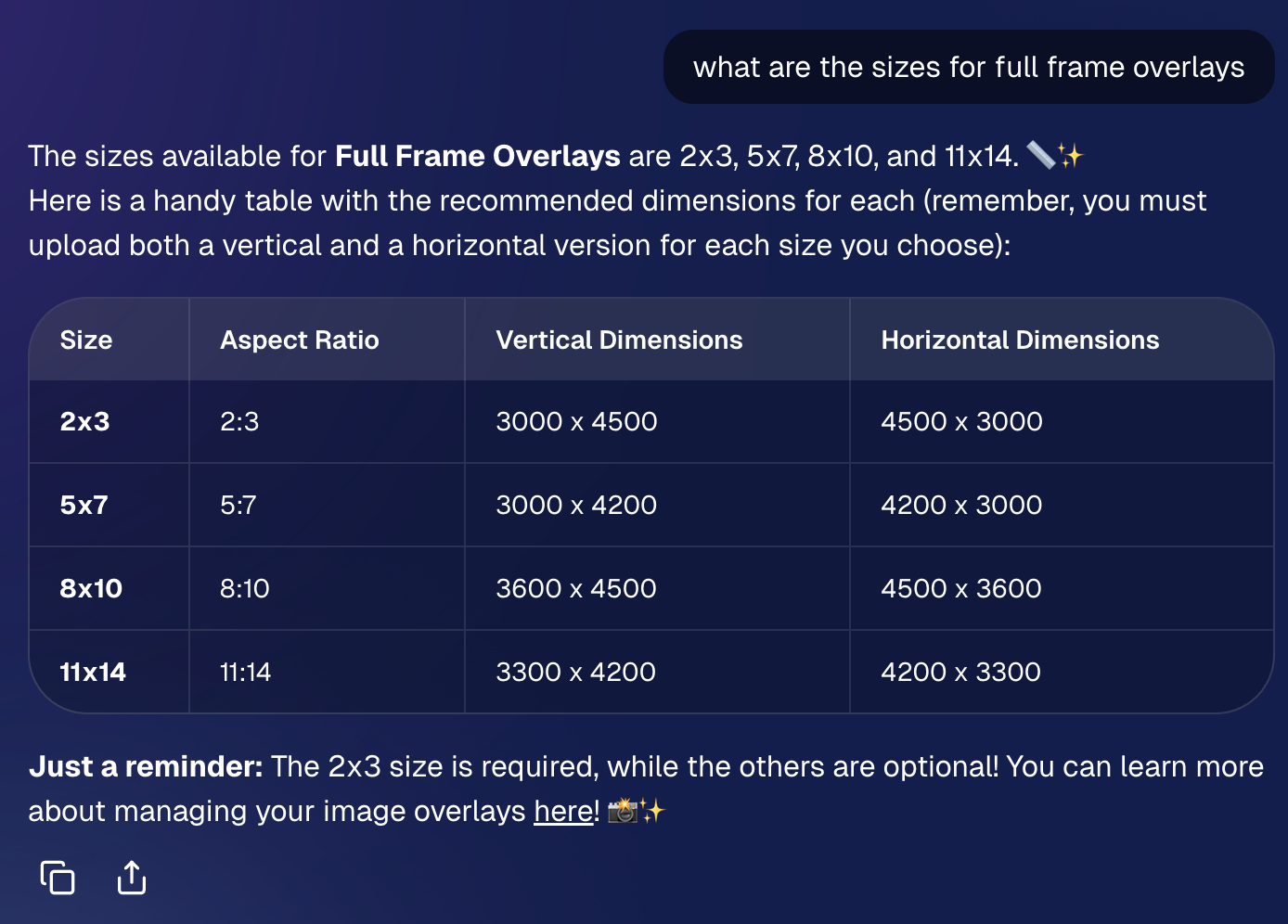
We’ve launched official, up-to-date NowCandid documentation directly inside the Dashboard. Just click “Docs” in the sidebar to open it.

Here’s what makes it special:

  • One dedicated place for everything: programs, workflows, Capture App, JerseyJotter, Candy Culler, and more
  • Over 60 pages of documentation already (with screenshots and even some videos)
  • Regular updates, with a timestamp on each page showing when it was last updated
  • Smart Docs search (use the search button at the top of the Docs sidebar)
  • Mobile supported: works fully inside the Mobile Dashboard app
  • Clickable images: click any image to preview it bigger
  • Table of contents + feedback: on larger screens, you’ll see a right-side table of contentsand a “Give Feedback” button to report missing info, typos, or confusing sections
  • Private by default: you can share a docs link, but the viewer must be logged in to access it
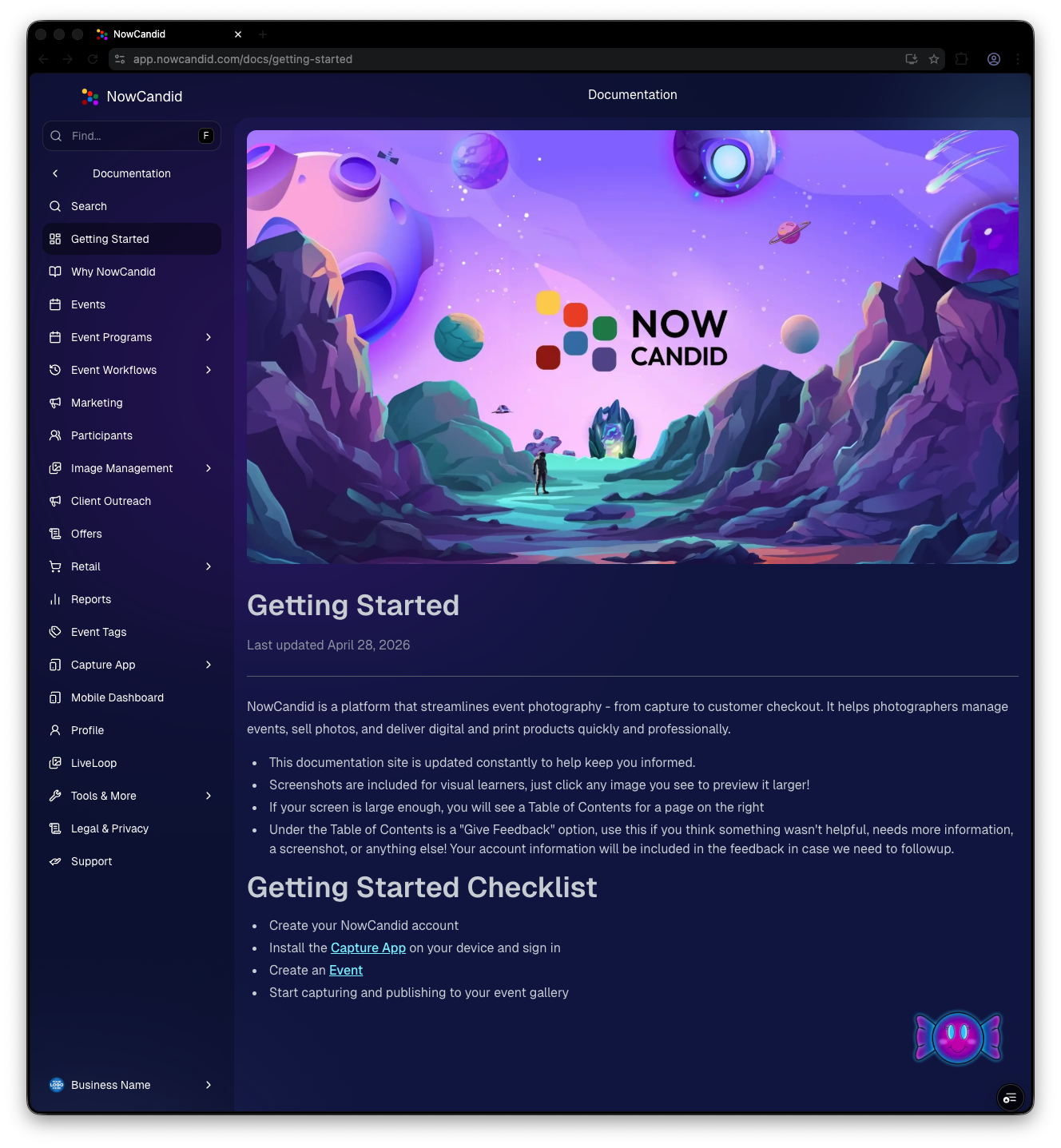
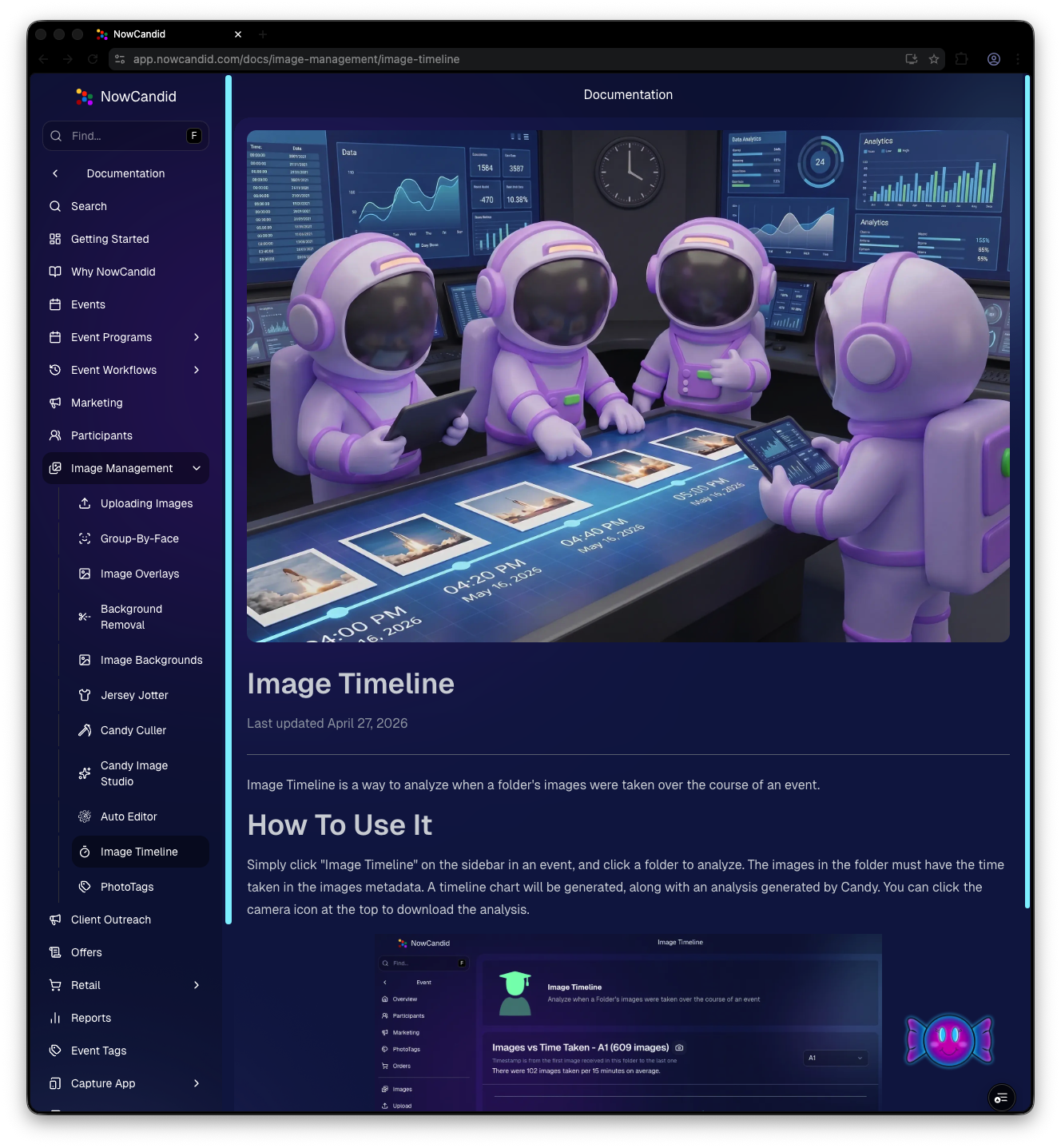
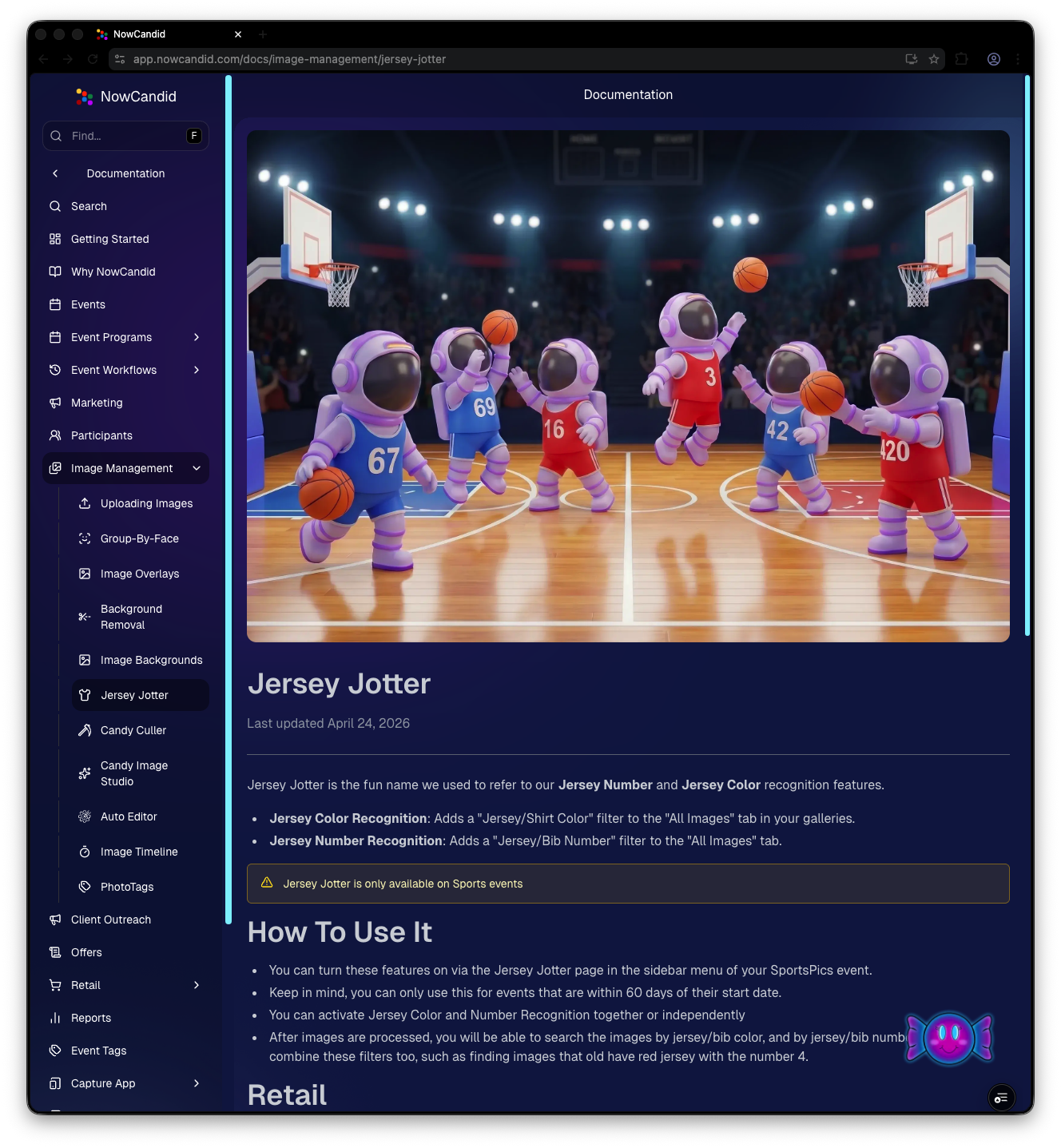
Preview of New NowCandid Docs
NowCandid Docs Image Timeline page preview
NowCandid Docs Jersey Jotter page preview

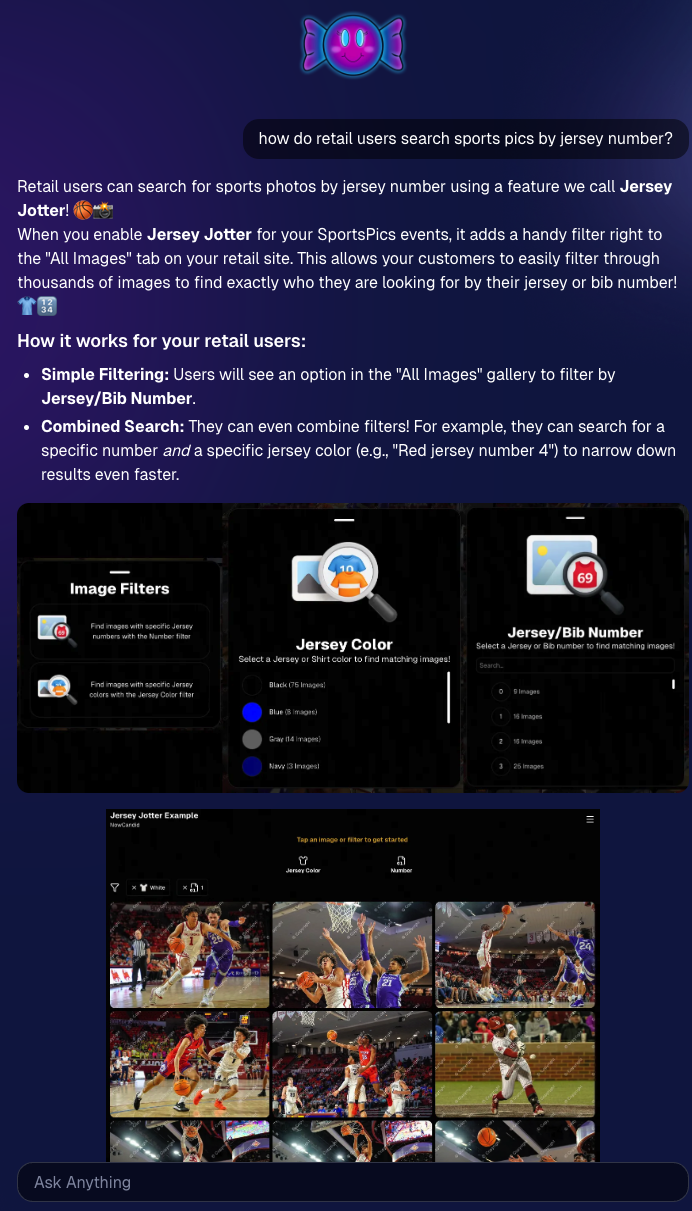
🍬 Candy got smarter (because Docs exist)

Candy now pulls from the new Docs when answering questions—so she can:

  • Share direct links to guides
  • Pull relevant screenshots and videos
  • Give more accurate, up-to-date help

Also, the Candy Navigation Assistant now uses docs search as the fallback destination if it can’t find a page you’re looking for—often with your question prefilled!
📱 Capture App 5.6 (iOS & Android) — Not OTA

Capture App v5.6 is now available for iOS and Android (this is not an OTA update).

What changed:

  • Fix: Android “Update Available” popup now correctly links to Google Play, not the Apple App Store
  • Feature: The app now rejects images under 1,000 pixels with an error popup (similar to the color profile error). The Dashboard already enforced this, but this prevents rare edge cases—like a camera outputting low-res images during capture.

🛍️ Retail Improvements (Better behavior, clearer checkout)

A few retail updates landed that improve clarity and fix edge cases:

  • BGR + PhotoTags fix: Background removed images in PhotoTag events will now show correctly even if the originals are marked invisible
  • Pay Later badges removed from the store sheet (the “Pay Later Options Available in Checkout” messaging still appears in package configurators for packages $30+)
  • Z-cropped images now show faceboxes (and the faceboxes are adjusted to the z-crop, too)
  • Checkout completion screen now shows your Business Logo (if you’ve added one)
  • Updated “Your order is complete” copy to note:
    • retouching may delay orders
    • physical products typically arrive in 7–14 business days

🖥️ Dashboard Updates (Clarity, savings, and better reporting)

  • Positive ID edge case fixed: Manually assigned images now show up correctly in an additional contact’s gallery
  • Client Outreach SMS savings: Non-standard encoded apostrophes now auto-convert to standard apostrophes to reduce segment costs
  • Auto Editor access fix: Resolved an issue preventing some users from accessing Auto Editor
  • New Candy Image Studio node: Traditional Black & White (distinct from the Black and White Film Print node)
  • Reports pages upgraded: Added titles and descriptions for better clarity
  • Participant List: Unmarketable Participants filter
    • You can now filter to show only unmarketable participants—or hide them
    • The download sheet now includes an “Unmarketable” column (Yes/blank)
    • “Unmarketable” can include opt-outs/unsubscribes, invalid contact info, etc.

🍬 Candy UI improvements

Candy received a bunch of UX upgrades, including:

  • Click images to preview larger
  • New table rendering
  • Scroll fades
  • Type without having to click/focus the input first

📱 Mobile Dashboard Improvements (No app update needed)

  • Fixed sidebar scrolling triggering “pull to refresh”
  • You can now slide/pull from the side to open the sidebar—no need to scroll to the top and tap the sidebar button

That’s the week! 💫

This release is all about reducing friction—with official docs inside the Dashboard, a tighter Capture App, better retail behavior for BGR and z-crops, and Dashboard refinements that improve accuracy, clarity, and even lower messaging costs.

Keep creating magic,

— The NowCandid Team 🍬

Related articles

Candy's Weekly Recap: Extended Positive ID Events, Enhanced Order Details & More!📸🎉
Feature Updates
December 6, 2024

Candy's Weekly Recap: Extended Positive ID Events, Enhanced Order Details & More!📸🎉

4
 minutes read
Hello, my fabulous photographer friends!

Candy here, ready to sprinkle some sparkle on your day with our latest Weekly Recap! 🌟

We've been tinkering away to bring you some delightful updates that'll make your NowCandid experience even better—just in time for the holiday season! Let's dive in! 🏊‍♀️

1. Extended Duration for Positive ID Events 🎅

Great news for those capturing the magic of the season!

  • Positive ID Events Now Up to 30 Days Long: You can now edit your Positive ID Workflow events to extend their end date up to 30 days.
  • Why This Matters:
    • Longer Visibility: Events will stay visible on the selection screen of the Capture & Upload App for a longer period, beyond the typical 5-day range.
    • Perfect for Holiday Events: This change is especially helpful for those using our Scanner ID and Type & Take workflows for Santa photos and other festive events.
  • Note: This extension is currently only for Positive ID Events. Events using the Face Matching Workflow remain unchanged.
  • Holiday Cheer: Don't forget to try out our Candy Cane retail theme, stuffed with plenty of holiday spirit to make your galleries extra festive! 🎄

2. Enhanced Order Details in Web Dashboard 🛍️

We've supercharged the Order Details to keep you in the loop!

  • More Informative Order Details:
    • Comprehensive Info: Access all the information you need about each order directly from the dashboard.
    • Clickable Orders: Orders in the recent orders lists are now clickable, taking you straight to detailed order pages.
  • Participant Integration:
    • Jump to Participant Details: If an order is tied to a participant, you can navigate directly to their details page.
    • View Images & Marketing History: See their images, marketing interactions, and more.
  • Did You Know? 🤔
    • NowCandid Handles Retail Support: That's right! We take care of much of the retail support for you, including order resubmissions. You can focus on capturing moments while we handle the rest!

3. Improved Scan Card Generation Performance 📝

We've fine-tuned the Scan Card generation to make it smoother than ever!

  • Performance Boost:
    • Faster Generation: Recent updates had slowed down scan card creation, but we've optimized the process.
    • Reliability Restored: Generating Scan Card PDFs should now work properly and more efficiently.
  • Why It Matters:
    • Seamless Workflow: Especially important for high-volume events like holiday photo sessions.
    • Feedback Welcome: If you notice anything not performing as expected or have suggestions, please let us know!
  • A Festive Note:
    • We're committed to resolving any issues faster than Santa delivering presents to billions of children across the globe in just 24 hours! (All those cookies must give him quite the sugar rush.) 🍪🎅

We're always here to support you!

So please, feel free to share your feedback or questions.

Cheers and sparkles,

Candy 🍬

P.S. Wishing you all a joyful holiday season filled with magical moments to capture! 🎁✨

Candy's Weekly Recap: New Image Timeline Stats, Capture App Update & More!📸🎉
Feature Updates
November 22, 2024

Candy's Weekly Recap: New Image Timeline Stats, Capture App Update & More!📸🎉

4
 minutes read
Hello, my fabulous photographer friends!

Candy here, ready to sprinkle some sparkle on your day with our latest Weekly Recap! 🌟

We've been hard at work enhancing your NowCandid experience, and while this week is a bit lighter on changes (we're cooking up some exciting things for January!), I've got all the juicy details right here. Let's dive in! 🏊‍♀️

1. New "Images per 15 Minutes" Stat on Image Timeline 📈

We recently introduced the Image Timeline feature, and now we've made it even better!

  • What's New: There's a new "Images per 15 Minutes" stat available.
  • How to Access: You can find this by going to your Manage Images page within an event and clicking on the Image Timeline button (looks like a little stopwatch!).
  • Why It Matters: This stat helps you visualize your (or your photographer's) shooting pace throughout the event, identifying peak activity times and lulls.

2. Capture App Version 4.10 for Windows 💻

We've released Version 4.10 for the Windows Capture App!

  • Performance Improvements: This update includes various performance enhancements to make your capturing process smoother.
  • Note: These updates weren't needed for the iOS version at this time.

3. Manage Images Page Sorting Update 🗂️

We've improved the Manage Images page for better usability.

  • New Default Sorting: Images now sort by newest first by default.
  • Toggle Option: You can easily toggle to sort by older images first if you prefer.
  • How to Use: Look for the new sorting button on the Manage Images page (a small button with up and down arrows!).

4. Quick Access to Default Price Levels Spreadsheet 💰

Setting up events just got a little easier!

  • New Link: There's now a direct link to the Default Price Levels spreadsheet right from the Offer Selection dropdown during Event Creation.
  • Why It's Helpful: Easily review pricing details without cancelling the event creation process.

5. Image Uploader Now Detects Corrupt Files 🛠️

We've enhanced the reliability of our image uploading process.

  • Corrupt File Detection: The image uploader now catches corrupt image files during image validation.
  • Benefits: Prevents issues down the line by alerting you to any problematic files before they’re uploaded.

We're always here to support you!

So please, feel free to share your feedback or questions.

Cheers and sparkles,

Candy 🍬

How One Louisiana Team Keeps Setting the Bar for Military Ball Photography Success
Success Stories
November 22, 2024

How One Louisiana Team Keeps Setting the Bar for Military Ball Photography Success

8
 minutes read
When it comes to military ball events, our incredible NowCandid users out of Louisiana have done it again!

Building on their previous years of success, they’ve once again showcased how profitable and rewarding these events can be with the right tools, strategy, and dedication.

Consistency & Growth in 2024

Despite a slight decrease in event participants/attendance in 2024 compared to the previous year, this Louisiana team managed to match their impressive ~$26,000 sales total from 2023—and they didn’t stop there. They also improved their sales per image and sales per participant averages, proving that even with fewer attendees, their ability to deliver value remains unparalleled.

This is the kind of consistency and adaptability that defines true professionals. Even more remarkable is their journey to this point.

The Journey: From 2022 to 2024

It’s worth revisiting their story. Back in 2022, this team had just started using NowCandid—trained on the system the week of their first military ball event. Despite being completely new to the platform and working under tight deadlines, they pulled in an impressive $16,000 in sales. While those numbers didn’t quite hit the heights of their 2023 and 2024 totals, it was a strong foundation for what was to come.

For their 2023 and 2024 events, they doubled down on preparation and team strategy, hiring additional staff to support their photographers and improve operational efficiency.

One of the key moves was more actively promoting selfie check-ins, which not only enhanced the customer experience but also increased the number of photos taken—a direct driver of sales. These refinements pushed them to over $26,000 in sales in 2023 and another stellar year in 2024.

Looking Ahead to 2025

With the new Web Dashboard at their fingertips, the Louisiana team is already preparing to take their 2025 military ball to new heights. The Web Dashboard will unlock features that are sure to impress attendees and drive even greater sales:

  • More Art Overlay Options: Customize event images with exciting designs that attendees will love.
  • All-New Retail Site: A sleek, user-friendly interface for clients to browse and purchase their images.
  • Upsell Opportunities: Introduce premium options like retouching and diamond gloss print coating to enhance the final product and boost sales.

Armed with these enhancements, they’re aiming for even bigger successes in 2025—and we can’t wait to see what they accomplish.

Military Balls: A Goldmine for Photographers

This Louisiana team’s story is a shining example of how profitable military ball events can be. With strategic planning, the right tools, and a little effort, these events can bring in tens of thousands of dollars in revenue.

If there are military bases in or near your area, we strongly encourage you to seek out these opportunities. Partnering with military organizations for formal events is not only rewarding financially but also a chance to build lasting relationships with a highly engaged audience.

Tips for Success

  • Invest in Support Staff: Extra hands help keep the process smooth, from organizing attendees to encouraging selfie check-ins.
  • Leverage NowCandid Tools: Our workflows, like Selfie Check-In and advanced offers, make events efficient and client-focused.
  • Upsell Smartly: Use premium options like overlays, retouching, and print upgrades to maximize your per-participant revenue.
  • Engage Participants Early: Drive excitement and ensure attendees know how to access their photos before and after the event.

Ready to Capture More Success?

Military ball events are a prime opportunity to elevate your business, and NowCandid is here to support you every step of the way. If this story inspires you to explore similar opportunities, don’t hesitate to reach out or dive into your local market to find events like these.

Here’s to making 2025 your most successful year yet! 🎉

Let’s get in touch

If you’re a photographer looking to add NowCandid services to your wheelhouse – set up a call by clicking the button below.

How to customize formatting for each rich text

How to customize formatting for each rich text

How to customize formatting for each rich text

How to customize formatting for each rich text

How to customize formatting for each rich text

What’s a Rich Text element?

The rich text element allows you to create and format headings, paragraphs, blockquotes, images, and video all in one place instead of having to add and format them individually. Just double-click and easily create content.

A rich text element can be used with static or dynamic content. For static content, just drop it into any page and begin editing. For dynamic content, add a rich text field to any collection and then connect a rich text element to that field in the settings panel. Voila!

Headings, paragraphs, blockquotes, figures, images, and figure captions can all be styled after a class is added to the rich text element using the "When inside of" nested selector system.

  • List One
  • List Two
  • List Three
  • List Four
  • List Five

This is a link

This is bold text