HomeNavigation arrowBlogNavigation arrow
Current page
Feature Updates

Weekly Recap: Collapsible Sidebar, QR Code Printouts & RCS Text Preview ✨📱

Weekly Recap: Collapsible Sidebar, QR Code Printouts & RCS Text Preview ✨📱
Hey photo friends! 👋

Candy here with another round of NowCandid updates! This week brings a more flexible Dashboard sidebar, easier QR code sharing, a new price level reference page, and a preview of cleaner-looking RCS messaging.

🖥️ Dashboard Improvements

📌 Collapsible Sidebar on desktop

  • You can now collapse the Dashboard Sidebar to give yourself more room. Click the edge of the Sidebar to toggle it, or use CTRL/CMD+B or CTRL/CMD+S.

🎓 “Class of 2026” background pack added

  • Available now in the Offer Creator.

🖼️ Participant Details fix

  • Invisible BGR images now appear where expected.

📅 Event Calendar fix

  • Hidden Events no longer appear on the Event Calendar.

Better performance for large Events

  • Event Participants and Manage Images pages now behave better with several thousand participants or images, including faster initial loading, longer timeouts, and clearer loading feedback.

📊 Default Price Levels Overview is now built into the Dashboard

View it here: https://app.nowcandid.com/offers/price-level-overview

🔳 QR Creator Upgrade: Printable QR Code Cards

🖨️ Download a PDF sheet of QR code cards

  • The NowCandid QR Code Generator can now create a printable PDF sheet with customizable text.

Great for:

🎓 Placing QR cards on graduation chairs for Selfie Check-In

🏈 Handing out QR cards at sports events linking to an All Images Gallery

📸 Creating polished cards for check-in links, retail links, or any URL you want to share

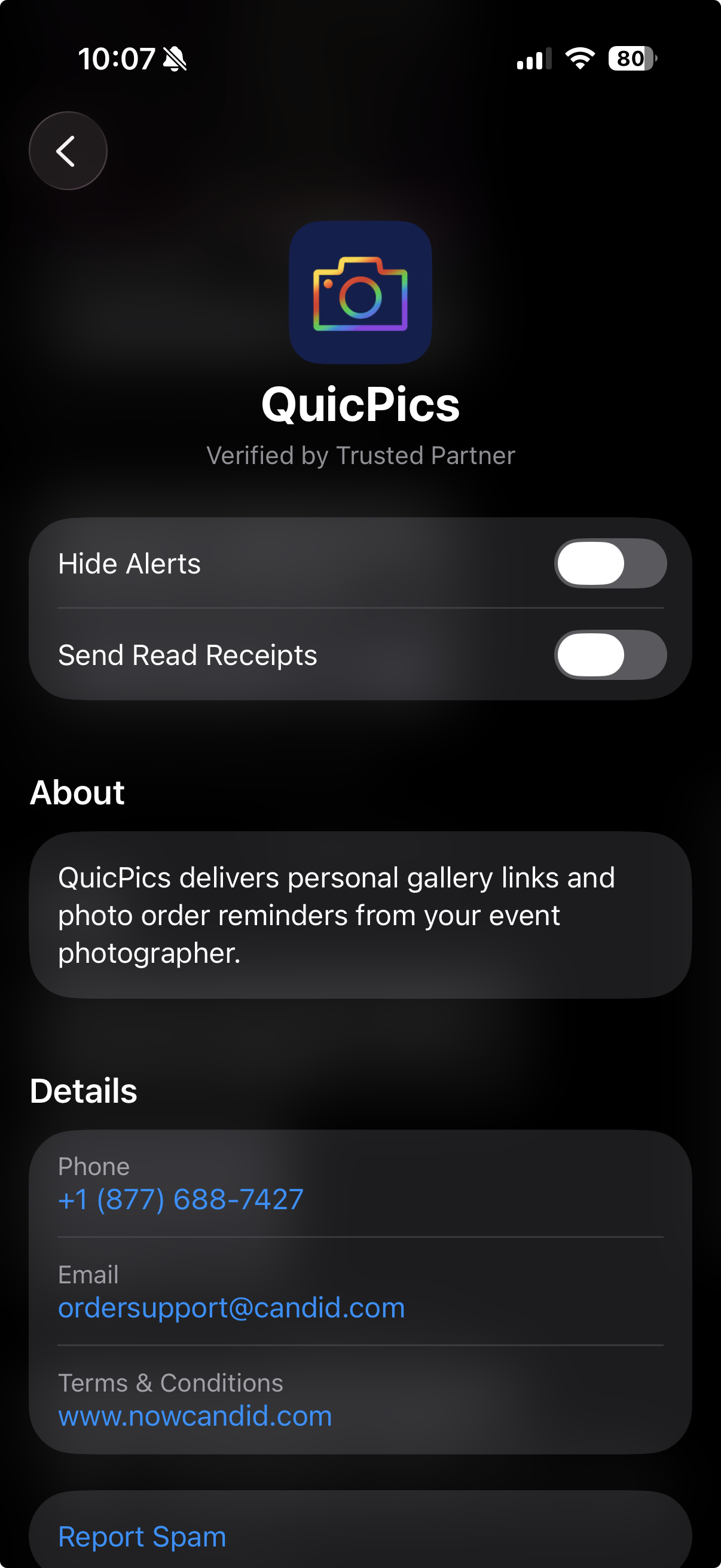
💬 RCS Messaging Preview

We’re testing RCS messaging for some texts.

📱 Texts can appear as coming from “QuicPics” instead of a phone number

📷 Uses a generic camera-style logo to keep things white-labeled

✅ Helps messages look cleaner and easier to find

🛡️ May help reduce spam filtering in some cases

Currently, RCS is available for:

  • Dashboard 2FA texts
  • Find Me Portal texts

We’ll likely explore rolling this out to marketing texts after grad season.
🛍️ Retail Updates

💸 Slash-through pricing improved

  • Slash-through amounts now use week 3 pricing when applicable, or à la carte pricing if that is higher.
  • So now, we've ensured your customer is always seeing the maximum amount of Discount being provided! Automatically.

📦 Personal Gallery Download slash-through price

  • Even though Personal Gallery Download is technically a package, it can now show a slash-through price based on the individual download product in your Event, when available.

🖼️ Better package performance with BGR images

  • Selecting and editing BGR images inside packages should feel faster.

🧼 Cleaner BGR timing on retail

  • Images going through background removal will no longer appear on the retail site before the BGR process is finished.
  • This helps keep galleries clearer for shoppers! Especially during grad season, when high BGR volume can occasionally slow processing down.

🧩 Favorites Gallery download fix

  • Fixed an edge case where the Personal Image Gallery Download product could appear for Favorites Galleries even when Dynamic Personal Gallery Download was not enabled.

🛠️ Small Fixes & Cleanup

📅 Hidden Events no longer appear on the Event Calendar.

🖼️ Invisible BGR images now display correctly on Participant Details.

⚡ Large Events with thousands of participants or images should feel more stable and responsive.

That’s the update for this week!

From a cleaner Dashboard layout to printable QR cards and better retail pricing displays, these changes are all about making NowCandid easier to use in real-world event workflows.

Keep creating magic,

Candy 🍬

Related articles

Weekly Recap: Multi-Select, Event Tags & More! ✨
Feature Updates
January 24, 2025

Weekly Recap: Multi-Select, Event Tags & More! ✨

9
 minutes read
Hello, my fabulous photographers!

Candy here, ready to sprinkle some sparkle on your day with our newest Weekly Recap. We’ve been hard at work improving your NowCandid™ experience, and I’m excited to share all the juicy details. Let’s dive in!

1. Select System in Manage Images 🖼️

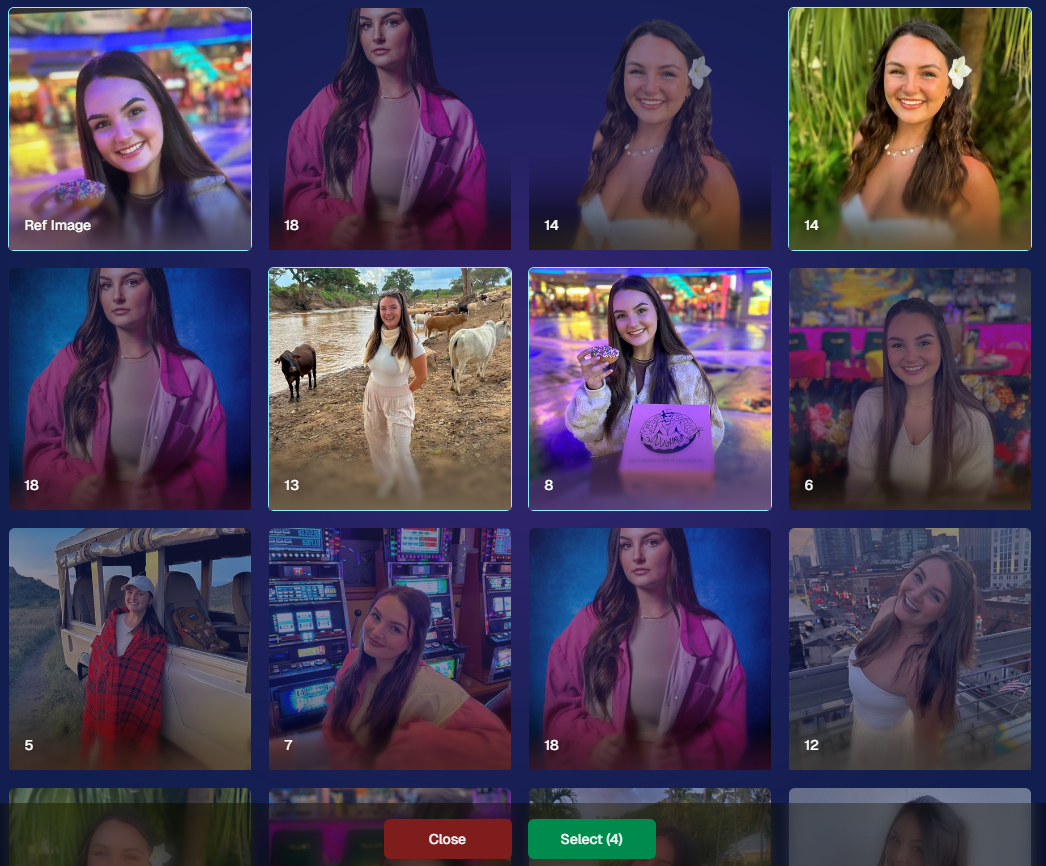
We’re introducing a Multi-Select feature to the Manage Images interface:

  • Multi-Select Button: Highlight multiple images at once.
  • Bulk Actions: After choosing your set, tap “Select” at the bottom. You can:
    • Mark them Invisible or Visible
    • Download them all in a single zip file
    • Toggle them as Group Photos or Individual all at once
  • Speedy Management: No more one-by-one adjustments. This should help you power through large batches of images in a fraction of the time!

2. Event Tags 🏷️

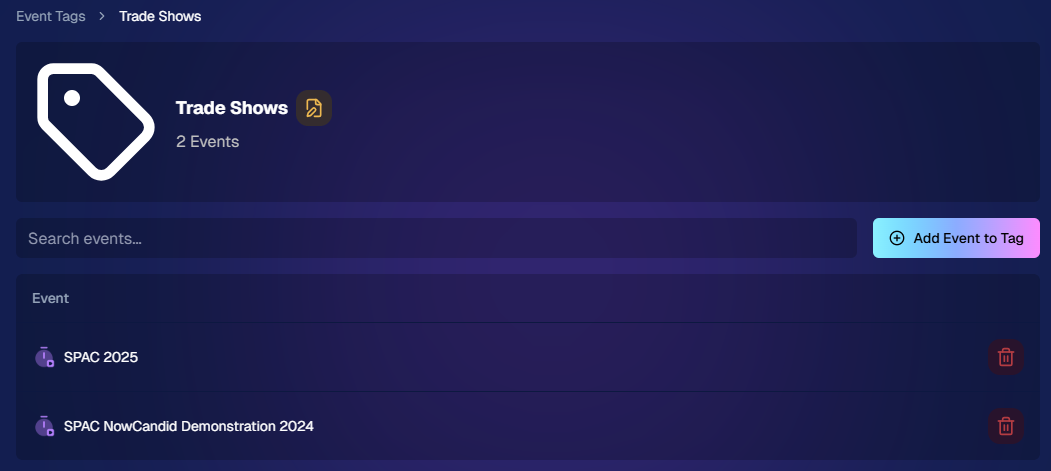
There’s a brand-new Extras tab in the Web Dashboard navigation, featuring our new Event Tags tool:

  • Creating Tags: Assign tags to your events (e.g., “Prom,” “Winter Formal,” etc.).
  • Filtering by Tag: On the Events List or in your Events Report, choose an Event Tag to instantly see only those events.
  • Performance Insights: Group your events by theme and get a quick view of how each set is performing all at once.

Tagging is perfect for photographers juggling multiple event types, letting you spot patterns and trends with ease.

Just two Events on this Event tag, but you can add lots!

3. Updates to the Faces Report 👥

Our Faces Report—released last week—has already received some polish:

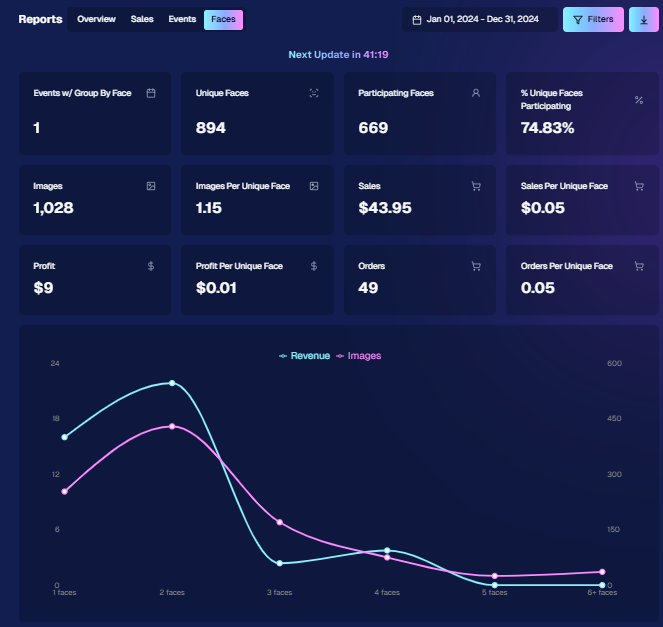
  • New Revenue Line: Alongside face counts in the chart, you’ll now see a revenue line.
  • Compare Image Types & Sales: See whether couples, solos, or big group shots bring in the most orders.
  • Informed Future Shooting: Focus your time at events on what sells best—maybe it’s the big friend groups or the sweet one-on-one moments.

This view helps you refine your event coverage strategy for max impact.

Ignore the low sales, it was a test Event!

4. Image Details Page 📝

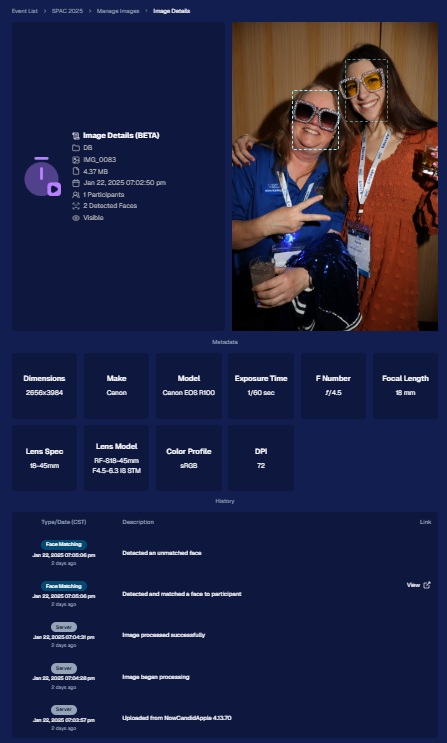
While managing images in your events, you’ll notice a “Details, Logs, and more” link on each image:

  • Expanded Meta Data: Discover camera settings, image size, camera type, and more.
  • Face Matching™ Logs: See if and when a face got paired to a participant; even jump directly to that participant’s gallery.
  • Advanced Troubleshooting: Ideal for debugging customer issues or satisfying your own curiosity about each shot.

It’s more info than we’ve ever provided, so have fun geeking out over the details!

So much image file info and image history now!

5. Big Improvements to the Web Dashboard Image Uploader

Finally, a behind-the-scenes upgrade that’ll make your day-to-day life easier:

  • Upload Up to 5000 Images: Jumping from 1000, so you can batch bigger events in fewer steps.
  • Faster Transfers: As long as you have decent upload speeds, the process should feel snappier overall.
  • Lower CPU Demand: Less strain on your computer, letting you multi-task without slowing to a crawl.

Sometimes it’s the quiet changes under the hood that make the biggest difference.

6. Tiered Pricing Now Live 🎉

After last week’s preview, Tiered Pricing is officially rolled out to SportsPics™, PartyPics™, GradPics™, and other sales-driven events:

  • Upgraded Text & Email Campaigns: We’ve refined the promotional messages to match your Week 1, Week 2, and Week 3 pricing tiers, giving your buyers a clear sense of each week’s small price bump.
  • 365-Day Marketing SMS Replaced with 180: We’ve shortened the final reminder’s timeline from a year to 180 days, aligning better with your event marketing cycle and typical follow-up patterns.

If you haven’t explored Tiered Pricing yet, check it out in your Offer Creator and see how these incremental price changes (and updated marketing) might boost your sales!

That’s all for this week, my wonderful NowCandid™ community.

I hope these new features and improvements empower you to breeze through event management and deliver an even better experience to your clients. As always, if you have questions or feedback, give us a shout.

Until next time—keep capturing those unforgettable moments! ✨

Candy 🍬

Weekly Recap: Tiered Pricing 💵, Enhanced Reporting 📊 & More!✨
Feature Updates
January 17, 2025

Weekly Recap: Tiered Pricing 💵, Enhanced Reporting 📊 & More!✨

6
 minutes read
Hello, my fabulous photographer friends!

Candy here, ready to sprinkle some sparkle on your day with our latest Weekly Recap!

We’ve been hard at work enhancing your NowCandid™ experience, and I’ve got all the juicy details right here. Let’s dive in!

1. Tiered Pricing Reminders & Preview

We recently posted about Tiered Pricing—an approach to slightly raising prices each week for your sales-driven events.

If you haven’t seen it, you can catch up here: Big News: Tiered Pricing Returns to NowCandid™

  • Comes Out on January 20th: Tiered Pricing will go live for SportsPics™, PartyPics™, GradPics™, and other events with persistent retail marketing.
  • Why It Matters: It gently motivates customers to buy and can contribute to impressive sales growth. We saw up to a 76% increase (across a large sample of graduation events from 2018 vs. 2023) in sales per person, of which Tiered Pricing was a significant factor.
  • Check Your Custom Offers: You’ll now see new Week 1, Week 2, and Week 3 tabs so you can preview how the pricing progression will look. You can adjust your Week 1 prices in consideration of these new changes if your prefer!

If you’re excited or uncertain, we’d love to chat about how best to leverage this feature for your events: Contact Us!

2. Reporting-Related Additions & Improvements 📊

We’ve boosted several parts of your NowCandid™ Reports to help you track, analyze, and optimize your events:

  • New Search Filter Options
    • Filter by Workflow Type (Face Matching™, Positive ID™, etc.) and by Program (QuicPics™, PartyPics™, etc.).
    • Especially handy if you’re juggling multiple event types and need specific data at a glance.

  • Reorganized Quick Stats + “Upfront Sales” Box
    • We reshuffled some quick stats on the Events Report to be more intuitive.
    • Introducing “Upfront Sales” specifically for QuicPics™ and QuicPics GO™: Enter how much you were paid to shoot the event upfront, and this will appear in your date-range reports, right alongside your retail sales figures.

  • Faces Report
    • A new “Faces” Report for events that have run Group-By-Face™.
    • Easily see an estimate of unique faces, compare that to your participant count, and spot how many images contain 1, 2, 3, 4, 5, or 6+ faces.
    • Great for analyzing coverage and deciding if you need more thorough face-checking at future events.

3. Additional Participant Details 🙋

We’ve made small but valuable changes to the Participant Details page:

  • Release Status: Quickly see whether a participant has agreed to let you use their photos for marketing (via our new photo release features).
  • Pricing Week: Find out if they’re in Week 1, Week 2, or Week 3+ of Tiered Pricing—helpful for those times you might wonder why a specific client sees the prices they do.

4. LiveLoop™ Improvements 🖼️

LiveLoop™ just got a quality & performance boost:

  • Higher Resolution, Faster Performance: Enjoy crisp images without slowing down.
  • Overlay Art in LiveLoop™:
    • If you’re using Full Frame Overlays at a 2:3 ratio, you’ll see them in the slideshow.
    • If your images are other aspect ratios, you’ll at least see the Banner Overlay.
  • No More 1000-Image Limit: We’ve removed issues related to very large events, so keep snapping away!

Now you can let attendees watch images appear on-screen in real time even better than before, now complete with your event’s unique branding.

5. Candy Upgrades 🤖

Yes, I (Candy) got a little smarter!

  • Bigger Brain: Not literally of course! But in general, we've improved Candy's Q&A and reasoning skills!
  • Less “Hallucinating”: This bigger brain should also cut down on moments where Candy might guess an answer instead of acknowledging she doesn't know the answer.
  • Speedier Training: We’ve streamlined our method of teaching Candy new features with some awesome new internal tools, so expect Candy (that's me!) to gain knowledge at a quicker pace going forward.

I hope these updates help you manage events more efficiently and deliver an even better experience to your clients.

If you have any thoughts or want to share feedback, just reach out. Until next time!

Candy 🍬

Big News: Tiered Pricing Returns to NowCandid™! 🎉
Feature Updates
January 15, 2025

Big News: Tiered Pricing Returns to NowCandid™! 🎉

10
 minutes read
Hello, my wonderful photographers!

Candy here, and I’ve got big news about a feature that might just boost your sales in 2025. Yes, that’s right—Tiered Pricing is making its comeback to NowCandid™!

Let’s dive into the what, why, and how of this exciting development.

Heads Up, Everyone! ⚠️

This is an important one if you’re an active NowCandid™ user. So, if you read only one of our updates this year... let it be this one!

Tiered Pricing will roll out on January 20th, and it’s a big deal for your SportsPics™, PartyPics™, GradPics™, or other sales-driven events. So please keep reading to see what’s new and how it could benefit you.

What Is Tiered Pricing?

Tiered Pricing is the concept that your retail prices will nudge upward in small increments over three separate one-week periods:

  1. Week 1 – “Early bird” pricing
  2. Week 2 – Slightly higher “discounted” pricing
  3. Week 3 – Another small bump, settling at your “regular” pricing

We call it “Tiered Pricing” because each week is its own “Tier.”

We’re not trying to get you to charge outrageous amounts (in fact, lowering your prices can often benefit your overall profit), we're just introducing tiny price increases that the NowCandid™ marketing campaign will reference to gently push people to order more, and sooner.

The Real Advantage Lies in the Marketing

Some might assume Tiered Pricing is about making money off late buyers, but that’s not our aim:

  • Minimal Price Increases:

    A $1 or $2 difference won’t significantly affect your overall pricing but creates a sense of urgency in your marketing.
  • Deadlines & Discounts:
    • Week 1: Promoted as “early bird.”
    • Week 2: Positioned as “slightly higher but still discounted.”
    • Week 3: Called “regular” or “final” pricing.
  • No Negative Reinforcement:
    • There are no hefty late fees. Buyers see a small difference in price from one week to the next, which spurs action without scaring them off.

This structure keeps your clients engaged, draws in earlier purchases, and still ensures a reasonable price for those who come back later.

Remembering Tiered Pricing from the Past 🏛️

  • Before the New Dashboard:

    In mid-2024, when we introduced our modern Web Dashboard & new retail site, we chose to keep pricing straightforward at first—no Tiered Pricing.
  • Old Premade Offers:

    Back in the day, NowCandid™ used default “Tiered” premade offers with subtle $1–$2 increases each week. These small bumps proved beneficial enough that we’re ready to bring them back with the new system.

Why Such Tiny Price Increases? 🤏

NowCandid™ fosters long-term, residual sales through:

  • Annual Marketing Reminders
  • Event History (for customers who log into the retail site)
  • “Buy More” QR Codes on Prints
  • Our Find Me Portal
  • And future expansions that will encourage reorders!

By raising prices too steeply in the final weeks, you risk losing those valuable residual buyers. Tiny increments let the marketing do the heavy lifting—highlighting deadlines without truly punishing anyone for missing Week 1 or 2.

Why Bring Tiered Pricing Back Now? 📈

We studied a large batch of graduation Events, comparing the performance of schools photographed in both 2018 and 2023 (avoiding COVID years in the middle).

Between these two rounds of graduations, we made many improvements, but one of the bigger changes was the addition of Tiered Pricing.

Importantly, in 2023, Sales per person photographed increased by 76% over 2018.

Even if Tiered Pricing accounted for just one-fifth of that boost, that’s still a 15% jump in your own sales.

So while it might not be the only factor, it’s likely to be a meaningful one.

How We’re Implementing Tiered Pricing 🚀

We want to keep NowCandid™ easy to use, so Tiered Pricing will be made active for all sales-driven events (SportsPics™, PartyPics™, GradPics™, Portraits, etc.) starting January 20th, without a special toggle to turn it off—for now. Here’s the plan:

  1. New Tabs Accompanying Each Product & Package in the Offer Creator
    • Week 1 (base price)
    • Week 2 (+$1 on individual items, +$2 on packages)
    • Week 3 (+$2 on individual items, +$4 on packages compared to Week 1).
  2. Marketing Alignment
    • NowCandid™ marketing texts and emails will be altered to automatically reference these price bumps each week, nudging people to purchase before they miss the “discounted” or “early bird” phase.
  3. Your Current Prices Will Become Week 1 Prices
    • If you want your current price to remain the “Week 2” rate, consider lowering your Week 1 by $1 or $2. That way, you’re effectively offering a genuine discount in Week 1 while still matching your usual rate in Week 2, with only a slight increase in Week 3.
  4. What About QuicPics™ or QuicPics GO™?
    • Tiered Pricing won’t apply to those event types, since they focus on free downloads and don’t rely on persistent marketing. This only affects events where you’re selling items at retail prices over multiple weeks.

Participant vs. Event-Based Timing ⏱️

  • Participant Timing:

    Tiered Pricing for a specific subject starts when their “Day 0” marketing text goes out—i.e., once they become a participant in your Face Matching or Positive ID event. If someone isn’t photographed until Day 3, they’ll still get a full Week 1 period from that day forward.
  • All Images Gallery:

    If a customer bypasses personal galleries and shops the All Images Gallery on the NowCandid™ retail site, the Price Tier they see is based on the Event’s official start date.
  • Dashboard Insight:

    You can see which pricing Week a participant is currently in by viewing their Participant Details page on the Web Dashboard.

What Do I Have to Do? 🤔

  • If You’re Fine With Default:

    Sit back and let NowCandid™ handle it! We’ll roll out the changes automatically on January 20th.
  • If You Want a Lower “Week 1”:

    Adjust your existing Offer prices downward for that first Tier, making your Week 2 and Week 3 prices align with what you used to charge

    If you want your current price to remain the “Week 2” rate, consider lowering your Week 1 by $1 or $2. That way, you’re effectively offering a genuine discount in Week 1 while still matching your usual rate in Week 2, with only a slight increase in Week 3.
  • Feedback Welcome:

    If you truly dislike Tiered Pricing or think it messes up your strategy, reach out. We’re open to suggestions for making it optional, though for now it’s set to be standard across sales-driven events.

That’s the scoop, my lovely photographers!

Tiered Pricing is coming back to NowCandid™, and we believe it can add a gentle lift to your sales without complicating your life.

If you have questions or concerns, don’t hesitate to let us know. Otherwise, mark your calendar for January 20th and watch those early-bird sales roll in!

Candy 🍬

Let’s get in touch

If you’re a photographer looking to add NowCandid services to your wheelhouse – set up a call by clicking the button below.

How to customize formatting for each rich text

How to customize formatting for each rich text

How to customize formatting for each rich text

How to customize formatting for each rich text

How to customize formatting for each rich text

What’s a Rich Text element?

The rich text element allows you to create and format headings, paragraphs, blockquotes, images, and video all in one place instead of having to add and format them individually. Just double-click and easily create content.

A rich text element can be used with static or dynamic content. For static content, just drop it into any page and begin editing. For dynamic content, add a rich text field to any collection and then connect a rich text element to that field in the settings panel. Voila!

Headings, paragraphs, blockquotes, figures, images, and figure captions can all be styled after a class is added to the rich text element using the "When inside of" nested selector system.

  • List One
  • List Two
  • List Three
  • List Four
  • List Five

This is a link

This is bold text